USP Per-Device Unique Credentials — Software Design Document
- 1. Overview
- 2. Architecture
- 3. Data Model
- 4. Configuration
- 5. Business Logic
- 5.1. Credential Provisioning Flow
- 5.2. Resolving the Device’s Own MQTT/STOMP Object
- 5.3. Credential Delivery
- 5.4. Confirmation
- 5.5. Authentication Flow
- 5.6. Factory Reset Quarantine
- 5.7. Profile Overwrite Protection
- 5.8. Retirement When Generation Is Disabled
- 5.9. Deleting a Security Configuration
- 5.10. Device Deletion and Re-registration
- 6. Support Guide
- 7. Database Migration Reference
- 8. Related Documents
- 9. Document History
1. Overview
1.1. Purpose
This document describes the design and implementation of per-device unique BASIC-auth credentials (DEV-1799) for USP (TR-369) devices managed by the Friendly Technologies ACS.
It is the USP counterpart of TR-069 Per-Device Unique Credentials (DEV-1194).
Both features store their credentials in the same cpe_credentials table and share the value generator and the profile-exclusion contract, but the steps between generation and enforcement differ: the two protocols authenticate at different moments and over different channels.
| This document covers USP devices reached over MQTT or STOMP with BASIC authentication. USP devices using other MTPs (CoAP, WebSocket, UDS) or other security modes (PSK, certificates) have no BASIC credentials to make unique and are unaffected. |
1.2. Problem Statement
A USP agent authenticates to the ACS with the login/password of its security configuration (iot_sec_conf_details table), presented on the MQTT CONNECT (or STOMP CONNECT) frame.
That login/password is shared by every device of the configuration, so any device holding it can connect under another device’s endpoint name.
1.3. Solution Summary
When unique-credential generation is enabled on the security configuration a device authenticates against, the ACS:
-
generates a unique username/password pair for that device and stores it, DES-encrypted, in the
cpe_credentialstable; -
writes it onto the device’s own MQTT client (
Device.MQTT.Client.{i}.Username/.Password) or STOMP connection (Device.STOMP.Connection.{i}.Username/.Password) with aSetParameterValuestask; -
marks the pair
confirmedonce the delivery is known; the pair is accepted at authentication whether or not it is confirmed; -
protects the pair from being overwritten by profile parameters;
-
adopts a username, a password or both written onto that same object by anything other than its own push — a provision an operator made by hand, for example — as the new unique pair, so the stored copy never drifts from what the device holds;
-
lets a device that was factory reset back in on the shared credentials provisionally, and disconnects it unless it then proves the reset — see Factory Reset Quarantine.
The feature is opt-in per security configuration (iot_sec_conf_details.generate_unique_credentials column).
1.4. How USP Differs from TR-069
| TR-069/TR-181 | USP | |
|---|---|---|
Credential pairs per device |
Two — ManagementServer (device → ACS) and Connection Request (ACS → device) |
One — the MQTT/STOMP BASIC pair, used device → ACS. There is no ACS-initiated dial-back, so no CR equivalent. |
Where the credentials live on the device |
|
|
Opt-in flag |
|
|
When the ACS decides which credentials to accept |
At HTTP request time, with the Inform body available — the event list ( |
At MQTT/STOMP CONNECT, which carries nothing but the credentials. Anything the device has to say arrives later, on the already-accepted connection. |
Factory reset handling |
The |
The connection is accepted provisionally and the device owes a |
Provisioning trigger |
Every Inform (AOP on the Inform handler). |
Every registration ( |
Confirmation |
|
Completed |
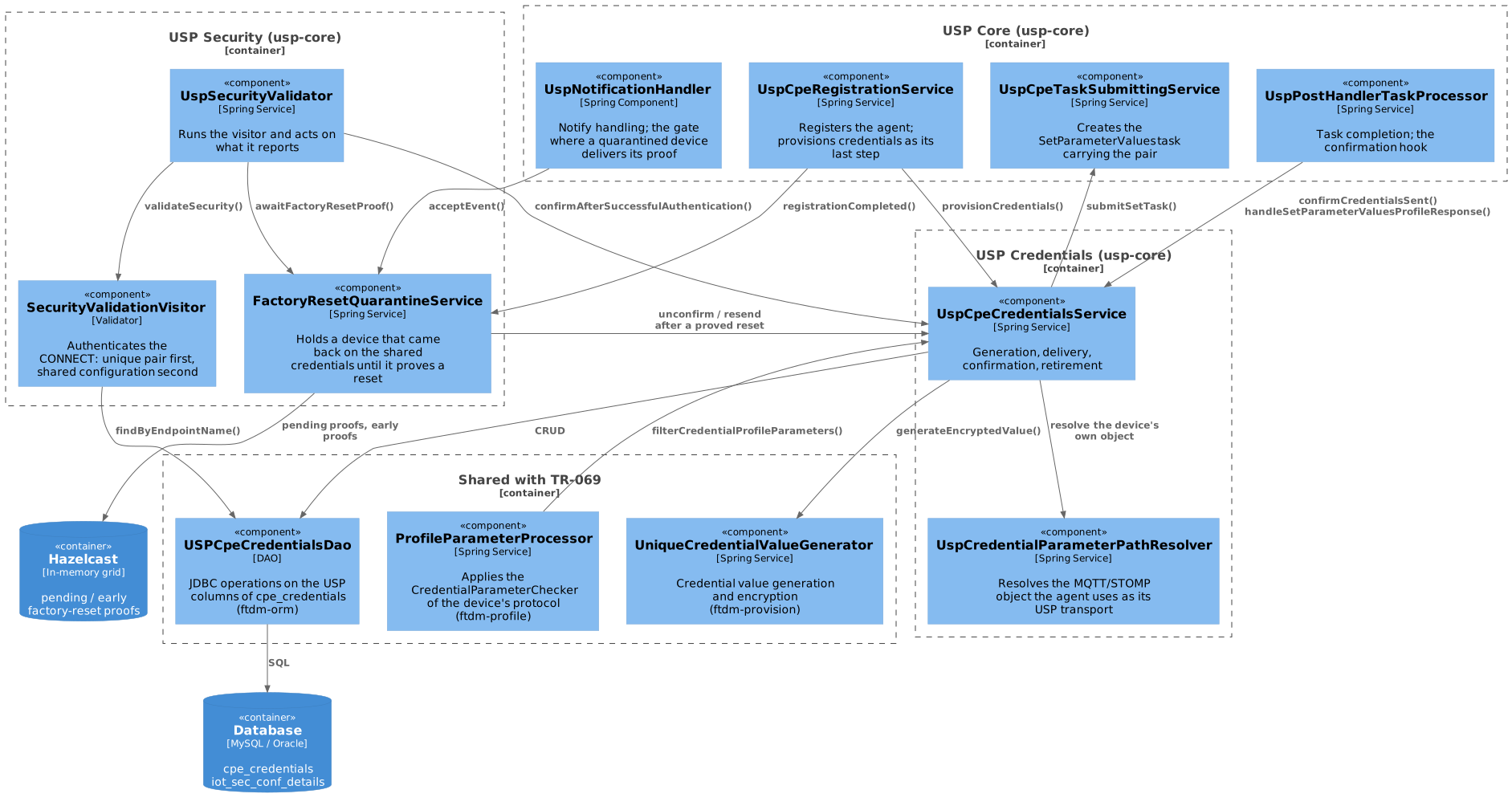
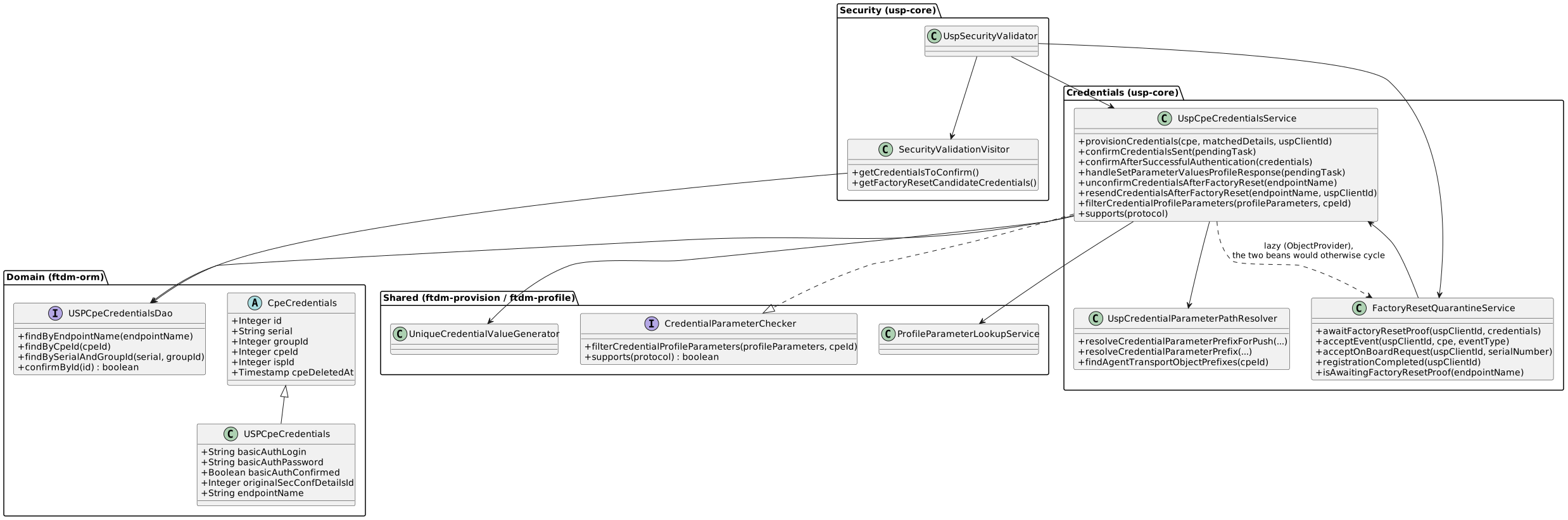
3. Data Model
3.1. Database Schema
USP credentials live in the same cpe_credentials table as TR-069/TR-181 ones — one row per device, whatever the protocol.
The diagram below is shared by both design documents.
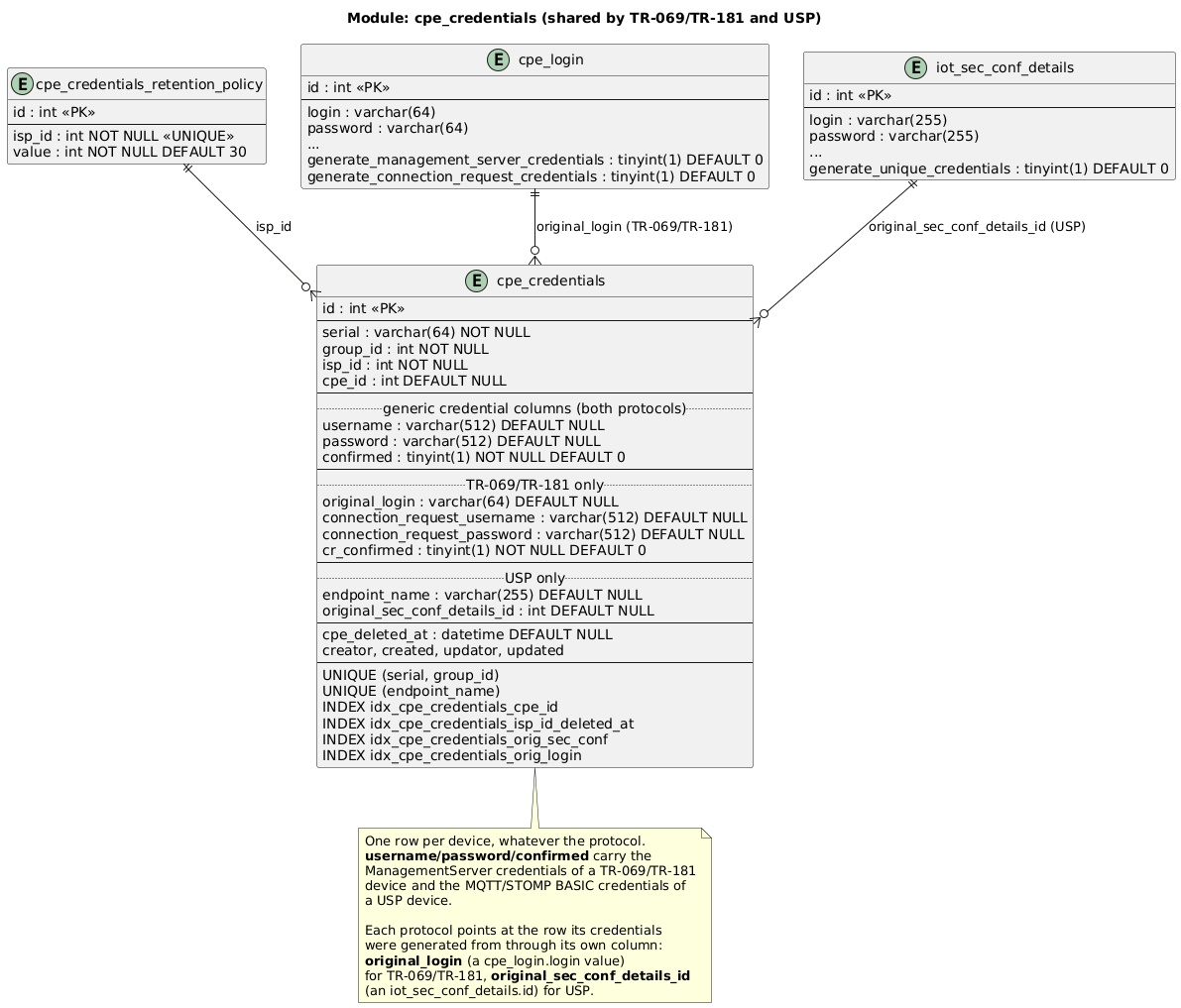
3.2. USP Columns of cpe_credentials
A USP credentials row is created on the first registration that finds unique-credential generation enabled.
It is identified by serial + group_id when provisioning, and by endpoint_name on every authentication and factory-reset path.
| Column | Nullable | Description |
|---|---|---|
|
Yes |
The device’s unique MQTT/STOMP BASIC credentials, DES-encrypted. Both set or both |
|
No |
Whether the ACS knows the device received the pair. Raised by the completed |
|
Yes |
The USP endpoint name (MTP client endpoint) the credentials were provisioned for, unique across the table. USP rows only; |
|
Yes |
The |
|
Yes |
The device’s id, |
|
— |
As for TR-069/TR-181 — see the TR-069 table description. |
|
— |
TR-069/TR-181 only. USP never writes them: there is no ACS-initiated connection request in USP. |
4. Configuration
4.1. Feature Toggle per Security Configuration
| Column | Default | Description |
|---|---|---|
|
|
When |
The flag is exposed to the outside by ACSWebService.saveOrUpdateSecurityConfiguration() and ACSWebService.getSecurityConfigurations(), as the generateUniqueCredentials field of SecurityConfigurationDetailsWs.
It is read at two different moments, off two different configuration rows:
-
when credentials are generated and pushed — off the configuration the device authenticated against on this connection;
-
when they are retired after a proved factory reset — off the configuration recorded in
original_sec_conf_details_id.
4.2. Credential Format and Length
Values are produced by the shared UniqueCredentialValueGenerator, exactly as for TR-069:
-
format
{OUI}-{random}-{serial}, where OUI comes from the device’s manufacturer record; -
random part length between
DMConfigurationParameter.credentialMinLengthandcredentialMaxLength(defaults 7 and 180); -
stored DES-encrypted.
The cipher is DES/ECB/ISO10126Padding, whose padding bytes are random, so encrypting the same secret twice yields different ciphertexts.
Stored credential values must therefore never be compared or matched in SQL — compare decrypted plaintext, and address rows by id or endpoint_name.
|
4.3. Factory Reset Proof Timeout
| Parameter | Default | Description |
|---|---|---|
|
|
How long a device that authenticated with the shared credentials while holding a confirmed unique pair is given to prove a factory reset before it is disconnected. Available on Settings → Protocols → USP → Configuration page. See Factory Reset Quarantine. |
Setting it to 0 or less would leave the wait for a proof without any expiry at all, so such a value is refused: the default 60 seconds is used instead, and a single error line reports it.
ERROR [c.f.u.c.s.c.FactoryResetQuarantineService] USP factory reset proof timeout is configured as 0, which would leave the waits for a proof without expiry - using 60000 ms instead: property=usp.credentials.reset_proof_timeout4.4. Retention Policy
Retention of credential rows after a device is deleted is shared with TR-069 and unchanged — see Retention Policy.
5. Business Logic
5.1. Credential Provisioning Flow
Provisioning — provisionCredentials in the diagrams — is the last step of registration (UspCpeRegistrationService), reached on both registration routes: with an OnBoardRequest and without one.
A failure here does not fail the registration: a device whose credentials could not be provisioned is still a registered device, and the unique credentials stay unconfirmed so the next registration re-sends them.
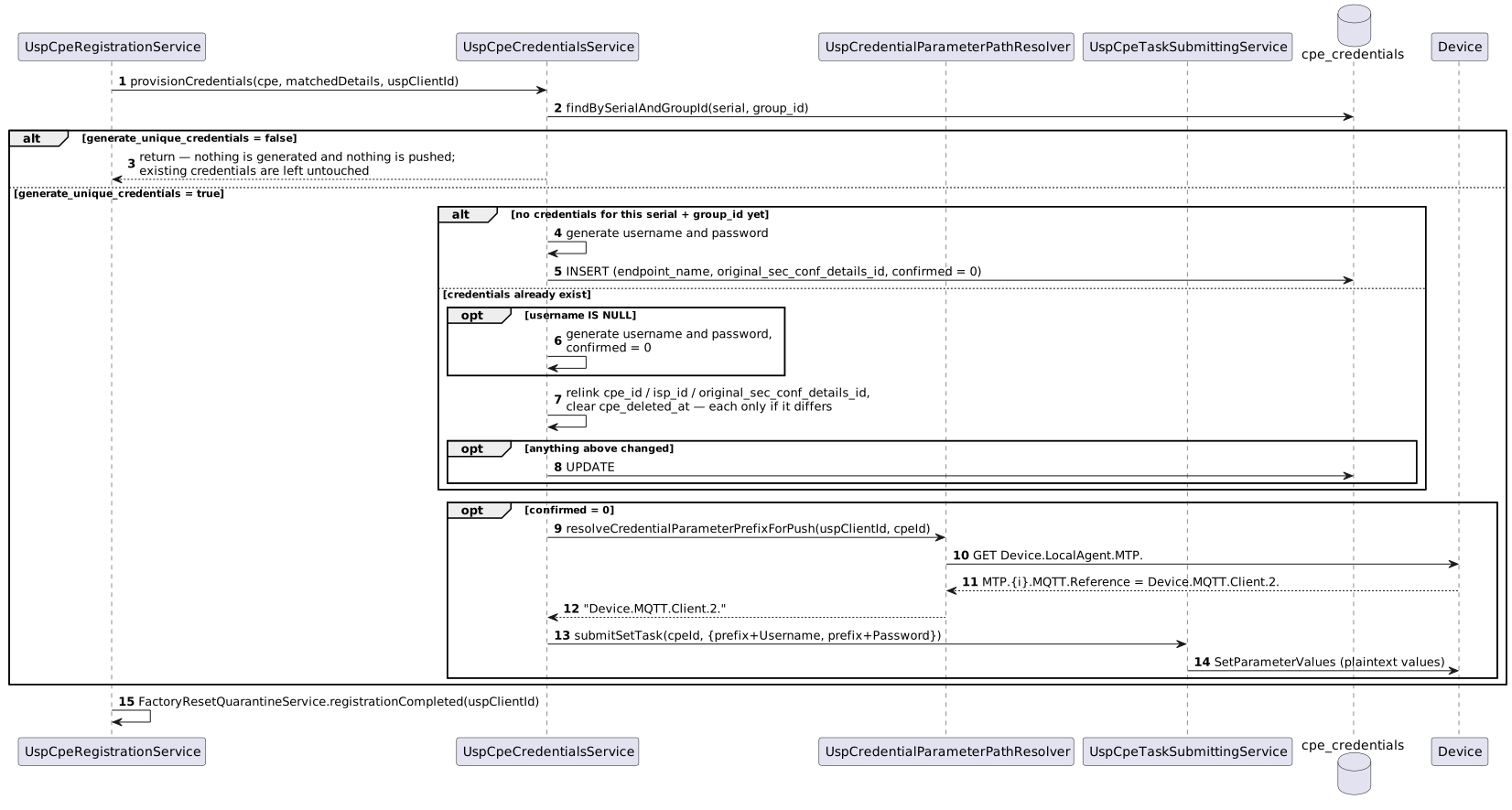
Anything that leaves the unique credentials unconfirmed ends in the same retry: a push that never reached the device, a response that never came back, or a pair unconfirmed by a proved factory reset.
5.2. Resolving the Device’s Own MQTT/STOMP Object
A device may have several MQTT clients or STOMP connections that have nothing to do with USP — the ACS itself creates an MQTT one when a BulkData profile points at a broker.
Writing to the wrong object puts the secret where the device does not read it, while the ACS can still record the pair as delivered.
The device is then refused on every connection — dropped in the factory-reset quarantine, or matching neither cpe_credentials nor the shared configuration if a foreign value was taken for its own.
UspCredentialParameterPathResolver therefore takes the object from what the agent states itself — Device.LocalAgent.MTP.{i}.MQTT.Reference or Device.LocalAgent.MTP.{i}.STOMP.Reference, a strong path reference to the MQTT client / STOMP connection the agent carries USP over.
Resolution ladder, strongest first:
-
Live read of
Device.LocalAgent.MTP.from the device. Used before every push, because a cached reference can predate a factory reset that renumbered the instances, a stale answer writes the credentials to an object the device does not use, and it can then no longer connect. The response also refreshes the parameter cache. -
Cached reference, from
cpe_parameter. Used first on the read-only route (recognizing whether a completed task wrote to our object), where a round trip on every completed task is not worth it and the cache has just been refreshed by the push anyway. -
Lowest instance under the transport prefix — the pre-DEV-1799 behaviour, kept so devices that do not model the reference keep working. Logged at
warn—Device states no MTP reference … falling back to the lowest instance— so such devices can be found in the logs. -
Instance
0— when neither the cache nor a liveGETfinds any instance under the transport prefix at all. Logged atwarn:No instance found under Device.MQTT.Client. on device cpeId=… (cache miss + GET miss); defaulting to 0. Instance0normally does not exist on a device, so a push addressed there faults and the credentials stay unconfirmed for the next registration to retry.
When more than one MTP of the same protocol carries a reference, an enabled one is preferred, then the lowest MTP instance; the ambiguity is logged at warn: Device has 2 MTPs referencing a Device.MQTT.Client. object and nothing tells which one this connection arrived over, preferring an enabled one.
A reference that is empty, or that does not name a plain instance path (an alias-addressed one, for instance), is treated as absent and the ladder continues.
The synchronous counterpart, findAgentTransportObjectPrefixes(cpeId), works from the cache alone and returns every MQTT client and STOMP connection the agent references — with no connection to ask, which MTP the device uses is not known. Used where a device round trip is impossible — see Profile Overwrite Protection.
5.3. Credential Delivery
The pair is written with an ordinary SetParameterValues provisioning task carrying both parameters, in plaintext (the device expects the value, not the ciphertext).
Nothing is sent when the object cannot be resolved: the unique credentials stay unconfirmed and the next registration retries.
5.4. Confirmation
cpe_credentials.confirmed records that the ACS knows the device holds the pair. It is a latch, not an admission gate: authentication accepts the pair whether or not the flag is up, because presenting the pair proves the device holds it, while a task response only reports that it was sent.
Two routes raise it.
The completed task (confirmCredentialsSent, called from UspPostHandlerTaskProcessor for every completed SetParameterValuesProvision task):
-
the task is recognized by parameter name, so it is not necessarily our own push: the ACS’s own BulkData feature writes
Username/Passwordon its MQTT client too. Only what was written to the device’s own object counts, resolved as above; -
the value that reached the device becomes the stored value. Confirming without adopting would leave
cpe_credentialsholding a secret the device no longer has, which locks the device out with no way to recover; -
the flag is raised only by a task that carried both halves — a half task is always someone else’s, and the stored credentials would otherwise be left in a state the device never had.
A successful authentication (confirmAfterSuccessfulAuthentication): the device connected using its unique pair while the ACS still had it marked unconfirmed.
Connecting with the pair proves the device has it, so the flag is raised.
The flag is raised only if it is still down, so a factory reset lowering it at that same moment is not overwritten.
The event is logged at error: the ACS recovers by itself, but a confirmation that went missing is a fault on the delivery path.
Look for USP device authenticated with unique credentials that were still unconfirmed … confirming them now.
Leaving the flag down would not lock the device out — authentication accepts its pair either way. It would cost the device the protection the flag provides: the factory-reset quarantine only holds devices whose pair is confirmed, so until the ACS knows the device has its pair, a client connecting with the shared credentials under that endpoint name is treated as a device still waiting for it, and the next registration pushes the pair to it. Every device is in that state until its first confirmation, and this route ends it on the device’s next connection rather than waiting for another push.
5.5. Authentication Flow
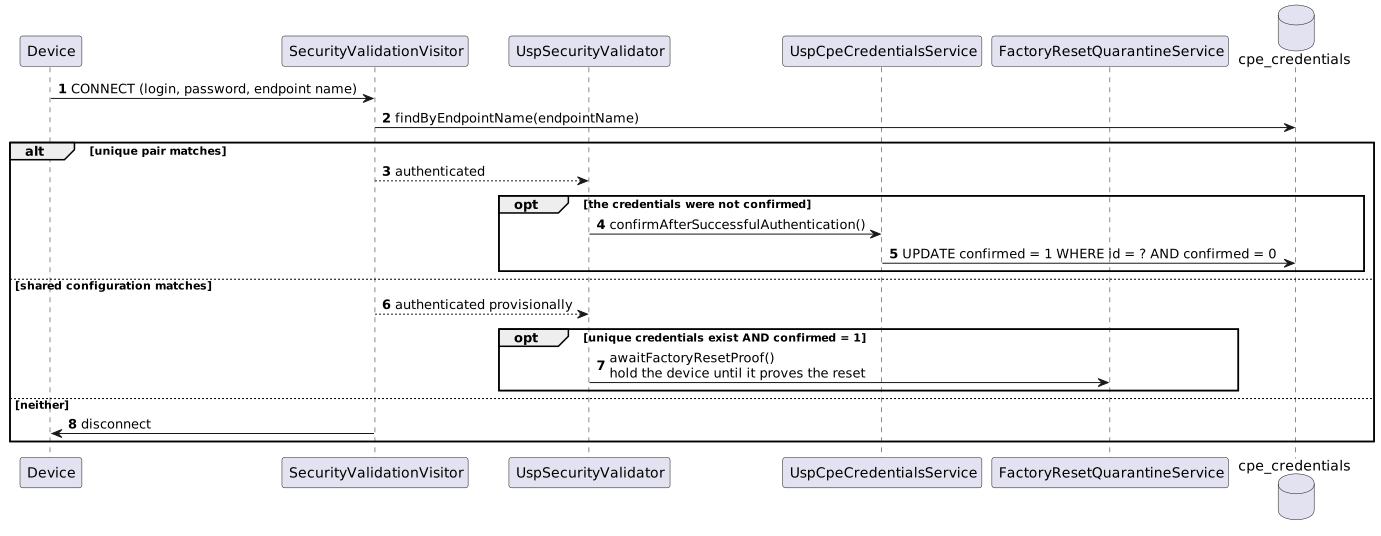
The unique-pair lookup runs first and is keyed by the endpoint the device connects as.
It deliberately does not filter on cpe_credentials.confirmed.
A unique-pair mismatch is not a rejection on its own: the shared credentials are what a factory reset leaves the device with. Matching them proves nothing by itself, so the connection is accepted provisionally and the proof is owed afterwards — see Factory Reset Quarantine.
If the stored pair cannot be decrypted, the device is disconnected outright: that is a corrupted stored pair on the ACS side, not a device that came back with its factory credentials.
5.6. Factory Reset Quarantine
A device that authenticates with the shared credentials while its unique credentials are still marked confirmed = 1 may have been factory reset, and is indistinguishable from any other client of the same configuration connecting under that endpoint name.
It is held until it proves the reset.
5.6.1. The wait begins
Nothing is written to the database when the wait starts: the unique credentials stay confirmed, and that is what stops anything from sending them while the proof is owed. The wait itself is only a note in the cache — one per device, keyed by its endpoint name, saying that this device owes a proof. It is removed when the proof arrives or when the device is dropped, and it expires by itself if neither happens, so there is never anything to clean up by hand. The note is shared across the cluster because the connection and the proof may reach different nodes, while the countdown belongs to the node that accepted the connection.
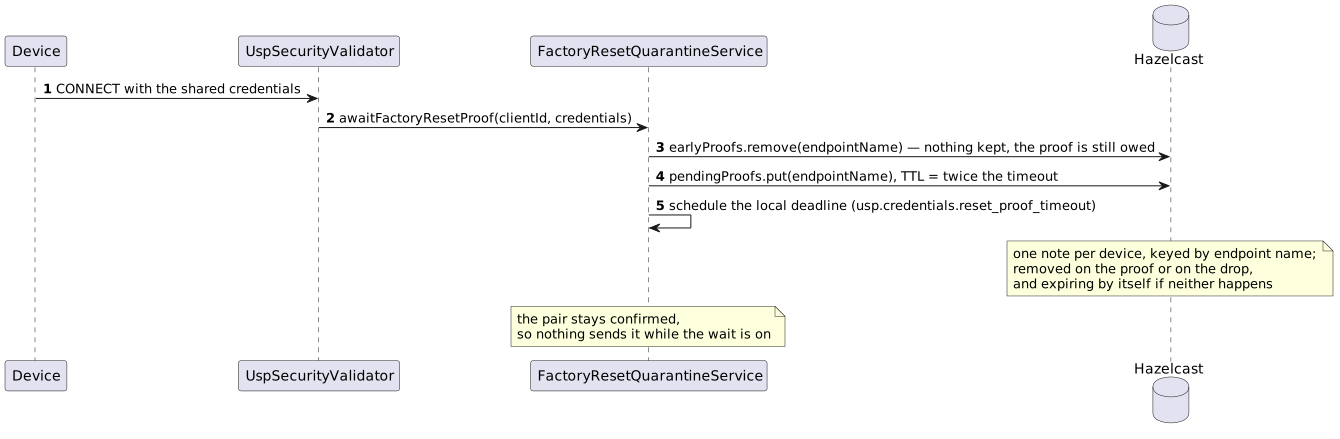
5.6.2. The device proves the reset
The proof is a Boot! notification that reports a factory reset — one whose Cause is FactoryReset, LocalFactoryReset or RemoteFactoryReset, which the ACS records as the event Boot!(Reset) — or an OnBoardRequest. These are the two things only a device starting from factory defaults sends.
A Boot! reporting a plain reboot (LocalReboot, RemoteReboot) is not a proof: it is recorded as Boot!(Reboot) and counts as one of the events the device is dropped on.
An OnBoardRequest is a proof only when its serial_number is equal to cpe_credentials.serial of the unique credentials (DEV-3204).
A factory reset does not change the serial number of a device.
A different serial number means that a different device connected with the same endpoint name, for example a second device configured with this endpoint name by mistake.
In that case:
-
confirmedstays1, and the unique credentials are not sent. -
The wait continues. If no valid proof arrives, the connection is dropped when the wait times out.
-
The registration started by the
OnBoardRequestfails withEndpoint already exists, because the endpoint name is already registered for another serial number. -
The log has the line
USP device sent an OnBoardRequest with a serial number other than the one its endpoint’s unique credentials belong to, not accepted as a factory reset proof.
Who hands the pair back depends on whether registration has already run on this connection.
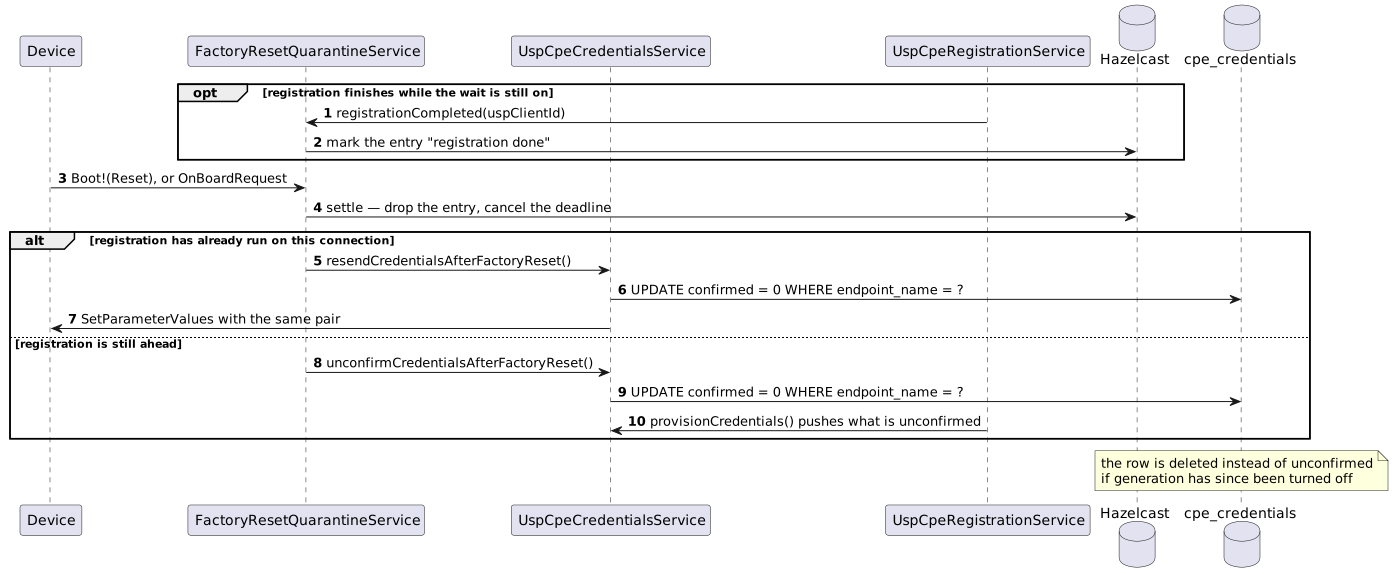
An OnBoardRequest normally takes the second branch: it is settled before registration starts, on purpose.
5.6.3. The proof arrives first
A Boot! is handled the moment it arrives, whereas the connection is authenticated only when registration starts — REG_PAUSE (5 s by default) after the connection, or at once if the device opens with an OnBoardRequest.
A device that reports its reset inside that window therefore proves it before anything is waiting for the proof.
Such a boot is remembered for usp.credentials.reset_proof_timeout (60 s by default), and the authentication that follows takes it instead of starting a wait.
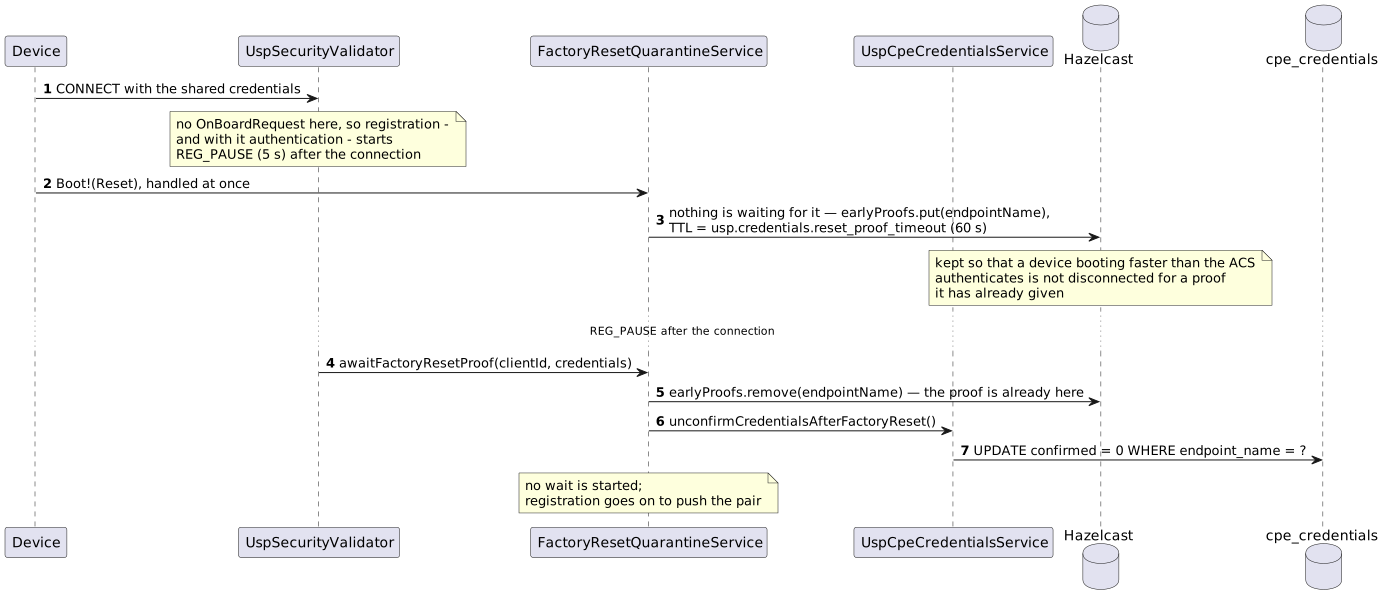
Only a Boot!(Reset) is kept this way, and an OnBoardRequest needs no such memory: onboarding authenticates the device itself before it settles the proof, so the wait it settles has just been started a step earlier.
5.6.4. The device fails to prove itself
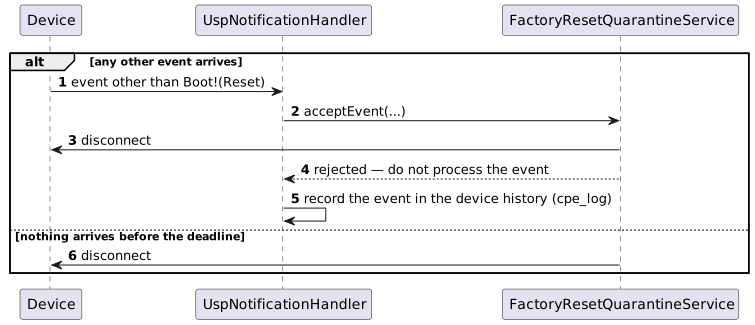
The pair is never handed over in either case, and the credentials stay confirmed.
Nothing stops the device from connecting again, and if it still cannot prove the reset the same wait starts and ends the same way — see Recovering a Device That Cannot Prove Itself for the way out.
The event a quarantined device is dropped on is still recorded in its device history (cpe_log), so the attempt is visible in the UI rather than silent — a drop on the timeout has no event to record and shows only in the log.
5.6.5. Key properties
These hold for the quarantine as a whole, whichever way it ends.
-
The credentials stay confirmed while the proof is pending. This is what the wait relies on: the provisioning at the end of every registration (Credential Provisioning Flow) only pushes credentials that are unconfirmed, so a client that never proves a reset never gets the device’s pair. While the wait is on, only a proof lowers the flag — and no route sends the pair meanwhile either.
-
The same pair is re-sent, never a fresh one. A device that did not actually reset still holds the old pair; rotating it would lock that device out permanently.
-
Never both sides send. A proof that arrives before registration only unconfirms the pair and lets registration push it; a proof that arrives after registration has no registration left on this connection, so it pushes the pair itself. The two are told apart by a "registration done" mark that registration leaves on the wait, and it is set after registration’s own push rather than before, deliberately: the worst case is then a pair left unconfirmed and re-sent on the device’s next connection, never one sent twice.
-
State is shared, timers are local. The waits live in Hazelcast, so a proof and the wait for it need not reach the same node. The deadline that normally ends a wait is local to the node that started it, and the shared entry is given twice the timeout, so a node dying mid-wait leaves an entry that expires by itself.
-
Disconnect is local-or-broadcast, the same pattern registration uses: disconnect here if the agent is connected here, otherwise broadcast the disconnect event.
5.7. Profile Overwrite Protection
A profile is declarative configuration the ACS owns, so it must never silently overwrite a device’s unique credentials. Two layers, mirroring TR-069:
Prevention. Credential parameters a profile carries for the object the agent uses as its USP transport are never sent to the device: they are dropped while the profile’s task for that device is being built, going by the cached Device.LocalAgent.MTP references.
The profile itself is left as the operator configured it — only this device’s copy of the task loses them.
A profile that configures the credentials of another MQTT client or STOMP connection — a bulk-data one, for example — is legitimate configuration and is still sent, and so is a profile for a device that has no unique credentials and is not due any.
When the references are not known, the Username and Password of every MQTT client and STOMP connection the profile touches are dropped instead — nothing outside those objects is affected, and a device with no unique credentials is not filtered at all.
Dropping too much only leaves a profile parameter unapplied, while letting one through can lock the device out.
That is the one case reported at warn — ordinary exclusions are debug:
WARN [c.f.u.c.s.c.UspCpeCredentialsService] Cpe 42: excluding credential profile parameter Device.MQTT.Client.2.Username (profile 7) without knowing whether it belongs to the object the device carries USP over - its Device.LocalAgent.MTP references are not known.Recovery. If a profile’s credential parameter reaches the device anyway (due to some bug in the code or another reason), the completed task is inspected: the ACS resolves the device’s own object off the device, as a push does, and only if the profile wrote there does it lower confirmed and immediately re-send the correct value.
Waiting for the next registration instead would leave the device holding a value the ACS does not have.
If the object cannot be resolved just then, the pair is only marked unconfirmed and the next registration re-sends it — reported at warn as Cannot tell whether a profile task overwrote the unique credentials of cpe ….
Recovery runs only for a pair already recorded as delivered; an unconfirmed one is on the ordinary re-send path anyway.
A device that still owes a factory reset proof is left alone. Nothing is sent to it, and confirmed is not lowered either.
Whoever is on the other end got in on the shared credentials and has proved nothing, and keeping the pair away from such a client is exactly what the wait is for.
The flag stays up because the stored pair is still the one the genuine device holds.
Waiting costs nothing: a device that proves the reset has the pair re-sent then, and one that never proves it is disconnected.
Logged at debug: Profile task carried the credential parameters of a USP device that still owes a factory reset proof, leaving its unique credentials untouched.
5.8. Retirement When Generation Is Disabled
Generation is a per-configuration flag, iot_sec_conf_details.generate_unique_credentials.
Turning it off stops new credentials: provisioning returns before it touches cpe_credentials, so no row is created for a device that has none, and an existing row is left exactly as it stands — not deleted, confirmed not lowered, nothing pushed, whatever that row’s confirmed says.
Such a device also keeps the prevention layer of the profile protection: a row that still carries a username/password counts as unique-managed whatever the flag says, and that check never looks at confirmed either.
A device already running on its unique pair has nothing to fall back on — the ACS never sends the shared credentials to a device — so removing its credentials would reject it on its next CONNECT.
Credentials are therefore retired only on a proved factory reset, the point at which the device’s state is known: the proof deletes them instead of unconfirming them when generation is disabled on the original_sec_conf_details_id configuration.
In practice:
| The device comes back… | …and its unique credentials |
|---|---|
with its unique pair |
stays. The device has just proved it holds the pair; deleting it would lock the device out. |
with the shared credentials, and proves a reset |
is deleted (generation disabled) or unconfirmed and re-sent (generation still enabled). |
with the shared credentials and proves nothing |
stays untouched; the connection is dropped when the proof times out. |
| There is no supported way to migrate a device that holds a unique pair back onto the shared credentials — the ACS never pushes shared credentials to a device. Disabling the flag means "stop generating", not "revert what was generated". |
5.9. Deleting a Security Configuration
A security configuration’s details row cannot be deleted while any cpe_credentials row still points at it through original_sec_conf_details_id.
The attempt is refused and nothing is deleted — whether the details row was deleted on its own, together with the whole security configuration, or simply left out of a save, which deletes it just the same.
Every referencing row counts, whatever its cpe_id, cpe_deleted_at or confirmed hold: a device deleted from the ACS keeps its pair and relinks on its next registration, and an unconfirmed pair may well be in the device’s hands with only the delivery confirmation lost.
The reason is the one behind Retirement When Generation Is Disabled: the details row is what the ACS reads to place such a device in its domain, to tell whether generation is still on for it, and to decide whether a proved reset re-sends its pair or retires it.
With the row gone those lookups come back empty, which is indistinguishable from generate_unique_credentials having been turned off, and the shared credentials the device would fall back to are gone with the row too.
The refusal is reported to the caller and logged at error by com.friendly.security:
Refused to delete security configuration details unique per-device credentials were generated from: securityDetailsIds=…
Credential rows are removed by the paths that know the device’s state — a proved factory reset while generation is off, or the retention policy once the device has been deleted long enough — so the configuration becomes deletable once those have run.
5.10. Device Deletion and Re-registration
Deleting a device from the ACS touches two columns only: cpe_id is set to NULL and cpe_deleted_at is stamped.
The pair itself, its confirmed flag and its endpoint_name stay exactly as they were, so a device that comes back without a factory reset still authenticates with its own credentials.
This is why every authentication and factory-reset path is keyed on endpoint_name and never on cpe_id.
The next registration relinks cpe_id, isp_id and original_sec_conf_details_id; endpoint_name is never rewritten on credentials that already exist.
6. Support Guide
6.1. How to Enable Unique Credentials
-
Set
generate_unique_credentials = trueon the security configuration (iot_sec_conf_details) the devices authenticate against — on the Settings → Protocols → USP → Configuration page, or throughACSWebService.saveOrUpdateSecurityConfiguration, which carries the flag asSecurityConfigurationDetailsWs.generateUniqueCredentials. -
The next registration of each device generates its pair and pushes it.
-
The completed task marks the pair
confirmed, and the device reconnects to the broker with it.
Nothing has to be done per device, and devices that are offline pick it up on their next connection.
6.2. Log Lines to Look For
All lines below come from com.friendly.usp.core… and name the device by endpointName= and/or cpeId=.
Most of them are debug; the level is given below only where it is warn or error.
The debug ones are off by default, because conf/logback-spring.xml sets com.friendly to INFO. One entry alongside the other <logger> elements turns on all of them:
<logger name="com.friendly.usp.core.security" level="DEBUG"/>That covers SecurityValidationVisitor and everything under …security.credentials (UspCpeCredentialsService, FactoryResetQuarantineService, UspCredentialParameterPathResolver) — name those four classes individually instead if a narrower switch is wanted. The one line from registration is an error and needs no change.
| Line | What it means |
|---|---|
|
The pair has just been created — the device does not have it yet. |
|
The task carrying the pair is being created; the object was resolved as shown. |
|
Generating or pushing the pair threw. The device stays registered and its pair stays unconfirmed, so its next connection retries. |
|
The task completed and carried both halves. |
|
The confirmation of the push was lost; the ACS recovered from it via the authentication latch. |
|
The device is now unreachable — see Recovering a Device That Cannot Prove Itself. |
|
The quarantine has started. |
|
The device was dropped; the event it sent is recorded in its device history. |
|
The proof never arrived and the wait timed out. This drop leaves no device-history entry, so this line is the only trace of it. |
|
Retirement — the device proved a reset while generation was off. |
|
A profile got past the prevention layer while the device was in quarantine; its credentials were deliberately left untouched. |
|
An early proof was stored for one timeout period — the only trace of what the early-proof cache holds. |
|
|
|
The agent does not model |
|
The live read before a push went unanswered; the cached reference is used instead, or the lowest instance if the cache is empty too. |
|
Neither the cache nor a |
6.3. Recovering a Device That Cannot Prove Itself
A device can lose its unique pair without a factory reset — a restored configuration, a firmware downgrade, an MQTT client or STOMP connection re-created without it.
It then has no proof to offer and is dropped on every connection, since only a proof lowers confirmed.
No code change is needed, just run the following SQL query against the database:
UPDATE cpe_credentials SET confirmed = 0 WHERE endpoint_name = ?;Nothing caches that row, so it takes effect on the device’s next connection: the wait no longer starts, and registration re-sends the pair to a device now known not to hold it. A wait that has already started still expires on its own timeout first, so one more disconnect after the update is expected.
Use endpoint_name, never cpe_id — the latter is NULL once the device has been deleted from the ACS, which is one of the states this recovery is for.
6.4. Known Limitations
-
The factory-reset proof is not authenticated — the device asserts it, exactly as TR-069’s
0 BOOTSTRAPis asserted. The quarantine keeps the pair from a client that never claims a reset; it does not stop one that claims it deliberately. -
Disabling generation does not revert existing devices — see Retirement When Generation Is Disabled.
-
A security configuration cannot be deleted while devices hold credentials generated from it — see Deleting a Security Configuration.
-
Devices that do not model their MTP reference fall back to the lowest MQTT client / STOMP connection instance, which is only correct when the device has one — and to instance
0, which normally does not exist, when no instance can be found at all. -
A quarantine that ends in a timeout leaves no device-history entry, unlike one ended by a wrong event.
7. Database Migration Reference
Migration file: changelog-7.1.2.DEV-1799.xml — see the change-set list in the TR-069 document, where the shared table is described.
8. Related Documents
-
TR-069 Per-Device Unique Credentials — the TR-069/TR-181 implementation, the shared table and its retention policy.
9. Document History
This section lists what was changed in this document, when and by whom, with links to the affected sections. The Ticket column is the JIRA issue the document change was committed under, so the matching code change and test scope can be looked up from it.
| Date | Author | Ticket | What changed in the document |
|---|---|---|---|
2026-08-28 |
Eduard Fastovskyi |
DEV-1799 |
Initial version of the document — the USP (TR-369) per-device unique credentials feature described in full: provisioning, delivery, confirmation, authentication, the factory-reset quarantine, profile overwrite protection, retirement, and the support guide. |