Friendly Tech UI Backend
Introduction
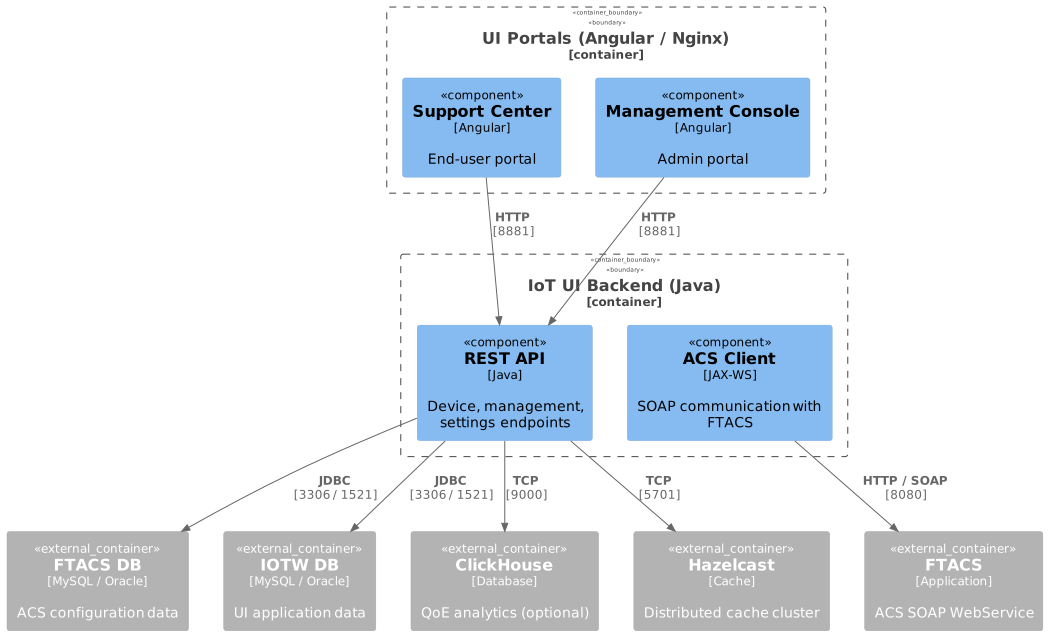
Friendly Tech UI Backend is the server-side component of the OneIoT Web platform — an IoT device management system built around Friendly TR-069 ACS services. The backend provides REST API endpoints for two Angular web portals (Support Center and Management Console), enabling operators to configure, monitor, and manage CPE devices at scale.
Business Purpose
The platform covers the following areas:
-
Device management — CRUD operations, parameter tree, diagnostics, firmware upgrades
-
Provisioning — profile-based automation, group updates, scheduled actions
-
Monitoring — QoE metrics via ClickHouse, device connectivity scoring
-
Multi-tenancy — domain-based access control with role and location separation
-
Integration — SOAP interface to FTACS for device communication (TR-069 / TR-181 / LWM2M / USP)
Technology Stack
| Component | Details |
|---|---|
Language |
Java 25 |
Framework |
Java web application (WAR) |
Build Tool |
Maven (multi-module) |
Databases |
MySQL 8.0+ / Oracle 21c+ (dual datasource: FTACS + IOTW) |
Analytics |
ClickHouse (QoE data, optional) |
Cache |
Hazelcast (distributed clustering) |
ACS Integration |
SOAP / JAX-WS client (auto-generated from WSDL) |
Authentication |
JWT + optional LDAP |
Container Runtime |
Docker / Docker Compose |
Documentation
| Section | Description |
|---|---|
Docker deployment of the UI Backend (REST API) on a dedicated host, environment configuration, troubleshooting |
|
SSL certificate setup for different deployment scenarios |
|
Verifying services are running, log analysis, endpoint checks |
|
Deploy the shared Keycloak identity server (Docker, storage, TLS, network, HA) used by the SAML, LDAP, Azure AD, and Windows login types |
|
JWT configuration, LDAP integration, user management |
|
Application structure, folder layout, component descriptions |
|
Release history and change notes |