FCC Diagnostics Redesign SDD
This document describes the redesigned FCC Diagnostics feature, covering GUI design, backend REST API, database schema, report generation, and ACS implementation changes.
1. Overview
The FCC Diagnostics feature is implemented in the Angular GUI as a separate module due to the unique workflows distinct from the "Update Group" module. The system includes:
-
GUI: Angular
-
GUI Backend: Java REST Web Services
-
ACS: Java SOAP Web Services
2. FCC Feature Description
2.1. FCC Test Types
-
Speed Test: Measures download and upload speeds.
-
Latency Test: Measures IP ping latency.
2.2. FCC Test Workflow
-
Evaluate the current network state (WAN usage) by sending GetParameterValues requests for BytesReceived and BytesSent at 10-second intervals.
-
If the network is not busy (based on predefined thresholds), initiate diagnostics.
-
Analyze diagnostic results to calculate statistics:
-
Compare against tier values.
-
Determine if the test passed or failed.
-
2.3. Execution Requirements
-
Tests are executed during the "Total Test Duration" (hours).
-
Tests are repeated at "Single Test Duration" intervals (minutes).
-
Execution Count:
-
Formula: (Total Test Duration * 60) / Single Test Duration.
-
-
The system checks the network state before initiating diagnostics:
-
Send GetParameterValues requests for BytesReceived (download/ping) and BytesSent (upload).
-
Retry WAN usage checks up to the "WAN Usage Retries" count if the network is busy.
-
-
Optionally, execute tests on a subset of devices using the "Batch Interval".
-
Compare results with the "Speed Tier" to determine success or failure.
-
Failed speed tests can be retried up to the "Failed Test Retries" count.
-
Full tests can be repeated daily for a specified number of reactivations ("Ends After Reactivations").
3. GUI Design
3.1. New Menu Item and Views
FCC Diagnostics is added as a new menu item with:
-
Test List View: Displays all FCC tests.
-
Test Details View: Create or update FCC tests.
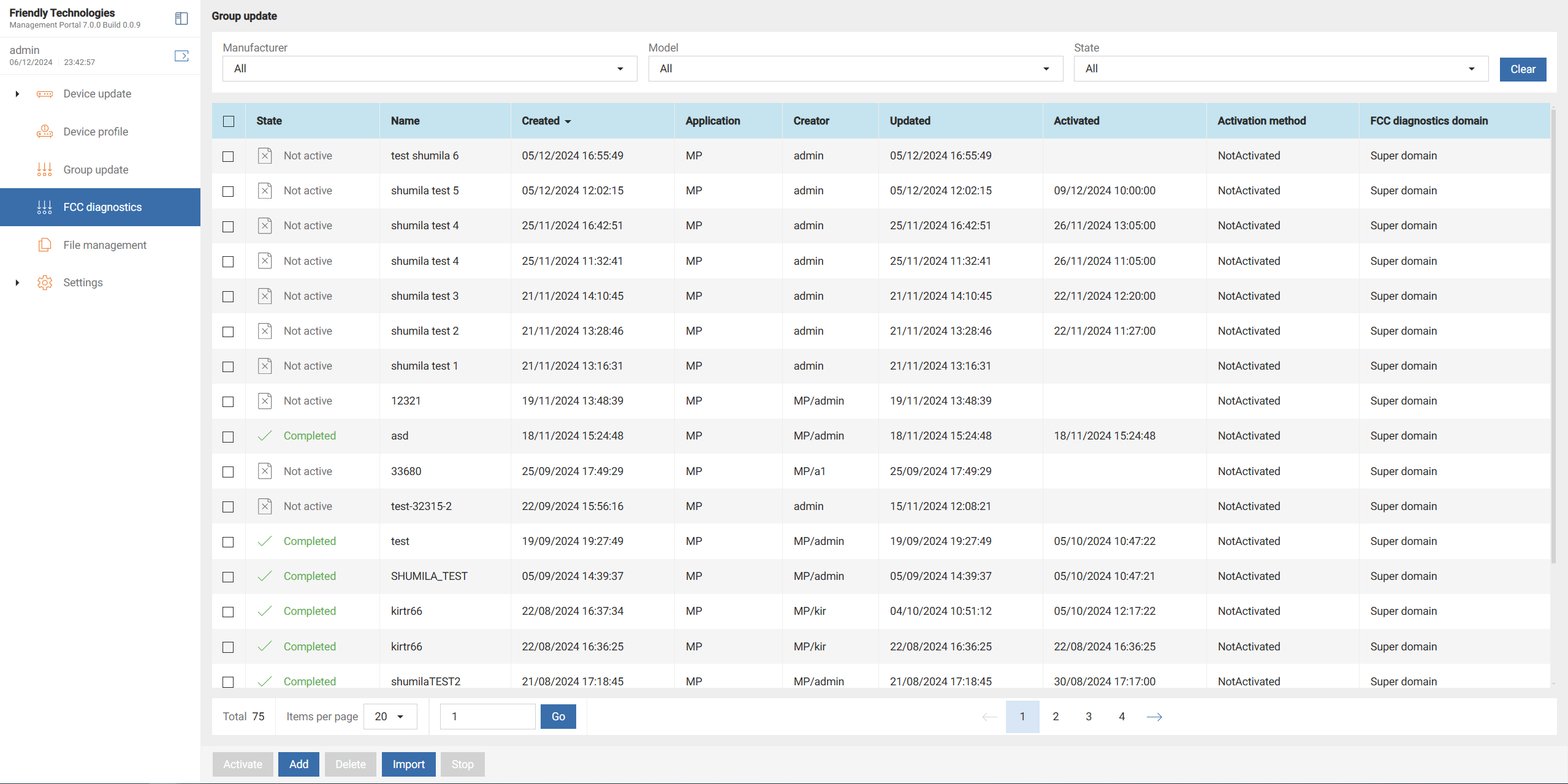
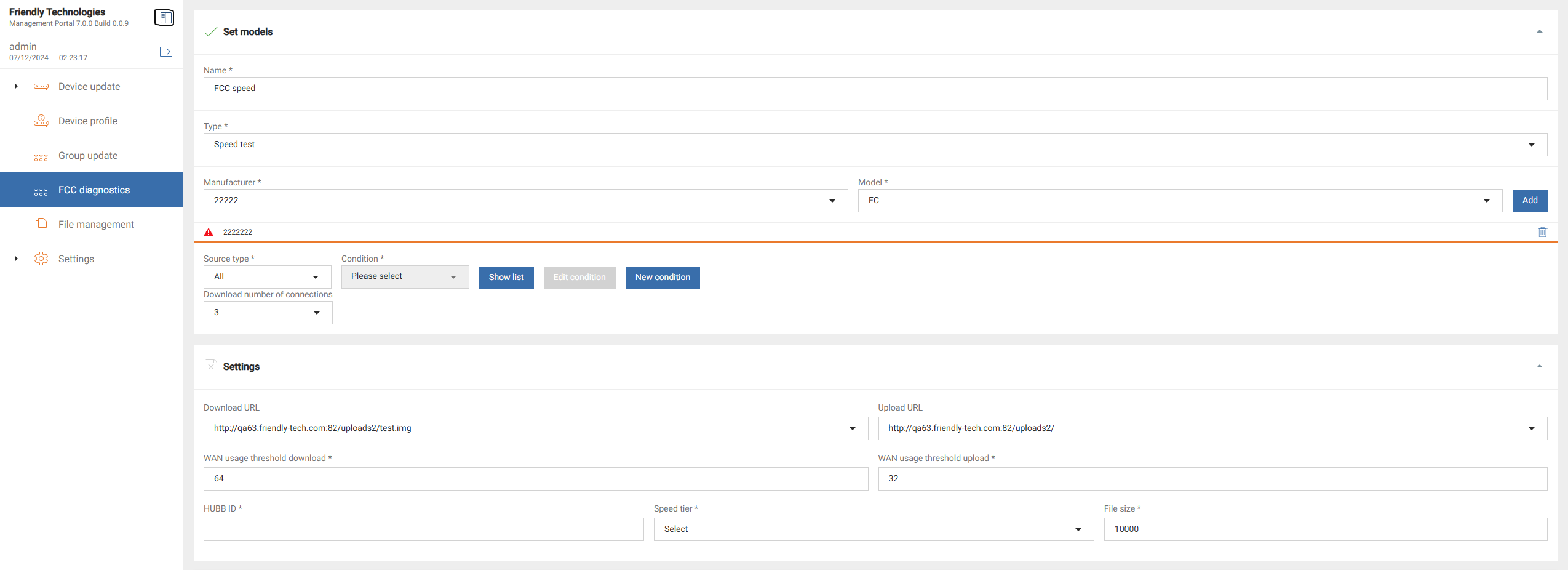


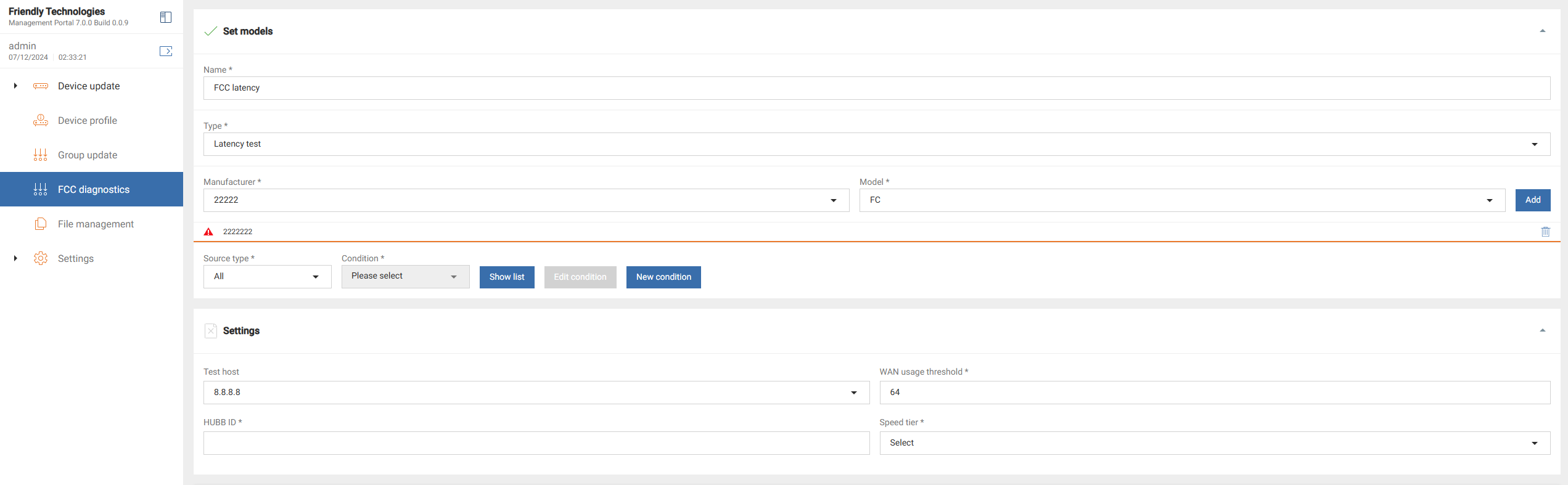

3.2. Dropdown Content
-
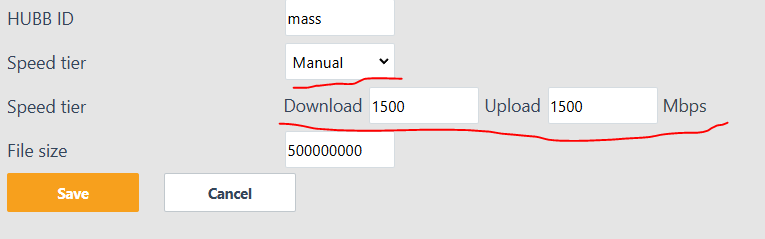
Speed Tier for Speed Test:
-
Options: Manual, 1 / 0.25, 2 / 1, 4 / 1, 6 / 1, 10 / 1, 25 / 3, 50 / 5, 100 / 20, 100 / 25, 1000 / 100, 1000 / 500
-
-
Speed Tier for Latency Test:
-
Options: Manual, 1, 2, 6, 10, 25, 100, 1000
-
-
Download Number of Connections:
-
Options: 1, 2, 3, 4.
-
-
Reactivation Frequency:
-
Options: None, Daily.
-
![Speed tier dropdown for speed test] image::fcc-redesign/image10.png[Speed tier dropdown for latency test] image::fcc-redesign/image11.png[Download connections dropdown] image::fcc-redesign/image12.png[Reactivation frequency dropdown](../_images/fcc-redesign/image9.png)
3.3. GUI Create Test Flow
-
Initialization:
-
Only "Name" and "Type" fields are editable initially.
-
-
Step 1:
-
User sets "Name" and "Type".
-
A POST REST request is sent to fetch supported manufacturers and models for the selected test type.
-
Response should contain an array of:
-
Manufacturer name
-
Model name
-
Only in case of "Speed test": "Download number of connections" if the current model supports it
-
-
-
Step 2:
-
Display the "Settings" and "Activation" forms based on the test type.
-
-
Step 3:
-
User configures:
-
Devices: Source type and list.
-
Test settings and thresholds.
-
Activation properties.
-
-
4. GUI Backend Design
4.1. REST Methods
-
POST /list — Retrieve all FCC tests.
-
POST /details — Fetch FCC test details by ID.
-
PUT /details — Create or update FCC tests.
-
DELETE /fcc — Delete FCC tests by IDs.
-
POST /manufacturerAndModelByTestType — Fetch manufacturers/models for a test type.
-
POST /activate — Activate a test.
-
POST /stop — Stop a test.
4.2. Backend Flows
Currently, all modification operations are performed on the ACS side, and the backend only makes SOAP calls to the ACS. However, since this feature is being implemented from scratch, the GUI backend handles all these operations.
-
Data Operations:
-
INSERT, UPDATE, DELETE, and SELECT FCC test information from the database.
-
-
Activation:
-
Use ACS SOAP calls to activate tests.
-
-
Stopping:
-
If deleting a running, scheduled, or reactivating test, call stop on ACS via SOAP.
-
5. Database Design
5.1. Tables
5.1.1. fcc
Stores FCC test settings and reactivation properties.
id INTEGER PRIMARY KEY AUTO_INCREMENT
type TINYINT
state TINYINT
threshold_dl INTEGER
threshold_ul INTEGER NULLABLE
hubb_id VARCHAR
tier_dl INTEGER
tier_ul INTEGER NULLABLE
url_dl VARCHAR
url_ul VARCHAR NULLABLE
file_size INTEGER NULLABLE
total_duration INTEGER
single_duration INTEGER
batch_interval INTEGER NULLABLE
retry_failed INTEGER NULLABLE
retry_wan INTEGER
scheduled DATETIME NULLABLE
reactivation_count INTEGER NULLABLE
updated DATETIME
updator VARCHAR
created DATETIME
creator VARCHAR5.2. Liquibase ChangeLog
<databaseChangeLog xmlns="http://www.liquibase.org/xml/ns/dbchangelog"
  xmlns:xsi="http://www.w3.org/2001/XMLSchema-instance"
  xsi:schemaLocation="http://www.liquibase.org/xml/ns/dbchangelog
  http://www.liquibase.org/xml/ns/dbchangelog/dbchangelog-3.8.xsd">

  <!-- FCC Table -->
  <changeSet id="1" author="your_name">
    <createTable tableName="fcc">
      <column name="id" type="INTEGER" autoIncrement="true" primaryKey="true"/>
      <column name="type" type="TINYINT"/>
      <column name="state" type="TINYINT"/>
      <column name="threshold_dl" type="INTEGER"/>
      <column name="threshold_ul" type="INTEGER" nullable="true"/>
      <column name="hubb_id" type="VARCHAR(255)"/>
      <column name="tier_dl" type="INTEGER"/>
      <column name="tier_ul" type="INTEGER" nullable="true"/>
      <column name="url_dl" type="VARCHAR(255)"/>
      <column name="url_ul" type="VARCHAR(255)" nullable="true"/>
      <column name="file_size" type="INTEGER" nullable="true"/>
      <column name="total_duration" type="INTEGER"/>
      <column name="single_duration" type="INTEGER"/>
      <column name="batch_interval" type="INTEGER" nullable="true"/>
      <column name="retry_failed" type="INTEGER" nullable="true"/>
      <column name="retry_wan" type="INTEGER"/>
      <column name="scheduled" type="DATETIME" nullable="true"/>
      <column name="reactivation_count" type="INTEGER" nullable="true"/>
      <column name="updated" type="DATETIME"/>
      <column name="updator" type="VARCHAR(255)"/>
      <column name="created" type="DATETIME"/>
      <column name="creator" type="VARCHAR(255)"/>
    </createTable>
  </changeSet>

  <!-- FCC Model Table -->
  <changeSet id="2" author="your_name">
    <createTable tableName="fcc_model">
      <column name="id" type="INTEGER" autoIncrement="true" primaryKey="true"/>
      <column name="fcc_id" type="INTEGER"/>
      <column name="group_id" type="INTEGER"/>
      <column name="custom_view_id" type="INTEGER" nullable="true"/>
      <column name="connections_dl" type="INTEGER" nullable="true"/>
    </createTable>
  </changeSet>

  <!-- FCC CPE List Table -->
  <changeSet id="3" author="your_name">
    <createTable tableName="fcc_cpe_list">
      <column name="fcc_model_id" type="INTEGER" primaryKey="true"/>
      <column name="cpe_id" type="INTEGER" primaryKey="true"/>
    </createTable>
  </changeSet>

</databaseChangeLog>
6. Reports
6.1. Overview
The FCC Diagnostics Reports provide functionality to view and export FCC test results. You can filter reports based on various criteria and access detailed test results for specific devices.
6.2. GUI
6.2.1. Features
-
Add a new report type under the "Reports" menu in the GUI.
-
Allow users to filter reports by:
-
Manufacturer
-
Model
-
Test type (e.g., speed test or latency test)
-
Time frame
-
-
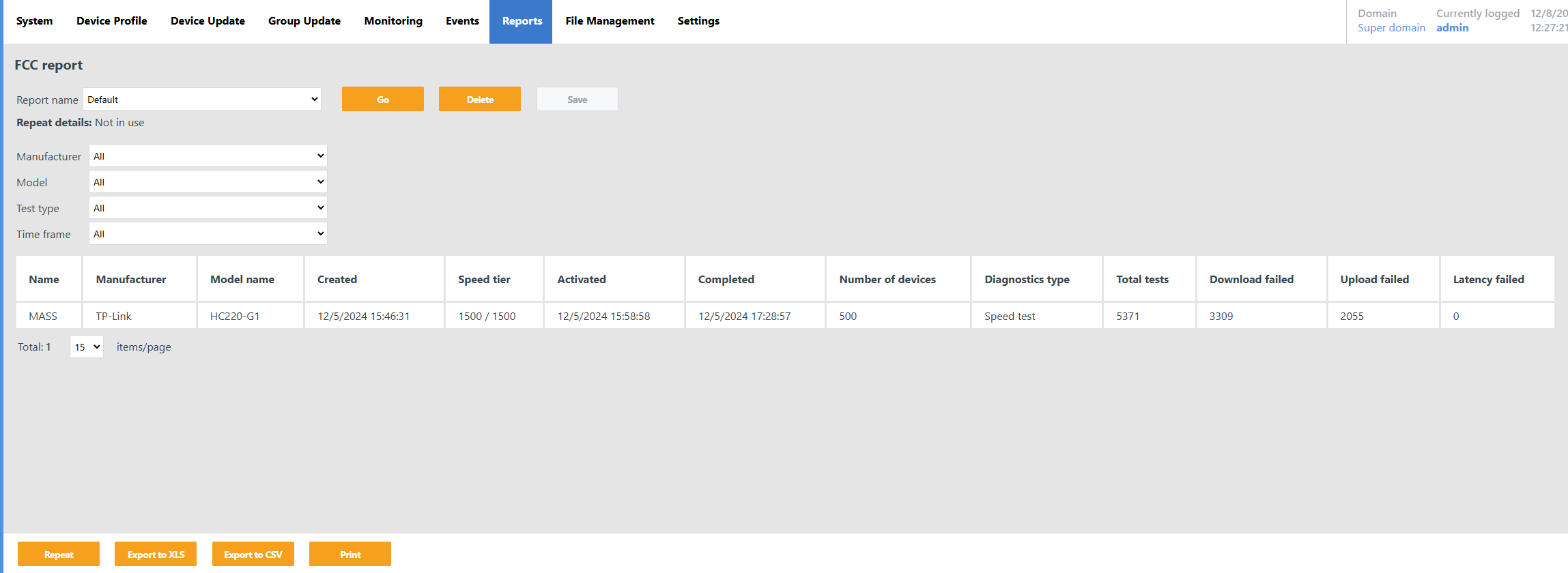
Display a list of reports based on the selected filters.
-
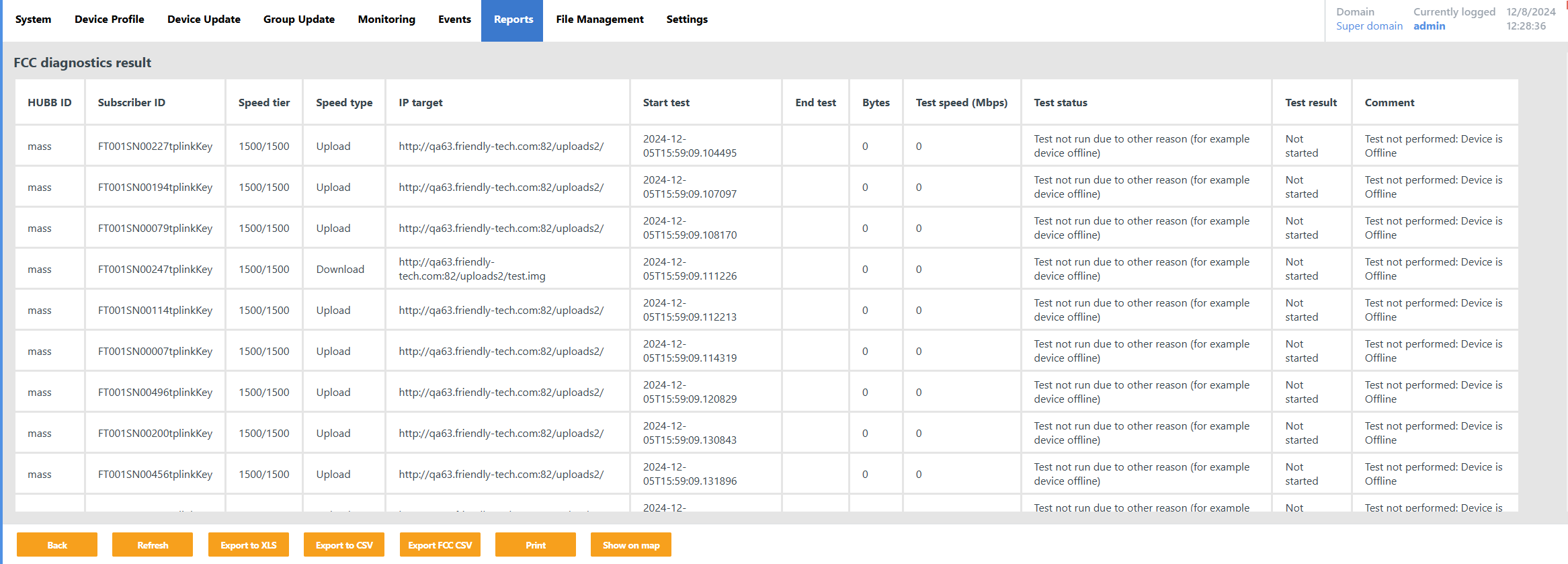
On selecting a report, display the FCC test state per device for the selected report.
-
Enable exporting reports to formats such as XLS and CSV.
6.2.2. Images and Descriptions
-
New report type
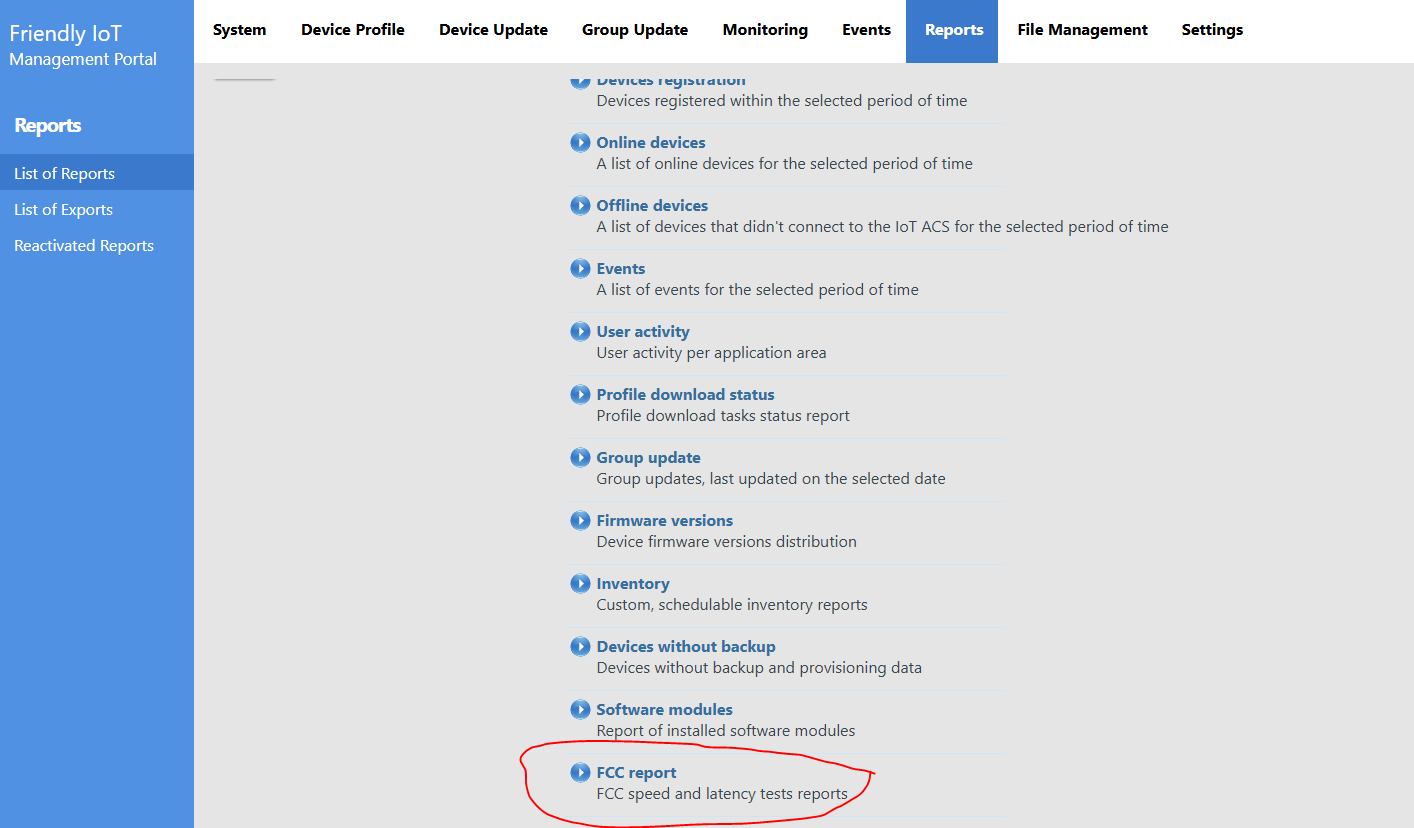
-
FCC report filters
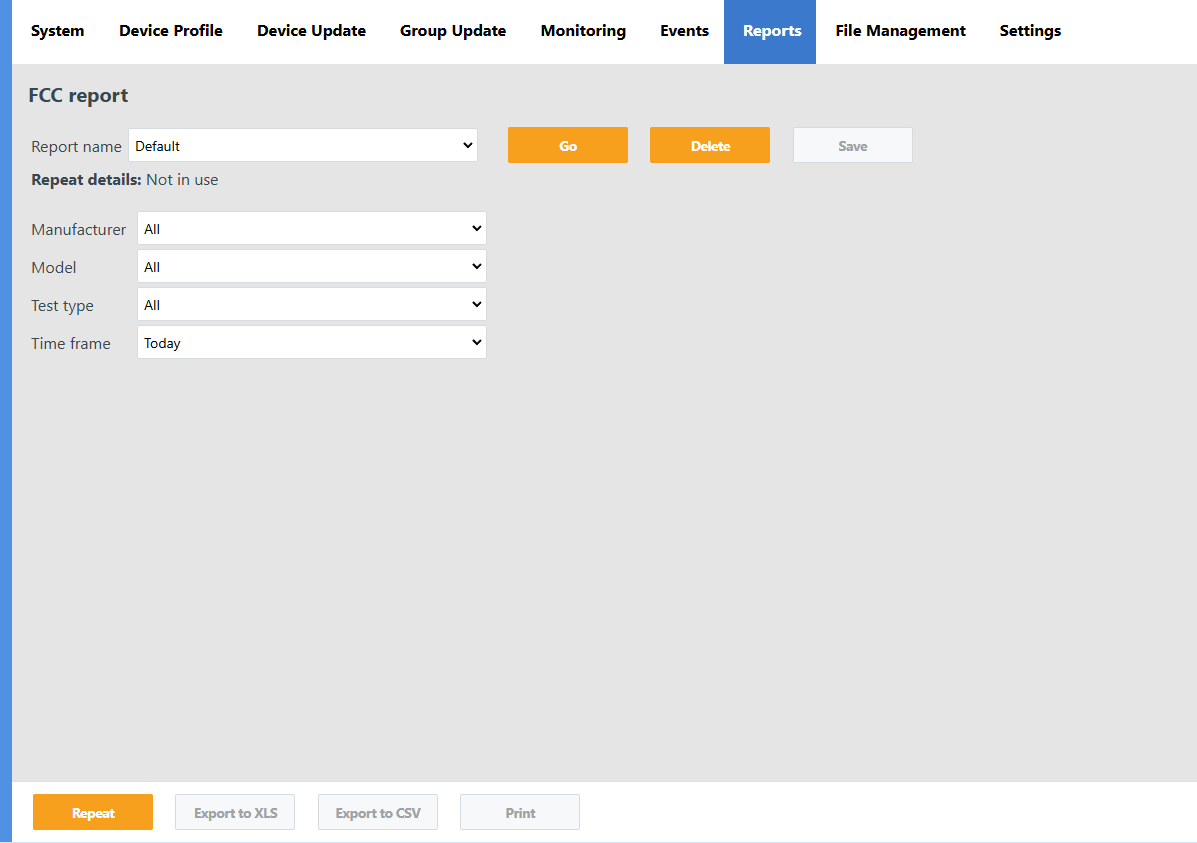
-
Report List View
Displays a list of available reports with filtering options. Allows users to select specific reports and view test results.
-
FCC Diagnostics Result View
Displays detailed FCC test results per device, including statuses and metrics such as speed and latency.
6.3. GUI backend Design
6.4. Database Design
6.4.1. Database Tables
-
fcc_result_latency (Latency Test Results)
-
Columns:
-
id (integer)
-
fcc_id (integer)
-
hubb_id (varchar, nullable)
-
serial (varchar)
-
tier (varchar)
-
url (varchar, nullable)
-
start_date (datetime with microseconds)
-
status (tinyint)
-
description (varchar)
-
val_avg (integer, nullable)
-
min_avg (integer, nullable)
-
max_avg (integer, nullable)
-
packets_sent (integer, nullable)
-
packets_received (integer, nullable)
-
-
-
fcc_result_speed (Speed Test Results)
-
Columns:
-
id (integer)
-
fcc_id (integer)
-
hubb_id (varchar, nullable)
-
serial (varchar)
-
tier (varchar)
-
url (varchar, nullable)
-
start_date (datetime with microseconds)
-
end_date (datetime with microseconds, nullable)
-
status (tinyint)
-
description (varchar)
-
total_bytes (integer, nullable)
-
speed (double, nullable)
-
-
-
fcc_cpe_state (CPE State During FCC Execution)
-
Columns:
-
id (integer)
-
fcc_id (integer)
-
cpe_id (integer)
-
state (tinyint; enum: initial, wan, sent, finished, error, offline)
-
-
6.4.2. Liquibase XML
<?xml version="1.0" encoding="UTF-8"?>
<databaseChangeLog xmlns="http://www.liquibase.org/xml/ns/dbchangelog"
  xmlns:xsi="http://www.w3.org/2001/XMLSchema-instance"
  xsi:schemaLocation="http://www.liquibase.org/xml/ns/dbchangelog
  http://www.liquibase.org/xml/ns/dbchangelog/dbchangelog-3.8.xsd">

  <!-- fcc_result_latency Table -->
  <changeSet id="1" author="your_name">
    <createTable tableName="fcc_result_latency">
      <column name="id" type="INTEGER" autoIncrement="true" primaryKey="true"/>
      <column name="fcc_id" type="INTEGER"/>
      <column name="hubb_id" type="VARCHAR(255)" nullable="true"/>
      <column name="serial" type="VARCHAR(255)"/>
      <column name="tier" type="VARCHAR(255)"/>
      <column name="url" type="VARCHAR(255)" nullable="true"/>
      <column name="start_date" type="DATETIME(6)"/>
      <column name="status" type="TINYINT"/>
      <column name="description" type="VARCHAR(255)"/>
      <column name="val_avg" type="INTEGER" nullable="true"/>
      <column name="min_avg" type="INTEGER" nullable="true"/>
      <column name="max_avg" type="INTEGER" nullable="true"/>
      <column name="packets_sent" type="INTEGER" nullable="true"/>
      <column name="packets_received" type="INTEGER" nullable="true"/>
    </createTable>
  </changeSet>

  <!-- fcc_result_speed Table -->
  <changeSet id="2" author="your_name">
    <createTable tableName="fcc_result_speed">
      <column name="id" type="INTEGER" autoIncrement="true" primaryKey="true"/>
      <column name="fcc_id" type="INTEGER"/>
      <column name="hubb_id" type="VARCHAR(255)" nullable="true"/>
      <column name="serial" type="VARCHAR(255)"/>
      <column name="tier" type="VARCHAR(255)"/>
      <column name="url" type="VARCHAR(255)" nullable="true"/>
      <column name="start_date" type="DATETIME(6)"/>
      <column name="end_date" type="DATETIME(6)" nullable="true"/>
      <column name="status" type="TINYINT"/>
      <column name="description" type="VARCHAR(255)"/>
      <column name="total_bytes" type="INTEGER" nullable="true"/>
      <column name="speed" type="DOUBLE" nullable="true"/>
    </createTable>
  </changeSet>

  <!-- fcc_cpe_state Table -->
  <changeSet id="3" author="your_name">
    <createTable tableName="fcc_cpe_state">
      <column name="id" type="INTEGER" autoIncrement="true" primaryKey="true"/>
      <column name="fcc_id" type="INTEGER"/>
      <column name="cpe_id" type="INTEGER"/>
      <column name="state" type="TINYINT"/>
    </createTable>
  </changeSet>

</databaseChangeLog>
7. ACS Implementation
7.1. Overview
FCC functionality in the ACS:
-
Test Settings Store:
Remove test settings storage from the ACS and manage it entirely on the GUI backend.
-
Test Activation/Deactivation:
Provide new SOAP web service methods for test activation and deactivation.
Rewrite scheduler tasks for better functionality.
-
Test Execution on Device:
Rewrite execution logic using new database tables and models.
-
Test Results:
Apply minimal changes to align with the new database structure.
-
Old Database Tables:
Retain old tables for backward compatibility with the existing .NET UI (CpeAdmin).