Protocol Support
This document describes the communication protocols supported by the OneIoT ACS platform for device management. The system implements a multi-protocol architecture, allowing you to manage CPE devices over TR-069 (CWMP), MQTT, USP, and XMPP depending on your deployment requirements.
1. Overview
OneIoT ACS supports the following device management protocols:
| Protocol | Purpose | Transport |
|---|---|---|
TR-069 (CWMP) |
Primary device management protocol with adaptive load control |
HTTP/HTTPS |
MQTT |
Lightweight messaging for IoT device communication |
TCP/TLS |
USP (User Services Platform) |
Next-generation device management (TR-369) |
Various (CoAP, MQTT, WebSocket) |
XMPP |
Persistent bidirectional connection requests for TR-069 sessions |
TCP (port 5222) |
2. TR-069 (CWMP)
The TR-069 module provides the core CWMP (CPE WAN Management Protocol) implementation for device management. It includes an adaptive load control system that automatically adjusts the number of concurrent device sessions based on system resources.
2.1. Load Handling
The TR-069 module includes an adaptive load control system that automatically adjusts the number of concurrent device sessions based on system resources.
2.1.1. How It Works
| Component | Description |
|---|---|
DeviceLimiter |
Controls the maximum number of devices that can connect simultaneously. Uses a semaphore-based system to manage permits. |
AdaptiveLimiter |
Monitors system health every second and automatically adjusts the device limit up or down. |
2.1.2. Automatic Adjustment Logic
The system monitors two key metrics:
| Metric | Thresholds | Action |
|---|---|---|
Database Pool Usage |
High: >90%, Low: <60% |
Ratio of active DB connections to total pool size |
CPU Load |
High: >85%, Low: <50% |
System-wide CPU utilization |
Adjustment Rules:
-
Overload detected (DB >90% OR CPU >85%): Limit is reduced by 30% (multiplicative decrease)
-
Underutilized (DB <60% AND CPU <50%) with devices waiting: Limit is increased gradually (additive increase)
-
Otherwise: No change
2.1.3. Configuration Values
| Parameter | Default | Description |
|---|---|---|
Minimum Limit |
8 |
Floor value — limit never goes below this |
Maximum Limit |
1024 |
Ceiling value — limit never exceeds this |
Check Interval |
1 second |
How often the system evaluates metrics |
2.1.4. Log Messages
When the limit changes, you will see this log entry:
INFO  Changing TR069 limiter.
    Old: 64
    New: 44
This indicates the system detected overload and reduced capacity from 64 to 44 concurrent devices.
2.1.5. Troubleshooting
| Symptom | Possible Cause |
|---|---|
Limit keeps decreasing |
Database or CPU is consistently overloaded. Check DB connection pool size and server resources. |
Limit stays at minimum (8) |
Persistent overload condition. Investigate database performance or consider scaling. |
Devices waiting but limit not increasing |
System resources above "low" thresholds. This is normal — increase only happens when both DB and CPU are underutilized. |
3. MQTT
MQTT (Message Queuing Telemetry Transport) provides lightweight publish/subscribe messaging for IoT device communication within the OneIoT platform.
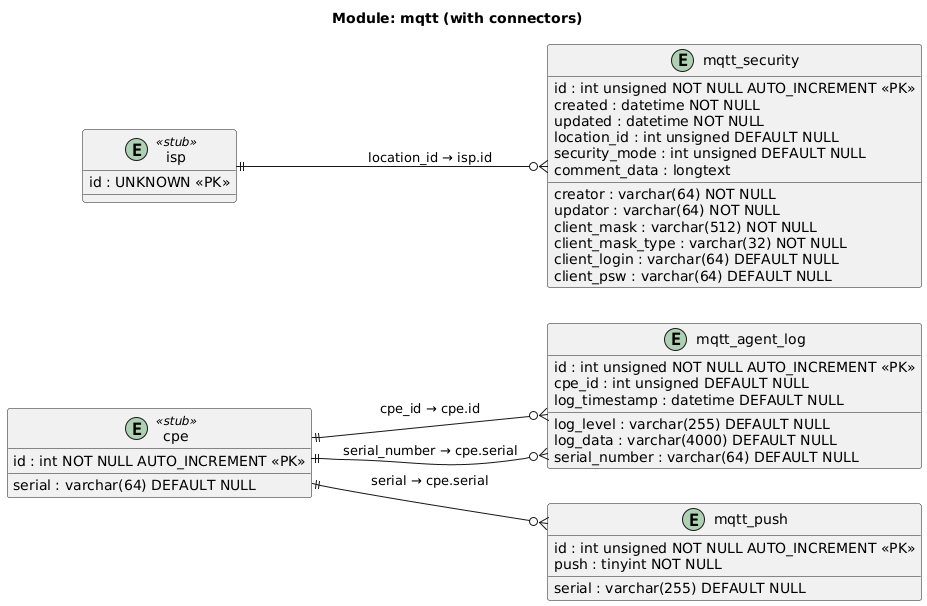
3.2. Table Descriptions
| Table | Description |
|---|---|
|
Log entries from MQTT-connected devices — stores log level, message data, and timestamp per device serial |
|
Tracks connection-request (push) state for MQTT devices. The |
|
MQTT authentication and authorization rules per domain ( |
4. USP
USP (User Services Platform, TR-369) is the next-generation device management protocol that builds on the foundations of TR-069.

4.2. Table Descriptions
| Table | Description |
|---|---|
|
Maps a USP Agent’s endpoint ID and the corresponding Controller endpoint to an ACS device ( |
|
Stores pending USP Operate (command execution) requests per device — references the RPC method name to invoke |
|
Arguments for a USP Operate command — each row is a name/value pair linked to a |
5. XMPP Connection Request
In TR-069-based device management, XMPP (Extensible Messaging and Presence Protocol) provides an alternative transport mechanism for initiating communication between CPE and ACS. XMPP enables bidirectional, event-driven communication with persistent connections, reducing the need for polling and improving efficiency, especially for IoT devices or large-scale deployments.
5.1. Key Benefits
-
Persistent connections: Devices maintain always-on connectivity
-
Bidirectional communication: ACS can initiate requests without connection request URL
-
Event-driven: Immediate notification capability
-
Scalability: Efficient for large-scale deployments
-
NAT traversal: Works behind firewalls without port forwarding
5.2. XMPP Architecture Components
5.3. Device Registration Flow
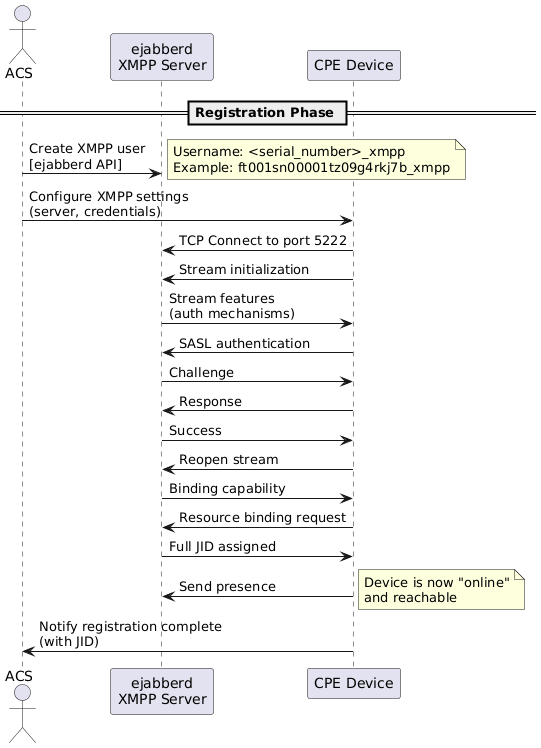
The registration process establishes the device’s XMPP identity and enables the ACS to send connection requests.
5.3.1. Registration Steps by Role
Step 1: ACS Creates XMPP Account
Use the ejabberd API to register a new XMPP user for the device.
Username format: <serial_number>_xmpp
Example: ft001sn00001tz09g4rkj7b_xmpp
Step 2: ACS Configures Device
ACS provisions the device with XMPP connection parameters via TR-069:
-
XMPP server domain and port (e.g.,
demodm.friendly-tech.com:5222) -
Username and password
-
Connection request credentials
Step 3: CPE Connects and Authenticates
The device initiates connection to the XMPP server:
-
Open a TCP connection to port 5222
-
Initiate the XMPP stream
-
Perform SASL authentication using the provided credentials
Supported authentication mechanisms:
-
SCRAM-SHA-512
-
SCRAM-SHA-256
-
SCRAM-SHA-1
-
DIGEST-MD5
-
PLAIN
-
X-OAUTH2
Step 4: XMPP Server Assigns JID
Upon successful authentication, the server assigns a full Jabber ID (JID):
Format: <username>@<domain>/<resource>
Example: ft001sn00001tz09g4rkj7b_xmpp@demodm.friendly-tech.com/ft001sn00001tz09g4rkj7b_xmpp
5.4. XMPP Message Exchange During Registration
5.4.1. Stream Initialization
CPE → XMPP Server:
<stream:stream xmlns='jabber:client'
               to='demodm.friendly-tech.com'
               xmlns:stream='http://etherx.jabber.org/streams'
               version='1.0'
               from='ft001sn00001tz09g4rkj7b_xmpp@demodm.friendly-tech.com'
               id='4978142062425297665'
               xml:lang='en'>
5.4.2. Stream Features
XMPP Server → CPE:
<stream:stream id='4978142062425297665' version='1.0'
               xml:lang='en'
               xmlns:stream='http://etherx.jabber.org/streams'
               to='ft001sn00001tz09g4rkj7b_xmpp@demodm.friendly-tech.com'
               from='demodm.friendly-tech.com'
               xmlns='jabber:client'>
  <stream:features>
    <mechanisms xmlns='urn:ietf:params:xml:ns:xmpp-sasl'>
      <mechanism>DIGEST-MD5</mechanism>
      <mechanism>PLAIN</mechanism>
      <mechanism>SCRAM-SHA-512</mechanism>
      <mechanism>SCRAM-SHA-256</mechanism>
      <mechanism>SCRAM-SHA-1</mechanism>
      <mechanism>X-OAUTH2</mechanism>
    </mechanisms>
    <starttls xmlns='urn:ietf:params:xml:ns:xmpp-tls'/>
    <register xmlns='http://jabber.org/features/iq-register'/>
  </stream:features>
5.4.3. SASL Authentication
CPE → XMPP Server (Auth Request):
<auth xmlns='urn:ietf:params:xml:ns:xmpp-sasl'
      mechanism='SCRAM-SHA-1'>
  biwsbj1mdDAwMXNuMDAwMDF0ejA5ZzRya2o3Yl94bXBwLHI9RkMqOlQyPEM1VVlOPzBuXHVgKGg1eWZmRSlTOTJDPEc=
</auth>
XMPP Server → CPE (Challenge):
<challenge xmlns='urn:ietf:params:xml:ns:xmpp-sasl'>
  cj1GQyo6VDI8QzVVWU4/MG5cdWAoaDV5ZmZFKVM5MkM8R0luYmtIWUFoVUJnMFJETmpSVWJac2c9PSxzPWkvbnk1aDI0eWRwaytGRkloa1lzSFE9PSxpPTQwOTY=
</challenge>
CPE → XMPP Server (Response):
<response xmlns='urn:ietf:params:xml:ns:xmpp-sasl'>
  Yz1iaXdzLHI9RkMqOlQyPEM1VVlOPzBuXHVgKGg1eWZmRSlTOTJDPEdJbmJrSFlBaFVCZzBSRE5qUlViWnNnPT0scD1Fc05SSnVxTmFwdXJ1ZjMyOHYvL0ZqRWhwd289
</response>
XMPP Server → CPE (Success):
<success xmlns='urn:ietf:params:xml:ns:xmpp-sasl'>
  dj1CYlYvQjE2QjQxYVJIWDZqQ0tMdGwzVDRTbFU9
</success>
5.4.4. Resource Binding
CPE → XMPP Server:
<iq id='L1iyn-3' type='set'>
  <bind xmlns='urn:ietf:params:xml:ns:xmpp-bind'>
    <resource>ft001sn00001tz09g4rkj7b_xmpp</resource>
  </bind>
</iq>
XMPP Server → CPE (Full JID Assignment):
<iq type='result' id='L1iyn-3'>
  <bind xmlns='urn:ietf:params:xml:ns:xmpp-bind'>
    <jid>ft001sn00001tz09g4rkj7b_xmpp@demodm.friendly-tech.com/ft001sn00001tz09g4rkj7b_xmpp</jid>
  </bind>
</iq>5.5. Keep-Alive Mechanism
To maintain connection state, the XMPP server sends periodic ping requests.
Ping Interval: 30 seconds
5.5.1. Ping Message
XMPP Server → CPE:
<iq to='ft001sn00001tz09g4rkj7b_xmpp@demodm.friendly-tech.com/ft001sn00001tz09g4rkj7b_xmpp'
    from='demodm.friendly-tech.com'
    type='get'
    id='rr-1743087549729-14859745515995227305-xki+g8xNMHREpvKxtfCWTl+g1BI=-55238004'>
  <ping xmlns='urn:xmpp:ping'/>
</iq>
CPE → XMPP Server:
<iq to='demodm.friendly-tech.com'
    from='ft001sn00001tz09g4rkj7b_xmpp@demodm.friendly-tech.com/ft001sn00001tz09g4rkj7b_xmpp'
    id='rr-1743087549729-14859745515995227305-xki+g8xNMHREpvKxtfCWTl+g1BI=-55238004'
    type='result'>
</iq>
5.6. Connection Request Flow
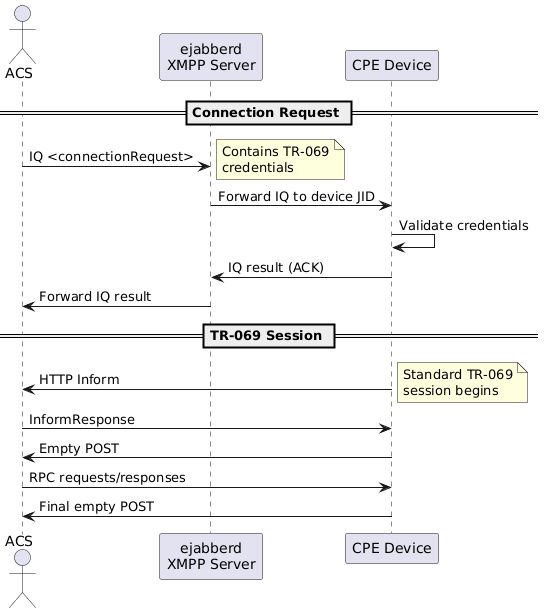
Once registered, ACS can initiate TR-069 sessions by sending connection requests via XMPP.
5.6.1. Connection Request Message
ACS → CPE (via XMPP):
<iq to='ft001sn00001tz09g4rkj7b_xmpp@demodm.friendly-tech.com/ft001sn00001tz09g4rkj7b_xmpp'
    from='ftacs@demodm.friendly-tech.com'
    type='get'
    id='45wft-32370'>
  <connectionRequest xmlns='urn:broadband-forum-org:cwmp:xmppConnReq-1-0'>
    <username>ftacs</username>
    <password>ftacs</password>
  </connectionRequest>
</iq>
CPE → ACS (Acknowledgment):
<iq to='ftacs@demodm.friendly-tech.com'
    from='ft001sn00001tz09g4rkj7b_xmpp@demodm.friendly-tech.com/ft001sn00001tz09g4rkj7b_xmpp'
    id='45wft-32370'
    type='result'>
</iq>5.7. XMPP Configuration in ACS
5.7.1. Required Parameters
| Parameter | Description |
|---|---|
XMPP Server Domain |
XMPP domain name (e.g., |
XMPP Server Port |
Client connection port (default: 5222) |
XMPP Admin Credentials |
Credentials for ejabberd API access |
ACS JID |
ACS Jabber ID for sending connection requests |
Connection Request Credentials |
Username/password for TR-069 authentication |
5.7.2. Device Configuration Parameters
Configure these via TR-069 on the device:
| Parameter | TR-069 Data Model Path |
|---|---|
Enable XMPP |
|
XMPP Server Address |
|
XMPP Server Port |
|
XMPP Username |
|
XMPP Password |
|
Resource |
|
Keep-Alive Interval |
|
5.8. Operational Considerations
5.8.1. Connection State Monitoring
ACS monitors device XMPP presence to determine online status:
-
Online: Device has active XMPP connection
-
Offline: Device disconnected or unreachable
-
Away: Device connected but potentially inactive
5.9. Troubleshooting
5.9.1. Symptom: Device Cannot Connect to XMPP Server
The device remains offline in ACS.
- Cause
-
Incorrect XMPP server address or port, firewall blocking outbound port 5222, invalid credentials, or XMPP server down/unreachable.
- Fix
-
-
Verify XMPP server connectivity:
telnet <XMPP_SERVER_HOST> 5222 -
Check device XMPP configuration parameters
-
Verify the user exists in ejabberd
-
Review ejabberd logs for authentication failures
-
5.9.2. Symptom: Connection Request Not Received by Device
ACS sends connection request but the device does not respond.
- Cause
-
Device XMPP connection dropped, JID mismatch, or message routing failure.
- Fix
-
-
Check device presence in ejabberd
-
Verify the JID in the connection request matches the device JID
-
Review XMPP server message routing logs
-
Test with a manual XMPP message
-
5.9.3. Symptom: Frequent Disconnections
The device repeatedly connects and disconnects.
- Cause
-
Unstable network connection, keep-alive interval too long, or resource exhaustion on the device.
- Fix
-
-
Reduce the keep-alive interval
-
Monitor device resource usage (CPU, memory)
-
Check network stability and latency
-
Review device XMPP client logs
-
5.10. Comparison: XMPP vs. Standard Connection Request
| Aspect | Standard TR-069 | XMPP-based |
|---|---|---|
Transport |
HTTP Connection Request URL |
XMPP IQ stanza |
NAT Traversal |
Requires port forwarding or STUN |
Works behind NAT naturally |
Device Reachability |
Polling or callback URL required |
Always-on presence |
Scalability |
One HTTP request per device |
Efficient persistent connections |
Latency |
Depends on inform interval |
Near real-time |
Implementation Complexity |
Simple |
Moderate (XMPP infrastructure required) |
Firewall Requirements |
Inbound port to device |
Outbound XMPP port only |
5.11. References
-
TR-069 Amendment 5: XMPP Connection Request specification
-
RFC 6120: XMPP Core
-
RFC 6121: XMPP Instant Messaging and Presence
-
ejabberd Documentation: https://docs.ejabberd.im/
-
XMPP Standards Foundation: https://xmpp.org/rfcs/