Device Parameter Operation Result Event Subscription - Software Design Document
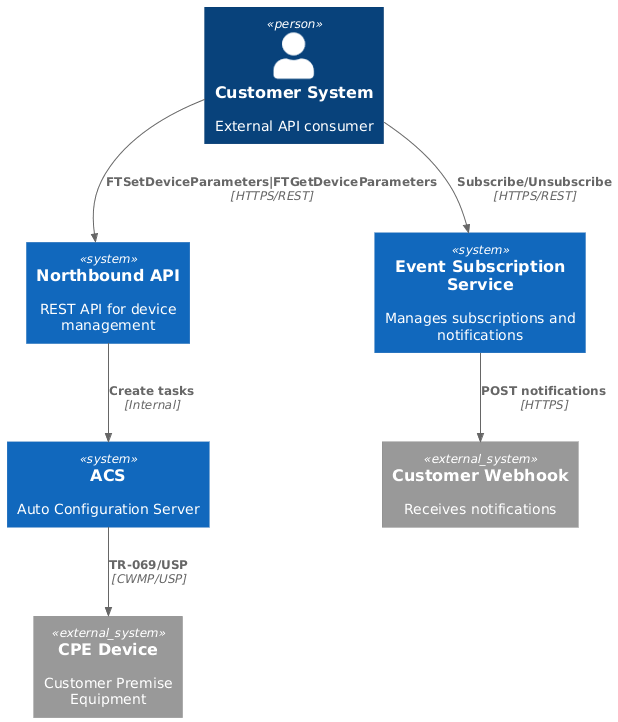
This document describes the design of the Event Subscription system for Device Parameter Operation Results, enabling external systems to receive asynchronous notifications when device parameter operations (Set or Get) are completed.
1. Overview
1.1. Purpose
This document describes the design of the Event Subscription system for Device Parameter Operation Results, enabling external systems to receive asynchronous notifications when device parameter operations (Set or Get) are completed.
1.2. Problem Statement
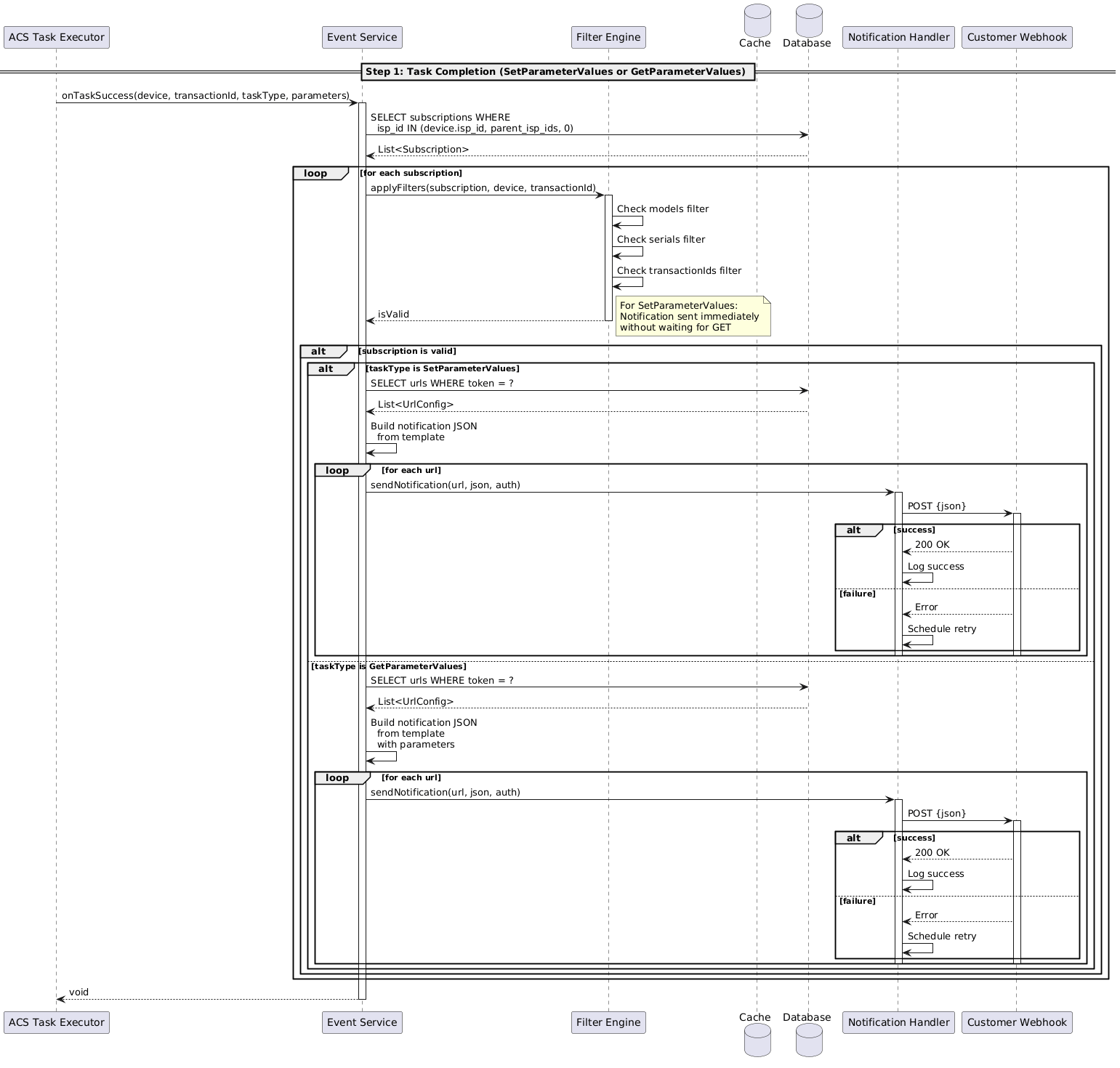
When Customer API triggers device parameter operations via Northbound API (SetParameterValues or GetParameterValues), these operations can take hours if the device is offline or sleeping. Current polling mechanisms are inefficient for long-running operations. This feature enables webhook-based notifications when parameter operations complete.
For SetParameterValues operations, the notification is sent immediately upon successful SET completion, without waiting for a consequent GET operation. For GetParameterValues operations, the notification is sent when the GET response is received.
1.3. Solution Summary
Implement an event subscription system that:
-
Allows customers to subscribe to device parameter operation results (Set or Get) via webhook URLs
-
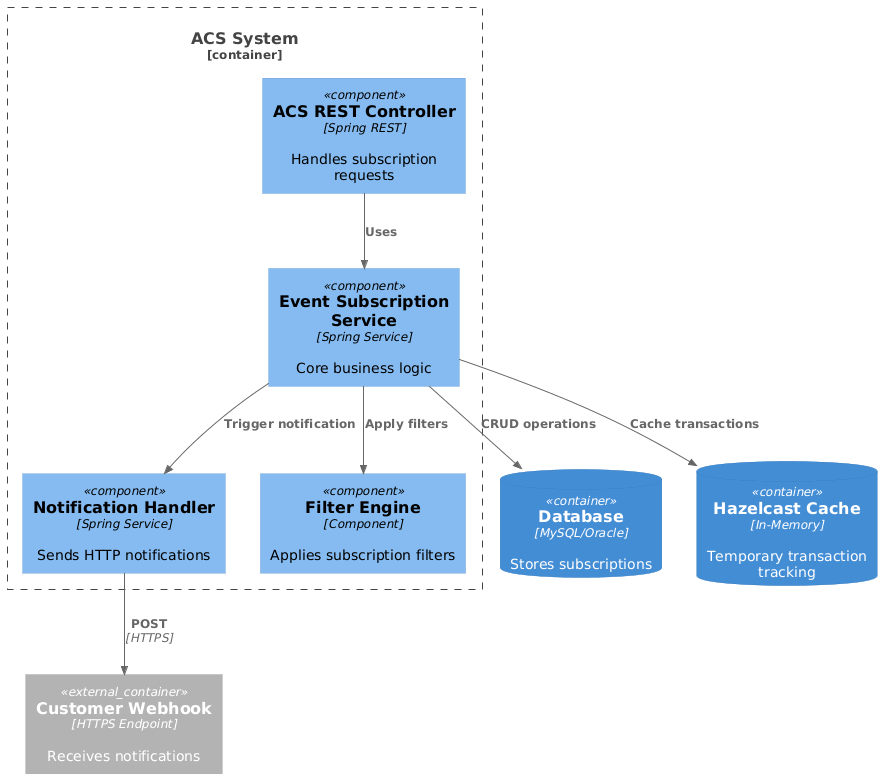
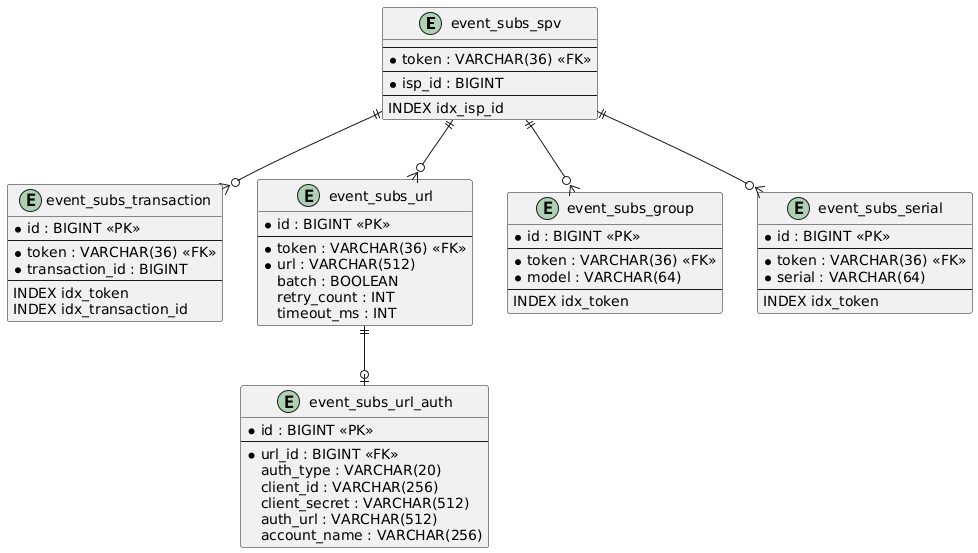
Filters subscriptions by domain, device model, serial number, and transaction ID
-
Sends HTTP POST notifications when parameter operations complete:
-
For SetParameterValues: notification sent immediately upon successful SET completion
-
For GetParameterValues: notification sent when GET parameter response is received
-
-
Supports authentication (API key, OAuth2)
-
Provides asynchronous, non-blocking delivery with retry logic
2. Architecture
4. API Specification
4.1. Subscribe Endpoint
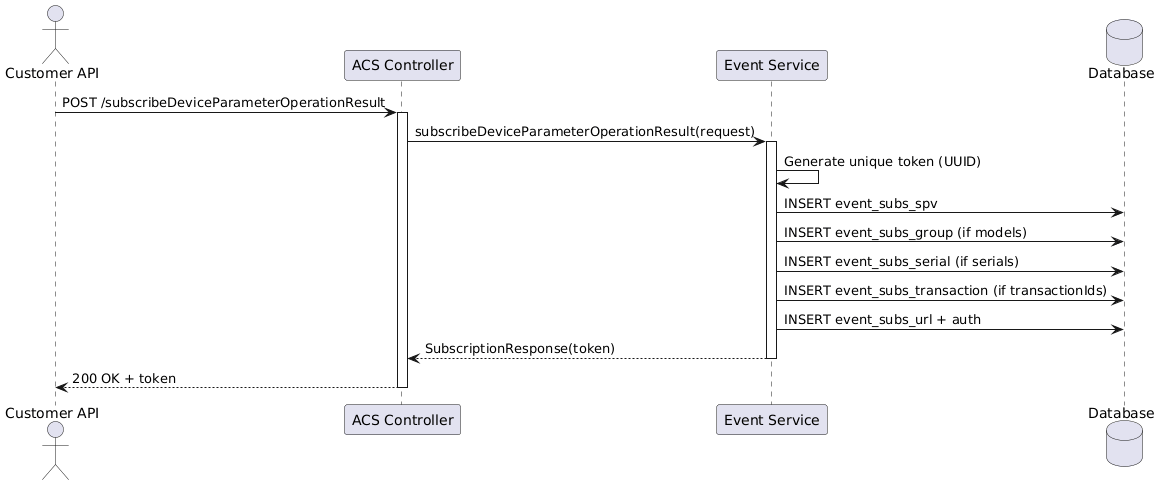
POST /rest/subscribeDeviceParameterOperationResult

Request:
{
  "models": [                            // Optional: filter by device models
    "W270",
    "DG3270"
  ],
  "serials": [                           // Optional: filter by serial numbers
    "8LUG1E73058377"
  ],
  "transactionIds": [                    // Optional: filter by transaction IDs
    14562,
    14563
  ],
  "urls": [                              // Required: webhook endpoints
    {
      "url": "https://customer.com/webhook",
      "batch": false,                    // Future: batch multiple notifications
      "auth": {                          // Optional: authentication
        "type": "NoAuth",                // NoAuth, OAuth2, ApiKey, Basic
        "clientId": "client-id",         // For OAuth2
        "clientSecret": "secret",        // For OAuth2
        "authUrl": "https://auth.com/token", // For OAuth2
        "accountName": "customer-account" // For OAuth2
      }
    }
  ]
}

Response:
{
  "token": "a1b2c3d4-e5f6-7890-abcd-ef1234567890"
}
4.2. Unsubscribe Endpoint
POST /rest/unsubscribeDeviceParameterOperationResult

Request:
{
  "token": "a1b2c3d4-e5f6-7890-abcd-ef1234567890"
}

Response:
{
  "success": true
}
4.3. Webhook Notification Format
NoAuth:
POST {customer_webhook_url}

Headers:
  Content-Type: application/json

Body:
{
  "serial": "8LUG1E73058377",
  "domain": "watertenent",
  "model": "W270",
  "taskId": 14562,
  "parameters": [
    {
      "name": "Root.Device.0.Current Time",
      "value": "Thu Oct 06 15:11:01 EEST 2025",
      "ts": 167889999999
    }
  ],
  "errorcode": 100,
  "message": ""
}
OAuth2:
POST {customer_webhook_url}

Headers:
  Content-Type: application/json
  Authorization: Bearer {access_token}

Body: {same as above}
ApiKey:
POST {customer_webhook_url}

Headers:
  Content-Type: application/json
  X-API-Key: {api_key}

Body: {same as above}
5. Business Logic
5.3. Notification Template
Template file loaded on startup: device-parameter-operation-result-template.json
{
  "headers": {},
  "body": "{\n  \"serial\": ${serial},\n  \"domain\": ${domain},\n  \"model\": ${model},\n  \"taskId\": ${taskId},\n  \"transactionId\": ${transactionId},\n  \"parameters\": ${parameters},\n  \"errorcode\": ${errorcode},\n  \"message\": ${message}\n}"
}
Template variables are replaced at runtime using the templating engine.
6. Non-Functional Requirements
6.1. Performance (NFR1)
-
Notification sending is fully asynchronous and non-blocking
-
Cache lookup time: < 5ms
-
Database query optimization via indexes on token, isp_id, transaction_id
-
Async executor pool: 20 threads for notification sending
6.2. Reliability (NFR2)
-
Retry logic: configured attempts
-
Dead letter log for permanently failed notifications
6.3. Security (NFR3)
-
API keys encrypted at rest using AES-256
-
HTTPS required for webhook URLs
-
Webhook URLs validated against SSRF attacks
7. Testing Strategy
7.1. Overview
Due to critical customer urgency, testing is executed in three progressive stages, allowing early delivery of core functionality while validating additional features incrementally.
7.2. Stage 1: Core Functionality (v6.4.9.1 - Immediate Release)
-
Scope:
-
Protocol: LWM2M devices only
-
Global subscription (all models)
-
Authentication: No authentication (NoAuth only)
-
Database: Single DBMS type (MySQL OR Oracle - requires clarification from support team)
-
Functionality: Basic subscription and notification flow
-
|
Action Required: Support team must clarify the customer’s production database type (MySQL or Oracle) before Stage 1 deployment. Initial testing and validation will be performed on the confirmed DBMS type only. |
Test Cases:
| ID | Test Case | Expected Result |
|---|---|---|
ST1.1 |
All devices Subscribe |
Subscription created, token returned |
ST1.2 |
Trigger SET parameter on subscribed device |
Notification sent immediately to webhook URL with correct JSON format |
ST1.3 |
Trigger GET parameter on subscribed device |
Notification sent to webhook URL with correct JSON format when device responds |
ST1.4 |
Verify JSON payload format matches template |
All fields present: serial, domain, model, taskId, parameters, errorcode, message |
ST1.5 |
Unsubscribe using token |
Subscription removed, no further notifications |
ST1.6 |
Device offline, task completed not immediately |
Notification still sent when device comes online |
Validation Criteria:
-
JSON format exactly matches customer API expectations
-
NoAuth webhooks successfully receive POST requests
-
No impact on existing ACS device communication performance
-
Transaction tracking works across device offline periods
Deliverable: Release to customer for production use
7.3. Stage 2: Filtering and Authentication Support (v6.4.9.1 Hotfix)
Scope:
-
Add authentication types: OAuth2, ApiKey, Basic
-
Protocol: LWM2M/USP devices only
-
Database: Same as Stage 1
Test Cases:
| ID | Test Case | Expected Result |
|---|---|---|
ST2.1 |
Subscribe with model filter for LWM2M device |
Subscription created, token returned |
ST2.2 |
Subscribe with serial filter for LWM2M device |
Subscription created, token returned |
ST2.3 |
Subscribe with transaction ID filter |
Subscription created, token returned |
ST2.4 |
Filter validation: wrong model |
No notification sent |
ST2.5 |
Filter validation: domain hierarchy |
Parent domain subscription receives notification |
ST2.6 |
Subscribe with OAuth2 authentication |
Subscription created with OAuth2 config stored encrypted |
ST2.7 |
OAuth2 token acquisition |
Access token obtained from auth URL using client credentials |
ST2.8 |
Notification with OAuth2 Bearer token |
POST request includes valid Authorization header |
ST2.9 |
OAuth2 token refresh on expiration |
New token obtained and used for subsequent requests |
ST2.10 |
Subscribe with ApiKey authentication |
API key stored encrypted in database |
ST2.11 |
Notification with ApiKey |
POST request includes X-API-Key header |
ST2.12 |
Invalid OAuth2 credentials |
Error logged, notification marked as failed |
Security Validation:
-
Credentials never logged in plain text
-
HTTPS enforced for webhook URLs with auth
-
OAuth2 tokens cached with appropriate TTL
Deliverable: Hotfix deployed to customer
7.4. Stage 3: Full Protocol Support (v6.5.0 - Next Major Release)
Scope:
-
Protocols: USP, TR-069, MQTT
-
Authentication: All types (NoAuth, OAuth2, ApiKey)
-
Database: Both MySQL and Oracle validated
-
Additional features: extended retry logic
Test Cases:
| ID | Test Case | Expected Result |
|---|---|---|
ST3.1 |
TR-069 device SET/GET parameter flow |
Notification sent with correct TR-069 parameter paths |
ST3.2 |
MQTT device parameter update |
Notification sent with MQTT-specific format |
ST3.3 |
Cross-protocol subscription (mixed devices) |
All matching devices trigger notifications regardless of protocol |
ST3.4 |
Oracle database backend |
All CRUD operations work correctly with Oracle |
ST3.5 |
MySQL database backend |
All CRUD operations work correctly with MySQL |
ST3.6 |
Database failover scenario |
Subscriptions persist, cache rebuilds on recovery |
ST3.7 |
Circuit breaker activation |
Failed webhook moved to circuit breaker state after 5 failures |
ST3.8 |
Dead letter queue |
Permanently failed notifications stored for manual review |
Deliverable: Full production release with all features
7.5. Test Environment Requirements
Stage 1:
-
ACS 6.4.9.1 with LWM2M support
-
Single database instance (MySQL or Oracle)
-
Mock webhook server for notification testing
-
10 test devices (LWM2M capable)
-
Hazelcast cluster (2+ nodes)
Stage 2:
-
OAuth2 mock server for authentication testing
-
SSL certificates for HTTPS webhook URLs
-
Encryption key management setup
Stage 3:
-
Multi-protocol test devices (USP, TR-069, MQTT)
-
Both MySQL and Oracle database instances
-
Production-scale load testing environment
-
Distributed tracing infrastructure