Platform Modules
This document describes every functional module of the OneIoT ACS platform — its database schema, table purposes, workflows, and integration points. Use the anchors in each section heading to deep-link from navigation or external references.
1. Overview
The platform is composed of the following modules:
| Module | Purpose |
|---|---|
Device profiles, provisioning queues, and file transfer definitions |
|
Core device records, parameters, logging, diagnostics, and software inventory |
|
ChangeDUState operations — install, uninstall, and update of Deployment Units |
|
Event and parameter monitoring campaigns with device enrollment |
|
System-defined event codes, SOAP/HTTP delivery, JWT OAuth, and per-domain configuration |
|
Quality-of-Experience parameter sampling campaigns |
|
FCC speed and latency compliance testing via Update Groups |
|
Device authentication, blacklist/whitelist, serial registry, and licensing |
|
Parameter value-change subscriptions with callback delivery |
|
ACS and Hazelcast node health, task execution statistics, and audit logs |
|
Automated mass-operations on devices with scheduling and task dependency resolution |
|
ACS configuration properties and security profiles per protocol |
|
Custom column-to-parameter mappings for the device list view |
|
Saved SQL filter queries for device list views |
2. Bootstrap
The Bootstrap module manages device profiles and per-device provisioning queues. A profile is a named configuration template that bundles parameter values, access-list overrides, notification attributes, file downloads/uploads, and object definitions. Provision records queue individual parameter changes, file transfers, and custom RPCs for delivery during the next device session.
2.1. Profile
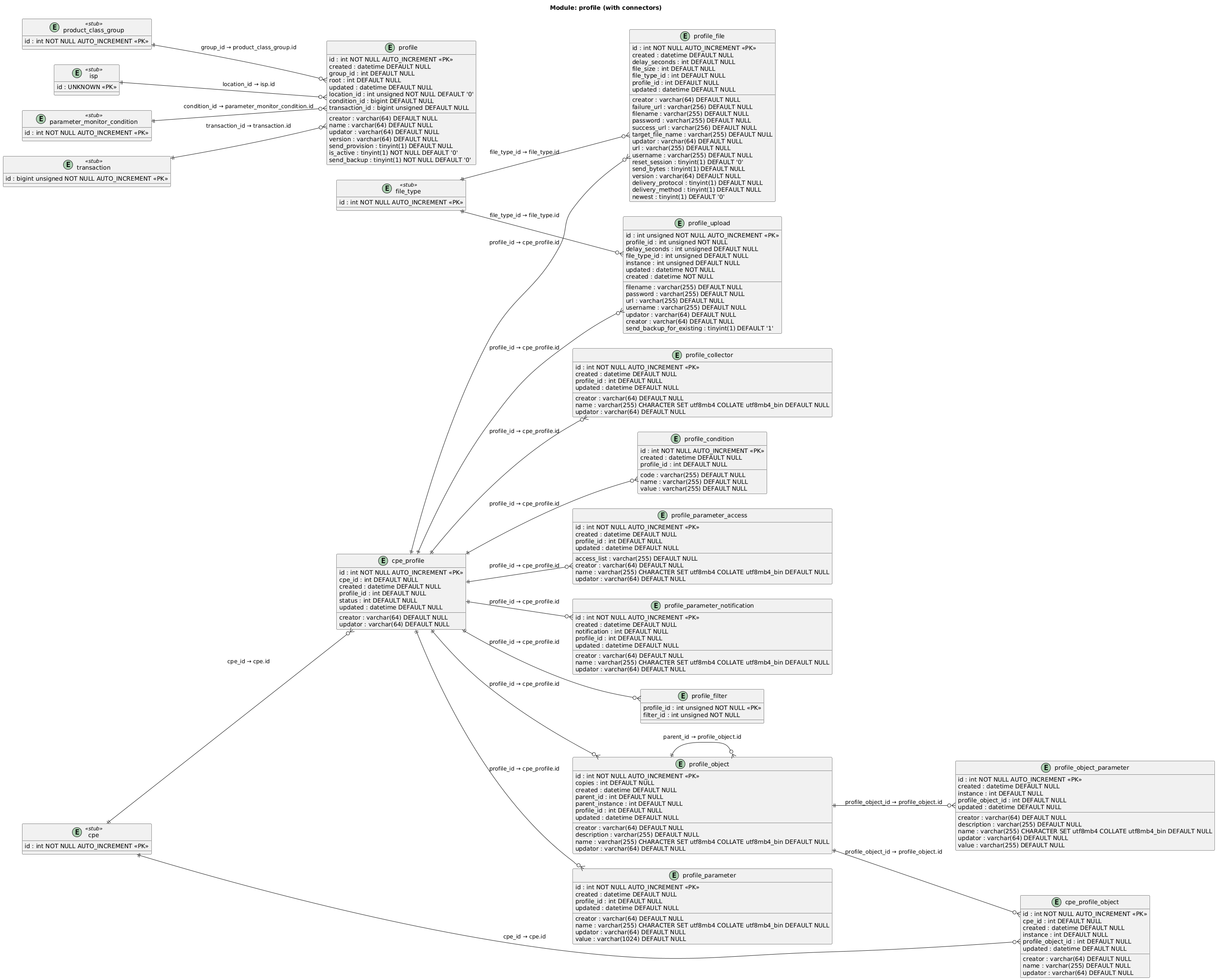
2.1.2. Table Descriptions
| Table | Description |
|---|---|
|
Device profile definition — a named configuration template scoped to a model group and domain. |
|
Scalar parameter values to set when the profile is applied — parameter name + value pairs |
|
Parameter access list overrides applied by the profile — sets the access list string for specified parameters |
|
Parameter notification attribute overrides — sets the notification level (0=off, 1=passive, 2=active) for specified parameters |
|
Multi-instance object definitions within a profile — supports hierarchical nesting via |
|
Parameter values within a profile object instance — name/value pairs set when the object is created on the device |
|
Download file tasks attached to a profile — URL, credentials, file type, target filename, reset-session flag, and firmware version matching |
|
Upload file tasks attached to a profile — URL, credentials, file type, and instance targeting |
|
Parameter names to retrieve (GetParameterValues) when the profile is applied — collects values from the device after provisioning |
|
Links a profile to device filters that control which devices the profile is applied to |
|
Conditional activation rules for a profile — code/value pairs that must be satisfied for the profile to apply |
|
Junction table linking a device to its assigned profiles — tracks assignment status, creation time, and the user who assigned it |
|
Tracks which profile object instances have been created on a specific device — records the actual instance number assigned by the device |
2.2. Provision
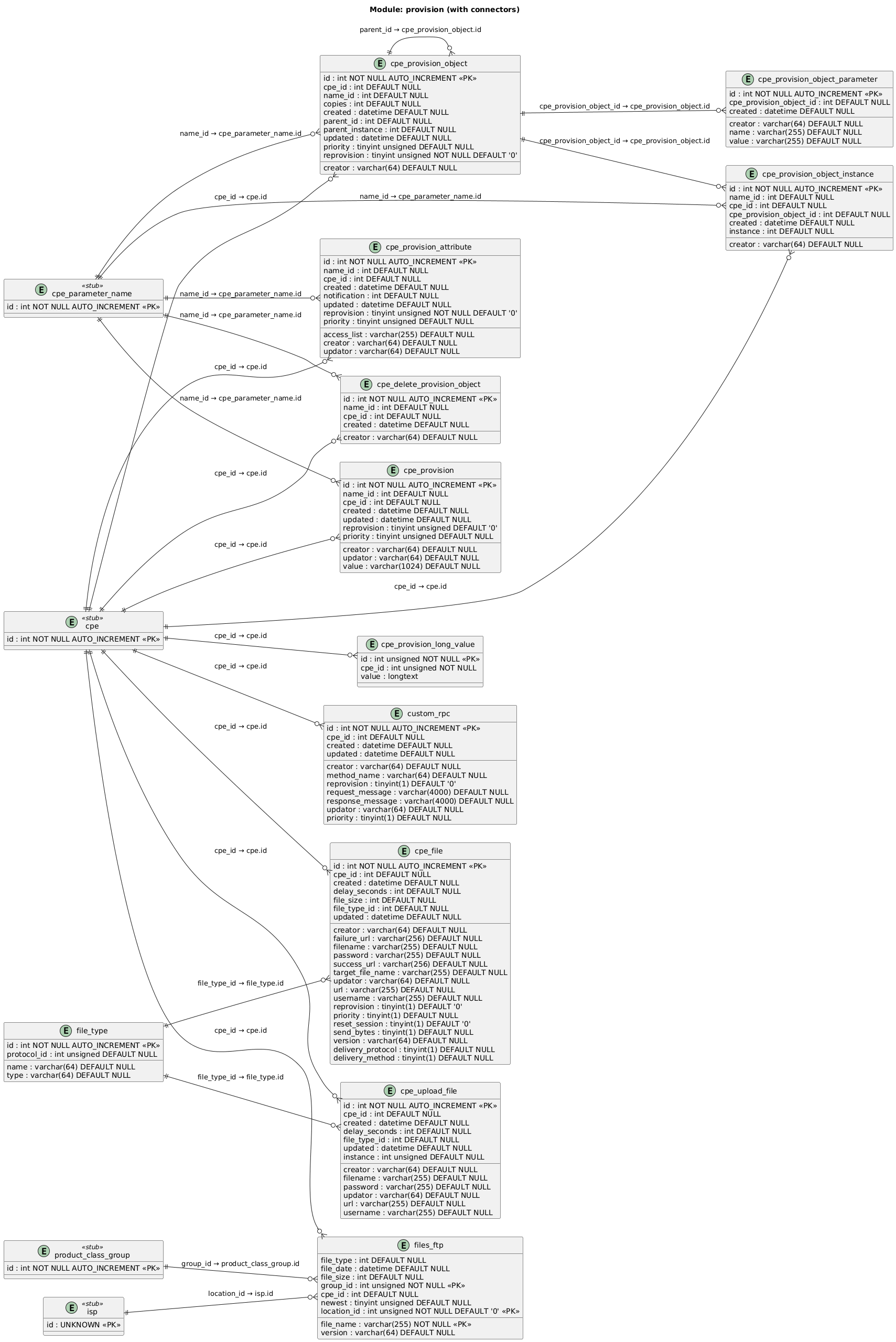
2.2.2. Table Descriptions
| Table | Description |
|---|---|
|
Per-device parameter provisioning data — parameter name, desired value, and reprovision flag. Sent as SetParameterValues on next session |
|
Per-device parameter attribute provisioning — notification level and access list to set via SetParameterAttributes |
|
Overflow storage for provision values exceeding 1024 characters — linked by |
|
Per-device multi-instance object provisioning — defines objects to create via AddObject with instance count ( |
|
Tracks which instances of provisioned objects have been created on the device |
|
Parameter values within a provisioned object instance — name/value pairs set after AddObject succeeds |
|
Per-device objects pending deletion via DeleteObject — queued for the next device session |
|
Per-device file download provisioning — URL, credentials, file type, reset-session flag, delivery protocol, and reprovision behavior |
|
Per-device file upload provisioning — URL, credentials, file type, and target instance |
|
Per-device custom RPC provisioning — stores a raw request/response XML message pair with the method name to invoke |
|
Lookup table of file types (e.g. "Firmware Image", "Web Content") with their protocol scope |
|
Available firmware/config files on the FTP server — file name, type, size, version, and model group scope. |
3. Device Information
The Device Information module holds the core device inventory: device records, manufacturers, models, parameters, session logs, diagnostics, and software inventory.
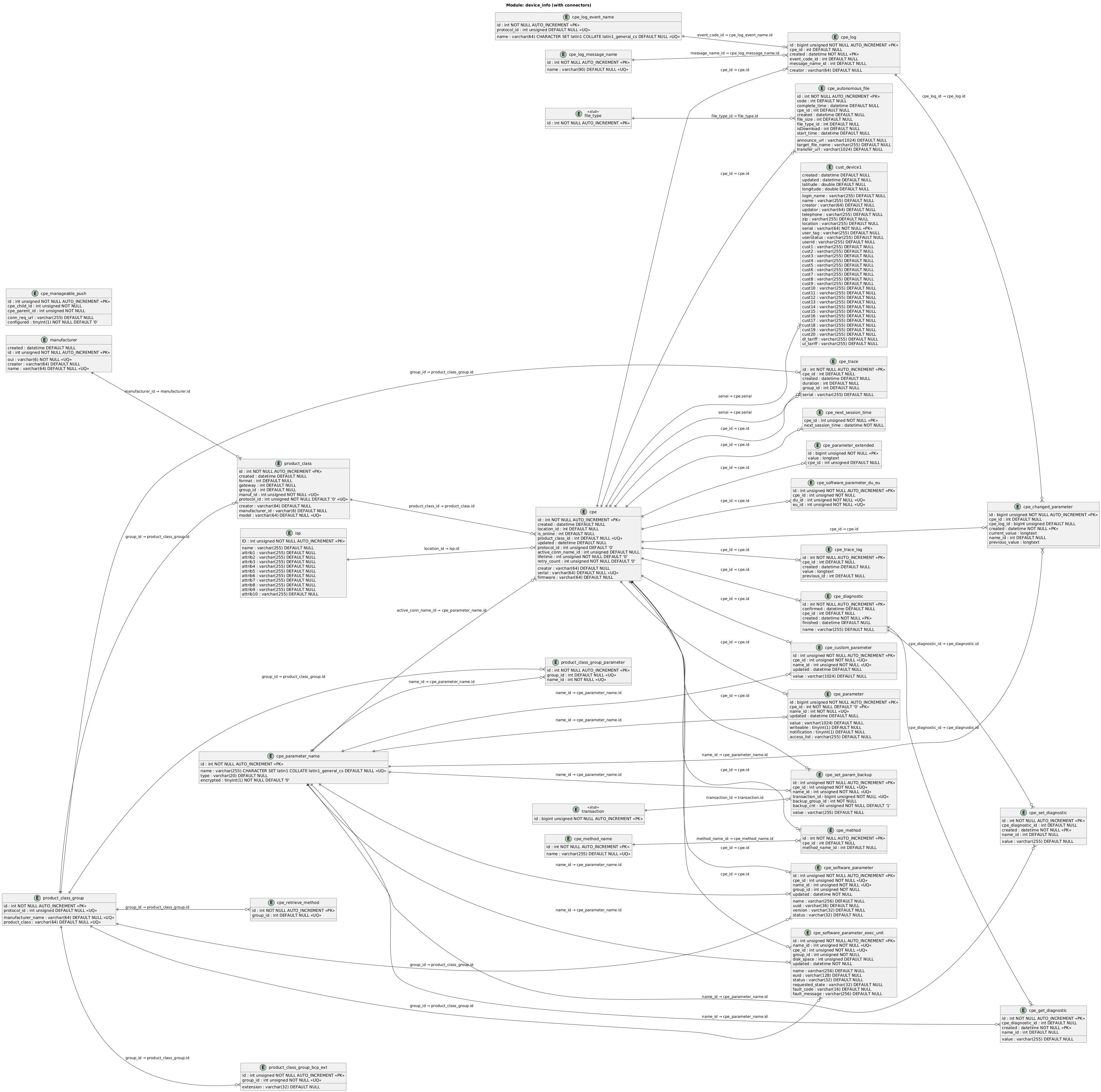
3.2. Core Device Tables
| Table | Description |
|---|---|
|
Primary device record — serial number, model reference, domain ( |
|
Device manufacturers — OUI (Organizationally Unique Identifier) and human-readable name |
|
Device models — links manufacturer OUI to model name, model group, protocol, and gateway flag |
|
Logical grouping of models by manufacturer + product class + protocol. Used to scope profiles, provisions, files, and monitoring |
|
Backup/config file extensions associated with a model group (e.g. |
|
Parameters automatically retrieved for all devices in a model group — used during initial tree discovery |
|
Domain / ISP definitions — name and up to 10 custom attributes for multi-tenant deployments |
|
Customer device mapping — links serial to subscriber info (login name, telephone, location, tariffs) and up to 20 custom fields ( |
3.3. Device Parameters and State
| Table | Description |
|---|---|
|
Current device parameter values — one row per parameter per device. Stores value, writeable flag, notification level, and access list |
|
Overflow storage for parameter values exceeding 1024 characters |
|
Global parameter name dictionary — maps integer IDs to full parameter path strings with type and encryption flag |
|
Parameter change history — records previous and current values for each parameter change, linked to the session log entry |
|
Denormalized custom parameter values per device — used for fast lookup of frequently accessed parameters mapped via |
|
Scheduled next session time per device — used to enforce periodic inform intervals |
|
Supported RPC methods per device — populated from GetRPCMethods response |
|
Lookup table of TR-069 RPC method names |
|
Model groups that require explicit method retrieval during bootstrap |
|
Parent-child device push mapping — for hub/sensor scenarios where a push to the parent triggers communication with the child device |
3.4. Logging and Diagnostics
| Table | Description |
|---|---|
|
Device session log — one entry per session recording event code, message type, and originator |
|
Lookup table of Inform event codes (e.g. "0 BOOTSTRAP", "2 PERIODIC") |
|
Lookup table of SOAP message names (e.g. "Inform", "SetParameterValues") |
|
Active SOAP trace sessions — enables full message capture for a device for a specified duration |
|
Captured SOAP messages for traced devices — full request/response XML content |
|
Diagnostic sessions per device (e.g. IPPing, TraceRoute) — tracks creation, confirmation, and completion timestamps |
|
Input parameters sent to the device for a diagnostic (SetParameterValues before the diagnostic) |
|
Diagnostic result parameters retrieved from the device after completion |
|
Records of autonomous file transfers reported by devices — transfer URL, file type, status code, and timestamps |
|
Parameter value backups created before SetParameterValues — used for automatic rollback on failure (see |
3.5. Software and Deployment Units
| Table | Description |
|---|---|
|
Installed Deployment Units (DUs) per device — name, UUID, version, status, and model group |
|
Installed Execution Units (EUs) per device — name, EUID, status, requested state, fault info, and disk usage |
|
Junction table mapping Deployment Units to their Execution Units on a device |
4. Device Software Management
The Device Software Management module handles pending ChangeDUState operations — install, uninstall, and update requests queued for delivery to devices.
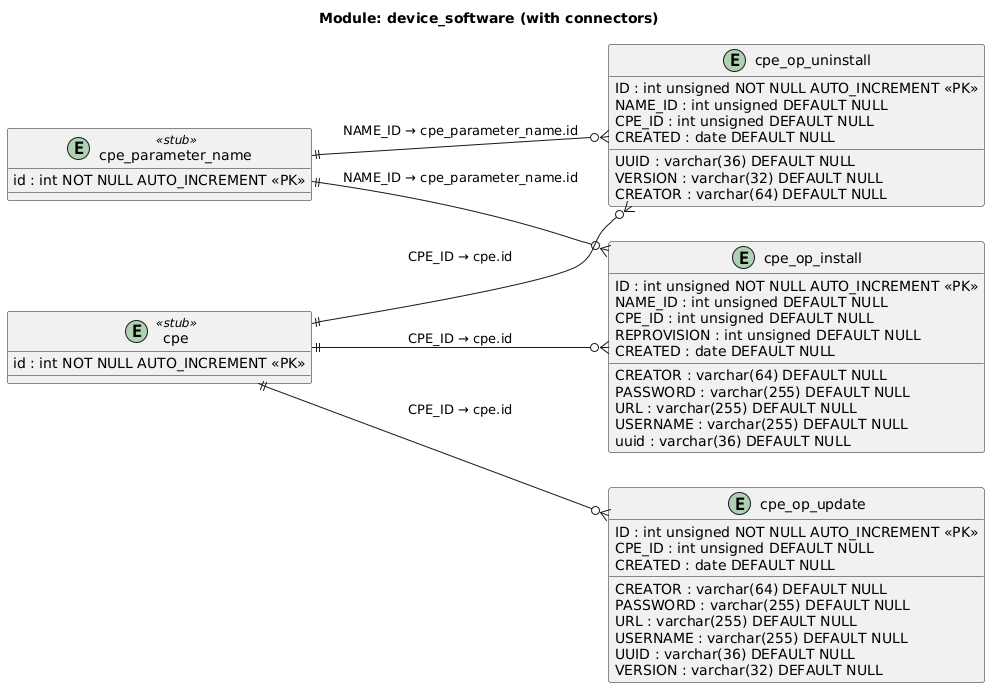
4.2. Table Descriptions
| Table | Description |
|---|---|
|
Pending ChangeDUState Install operations per device — URL, credentials, and target Deployment Unit UUID for software installation |
|
Pending ChangeDUState Uninstall operations per device — UUID and version of the Deployment Unit to remove |
|
Pending ChangeDUState Update operations per device — URL, credentials, UUID, and target version for software update |
5. Events
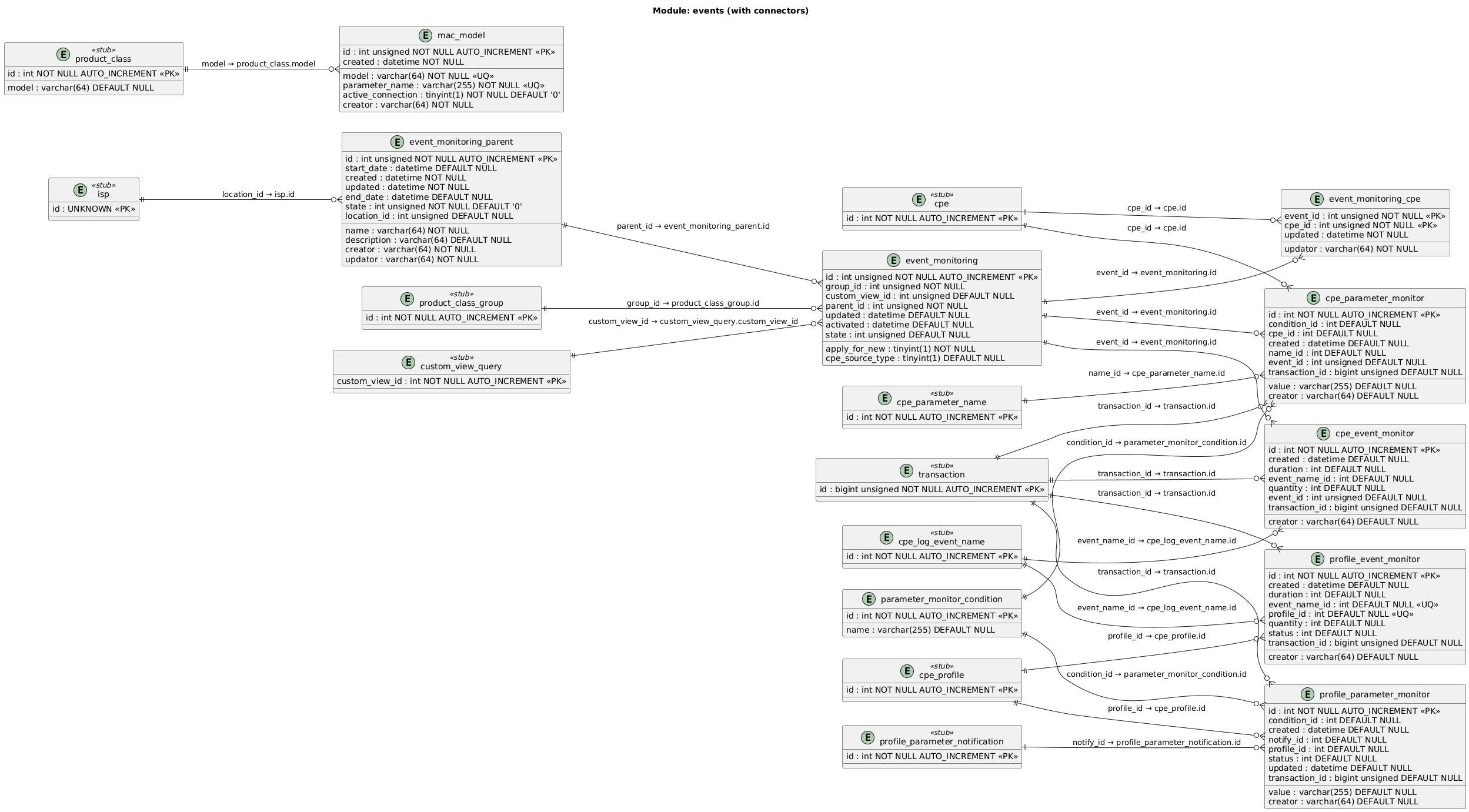
The Events module defines event and parameter monitoring campaigns. You create a monitoring parent with start/end dates, attach concrete monitoring instances targeting specific model groups, and enroll devices individually or via filters. When a monitored event fires or a parameter condition is met, the platform triggers the configured action.
5.2. Table Descriptions
| Table | Description |
|---|---|
|
Top-level event monitoring definition — a named monitoring campaign with start/end dates, state, and domain scope ( |
|
Concrete event monitoring instance linked to a parent. Targets a model group, optionally uses a custom view for device filtering. |
|
Junction table enrolling individual devices into an event monitoring instance |
|
Per-device event trigger rule — watches for a specific event code with quantity and duration thresholds. Fires when conditions are met within a transaction |
|
Per-device parameter value trigger — monitors a named parameter against a condition (e.g. equals, greater-than). Fires when the parameter value satisfies the condition |
|
Lookup table of condition operators used by parameter monitors (e.g. "equals", "greater than", "changed") |
|
Event trigger rules attached to a device profile — same structure as |
|
Parameter value triggers attached to a device profile — applied when the profile is deployed to matching devices |
|
MAC address parameter mappings per device model — defines which parameter path contains the MAC address and whether it is under the active connection object |
6. Hardcoded Events
Hardcoded events are system-defined event codes emitted by the ACS engine during device session processing. Each code signals a specific outcome (success, failure, rejection) for provisioning, file transfer, profile application, and other RPC operations. You can configure delivery per domain, choose the transport protocol (SOAP, HTTP, SNMP, SYSLOG), and attach JWT OAuth credentials for third-party receivers.
6.1. Event Code Reference
| Event Code | Description |
|---|---|
1001 — provision failed |
At least one provision task failed |
1002 — provision succeeded |
Provision task(s) completed successfully |
1003 — download failed |
Download file task failed |
1004 — download succeeded |
Download file task completed successfully |
1005 — setvalue failed |
Set Parameter Values task failed |
1006 — setvalue succeeded |
Set Parameter Values task completed successfully |
1007 — config failed |
CPE profile application failed |
1008 — config succeeded |
CPE profile applied successfully |
1009 — upload failed |
Upload file task failed |
1010 — upload succeeded |
Upload file task completed successfully |
1011 — new device arrive |
A new CPE was registered by ACS |
1012 — add object failed |
AddObject task failed |
1013 — add object succeeded |
AddObject task completed successfully |
1014 — login failed |
CPE tried to login with wrong credentials |
1015 — download sent |
Download request sent to the CPE |
1016 — download rejected |
Download task was rejected |
1017 — upload sent |
Upload request sent to the CPE |
1018 — upload rejected |
Upload task was rejected |
1019 — factory reset sent |
FactoryReset request sent to the CPE |
1020 — factory reset failed |
FactoryReset task failed |
1021 — factory reset succeeded |
FactoryReset task completed successfully |
1022 — factory reset rejected |
FactoryReset task was rejected |
1023 — setvalue rejected |
Set Parameter Values task(s) rejected |
1024 — get parameter values failed |
GetParameterValues task(s) failed |
1025 — get parameter values rejected |
GetParameterValues task(s) rejected |
1026 — get parameter values succeeded |
GetParameterValues task(s) completed successfully |
1027 — get parameter names failed |
GetParameterNames task(s) failed |
1028 — get parameter names rejected |
GetParameterNames task(s) rejected |
1029 — get parameter names succeeded |
GetParameterNames task(s) completed successfully |
1030 — get parameter attributes failed |
GetParameterAttributes task(s) failed |
1031 — get parameter attributes rejected |
GetParameterAttributes task(s) rejected |
1032 — get parameter attributes succeeded |
GetParameterAttributes task(s) completed successfully |
1034 — set parameter attributes failed |
SetParameterAttributes task(s) failed |
1035 — set parameter attributes rejected |
SetParameterAttributes task(s) rejected |
1036 — set parameter attributes succeeded |
SetParameterAttributes task(s) completed successfully |
1037 — setvalue sent |
Set Parameter Values task(s) sent |
1038 — config rejected |
CPE profile application rejected |
1039 — config sent |
CPE profile data sent |
1040 — provision rejected |
At least one provision task rejected |
1041 — provision sent |
Provision task(s) sent |
1110 — SPV download sent |
Download-related SPV task(s) sent to CPE |
1111 — SPV download failed |
Download-related SPV task(s) failed |
1112 — SPV download rejected |
Download-related SPV task(s) rejected |
1113 — SPV download succeeded |
Download-related SPV task(s) completed successfully |
1114 — setvalue rollback |
Set Parameter Values rolled back successfully |
1115 — parameters updated in DB |
A parameter was updated in the DB |
2001 — profile sent |
All requests completed during profile apply (profileId present) |
2002 — profile rejected |
At least one request rejected during profile apply (profileId present) |
2003 — profile failed |
At least one request failed during profile apply (profileId present) |
6.2. SOAP Templates
6.2.1. Default Template (Placeholders)
<soapenv:Envelope xmlns:soapenv="http://schemas.xmlsoap.org/soap/envelope/" xmlns:fri="http://www.friendlytech.com/">
<soapenv:Header/>
<soapenv:Body>
<fri:deviceEventMonitorResult>
<fri:deviceEventMonitor>
<fri:deviceId>${deviceId}</fri:deviceId>
<fri:serialNumber>${serialNumber}</fri:serialNumber>
<fri:IPAddress>${ipAddress}</fri:IPAddress>
<fri:MACAddress>${macAddress}</fri:MACAddress>
<fri:transId>${transactionId}</fri:transId>
<fri:event>${event}</fri:event>
<fri:initialQuantity>${initialQuantity}</fri:initialQuantity>
<fri:currentQuantity>${currentQuantity}</fri:currentQuantity>
<fri:duration>${duration}</fri:duration>
<fri:date>${date}</fri:date>
<fri:validFrom>${validFrom}</fri:validFrom>
<fri:validTo>${validTo}</fri:validTo>
</fri:deviceEventMonitor>
</fri:deviceEventMonitorResult>
</soapenv:Body>
</soapenv:Envelope>
6.2.2. Windstream Template (Headers)
<soapenv:Envelope xmlns:soapenv="http://schemas.xmlsoap.org/soap/envelope/" xmlns:web="http://webservice.captiveportal.windstream.com">
<soapenv:Header>
<Authorization>${authorization}</Authorization>
<Account>${account}</Account>
</soapenv:Header>
<soapenv:Body>
<web:processSoapRequest>
<deviceId>${deviceId}</deviceId>
<serialNumber>${serialNumber}</serialNumber>
<IPAddress>${ipAddress}</IPAddress>
<MACAddress>${macAddress}</MACAddress>
<transId>${transactionId}</transId>
<event>${event}</event>
<initialQuantity>${initialQuantity}</initialQuantity>
<currentQuantity>${currentQuantity}</currentQuantity>
<duration>${duration}</duration>
<date>${date}</date>
<validFrom>${validFrom}</validFrom>
<validTo>${validTo}</validTo>
</web:processSoapRequest>
</soapenv:Body>
</soapenv:Envelope>
6.2.3. Supported Placeholders
| Placeholder | Description | Example |
|---|---|---|
|
Authorization token for API authentication |
Bearer eyJhbGciOiJSU… |
|
Account name for request tracking |
Friendly Technologies ACS |
|
Unique ID assigned to the device |
687 |
|
Serial number of the device |
346020ADAD |
|
IP Address assigned to the device |
192.168.4.121 |
|
MAC Address of the device |
EC:74:D7:36:69:9E |
|
Unique transaction ID |
123456 |
|
Event code and description |
1116 - cpe comes with bootstrap |
|
Initial quantity of the event-related metric |
null |
|
Current count related to the event |
null |
|
Duration of the event process |
null |
|
Timestamp |
2025-01-16 08:54:27.54 |
|
Start validity period |
null |
|
End validity period |
null |
6.3. MAC Address Mapping
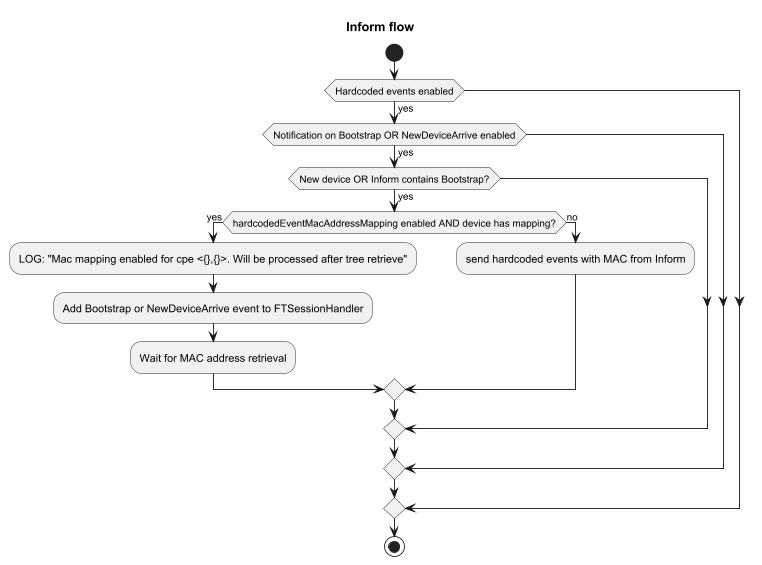
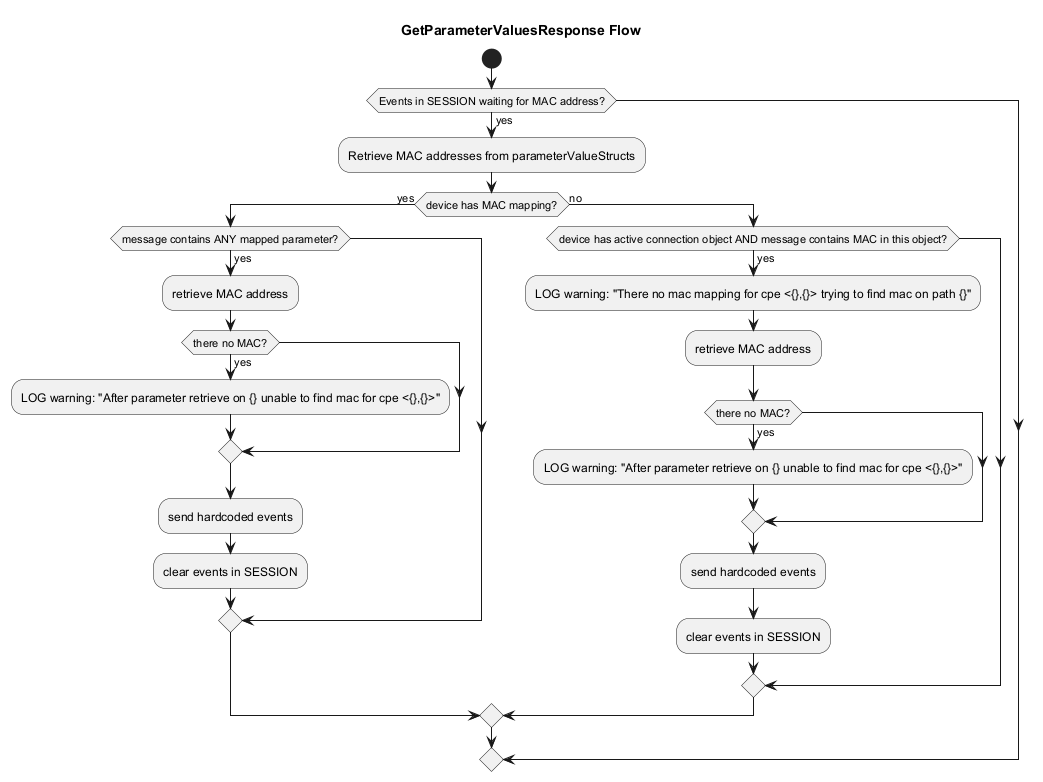
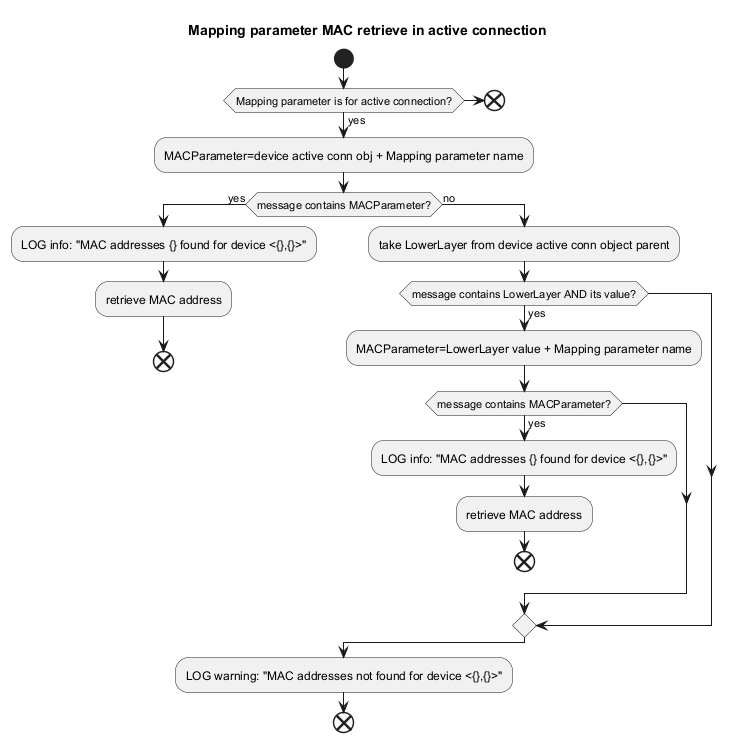
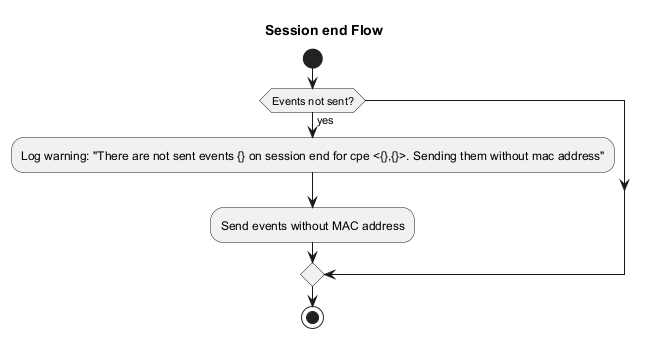
MAC mapping is active only when hardcodedEventMacAddressMapping=1 (and the deprecated retrieveMacAddressesOnNewDeviceArrive is removed — event 1011 follows the same logic as 1116).
6.3.2. REST API (MAC Model Mappings)
Base URL: /rest/mac-mappings
-
POST
/getAll— returns list ofMacModelDTO(requiresIOT-AUTH-HEADER). -
POST
/getByModel— body:{"model":"ModelA"}. -
PUT
/replaceAll— body: list ofMacModelDTO. -
PUT
/replaceForModel— body: singleMacModelDTO. -
DELETE
/deleteAll. -
DELETE
/deleteForModel— body:{"model":"ModelA"}.
Example response (truncated):
{
  "model": "ModelA",
  "parameters": [
    {"parameterName": "Param1", "activeConnection": true},
    {"parameterName": "Param2", "activeConnection": false}
  ]
}
6.4. Database Schema
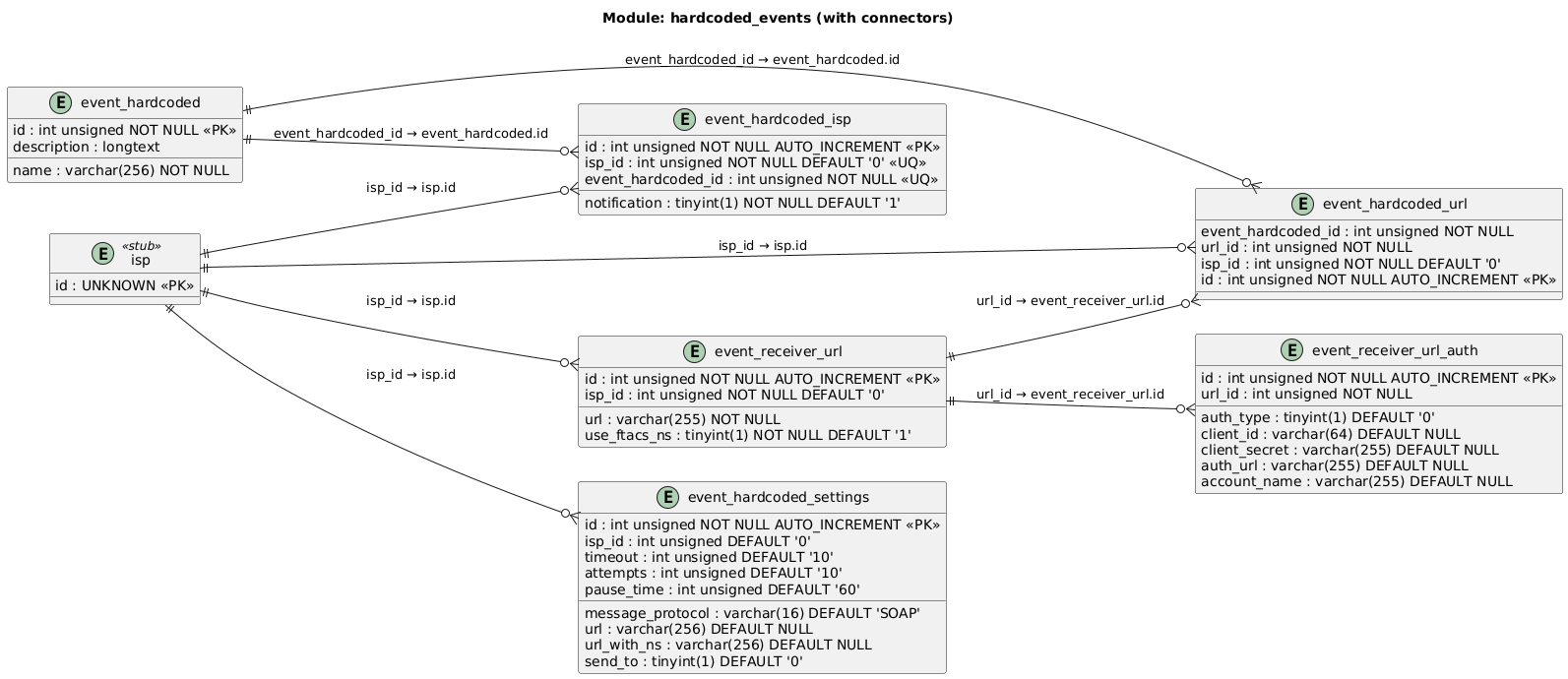
6.4.1. Table Descriptions
| Table | Description |
|---|---|
|
Master list of hardcoded event definitions — event ID, name, and description (e.g. "1001 — provision failed") |
|
Per-domain event enable/disable — links an event to a domain ( |
|
Per-domain event delivery configuration — message protocol (SOAP/HTTP/SNMP/SYSLOG), timeout, retry attempts, pause between retries, primary and secondary URLs, and send-to mode |
|
Maps individual events to receiver URLs per domain — controls which URL(s) receive notifications for each event |
|
Receiver URL definitions — the target endpoint for event notifications, with a |
|
OAuth2 authentication credentials for a receiver URL — auth type, client ID/secret, auth URL, and account name for JWT token acquisition |
6.5. JWT OAuth Authentication for Events
This section defines JWT OAuth authentication for sending hardcoded events to third-party systems.
6.5.1. Functional Requirements
-
Authenticate to third-party systems using JWT OAuth.
-
Send event notifications using JWT OAuth.
-
Provide configuration UI for username/password (client id/secret) and auth URL.
-
Implement robust error handling and logging.
6.5.2. Web Service Changes
Methods updateReceiverUrls and createReceiverUrls accept authProps with optional fields: authType(NoAuth|OAUTH2), authUrl, clientId, clientSecret.
6.6. Domain Changes (Per-Domain Events)
Hardcoded events are configurable per domain (ISP). If not configured, super-domain defaults apply.
6.6.1. Deprecated from acs_configuration.xml
-
enableHardcodedEvents— removed -
hardcodedEventsProtocol— scheduled for removal
Parameters no longer used by Hardcoded Events (still used by Device Events):
timeoutForSendingMonitorResult, attempsForSendingMonitorResult, rangeForSendingMonitorResult, sendToFEMS, urlForSendMonitorResult, urlForSendMonitorResultAdditional.
6.6.2. Database (Per-Domain)
-
New
event_hardcoded_settings(id, isp_id, message_protocol, timeout, attempts, pause_time, url, url_with_ns, send_to)+ index on(isp_id). -
New
event_hardcoded_isp(id, isp_id, event_hardcoded_id, notification)+ unique(isp_id, event_hardcoded_id). -
Modify
event_receiver_url— addisp_id(indexed). -
Modify
event_hardcoded— drop columnnotification(migrated toevent_hardcoded_isp). -
Liquibase changeSets
6.4.12_35700_*provided (MySQL/Oracle variants).
6.6.3. ACS WS Changes (Per-Domain)
-
getHardcodedEventsGeneralSettingsByDomain(ispId)— returns protocol, sendToFems, urls, timeout/attempts/range, ispId. -
saveHardcodedEventsGeneralSettings(settings)— upsert per-domain settings. -
removeHardcodedEventsGeneralSettings(ispId)— delete, except super domain (ispId=0). -
Existing
createReceiverUrls/updateReceiverUrlsnow requireispIdand the UI must use the new APIs (notacs_configuration.xml).
7. QoE Monitoring
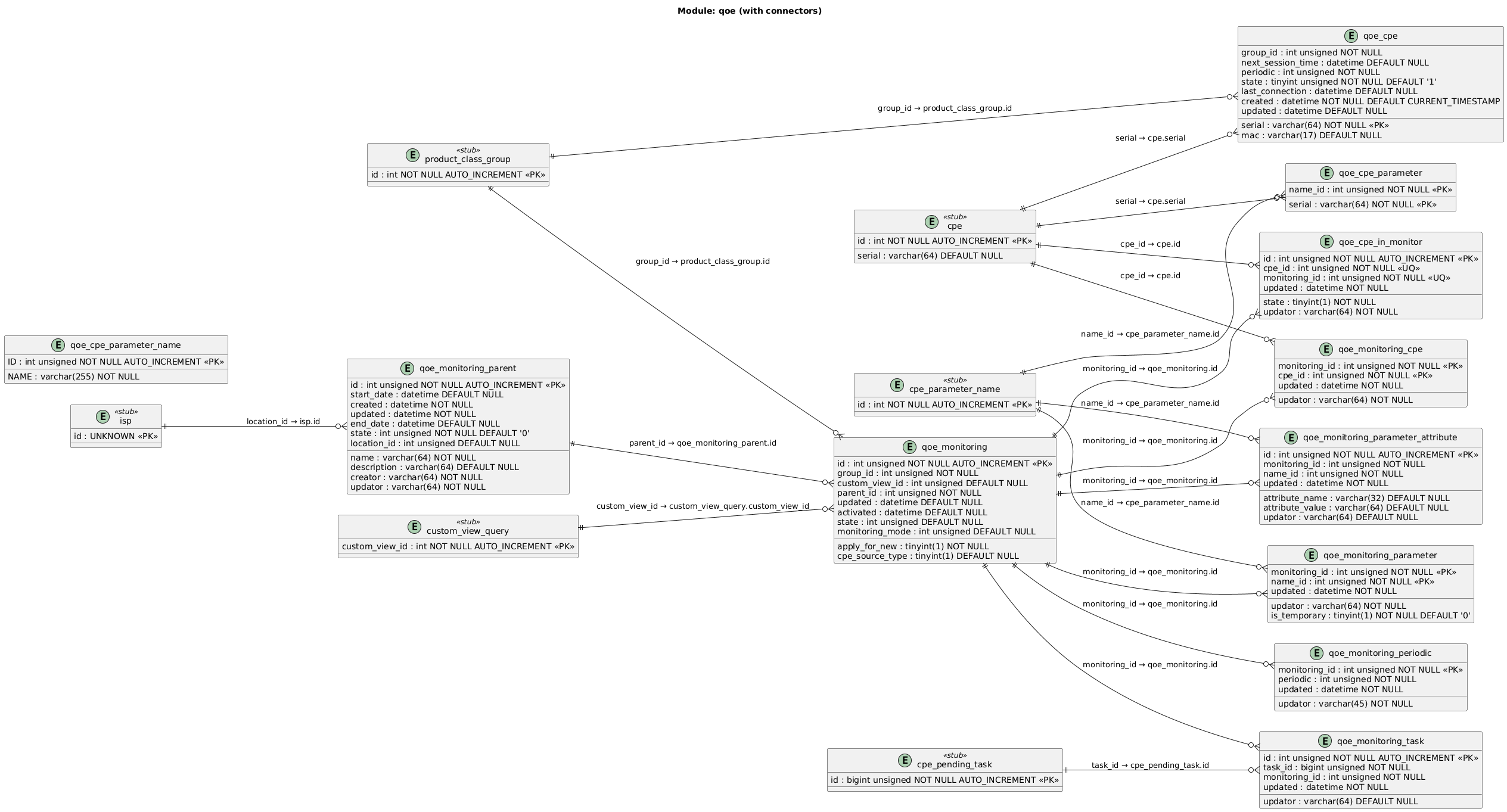
The QoE (Quality of Experience) Monitoring module runs parameter-sampling campaigns against enrolled devices. You define a monitoring parent with start/end dates, attach monitoring instances targeting model groups, and configure per-parameter sampling attributes (pmin, pmax, intervals). The module overrides periodic inform intervals for monitored devices while campaigns are active.
7.2. Table Descriptions
| Table | Description |
|---|---|
|
Top-level QoE monitoring campaign — named definition with start/end dates, state, and domain scope |
|
Concrete QoE monitoring instance under a parent. Targets a model group with optional custom view filtering. |
|
Junction table enrolling individual devices into a QoE monitoring instance |
|
Parameters tracked by a QoE monitoring — each row links a parameter name to a monitoring instance. |
|
Per-parameter monitoring attributes (e.g. |
|
Overrides the periodic inform interval for a monitoring — sets the device reporting frequency while QoE is active |
|
Links QoE monitoring instances to their generated pending tasks — tracks which task was created for which monitoring |
|
Runtime state of QoE-monitored devices — stores serial, model group, MAC, periodic interval, next session time, and connection state |
|
Tracks which device is currently participating in which monitoring instance and its activation state |
|
Active monitored parameter data per device serial — lightweight junction of serial + parameter name ID used by the monitoring cache |
|
QoE-specific parameter name lookup — stores parameter names used in QoE monitoring independently from the main |
8. FCC
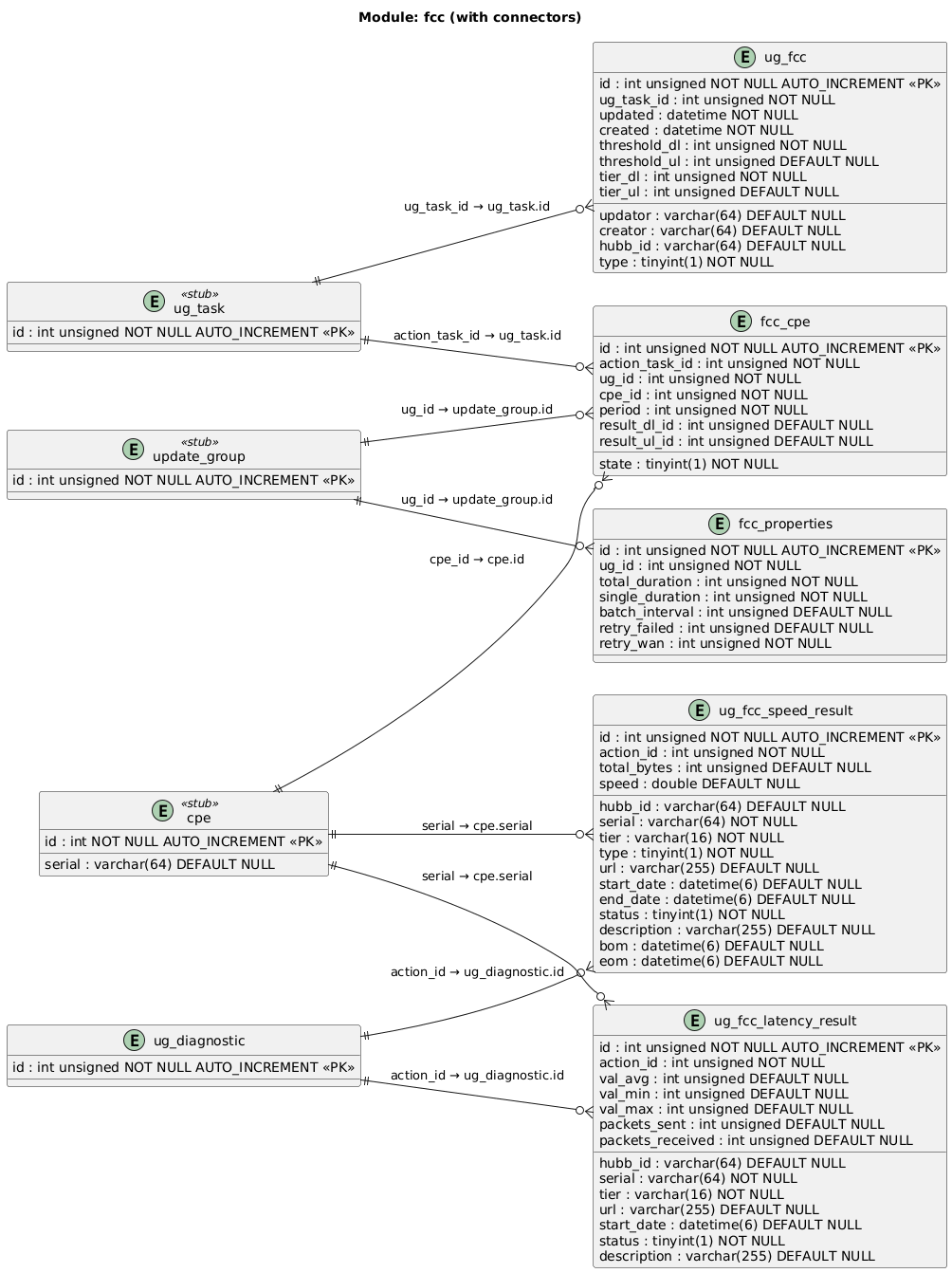
The FCC module manages Federal Communications Commission compliance testing — speed and latency tests executed via Update Groups. Test configuration is per-Update-Group, and results are stored individually with pass/fail status against speed tier thresholds.
8.2. Table Descriptions
| Table | Description |
|---|---|
|
Tracks FCC test state per device — links a CPE to an Update Group action task, stores the test period and references download/upload speed result records |
|
Per-Update-Group FCC test configuration overrides — total/single duration, batch interval, retry counts for failed tests and WAN usage rechecks |
|
FCC task definition within an Update Group — stores speed tier thresholds (download/upload), hub ID, and test type (speed or latency) |
|
Individual speed test result record — actual speed, total bytes, start/end timestamps, tier, status (pass/fail), and descriptive notes |
|
Individual latency test result record — average/min/max latency, packets sent/received, status, tier, and URL tested |
9. Security
The Security module manages device authentication, access control, serial registry, and ACS licensing.
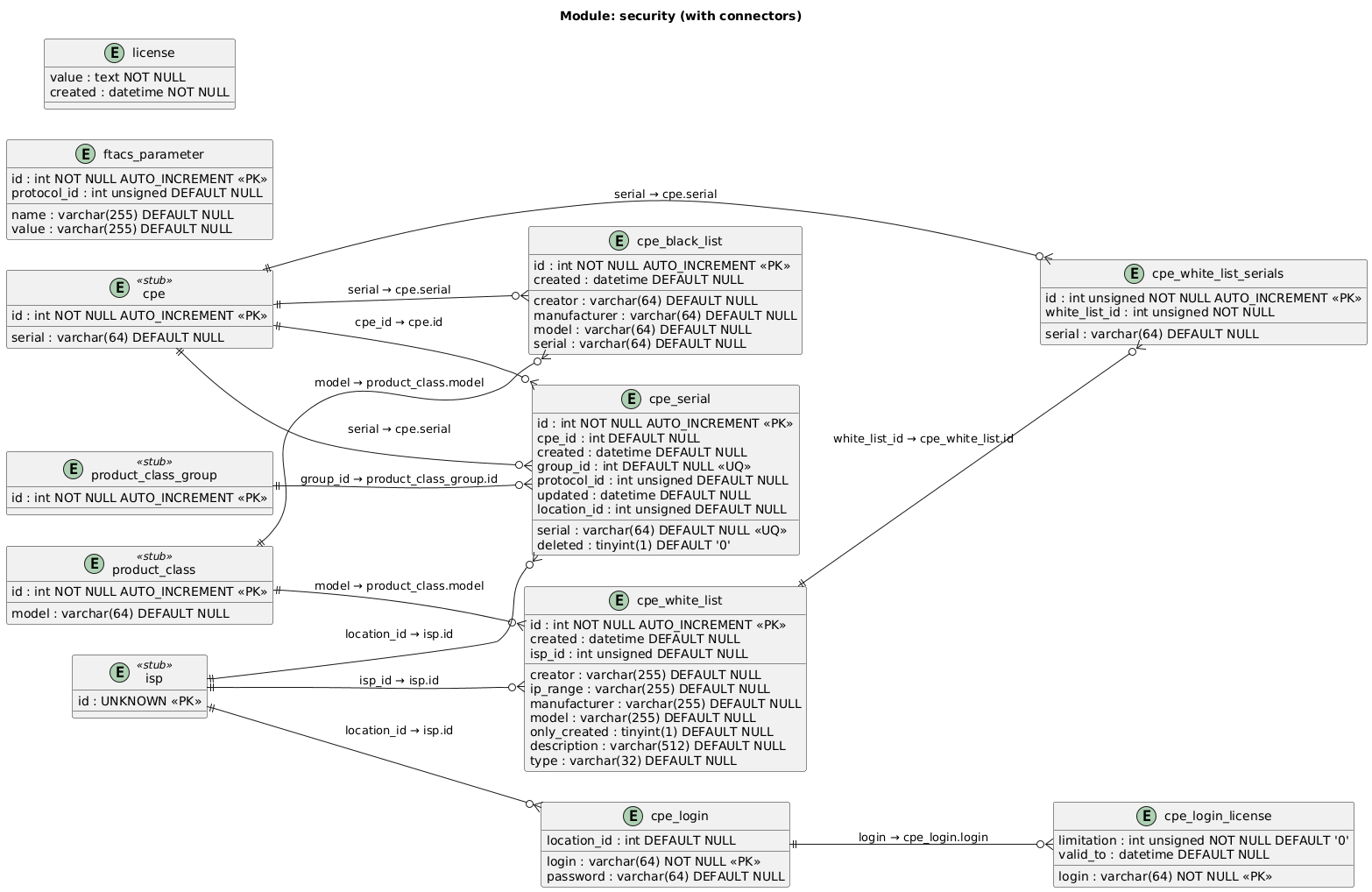
9.2. Table Descriptions
| Table | Description |
|---|---|
|
Device authentication credentials — login/password pairs used by CPEs to connect to the ACS, scoped by domain ( |
|
Per-login device count limitation. |
|
Blacklisted devices — devices matching manufacturer/model/serial combinations are blocked from connecting to the ACS |
|
Whitelist rules for device access control. Rules match by manufacturer, model, IP range, and/or domain. |
|
Individual device serials attached to a whitelist rule — devices whose serial appears here are allowed when whitelist is enforced |
|
Device serial registry — tracks known serials with their model group, protocol, domain, and deletion status. Used for serial-based device lookup and registration |
|
ACS-level system parameters — key/value configuration pairs (e.g. ACS URL) optionally scoped by protocol |
|
ACS license data — stores the encrypted license blob with creation timestamp |
10. Subscription API
The Subscription API module enables external systems to subscribe to parameter value-change notifications. Subscriptions scope by device model and domain, track individual device enrollment states, and deliver notifications to configured callback URLs (individually or batched).
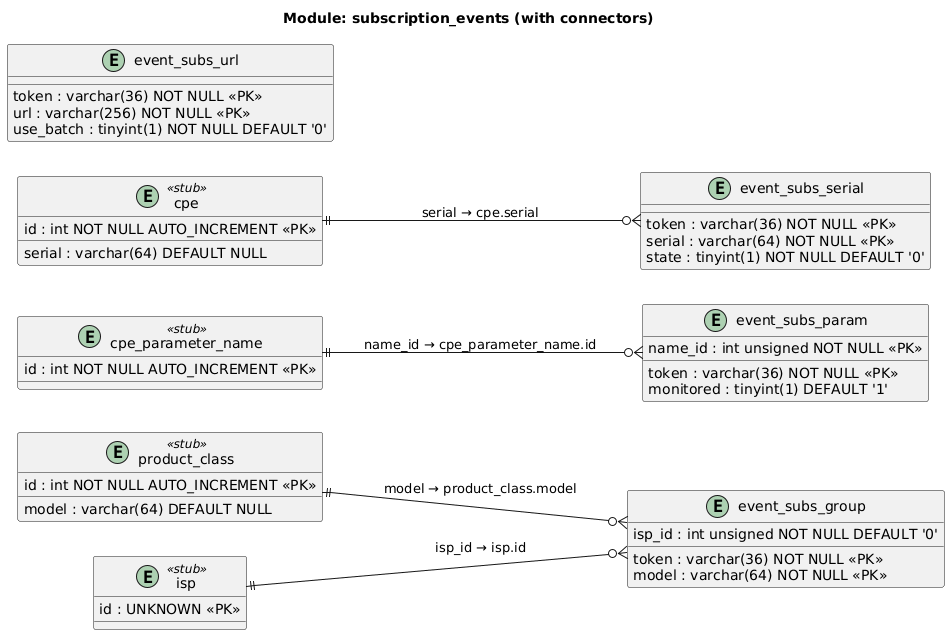
10.2. Table Descriptions
| Table | Description |
|---|---|
|
Subscription scope by device model and domain — links a subscription token to one or more ProductClass models within an ISP |
|
Parameters watched by a subscription. |
|
Individual device serials enrolled in a subscription. |
|
Callback URLs for delivering subscription notifications. |
11. System Metrics
The System Metrics module tracks ACS node health, Hazelcast cluster state, RPC task execution statistics, and device lifecycle audit logs.
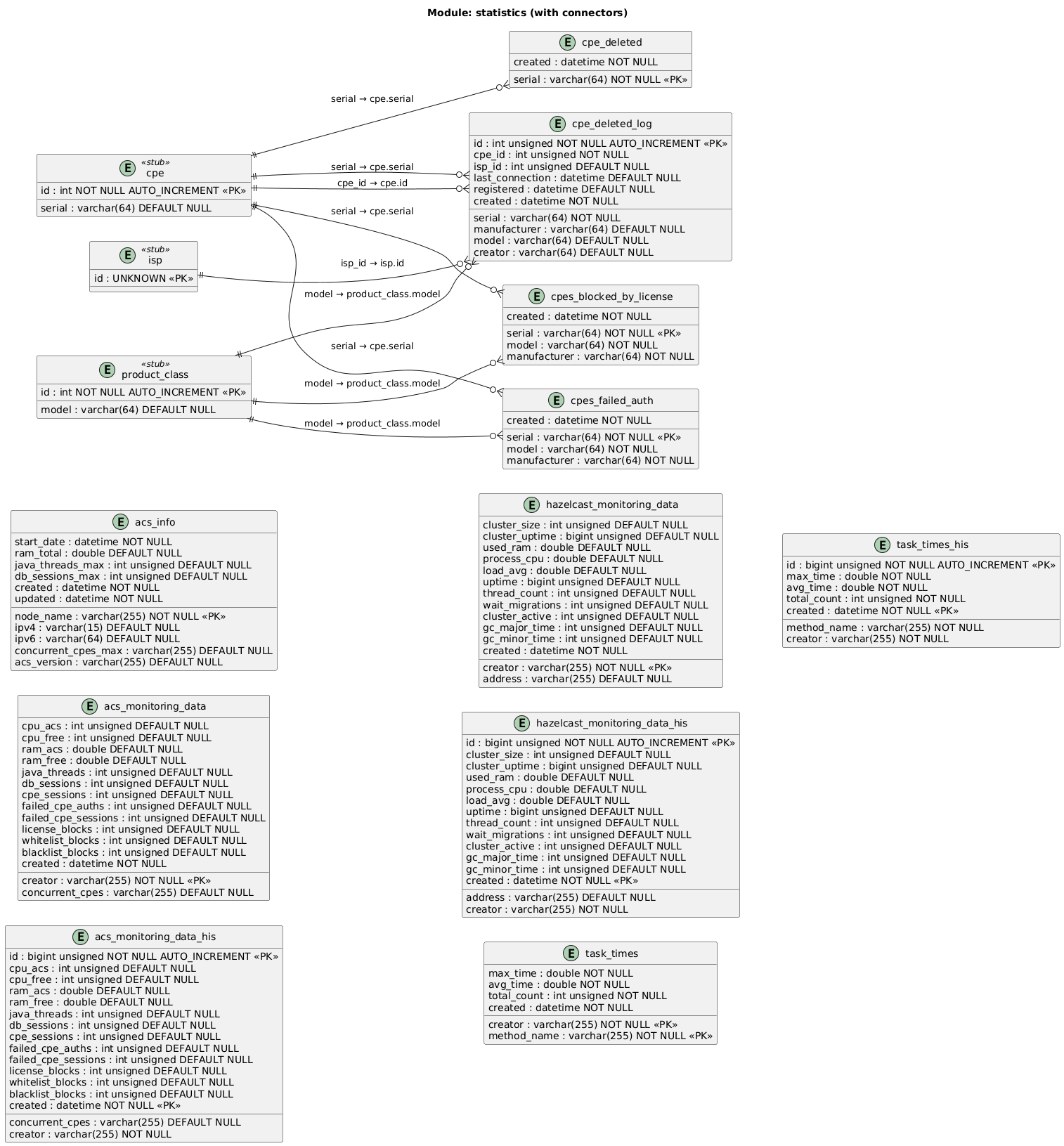
11.2. Table Descriptions
| Table | Description |
|---|---|
|
ACS node identity and capabilities — node name, IP addresses, start date, RAM, max threads, max concurrent CPEs, DB session limit, and software version |
|
Current (live) ACS performance snapshot per node — CPU, RAM, thread count, concurrent sessions, and counters for failed auths, license blocks, whitelist/blacklist blocks |
|
Historical ACS performance data — same columns as |
|
Current Hazelcast cluster health per node — cluster size, uptime, RAM, CPU, load average, thread count, GC times, and pending partition migrations |
|
Historical Hazelcast cluster health data — time-series archive of |
|
Current RPC task execution statistics per node — max/avg execution time and total count for each method name |
|
Historical task execution statistics — time-series archive of |
|
Recently deleted device serials — used by auto-delete to prevent re-registration of devices removed by retention policy |
|
Audit log of device deletions — records device identity (serial, model, manufacturer, ISP), last connection time, and deletion timestamp |
|
Devices blocked from connecting due to license limitations — serial, model, manufacturer, and block timestamp |
|
Devices that failed authentication — serial, model, manufacturer, and failure timestamp |
12. Update Group
The Update Group module orchestrates automated mass-operations on Customer Premises Equipment (CPEs). It covers:
-
Creation and update of groups through web services.
-
Scheduling and reactivation logic handled by Quartz.
-
Task generation and CPE response processing performed by the ACS core.
|
All modification operations on |
12.1. Provided Web Services
| Service | Description |
|---|---|
|
Creates a new UpdateGroup record and related metadata. |
|
Modifies existing group parameters (e.g., schedule, device filters). |
|
Removes a group definition and its pending jobs. |
12.2. Transaction Control
-
A unique transaction ID is generated for:
-
All CPEs and tasks created within one UpdateGroup execution.
-
Each group reactivation (Quartz firing).
-
-
Transaction IDs are persisted in
ug_transaction.
Upper-level systems (UI/API) should query this table to trace job results.
12.3. Reactivation Expression
Scheduling expressions for group reactivation follow Quartz cron syntax: See Quartz CronTrigger documentation. Use the online validator at CronMaker during debugging.
12.4. CPE Online Check Flow
Executed only if sendOnlyForOnlineCPEs = 1.
-
Set a temporary flag (in cache for clustered mode, in DB for standalone) to prevent session termination before task creation.
-
Send Connection Request (CR) to the target CPE.
-
If the CPE responds — create corresponding tasks.
-
If not — remove the flag and skip that CPE.
This ensures tasks are generated only for devices currently reachable online.
12.5. Update Group Create Flow
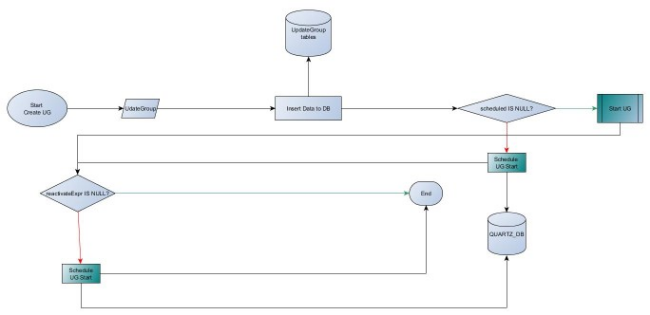
12.5.1. Description
-
Start Create UG — begins via WS
createUpdateGroup. -
UpdateGroup — new record inserted into
update_grouptables. -
Insert Data to DB — persists metadata, schedules, filters.
-
scheduled IS NULL? — if no cron provided, start immediately.
-
Start UG — triggers the first execution cycle.
-
Schedule UG Start — if
schedulednot null, record job in Quartz DB. -
reactivateExpr IS NULL? — if defined, schedule future reactivations.
-
End — process terminates or waits for Quartz event.
Data: update_group, ug_transaction, quartz_db.
12.6. Update Group Start Flow
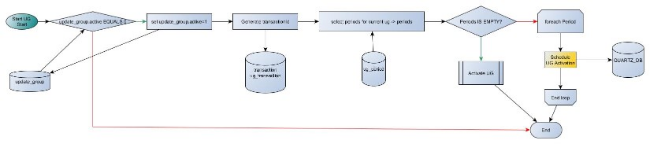
12.6.1. Description
-
Start UG Start — Quartz or manual trigger.
-
Load
update_groupstate; if inactive, skip. -
Set
active=1in DB and generate new transactionId. -
Retrieve corresponding
ug_periodrows. -
If no periods, Activate UG directly; otherwise loop per period.
-
For each period, Schedule UG Activation (stored in Quartz DB).
-
Commit and end.
Tables involved: update_group, ug_transaction, ug_period, quartz_db.
12.7. Update Group Activation Flow
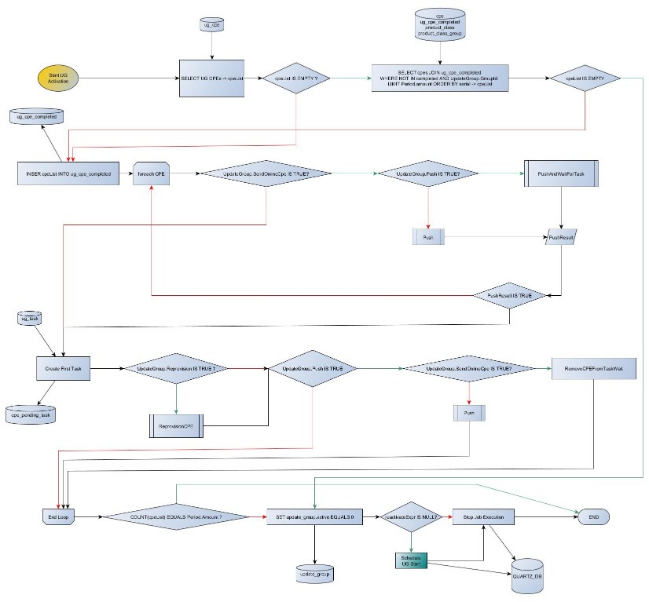
12.7.1. Description
-
Start UG Activation — triggered by scheduled Quartz job.
-
Fetch CPEs assigned to the UpdateGroup (
ug_cpe). -
If list empty, end.
-
For each CPE:
-
If
SendOnlineCpeis TRUE, ensure device is online before tasking. -
Check push policies (
Push,PushAndWaitForTask). -
Create initial ug_task entry.
-
Possibly reprovision device if
Reprovisionflag is true.
-
-
Monitor task completion:
-
On success, update
ug_cpe_completed. -
On failure, mark CPE failed.
-
-
When all CPEs are processed and
PeriodAmountis reached:-
Set
update_group.active = 0. -
If
reactivateExpris defined, reschedule next run.
-
-
End or reschedule through Quartz DB.
12.8. Task Dependency Resolving Flow
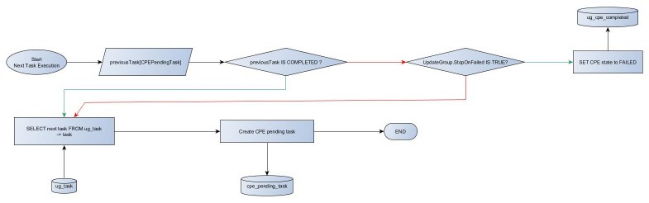
12.8.1. Description
-
Start Next Task Execution — triggered after previous task completion.
-
Query
ug_taskfor next step. -
If previous task completed:
-
Check if
StopOnFailedflag is set. -
If yes and task failed, set CPE state to FAILED.
-
-
If no blocking errors:
-
Create new
cpe_pending_taskfor the next step. -
Continue loop until all tasks are processed.
-
-
End when queue is empty or final step is reached.
Tables used: ug_task, cpe_pending_task, ug_cpe_completed.
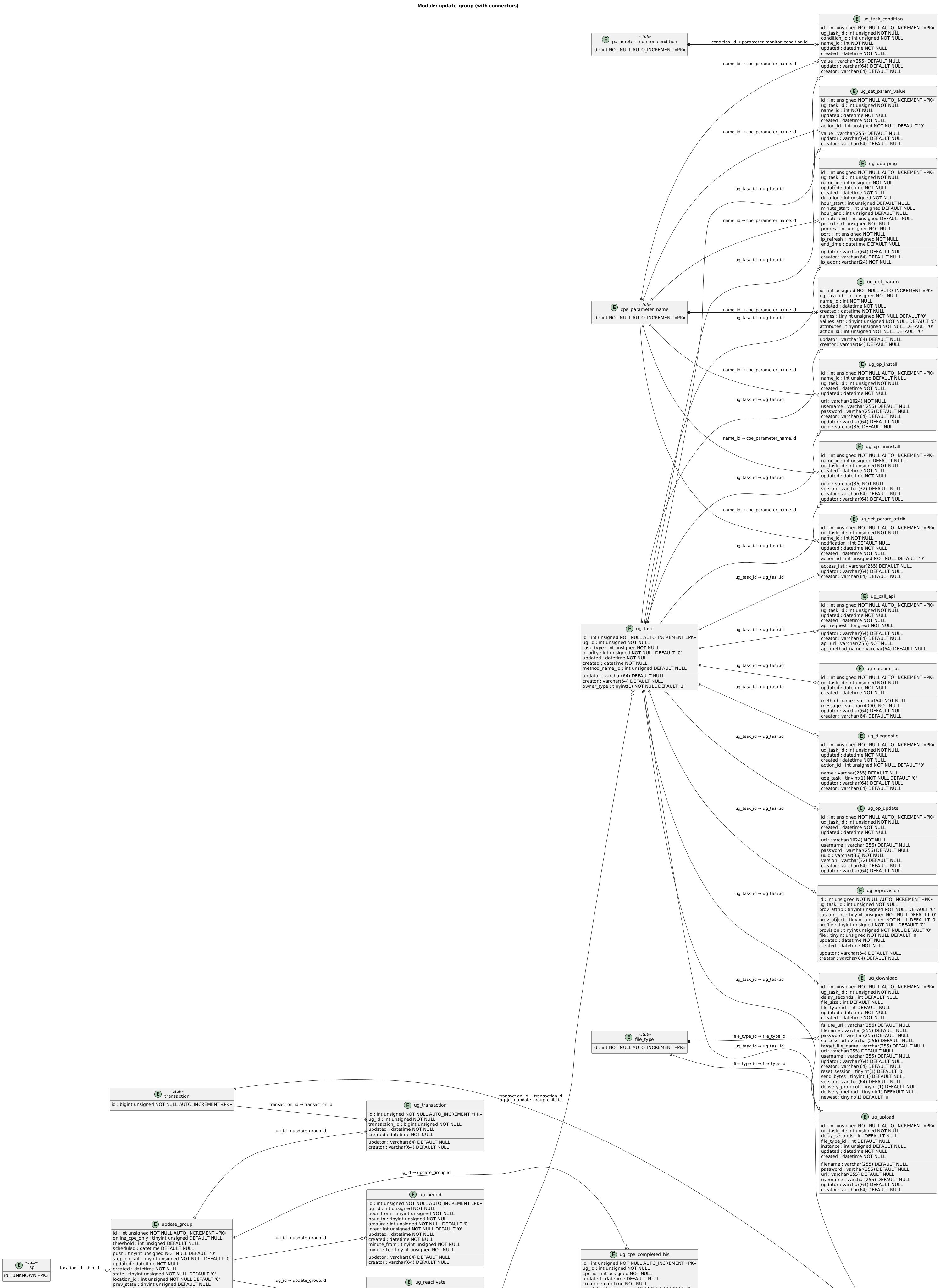
12.10. Notes
|
13. IoT Configuration
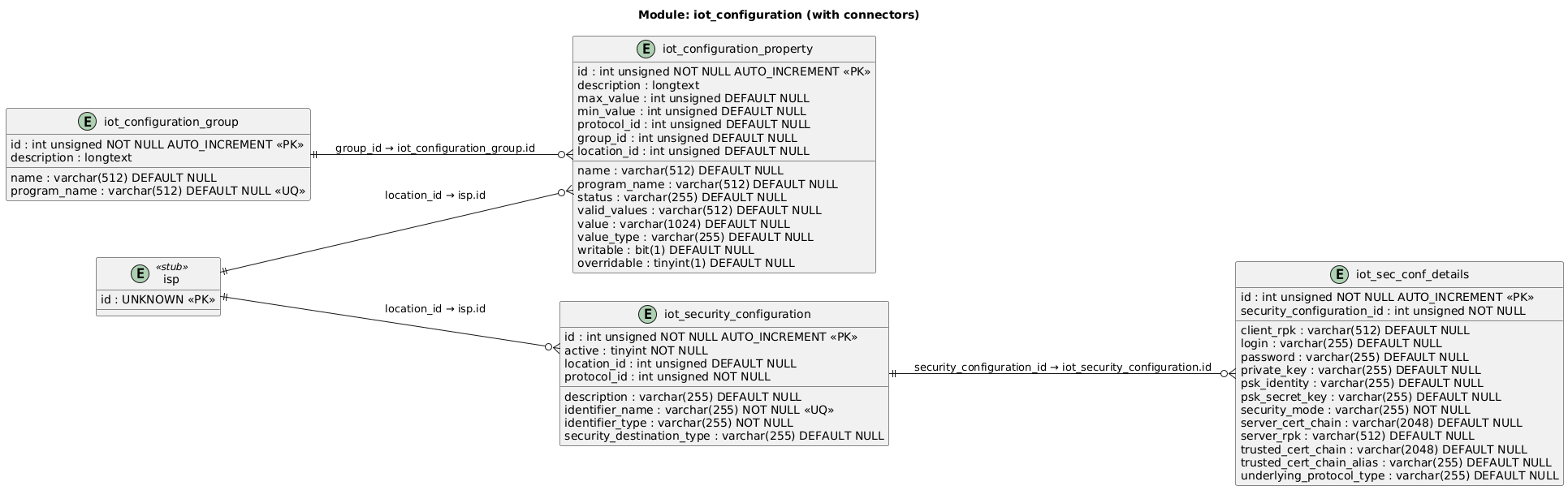
The IoT Configuration module stores ACS configuration properties and security profiles per protocol (TR-069, MQTT, USP). Properties are grouped into named categories and support per-domain overrides. Security profiles bind device identifiers to authentication credentials and key material.
13.2. Table Descriptions
| Table | Description |
|---|---|
|
Groups related ACS configuration properties under a named category. |
|
Individual ACS configuration parameter — stores value, type, constraints ( |
|
Security profile definition for a protocol (TR-069, MQTT, USP). Binds an identifier (serial, model) to a security destination type within a domain |
|
Security credentials and key material for a security profile — supports PSK, RPK, and certificate-based modes with login/password, keys, and trust chains |
14. Custom Parameters Mapping
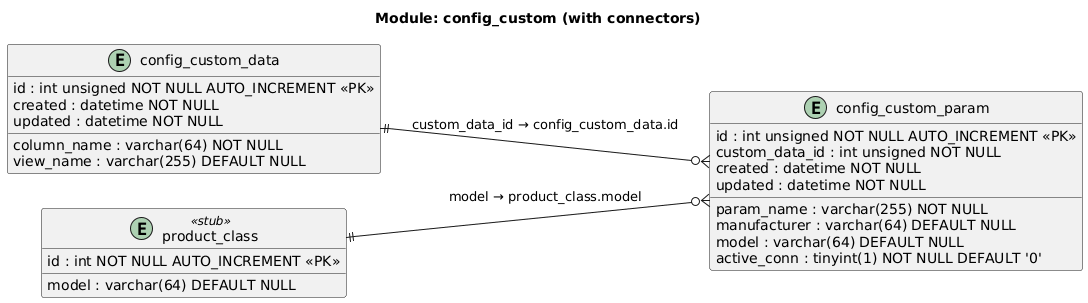
The Custom Parameters Mapping module defines which device parameters appear as custom columns in the device list view. Each mapping links a display column name to a device parameter path, resolved per manufacturer and model.
14.2. Table Descriptions
| Table | Description |
|---|---|
|
Defines custom columns displayed in the device list view. Each row maps a |
|
Maps a custom column to a device parameter path per manufacturer/model. |
15. Custom View Filtering
The Custom View Filtering module stores saved SQL filter queries used to narrow the device list view. Each query is scoped to a domain and can include typed bind parameters for safe, reusable filtering.

15.2. Table Descriptions
| Table | Description |
|---|---|
|
Stores a saved SQL filter query for the device list view, scoped to a domain ( |
|
Bind parameters for a custom view query — each row defines a named parameter ( |