TR-069 Per-Device Unique Credentials — Software Design Document
- 1. Overview
- 2. Architecture
- 3. Data Model
- 4. Configuration
- 5. Business Logic
- 5.1. Credential Provisioning Flow
- 5.2. Profile Task Credential Parameter Exclusion
- 5.3. Credential Confirmation Flow
- 5.4. Authentication Flow (Management Server)
- 5.5. Connection Request Push Flow
- 5.6. Credential Cleanup Flow
- 5.7. Bootstrap Behavior
- 5.8. Device Re-registration After Deletion
- 5.9. Interaction with cpe_provision and Profile CR Credentials
- 5.9.1. Priority Rules Summary
- 5.9.2. Scenario A: cpe_provision was configured before unique credentials were enabled
- 5.9.3. Scenario B: cpe_provision CR credentials are added after unique credentials are already confirmed
- 5.9.4. Scenario C: Profile is applied while unique credentials are managed for the device
- 5.10. Disabling the Feature After Activation
- 6. Support Guide
- 7. Database Migration Reference
- 8. Related Documents
- 9. Document History
1. Overview
1.1. Purpose
This document describes the design and implementation of the per-device unique credentials feature (DEV-1194) for TR-069 devices managed by the Friendly Technologies ACS.
Link to FRD: https://friendlytech.sharepoint.com/:w:/g/IQCl5xweZOPGTpwQoYOv_uYUAWtrHYYIK1nP9NtOKkSfNAU?e=hx5CJn
| What was updated in this document, when and by whom is listed in Document History at the end of the page. |
This document covers TR-069/TR-181 (CWMP) devices only.
USP devices have their own per-device credentials feature (DEV-1799), built on the same cpe_credentials table but with its own provisioning, delivery and authentication flows — see USP Per-Device Unique Credentials.
MQTT and LWM2M devices are not affected.
|
1.2. Problem Statement
In TR-069, the ACS communicates with CPE devices using two sets of credentials:
-
Management Server (MS) credentials — username/password used by the TR-069 device to authenticate its HTTP Inform requests to the ACS. Configured in the
cpe_logintable and shared across all devices in the same login group. -
Connection Request (CR) credentials — username/password used by the ACS to authenticate a Connection Request push to the TR-069 device. Configured in the device profile and shared across all devices in the same profile.
Because these credentials are shared within a group or profile, any device that obtains them can impersonate another device during HTTP authentication, and any party with knowledge of the CR credentials can initiate unauthorized connection requests to any device in the same group or profile.
For TR-069 deployments that require stronger device identity isolation, the shared credential model is insufficient.
1.3. Solution Summary
The system can now generate a unique username/password pair for each individual TR-069 device for:
-
Management Server authentication — used by the TR-069 device when it sends Inform requests to the ACS over HTTP
-
Connection Request authentication — used by the ACS when it initiates a TR-069 Connection Request push to the device
The feature is opt-in, configured per cpe_login group.
Credentials are generated on first TR-069 contact, sent to the device via SetParameterValues, and considered active only after the device confirms receipt via SetParameterValuesResponse.
Until confirmation, the shared credentials from cpe_login (MS) and profile (CR) remain valid as fallback.
For CR, a push tries both the shared and the unique credentials until confirmation, because ACS does not know which pair the device uses.
2. Architecture
2.1. Component Overview
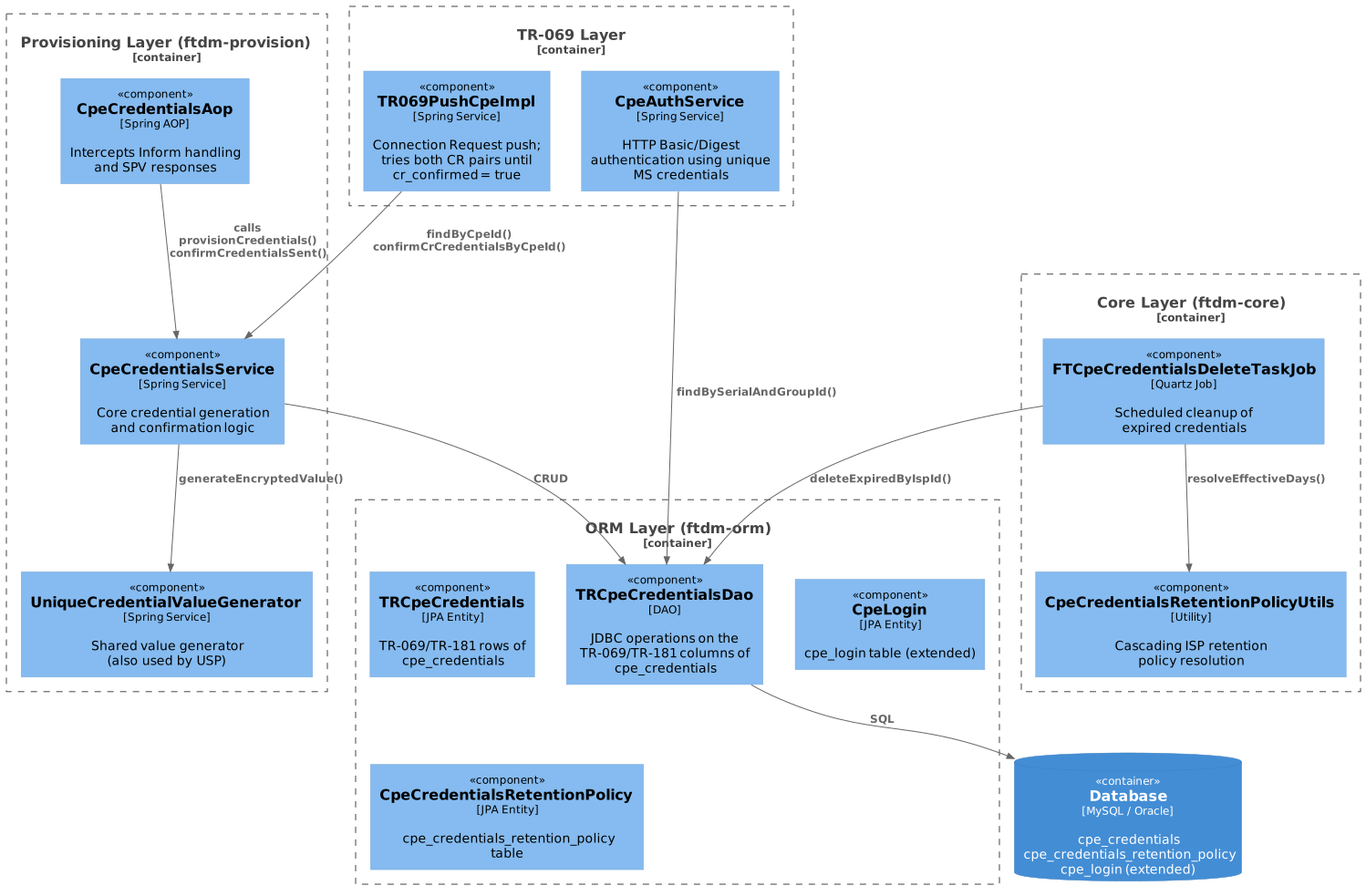
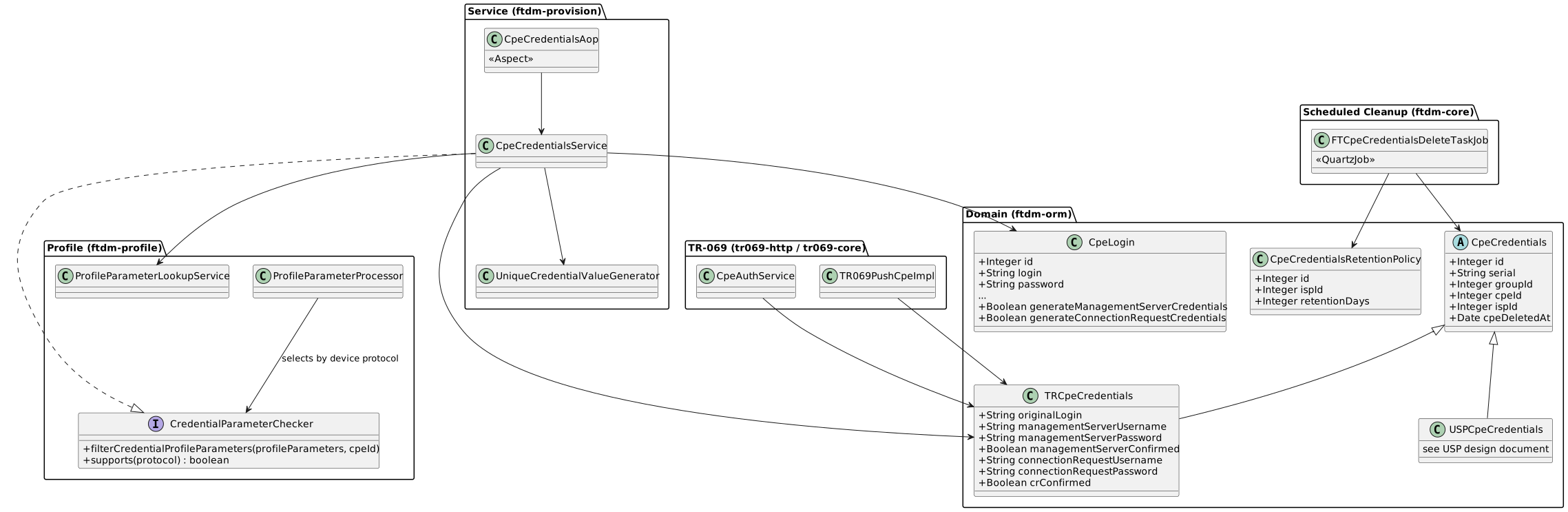
All credential generation, confirmation and enforcement logic described here is specific to the TR-069 (CWMP) protocol.
Three building blocks are, however, shared with the USP implementation of the same feature and are therefore protocol-agnostic: the cpe_credentials table and its retention policy, the value generator (UniqueCredentialValueGenerator), and the profile-exclusion contract (CredentialParameterChecker, applied by ProfileParameterProcessor to whichever checker supports the device’s protocol).
Changing any of them affects USP devices too.
3. Data Model
3.1. Database Schema
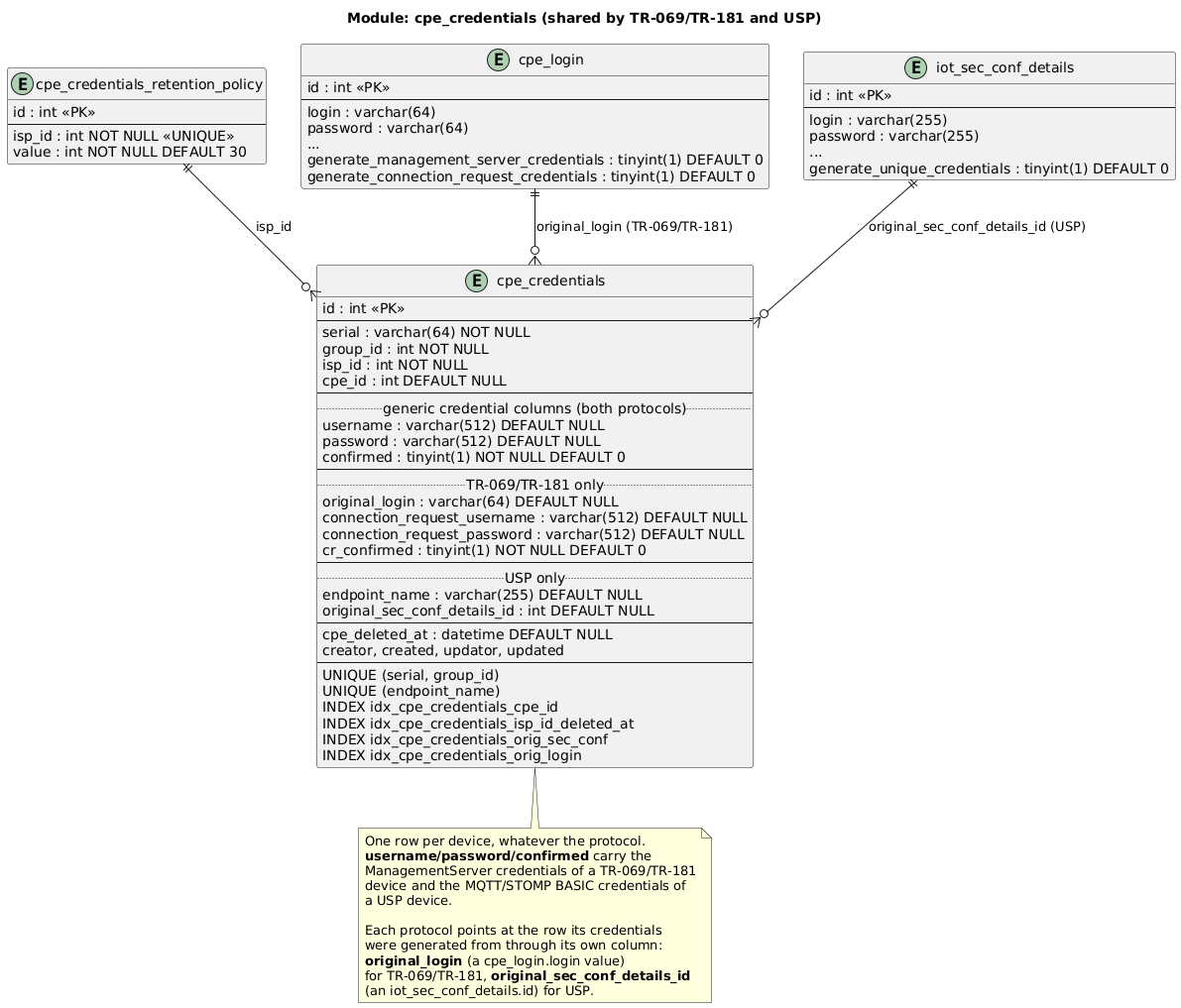
cpe_credentials and cpe_credentials_retention_policy are shared with the USP implementation of this feature: one row per device whatever the protocol, with the generic username/password/confirmed columns carrying TR-069/TR-181 ManagementServer credentials here and MQTT/STOMP BASIC credentials on the USP side.
The diagram below is the single source of truth for both documents.
3.2. Table Descriptions
3.2.1. cpe_login (modified)
Two boolean columns were added:
| Column | Default | Description |
|---|---|---|
|
|
When |
|
|
When |
3.2.2. cpe_credentials
One record per device (identified by serial + group_id).
Created on first device Inform after the feature is enabled.
The table is shared with USP devices, so it carries columns that TR-069/TR-181 never writes (endpoint_name) and columns USP never writes (connection_request_username, connection_request_password, cr_confirmed).
Columns are listed below from the TR-069/TR-181 point of view; see USP Per-Device Unique Credentials for the USP reading of the same row.
| Column | Nullable | Description |
|---|---|---|
|
No |
Primary key. |
|
No |
Device serial number. |
|
No |
Login group ID from |
|
Yes |
Foreign key to |
|
No |
ISP identifier. Used by the retention policy cleanup job. |
|
Yes |
The |
|
Yes |
Unique encrypted MS credentials. Both either set or |
|
Yes |
Unique encrypted CR credentials. Both either set or |
|
No |
(Renamed from |
|
No |
Becomes |
|
Yes |
USP only — always |
|
Yes |
Populated when the associated CPE device is deleted. Used by the retention policy cleanup job to determine when the credential record itself can be removed. Becomes |
3.2.3. cpe_credentials_retention_policy
Defines how long credential records are kept after the associated device is deleted.
| Column | Default | Description |
|---|---|---|
|
— |
ISP identifier. |
|
|
Retention period in days. After this period, credential records for deleted devices are purged by the cleanup job. |
Default row (isp_id=0, value=30) is inserted during migration and serves as a global fallback.
4. Configuration
4.1. Feature Toggle per Login Group (cpe_login)
The feature is enabled/disabled at the cpe_login level via two independent flags:
| Flag | Effect when enabled (true) |
|---|---|
|
ACS generates unique MS username/password for each device in this login group and sends them via SPV.
Authentication switches to unique credentials once |
|
ACS generates unique CR username/password for each device in this login group and sends them via SPV.
Until |
Both flags are independent: you can enable/disable MS-only, CR-only, or both.
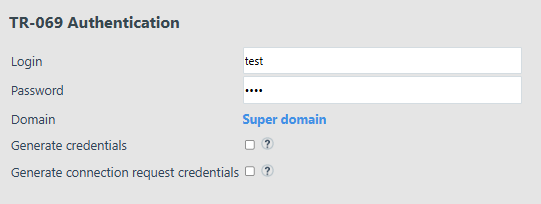
Settings on UI: Settings → Protocols → TR-069 → selected Login.
An example:
When generate_management_server_credentials is enabled for a login group, the ACS configuration parameter useCpeSerialAsLogin is ignored for devices in that group.
useCpeSerialAsLogin requires each device to present its serial number as the HTTP authentication username, but unique MS credentials use a generated username in the format {OUI}-{RANDOM}-{SERIAL} — not the serial alone.
Since the two mechanisms are mutually exclusive, useCpeSerialAsLogin takes no effect while generate_management_server_credentials is active.
|
4.2. Credential Length Parameters (DMConfigurationParameter)
The length of the randomly generated part of the credential value is configurable (Settings → System Settings → ACS Settings page):
| Parameter | Default | Allowed Range | Description |
|---|---|---|---|
|
|
|
Minimum length of the random part. If the configured value is out of range, the default (7) is used. |
|
|
|
Maximum length of the random part. If the configured value is out of range, the default (180) is used. |
The actual random part length is chosen uniformly at random in the range [credentialMinLength, credentialMaxLength] on each credential generation.
| If these parameters have invalid values, default ones will be used. |
4.3. Credential Format
The full credential value follows this pattern:
{OUI}-{RANDOM_PART}-{SERIAL}
Where:
-
{OUI}— device OUI identifier -
{RANDOM_PART}— random string of length betweencredentialMinLengthandcredentialMaxLength, drawn from:ABCDEFGHIJKLMNOPQRSTUVWXYZabcdefghijklmnopqrstuvwxyz0123456789!@#%^*()-_=+[]{}|;.?/~The $character is intentionally excluded from the charset due to a known limitation in the TR-069 device emulator. -
{SERIAL}— device serial number
Credentials are DES-encrypted before being stored in the database.
4.4. Retention Policy
The cleanup job (FTCpeCredentialsDeleteTaskJob) runs on a Quartz schedule and deletes credential records for already-deleted CPE devices.
Domain-specific setting set on Settings → System Settings → Interface page:

The resolution order for the retention period is:
-
ISP-specific entry in
cpe_credentials_retention_policytable for the device’sisp_id -
Parent ISP entry (traversing the ISP hierarchy using dot-notation)
-
Global default entry (
isp_id = 0, value = 30 days)
5. Business Logic
5.1. Credential Provisioning Flow
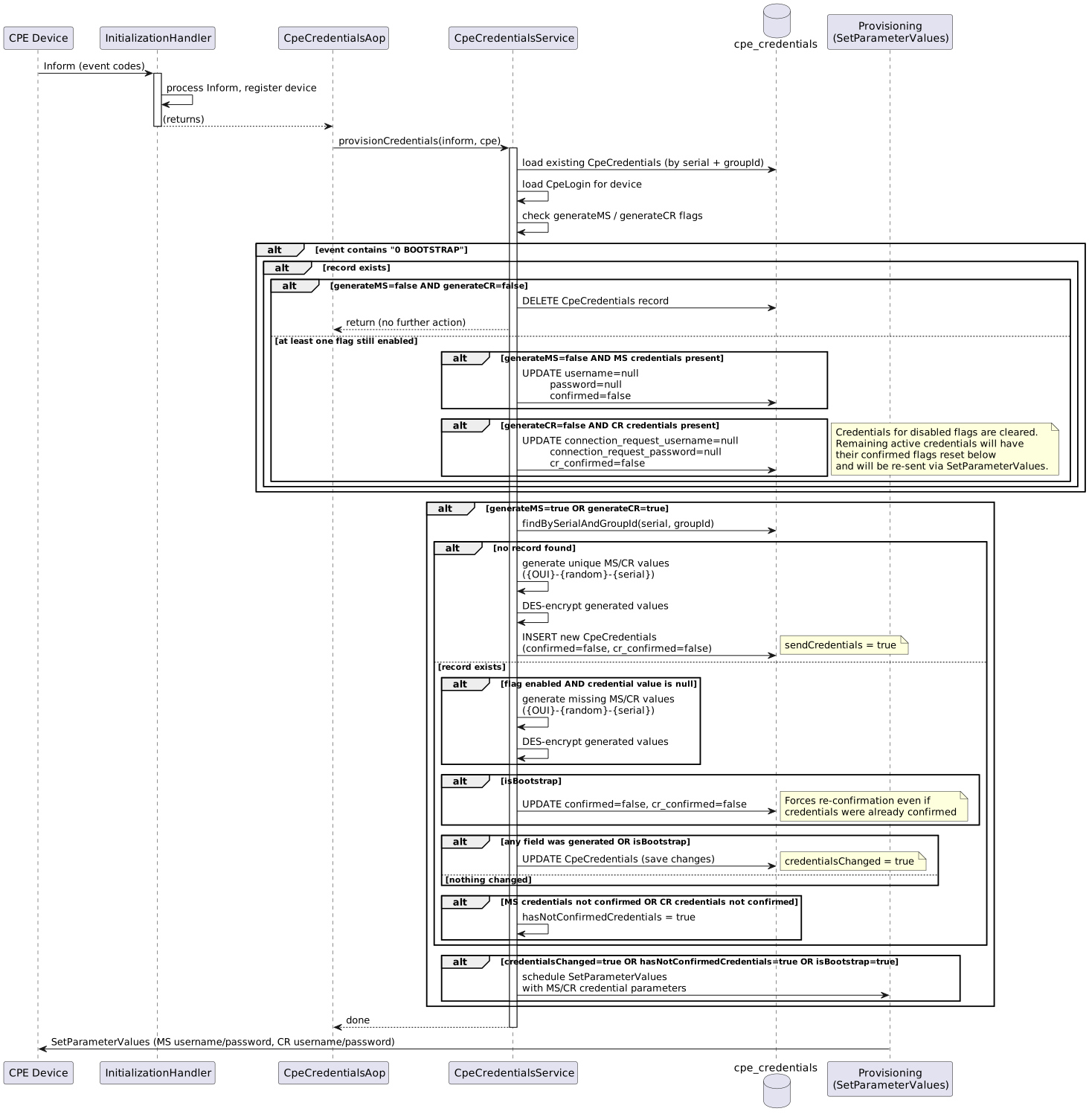
Triggered on every device Inform via CpeCredentialsAop → CpeCredentialsService.provisionCredentials().
5.2. Profile Task Credential Parameter Exclusion
When a profile SetParameterValues task is being built for a device, ProfileParameterProcessor.processTaskCreating() filters credential parameters (MS username/password, CR username/password) out of the profile parameter list under two conditions:
-
Device already has unique credentials — a
cpe_credentialsrecord exists with a non-nullmanagementServerUsername(for MS params) orconnectionRequestUsername(for CR params). The profile parameter for that credential type is excluded, preventing the profile from overwriting the unique value already stored for the device. -
Device does not yet have unique credentials, but its
CpeLoginis configured to generate them — thecpe_login.generate_management_server_credentialsorgenerate_connection_request_credentialsflag is enabled. The corresponding credential parameters are excluded even though nocpe_credentialsrecord exists yet, because unique credentials will be generated and sent to the device on first contact.
handleSetParameterValuesProfileResponse() (see Profile SPV Response (handleSetParameterValuesProfileResponse())) continues to run after every profile SetParameterValuesResponse as a safety net: if credential parameters reach the device despite the exclusion due to some issue, the unique credentials are immediately re-sent upon device confirmation.
5.3. Credential Confirmation Flow
CpeCredentialsAop.afterSPVResponse() intercepts every SetParameterValuesResponse and routes it based on task type:
-
Provision SPV (
SetParameterValuesProvision) →confirmCredentialsSent()— confirms or clears unique credentials depending on current flag state. -
Profile SPV (
SetParameterValuesProfile) →handleSetParameterValuesProfileResponse()— re-sends unique credentials if the profile overwrote them. -
All other SPV task types are ignored by
CpeCredentialsAop.
5.3.1. Provision SPV Response (confirmCredentialsSent())
Triggered when a device acknowledges a provision SetParameterValues that carried unique MS/CR credentials.
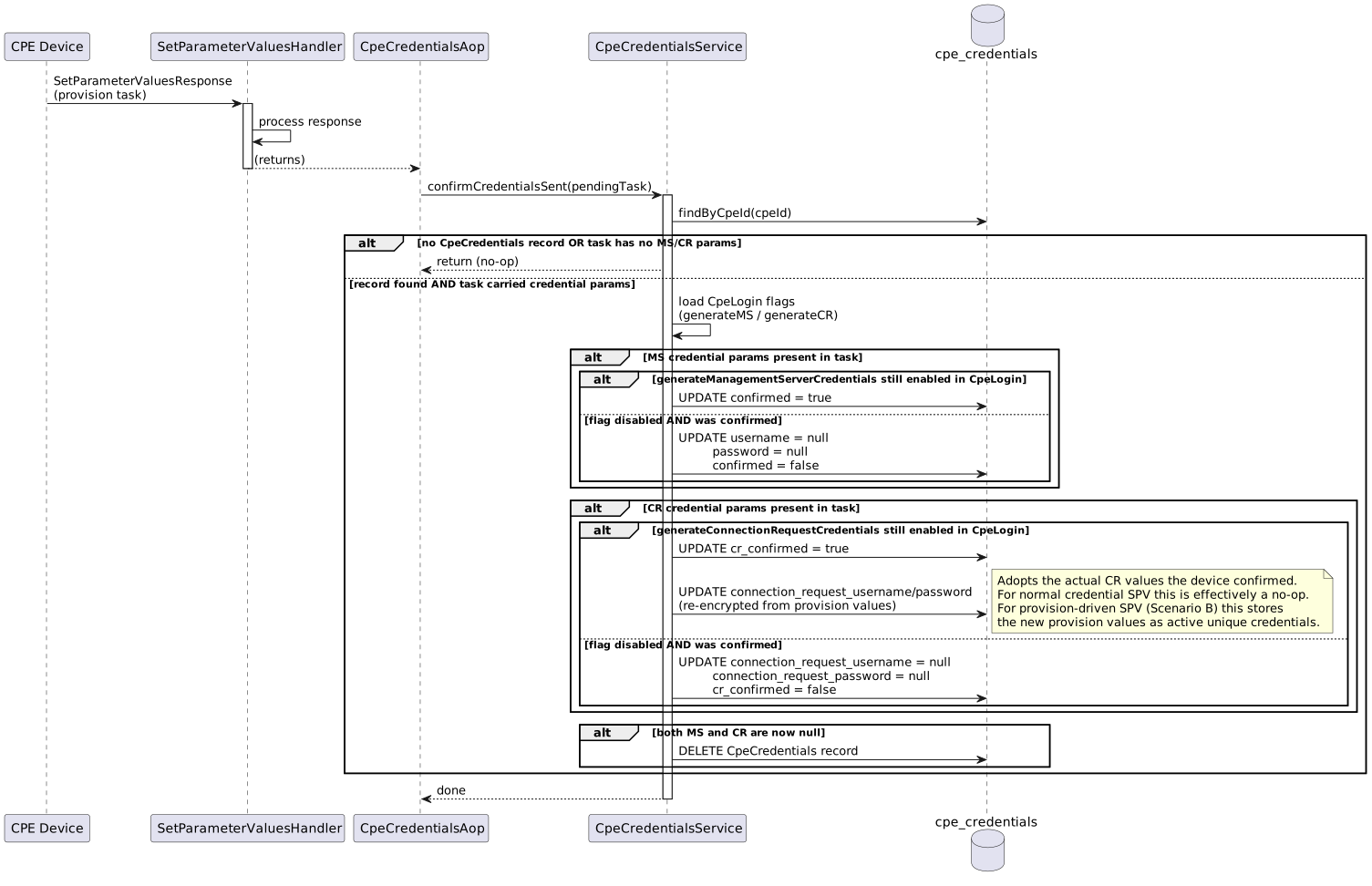
Confirmation is performed on SetParameterValuesResponse, not on the first authentication with new credentials.
This eliminates the timing window that would exist if confirmation happened on authentication, which could occur during a push initiated with old credentials.
|
If the ACS never receives SetParameterValuesResponse (e.g., due to a connection drop or an ACS-side error after the device has already applied the new credentials), confirmed remains false.
In that case, the device will authenticate with its unique credentials on the next Inform, and the ACS will detect this, accept the credentials, and set confirmed = true automatically (self-healing).
|
The same can happen with CR credentials: cr_confirmed remains false.
In that case, a push tries both pairs, and the ACS sets cr_confirmed = true when an HTTP Connection Request with the unique pair succeeds (self-healing, see Connection Request Push Flow).
|
5.3.2. Profile SPV Response (handleSetParameterValuesProfileResponse())
Triggered when a device acknowledges a profile SetParameterValues.
Under normal conditions, credential parameters are excluded from profile tasks before they are sent (see Profile Task Credential Parameter Exclusion), so this method will typically find no credential parameters in the task and return early.
It acts as a safety net: if credential parameters do reach the device despite the exclusion, ACS detects this on SetParameterValuesResponse and immediately re-sends the unique credentials to restore them, resetting the confirmed flags until the device re-confirms.
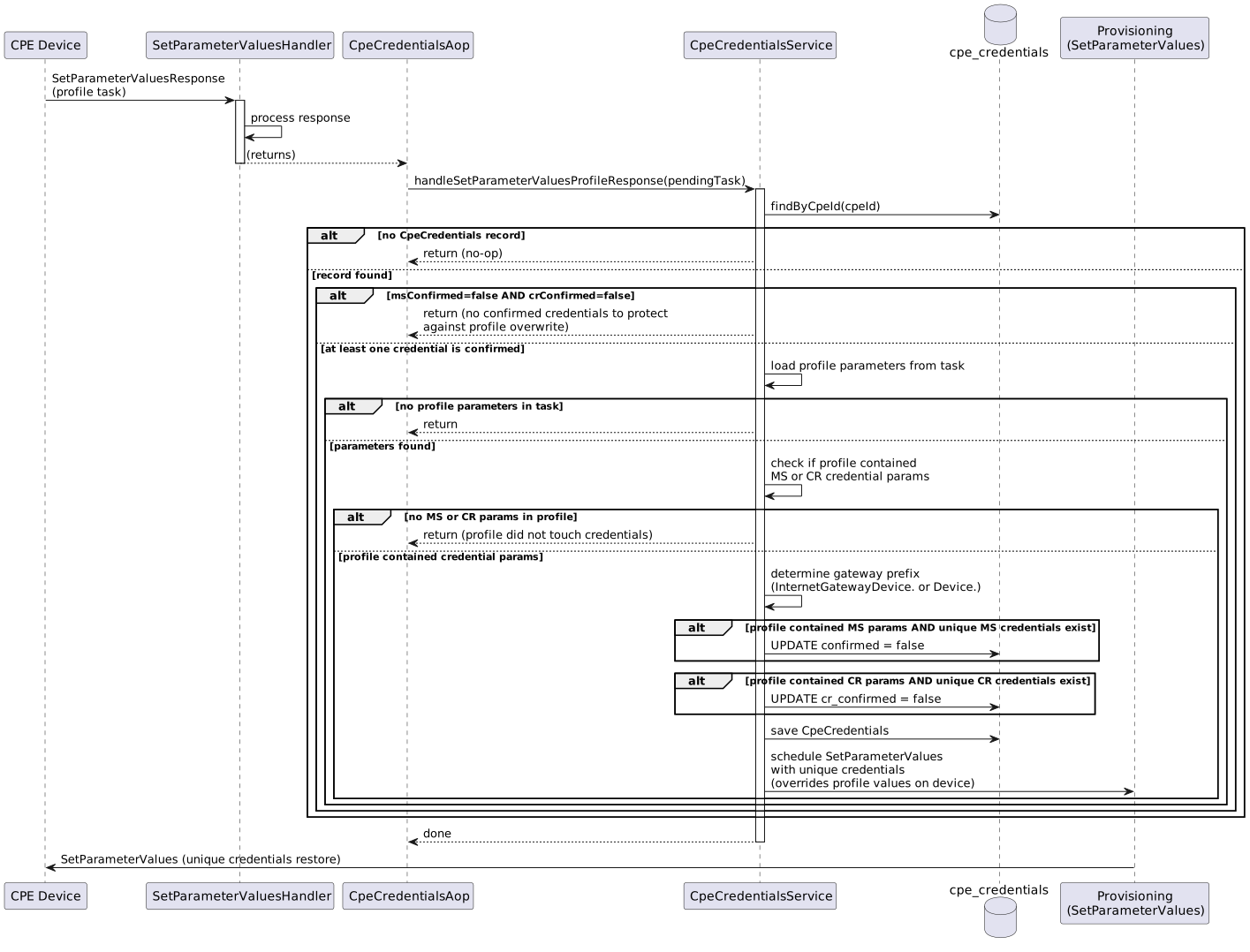
Profile and provision are treated differently by design.
Profile changes are automatically "healed" — ACS detects that the profile overwrote unique credentials and immediately re-sends them.
Provision changes are intentional and adopted as the new unique values (handled in confirmCredentialsSent(), see Scenario B in Interaction with cpe_provision and Profile CR Credentials).
|
5.4. Authentication Flow (Management Server)
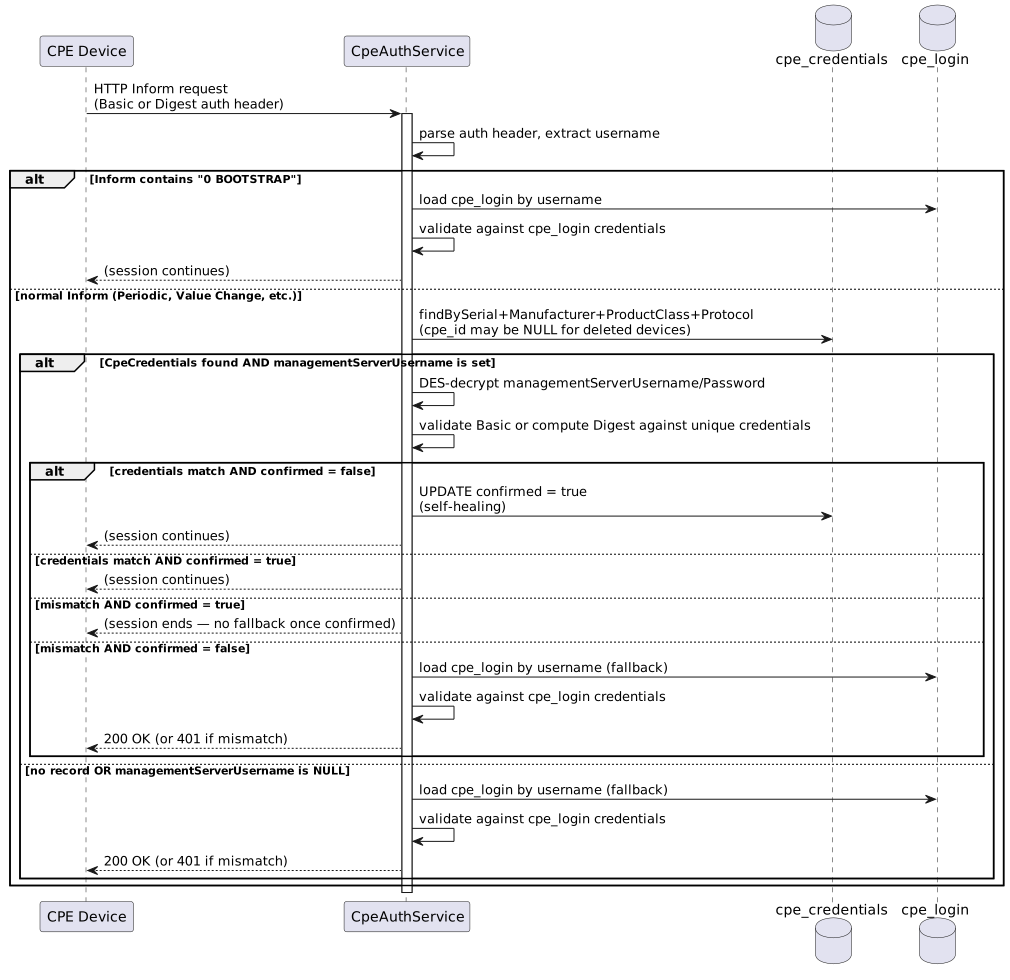
When a device sends 0 BOOTSTRAP (factory reset), ACS always falls back to shared cpe_login credentials regardless of whether unique MS credentials exist and are confirmed.
This ensures the device can authenticate immediately after a reset, before the ACS has a chance to re-send and the device re-confirm the unique credentials.
For all other events in Inform, ACS looks up cpe_credentials by device identity (serial, manufacturer, product class, protocol).
This lookup works regardless of whether the device currently exists in ACS — a deleted device with cpe_id = NULL is found by the same query.
If a record exists and managementServerUsername is set, ACS attempts authentication against the unique MS credentials regardless of confirmed:
-
If authentication succeeds and
confirmed = false— ACS automatically setsconfirmed = true(self-healing). This covers the case where the device applied theSetParameterValuesbut the ACS never receivedSetParameterValuesResponse(connection drop, ACS-side error, etc.). -
If authentication succeeds and
confirmed = true— normal flow, session continues. -
If authentication fails and
confirmed = false— the device has not yet applied the unique credentials; ACS falls back to sharedcpe_logincredentials. -
If authentication fails and
confirmed = true— authentication fails with no fallback. Once confirmed, the device is required to use its unique credentials.
If no cpe_credentials record exists, or managementServerUsername is NULL, ACS falls back to shared cpe_login credentials.
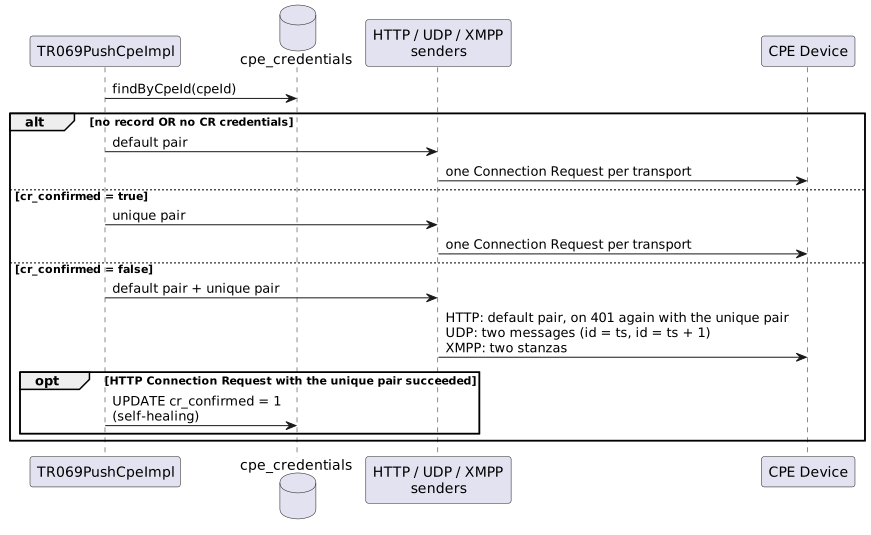
5.5. Connection Request Push Flow
When initiating a Connection Request push to a device, ACS resolves the CR credentials to use as follows:
-
No
cpe_credentialsrecord, or the record has no CR credentials — ACS uses the default CR credentials from the device profile or provision. -
CR credentials exist and
cr_confirmed = true— ACS uses the unique CR credentials. -
CR credentials exist and
cr_confirmed = false— ACS does not know which pair the device uses now. The device may have applied the unique pair while the ACS did not receiveSetParameterValuesResponse, or the device may still use the default pair. So ACS tries both pairs: the default pair first, then the unique pair.
In the first two cases, ACS sends one Connection Request per transport.
ACS starts all transports that the device supports (HTTP, UDP, XMPP) at the same time. When the first transport reports success, ACS stops the others. In the third case, each transport tries both pairs as follows:
| Transport | Behaviour when cr_confirmed = false |
|---|---|
HTTP |
ACS sends the Connection Request with the default pair.
If the device answers HTTP |
UDP |
ACS sends two UDP messages: the first with the default pair, the second with the unique pair.
The device ignores the message with the wrong signature (TR-069 Annex G.2.1.4) and does not answer either message (Annex G.2.2.3).
The first message has |
XMPP |
ACS sends two stanzas through ejabberd: the first with the default pair, the second with the unique pair.
Each stanza has its own stanza |
For UDP and XMPP, success means only that the message was sent, not that the device accepted it. The UDP or XMPP push is successful if at least one of the two messages was sent.
5.5.1. Self-healing of cr_confirmed
If the HTTP Connection Request with the unique pair succeeds, the device has applied the unique pair.
ACS then sets cr_confirmed = true, and the next pushes use only the unique pair.
This is the same self-healing as for MS credentials (see Authentication Flow (Management Server)).
UDP and XMPP cannot confirm the pair: ACS gets no answer that shows which message the device accepted.
In addition, UDP and XMPP usually report success before HTTP gets an answer, and ACS then stops HTTP.
So for a device that supports UDP or XMPP Connection Request, cr_confirmed usually stays false, and every push sends both pairs.
This lasts until the device confirms the credentials with SetParameterValuesResponse, for example after 0 BOOTSTRAP.
This is expected behaviour.
A successful push with the default pair does not delete the unique CR credentials.
A SetParameterValues with the unique pair may still be queued for the device and may be applied later.
If ACS deleted the unique pair at that point, it could not reach the device with a push any more.
|
5.6. Credential Cleanup Flow
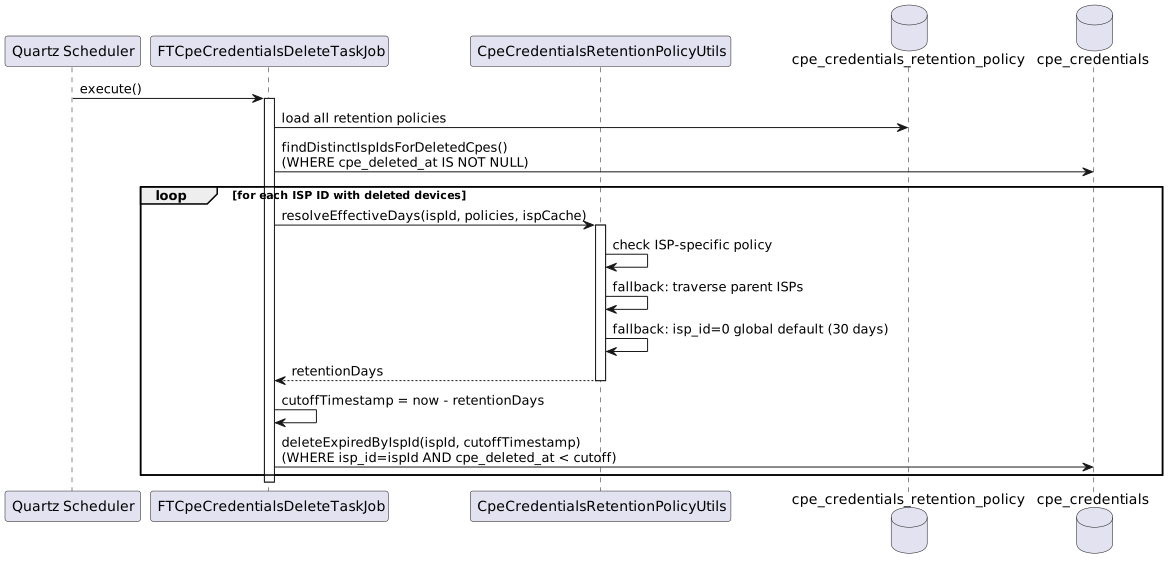
When a device is deleted from ACS, its cpe_credentials record is not removed immediately — instead, cpe_deleted_at is set to the deletion timestamp and the record is retained for a configurable period.
This allows the device to re-register without losing its credentials if it comes back online within the retention window.
A scheduled Quartz job (FTCpeCredentialsDeleteTaskJob) periodically removes records for deleted devices that have exceeded the retention period.
The job runs on the schedule defined by the autoDeleteCron ACS configuration parameter (default: 0 0 2 * * ? — every day at 02:00).
The retention period is resolved per ISP: the job first checks for an ISP-specific entry in cpe_credentials_retention_policy, then traverses the ISP hierarchy, and finally falls back to the global default of 30 days.
If the resolved retention period is 0, cleanup is disabled for that ISP and its credential records are never automatically removed.
5.7. Bootstrap Behavior
When a device sends 0 BOOTSTRAP (factory reset), the confirmed flags are reset to false:
-
confirmed→false -
cr_confirmed→false
The credential values themselves are not regenerated — the same unique credentials are sent to the device again via SetParameterValues.
This means the device will reauthenticate with cpe_login credentials until the ACS resends and the device re-confirms the unique credentials.
If a device with an existing cpe_credentials record send Inform with 0 BOOTSTRAP through an ACS endpoint that does not require HTTP authentication, the record is permanently deleted.
|
5.8. Device Re-registration After Deletion
When a device is deleted from ACS, cpe_id is set to NULL and cpe_deleted_at is populated, but confirmed and cr_confirmed are intentionally preserved.
This allows the device to re-register and authenticate using its unique credentials without going through a factory reset.
If the deleted device re-registers without 0 BOOTSTRAP (e.g., Periodic Inform):
-
ACS looks up
cpe_credentialsby device identity (serial, manufacturer, product class, protocol). The record is found even thoughcpe_id = NULL. -
If
confirmed = true, ACS authenticates the request using the stored unique MS credentials. If the device sendscpe_logincredentials in this case, its authenitcation will fail. -
cpe_idis updated fromNULLto the new device ID;cpe_deleted_atis cleared. -
Credentials are not re-sent — the device already holds them and has previously confirmed receipt.
If the deleted device re-registers with 0 BOOTSTRAP (factory reset), normal Bootstrap handling applies:
confirmed and cr_confirmed are reset to false, and the unique credentials are re-sent via SetParameterValues.
See Bootstrap Behavior for details.
5.9. Interaction with cpe_provision and Profile CR Credentials
The behavior of unique CR credentials when other CR credential sources exist depends on the order of operations.
5.9.1. Priority Rules Summary
| CR Credential Source | Condition | Result |
|---|---|---|
Unique (cpe_credentials) |
|
Used for push. Profile values will be overwritten. |
cpe_provision |
Added before unique credentials were enabled |
Unique credentials are generated later and sent to the device. Once confirmed, they take precedence. |
cpe_provision |
Added after unique credentials are already confirmed |
Provision values are sent to the device and, upon confirmation, stored in |
Profile |
Profile is applied and unique credentials are managed for the device — either a |
Credential parameters are excluded from the profile task before it is created. The device never receives them as part of the profile. |
5.9.2. Scenario A: cpe_provision was configured before unique credentials were enabled
-
Device has CR credentials in
cpe_provision. -
Administrator enables
generate_connection_request_credentials = trueon the login group. -
On the next device Inform,
CpeCredentialsService.provisionCredentials()generates new unique CR credentials and schedules aSetParameterValuestask. -
The device receives and confirms the unique credentials via
SetParameterValuesResponse. -
Result:
cpe_credentials.connectionRequestUsername/Passwordholds the unique values;cr_confirmed = true. The cpe_provision CR values are no longer used for Connection Request push.
5.9.3. Scenario B: cpe_provision CR credentials are added after unique credentials are already confirmed
-
Device already has confirmed unique CR credentials (
cr_confirmed = true). -
A new
cpe_provisionentry is added (or updated) with CR username/password values for this device. -
ACS sends a
SetParameterValueswith the provision CR parameters to the device. -
Device acknowledges the SPV with
SetParameterValuesResponse. -
CpeCredentialsService.confirmCredentialsSent()detects CR parameters in the task and reads their values fromcpe_provision. -
The provision values are decrypted and re-encrypted into
cpe_credentials.connectionRequestUsername/Password. -
Result: the provision CR values are now stored in
cpe_credentialsand become the active unique credentials;cr_confirmed = true.
In Scenario B the provision values "win" because they arrive after the unique credentials and the device confirms them. The cpe_credentials record is updated to reflect the current state of the device — whatever CR credentials the device last confirmed are always stored in cpe_credentials.
|
5.9.4. Scenario C: Profile is applied while unique credentials are managed for the device
ProfileParameterProcessor excludes credential parameters from the profile task in two situations.
Sub-scenario C1: Unique credentials already exist
-
Device already has a
cpe_credentialsrecord (MS and/or CR credentials generated). -
ACS is about to send a profile
SetParameterValuesthat includes credential parameters. -
ProfileParameterProcessor.processTaskCreating()loads thecpe_credentialsrecord;isUniqueCredentialParameter()detects that the corresponding username is non-null and excludes the parameter from the task. -
Device confirms the profile SPV.
CpeCredentialsService.handleSetParameterValuesProfileResponse()is triggered but finds no credential parameters in the task and returns early. -
Result: the profile is applied on the device without touching the unique credentials.
cr_confirmedremainstrue.
Sub-scenario C2: Unique credentials not yet created, but CpeLogin has generation enabled
-
Device’s
cpe_loginhasgenerate_management_server_credentials=trueand/orgenerate_connection_request_credentials=true, but the device has not yet connected — nocpe_credentialsrecord exists. -
ACS builds a profile
SetParameterValuestask for the device. -
ProfileParameterProcessor.processTaskCreating()finds nocpe_credentialsrecord, but resolves theCpeLoginvia the active device session store;isUniqueCredentialParameter()detects the generation flags are enabled and excludes the corresponding parameters. -
When the device eventually connects,
provisionCredentials()generates and sends the unique credentials. -
Result: the profile does not pre-configure credential parameters that will be auto-generated..
If credential parameters reach the device despite the exclusion due to some issue, handleSetParameterValuesProfileResponse() detects them on SetParameterValuesResponse, resets the confirmed flag(s), and immediately re-sends the unique credentials to restore them.
|
| Profile and cpe_provision are treated differently. Profile credential parameters are proactively excluded when unique credentials are managed; cpe_provision changes are intentional and adopted as the new unique values. |
5.10. Disabling the Feature After Activation
5.10.1. Both flags false from the start
If both generate_management_server_credentials and generate_connection_request_credentials are false on a cpe_login, the feature is entirely inactive for that login group:
-
CpeCredentialsService.provisionCredentials()is called on every Inform, but thegenerateMS=true OR generateCR=truecondition is not met — no credentials are generated, nocpe_credentialsrecord is created, and noSetParameterValuestask is scheduled. -
All devices in the group authenticate with shared
cpe_logincredentials and receive Connection Request pushes using profile CR credentials, exactly as before the feature existed.
5.10.2. Flag disabled after credentials were generated but before confirmation
If a flag is disabled after a cpe_credentials record has been created (credentials generated and a SetParameterValues task scheduled) but before the device responds with SetParameterValuesResponse:
-
The
cpe_credentialsrecord remains in the database withconfirmed=false(and/orcr_confirmed=false). -
On the next Inform,
provisionCredentials()sees the flag is nowfalseand does not schedule a new SPV — the pending credentials are left as-is. -
When the device eventually responds with
SetParameterValuesResponse,confirmCredentialsSent()reads the current flag value, detects it isfalse, and clears the corresponding credential columns (NULL) and resets the confirmed flag. -
If both MS and CR become
NULLas a result, the entirecpe_credentialsrecord is deleted. -
Until that cleanup happens, the record stays in the database with
confirmed=false(and/orcr_confirmed=false). The device may have applied the unique credentials already, so ACS still accepts the unique MS credentials (see Authentication Flow (Management Server)), and a push still tries the unique CR credentials as the second pair (see Connection Request Push Flow).
5.10.3. Flag disabled after credentials were confirmed
If an administrator disables the generate_management_server_credentials or generate_connection_request_credentials flag on a cpe_login after credentials have already been provisioned and confirmed:
-
On the next
SetParameterValuesResponsefor that device,CpeCredentialsService.confirmCredentialsSent()detects the flag is now disabled. -
The corresponding credential columns are cleared (
NULL) and the confirmed flag is reset. -
If both MS and CR credentials are now
NULL, the entirecpe_credentialsrecord is deleted. -
The device falls back to shared
cpe_logincredentials.
There is a window between disabling the flag and the next SetParameterValuesResponse during which the cpe_credentials record still exists with confirmed / cr_confirmed = true.
During this window, ACS continues to use the unique credentials — MS authentication validates against them and Connection Request pushes use them — exactly as if the flag were still enabled.
The credentials are cleared only after the next SetParameterValuesResponse triggers confirmCredentialsSent() and detects the flag is now disabled.
|
When the device sends a 0 BOOTSTRAP the corresponding credentials are cleared (see the bootstrap handling in Credential Provisioning Flow for details).
6. Support Guide
6.1. How to Enable Unique Credentials for a Device Group
-
In the ACS management UI, navigate to the login group configuration (
cpe_login). -
Enable Generate Management Server Credentials and/or Generate Connection Request Credentials.
-
On the next Inform from a device in this group, unique credentials will be generated and sent to the device.
| The transition is seamless — devices continue to authenticate with shared credentials until they confirm the new unique ones. |
6.2. Understanding the Confirmation Window
Between the moment unique credentials are sent and the device confirms them:
-
The device is still using the old shared credentials from
cpe_login. -
ACS handles this window in two ways:
-
If the device sends shared
cpe_logincredentials whileconfirmed = false, ACS accepts them — the device has not yet applied the unique ones. -
If the device sends unique credentials while
confirmed = false, ACS accepts them and immediately setsconfirmed = true(self-healing — the device applied theSetParameterValuesbut the response was lost).
-
-
Once
confirmed = true, only the unique credentials are accepted — there is no fallback tocpe_login.
6.3. Connection Request Push Before Confirmation
While cr_confirmed = false, every push sends the Connection Request with both pairs (see Connection Request Push Flow).
The device accepts one pair and rejects or ignores the other one. This is expected.
What it looks like in the device trace:
| Transport | Device trace |
|---|---|
HTTP |
One entry for the request with the default pair. A second entry for the request with the unique pair, only if the device answered |
UDP |
Two entries, one for each message. The first message has |
XMPP |
One entry with both stanzas. Passwords are shown as |
For a device that supports UDP or XMPP Connection Request, cr_confirmed usually stays false until the device confirms the credentials with SetParameterValuesResponse.
Until then, each push sends two UDP messages or two XMPP stanzas. This is expected, not a bug.
6.4. What Happens on Factory Reset
When a device is factory-reset:
-
Device sends Inform with event code
0 BOOTSTRAP. -
ACS resets
confirmed = falseandcr_confirmed = falsefor that device. -
ACS sends the same unique credentials again via
SetParameterValues. -
Device authenticates with shared
cpe_logincredentials until it re-confirms the unique ones.
The device goes through the same confirmation cycle as on first enrollment.
If the device sends 0 BOOTSTRAP through an ACS endpoint that does not require HTTP authentication, its unique credentials are permanently deleted.
|
If a deleted device reconnects with a regular Periodic Inform (no factory reset), it is authenticated using its still-confirmed unique credentials, cpe_id is restored, and the credentials are not re-sent.
See Device Re-registration After Deletion for the full re-registration flow.
|
6.5. Credential Storage Security
Credential values in cpe_credentials are DES-encrypted.
They are never stored in plain text in the database.
Decryption happens in memory only during authentication or push operations.
6.6. Retention Policy After Device Deletion
6.6.1. Main logic
When a device is deleted from ACS:
-
Its
cpe_credentialsrecord is not immediately removed. -
The
cpe_deleted_atcolumn is set to the deletion timestamp. -
A scheduled Quartz job runs periodically and removes credential records older than the configured retention period.
-
The default retention is 30 days (configurable per ISP in
cpe_credentials_retention_policy).
This retention window ensures that if a deleted device unexpectedly comes back online, its credentials are still available for a reasonable period.
6.6.2. ISP Synchronization on Deletion
Before the credential record is soft-deleted, cpe_credentials.isp_id is updated to match the location_id of the device at the moment of deletion.
This step is necessary when ispMode=1 (Multi-Domain mode) and the operator has manually moved the device to a different domain after the credential record was first created.
In that case cpe_credentials.isp_id may still hold the old domain value, so the update ensures the retention policy is resolved against the domain the device actually belonged to when it was deleted — not the domain it was originally enrolled in.
Without this synchronization, the scheduled job would apply the wrong domain’s retention period (or fall back to the default), potentially deleting credentials too early or too late relative to the operator’s intent.
7. Database Migration Reference
Migration file: changelog-6.5.1.DEV-1194.xml
| Change Set | Description |
|---|---|
|
Adds |
|
Creates the |
|
Oracle only: creates sequence |
|
Creates |
|
Oracle only: creates sequence |
|
Adds performance indexes: |
7.1. Columns renamed for USP (DEV-1799)
Migration file: changelog-7.1.2.DEV-1799.xml
The USP implementation stores its credentials in the same table, so the three columns that are not TR-069-specific were given protocol-neutral names, and USP’s own columns were added alongside them.
No TR-069/TR-181 behaviour changed with this migration — only column names, one relaxed NOT NULL, and comments.
| Change Set | Description |
|---|---|
|
Adds |
|
Renames |
|
Adds the USP-only |
|
Adds the USP-only |
|
Drops |
|
Adds index |
When reading older logs, dumps or scripts, ms_confirmed and management_server_* are the pre-7.1.2 names of confirmed and username/password.
|
8. Related Documents
-
USP Per-Device Unique Credentials — the USP (TR-369) implementation of the same feature, sharing this table, the value generator and the profile-exclusion contract.
9. Document History
This section lists what was changed in this document, when and by whom, with links to the affected sections. The Ticket column is the JIRA issue the document change was committed under, so the matching code change and test scope can be looked up from it.
| Date | Author | Ticket | What changed in the document |
|---|---|---|---|
2026-08-27 |
Eduard Fastovskyi |
DEV-1799 |
Aligned the document with the USP implementation of the same feature, which shares the
|