Deployment & Usage
Two things to set up:
(1) the agents & skills on each developer’s machine
(2) the per-repo wiring & CI guardrails
Then drive it with prompts.
Scripts at a glance
Every script ships in two lockstep forms — bash (.sh, BSD/macOS + GNU/Linux) and
PowerShell (.ps1, native Windows — no WSL/Git Bash needed). Pick your platform; both produce
the same result (the deterministic gen-component-map is byte-identical across all three OSes).
Human-run ones are opt-in and preview with DRY_RUN=1 (bash) / $env:DRY_RUN=1 (PowerShell); CI
ones gate a PR. The table lists the .sh; the .ps1 sibling sits next to it — see the note below.
| Script | Why (what it’s for) | How to run | Where |
|---|---|---|---|
|
Sync skills + agents into |
|
local · per dev |
|
Wire a repo to the toolkit: standard pointer in CLAUDE.md + component map + CI workflows. Idempotent, never commits. |
|
local · per repo |
|
(Re)generate the deterministic |
|
local + CI |
|
Fail CI if the committed map is stale or untracked (treat it like generated code). |
in CI (or |
CI |
|
Fail CI if a skeleton module has no |
in CI |
CI |
|
GitHub Actions wrappers: run the two gates on PRs · reindex |
drop into |
CI |
Human flow is install.sh (once per machine) → wire-repo.sh (once per repo); the rest run in CI.
Details for each below.
|
|
On Windows, run the
The CI workflows ( |
1 · Local — install agents & skills
Opt-in sync into ~/.claude (nothing auto-installs).
This installs the toolkit’s agents & skills — it does not install the Claude Code CLI itself.
On Windows, install.ps1 assumes claude is already on your PATH; if it isn’t yet, start with
Install Claude Code (Windows) first.
|
# preview first
DRY_RUN=1 deploy/scripts/install.sh
# then apply
deploy/scripts/install.sh
On Windows run the native PowerShell counterpart instead — feature-identical, same env flags
(DRY_RUN / SKIP_MCP / SKIP_JDTLS / ASSUME_YES), no WSL or Git Bash required:
# preview first
$env:DRY_RUN=1; .\deploy\scripts\install.ps1
# then apply
Remove-Item Env:\DRY_RUN; .\deploy\scripts\install.ps1
Both installers sync the same assets and register the same MCP set — the four remote servers plus
the native sequential-thinking / memory stdio servers (via npx, no Docker) — and both install
the Java LSP backend jdtls (skip it with SKIP_JDTLS=1). The only platform deltas: install.ps1
mirrors assets with robocopy (vs rsync) and installs jdtls via Scoop (scoop install jdtls),
where install.sh uses Homebrew (brew install jdtls). They are kept behaviourally in
lockstep — an edit to one must be applied to the other.
| Installs | Into |
|---|---|
|
|
|
|
|
|
MCP servers (user scope) |
your Claude config (via |
Verify in Claude Code with /skills, /agents, and claude mcp list (or /mcp).
Plugins (workflow layer — installed by the claude plugin CLI, offer-gated)
Claude Code plugins are not files this script copies like skills/agents — they are installed
with the claude plugin CLI. install.sh / install.ps1’s verification step (--doctor`, and
the pass every plain install run ends with) actually runs that CLI: each missing plugin gets a
per-item offer — y on a TTY, unattended under ASSUME_YES=1, previewed instead of run under
DRY_RUN=1. The FT workflow tracks five plugins (workflow_plugin_rows() in install.sh /
$WorkflowPlugins in install.ps1 — read there for the authoritative table):
| Plugin | Plugin ID | Marketplace | Why |
|---|---|---|---|
superpowers |
|
built into Claude Code |
process skills: brainstorming, systematic-debugging, verification-before-completion, … |
claude-mem |
|
third-party — |
cross-session memory + AST tools — both capability manifests list it (recommended tier) |
impeccable |
|
third-party — |
frontend design QA — |
jdtls-lsp |
|
built into Claude Code |
wires the |
obsidian |
— |
none configured |
Obsidian vault access — the knowledge-persistence layer agents write decisions/debugging notes to when present |
The two built-in rows (superpowers, jdtls-lsp) install under plain ASSUME_YES=1. The two
third-party rows (claude-mem, impeccable) additionally need
ALLOW_THIRD_PARTY_MARKETPLACES=1, because adding a marketplace is a standing trust
relationship, not a one-time reviewed install: Claude Code re-clones it whenever it finds new
commits and swaps the new clone in, and upstream can ship new plugin code by bumping the version
in its own manifest — there is no blanket disable-auto-update setting, only
CLAUDE_CODE_PLUGIN_KEEP_MARKETPLACE_ON_FAILURE=1 and CLAUDE_CODE_DISABLE_NONESSENTIAL_TRAFFIC
(https://code.claude.com/docs/en/plugin-marketplaces). That is what a y on those two rows really
runs:
claude plugin marketplace add thedotmack/claude-mem
claude plugin install claude-mem@thedotmack --scope user
obsidian can never turn green this way — that is a deliberate choice, not an installer bug: no
marketplace source is configured for it (see Knowledge Vault), so
verification reports it missing and tells you to open /plugin inside Claude Code and pick it
from the marketplace browser instead.
Skip the whole section with SKIP_PLUGINS=1. (SKIP_PONYTAIL=1 and SKIP_JDTLS=1 gate two
separate, unconditional installs earlier in the script — the ponytail plugin and the jdtls
binary itself — not part of this offer-gated table.)
Registry skills (npx — updatable upstream)
emil-design-eng (UI polish & animation canon, read JIT by the Angular coding agent) comes from
the public skills registry rather than this repo, so it keeps receiving upstream updates. The
invocation is fully non-interactive — --skill installs just this one skill (no multi-select
picker), -g puts it in ~/.claude/skills (never a stray project-local .claude/), -a
targets Claude Code, and the two -y flags clear npx’s own prompt and the CLI’s confirmation:
npx -y skills add emilkowalski/skill --skill emil-design-eng -g -a claude-code -y
# installs just this skill to ~/.claude — re-run the same command anytime to update
The install.sh / install.ps1 verification detects it and offers this command when it is missing.
agent-browser (npm — the browser verification CLI)
Every agent-driven browser check goes through the agent-browser CLI: it drives Chrome/Chromium
over CDP and returns accessibility-tree snapshots with @eN element refs, which cost a few hundred
tokens where a DOM dump costs multiple kB. The canon lives in rules/agents/common.md ("Browser
verification — agent-browser first") and applies to every pipeline: the Angular coding agent
verifies its own UI slice, bugfix-agent observes a UI symptom before calling it irreproducible,
refactor-agent compares the rendered before/after, and the checkpoint-F executor verifier
re-drives the flow instead of trusting a screenshot.
npm i -g agent-browser && agent-browser install
# Linux hosts: agent-browser install --with-deps
The installed skill file is a discovery stub by design — agents run agent-browser skills get core
to load the reference for the version actually installed, so the instructions cannot go stale.
Playwright is scoped, not replaced. Committed .spec.ts e2e suites (@axe-core/playwright,
CI) stay Playwright, and it is the fallback when agent-browser is unavailable or the task needs
fixtures / trace-viewer / codegen. A one-off "does my change render" check never becomes a
committed spec. The Chrome-extension tools (mcpclaude-in-chrome) drive the developer’s own
logged-in browser and are not an agent channel.
|
Never add a skill named like a bundled one (code-review, security-review, verify, simplify, review, run) — ~/.claude/skills/<name> silently overrides the bundled skill.
|
MCP servers — the agents' live data
install.sh also registers, at user scope, the MCP servers the agents query (skip with SKIP_MCP=1).
It is idempotent — each server is removed then re-added, so re-running is safe.
| Server | Transport | Endpoint |
|---|---|---|
|
SSE |
|
|
HTTP (streamable) |
|
|
SSE |
|
|
HTTP |
|
The three FT servers are internal — you need network/VPN access to ai.friendly-tech.com; context7
is public. jira-mcp already speaks streamable HTTP (/mcp); qdrant-vector-db and tr069-emulator still
use SSE (deprecated in Claude Code v2.1+ — migrate each as its server exposes /mcp). What each server is
for: Claude Toolkit § MCP servers.
|
The four above are remote (HTTP/SSE) and auto-registered. The agents also use local stdio servers — a local process, so no endpoint or VPN. Each needs a local prerequisite, so the verification pass offers them per item rather than adding them unattended:
| Server | What it gives | How it’s set up |
|---|---|---|
|
Read/write the shared Obsidian Knowledge Vault — the agents' cross-session memory. |
stdio via |
|
Structured step-by-step reasoning · a local knowledge-graph the agents accumulate. |
Both installers register them natively via |
|
The local code graph — graph-first localization + blast-radius for the pipelines. |
A local binary (its own installer); the verification pass offers to install/register it and enable auto-index. |
Maximum-quality setup (checklist)
The quality pipelines degrade gracefully — every missing capability has a documented fallback —
but degraded is degraded: each run’s report prints a degradations: line naming what was
missing (e.g. "knowledge-graph absent → blast radius grep-only"). A complete install is not
evangelism — it directly improves verification statistics: knowledge-graph gives the
Architecture/Regression lenses an evidence source independent of the code, claude-mem feeds
past misses back into triage.
The canonical per-item lists (purpose · benefit · tier · fallback) are the two capability manifests the pipelines read at preflight:
-
~/.claude/rules/bugfix/dependencies.md— the ft-fix / bugfix pipeline -
~/.claude/rules/feature/dependencies.md— the ft-developer feature pipeline
Tiers: required — the pipeline escalates or runs with a prominent warning without it;
recommended — a named degradation; optional — nice-to-have. Beyond install.sh defaults, the
manifests cover: the superpowers, claude-mem, and impeccable plugins, a
knowledge-graph server, sequentialthinking, codebase-memory-mcp (index your repos!),
ide-diagnostics, and the jdtls Java LSP (symbol-accurate navigation/diagnostics for the
Java agents, wired in via the jdtls-lsp plugin). Both installers set these up automatically:
the two stdio servers (sequential-thinking, memory) via npx — no Docker required — and
jdtls via Scoop (install.ps1) or Homebrew (install.sh); skip the Java LSP with
SKIP_JDTLS=1. A Docker MCP gateway (MCP_DOCKER) is an optional alternative for the reasoning
servers.
Every install.sh run ends with a verification pass over the full working set — toolkit
assets, MCP servers (incl. codebase-memory-mcp and the Docker MCP gateway), the Java LSP, and
the five workflow plugins (superpowers / claude-mem / impeccable / jdtls-lsp / obsidian — see
"Plugins" above). Anything missing gets an offer: MCP servers register on a per-item y (or
ASSUME_YES=1 for CI); the four installable plugins register the same way through the claude
plugin CLI (the two third-party rows additionally need ALLOW_THIRD_PARTY_MARKETPLACES=1);
obsidian has no configured marketplace source, so it is reported missing with instructions to
pick it from the /plugin browser instead.
The local code-graph server (codebase-memory-mcp) has its own official installer (macOS/Linux;
Windows uses the install.ps1 from that upstream repo — not the toolkit’s — inspect third-party
installers before running):
curl -fsSL https://raw.githubusercontent.com/DeusData/codebase-memory-mcp/main/install.sh | bash -s -- --uiinstall.sh’s verification offers this installer when the binary is absent, Claude registration
when it is unregistered, and auto-indexing on session start (`config set auto_index true,
file limit auto_index_limit 50000) when it is off — new projects index on first connection;
previously-indexed ones join the background git-change watcher.
Re-run the verification alone anytime:
deploy/scripts/install.sh --doctor # verify only — ok/MISSING per item + fix offers2 · On-project — plug into the FT portal & CI
Wire a repo in one command
wire-repo.sh is opt-in (like install.sh) and idempotent — it does not commit; it leaves
changes for the repo owner to review. It detects the stack and:
-
inserts a managed standard pointer block (between
<!-- FT-AI-TOOLKIT:START/END -->markers) into the repo’sCLAUDE.md(or existingAGENTS.md, else createsCLAUDE.md) — naming the right standard (ft-java-standards/ft-angular-standards/ both) plus a non-negotiables quick-ref; -
generates
COMPONENT-MAP.mdand seedsCOMPONENT-MAP.semantic.md; -
installs the CI workflows (
component-map.yml,ft-code-reindex.yml).
DRY_RUN=1 deploy/scripts/wire-repo.sh ../ftacs   # preview (diff + file list)
deploy/scripts/wire-repo.sh ../ftacs # apply; then review & commit in that repo| Re-running replaces the managed block in place (markers) — safe to run after every standard change. |
Plug in as a sub-portal
The FT Docs Portal (ft-docs-portal) is built and hosted on its own server (Cloudflare Pages). It
clones each product under ./sources/<repo> and renders every Antora component — PlantUML via its own
Kroki server — so there is nothing to build here. Register this repo like the other products in
ft-docs-portal/antora-playbook.yml:
content:
  sources:
    # … existing product sources (ft-acs, ft-device-network-service, oneiot-ui, …) …
    - url: ./sources/ft-ai-toolkit
      branches: main
      start_path: docs          # this repo's Antora component root (docs/antora.yml)
The component name is ft-ai-toolkit (docs/antora.yml); link it from the portal nav with
xref:ft-ai-toolkit::index.adoc[FT AI Toolkit].
The product repos mount at start_path: docs/src; this repo uses docs — both are supported,
just match what’s in docs/antora.yml.
|
Component map: two layers
The map has a mechanical skeleton and a semantic layer — gated differently.
| File | Content | CI gate |
|---|---|---|
|
Generated skeleton: modules, Spring beans, JPA entities, DB tables, legacy MDC keys (should be empty), Angular counts. Deterministic. |
Content — fails on any drift ( |
|
AI-authored: per-module responsibility, boundaries, key flows, standard deviations. Seed from |
Coverage — every skeleton module needs a |
# locally, before commit:
deploy/scripts/gen-component-map.sh .   # (re)write the skeleton COMPONENT-MAP.md
# then have an agent (ft-architecture-audit / ft-doc-writer-agent) update the
# semantic layer when a module is added or its responsibility shifts.
Component-map drift gate (per repo)
Treat the skeleton like generated code — CI fails if it’s stale or uncommitted, then
fails if the semantic layer is missing a module. Drop in deploy/ci/component-map.yml:
# .github/workflows/component-map.yml
- run: bash <toolkit>/deploy/ci/component-map-gate.sh .   # skeleton drift
- run: bash <toolkit>/deploy/ci/semantic-coverage.sh .    # semantic coverage
The generator skips vendored/build dirs (node_modules, target, build…), is
portable across BSD (macOS) and GNU (Linux CI), and was validated on ft-bs-client,
ftacs, ft-device-network-service, oneiot-ui, and angular-ui.
|
Keep onboarding fast
| Channel | Wire-up |
|---|---|
Component map |
the CI gate above (mechanical skeleton, always fresh) |
Qdrant |
re-index on merge to main via |
|
the managed standard-pointer block from |
All three are installed in one shot by wire-repo.sh (see "Wire a repo in one command" above).
|
3 · Drive it — example prompts
Full list in deploy/prompts/example-prompts.md. The essentials:
# feature, end to end
Use ft-developer. Add <feature> to <repo>; grade the task; follow the matching FT standard;
run ft-architecture-audit before reporting.

# bug
Use bugfix-agent for DEV-1234.

# standard audit (read-only)
Use ft-architecture-audit on the current branch diff. Report violations with file:line.

# final external review (user-only)
/autoreview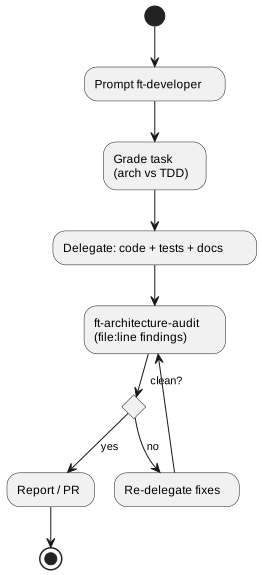
| Back to Overview · Java / Angular standards · the Toolkit. |