Installation
Follow this guide to stand up Friendly Jenkins on a single machine (master) and prepare agents for Docker Compose deployments.
Requirements
-
Jenkins Master: 2–4 vCPUs (4+ recommended), 4–8 GB RAM, 20–50 GB SSD, Linux/macOS/Windows with Docker.
-
Jenkins Agent (per node): 4–8 vCPUs, 8–16 GB RAM, 100–500 GB SSD, Linux (Ubuntu 20.04+, Debian 11+, CentOS/RHEL 8+).
-
Network: TCP 8080 (UI), 50000 (JNLP), outbound HTTPS to registries, outbound Git if syncing shared library.
-
Optional: Harbor registry, GitLab for webhooks, SMTP, LDAP/AD.
Software Versions (min → recommended)
-
Docker
20.10→24.x -
Docker Compose
2.0→2.23+ -
Git
2.30→2.43+ -
Jenkins LTS
2.426.1→ latest LTS
Install Docker
Use your OS package manager:
-
Ubuntu/Debian: add Docker APT repo, install
docker-ce+docker-compose-plugin, add your user todockergroup. -
CentOS/RHEL: add Docker YUM repo, install
docker-ce+ plugins, enable service. -
macOS: install Docker Desktop via Homebrew (
brew install --cask docker) or official download.
Verify:
docker --version
docker compose version
Prebuilt Images in Harbor (recommended)
Publish images once to Harbor and pull them everywhere (no local builds on testers’ machines):
-
Build and push master image:
cd jenkins-master docker login hub.friendly-tech.com -u "$HARBOR_USER" -p "$HARBOR_PASS" docker build -t hub.friendly-tech.com/qa-jenkins/friendly-jenkins-master:latest . docker push hub.friendly-tech.com/qa-jenkins/friendly-jenkins-master:latest -
Build and push agent image:
cd jenkins-agent docker login hub.friendly-tech.com -u "$HARBOR_USER" -p "$HARBOR_PASS" docker build -t hub.friendly-tech.com/qa-jenkins/qa-agent:latest . docker push hub.friendly-tech.com/qa-jenkins/qa-agent:latest -
In the compose examples below, use
image: hub.friendly-tech.com/qa-jenkins/friendly-jenkins-*:latestto pull from Harbor.
Master Setup (one-time)
If the master already runs, skip to Agent setup.
-
Files you need on the master host (copy from your bundle or artifact store):
-
jenkins-master/docker-compose.yml -
jenkins-master/casc.yaml -
jenkins-master/.env(create from the example below) -
Optional:
shared-library/(if you want to mount it read-only) -
Optional:
dependencies.drawiofor reference
-
Minimal layout:
/opt/friendly-jenkins/
├── jenkins-master/
│   ├── docker-compose.yml
│   ├── casc.yaml
│   ├── .env            # you create this
│   └── ...             # other supporting files
└── shared-library/     # optional mount for live edits
Use these examples if you need to recreate files from scratch.
Example: master docker-compose.yml (single host, host networking)
services:
  jenkins:
    image: hub.friendly-tech.com/qa-jenkins/friendly-jenkins-master:latest
    container_name: jenkins-qa-master
    restart: unless-stopped
    user: "0:0"
    env_file:
      - .env
    environment:
      JENKINS_OPTS: "--httpPort=${JENKINS_PORT} --httpListenAddress=0.0.0.0"
      JAVA_OPTS: "-Xmx2g -Xms1g -Djenkins.install.runSetupWizard=false"
      CASC_JENKINS_CONFIG: "/var/jenkins_home/casc.yaml"
      JENKINS_ADMIN_PASSWORD: "${JENKINS_ADMIN_PASS}"
    build:
      context: .
      dockerfile: Dockerfile
    volumes:
      - ./data:/var/jenkins_home
      - ./casc.yaml:/var/jenkins_home/casc.yaml:ro
      - ./init.groovy.d:/usr/share/jenkins/ref/init.groovy.d
      - /var/run/docker.sock:/var/run/docker.sock
      - ./pipelines:/var/jenkins_home/jenkins/pipelines/
      # Optional: mount shared library read-only
      - ../shared-library:/var/jenkins_home/qa-library/:ro
    network_mode: host
    # For non-host networking:
    # ports:
    #   - "${JENKINS_PORT}:8080"
    #   - "${JENKINS_AGENT_PORT}:50000"
    # networks:
    #   - jenkins_network

# networks:
#   jenkins_network:
#     driver: bridge
Example: master .env
JENKINS_ADMIN_USER=admin
JENKINS_ADMIN_PASS=ChangeMe!SecurePassword123
JENKINS_URL=http://localhost:8080
JENKINS_PORT=8080
JENKINS_AGENT_PORT=50000

# Optional registry
HARBOR_USER=robot$jenkins-qa
HARBOR_PASS=robot-token

# Optional Git for shared library sync
GIT_USER=git-username
GIT_PASS=git-token

# Optional SMTP
SMTP_HOST=smtp.example.com
SMTP_PORT=587
SMTP_USER=jenkins@example.com
SMTP_PASS=app-password

# Optional webhook secret
WEBHOOK_SECRET_EXPECTED=SHLIB_WEBHOOK_SECRET-
Start Jenkins on the master:
cd jenkins-master
docker compose up -d
docker compose logs -f jenkins-master
Wait for:
Jenkins is fully up and running. -
Access UI:
http://localhost:8080(defaultadmin/admin123if unchanged).
First Run Verification
After startup, the following Jenkins folders should exist automatically:
-
QA-Application-Templates/— template CRUD jobs. -
QA-Environments/— create, deploy, update, stop, delete, backup jobs. -
QA-System/— system and shared-library sync jobs.
Check Manage Jenkins → System → Global Pipeline Libraries for the qa-shared library pointing to your Git repository.
Agent Setup (repeatable per host)
You only need the small jenkins-agent/ bundle and a node secret from the master.
Prerequisites:
-
Docker + Compose installed; user allowed to run Docker.
-
JNLP connectivity from the agent to the master on port
50000. -
Agent name and secret from the Jenkins UI (see “Get the agent secret via Jenkins UI” below).
-
Environment storage lives under
/opt/qa-envs/<env-name>/on the host. Create/opt/qa-envsonce (owned by the user running Compose) — all envs will land there. -
Port probe tools on the agent: pipelines check availability via
ss/netstat/lsof. Without at least one installed, port conflicts won’t be detected and the pipeline can fail when binding. Install on Debian/Ubuntu:sudo apt-get update && sudo apt-get install -y iproute2 net-tools lsofRHEL/CentOS:
sudo yum install -y iproute net-tools lsof
You can start the agent Compose stack from any working directory on the server; only /opt/qa-envs must exist on the host.
Files you need on each agent host:
-
jenkins-agent/docker-compose.yml(from this repo or your bundle) -
jenkins-agent/.env(create and fill from the example below with the node name/secret) -
Directory next to the compose file:
jenkins-agent/data-agent/(empty; holds the agent workspace) -
Host path:
/opt/qa-envs/(create it before first run; env folders like/opt/qa-envs/<env>/will appear here)
Example minimal layout before docker compose up -d (the top-level path is arbitrary):
/usr/jenkins/agent/
├── docker-compose.yml
├── .env
└── data-agent/
Get the agent secret via Jenkins UI
-
In Jenkins, go to
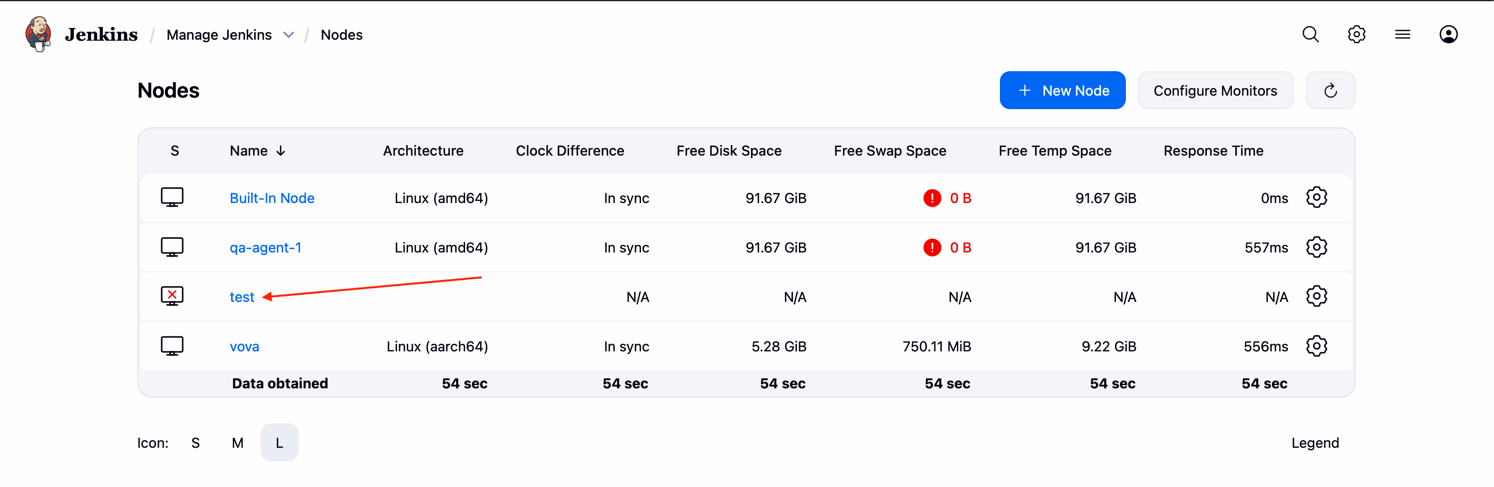
Manage Jenkins → Nodes.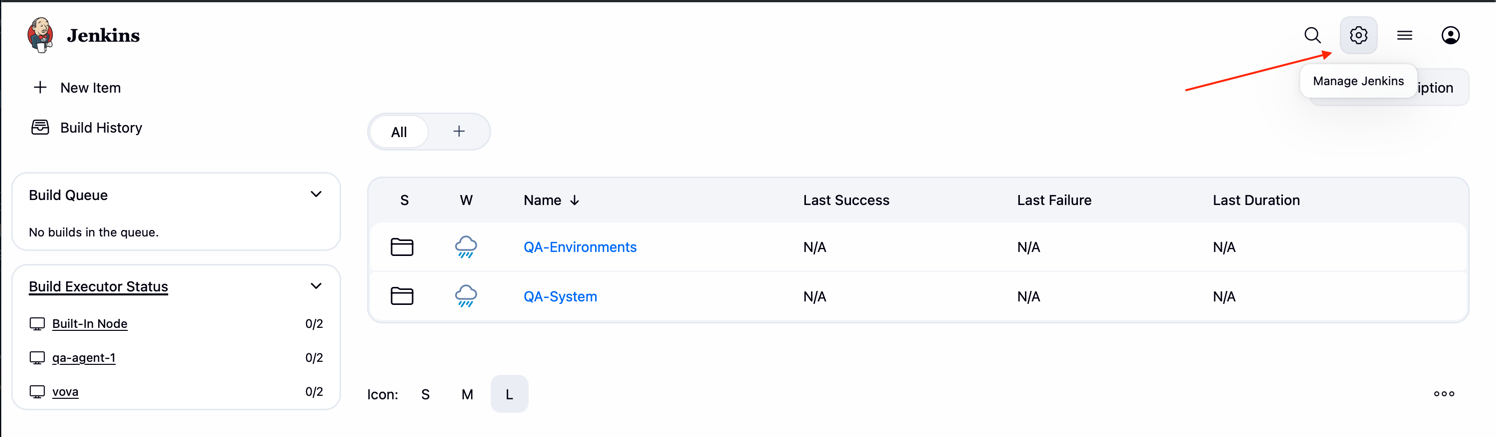
-
Create a node (or open an existing one):
-
New node → Node name: any name, type: Permanent Agent → set Remote root directory (e.g.,
/home/jenkins/agent- this path will be mapped into container) and labels(qaby default). -
Launch method: Launch agent by connecting it to the controller.
-
Save.
-
-
Open the node and find Run from agent command line.
 The page shows the agent command: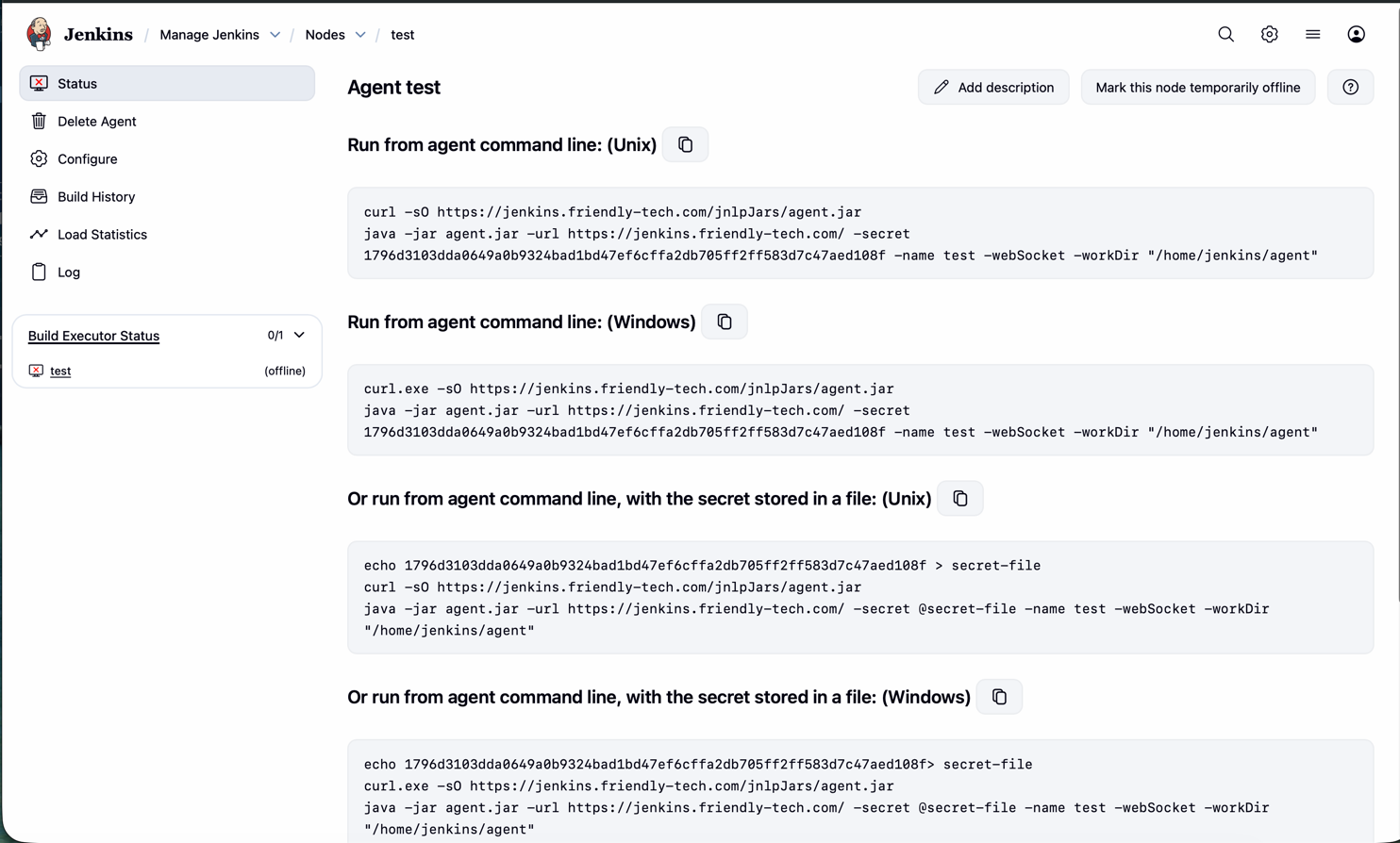
curl -sO https://jenkins.friendly-tech.com/jnlpJars/agent.jar; java -jar agent.jar -url https://jenkins.friendly-tech.com/ -secret <SECRET> -name <agent> -webSocket -workDir "/home/jenkins/agent" -
Copy
<agent>asJENKINS_AGENT_NAMEand<SECRET>asJENKINS_AGENT_SECRETfor your.env.
Example: agent docker-compose.yml
services:
  jenkins-agent:
    image: hub.friendly-tech.com/qa-jenkins/qa-agent:latest
    container_name: jenkins-qa-agent
    restart: unless-stopped
    env_file: .env
    user: "0:0"
    volumes:
      - ./data-agent:/home/jenkins/agent
      - /var/run/docker.sock:/var/run/docker.sock
      # Environments live under /opt/qa-envs on the host
      - /opt/qa-envs:/opt/qa-envs
    command: >
      -url ${JENKINS_URL}
      ${JENKINS_AGENT_SECRET}
      ${JENKINS_AGENT_NAME}
    network_mode: host
    # For non-host networking:
    # ports: []
    # networks: [jenkins_network]

    # networks:
    #   jenkins_network:
    #     driver: bridge