Keycloak Role & Domain Mappers
Whatever the login type — ldap, windows or saml — the backend requires the same three claims on every token, and refuses the login if any of them is missing or unknown:
-
portal-type— which portal the token is for (sc/mc), -
user-group— the application user-group (role) name, and -
domain— the application domain name (Super domain= full access,domainId = 0).
This page is the single, login-type-neutral procedure for producing them.
It is shared verbatim by the ldap and windows login types — both use the same realm, the same LDAP federation and the same mappers, and differ only in how Keycloak authenticates the user (the login form vs.
silent Kerberos / SPNEGO).
Configure it once per realm and it applies to whichever login type that portal uses.
1. Prerequisites
Whichever mode you pick, the following must already exist — from your login type’s setup guide:
-
A realm per portal (e.g.
oneiot-sc,oneiot-mc) with a confidential OIDC client. See LDAP Login via Keycloak (OIDC) or Windows (AD / Kerberos) SSO for the realm and client setup. -
LDAP User Federation connected to Active Directory. This is what authenticates the user and supplies
preferred_username, in both modes. -
Mode B only: a group mapper on the federation, with the AD groups synced into Keycloak (User federation > the provider > Mappers > the group mapper > Action → Sync LDAP groups to Keycloak). The groups must be visible under Groups before their translation attributes can be set, and each user must be in one role group and one domain group.
2. Choose a mode
How the user-group and domain claims are produced depends on whether the deployment needs more than one application user-group or more than one domain.
Pick one mode per realm and configure all three claims accordingly — the two modes are not mixed.
| Mode | Use when | How the claims are produced |
|---|---|---|
Every SSO user should land in the same application user-group and in the super domain. No per-user role or domain distinction is needed. |
All three claims are Hardcoded claim mappers, exactly as |
|
Different users must land in different user-groups, different domains, or both. |
|
|
A missing claim blocks the login — in both modes
This is deliberate for |
|
Never configure both modes for the same claim
A Hardcoded claim mapper and a User Attribute mapper carrying the same |
3. Mode A — Single user-group and domain (hardcoded claims)
Add three Hardcoded claim mappers to the client’s dedicated scope (Clients > your client > Client scopes > <client>-dedicated > Add mapper > By configuration > Hardcoded claim).
Field-by-field, they are identical to the portal-type mapper described in
portal-type (Hardcoded claim); only the name and value differ.
| Token Claim Name | Claim value | Notes |
|---|---|---|
|
|
Always hardcoded, in both modes. |
|
The application user-group every SSO user should get, e.g. |
Must already exist in the backend database for that portal (Settings > User groups). It is never created automatically. |
|
|
Resolves to |
Set Claim JSON Type to String and Add to ID token / Add to access token to On for all three, then verify with Step 3 — Verify the claims without logging in — the check is the same in both modes.
In this mode the AD groups need no translation attributes, so Mode B’s Steps 1 and 2 do not apply — only Step 3, to confirm the claims actually reach the token.
| Mode A is the shortest path to a working SSO login, and it is a valid permanent configuration for single-tenant deployments — not just a starting point. Moving to Mode B later only requires replacing the two hardcoded mappers, not reworking the realm. |
4. Mode B — Multi user-group / multi-domain
The rest of this page describes Mode B: each AD group carries an attribute holding the
application name, Keycloak emits it as a claim, and the backend resolves permissions and domain visibility from it.
Directory naming (AdminRole, SuperDomainRole) stays independent of application naming (admin, Super domain).
|
One user-group and one domain per user
Both claims are single-valued: the backend stores one |
|
The claim value must exactly match a name in the backend database
The backend matches claim values by name: the |
4.1. Step 1 — Translation attributes on groups
This is where the AD group name is translated into the application name. Each group carries one attribute; the attribute name decides which claim it feeds.
| AD group | Attribute key | Attribute value |
|---|---|---|
|
|
|
|
|
|
|
|
|
For each group: open Groups > the group > Attributes, click Add attributes, fill in the key and value, and click Save.
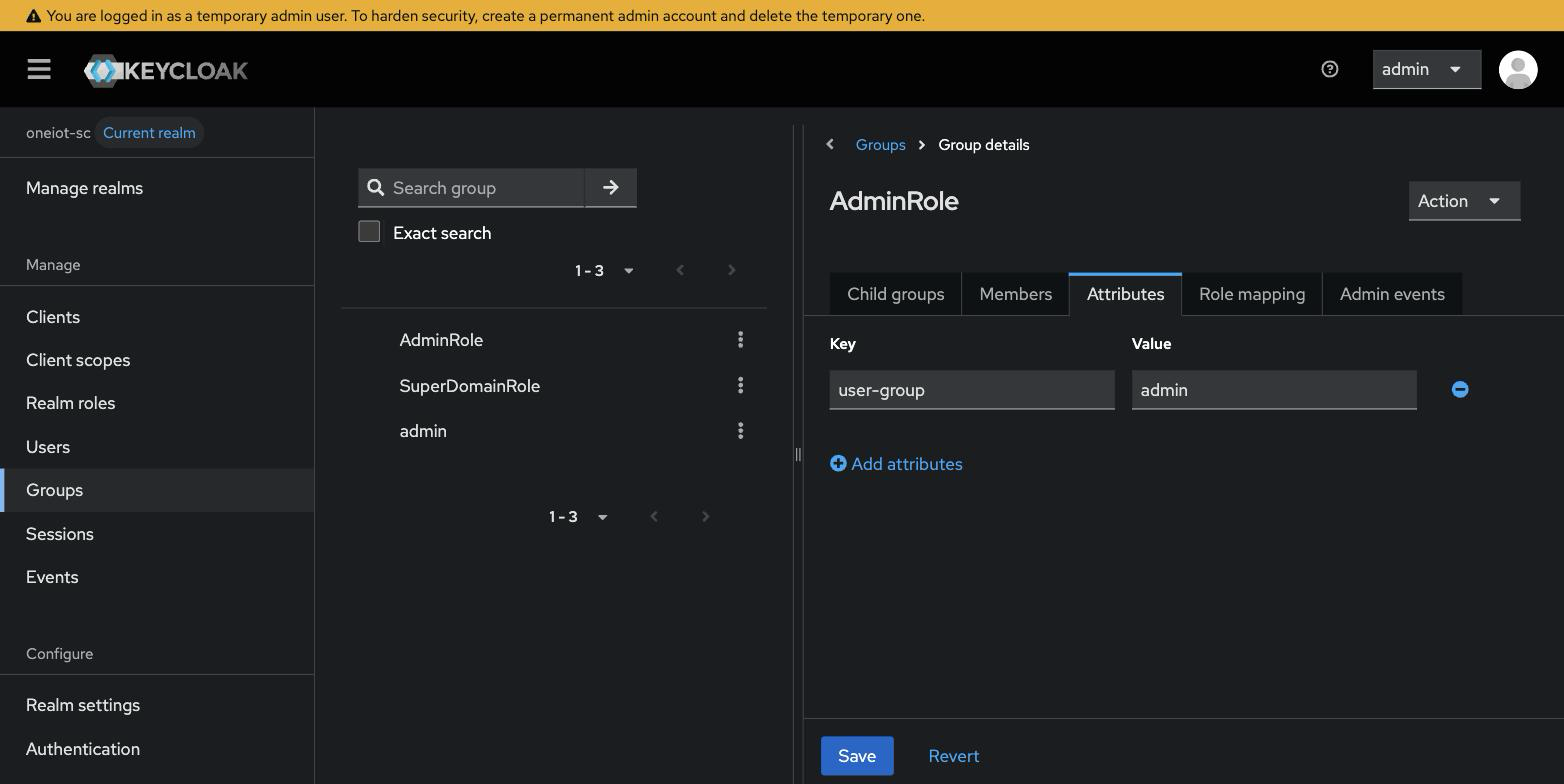
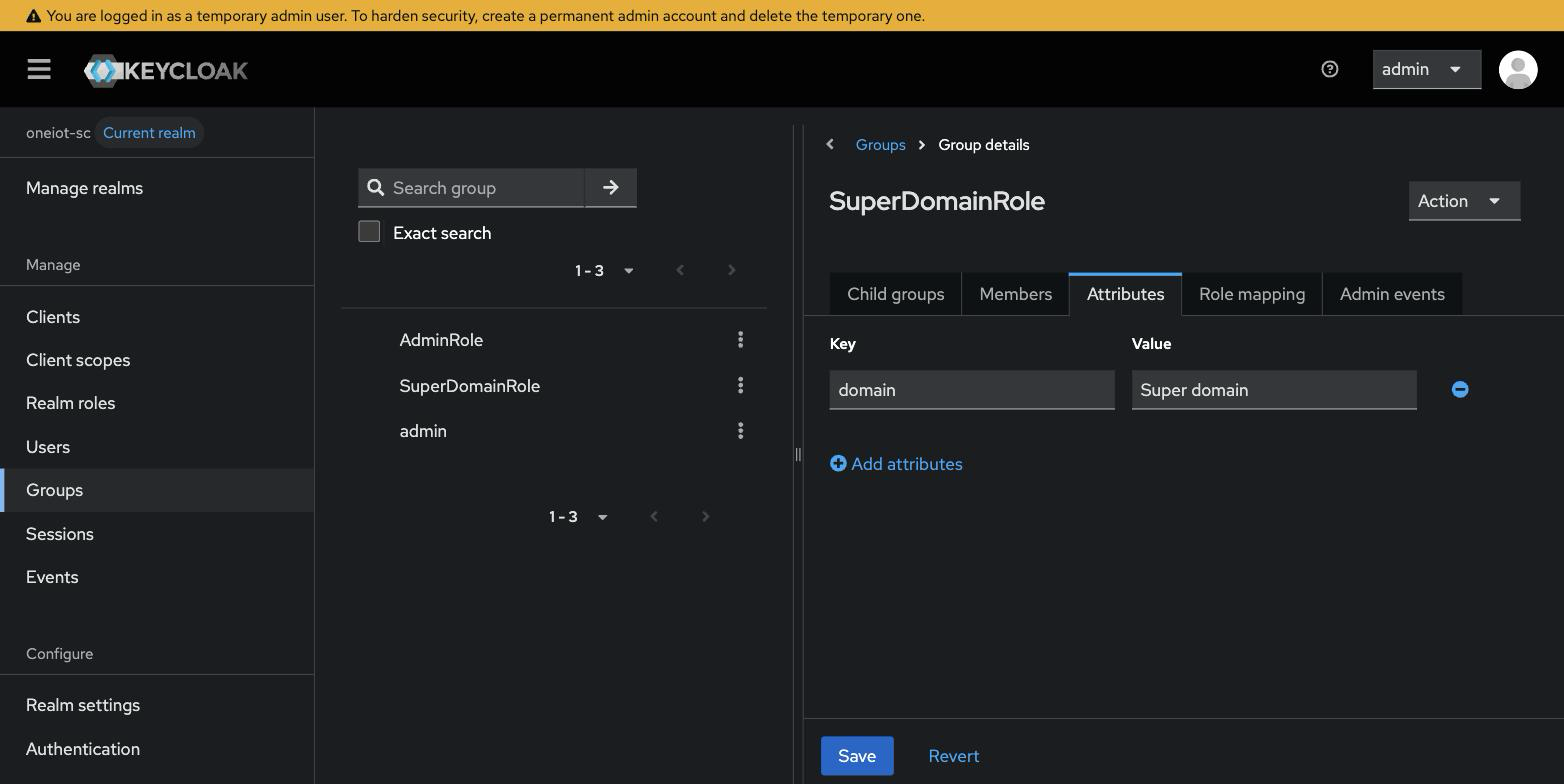
|
The value is the application name, spelled exactly
The attribute value must match a user-group or domain that exists in the backend database for that portal. |
This replaces the older arrangement in which AD groups had to be named exactly like the application user-groups. With the translation attribute, directory naming and application naming are independent.
4.2. Step 2 — Protocol mappers (per client)
The ID token must carry three custom claims: portal-type, user-group, and domain. The
username arrives in the standard preferred_username claim and needs no mapper. Add the
mappers to the client’s dedicated scope, in each realm.
-
Switch to the target realm and open Clients > your client > Client scopes.
-
Click the client’s dedicated scope — the first row, described as "Dedicated scope and mappers for this client".
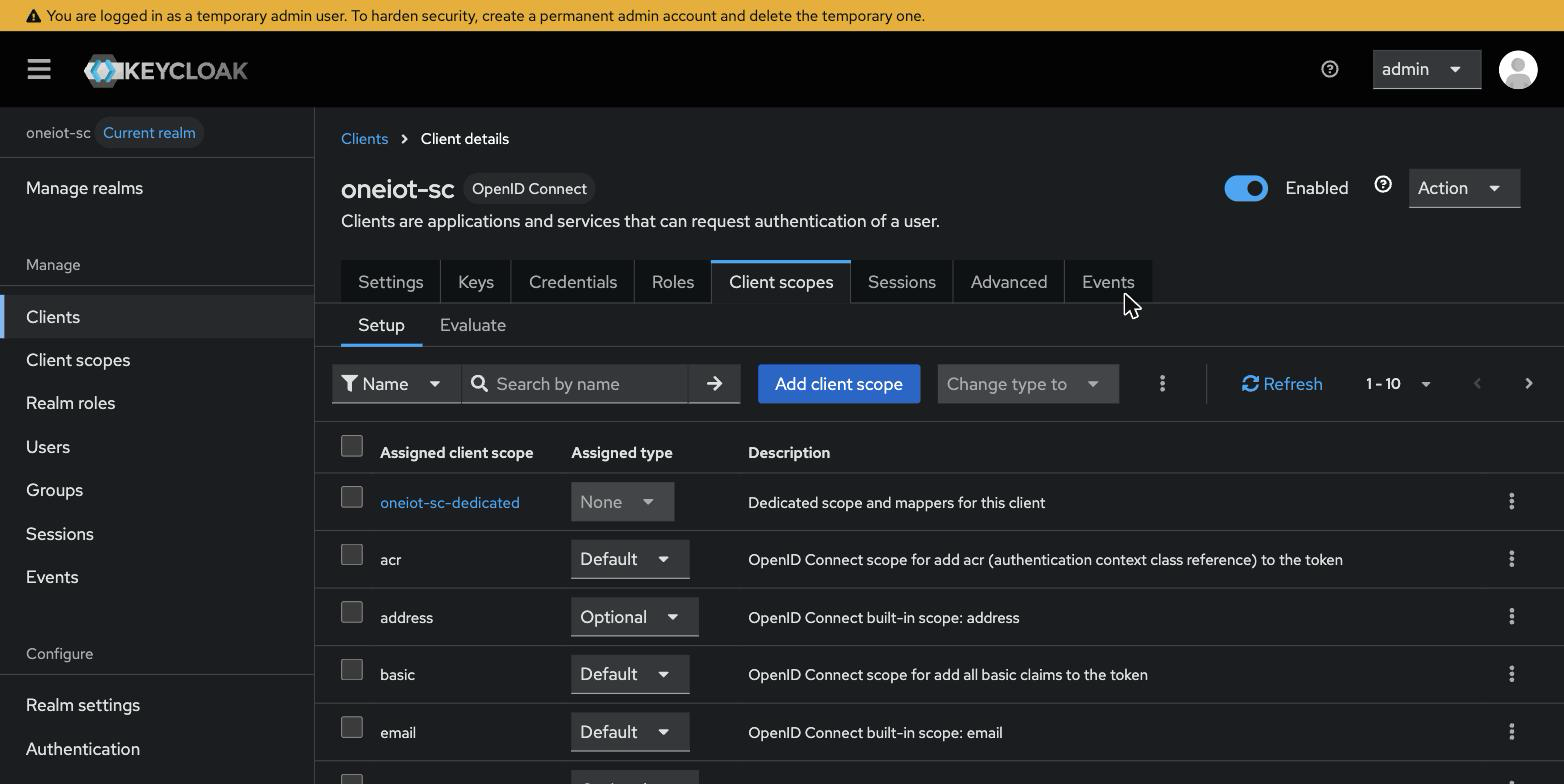
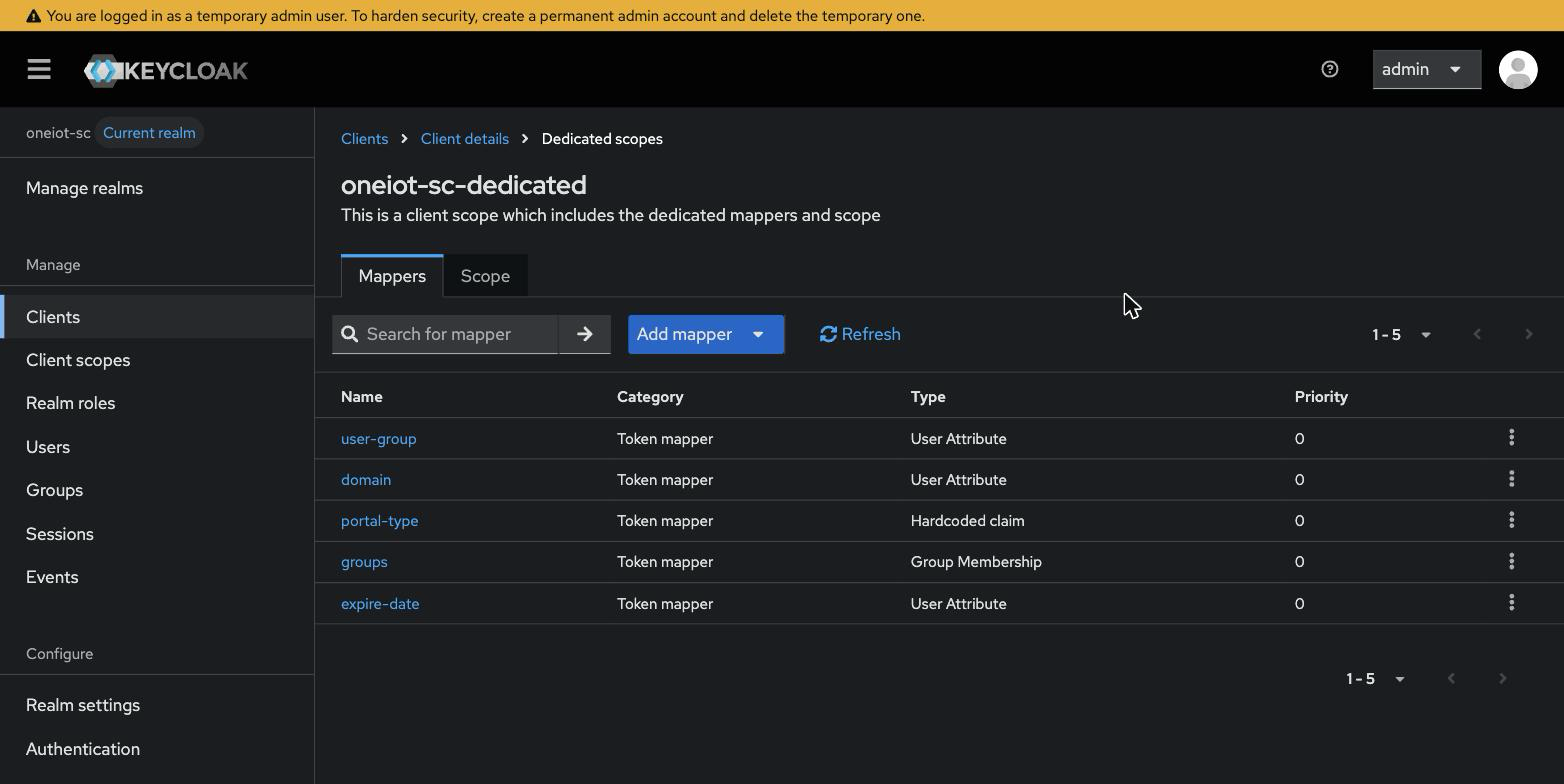
-
Click Add mapper > By configuration and create the mappers below.
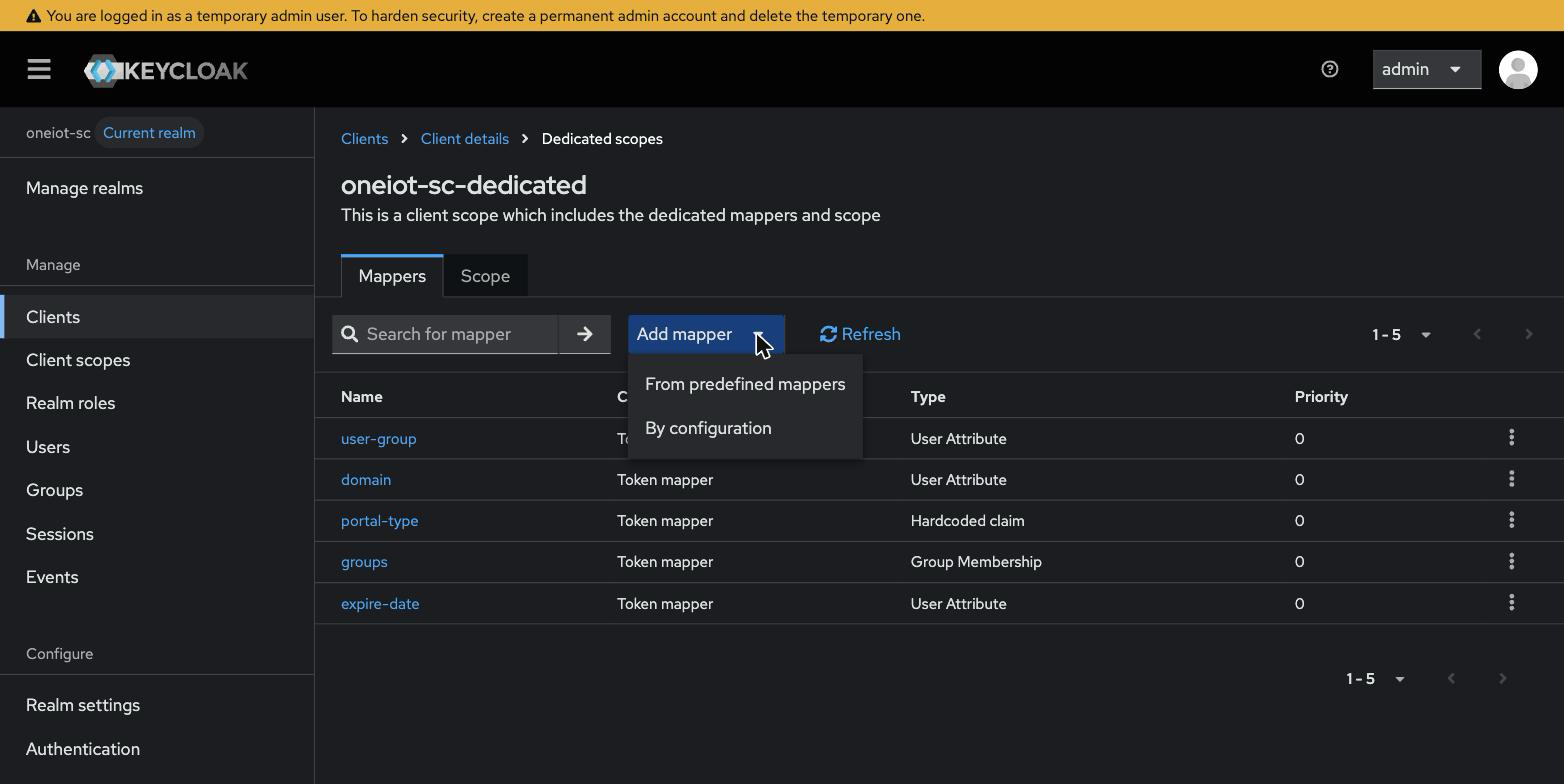
|
Remove any hardcoded
user-group / domain mappers firstThese mappers replace the Mode A ones.
If mappers with the |
4.2.1. portal-type (Hardcoded claim)
| Field | Value |
|---|---|
Mapper type |
|
Name |
|
Token Claim Name |
|
Claim value |
|
Claim JSON Type |
|
Add to ID token |
|
4.2.2. user-group (User Attribute)
Both remaining mappers use the same type, User Attribute, and differ only in the name. In the type picker, scroll down to User Attribute — not User Client Role or User Property.
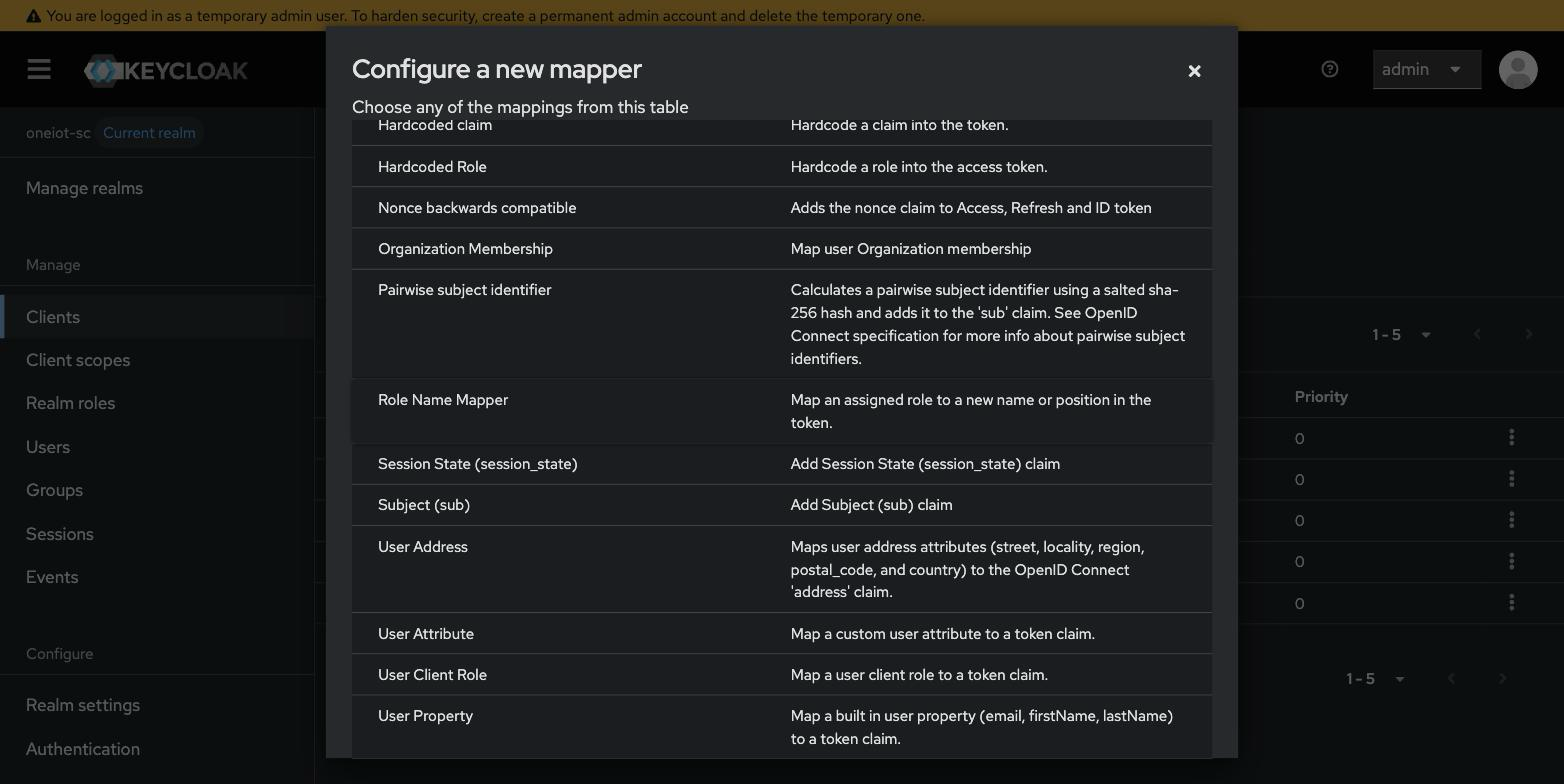
| Field | Value |
|---|---|
Mapper type |
|
Name |
|
User Attribute |
|
Token Claim Name |
|
Claim JSON Type |
|
Add to ID token |
|
Add to access token |
|
Multivalued |
|
Aggregate attribute values |
|
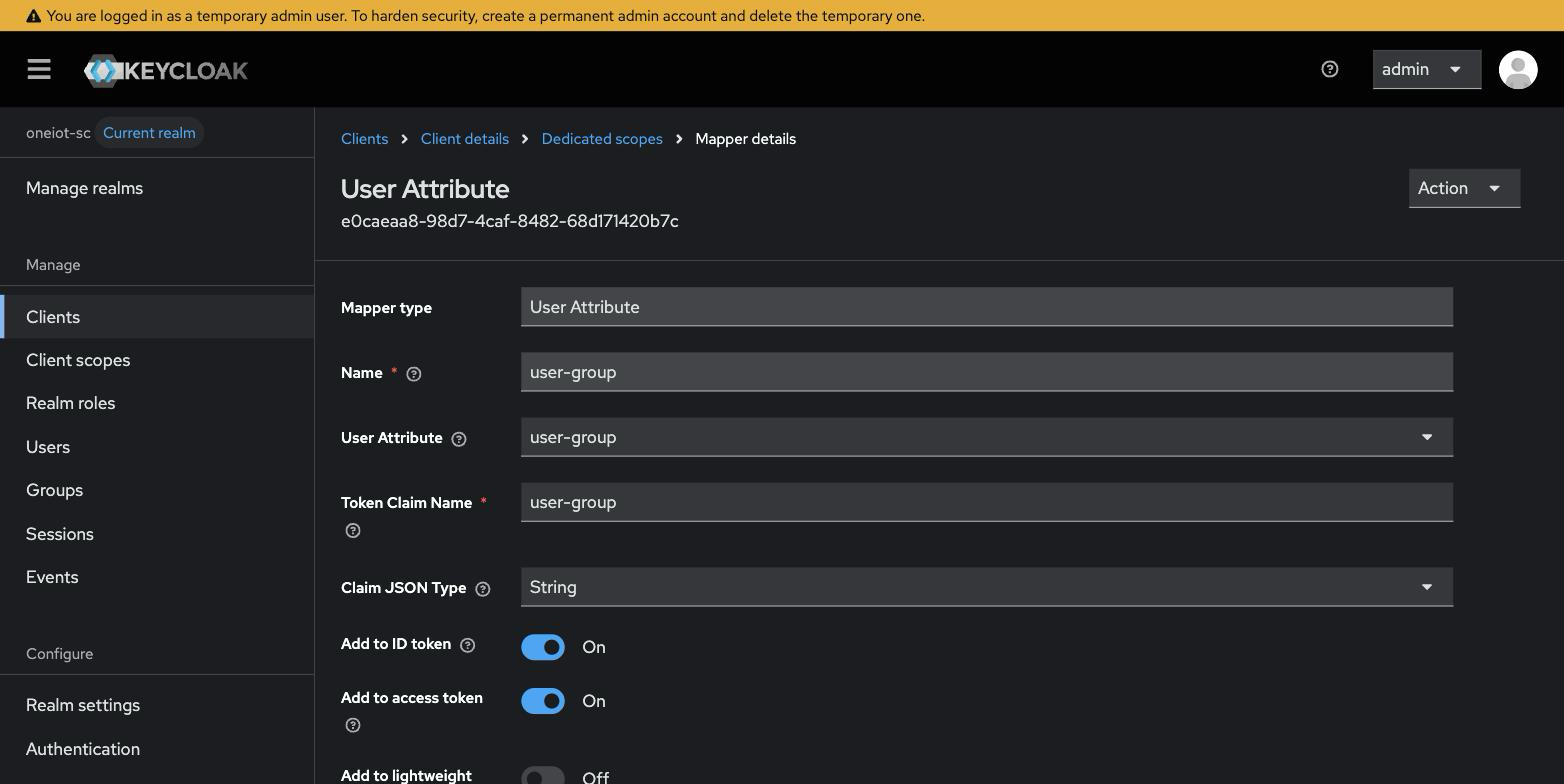
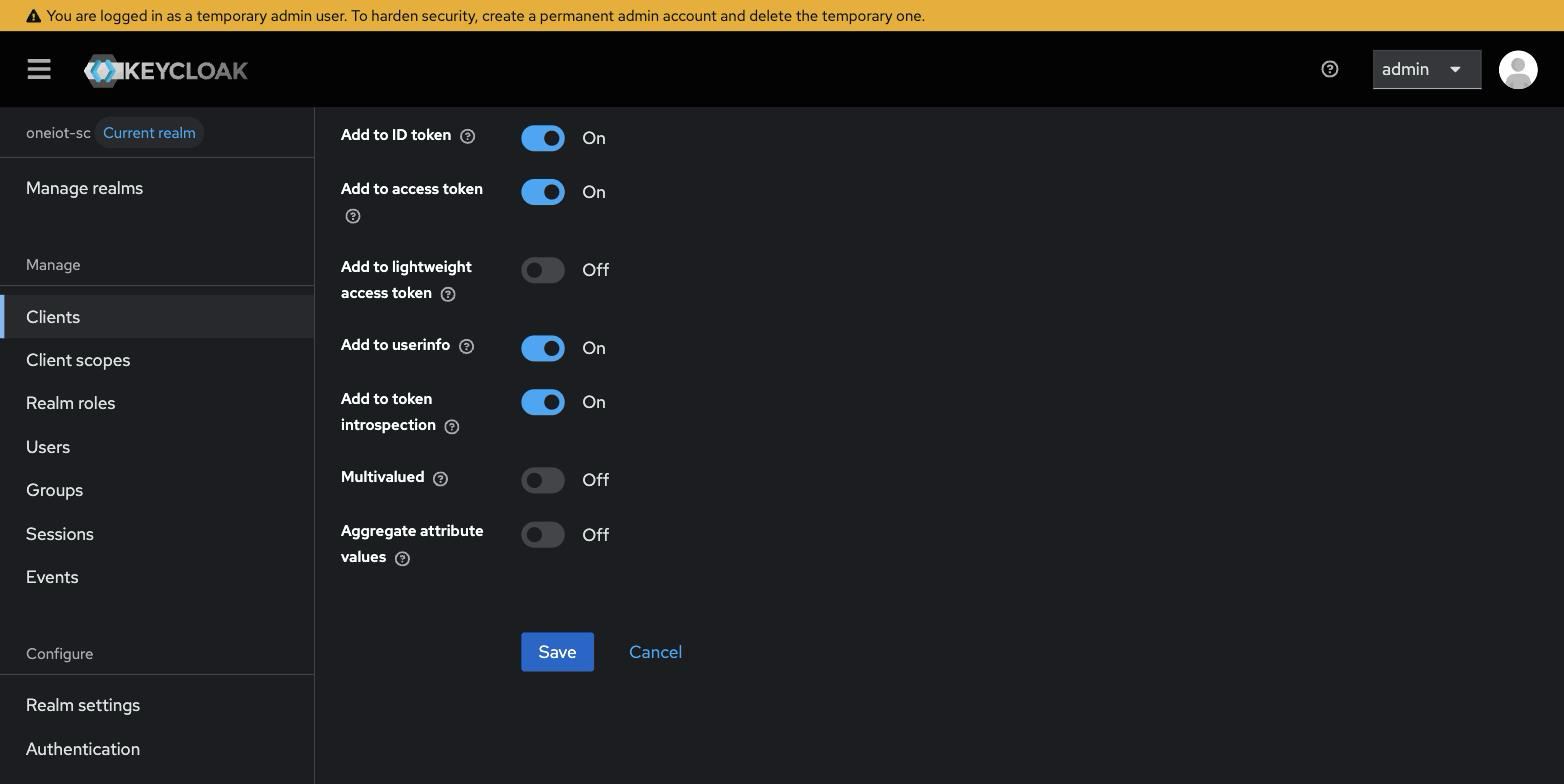
|
Why Multivalued and Aggregate stay off
Role and domain are one value per user. With Aggregate attribute values off, Keycloak returns the value of the first group that carries the attribute and skips groups that do not — exactly the required behaviour. Leaving Multivalued off keeps the claim a plain string rather than an array. |
4.2.3. domain (User Attribute)
Identical to the previous mapper, with domain substituted everywhere.
| Field | Value |
|---|---|
Mapper type |
|
Name |
|
User Attribute |
|
Token Claim Name |
|
Claim JSON Type |
|
Add to ID token |
|
Add to access token |
|
Multivalued / Aggregate attribute values |
|
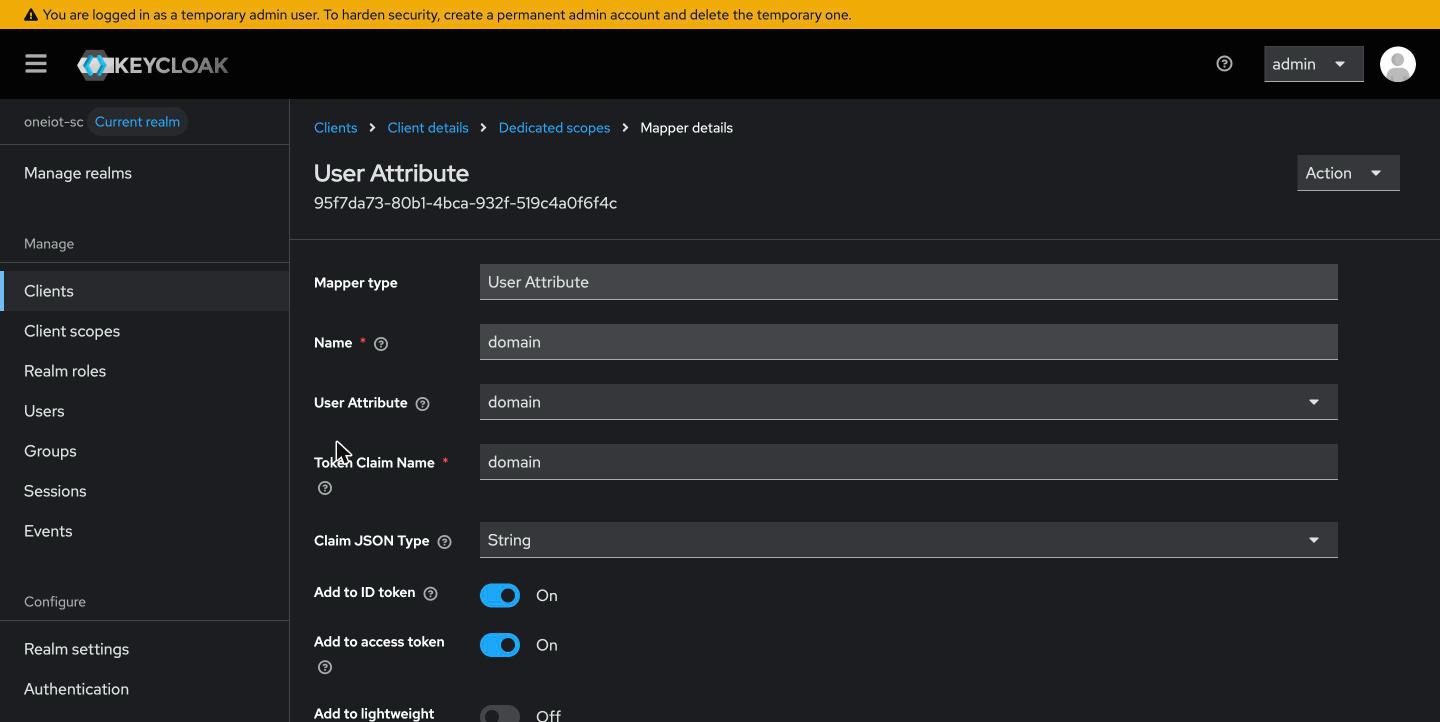
The Token Claim Name values must be exactly portal-type, user-group, and
domain — the backend expects these fixed names and has no override for them.
The claim
values come from the group attributes configured in
Step 1 — Translation attributes on groups and must match names that exist in the backend database.
|
4.3. Step 3 — Verify the claims without logging in
Keycloak can assemble a token for any user from the Admin Console, which verifies the whole chain without disturbing anyone’s session.
-
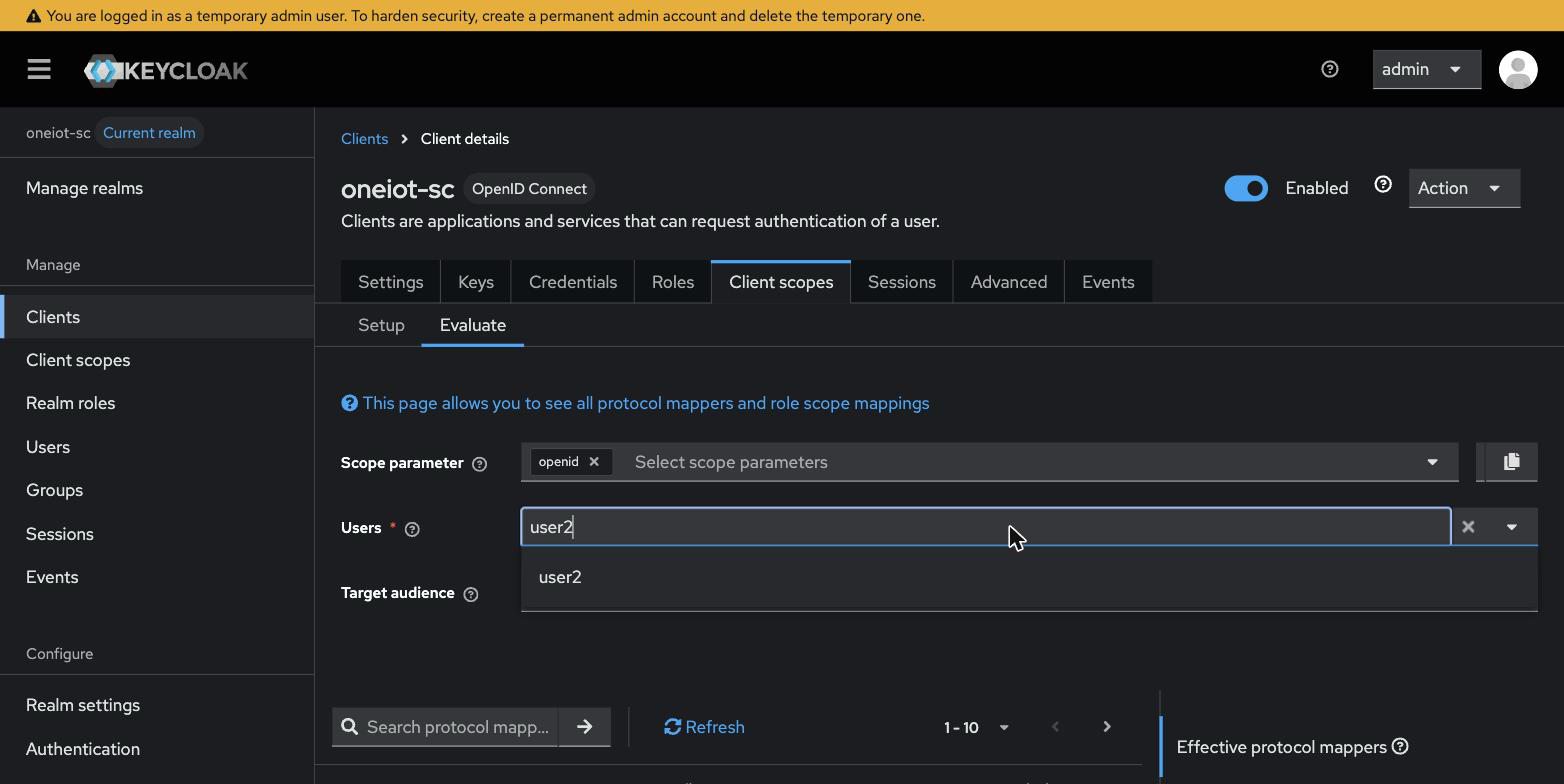
Open Clients > your client > Client scopes > Evaluate.
-
Start typing a login in the Users field and pick the user from the suggestions.
-
On the right, click Generated ID token.
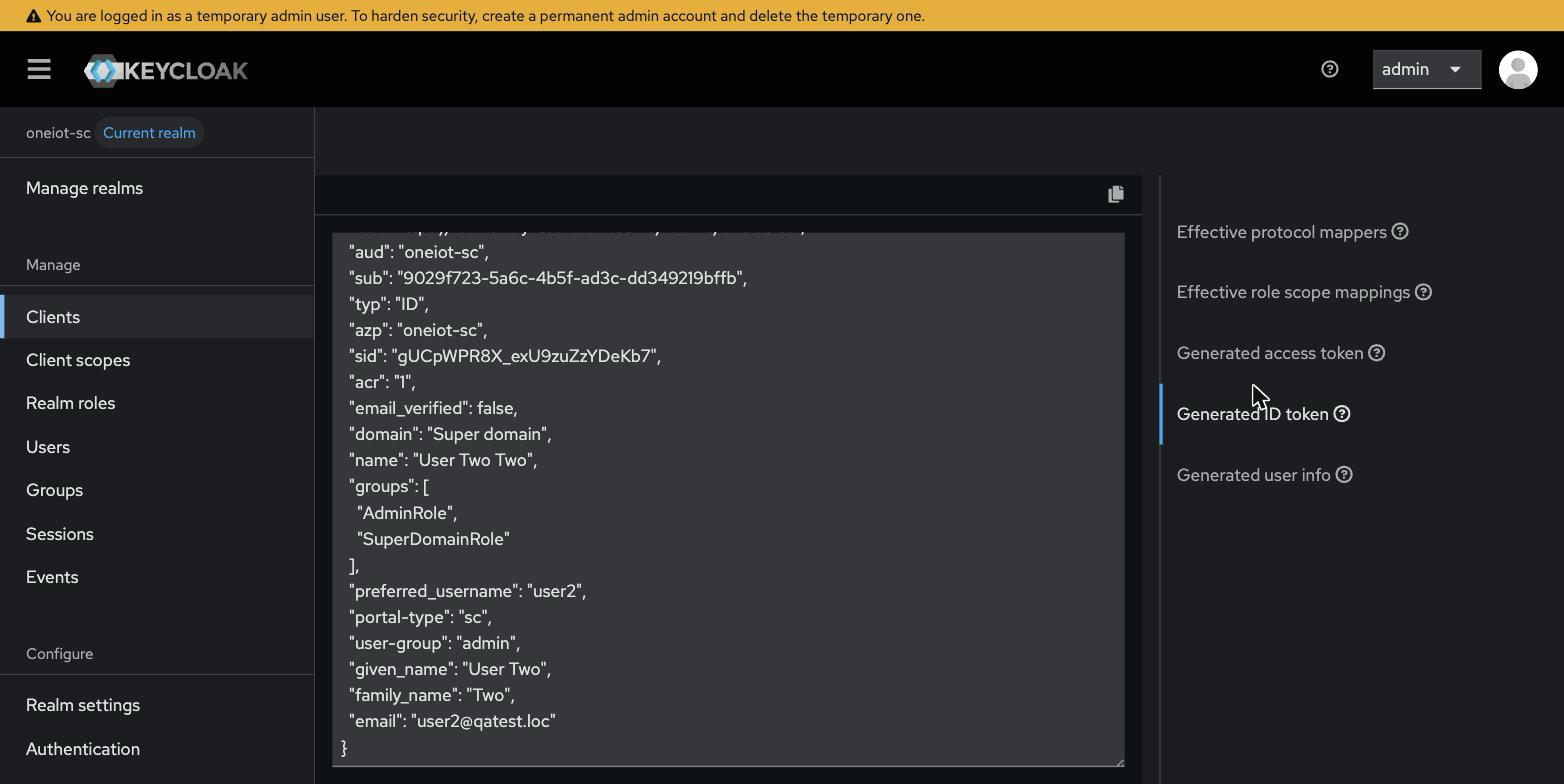
The configuration is correct when both claims are present as plain strings:
"domain": "Super domain",
"user-group": "admin",
An array (["admin"]) instead of a string means Multivalued is still enabled on the mapper.
|
|
Diagnose from the token backwards
Work the chain in this order: the generated ID token (Client scopes → Evaluate), then the user’s Groups tab, then the group’s Attributes tab (Step 1), then the federation’s group mapper. The first step that shows the wrong value is the layer that is broken. |
5. Checklist
Mode A — single user-group and domain:
-
Three Hardcoded claim mappers on the client’s dedicated scope:
portal-type,user-group,domain. -
The hardcoded
user-groupvalue exists in the backend database for that portal; thedomainvalue isSuper domainor an existing domain name. -
No User Attribute mappers for
user-group/domainleft on the client. -
Evaluate shows all three claims as plain strings (Step 3).
Mode B — multi user-group / multi-domain:
-
AD groups synced into Keycloak and visible under Groups.
-
A
user-groupattribute set on each role group, and adomainattribute on each domain group (Step 1); values match names that exist in the backend database for that portal. -
Every user is in exactly one role group and exactly one domain group — a user missing either one is rejected at login.
-
Protocol mappers on the client’s dedicated scope (Step 2):
user-groupanddomain(both User Attribute, Multivalued / Aggregate off) plusportal-type(hardcodedsc/mc). -
No leftover Hardcoded claim or Group Membership mappers for
user-group/domain. -
Evaluate shows both claims as plain strings (Step 3).
6. Related documentation
-
LDAP Login via Keycloak (OIDC) — the
ldaplogin type: backend variables, TLS trust, OIDC client, and LDAP User Federation. -
Windows (AD / Kerberos) SSO — the
windowslogin type: the same OIDC/Keycloak flow with silent Kerberos SSO. -
Keycloak Deployment — deploy the Keycloak container (Docker, storage, TLS, network, HA).