Supported Protocols
The IoT Emulator supports multiple IoT communication protocols.
LWM2M (Lightweight M2M)
LWM2M is a device management protocol designed for IoT devices, built on top of CoAP.
Features
-
Device registration and lifecycle management
-
Resource observation and notification
-
Firmware update support
-
Bootstrap support
Default Ports
-
CoAP over UDP: 5683 (unsecured), 5684 (DTLS secured)
-
CoAP over TCP: 5883 (unsecured), 5884 (TLS secured)
The transport (UDP/TCP) and concrete port are chosen in the Protocol Options tab.
Protocol Options
These are the defaults used by the emulator (from lwm2m_gui.properties); the Protocol Options tab exposes many more advanced fields (OSCORE, firmware/software update timing, DTLS CID, content format, thread counts, etc.).
| Option | Default | Description |
|---|---|---|
Version |
1.0 |
LWM2M Enabler version — |
Transport |
UDP |
|
Registration Lifetime |
6000 |
Registration validity in seconds ( |
Registration Timeout |
600 |
Seconds to wait for a registration response ( |
ACK Timeout |
10000 |
CoAP acknowledgment timeout in ms ( |
Bootstrap |
false |
Register against a bootstrap server before the management session ( |
Notification Type |
CON |
|
Many-device runs (scale mode)
One container can hold thousands of devices with scale mode, per-device PSK identities and per-device X.509 certificates minted from a CA. See LwM2M Scale Mode and Load Testing. A server-Created instance now also honours WRITE-ATTRIBUTES (it was dropped before).
X.509 client certificate chain
In the X.509 security mode over UDP, the device sends its certificate chain in the DTLS handshake (RFC 5246 §7.4.2), not only its own certificate.
-
Keystore device: the chain of the keystore entry, without a self-signed root. A keystore entry with only the device certificate sends only that certificate.
-
EST device: the EST certificate and the
/crtsCA that issued it, unless that CA is a self-signed root. CAs above the issuing CA are not sent, so the server must trust the issuing CA or its direct issuer. -
If the Security resource
/0/x/3holds a certificate other than the first certificate of that chain, for example one written by the bootstrap server, the device sends that certificate only.
EST enrollment (RFC 9148)
A LWM2M device over UDP with DTLS and the X.509 security mode can enroll a certificate over EST-coaps (RFC 9148). The emulator uses the EST certificate for its X.509 DTLS connection to the bootstrap server and to the LWM2M server.
What the device does
-
The device connects to the EST server with its factory certificate.
-
The device reads the trust anchors from
/crts. -
The device sends a certificate request to
/sen. The request key is a new P-256 key. -
The EST certificate replaces the factory certificate for the bootstrap server and the LWM2M server. If the bootstrap server writes an X.509 Security instance without the client certificate
/0/x/3or the private key/0/x/5, the device puts the EST certificate or key there when the bootstrap server writes the instance, before the bootstrap finishes. If the bootstrap server writes/0/x/3or/0/x/5itself, the device keeps those values, also after the bootstrap and at later starts. A device without a valid EST certificate leaves the instance as the bootstrap server wrote it. -
A running device restarts once after a successful enrollment, to connect with the new certificate.
-
At 50 to 66 percent of the certificate lifetime, the device renews the certificate with
/sren. The emulator does this automatically.
If enrollment fails at the start, the emulator reports the failure to the device lifecycle observers as an event, never as an error. The device keeps running with its factory certificate, and fleet runners keep tracking the device. The emulator retries according to the schedule.
Factory credential
The factory credential comes from the device X.509 keystore.
-
The emulator uses the keystore entry whose alias equals the endpoint name.
-
If no such entry exists, the emulator uses the entry named by
authCertAlias. -
The common name (CN) of the certificate must equal the endpoint name. Otherwise enrollment stops with
factory-cn-mismatchbefore any network traffic. -
If the keystore is missing or has no usable entry, enrollment stops with
no-keystore. -
If the factory key is not an elliptic curve (EC) key, enrollment stops with
unsupported-factory-key. A REST request answers409 unsupported-factory-key.
The certificate request CN is always the endpoint name.
EST options
| Option | Default | Description |
|---|---|---|
|
(empty) |
EST server address, |
|
(empty) |
SHA-256 of the DER form of the EST server certificate. Use 64 hexadecimal digits. Upper case and |
|
|
Test fault for the first enrollment. |
You can set the options in two ways.
| Scope | How |
|---|---|
Fleet |
|
One device |
|
Rules for the options:
-
A per-device value wins over the fleet value.
-
An empty per-device value removes the override. The fleet value applies again.
-
You cannot turn EST off for one device when the fleet value contains an address.
-
Per-device overrides are not saved. They are lost when the emulator process restarts.
-
A new address pushed to a running fleet applies at the next device start or at the next REST enrollment.
-
In passive-runner mode, the emulator creates and starts devices together. You cannot set a per-device override before the first start.
-
A change of the effective options clears a terminal state and resets the backoff. See schedule.
-
A change of the EST address also discards the current EST certificate and the stored trust anchors.
-
An EST certificate counts only for the EST address that issued it. If the effective
lwm2m.est.urichanges or becomes empty, the device uses the factory certificate. The device enrolls again at the next start. -
A changed address, pin, or fault applies at the next start, even when a renewal is pending.
Server trust
The emulator decides for each exchange how it recognizes the EST server. The status field trustMode shows the weakest mode of the operation that issued the current certificate.
| Mode | Meaning |
|---|---|
|
A pin is set and the SHA-256 of the server certificate equals the pin. If the pin does not match, the handshake fails with |
|
No pin is set. The server certificate chain is valid against the trust anchors from the |
|
No pin is set and the first contact has no stored trust anchors, or the chain does not match the stored anchors. The emulator accepts any server. |
Without a pin, EXPLICIT_TA is a label for observation. The emulator does not reject a server that is only UNPINNED.
The emulator writes one warning for each exchange in this state.
-
event=est-server-unpinnedmeans that the emulator has no stored trust anchors. -
event=est-server-ta-mismatchmeans that the emulator has anchors, but the server does not match them.
Each exchange of an operation uses the trust anchors stored when the operation started. The /crts response of a successful operation replaces the stored anchors.
Automatic schedule
The emulator runs one pending EST task for each endpoint. A REST operation cancels the pending task and plans the next task from its own result.
| Result | Next automatic operation |
|---|---|
|
|
|
|
5.03 from the server |
The same operation after the Max-Age, limited to 30 s to 1 h. The default is 60 s when the server sends no Max-Age. |
4.03 |
|
4.03 |
|
Timeout, handshake failure, an unexpected internal error, or a 5.xx code other than 5.03 |
The same operation after the backoff. The backoff starts at 60 s, doubles, and stops at 1 h. |
Other refusal, validation error, |
No retry. If a valid certificate exists, |
A |
|
More rules:
-
At the first start, a device without a valid EST certificate runs one synchronous
/senbefore it registers. Each EST operation blocks for at most 3 × 10 s:/crts,/senor/sren, and one/crtsre-fetch. -
A recorded plan survives
stopandstart. The emulator arms the recorded operation again at the later of now and the recorded time. -
A recorded
/srenthat is past the certificatenotAfterbecomes/sen. -
A terminal state is cleared only by a REST enrollment or by a change of the effective EST options.
-
A
/senfailure never stops the device. The device uses the factory certificate. -
A start-time failure, including
endpoint-case-collision, reaches the device lifecycle observers as an event (onEvent), never as an error (onError). -
A configuration refusal (
tcp-unsupported,invalid-uri,invalid-pin,invalid-fault) is reported once for each effective settings value, not at every start. If the settings change, the same refused value is reported again. This includes a REST fix that you revert later. The warningest-failedis unchanged. -
If the endpoint of a device changes, for example after bootstrap, the emulator cancels the pending EST task of the previous endpoint.
-
If an EST certificate has expired or no longer matches the EST address, the device replaces it with the factory certificate in every X.509 Security instance that still carries it. This includes instances that the bootstrap server wrote.
-
An unexpected internal error is recorded as
TIMEOUT unexpected-error. The emulator retries after the backoff. A REST request answers502 TIMEOUT unexpected-error.
State lifetime
The emulator keeps the EST state for each endpoint until the Java process ends. The endpoint name is compared in lower case.
-
The state survives a device reboot,
/api/stop,/api/reset,/api/init, and the re-creation of the device. -
A restart of the emulator process loses the state. A new
/senon the same UTC day getsenroll-quota, and the device uses the factory certificate until the next UTC midnight. -
If two devices use endpoint names that differ only in letter case, the second device gets
endpoint-case-collision.
Out of scope
-
LWM2M over TCP with TLS. A REST request for such a device answers
409 tcp-unsupported. -
An EST address that the bootstrap server delivers. You must set
lwm2m.est.uriin the emulator. -
/skg,/skc, and/att.
Log events
| Event | Meaning |
|---|---|
|
An operation succeeded. Fields: |
|
An operation failed. Fields: |
|
The exchange had no pin and no stored trust anchors. |
|
The exchange had no pin, and the server did not match the stored trust anchors. |
|
A renewal did not move |
|
The emulator could not read the factory keystore. |
|
An internal error outside the EST error contract. Level ERROR. Fields: |
The log never contains a key, a certificate request, or a certificate body.
Known limits
| Read these limits before you use EST outside a closed test network. |
-
The Scandium library 2.0.0-M16 accepts a ServerKeyExchange message without a signature (the behavior of CVE-2021-34433). An attacker on the network path can replay the public EST server certificate and pass the pin. The pin detects a wrong or misconfigured server. It does not stop an attacker. This is accepted for an emulator.
-
The emulator copies the EST private key into the Security resource
/0/x/5, as it does for the keystore path. You can read the key withGET /api/devices/{clientId}/parameters.POST /api/snapshot/savewrites the key in plain text. The emulator REST API has no authentication. Never publish port 8556. -
During an EST outage, each first device start in the passive runner blocks for up to 3 × 10 s on the registration pool. The pool has one thread for each CPU core.
-
The registration timeout of the passive runner (
lwm2m.regtimeout) starts to count while a device still waits in this queue. If many devices wait, the runner can recycle a device whose start has not run yet. The code default is 60 s. The shipped fileemulator-assembly/configuration/lwm2m_gui.propertiessets 600 s. -
While the EST server can be unreachable, raise
lwm2m.regtimeoutto at least N × 10 s / cores. N is the number of devices that start at once. You can also start the fleet in smaller batches. The passive runner itself is unchanged. -
The integration test is pinned to the
ft-est-servicecommit9815176(version 5, production cut). The server returns the tenant chains and the DTLS trust anchor from/crts. The server returns only the issued leaf from/senand/sren. The test covers thePINNED,UNPINNED, andEXPLICIT_TAmodes against the real server. -
The EST client accepts a reassembled response body of up to 64 KiB. This is an explicit Californium limit.
Testing
The integration test EstEnrollmentIT runs the client against a real ft-est-service container and a MySQL container.
Prerequisites:
-
Docker.
-
JDK 25. Set
JAVA_HOMEto a JDK 25.
To build the server image, follow these steps.
-
Create a clean worktree of the server commit:
git -C ~/Projects/ft-est-service worktree add --detach <tmp> 9815176 -
Check the worktree:
git -C <tmp> status --porcelain. The output must be empty. -
Build the image:
docker build --target runtime --label source.commit=$(git -C <tmp> rev-parse HEAD) -t ft-est-service:it-9815176 <tmp> -
Remove the worktree:
git -C ~/Projects/ft-est-service worktree remove <tmp>
To run the test, use this command from the repository root.
mvn -B -P est-it -pl lwm2m-emulator -am verify -Dsurefire.failIfNoSpecifiedTests=false| Option | Description |
|---|---|
|
Image name. The default is |
|
Full 40-character commit SHA that the image label |
|
The only way to skip the test. If Docker is not reachable and you do not set this option, the test fails. |
The failsafe summary must show Tests run: 8. The cells are I1 to I8. Cell I7 re-enrolls before the halfway point of the certificate against a CA with a one-day lifetime. The server answers 4.03 with the reason renew-too-early. The emulator plans the retry at the halfway point plus 60 s. Cell I8 runs a first /sen in UNPINNED mode, stores the /crts anchor, and then runs /sren in EXPLICIT_TA mode without an unpinned or trust anchor mismatch warning.
The test starts the server with these settings:
-
SPRING_PROFILES_ACTIVE=software-caandEST_CA_CUSTODY=SOFTWARE. Never use theproductionprofile with this combination, because the server refuses to boot. -
EST_COAP_SERVER_NAME=127.0.0.1. This value equals the host that the test dials. The test fails if the Docker host is not127.0.0.1. -
The
hsmhealth indicator is absent underSOFTWAREcustody.
The test retries the first exchange of a cell once after a TIMEOUT no-response result. The test logs event=est-it-first-exchange-retry cell=<cell> kind=TIMEOUT. A second failure fails the cell.
=== Package Management Object Simulation
The emulator simulates the device side of the OMA LwM2M package-management lifecycle for two standard objects:
-
Object /5 — Firmware Update (FOTA): models firmware package delivery and installation driven by Write (package or URI) and Execute (update).
-
Object /9 — Software Management (SOTA): models software package install, uninstall, and independent activation/deactivation.
On every server-driven Execute or Write, the enabler updates the relevant resource value and calls fireResourcesChange() on the Leshan BaseInstanceEnabler.
The Leshan client stack then emits a CoAP Observe NOTIFY to every server that holds an active observation on the changed resource.
A server that arms an observation before issuing the Execute therefore receives the state transition without polling — a static resource read is not sufficient.
Object /5 — Firmware Update
Object /5 is the OMA LwM2M Firmware Update object.
The emulator exposes instance /5/0.
| Resource | Name | Access | Role in emulator |
|---|---|---|---|
|
Package |
W |
Write triggers download state machine (binary payload); null/empty byte resets state machine |
|
Package URI |
W |
Write triggers CoAP or HTTP download; empty URI resets state machine |
|
Update |
E |
Execute triggers firmware update sequence (see table below) |
|
State |
R |
Update State (0 Idle, 1 Downloading, 2 Downloaded, 3 Updating); NOTIFY emitted on every change |
|
Update Result |
R |
Result code (0 Initial, 1 Updated successfully, 7 Invalid URI/timeout); NOTIFY emitted on every change |
| Step | /5/0/3 Update State |
/5/0/5 Update Result |
|---|---|---|
Immediately on Execute |
3 — Updating |
0 (transitional) |
After update completes (~5 s) |
0 — Idle |
1 — Firmware updated successfully |
A NOTIFY is emitted for /5/0/3 and /5/0/5 at each step.
When lwm2m.fw.exec.pause is set to a non-zero value, the emulator additionally simulates a device reboot after posting the final result.
Object /9 — Software Management (SOTA)
Object /9 is the OMA LwM2M Software Management object.
The emulator exposes instance /9/0.
| Resource | Name | Access | Role in emulator |
|---|---|---|---|
|
PkgName |
R |
Software package name; updated from URI filename on Install |
|
PkgVersion |
R |
Package version; extracted from the |
|
Package |
W |
Write triggers download state machine; drives Update State through 1 → 2 → 3 |
|
Package URI |
W |
Write triggers CoAP or HTTP download; drives Update State through 1 → 2 → 3 |
|
Install |
E |
Execute installs the package; drives Update State 4 (Installed) then back to 0 (Initial) |
|
Uninstall |
E |
Execute resets the state machine: Update State → 0, Update Result → 0 |
|
Update State |
R |
Package lifecycle state (integer); NOTIFY emitted on every change |
|
Update Result |
R |
Last operation result (integer); NOTIFY emitted on every change |
|
Activate |
E |
Execute sets Activation State to |
|
Deactivate |
E |
Execute sets Activation State to |
|
Activation State |
R |
Boolean; |
| Value | Name | When set by emulator |
|---|---|---|
0 |
Initial |
On Uninstall; as the final step of Install (after the Installed step) |
1 |
Download Started |
When package download begins (Write to |
2 |
Downloaded |
When package bytes are fully received |
3 |
Delivered |
When the package is ready for installation |
4 |
Installed |
Immediately after Execute |
| Resource | Verb | Resource changes | NOTIFY emitted for |
|---|---|---|---|
|
Install |
Update State: 4 (Installed) → 0 (Initial); Update Result: 2 (Successfully installed) → 0 (Initial); PkgName and PkgVersion updated from URI if Package URI is set |
|
|
Uninstall |
Update State: 0 (Initial); Update Result: 0 (Initial) |
|
|
Activate |
Activation State: |
|
|
Deactivate |
Activation State: |
|
|
The Install verb ( |
Activate and Deactivate flow
The Activate and Deactivate verbs are symmetric: they set /9/0/12 (Activation State) to true or false respectively and immediately call fireResourcesChange(12), causing one CoAP NOTIFY per invocation.
The Activate flow is shown below.
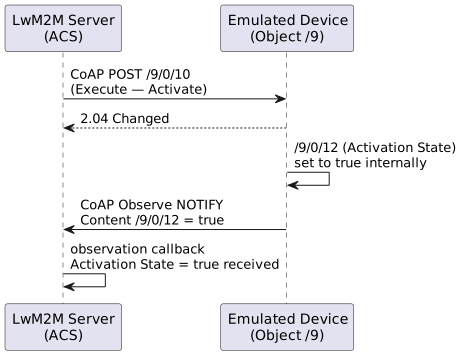
Deactivate (Execute /9/0/11) follows the identical pattern with Activation State set to false.
MQTT
MQTT is a lightweight publish-subscribe messaging protocol.
Protocol Options
The Protocol Options tab for MQTT exposes the fields below (from mqtt_gui.properties).
| Option | Default | Description |
|---|---|---|
Username |
(empty) |
MQTT broker username (optional) |
Password |
(empty) |
MQTT broker password (optional) |
QoS Level |
1 |
Quality of Service for publish/subscribe — |
Port |
1883 |
Broker port — |
CoAP (Constrained Application Protocol)
USP (User Services Platform)
USP (TR-369) is the next-generation protocol for device management, replacing TR-069.
Features
-
Controller-Agent architecture
-
Four Message Transfer Protocols (MTPs): STOMP, CoAP, WebSocket, MQTT
-
Protobuf message encoding
-
Bulk data collection
-
Configurable session handling, onboarding and TLS host-name verification
Default Ports
Each MTP has its own plain/secured port pair (selected in the Protocol Options tab):
| MTP | Plain | Secured |
|---|---|---|
STOMP |
61617 |
61618 |
CoAP |
5783 |
5784 (DTLS) |
WebSocket |
8025 |
4430 (TLS) |
MQTT |
18881 |
18882 (TLS) |
Protocol Options
| Option | Default | Description |
|---|---|---|
MTP |
STOMP |
Message Transfer Protocol — |
Endpoint ID |
auto |
Agent endpoint identifier ( |
Protocol Version |
1.0 |
USP protocol version — |
MQTT QoS |
1 |
QoS for the MQTT MTP — |
MTP Ping Interval |
0 |
Seconds between MTP keep-alive pings, |
MQTT Connect Retry Time |
5 |
Minimum delay (sec) between MQTT reconnect attempts. Maps to |
MQTT Connect Retry Max Interval |
30720 |
Maximum delay (sec) for the exponential reconnect backoff. Maps to |
MQTT Connect Retry Interval Multiplier |
2000 |
Backoff multiplier in units of 0.001 (informational; the underlying Paho v5 client uses its own exponential schedule between min and max). Maps to |
Ookla speed test (Tozed X_T_SpeedTest) |
false |
Declares the vendor Ookla speed test in the device tree, turning the agent into a Tozed-like CPE. Maps to |
| When the USP agent is bound to MQTT, an unexpected disconnect triggers automatic reconnect with the delay range above. After a successful reconnect the agent re-subscribes to its reply-to topic so that pending controller requests can resume. |
TLS Authentication
When the USP agent communicates with the MQTT broker over TLS, the emulator
supports both mutual (client + server) authentication and server-only
authentication. The mode is controlled by the FT_TLS_AUTH environment
variable (or -Dft.tls.auth JVM property): 1 (default) enables mutual auth,
0 switches to server-only auth.
See TLS Authentication Mode in the Installation Guide for details and examples.
Diagnostics
The USP agent answers the diagnostic commands declared in its device tree with synthesised results — no real test runs. It answers Operate at once and sends the results a moment later in an
OperationComplete notification, to the controller’s OperationComplete subscription for that command.
Covered commands: IPPing(), TraceRoute(), UDPEchoDiagnostics(), DownloadDiagnostics(),
UploadDiagnostics() and X_T_SpeedTest() under Device.IP.Diagnostics., and
Device.WiFi.NeighboringWiFiDiagnostic().
Ookla Speed Test (X_T_SpeedTest())
Device.IP.Diagnostics.X_T_SpeedTest() emulates the vendor Ookla speed test of Tozed devices as the
du-Tozed TR369 Speed Test Protocol V1.2.4 describes it. It is a vendor extension, so an emulated
agent does not offer it by default — the shipped usp_resources.xml is an ordinary TR-181 tree.
A device offers the command when either:
-
the Ookla speed test (Tozed X_T_SpeedTest) switch in the USP Protocol Options is on (
usp.diagnostics.ookla=true, also settable per device throughprotocolOptionsin the REST API), or -
its device tree declares the command itself — see the XML at the end of this section.
The switch only ever adds. A tree that declares the command keeps its own parameters and values whether the switch is on or off, so the XML stays the source of truth for a device modelled on a real CPE. Leave the switch off to emulate a device without Ookla support, which is what a support portal needs in order to show no Ookla options for it.
Once the command is offered:
-
GetSupportedDM reports the command with the input argument
WANCategoryand twelve output arguments. -
Operate is acknowledged with
req_obj_pathset toDevice.LocalAgent.Request.<n>, as for an asynchronous command; no output arguments come with it. -
When the test duration is over, the result is written under
Device.IP.Diagnostics.X_T_SpeedTest.*, where a Get can read it, and then sent inOperationComplete.
| Output argument | Emulated value |
|---|---|
|
|
|
Mbps with two decimals, random |
|
ms with two decimals, random |
|
time of the run, ISO 8601 in UTC (for example |
|
the values of the protocol’s own example ( |
|
a new UUID for every run |
A failed run reports Status = Error and a Timestamp, and leaves the other arguments empty.
SserverName is spelled the way the protocol and the device spell it.
The switch declares exactly what a device tree would: Device.IP.Diagnostics.X_T_SpeedTest().WANCategory
(default any), the twelve output arguments, and the Device.IP.Diagnostics.X_T_SpeedTest. parameters
that keep the last result.
To declare the command in a device tree of your own, list those argument parameters, and not a
bare Device.IP.Diagnostics.X_T_SpeedTest() line: read after the arguments, that line replaces the
command and its arguments are lost. Add the Device.IP.Diagnostics.X_T_SpeedTest. parameters as well,
or there is nowhere to keep the last result.
|
How long the test runs and how many runs fail are set with JVM system properties — see USP Diagnostics Simulation.
FSH_HUB
Proprietary protocol for FSH Hub smart-home gateways. It is built on top of the MQTT client (JSON-RPC over MQTT) and overrides the default QoS to 2.
Transport
-
MQTT broker, ports 1883 (plain) / 8883 (TLS) — same as MQTT
-
Default QoS 2 (exactly-once delivery)
Topics
The emulated hub subscribes to and publishes on the friendlytech/oneiot/api/v1/… topic namespace:
| Topic | Direction | Purpose |
|---|---|---|
|
subscribe |
Incoming RPC requests ( |
|
subscribe |
Event acknowledgements from the server |
|
publish |
RPC responses back to the server |
|
publish |
Telemetry events and parameter updates |
Protocol Options
In addition to the MQTT fields, the FSH Hub Protocol Options tab (from fsh_hub_gui.properties) exposes a sensor-scanning simulator:
| Option | Default | Description |
|---|---|---|
|
true |
Scan/attach sensors asynchronously instead of blocking |
|
true |
Add all sensors in a single bulk operation |
|
1000 |
Delay in ms between sensor additions (when not bulk) |
|
PowerMeter,DoorBell |
Comma-separated list of sensor categories to generate |
|
1 |
Number of sensors to create per category |
DUSUN
Protocol support for Dusun gateway devices. Like FSH_HUB it rides on the MQTT client (JSON messages over MQTT), but overrides the default QoS to 0 (at-most-once).
Topics
The gateway is addressed by its MAC address:
| Topic | Direction | Purpose |
|---|---|---|
|
subscribe |
Commands addressed to the gateway |
|
publish |
Reports/responses from the gateway |
Message Format
Messages are JSON with a reportAttribute envelope, for example:
{
  "type": "reportAttribute",
  "from": "GATEWAY",
  "to": "CLOUD",
  "mac": "30:ae:7b:26:2d:46",
  "deviceCode": "...",
  "time": 1717579200,
  "data": { }
}
DUSUN currently has no dedicated _gui.properties file — it reuses the MQTT connection settings and a fixed gateway MAC. There is no separate *Protocol Options page for it.
|