Group Update API
1. Overview
The Group Update API lets you define and run automation campaigns that execute the same set of tasks (set/get parameter, RPC method, diagnostic, install/uninstall, reboot, reprovision, factory reset, backup/restore, download/upload, update software, set attributes) on multiple devices grouped by manufacturer and model.
A campaign is described by an UpdateGroup structure containing:
-
Activation settings (online-only, stop-on-fail, failure threshold, push, execution periods)
-
Optional Reactivation settings (recurrence and termination rules)
-
One or more Configs — per-model task sets selecting target devices by All, Condition (existing filter view) or Individual serial numbers
-
Optional global execution Period and Random count
-
ScheduledStart — campaign scheduled start time
The lifecycle of a campaign is:
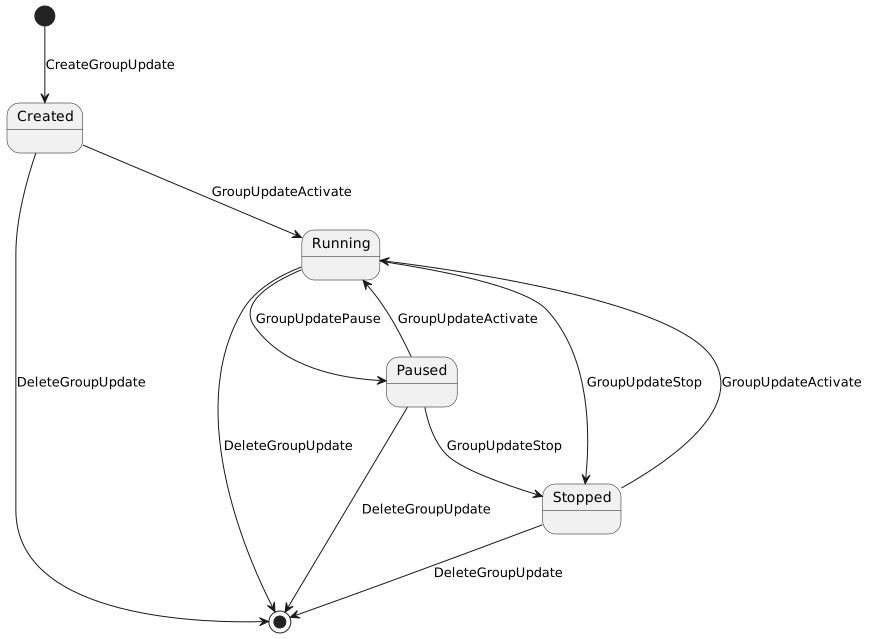
Conditions used by campaigns with SourceType=Condition are managed independently via CreateGroupUpdateCondition / DeleteGroupUpdateCondition.
2. Common Request Fields
All Group Update endpoints inherit the standard authentication envelope from BaseRequest:
| Field | Type | Description |
|---|---|---|
|
string |
API user name |
|
string |
Application identifier |
|
string |
API user password |
For brevity these fields are omitted from per-endpoint request examples below.
3. Base URL
All endpoints live under the /api path of the Northbound API service, e.g. http://<server>/iot-webservice/api/CreateGroupUpdate.
The full per-method JSON schemas (including all nested TaskDto variants and their fields) are available in the interactive Swagger UI at http://<server>/iot-webservice/swagger-ui/index.html.
|
4. CreateGroupUpdate
Create a new Group Update campaign.
HTTP Method |
|
URL |
|
4.1. Behavior
-
Request is delegated to ACS via the FT ACS API client; on ACS error the call fails with
204/ ACS_EXCEPTION. -
On success the campaign is persisted in ACS and the ID of the newly created campaign (last record in
update_grouptable) is returned inGroupUpdateTaskID. -
The campaign is created in inactive state. Use
GroupUpdateActivateto start it. -
Activationis required and defines online-only execution, stop-on-fail behavior, failure threshold, push flag and execution periods. -
Reactivationis optional; when present it defines recurrence (Minutely/Hourly/Daily/Weekly/Monthly/Yearly) and termination (EndsNever, EndsOn, or EndsAfter). Exactly one repeat option and exactly one end condition must be specified. -
Configs[]defines per-model task sets.SourceTypecontrols the target audience:-
All— all devices of the given manufacturer/model; -
Condition— devices matching the referencedConditionID(created viaCreateGroupUpdateCondition); -
Individual— devices listed by serial number inSn[].
-
-
At least one task (
TasksList) is required perConfig.
4.2. Request Fields
| Field | Type | Required | Description |
|---|---|---|---|
|
string (1-255) |
yes |
Campaign name |
|
boolean |
yes |
Update only devices that are currently online |
|
boolean |
yes |
Stop the campaign if a task fails |
|
integer (0-100) |
no |
Stop the campaign when this percentage of CPEs fail |
|
boolean |
yes |
Issue a connection request to each device |
|
array (1-2) |
no |
Execution windows ( |
|
ISO-8601 |
yes (within Reactivation) |
Reactivation start time |
|
|
exactly one |
Reactivation termination rule |
|
|
exactly one |
Reactivation recurrence rule |
|
boolean |
yes |
Reactivate only for CPEs that failed previously |
|
string |
yes |
Target manufacturer |
|
string |
yes |
Target model |
|
enum |
yes |
|
|
integer |
when |
Reference to an existing condition view |
|
array |
when |
Serial numbers of target devices |
|
array (min 1) |
yes |
Tasks to execute. Supported |
|
array (1-2) |
no |
Global execution windows |
|
integer (>= 1) |
no |
Randomization count |
|
ISO-8601 |
yes |
Campaign scheduled start time |
4.3. Supported Task Types
The taskType enum accepts: SET_VALUE_TASK, GET_TASK, RPC_METHOD_TASK, DIAGNOSTIC_TASK, INSTALL_TASK, REBOOT_TASK, RE_PROVISION_TASK, FACTORY_RESET_TASK, BACKUP_TASK, RESTORE_TASK, DOWNLOAD_TASK, SET_ATTRIBUTES_TASK, UNINSTALL_TASK, UPDATE_SOFTWARE_TASK, UPLOAD_TASK.
Each task supports optional TaskConditions (EQUAL, NOT_EQUAL, LESS, LESS_EQUAL, GREATER, GREATER_EQUAL, CONTAINS, STARTS_WITH, REGEXP) and a task-specific payload (Parameters, RPCMethod, InstallFile, File, UpdateFile, DeleteFile, cpeParamAttributeList, etc.). The full payload schemas are available in Swagger UI.
4.4. Request Example
{
  "UpdateGroup": {
    "Name": "Firmware Update Q1 2025",
    "Activation": {
      "OnlineOnly": true,
      "StopOnFail": true,
      "Threshold": 100,
      "Push": true,
      "Period": [
        { "From": "11:00", "To": "12:00", "DevicesAmount": 100, "Interval": 1 }
      ]
    },
    "Reactivation": {
      "StartsOn": "2026-07-23T15:15:54.259",
      "EndsAfter": 5,
      "RepeatDaily": 1,
      "ReactivateOnlyFailed": true
    },
    "Configs": [
      {
        "Manufacturer": "Friendly",
        "ModelName": "FT-1000",
        "SourceType": "All",
        "TasksList": [
          {
            "taskType": "REBOOT_TASK",
            "TaskConditions": { "TaskCondition": [] }
          }
        ]
      }
    ],
    "ScheduledStart": "2026-07-23T15:15:54.259"
  }
}5. DeleteGroupUpdate
Delete an existing Group Update campaign.
HTTP Method |
|
URL |
|
5.1. Behavior
-
Verifies that the campaign exists in
update_grouptable; returnsUPDATE_GROUP_NOT_FOUNDwhen absent. -
Delegates physical deletion to ACS via the FT ACS API client; on ACS error the call fails.
-
Deletion removes the campaign together with all associated configs, conditions linkage and pending executions on ACS side. Already-executed tasks recorded on devices are not rolled back.
-
This operation is irreversible.
6. CreateGroupUpdateCondition
Create a reusable Condition (filter view) that selects target devices for Group Update campaigns. The condition is persisted as a view of type GroupUpdateView together with its column-condition tree, and its ID can later be referenced from UpdateGroup.Configs[].ConditionID when SourceType=Condition.
HTTP Method |
|
URL |
|
6.1. Behavior
-
Persists a
ViewEntityof typeGroupUpdateViewscoped to the creator’s domain (or super-domain when domain is null/0). -
The
Namemust be unique within the domain for views of this type; otherwisePARAMETER_NOT_UNIQUEis returned. -
Saves the condition tree (logic, columnKey, compare, conditionString, etc.) in
column_conditiontable. Existing conditions not present in the request are removed. -
Builds an SQL specification from the supplied conditions and stores the generated query and its parameters in
custom_view_query/custom_view_query_parameterso the condition can be applied to device selection later. -
Returns the persisted view identifier as
GroupUpdateConditionID.
7. DeleteGroupUpdateCondition
Delete an existing Condition.
HTTP Method |
|
URL |
|
7.1. Behavior
-
Looks up the view by ID and verifies that its type is
GroupUpdateView; otherwiseUPDATE_GROUP_NOT_FOUNDis returned. -
Removes the view from
viewtable and cascades deletion of all related rows incolumn_condition. -
Campaigns that referenced this condition via
Configs[].ConditionIDwill no longer resolve devices through it; running ACS execution is not affected, but future re-selection will fail until the campaign is reconfigured.
8. ViewGroupUpdateList
Return a flat list of all Group Update campaigns.
HTTP Method |
|
URL |
|
8.1. Behavior
-
Reads all rows from
update_grouptable; no filtering by status, creator or domain is applied. -
Order of results is the natural persistence order returned by the repository.
-
Each entry contains only the campaign identifier and name; use
ViewGroupUpdateDetailsto retrieve the full configuration of a specific campaign. -
This operation does not contact the device or trigger ACS execution.
9. ViewGroupConditionList
Return a flat list of all Conditions (filter views).
HTTP Method |
|
URL |
|
10. ViewGroupUpdateDetails
Return the full configuration of a specific Group Update campaign.
HTTP Method |
|
URL |
|
10.1. Behavior
-
Looks up the campaign in
update_grouptable byGroupUpdateTaskID; returnsUPDATE_GROUP_NOT_FOUNDwhen absent. -
Maps the persisted
UpdateGroupentity (with its actions, conditions and serial-number lists) to the APIUpdateGroupstructure. -
This operation does not contact the device or trigger ACS execution; it returns the stored configuration only.
-
Field values reflect the state at request time.
11. ViewGroupUpdateConditionDetails
Return the full configuration of a specific Condition.
HTTP Method |
|
URL |
|
11.1. Behavior
-
Looks up the view by ID; if not found or its type is not
GroupUpdateView,DEVICE_PROFILE_NOT_FOUNDis returned. -
Maps the persisted
ViewEntitytoGroupUpdateViewand rebuilds the full hierarchical conditions tree fromcolumn_condition(parent/child relations). -
Localization id is fixed to
ENfor condition labels.
12. GroupUpdateActivate
Start execution of a previously created Group Update campaign.
HTTP Method |
|
URL |
|
12.1. Behavior
-
Delegates the start command to ACS via
FtAcsApiClient#startUpdateGroup; on ACS error the call fails withACS_EXCEPTION. -
Activation transitions the campaign from inactive/paused/stopped state to running. The exact transition rules are enforced by ACS.
-
For campaigns with
ScheduledStartin the future, ACS schedules execution rather than starting immediately.
13. GroupUpdatePause
Pause execution of a running Group Update campaign.
HTTP Method |
|
URL |
|
13.1. Behavior
-
Delegates the pause command to ACS via
FtAcsApiClient#pauseUpdateGroup; on ACS error the call fails withACS_EXCEPTION. -
Pause transitions the campaign from running to paused state. The exact transition rules are enforced by ACS.
-
Pause does not delete already-queued tasks; subsequent activation continues from the current execution position.
14. GroupUpdateStop
Stop a Group Update campaign.
HTTP Method |
|
URL |
|
14.1. Behavior
-
Delegates the stop command to ACS via
FtAcsApiClient#stopUpdateGroup; on ACS error the call fails withACS_EXCEPTION. -
Stop transitions the campaign from running/paused to stopped state. The exact transition rules are enforced by ACS.
-
Stop does not delete the campaign or its configuration; use
DeleteGroupUpdateto remove the campaign entirely. -
In-flight device interactions already dispatched by ACS may still complete; only further task dispatching is halted.
15. Errors
All Group Update endpoints return the standard Northbound error envelope (see API & Integration → Error Response Format). The most common codes relevant to Group Update are:
| Code | Enum | Trigger |
|---|---|---|
|
|
Operation succeeded |
|
|
Generic failure |
|
|
Request validation failed (e.g. missing required field, non-unique condition name, invalid reactivation combination) |
|
|
Unexpected server-side error ( |
|
|
ACS is unreachable |
Specific service-level errors (visible in Message):
| Error | Meaning |
|---|---|
|
|
|
Condition (view) name already exists within the domain |
|
Condition view requested in |
|
ACS rejected the operation; upstream error is propagated in |
16. Related Documentation
-
Interactive Swagger UI at
http://<server>/iot-webservice/swagger-ui/index.html(groupGroup Update)