Group Update API
1. Overview
The Group Update API lets you define and run automation campaigns that execute the same set of tasks (set/get parameter, RPC method, diagnostic, install/uninstall, reboot, reprovision, factory reset, backup/restore, download/upload, update software, set attributes) on multiple devices grouped by manufacturer and model.
A campaign is described by an UpdateGroup structure containing:
-
Activation settings (online-only, stop-on-fail, failure threshold, push, execution periods)
-
Optional Reactivation settings (recurrence and termination rules)
-
One or more Configs — per-model task sets selecting target devices by All, Condition (existing filter view) or Individual serial numbers
-
Optional execution Period windows (under
Activation) and a group-level Random count -
ScheduledStart — campaign scheduled start time
The lifecycle of a campaign is:
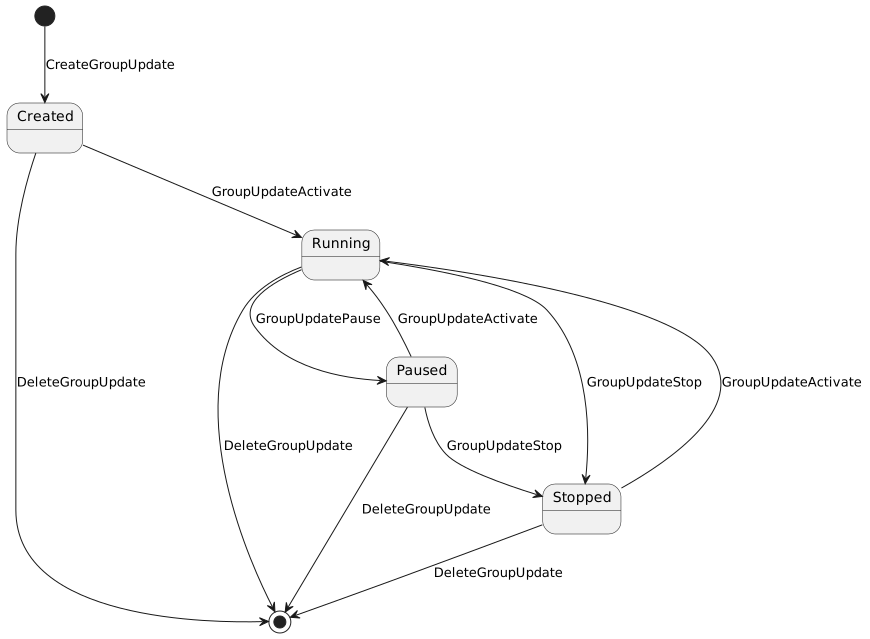
Conditions used by campaigns with SourceType=Condition are managed independently via CreateGroupUpdateCondition / DeleteGroupUpdateCondition.
2. Common Request Fields
All Group Update endpoints inherit the standard authentication envelope from BaseRequest:
| Field | Type | Description |
|---|---|---|
|
string |
API user name |
|
string |
Application identifier |
|
string |
API user password |
For brevity these fields are omitted from the per-endpoint field tables below.
3. Base URL
All endpoints live under the /api path of the Northbound API service, e.g. http://<server>/iot-webservice/api/CreateGroupUpdate.
Full per-method request/response schemas (including all nested TaskDto variants and their fields) and live request/response examples are available in the interactive Swagger UI at http://<server>/iot-webservice/swagger-ui/index.html.
|
4. SOAP Availability
All Group Update operations are available over both REST and SOAP. The SOAP endpoint is /FTACSWS/ACSWS; the available operations are also listed in the SOAP API tab of the Swagger UI.
SOAP request and response bodies carry the same field structure as their REST counterparts — element names match the JSON property names. Authentication is provided via creator, appid, and creatorpassword fields in the SOAP request body.
See Data Formats for the date-time and boolean value conventions, which are identical across REST and SOAP.
| REST endpoint | SOAP operation |
|---|---|
|
|
|
|
|
|
|
|
|
|
|
|
|
|
|
|
|
|
|
|
|
|
5. Data Formats
The value conventions below apply uniformly to both REST and SOAP: the two channels share the same parsing and formatting logic, so any value accepted over REST is accepted over SOAP and vice versa.
5.1. Date and Time
Timestamp fields — UpdateGroup.ScheduledStart, UpdateGroup.Reactivation.StartsOn and UpdateGroup.Reactivation.EndsOn — use ISO-8601 date-time strings.
On input, parsing is lenient and accepts:
| Accepted form | Example |
|---|---|
Date-time with milliseconds (canonical) |
|
Date-time without milliseconds |
|
Date-time with a zone offset — the offset is dropped, wall-clock time retained |
|
On output, timestamps are always emitted in the canonical form yyyy-MM-dd’T’HH:mm:ss.SSS (milliseconds, no offset), e.g. 2026-07-23T15:15:54.259.
An empty value is treated as absent (null). Times are interpreted as local wall-clock time; a supplied offset is stripped, not converted.
|
5.2. Boolean Parameters
Boolean fields accept the textual values true / false (case-insensitive). For the GET task parameter flags — TasksList[].Parameters[].Name, Parameters[].Attribute and Parameters[].Value — the numeric form documented in their field descriptions is additionally accepted:
| Value | Meaning |
|---|---|
|
Request the parameter names / attributes / values |
|
Do not request them |
Surrounding whitespace is ignored. An unrecognized value (e.g. yes, 2) is rejected with a request-validation error rather than being silently treated as false. Over SOAP the same flags use identical element names and accept the same values, e.g. <fri:Name>1</fri:Name> or <fri:Name>true</fri:Name>.
6. CreateGroupUpdate
Create a new Group Update campaign.
6.1. Behavior
http://<server>/iot-webservice/swagger-ui/index.html#/Group Update/createGroupUpdate (SOAP operation FTCreateGroupUpdate).-
Request is delegated to ACS via the FT ACS API client; on ACS error the call fails with
204/ ACS_EXCEPTION. -
On success the campaign is persisted in ACS and the ID of the newly created campaign (last record in
update_grouptable) is returned inGroupUpdateTaskID. -
The campaign is created in inactive state. Use
GroupUpdateActivateto start it. -
Activationis required and defines online-only execution, stop-on-fail behavior, failure threshold, push flag and execution periods. -
Reactivationis optional; when present it defines recurrence (Minutely/Hourly/Daily/Weekly/Monthly/Yearly) and termination (EndsNever, EndsOn, or EndsAfter). Exactly one repeat option and exactly one end condition must be specified. -
Configs[]defines per-model task sets.SourceTypecontrols the target audience:-
All— all devices of the given manufacturer/model (requires onlyManufacturer+ModelName); -
Condition— devices matching the referencedConditionID(created viaCreateGroupUpdateCondition); -
Individual— devices listed by device serial number inSn[]. EachSerialIDis a serial string (not an internal id): it is resolved to the internal device id within theManufacturer+ModelNameproduct class, restricted to the creator’s domain tree (a super-domain/unauthenticated creator resolves without a domain filter). Resolution is fail-closed: a serial that matches no device — or is ambiguous (matches more than one) — is treated as unresolved.For backward compatibility with the legacy contract,
SourceTypealso accepts the numeric ids0(All),1(Condition) and2(Individual) — as a JSON number or string over REST, and as element text over SOAP — and the name in any case. Responses always emit the canonical name. WhenSourceType=Condition, the condition may be referenced either viaConditionIDor via the legacyNamealias (a numeric condition id);ConditionIDtakes precedence when both are present. Any other value (for example3/Fileor an unknown name) is rejected with a request-validation error.Breaking change (FRD-10258). A numeric
SerialIDis no longer treated as an internal device id — everySerialIDis now looked up as a device serial number. Clients that previously passed internal ids must pass the actual device serials.Individual serial resolution outcome — for
SourceType=Individual: -
all serials resolve → the campaign is created for the resolved devices,
ErrorCode100; -
some serials resolve → best-effort: the campaign is still created for the resolved devices, and the unresolved serials are reported with
ErrorCode209and aMessagelisting them (GroupUpdateTaskIDis set); -
no serial resolves and there is no
All/Conditionconfig to fall back on → nothing to target,ErrorCode201(No CPE), no campaign is created.
-
-
A request may carry at most 50000 serial numbers in total across all
Individualconfigs; beyond that the request is rejected withErrorCode203. -
At least one task (
TasksList) is required perConfig.
6.2. Request Fields
| Field | Type | Required | Description |
|---|---|---|---|
|
string (1-255) |
yes |
Campaign name |
|
boolean |
yes |
Update only devices that are currently online |
|
boolean |
yes |
Stop the campaign if a task fails |
|
integer (0-100) |
no |
Stop the campaign when this percentage of CPEs fail |
|
boolean |
yes |
Issue a connection request to each device |
|
array (1-2) |
no |
Execution windows ( |
|
ISO-8601 |
yes (within Reactivation) |
Reactivation start time |
|
|
exactly one |
Reactivation termination rule |
|
|
exactly one |
Reactivation recurrence rule |
|
boolean |
yes |
Reactivate only for CPEs that failed previously |
|
string |
yes |
Target manufacturer |
|
string |
yes |
Target model |
|
enum |
yes |
|
|
integer |
when |
Reference to an existing condition view. The legacy |
|
array (max 50000) |
when |
Device serial numbers of target devices, resolved to internal ids within the target product class and the creator’s domain tree. At most 50000 serials in total per request (across all configs). Unresolved serials are reported via |
|
array (min 1) |
yes |
Tasks to execute. Supported |
|
integer (>= 1) |
no |
Randomization count |
|
ISO-8601 |
yes |
Campaign scheduled start time |
|
Execution |
6.3. Supported Task Types
The taskType enum accepts: SET_VALUE_TASK, GET_TASK, RPC_METHOD_TASK, DIAGNOSTIC_TASK, INSTALL_TASK, REBOOT_TASK, RE_PROVISION_TASK, FACTORY_RESET_TASK, BACKUP_TASK, RESTORE_TASK, DOWNLOAD_TASK, SET_ATTRIBUTES_TASK, UNINSTALL_TASK, UPDATE_SOFTWARE_TASK, UPLOAD_TASK.
Each task supports optional TaskConditions (EQUAL, NOT_EQUAL, LESS, LESS_EQUAL, GREATER, GREATER_EQUAL, CONTAINS, STARTS_WITH, REGEXP) and a task-specific payload (Parameters, RPCMethod, InstallFile, File, UpdateFile, DeleteFile, cpeParamAttributeList, etc.). The full payload schemas are available in Swagger UI.
|
FRD-10258 §7.1 lists each task as a named struct ( |
|
A misspelled or wrong-case element (e.g. |
6.4. Response Fields
| Field | Type | Description |
|---|---|---|
|
integer |
Result code — see the table below |
|
string |
Error description (for |
|
integer |
Identifier of the created campaign (set on |
| ErrorCode | Meaning |
|---|---|
|
Success — campaign created and all target devices resolved. |
|
No CPE — |
|
Incorrect request — request validation failed (missing/invalid field, or more than 50000 serials in total). |
|
General error (e.g. ACS_EXCEPTION when the downstream ACS call fails). |
|
Partial resolution — the campaign was created, but some |
|
|
7. DeleteGroupUpdate
Delete an existing Group Update campaign.
Schema and examples in Swagger UI: http://<server>/iot-webservice/swagger-ui/index.html#/Group Update/deleteGroupUpdate (SOAP operation FTDeleteGroupUpdate).
7.1. Behavior
-
Verifies that the campaign exists in
update_grouptable; returnsUPDATE_GROUP_NOT_FOUNDwhen absent. -
Delegates physical deletion to ACS via the FT ACS API client; on ACS error the call fails.
-
Deletion removes the campaign together with all associated configs, conditions linkage and pending executions on ACS side. Already-executed tasks recorded on devices are not rolled back.
-
This operation is irreversible.
8. CreateGroupUpdateCondition
Create a reusable Condition (filter view) that selects target devices for Group Update campaigns. The condition is persisted as a view of type GroupUpdateView together with its column-condition tree, and its ID can later be referenced from UpdateGroup.Configs[].ConditionID when SourceType=Condition.
Schema and examples in Swagger UI: http://<server>/iot-webservice/swagger-ui/index.html#/Group Update/createGroupUpdateCondition (SOAP operation FTCreateGroupUpdateCondition).
8.1. Behavior
-
Persists a
ViewEntityof typeGroupUpdateViewscoped to the creator’s domain (or super-domain when domain is null/0). -
The
Namemust be unique within the domain for views of this type; otherwisePARAMETER_NOT_UNIQUEis returned. -
Saves the condition tree (logic, columnKey, compare, conditionString, etc.) in
column_conditiontable. Existing conditions not present in the request are removed. -
Builds an SQL specification from the supplied conditions and stores the generated query and its parameters in
custom_view_query/custom_view_query_parameterso the condition can be applied to device selection later. -
Returns the persisted view identifier as
GroupUpdateConditionID.
8.2. Request Fields
| Field | Type | Required | Description |
|---|---|---|---|
|
string (1-255) |
yes |
Condition (view) name, unique within domain |
|
array (non-empty) |
yes |
Filter tree: column keys, comparison operators, values, AND/OR logic, optional nested items |
8.2.1. Filter operators per family
Each filter field accepts only the operators defined for its family (FRD-10258 §7.3). Operator names are case-insensitive and accept both the spaced and non-spaced spelling (not equal / notequal, starts with / startswith). An operator outside its family, an unknown operator, or an unknown logic value is rejected with ErrorCode 203.
Behavior change (FRD-10258). Previously, an unknown or out-of-family operator (for example Greater, Less, Regexp on a text filter) was silently coerced to Equal and the request succeeded with ErrorCode 100; such requests now return ErrorCode 203.
| Filter | Allowed operators |
|---|---|
|
|
|
|
|
|
|
|
-
Date filters use the format
dd.MM.yyyy.Betweentakes a rangedd.MM.yyyy – dd.MM.yyyy(the separator may be a space-surrounded en-dash or hyphen) and is inclusive of both endpoints. A malformed date or range is rejected withErrorCode203. -
Domain
Allselects every domain in the creator’s hierarchy and must be sent with an empty value; a non-empty value is rejected withErrorCode203. -
Each filter field accepts at most 100 conditions; exceeding this is rejected with
ErrorCode203. -
The request is validated at the SOAP boundary as well as over REST, so a missing
Name/Configsor an invalid operator yieldsErrorCode203on both transports.
9. DeleteGroupUpdateCondition
Delete an existing Condition.
Schema and examples in Swagger UI: http://<server>/iot-webservice/swagger-ui/index.html#/Group Update/deleteGroupUpdateCondition (SOAP operation FTDeleteGroupUpdateCondition).
9.1. Behavior
-
Looks up the view by ID and verifies that its type is
GroupUpdateView; otherwiseUPDATE_GROUP_NOT_FOUNDis returned. -
Removes the view from
viewtable and cascades deletion of all related rows incolumn_condition. -
Campaigns that referenced this condition via
Configs[].ConditionIDwill no longer resolve devices through it; running ACS execution is not affected, but future re-selection will fail until the campaign is reconfigured.
10. ViewGroupUpdateList
Return a flat list of all Group Update campaigns.
Schema and examples in Swagger UI: http://<server>/iot-webservice/swagger-ui/index.html#/Group Update/viewGroupUpdateList (SOAP operation FTViewGroupUpdateList).
10.1. Behavior
-
Reads all rows from
update_grouptable; no filtering by status, creator or domain is applied. -
Order of results is the natural persistence order returned by the repository.
-
Each entry contains only the campaign identifier and name; use
ViewGroupUpdateDetailsto retrieve the full configuration of a specific campaign. -
This operation does not contact the device or trigger ACS execution.
11. ViewGroupConditionList
Return a flat list of all Conditions (filter views).
Schema and examples in Swagger UI: http://<server>/iot-webservice/swagger-ui/index.html#/Group Update/viewGroupUpdateConditionList (SOAP operation FTViewGroupConditionList).
12. ViewGroupUpdateDetails
Return the full configuration of a specific Group Update campaign.
Schema and examples in Swagger UI: http://<server>/iot-webservice/swagger-ui/index.html#/Group Update/viewGroupUpdateDetails (SOAP operation FTViewGroupUpdateDetails).
12.1. Behavior
-
Looks up the campaign in
update_grouptable byGroupUpdateTaskID; returnsUPDATE_GROUP_NOT_FOUNDwhen absent. -
Maps the persisted
UpdateGroupentity (with its actions, conditions and serial-number lists) to the APIUpdateGroupstructure. -
This operation does not contact the device or trigger ACS execution; it returns the stored configuration only.
-
Field values reflect the state at request time.
13. ViewGroupUpdateConditionDetails
Return the full configuration of a specific Condition.
Schema and examples in Swagger UI: http://<server>/iot-webservice/swagger-ui/index.html#/Group Update/viewGroupUpdateConditionDetails (SOAP operation FTViewGroupUpdateConditionDetails).
13.1. Behavior
-
Looks up the view by ID; if not found or its type is not
GroupUpdateView,DEVICE_PROFILE_NOT_FOUNDis returned. -
Maps the persisted
ViewEntitytoGroupUpdateViewand rebuilds the full hierarchical conditions tree fromcolumn_condition(parent/child relations). -
Localization id is fixed to
ENfor condition labels.
14. GroupUpdateActivate
Start execution of a previously created Group Update campaign.
Schema and examples in Swagger UI: http://<server>/iot-webservice/swagger-ui/index.html#/Group Update/activateGroupUpdate (SOAP operation FTGroupUpdateActivate).
14.1. Behavior
-
Verifies the campaign exists in the
update_grouptable before delegating; a well-formed but non-existentGroupUpdateTaskIDreturnsErrorCode201(NO_CPE,Message=Update Group with ID <id> not found) without contacting ACS. -
Delegates the start command to ACS via
FtAcsApiClient#startUpdateGroup; on ACS error the call fails withACS_EXCEPTION. -
Activation transitions the campaign from inactive/paused/stopped state to running. The exact transition rules are enforced by ACS.
-
For campaigns with
ScheduledStartin the future, ACS schedules execution rather than starting immediately.
15. GroupUpdatePause
Pause execution of a running Group Update campaign.
Schema and examples in Swagger UI: http://<server>/iot-webservice/swagger-ui/index.html#/Group Update/pauseGroupUpdate (SOAP operation FTGroupUpdatePause).
15.1. Behavior
-
Verifies the campaign exists in the
update_grouptable before delegating; a well-formed but non-existentGroupUpdateTaskIDreturnsErrorCode201(NO_CPE,Message=Update Group with ID <id> not found) without contacting ACS. -
Delegates the pause command to ACS via
FtAcsApiClient#pauseUpdateGroup; on ACS error the call fails withACS_EXCEPTION. -
Pause transitions the campaign from running to paused state. The exact transition rules are enforced by ACS.
-
Pause does not delete already-queued tasks; subsequent activation continues from the current execution position.
16. GroupUpdateStop
Stop a Group Update campaign.
Schema and examples in Swagger UI: http://<server>/iot-webservice/swagger-ui/index.html#/Group Update/stopGroupUpdate (SOAP operation FTGroupUpdateStop).
16.1. Behavior
-
Verifies the campaign exists in the
update_grouptable before delegating; a well-formed but non-existentGroupUpdateTaskIDreturnsErrorCode201(NO_CPE,Message=Update Group with ID <id> not found) without contacting ACS. -
Delegates the stop command to ACS via
FtAcsApiClient#stopUpdateGroup; on ACS error the call fails withACS_EXCEPTION. -
Stop transitions the campaign from running/paused to stopped state. The exact transition rules are enforced by ACS.
-
Stop does not delete the campaign or its configuration; use
DeleteGroupUpdateto remove the campaign entirely. -
In-flight device interactions already dispatched by ACS may still complete; only further task dispatching is halted.
17. Errors
All Group Update endpoints return the standard Northbound error envelope (see API & Integration → Error Response Format). The most common codes relevant to Group Update are:
| Code | Enum | Trigger |
|---|---|---|
|
|
Operation succeeded |
|
|
Generic failure |
|
|
|
|
|
Request validation failed (e.g. missing required field, non-unique condition name, invalid reactivation combination) |
|
|
Unexpected server-side error ( |
|
|
ACS is unreachable |
Specific service-level errors (visible in Message):
| Error | Meaning |
|---|---|
|
|
|
Condition (view) name already exists within the domain |
|
Condition view requested in |
|
ACS rejected the operation; upstream error is propagated in |
18. Related Documentation
-
Interactive Swagger UI at
http://<server>/iot-webservice/swagger-ui/index.html(groupGroup Update)