ACS Event Flow
1. Overview
The ACS Event Flow applies the stored provisioning data after the ACS reports an event for a CPE. The data comes from the provision database (provision DB).
The flow has two uses:
-
delivery of the data for a CPE without an ACS registration
-
a new application of the stored data to a known CPE
The Input Flow stores the data of an unregistered CPE with status 196 or 261.
The ACS calls the Provision Portal with DeviceEventMonitor over SOAP or with POST /device-event over REST.
The request contains the serial number (SN), the MAC addresses and the event code of the CPE.
The Business Process Model and Notation (BPMN) process is deviceEventMonitorProcess in acsEventFlowV3.bpmn.
If the event code does not start with 1011, the flow returns at once.
In this case, the flow writes no status.
The ACS Event Flow has no request data of its own. All data comes from the provision DB. The flow matches this data with Objects.xml and Params.xml. The reprovision flag and the Reboot option also come from the stored records. See Common Options.
2. Flow Diagram
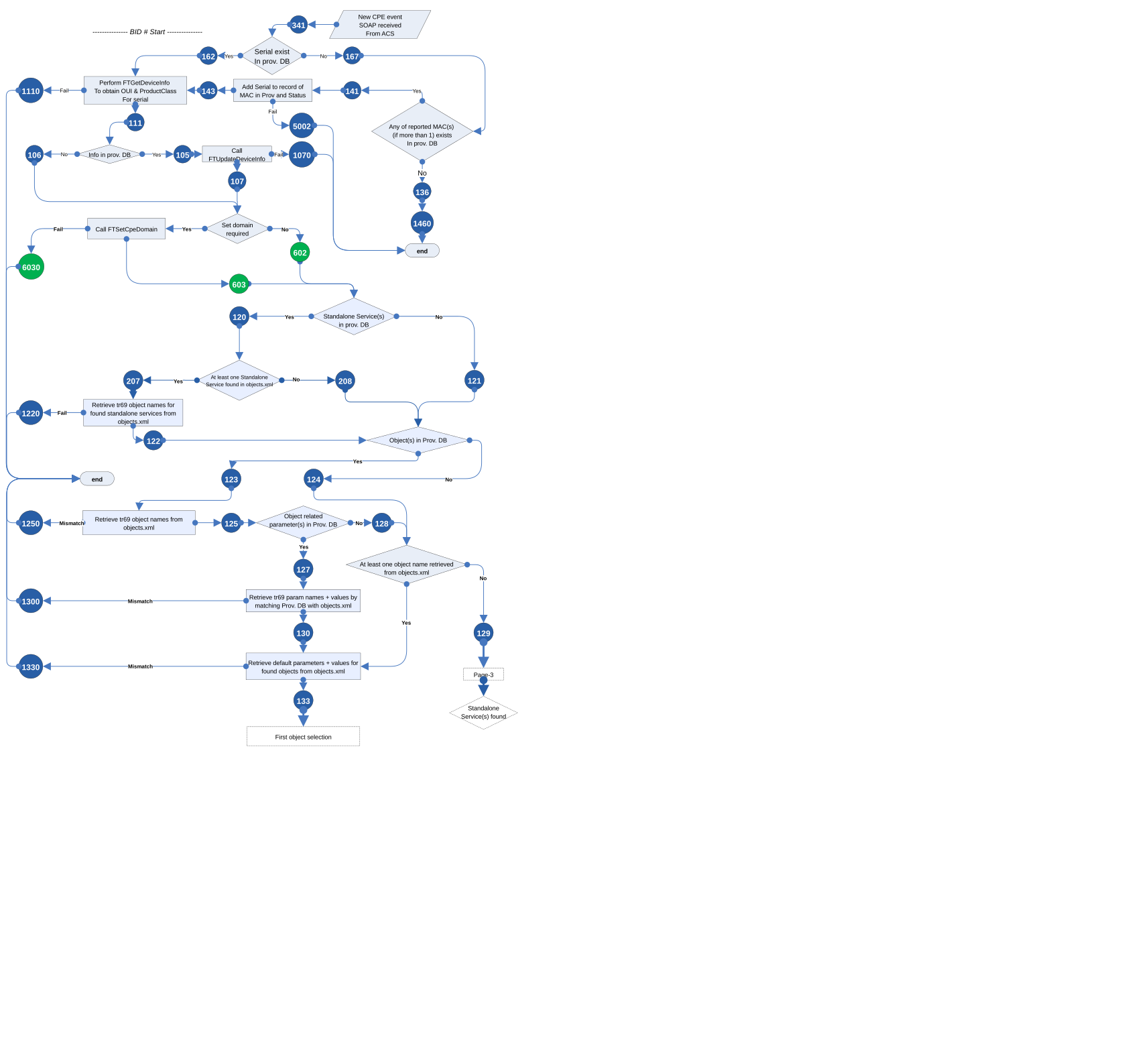
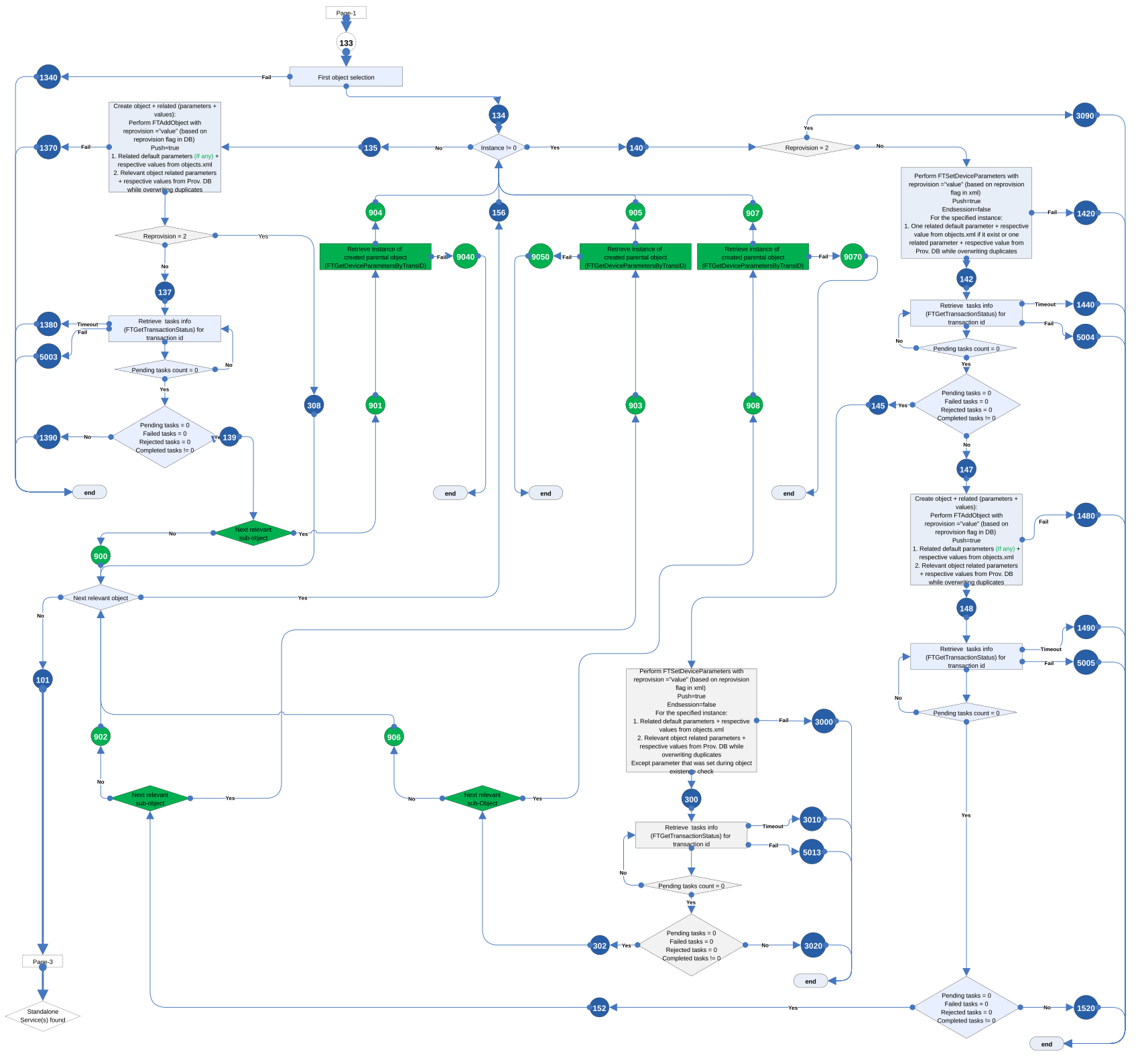
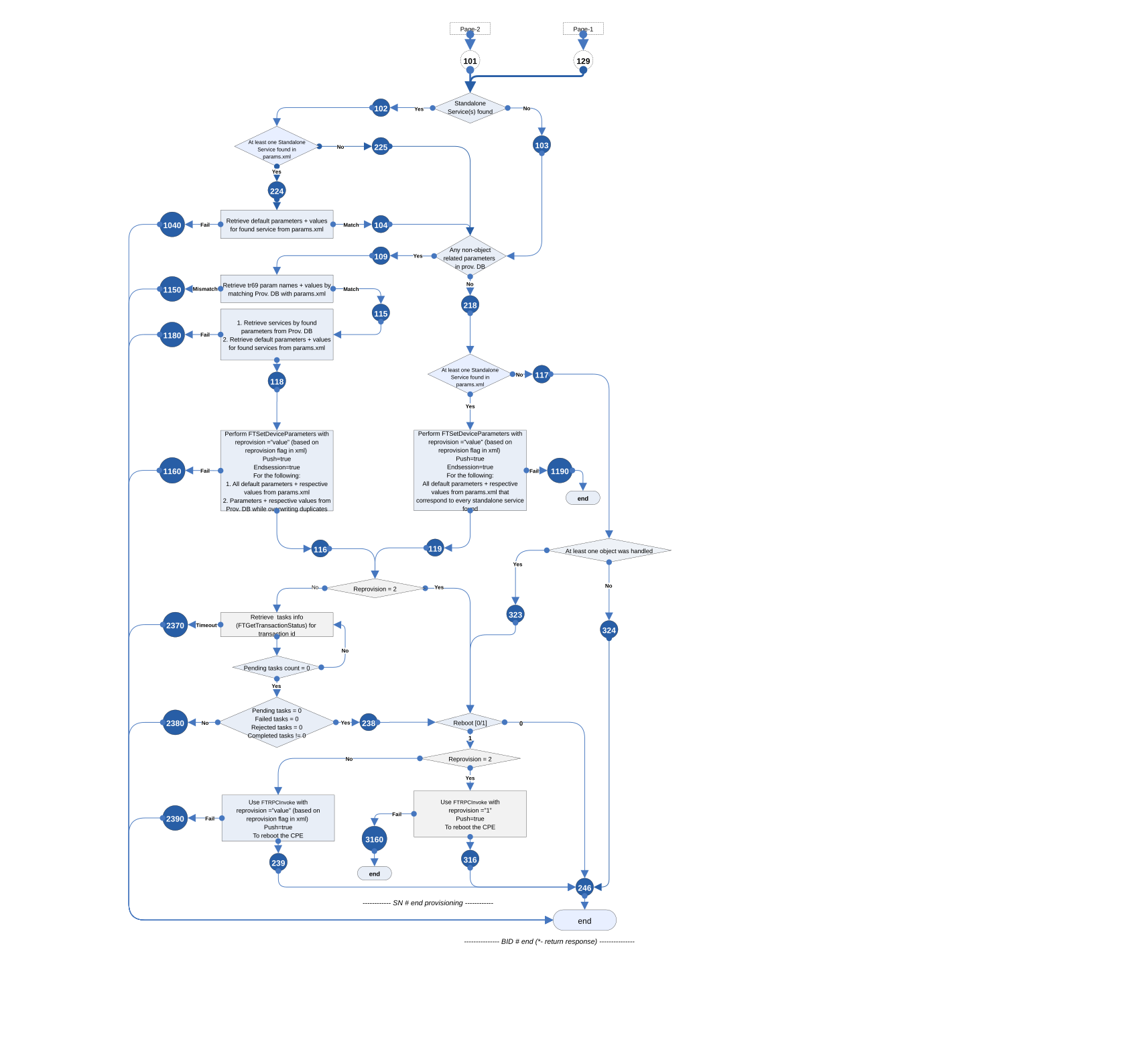
The numbers in the circles are status codes. For their meaning, see Status Codes Reference.
3. Steps
3.1. Find the CPE in the Provision DB
-
The flow searches the provision DB for the SN.
-
If the SN is not there, the flow searches for the reported MAC addresses.
-
If the flow finds a MAC address, the flow adds the SN to the records of this MAC address.
This is how data stored under a MAC address gets its SN. If the flow finds neither the SN nor a MAC address, the flow has nothing to provision. The flow ends with status 1460.
For a CPE with stored data, the flow then does these steps:
-
FTGetDeviceInfogets the OUI and the Product Class. -
If the provision DB has device info,
FTUpdateDeviceInfosends the device info. -
If the provision DB has a domain,
FTSetCpeDomainsets the domain.
| Code | Meaning |
|---|---|
341 |
New device event received |
162, 167 |
SN in the provision DB: yes, no |
141, 136 |
Reported MAC address in the provision DB: yes, no |
143, 5002 |
SN added to the records of the MAC address: success, failure |
1460 |
Nothing to provision for this CPE. Final status. |
111, 1110 |
OUI and Product Class: received, |
105, 106 |
Device info in the provision DB: yes, no |
107, 1070 |
|
602, 603, 6030 |
No domain, |
3.2. Collect Objects and Standalone Services
This step is the same as in the Input Flow. The only source is the provision DB. The flow matches the standalone services, objects and object related parameters with Objects.xml. If the flow finds no object name, the flow writes status 129 and continues with Set Non-Object Parameters, Reboot and Finish.
| Code | Meaning |
|---|---|
120, 121 |
Standalone services in the provision DB: yes, no |
207, 208 |
Standalone service in Objects.xml: yes, no |
122, 1220 |
Object names for the standalone services: received, failure |
123, 124 |
Objects in the provision DB: yes, no |
125, 1250 |
Objects matched with Objects.xml: success, mismatch |
127, 128 |
Object related parameters in the provision DB: yes, no |
130, 1300 |
Object related parameters matched with Objects.xml: success, mismatch |
133, 1330 |
Default parameters of the objects from Objects.xml: received, mismatch |
129 |
No Objects.xml data. No objects to process. |
3.3. Create and Update Objects
The flow processes the objects one by one, as in the Input Flow:
-
Instance 0: the flow creates a new object with
FTAddObject. -
Instance 1 to 9: the flow checks the instance, then sets the instance parameters or creates the object.
The flow creates the sub-objects under the new parent object.
The ACS Event Flow does not check the online status of the CPE. The CPE is online at this moment. The event comes from the current session of the CPE with the ACS.
| Code | Meaning |
|---|---|
134, 1340 |
First object selection: success, failure |
135 |
Instance 0 |
137, 1370 |
|
308 |
|
1380, 5003 |
Task still pending after the timeout, task status unknown |
139, 1390 |
Object created, task failed or rejected |
140 |
Instance 1 to 9 |
3090 |
Specific instance with reprovision flag |
142, 1420, 1440, 5004 |
Check of the instance with |
145, 147 |
Instance exists, instance may not exist |
300, 3000, 3010, 5013, 302, 3020 |
Parameters of an existing instance |
148, 1480, 1490, 5005, 152, 1520 |
New instance with |
900 to 908, 9040, 9050, 9070 |
Sub-objects |
156, 101 |
Next object selected, no objects left |
3.4. Set Non-Object Parameters, Reboot and Finish
The flow collects two groups of parameters:
-
the default parameters of the standalone services, from Params.xml
-
the non-object parameters of the provision DB, matched with Params.xml
One FTSetDeviceParameters call sends all these parameters.
| Reprovision flag | Action |
|---|---|
|
The flow waits for the task result.
If the stored records have Reboot, the flow reboots the CPE with |
|
The flow does not wait. If the stored records have Reboot, the flow reboots the CPE. The flow ends with status 246. |
| Code | Meaning |
|---|---|
102, 103 |
Standalone services: yes, no |
224, 225 |
Standalone service in Params.xml: yes, no |
104, 1040 |
Default parameters of the standalone services: received, failure |
109, 218 |
Non-object parameters in the provision DB: yes, no |
115, 1150 |
Parameters matched with Params.xml: success, mismatch |
118, 1180 |
Services and default parameters matched: success, failure |
116, 1160, 119, 1190 |
|
117 |
No parameter data for the CPE |
323, 324 |
Objects handled: at least one, none |
2370, 2380, 238 |
Parameter task: timeout, failed or rejected, parameters set |
239, 2390, 316, 3160 |
Reboot with |
246 |
Provisioning complete. Final status. |