API & Task Management
1. Overview
This document consolidates the task processing model and error reporting mechanisms of the ACS (Auto Configuration Server). It covers the full lifecycle of device tasks — from creation and queuing through execution, completion, and failure handling — as well as the CWMP fault code propagation through the Provision Portal API.
2. Task Management
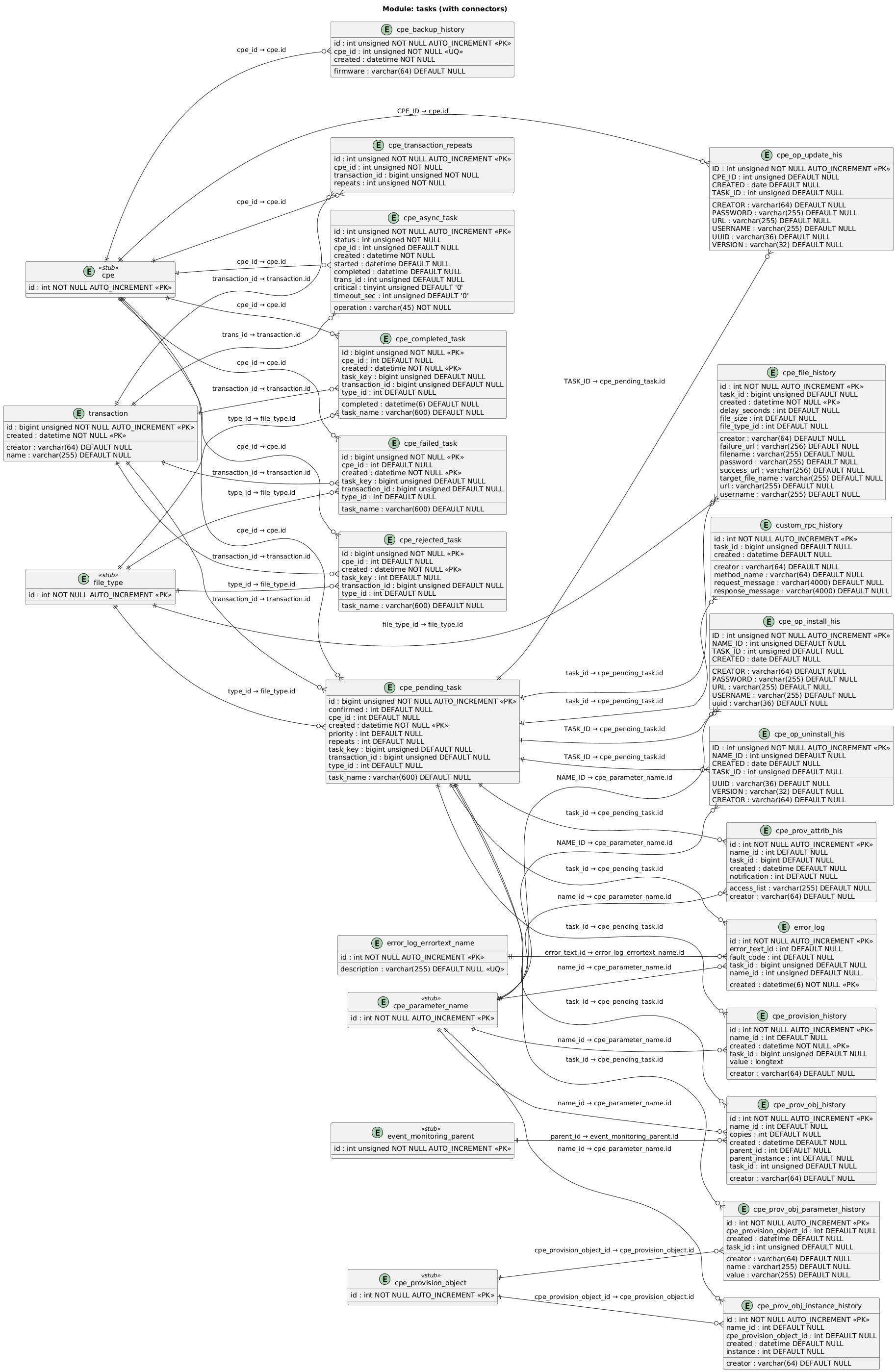
2.2. Task Lifecycle
| Table | Description |
|---|---|
|
Groups related tasks into a logical unit — each provisioning action, profile apply, or Update Group execution creates a transaction for traceability |
|
Tasks queued for execution on a device — includes task type, priority, repeat count, confirmation status, and transaction reference. Processed during the next device session |
|
Successfully completed tasks — archived from |
|
Tasks that failed during execution — archived with the task name and transaction for diagnostics |
|
Tasks rejected by the device (SOAP fault) — archived with the fault details and transaction |
|
Asynchronous operation tracking — monitors long-running tasks (e.g. firmware download) with status, start/completion timestamps, and timeout. |
|
Retry counter per device per transaction — used by the |
2.3. Task History (Provisioning Snapshots)
| Table | Description |
|---|---|
|
Snapshot of SetParameterValues data sent to the device — parameter name + value, linked to the pending task |
|
Snapshot of SetParameterAttributes data sent — notification and access-list values linked to the pending task |
|
Snapshot of AddObject data sent — object name, copy count, and parent hierarchy |
|
Snapshot of object instances created — records the instance number assigned by the device |
|
Snapshot of parameter values within provisioned object instances |
|
Snapshot of Download task data sent — URL, credentials, file type, and target filename linked to the pending task |
|
Snapshot of ChangeDUState Install operations sent — linked to the pending task for audit |
|
Snapshot of ChangeDUState Uninstall operations sent |
|
Snapshot of ChangeDUState Update operations sent |
|
Snapshot of custom RPC request/response sent — method name and XML messages linked to the pending task |
|
Device backup/restore history — records firmware version at backup time for configuration rollback tracking |
3. Task Type Reference
The task_type column in cpe_pending_task stores an integer code that identifies the operation to perform.
Each code maps to an FTTaskTypeInfo implementation that carries metadata about the task: which module owns it, whether it interrupts the session, and which message creator / response handler classes process it.
Resolved at runtime by FTIOTTaskTypeConverter (ftapp-core).
3.1. Core Tasks
Module: ftdm-core (FTCoreTaskTypeInfo)
| Code | Task Name | Description |
|---|---|---|
2 |
Reboot |
Sends a Reboot RPC to the device. Session-interrupt task — the device disconnects after receiving it. Also usable as an Update Group action |
5 |
GetParameterNames |
Retrieves the parameter tree structure from the device. Also usable as an Update Group action |
5 |
GetParameterNamesRetrieve |
Variant of GetParameterNames used during bootstrap tree discovery — not an Update Group action |
5 |
GetParameterNamesOnly |
Standalone GetParameterNames request without Update Group context |
9 |
FactoryReset |
Sends a FactoryReset RPC — resets the device to manufacturer defaults. Session-interrupt task. Also usable as an Update Group action |
27 |
GetParameterValueList |
Retrieves specific parameter values from the device (GetParameterValues). Also usable as an Update Group action |
28 |
GetParameterAttributesList |
Retrieves parameter attributes (notification, access list) from the device. Also usable as an Update Group action |
62 |
ExecuteMethod |
Executes an arbitrary supported RPC method on the device |
63 |
DiscoverParameterValueList |
Discovers parameter values — used for parameter tree exploration |
3.2. Profile Tasks
Module: ftdm-profile (FTProfileTaskTypeInfo)
All entries have isProfileTask = true — they are created when a device profile is applied.
| Code | Task Name | Description |
|---|---|---|
1 |
DownloadProfile |
Downloads a file (firmware, config) to the device as part of a profile. Session-interrupt task — creates an async operation |
4 |
SetParameterValuesProfile |
Sets parameter values on the device from profile parameter definitions |
21 |
AddObjectProfile |
Creates multi-instance objects on the device as defined in the profile (e.g. WiFi SSID instances) |
22 |
SetParameterValuesObjectProfile |
Sets parameter values within profile-created object instances. Not currently supported |
23 |
SetParameterNotificationProfile |
Configures parameter notification attributes (passive/active) from profile definitions |
24 |
SetParameterAccessProfile |
Configures parameter access list overrides from profile definitions |
64 |
BackupProfile |
Uploads a device configuration backup as part of a profile. Session-interrupt task |
3.3. Provision Tasks
Module: ftdm-provision (FTProvisionTaskTypeInfo)
All entries have isProvisionTask = true — they are created from per-device provisioning data.
| Code | Task Name | Description |
|---|---|---|
11 |
SetParameterValuesProvision |
Sets parameter values from per-device provision data ( |
12 |
SetParameterValuesObjectProvision |
Sets parameter values within provisioned object instances ( |
25 |
AddObjectProvision |
Creates multi-instance objects from per-device provision data ( |
29 |
Download |
Downloads a file to the device from per-device file provisioning ( |
33 |
DeleteObject |
Deletes a multi-instance object from the device ( |
36 |
Upload |
Uploads a file from the device ( |
37 |
CustomRPC |
Sends a custom RPC request/response pair to the device ( |
39 |
SetParameterAttributesProvision |
Sets parameter attributes (notification, access list) from per-device provision data ( |
70 |
RedirectDevice |
Redirects the device to a different management server URL. Session-interrupt task — the device reconnects to the new ACS |
3.4. TR-069 Protocol Tasks
Module: tr069-core (TR069TaskTypeInfo)
| Code | Task Name | Description |
|---|---|---|
0 |
GetRPCMethods |
Retrieves the list of RPC methods supported by the device. Typically executed during bootstrap |
10 |
ScheduleInform |
Schedules a future Inform from the device. Not currently supported |
19 |
GetOptions |
Retrieves supported options from the device (TR-069 GetOptions RPC) |
38 |
ResetHttpSession |
Resets the HTTP session with the device — forces re-authentication. |
41 |
ChangeDUState |
Installs, updates, or uninstalls Deployment Units on the device. Session-interrupt task — creates an async operation |
60 |
XMPPSettings |
Configures XMPP connection settings on the device for connection-request delivery |
3.5. Diagnostic Tasks
Module: tr069-cpediagnostics (FTACSDiagTaskTypeInfo)
| Code | Task Name | Description |
|---|---|---|
15 |
RequestDiagnostic |
Initiates a diagnostic operation on the device (IPPing, TraceRoute, etc.). Diagnostic task — session-interrupt |
16 |
DiagnosticComplete |
Retrieves diagnostic results after the device reports completion via DiagnosticsComplete event. |
3.6. QoE Monitoring Tasks
Module: ftdm-qoe (FTACSQoETaskTypeInfo)
| Code | Task Name | Description |
|---|---|---|
42 |
SetPeriodic_QoE |
Configures periodic parameter sampling intervals on the device for QoE data collection |
43 |
SetNotification_QoE |
Sets active/passive notification attributes on QoE-monitored parameters so the device reports changes |
44 |
WiFiChannelRescanQoE |
Triggers a WiFi channel rescan on the device. Marked as both provision and diagnostic task |
3.7. Update Group Tasks
Module: ftdm-task-action (FTUpdateGroupTaskTypeInfo)
All entries have isUpdateGroupTask = true — they are created by bulk Update Group operations targeting multiple devices.
| Code | Task Name | Description |
|---|---|---|
50 |
UploadUpdateGroup |
Bulk upload — requests file upload from each device in the group. Session-interrupt task |
51 |
CustomRPCUpdateGroup |
Bulk custom RPC — sends a custom RPC to each device in the group |
52 |
SetParameterValuesUpdateGroup |
Bulk SPV — sets parameter values on each device in the group |
53 |
SetParameterAttributesUpdateGroup |
Bulk SPA — sets parameter attributes on each device in the group |
54 |
DownloadUpdateGroup |
Bulk download — sends firmware/config files to each device in the group. Session-interrupt task |
55 |
GetParamUpdateGroup |
Bulk GPN — retrieves parameter names from each device in the group |
56 |
RunReProvisionCpe |
Re-provisions each device in the group — triggers a full parameter tree re-discovery |
57 |
BackupCpeConfiguration |
Bulk backup — uploads configuration backup from each device. Session-interrupt task |
58 |
RestoreCpeConfiguration |
Bulk restore — downloads a previously backed-up configuration to each device. Session-interrupt task |
59 |
ChangeDUStateUpdateGroup |
Bulk DU management — installs/updates/uninstalls deployment units on each device. Session-interrupt task |
66 |
DiagnosticUpdateGroup |
Bulk diagnostics — runs a diagnostic test on each device in the group. Diagnostic task |
100 |
CallApiAction |
Calls an external REST API for each device — no CWMP message sent to the device |
101 |
AddToProvisionAction |
Adds provisioning data to each device — no CWMP message sent, data is queued for the next session |
102 |
UdpPingAction |
Performs a UDP ping connectivity check for each device. Diagnostic task — no CWMP message sent |
103 |
FccSpeedTestUpdateGroup |
Runs an FCC speed test for each device in the group. Diagnostic task |
104 |
FccLatencyTestUpdateGroup |
Runs an FCC latency test for each device in the group. Diagnostic task |
3.8. Task Flags Reference
| Flag | Meaning |
|---|---|
|
Task originates from a device profile application |
|
Task originates from per-device provisioning data |
|
Task is part of a bulk Update Group operation |
|
Task interrupts the normal session flow — typically because the device must reboot, transfer a file, or run a diagnostic. These tasks create entries in |
|
Task runs a diagnostic operation — implies session interrupt |
|
Task forces an HTTP session reset (re-authentication) |
|
Task retrieves results after a diagnostic completes |
|
Task sends a custom (non-standard) RPC message |
|
Task initiates a file download to the device |
|
Task initiates a file upload from the device |
|
Task is processed server-side only — no CWMP message is sent to the device (e.g. CallApiAction, AddToProvisionAction) |
4. Error Codes
4.1. Overview
This section describes the enhanced error code reporting mechanism for SPV (SetParameterValues) failures.
The ACS propagates parameter-specific fault codes — including device-originated codes like 9820 — through to the Provision Portal API responses.
4.2. Background
During SPV requests sent via the PP API, inconsistencies have been observed in the way faults are reported across the system:
-
The Wi-Fi 6 device responds with error code 9820 when the same password is reused.
-
The ACS currently maps this to a generic error code 2460 in the PP API response.
-
In the UI device activity log, the code 9003 is shown.
These discrepancies hinder traceability and troubleshooting.
4.3. Customer Concern
Airtel has requested that the original error code 9820, as received from the device, be propagated to the PP API response for the following reasons:
-
Consistent error visibility across UI, logs, and API.
-
Better issue traceability and root cause analysis.
-
Improved integration and support processes.
4.4. CWMP Fault Codes
According to the TR-069 specification, the response to SetParameterValues can contain both a general fault code and detailed per-parameter fault codes.
The following example shows a CWMP fault response with per-parameter fault detail:
<soap-env:Fault>
  <faultcode>Client</faultcode>
  <faultstring>CWMP fault</faultstring>
  <detail>
    <cwmp:Fault>
      <FaultCode>9003</FaultCode>
      <FaultString></FaultString>
      <SetParameterValuesFault>
        <ParameterName>...FirmwareVersion</ParameterName>
        <FaultCode>9007</FaultCode>
        <FaultString>Read-only parameter</FaultString>
      </SetParameterValuesFault>
      <SetParameterValuesFault>
        <ParameterName>...Username</ParameterName>
        <FaultCode>9008</FaultCode>
        <FaultString>Invalid parameter value</FaultString>
      </SetParameterValuesFault>
    </cwmp:Fault>
  </detail>
</soap-env:Fault>|
The ACS previously processed and stored only the top-level fault code (9003) and discarded detailed information such as the specific fault per parameter (9007, 9008, or vendor-specific like 9820). |
4.5. ACS Implementation Details
When a Fault response with SetParameterValuesFault entries is received, the ACS:
-
Parses and persists each parameter-specific fault.
-
Stores these in the error_log table using the current task_id.
-
This means multiple entries per task_id may be created.
-
Takes the error message directly from each SetParameterValuesFault element.
-
Stores the parameter name in a new column name_id (default NULL) on the error_log table.
If the response does not contain any SetParameterValuesFault elements, the ACS continues operating in legacy mode:
-
Only the general fault code is saved as a single entry in error_log.
4.6. Provision Portal API Implementation
4.6.1. Database Changes
-
Add a new table
ftacs.status_faultwith columns:id,status_id,fault_code,error_text_id,name_id. -
In case of erroneous exit from the PP flow due to SPV task failure, store specific fault codes per parameter along with parameter names and fault messages into the ftacs.status_fault table using the current bid.
-
Retrieve fault code values from the error_log table.
-
Retrieve error text IDs from the error_log table.
4.6.2. Logging Changes
In case of erroneous exit from the PP flow due to SPV task failure, add the relevant specific fault codes per parameter into the log entry along with the PP exit code.
Status entry example:
Host: qa61, Date: 06.01.2025, Time: 10:43:06, Value: FT010SN00087QS2222463002077 2460 : At least one task was failed or rejected:

Parameter name: "Device.ManagementServer.ConnectionRequestURZZZ", Fault code: "9005", Fault string: "Invalid parameter name"

Parameter name: "Device.ManagementServer.ConnectionRequestURL", Fault code: "7010", Fault string: "Attempt to update non-writable parameter"
Affected status codes:
-
1390
-
1520
-
1890
-
2380
-
2460
-
4240
-
5121
4.6.3. GetStatus Method Output Changes
Add a new <Fault/> tag to the GetStatus Provision Portal API method response.
-
The tag remains self-closing in case of successful provisioning.
-
The tag contains a list of parameter names that failed the SPV task along with relevant fault codes and fault strings in case of erroneous exit from the PP flow.
Response example:
<soap:Envelope xmlns:soap="http://schemas.xmlsoap.org/soap/envelope/"
               xmlns:xsi="http://www.w3.org/2001/XMLSchema-instance"
               xmlns:xsd="http://www.w3.org/2001/XMLSchema">
  <soap:Body>
    <GetStatusResponse>
      <GetStatusResult>
        <Status>
          <Id>24</Id>
          <BId>f984e9fa-be9d-457a-9a31-2cdca97073ac</BId>
          <Sn>FT001SN00002SERIALBUK</Sn>
          <Mac/>
          <OperationCode>248</OperationCode>
          <Fault/>
          <Created>2025-08-05T15:55:54</Created>
        </Status>
        <Status>
          <Id>23</Id>
          <BId>f984e9fa-be9d-457a-9a31-2cdca97073ac</BId>
          <Sn>FT001SN00001SERIALBUK</Sn>
          <Mac/>
          <OperationCode>2460</OperationCode>
          <Fault>
            <Parameters>
              <Parameter>
                <Name>Device.ManagementServer.ConnectionRequestURZZZ</Name>
                <FaultCode>9005</FaultCode>
                <FaultString>Invalid parameter name</FaultString>
              </Parameter>
              <Parameter>
                <Name>Device.ManagementServer.ConnectionRequestURL</Name>
                <FaultCode>7010</FaultCode>
                <FaultString>Attempt to update non-writable parameter</FaultString>
              </Parameter>
            </Parameters>
          </Fault>
          <Created>2025-08-05T15:55:54</Created>
        </Status>
      </GetStatusResult>
    </GetStatusResponse>
  </soap:Body>
</soap:Envelope>
4.6.4. ProvisioningForDevice Method Output Changes
Add a new <Fault/> tag to the ProvisioningForDevice Provision Portal API method response.
-
The tag remains self-closing in case of successful provisioning.
-
The tag contains a list of parameter names that failed the SPV task along with relevant fault codes and fault strings in case of erroneous exit from the PP flow.
Response example:
<soap:Envelope xmlns:soap="http://schemas.xmlsoap.org/soap/envelope/"
               xmlns:xsi="http://www.w3.org/2001/XMLSchema-instance"
               xmlns:xsd="http://www.w3.org/2001/XMLSchema">
  <soap:Body>
    <ProvisioningForDeviceResponse>
      <ProvisioningForDeviceResult>
        <Result>200</Result>
        <Message>At least one task was failed or rejected</Message>
        <Bid>33ef836c-431d-4963-b76d-b31f8aec4049</Bid>
        <Status>2460</Status>
        <Fault>
          <Parameters>
            <Parameter>
              <Name>Device.ManagementServer.ConnectionRequestURZZZ</Name>
              <FaultCode>9005</FaultCode>
              <FaultString>Invalid parameter name</FaultString>
            </Parameter>
            <Parameter>
              <Name>Device.ManagementServer.ConnectionRequestURL</Name>
              <FaultCode>7010</FaultCode>
              <FaultString>Attempt to update non-writable parameter</FaultString>
            </Parameter>
          </Parameters>
        </Fault>
      </ProvisioningForDeviceResult>
    </ProvisioningForDeviceResponse>
  </soap:Body>
</soap:Envelope>
4.7. Impact Analysis
-
Data model changes:
-
Addition of
name_idcolumn inerror_logtable. -
New table
ftacs.status_faultwith columns:id,status_id,fault_code,error_text_id,name_id.
-
-
API schema and client integrations require updates.
-
Minor performance impact anticipated due to additional fault parsing and persistence.