Configuration Guide
This document is the consolidated reference for all ACS configuration items and environment variables.
|
Since version 6.5.2 most ACS configuration is owned by FT Configs Service, not by files on the ACS host. FT Configs Service stores each configuration set and publishes it into the shared Hazelcast cluster; every ACS node consumes it from there. That is how hot-reload and cluster-wide synchronization now work — there is no file to edit on the ACS host, and no direct HTTP call from ACS to the service. Only three files remain on disk in See Installation — Preparation for the resulting directory layout, and FT Configs deployment for deploying the service. |
1. Overview
1.1. Managed in FT Configs Service
Edited through FT Configs UI. The File column keeps the pre-6.5.2 file name — it is still the name of the configuration set and the term used throughout this guide.
| File | Purpose | Hot-Reload |
|---|---|---|
|
Core ACS settings: TR-069/TR-369 behaviors, QoE, authentication, sessions, STUN/XMPP, events, retention |
Yes |
|
Bulk Data collection/telemetry host and per-model paths |
Yes |
|
Account Info Mapping: device parameters to custom device-list columns (see Custom Data Mapping) |
Yes |
|
CTN (Customer/Connection) enrichment from RADIUS/IPoE database |
Yes |
|
Protocol trace of ACS-CPE RPCs to an external sink (SOAP/SYSLOG) |
Yes |
|
FCC-style speed/latency tests and WAN-usage triggered rechecks |
Yes |
|
Operational switches to halt or constrain QoE monitoring |
Yes |
|
Per-RPC task handling: reject timeouts, resend policies, backup attempts |
Yes |
|
Rules for caching of parameter names (GPN) to optimize tree discovery |
No (evaluated at startup) |
|
SOAP Web Service user credentials (username={noop}password format) |
Yes |
|
SOAP Web Service role-to-user mapping (username=roleName format) |
Yes |
|
SOAP envelope template for hardcoded device event notifications |
Yes |
|
JSON template for SetParameterValues result subscription notifications |
Yes |
1.2. Files on the ACS Host
| File | Purpose | Hot-Reload |
|---|---|---|
|
Hazelcast client configuration for cluster connectivity — also the channel FT Configs Service delivers configuration over |
No (loaded at startup) |
|
Logging configuration (Logback with async appenders, rolling files) |
Yes ( |
|
SSL/TLS keystore file (JKS or PKCS12) for HTTPS and secure protocols |
No (restart required) |
1.3. Environment Files
| File | Purpose | Hot-Reload |
|---|---|---|
|
Manual deployments — directories, database, JVM, TR-069 endpoints, SSL, Hazelcast |
No (loaded at startup) |
|
Per-service FTACS: port mapping, HikariCP pools, async executors, protocol settings, JVM |
No (container restart) |
|
Shared infrastructure: DB host/vendor/credentials, Hazelcast, ClickHouse, protocol ports |
No (container restart) |
|
The files that remain on the ACS host live under |
2. Environment Variables
Defines the runtime environment for the ACS application — base directories, database connections, JVM settings, TR-069 endpoints, SSL, and cluster (Hazelcast) settings.
File: app.env
Location: bin/app.env in the distribution package (manual deployments). For Docker, the equivalent variables live in .env next to compose.yml — see 3. Docker Compose Environment Files.
Reload: Requires restart. The same .env file can be used in both systemd and Docker Compose setups.
2.1. Sample
Click to expand app.env sample
# =============================================================================
# Friendly Tech ACS — Environment Configuration (app.env)
# =============================================================================
# This file defines the runtime environment for the ACS application.
# Used during deployment and startup (.env sourced by systemd, Docker, or
# launch scripts).

# =============================================================================
# Application Directories
# =============================================================================
APP_HOME=/usr/local/ftacs
CONF_DIR=${APP_HOME}/conf
LOG_DIR=${APP_HOME}/logs
EXT_DIR=${APP_HOME}/ext
DB_LIQUIBASE_DIR=${APP_HOME}/liquibase

# =============================================================================
# Database — MySQL
# =============================================================================
DB_VENDOR=mysql
DB_HOST=db
DB_PASSWORD=ftacs
MYSQL_USER=ftacs
MYSQL_PORT=3306

# =============================================================================
# Database — Oracle (uncomment to use)
# =============================================================================
# DB_VENDOR=oracle
# ORACLE_PORT=1521
# ORACLE_SERVICE=XEPDB1
# ORACLE_USER_FTACS=ftacs
# ORACLE_USER_QUARTZ=ftacs_quartz

# =============================================================================
# ClickHouse
# =============================================================================
# CLICKHOUSE_HOST=localhost
# CLICKHOUSE_PORT=8123
# CLICKHOUSE_SCHEMA=ftacs_qoe_ui_data
# CLICKHOUSE_USER=ftacs
# CLICKHOUSE_PASSWORD=ftacs

# =============================================================================
# TR-069 Endpoints
# =============================================================================
# WEB_TR069_NO_AUTH=/ftacs/ACS
# WEB_TR069_BASIC=/ftacs-basic/ACS
# WEB_TR069_DIGEST=/ftacs-digest/ACS

# =============================================================================
# JVM
# =============================================================================
JAVA_OPTS='-Xms1g -Xmx4g'

# =============================================================================
# HTTP / HTTPS
# =============================================================================
HTTP_PORTS=8080
HTTPS_PORTS=8443
# SSL_KEYSTORE=${CONF_DIR}/ftacs.keystore
# SSL_KEYSTORE_PASSWORD=friendly

# =============================================================================
# Hazelcast
# =============================================================================
# HZ_MEMBERS=127.0.0.1:5701
# HZ_CLIENT_CONFIG=${CONF_DIR}/hazelcast-client.xml
# HZ_JMX_PORT=9110
# HZ_JMX_INTERNAL_PORT=9110

# =============================================================================
# Server Bind Address
# When FTACS_IPV6_ADDRESS is set, IPv4 bind is skipped (listeners bind on IPv6
# only, `::` dual-stack socket accepts IPv4 traffic via mapped addresses).
# =============================================================================
# Docker bridge, IPv4 only (recommended):
#FTACS_IP_ADDRESS=0.0.0.0
#FTACS_IPV6_ADDRESS=
# Docker bridge, dual-stack via IPv6 wildcard:
#FTACS_IP_ADDRESS=
#FTACS_IPV6_ADDRESS=::
# Host-network or bare-metal, IPv6 only:
#FTACS_IP_ADDRESS=
#FTACS_IPV6_ADDRESS=2a01:4f9:3070:2862::2
# Host-network or bare-metal, IPv4 only:
#FTACS_IP_ADDRESS=192.168.1.100
#FTACS_IPV6_ADDRESS=

# =============================================================================
# ACS Mode & Features
# =============================================================================
#FTACS_MODE=ALL
#FT_MQTT_ADDITIONAL_CONNECTOR_URI=mqtt://0.0.0.0:1884
#FTACS_STATS_THREADS=64
#FTACS_SUBSCRIPTION_PARAMETER_ONLY_VALUE_CHANGE=0
#FTACS_SUBSCRIPTION_PARAMETER_NOT_NULL_ONLY=0

# =============================================================================
# USP X509 Certificates (optional)
# =============================================================================
#FT_USP_X509_KEYSTORE_PATH=/path/to/keystore.ks
#FT_USP_X509_KEYSTORE_PASSWORD=password
#FT_USP_X509_KEYSTORE_PK_PASSWORD=password
#FT_USP_X509_TRUSTSTORE_PATH=/path/to/truststore.ks
#FT_USP_X509_TRUSTSTORE_PASSWORD=password

# =============================================================================
# MQTT X509 Certificates (optional)
# =============================================================================
#FT_MQTT_X509_KEYSTORE_PATH=/path/to/mqtt-keystore.ks
#FT_MQTT_X509_KEYSTORE_PASSWORD=password
#FT_MQTT_X509_PK_PASSWORD=password
#FT_MQTT_X509_TRUSTSTORE_PATH=/path/to/mqtt-truststore.ks
#FT_MQTT_X509_TRUSTSTORE_PASSWORD=password

# =============================================================================
# MQTT and USP Settings
# =============================================================================
#MQTT_ACTIVE_API=api-v1,api-v2
#USP_SERVER_DM_PATH=tr-181-2-16-0-usp-full.xml

# =============================================================================
# Spring & Logging
# =============================================================================
SPRING_CONFIG_EXTRA=file:${CONF_DIR}/
LOGBACK_CONFIG=${CONF_DIR}/logback-spring.xml
CXF_PATH=/ACSServer-ACS
#SPRING_PROFILE=mysql
FTACS_PASSWORD=${DB_PASSWORD}
QUARTZ_PASSWORD=${DB_PASSWORD}
2.2. Environment Variables Reference
2.2.1. Application Directories
| Key | Description | Default/Example |
|---|---|---|
APP_HOME |
Root folder from which other paths are derived |
|
CONF_DIR |
Configuration directory |
|
LOG_DIR |
Logs directory |
|
EXT_DIR |
External libraries/plugins |
|
DB_LIQUIBASE_DIR |
Liquibase migration scripts |
|
2.2.2. Database
| Key | Description | Default/Example |
|---|---|---|
DB_HOST |
Primary DB host |
|
DB_PASSWORD |
Global DB password (for FTACS + Quartz) |
|
DB_VENDOR |
Database type ( |
|
MYSQL_PORT |
MySQL port |
|
MYSQL_USER |
MySQL user |
|
ORACLE_PORT |
Oracle listener port (if using Oracle) |
|
ORACLE_SERVICE |
Oracle service name |
|
ORACLE_USER_FTACS |
Oracle schema for main app |
|
ORACLE_USER_QUARTZ |
Oracle schema for Quartz scheduler |
|
2.2.3. ClickHouse
| Key | Description | Default/Example |
|---|---|---|
CLICKHOUSE_HOST |
ClickHouse host |
|
CLICKHOUSE_PORT |
ClickHouse HTTP port |
|
CLICKHOUSE_SCHEMA |
Target schema (used in |
|
CLICKHOUSE_USERNAME |
ClickHouse user (used in |
|
CLICKHOUSE_PASSWORD |
ClickHouse password ( |
|
|
ClickHouse variable names: FTACS reads Note that FTACS reads |
2.2.4. TR-069 Endpoints
| Key | Description | Default/Example |
|---|---|---|
WEB_TR069_NO_AUTH |
No-auth TR-069 endpoint path |
|
WEB_TR069_BASIC |
HTTP Basic-auth TR-069 endpoint |
|
WEB_TR069_DIGEST |
Digest-auth TR-069 endpoint |
|
2.2.6. HTTP / HTTPS / SSL
| Key | Description | Default/Example |
|---|---|---|
HTTP_PORTS |
Comma-separated list of HTTP ports |
|
HTTPS_PORTS |
HTTPS port list |
|
SSL_KEYSTORE |
Keystore path |
|
SSL_KEYSTORE_PASSWORD |
Keystore password |
|
2.2.7. Hazelcast
| Key | Description | Default/Example |
|---|---|---|
HZ_MEMBERS |
Hazelcast cluster member list |
|
HZ_CLIENT_CONFIG |
Hazelcast client config path |
|
HZ_JMX_PORT |
Docker/Compose: published Hazelcast JMX port on host |
|
HZ_JMX_INTERNAL_PORT |
Docker/Compose: Hazelcast JMX port inside container. For |
|
2.2.8. Server Bind Address
| Key | Description | Default/Example |
|---|---|---|
FTACS_IP_ADDRESS |
Bind IPv4 address for ACS protocol listeners (MQTT/USP/COAP/STOMP) and generated URLs. Used only when |
(auto-detected) |
FTACS_IPV6_ADDRESS |
Optional bind IPv6 address for ACS protocol listeners. When set, ACS binds listeners on IPv6 only — IPv4 bind is skipped to avoid dual-stack socket conflicts on Linux. |
(not set) |
2.2.9. ACS Mode & Features
| Key | Description | Default/Example |
|---|---|---|
FTACS_MODE |
ACS operating mode: |
|
FT_MQTT_ADDITIONAL_CONNECTOR_URI |
Additional MQTT connector URI for extra binding |
(not set) |
FTACS_STATS_THREADS |
Number of threads for statistics processing |
|
FTACS_SUBSCRIPTION_PARAMETER_ONLY_VALUE_CHANGE |
Send subscription events only on parameter value change ( |
|
FTACS_SUBSCRIPTION_PARAMETER_NOT_NULL_ONLY |
Send subscription events only for non-null values ( |
|
2.2.10. USP X509 Certificates
| Key | Description | Default/Example |
|---|---|---|
FT_USP_X509_KEYSTORE_PATH |
Path to USP X509 keystore file |
(default internal) |
FT_USP_X509_KEYSTORE_PASSWORD |
Password for USP X509 keystore |
(default internal) |
FT_USP_X509_KEYSTORE_PK_PASSWORD |
Password for USP X509 private key |
(default internal) |
FT_USP_X509_TRUSTSTORE_PATH |
Path to USP X509 truststore file |
(default internal) |
FT_USP_X509_TRUSTSTORE_PASSWORD |
Password for USP X509 truststore |
(default internal) |
2.2.11. MQTT X509 Certificates
| Key | Description | Default/Example |
|---|---|---|
FT_MQTT_X509_KEYSTORE_PATH |
Path to MQTT X509 keystore file for TLS connections |
(default from broker-config.properties) |
FT_MQTT_X509_KEYSTORE_PASSWORD |
Password for MQTT X509 keystore |
(default from broker-config.properties) |
FT_MQTT_X509_PK_PASSWORD |
Password for MQTT X509 private key |
(default from broker-config.properties) |
FT_MQTT_X509_TRUSTSTORE_PATH |
Path to MQTT X509 truststore file |
(default from broker-config.properties) |
FT_MQTT_X509_TRUSTSTORE_PASSWORD |
Password for MQTT X509 truststore |
(default from broker-config.properties) |
2.2.12. MQTT and USP Settings
| Key | Description | Default/Example |
|---|---|---|
MQTT_ACTIVE_API |
Comma-separated list of active MQTT API versions (e.g., |
(default from mqtt-config.properties) |
USP_SERVER_DM_PATH |
Path to USP data model XML file |
|
2.2.13. Spring & Logging
| Key | Description | Default/Example |
|---|---|---|
SPRING_CONFIG_EXTRA |
Extra Spring config directory passed to JVM |
|
LOGBACK_CONFIG |
Logback XML path |
|
CXF_PATH |
Apache CXF mapping path |
|
SPRING_PROFILE |
Force Spring profile override ( |
(commented out) |
FTACS_PASSWORD |
Alias of DB password for convenience |
|
QUARTZ_PASSWORD |
Alias for Quartz DB password |
|
2.3. Environment Variables Notes
-
For Oracle deployments, uncomment and adjust the
ORACLE_*section and setDB_VENDOR=oracle. -
For
FTACS_MODE=PROVin Docker/Compose deployments, set Hazelcast JMX internal port to9210(HZ_JMX_INTERNAL_PORT=9210). Otherwise statistics logs may containjava.net.ConnectException: Connection refused. -
For
FTACS_MODE=MNGMNT, make sure${CONF_DIR}/hazelcast-client-prov.xmlexists and points to the provisioning Hazelcast cluster. -
Rename
CLICKHOUSE_PASWORDtoCLICKHOUSE_PASSWORDwherever scripting still sets the old, deprecated name. -
If ACS fails with
java.net.BindException: Cannot assign requested address, verifyFTACS_IP_ADDRESS/FTACS_IPV6_ADDRESSare bindable in the current runtime namespace. In Docker, verify inside the container:ip addrandip -6 addr. -
Avoid committing real passwords; use secrets injection in CI/CD.
-
JVM options may be tuned per deployment.
3. Docker Compose Environment Files
Docker Compose deployments use a two-file environment architecture:
| File | Purpose | Reload |
|---|---|---|
|
Per-service FTACS settings: port mapping, HikariCP pools, deployment mode, protocol config, async executors, TLS certificates, JVM |
Container restart |
|
Shared infrastructure: DATA_FOLDER, timezone, DB host/vendor/credentials, Hazelcast, ClickHouse, TR-069 URL mappings, host port assignments |
Container restart |
|
The |
3.1. Per-Service: FTACS (.env)
File: .env
Location: Same directory as compose.yml
Reload: Requires container restart (docker compose up -d).
Contains all per-service FTACS configuration: host port mapping, HikariCP connection pool sizing, ACS deployment mode, server IP advertisement, event subscription behavior, TR-069/MQTT/USP protocol settings, X.509 certificate paths, async executor tuning, HikariCP advanced tuning, and JVM options.
Click to expand full .env
# =============================================================================
# FTACS - Core ACS Engine
# =============================================================================

# Host port exposed on the server for HTTP traffic.
# Maps to container internal port 8080 in compose.yml.
FTACS_HTTP_PORT=8080

# Host port exposed on the server for HTTPS traffic.
# Maps to container internal port 8443 in compose.yml.
FTACS_HTTPS_PORT=8443

# =============================================================================
# HikariCP Connection Pools
# =============================================================================

# Shared pool defaults (apply to all datasources unless overridden below)
DB_MAX_POOL_SIZE=10
DB_MIN_IDLE=5
DB_CONNECTION_TIMEOUT_MS=30000

# Main FTACS datasource pool. Handles CPE management, parameters,
# provisioning operations. Needs larger pool due to high concurrency.
FTACS_MAX_POOL=30
FTACS_MIN_POOL=5

# Quartz job scheduler datasource. Used for scheduled tasks persistence
# (UpdateGroup, QoE, Events). Lower load than main datasource.
QUARTZ_MAX_POOL=10
QUARTZ_MIN_POOL=2

# ClickHouse analytics datasource. Used for QoE data and statistics.
# Only active when CLICKHOUSE_HOST is configured (shared .env).
CLICKHOUSE_MAX_POOL=10
CLICKHOUSE_MIN_POOL=2

# =============================================================================
# ACS Deployment Mode
# Controls which functionality is active. Used for distributed deployments
# where provisioning and management run on separate nodes.
# =============================================================================

# ALL  = full functionality (provisioning + management) — single-node default
# PROV = provisioning only (device bootstrap, session handling)
# MNGMNT = management only (device monitoring, configuration)
# In MNGMNT mode, FTACS connects to a separate Hazelcast "provision" cluster.
# FTACS_MODE=ALL

# =============================================================================
# Server IP Address
# Advertised to CPE devices for callbacks and connection requests.
# Auto-detected from hostname if not set. Set explicitly in Docker/NAT
# environments where auto-detection returns an unreachable address.
# =============================================================================

# IPv4 bind address for ACS listeners. Used only when FTACS_IPV6_ADDRESS is empty.
# Format: dotted decimal (e.g., 192.168.1.100). For Docker bridge use 0.0.0.0.
# FTACS_IP_ADDRESS=

# IPv6 bind address. When set, IPv4 bind is skipped — `::` dual-stack socket
# accepts IPv4 traffic via IPv4-mapped addresses. Brackets added automatically.
# Format: colon-hexadecimal without brackets (e.g., 2001:db8::1 or ::)
# FTACS_IPV6_ADDRESS=

# =============================================================================
# Event Subscription Parameters
# Control when parameter change notifications are sent to subscriber URLs.
# =============================================================================

# 0 = notify on every parameter update (EACH_VALUE trigger)
# 1 = notify only when parameter value actually changes (VALUE_CHANGE trigger)
# Reduces notification volume for high-frequency polling scenarios.
# FTACS_SUBSCRIPTION_PARAMETER_ONLY_VALUE_CHANGE=0

# 0 = include all parameter values (including null/empty)
# 1 = skip notifications for null or empty parameter values
# Filters out spurious empty values during device initialization.
# FTACS_SUBSCRIPTION_PARAMETER_NOT_NULL_ONLY=0

# =============================================================================
# TR-069 Endpoint URL Mappings
# Each defines the servlet URL path for a different authentication mode.
# Multiple paths can be comma-separated.
# =============================================================================

# No authentication — CPE connects without credentials
WEB_TR069_NO_AUTH=/ftacs/ACS

# HTTP Basic Authentication (RFC 7617) — CPE sends base64(user:password)
WEB_TR069_BASIC=/ftacs-basic/ACS

# HTTP Digest Authentication (RFC 2617) — challenge-response, no plaintext password
WEB_TR069_DIGEST=/ftacs-digest/ACS

# =============================================================================
# MQTT Protocol (optional)
# Activates the embedded MQTT broker for TR-369/USP MQTT-MTP transport.
# =============================================================================

# Enable/disable MQTT protocol support (true/false)
MQTT_ENABLE=false

# Additional MQTT transport connector URI (ActiveMQ format).
# Useful for binding MQTT on a custom IP/port beyond the standard ones.
# Format: mqtt+nio://<host>:<port> or mqtt+nio+ssl://<host>:<port>
# Example: mqtt+nio://0.0.0.0:9001
# FT_MQTT_ADDITIONAL_CONNECTOR_URI=

# Active MQTT API versions. Comma-separated list.
# Incoming requests are validated against this list.
# MQTT_ACTIVE_API=api-v1,api-v2

# =============================================================================
# USP Protocol (optional)
# =============================================================================

# Path to USP data model XML specification (BBF TR-181-2 standard).
# Loaded from filesystem first; falls back to classpath resource.
# USP_SERVER_DM_PATH=tr-181-2-16-0-usp-full.xml

# =============================================================================
# X509 Certificates - USP TLS/DTLS (optional)
# Used for secure USP MTP connections (WebSocket, STOMP, CoAP over DTLS).
# Format: JKS or PKCS12 keystore files.
# =============================================================================
# FT_USP_X509_KEYSTORE_PATH=        # Server keystore with private key and certificate
# FT_USP_X509_KEYSTORE_PASSWORD=    # Keystore file password
# FT_USP_X509_KEYSTORE_PK_PASSWORD= # Private key password (if differs from keystore)
# FT_USP_X509_TRUSTSTORE_PATH=      # Truststore with trusted CA certificates
# FT_USP_X509_TRUSTSTORE_PASSWORD=  # Truststore file password

# =============================================================================
# X509 Certificates - MQTT TLS (optional)
# Used for MQTTS (MQTT over TLS) on port 8883.
# Enables mutual TLS when truststore is configured.
# =============================================================================
# FT_MQTT_X509_KEYSTORE_PATH=       # MQTT server keystore path
# FT_MQTT_X509_KEYSTORE_PASSWORD=   # MQTT keystore password
# FT_MQTT_X509_PK_PASSWORD=         # MQTT private key password
# FT_MQTT_X509_TRUSTSTORE_PATH=     # MQTT truststore path
# FT_MQTT_X509_TRUSTSTORE_PASSWORD= # MQTT truststore password

# =============================================================================
# General Async Executor (used by @Async methods without explicit executor)
# =============================================================================

# Minimum threads always running. Idle core threads are reclaimed
# after ASYNC_KEEPALIVE seconds (allowCoreThreadTimeout=true).
ASYNC_CORE=10

# Maximum threads under load. When queue=0, threads spawn immediately
# up to this limit before tasks go to an external 10,000-task overflow queue.
ASYNC_MAX=200

# Internal queue capacity before spawning new threads.
# 0 = no internal queue (SynchronousQueue); tasks spawn threads immediately.
# An external OverflowingExecutor with 10,000-task queue wraps the pool
# as a safety net, blocking on overflow to provide backpressure.
ASYNC_QUEUE=0

# Seconds an idle thread stays alive before termination.
ASYNC_KEEPALIVE=60

# Thread pool size for @Scheduled methods (virtual threads enabled).
# Handles periodic tasks: statistics flush (every 60s), counter reset (daily).
# Quartz jobs use a separate JDBC-based scheduler, not this pool.
SCHED_POOL=300

# =============================================================================
# HikariCP Tuning (optional)
# Applies to ALL three datasources (ftacs, quartz, clickhouse).
# =============================================================================

# Max time (ms) a connection can sit idle before removal. Default: 60000 (1 min)
# HIKARI_IDLE_TIMEOUT_MS=60000

# Max time (ms) to wait for a connection from the pool. Default: 45000 (45 sec)
# HIKARI_CONN_TIMEOUT_MS=45000

# Max age (ms) of a connection before forced rotation. Default: 180000 (3 min)
# Must be greater than HIKARI_IDLE_TIMEOUT_MS.
# HIKARI_MAX_LIFETIME_MS=180000

# Max time (ms) for connection validation query (SELECT 1). Default: 3000 (3 sec)
# HIKARI_VALIDATION_TIMEOUT_MS=3000

# Register HikariCP pool metrics as JMX MBeans (true/false).
# Enables monitoring via JConsole/VisualVM. Minor performance overhead.
# HIKARI_REGISTER_MBEANS=false

# =============================================================================
# JVM Options
# Passed directly to the java command. Controls heap, GC, timezone.
# =============================================================================
JAVA_OPTS=-Xms512m -Xmx2g -Duser.timezone=${TZ}
3.1.1. Host Port Mapping
| Variable | Description | Default |
|---|---|---|
FTACS_HTTP_PORT |
Host port exposed for HTTP traffic. Maps to container port 8080 |
|
FTACS_HTTPS_PORT |
Host port exposed for HTTPS traffic. Maps to container port 8443 |
|
3.1.2. HikariCP Connection Pools
| Variable | Description | Default |
|---|---|---|
DB_MAX_POOL_SIZE |
Shared default — max connections per pool |
|
DB_MIN_IDLE |
Shared default — minimum idle connections |
|
DB_CONNECTION_TIMEOUT_MS |
Shared default — connection acquisition timeout (ms) |
|
FTACS_MAX_POOL |
Main FTACS datasource — max connections (CPE management, provisioning) |
|
FTACS_MIN_POOL |
Main FTACS datasource — min idle connections |
|
QUARTZ_MAX_POOL |
Quartz scheduler datasource — max connections |
|
QUARTZ_MIN_POOL |
Quartz scheduler datasource — min idle connections |
|
CLICKHOUSE_MAX_POOL |
ClickHouse analytics datasource — max connections |
|
CLICKHOUSE_MIN_POOL |
ClickHouse analytics datasource — min idle connections |
|
3.1.3. ACS Deployment Mode
See 2.2.9. ACS Mode & Features for full description of FTACS_MODE, FTACS_IP_ADDRESS, FTACS_IPV6_ADDRESS, and subscription parameters.
3.1.4. Protocol Settings
TR-069 endpoint mappings, MQTT, and USP settings use the same variable names as app.env.
See 2.2.4. TR-069 Endpoints, 2.2.12. MQTT and USP Settings, 2.2.10. USP X509 Certificates, and 2.2.11. MQTT X509 Certificates for full descriptions.
3.1.5. Async Executor Tuning
| Variable | Description | Default |
|---|---|---|
ASYNC_CORE |
Core thread count for |
|
ASYNC_MAX |
Maximum threads under load. SynchronousQueue when |
|
ASYNC_QUEUE |
Internal queue capacity. |
|
ASYNC_KEEPALIVE |
Seconds an idle thread stays alive before termination |
|
SCHED_POOL |
Thread pool size for |
|
3.1.6. HikariCP Advanced Tuning
| Variable | Description | Default |
|---|---|---|
HIKARI_IDLE_TIMEOUT_MS |
Max idle time (ms) before connection removal |
|
HIKARI_CONN_TIMEOUT_MS |
Max wait time (ms) for a connection from the pool |
|
HIKARI_MAX_LIFETIME_MS |
Max age (ms) before forced connection rotation. Must be > |
|
HIKARI_VALIDATION_TIMEOUT_MS |
Max time (ms) for validation query ( |
|
HIKARI_REGISTER_MBEANS |
Register pool metrics as JMX MBeans ( |
|
3.2. Shared Infrastructure (.env.mysql / .env.oracle)
File: .env.mysql (MySQL deployments) or .env.oracle (Oracle deployments)
Location: Same directory as compose.yml
Reload: Requires container restart (docker compose up -d).
Contains settings shared across all services in the Compose stack: data folder, timezone, JVM heap, Hazelcast members, database connection details, ClickHouse credentials, TR-069 URL mappings, and host port assignments for all protocols.
The .env.oracle file is a mirror of .env.mysql with: DB_HOST=oracle, DB_VENDOR=oracle, Oracle-specific variables (ORACLE_PORT, ORACLE_SERVICE, ORACLE_USER_FTACS, ORACLE_USER_QUARTZ) uncommented and active, and MySQL-specific variables (MYSQL_*) commented out.
Click to expand .env.mysql
# Common vars
DATA_FOLDER=/usr/local/ft-services
TZ=Europe/Kiev
FT_ACS_JAVA_RAM=-Xms1g -Xmx4g

# JVM tuning
JAVA_OPTS="-Xms1g -Xmx4g -Duser.timezone=Europe/Kiev"

# Hazelcast settings
HZ_MEMBERS=hazelcast:5701

# DB settings
DB_HOST=mysql
DB_PASSWORD=ftacs

# MySQL settings
DB_VENDOR=mysql
MYSQL_EXTERNAL_PORT=3306
MYSQL_PORT=3306
MYSQL_USER=ftacs

# Oracle settings
#DB_VENDOR=oracle
#ORACLE_PORT=1521
#ORACLE_EXTERNAL_PORT=1521
#ORACLE_SERVICE=XEPDB1
#ORACLE_USER_FTACS=ftacs
#ORACLE_USER_QUARTZ=ftacs_quartz

# Optional DB settings
#FTACS_PASSWORD=ftacs
#QUARTZ_PASSWORD=ftacs

# Clickhouse
CLICKHOUSE_HOST=clickhouse
CLICKHOUSE_PORT=8123
CLICKHOUSE_SCHEMA=ftacs_qoe_ui_data
CLICKHOUSE_USERNAME=ftacs
CLICKHOUSE_PASSWORD=ftacs

# === TR-069 device URLs mappings ===
WEB_TR069_NO_AUTH=/ftacs/ACS
WEB_TR069_BASIC=/ftacs-basic/ACS
WEB_TR069_DIGEST=/ftacs-digest/ACS

# === PORTS ====
ACS_MQTT=1883
ACS_USP_WS=8025
ACS_HTTP_ADDITIONAL=8181
ACS_USP_MQTT=18881
ACS_USP_BULK=18891
ACS_USP_STOMP=61617
ACS_USP_CoAP=5783
ACS_USP_WSS=4430
ACS_HTTPS=8443
ACS_MQTT_TLS=8883
ACS_USP_MQTT_TLS=18882
ACS_USP_DTLS=5784|
The |
3.2.1. Common Settings
| Variable | Description | Default |
|---|---|---|
DATA_FOLDER |
Shared data directory mounted across containers |
|
TZ |
Timezone for all services |
|
FT_ACS_JAVA_RAM |
JVM heap flags (legacy alias, prefer |
|
JAVA_OPTS |
JVM options passed to the ACS process |
|
HZ_MEMBERS |
Hazelcast cluster member addresses (comma-separated |
|
3.2.2. Database Settings
| Variable | Description | Default |
|---|---|---|
DB_HOST |
Database hostname (Docker service name) |
|
DB_PASSWORD |
Global DB password used for both FTACS and Quartz schemas |
|
DB_VENDOR |
Database type: |
|
MYSQL_PORT |
MySQL container port |
|
MYSQL_EXTERNAL_PORT |
MySQL host-published port |
|
MYSQL_USER |
MySQL database user |
|
ORACLE_PORT |
Oracle listener port (active in |
|
ORACLE_EXTERNAL_PORT |
Oracle host-published port (active in |
|
ORACLE_SERVICE |
Oracle service name (active in |
|
ORACLE_USER_FTACS |
Oracle schema for FTACS (active in |
|
ORACLE_USER_QUARTZ |
Oracle schema for Quartz (active in |
|
3.2.3. ClickHouse Settings
| Variable | Description | Default |
|---|---|---|
CLICKHOUSE_HOST |
ClickHouse container hostname |
|
CLICKHOUSE_PORT |
ClickHouse native protocol port |
|
CLICKHOUSE_SCHEMA |
ClickHouse database name |
|
CLICKHOUSE_USERNAME |
ClickHouse username |
|
CLICKHOUSE_PASSWORD |
ClickHouse password |
|
3.2.4. TR-069 URL Mappings
Same variables as app.env. See 2.2.4. TR-069 Endpoints for full descriptions.
3.2.5. Host Port Assignments
| Variable | Description | Default |
|---|---|---|
ACS_MQTT |
MQTT broker plain port |
|
ACS_USP_WS |
USP WebSocket port |
|
ACS_HTTP_ADDITIONAL |
Additional HTTP port |
|
ACS_USP_MQTT |
USP MQTT port |
|
ACS_USP_BULK |
USP Bulk Data port |
|
ACS_USP_STOMP |
USP STOMP port |
|
ACS_USP_CoAP |
USP CoAP (UDP) port |
|
ACS_USP_WSS |
USP secure WebSocket port |
|
ACS_HTTPS |
HTTPS port |
|
ACS_MQTT_TLS |
MQTTS (MQTT over TLS) port |
|
ACS_USP_MQTT_TLS |
USP MQTT over TLS port |
|
ACS_USP_DTLS |
USP DTLS (CoAP over DTLS) port |
|
4. Logging Configuration
File: logback-spring.xml
Location: ${CONF_DIR}/logback-spring.xml
Reload: Yes — Logback auto-scans every 300 seconds (scan="true" scanPeriod="300 seconds").
Controls logging output: levels, file rotation, async appenders. Key configuration points:
-
Log directory:
${LOG_DIR}environment variable (falls back to${APP_HOME}/logs) -
Pattern:
%d\{yyyy-MM-dd HH:mm:ss.SSS} %-5p [%c{26}] (%t) %msg%n -
All appenders use async wrappers for non-blocking I/O
-
Rolling policy: time-based with configurable max history
|
To increase logging verbosity for debugging, change the relevant logger level in |
5. SOAP Web Service Credentials
5.1. Users (ftacsws-users.properties)
File: ftacsws-users.properties
Managed in: FT Configs Service — edit via FT Configs UI. Since 6.5.2 this is no longer read from ${CONF_DIR}.
Reload: Yes (hot-reloaded).
Format: username={noop}password (Spring Security NoOp password encoder).
Default: friendly={noop}linux4israel
|
Change the default credentials before production deployment. |
6. Event Notification Templates
6.1. Hardcoded Event SOAP Template
File: hardcoded_event_soap_template.xml
Managed in: FT Configs Service — edit via FT Configs UI. Since 6.5.2 this is no longer read from ${CONF_DIR}.
Reload: Yes (hot-reloaded).
SOAP envelope template used for sending device event notifications to subscriber URLs.
Contains placeholders: ${deviceId}, ${serialNumber}, ${ipAddress}, ${macAddress}, ${transactionId}, ${event}.
A Windstream-specific variant (hardcoded_event_soap_template (windstream).xml) is also available for ISP-customized event formatting.
6.2. SetParameterValues Result Template
File: set-parameter-result-template.json
Managed in: FT Configs Service — edit via FT Configs UI. Since 6.5.2 this is no longer read from ${CONF_DIR}.
Reload: Yes (hot-reloaded).
JSON template for SPV result subscription notifications.
Placeholders: ${serial}, ${domain}, ${model}, ${taskId}, ${parameters}, ${errorcode}, ${message}.
7. SSL/TLS Keystore
File: ftacs.keystore
Location: ${CONF_DIR}/ftacs.keystore
Reload: No (requires restart).
JKS or PKCS12 keystore file containing the server certificate and private key. Used for HTTPS (port 8443) and secure protocol endpoints (MQTTS port 8883, USP WSS, USP DTLS).
Configure via environment variables:
-
SSL_KEYSTORE— path to keystore file (see 2.2.6. HTTP / HTTPS / SSL) -
SSL_KEYSTORE_PASSWORD— keystore password (default:friendly)
8. ACS Configuration
Core ACS runtime settings: TR-069/TR-369 behaviors, QoE monitor, authentication, session limits, STUN/XMPP, event routing, data retention, and performance safeguards.
File: acs_configuration.xml
Managed in: FT Configs Service — edit via FT Configs UI. Since 6.5.2 this is no longer read from ${CONF_DIR}.
Reload: Hot-reloaded; changes are synchronized across cluster nodes via Hazelcast.
8.1. General & ISP
| Key | Description | Default |
|---|---|---|
ispMode |
0 — ISP disabled; 1 — Multi-Domain mode (domains processed by CpeAdmin); 2 — Multi-ISP mode (domains processed by the ACS) |
|
enableLimitationByUser |
If 1 — enable device amount limitation per each ACS user |
|
enableThingsboard |
If 1 — enables integration with the ThingsBoard platform |
|
redirectAcsURL |
URL ( |
- |
8.2. TR-069 Session & Authentication
| Key | Description | Default |
|---|---|---|
authFailedCpeHandlingMode |
0 — block device if authentication fails; 1 — allow device even if authentication fails; 2 — block device and send FactoryReset RPC if authentication fails |
|
useCpeSerialAsLogin |
If 1 — each device must use its serial number as username to connect to the ACS; otherwise authentication fails |
|
sessionInvalidateTime |
When a session is completed or terminated, the device must close the TCP connection. If it does not, the ACS force-closes it after this period (seconds) since the last message from the device. Minimum: 200 |
|
httpSessionLimit |
Concurrent TR-069 device processing session limit. 0 — unlimited |
|
connectionRequestTimeout |
Timeout (seconds) for a connection request. If a device fails to respond within this period, it is treated as offline. Minimum: 10 |
|
ignoreBootstrapExistingCPE |
0 — delete device data (except pending tasks) and treat as new on "0 BOOTSTRAP"; 1 — ignore bootstrap from existing device, create empty GPN task to retrieve full tree but keep log/history; 2 — treat bootstrap from existing device as a simple inform ("2 PERIODIC") |
|
createTasksForNewCPE |
If 1 — auto-create initial tasks for a new device: GetRPCMethods, profile, provision data, GetParameterNames (empty), GetParameterValues and GetParameterAttributes |
|
isNeedToRetrieveTreeOnFirmwareUpgrade |
If 1 — when a different SoftwareVersion is discovered from a device inform or GPV, the ACS retrieves a full tree from that device |
|
useEmptyRootOnGPN |
If 1 — GetParameterNames RPC (tree retrieval) is sent with an empty string instead of the root object name |
|
useMultipleSetTasks |
If 1 — ACS batches multiple parameter values into one SetParameterValues RPC instead of one RPC per parameter. Relevant for TR devices only |
|
retrieveAllParametersInOneSOAP |
If 1 — ACS retrieves all requested parameters in one RPC when multiple are pending. Applies to GetParameterNames, GetParameterValues and GetParameterAttributes |
|
processParametersAsync |
If 1 — parameters from the device are saved asynchronously after session end; if 0 — saved synchronously before sending an empty message |
|
enablePushOnMultipleInterfaces |
If 1 — connection request is sent through the specific NIC that the device originally connected through (useful when ACS has multiple network interfaces) |
|
8.3. Task Processing
| Key | Description | Default |
|---|---|---|
rejectedRetryCount |
Number of attempts to perform a task successfully. If 1 — no retry after rejection |
|
skipUGTaskProcessingIfUGTaskSentExists |
If 1 — block any Group Update, Device Profile or Events task processing when another such task is already in "sent" state |
|
updateGroupRandomStaticList |
If 1 — random device list for Group Update is retrieved only on first iteration and reused for subsequent reactivations; if 0 — re-retrieved on each reactivation |
|
blockPendingOn2StepSentExist |
If 1 and device has a task requiring a new session (Download, Upload, ChangeDUState, Reboot, FactoryReset, Diagnostics, SetParameterValues with ACS URL), the ACS sends ResetSession after these tasks. Not inherited by CustomRPC tasks |
|
blockPendingTillDownloadProcessing |
If 1 and device has any Download-with-reset-session in sent state — no pending tasks are processed |
|
overwriteProvisionParameters |
0 — overwrite depends on |
|
8.4. QoE Monitoring
| Key | Description | Default |
|---|---|---|
qoeMonitorMode |
1 — QoE monitoring handled by a single ACS node; 2 — handled by multiple ACS nodes (cluster) |
|
qoeMonitorCpeSyncDuration |
For QoE-monitored devices, defines an additional period (minutes) during which the device is allowed to connect for a regular session (task processing) on top of QoE. Applies when device comes with only "2 PERIODIC" or "2 PERIODIC" + "4 VALUE CHANGE" events |
|
qoeMacStoreEnabled |
If 1 — ACS retrieves and stores the MAC address for QoE-monitored devices |
|
qoeMonitoringDefaultPeriod |
Default QoE monitoring period (seconds). Used when the monitoring interval is NULL / empty / 0 and no pmax/pmin attributes are specified |
|
qoeTruncateMonitoringParameter |
If 1 — enable periodic truncation of selected monitored parameter data from the database |
|
qoeTruncateInterval |
Interval (hours) for removal of monitoring data of selected parameters from the database |
|
enableMonitorOnGPVR |
If 1 — parameter values from GetParameterValuesResponse messages are evaluated against active parameter monitorings (e.g. for triggering an event when the condition is met) |
|
8.5. Whitelist
| Key | Description | Default |
|---|---|---|
whiteListEnabled |
If 1 — ACS enforces a whitelist in addition to normal authentication. Devices not matching whitelist criteria are blocked even with valid credentials |
|
whiteListEnabledForSensors |
If 1 — whitelist check also applies to hub sensors. A sensor is blocked if its serial number is not in the whitelist |
|
whiteListDisabledForExistingCpe |
If 1 (when |
|
8.6. Event Monitoring & Routing
| Key | Description | Default |
|---|---|---|
hardcodedEventsProtocol |
Event message format: SOAP, HTTP, SNMP or SYSLOG. Must be SOAP when |
|
sendToFEMS |
Event message destination: 0 — WEB service; 1 — FEMS; 2 — both (primary URL must be FEMS) |
|
urlForSendMonitorResult |
Primary destination address (URL for FEMS/WEB or IP:port for SNMP) for event messages |
- |
urlForSendMonitorResultAdditional |
Secondary destination address (URL for non-FEMS WEB service or IP:port for SNMP). Used when |
- |
timeoutForSendingMonitorResult |
Timeout (seconds) per attempt when sending an event message. Minimum: 5 |
|
attempsForSendingMonitorResult |
Number of attempts to send an event message |
|
rangeForSendingMonitorResult |
Time interval (seconds) between retry attempts for sending an event message |
|
hardcodedEventMacAddressMapping |
If set to 1 and |
|
onDiagnosticCompleteRetrievePath |
Comma-separated list of parameter full paths for which a GPV task is sent on "8 DIAGNOSTIC COMPLETE" event when no running diagnostic is found in the database |
- |
8.7. STUN & Connection Request
| Key | Description | Default |
|---|---|---|
stunRedirectEnable |
If 1 — STUN server is used for connection requests to relevant devices |
|
stunRedirectURL |
STUN server address (domain name or IP). Used when |
|
stunRedirectPort |
STUN server port number. Used when |
|
manageableCpePort |
Port number on which connection request is mapped for manageable devices. 0 — disabled |
|
pushRetriesOn500 |
Number of HTTP push retry attempts when the device returns 500 or 503 |
|
8.8. XMPP
| Key | Description | Default |
|---|---|---|
xmppUsername |
XMPP service username |
|
xmppPassword |
XMPP service password |
|
xmppServerHostAcs |
XMPP server address used by the ACS |
- |
xmppServerHostCpe |
XMPP server address used by the device. Relevant when |
- |
xmppServerPort |
XMPP server port number. Relevant when |
|
xmppServerConnectAlgorithm |
XMPP server connection algorithm: DNS-SRV or ServerTable |
|
xmppUseSerialAsCpeUsername |
If 1 — device XMPP username is its serial number; if 0 — OUI-ProductClass-SerialNumber combination is used |
|
xmppUseDotForConnectionObjSet |
If 1 — ManagementServer.ConnReqXMPPConnection value is sent with a trailing dot ( |
|
8.9. Statistics, License & Performance
| Key | Description | Default |
|---|---|---|
statisticsEnable |
If 1 — collect performance statistics in old format; if >= 2 — write stats to database every N seconds; 0 — disabled |
|
licenseCheckingPeriod |
License checking interval (minutes) |
|
cpuThreshold |
CPU usage percentage above which the ACS blocks new session creation. 0 — disabled |
|
enableRowLockProtection |
If 1 — all modification operations on cpe_parameter, cpe_pending_task, cpe, cpe_next_session_time tables are synchronized through Hazelcast across all ACS nodes |
|
8.10. Data Retention
| Key | Description | Default |
|---|---|---|
dataStoreDaysAmount |
If > 0 — automatically delete devices whose last connection time is older than N days. 0 — disabled |
|
concurrentDataStoreCleanThreads |
Number of concurrent threads for deleting old device data (older than |
|
autoDeleteCron |
Cron expression defining when automatic deletion starts. See Quartz cron syntax |
|
doNotDeletePreprovisionedDevices |
If set to 1 ACS, will not delete preprovisioned devices during old devices (older than dataStoreDaysAmount days) deletion |
|
8.11. Model-specific Overrides
| Key | Description | Default |
|---|---|---|
blockedModelList |
Comma-separated ProductClass values. Inform messages (except "6 CONNECTION REQUEST") from matching devices are blocked from processing |
- |
typeStringModelList |
Comma-separated ProductClass values. Parameter type "string" is forced in SetParameterValues RPC for matching devices |
- |
specificationTypeModelList |
Comma-separated ProductClass values. Parameter type from TR-098 or TR-181 specification is used in SetParameterValues RPC for matching devices. Falls back to stored type if specification does not contain the parameter |
- |
udpPingServers |
Comma-separated UDP echo ping servers ( |
- |
9. Bulk Data Collection
Configures Bulk Data collection/telemetry host and per-model paths for vendors/devices.
File: bulk_data.xml
Managed in: FT Configs Service — edit via FT Configs UI. Since 6.5.2 this is no longer read from ${CONF_DIR}.
Reload: Hot-reloaded; changes are automatically detected and synchronized across cluster nodes via Hazelcast.
9.1. Root Element: <bulkData>
| Attribute | Description | Default |
|---|---|---|
|
Destination URL for bulk data uploads. Supports |
(required) |
|
If |
|
|
Username for HTTP/MQTT transport authentication. Set to literal |
- |
|
Password for HTTP/MQTT transport authentication. Set to literal |
- |
9.2. Child Element: <model>
| Attribute | Description | Default |
|---|---|---|
|
Device model identifier (ProductClass). Only devices matching a listed model have bulk data collection enabled |
(required) |
|
Bulk data base object path override for this model (e.g., |
auto-detected |
10. CTN/RADIUS Integration
Controls CTN (Customer/Connection) enrichment from RADIUS/IPoE DB and how ACS stores/creates CTN records.
File: ctn_info.properties
Managed in: FT Configs Service — edit via FT Configs UI. Since 6.5.2 this is no longer read from ${CONF_DIR}.
Reload: Hot-reloaded; changes apply without restart.
10.1. CTN Mode & Device Paths
| Key | Description | Default |
|---|---|---|
ctn.mode |
0 — disabled; 1 — store CTN info from device Inform into |
|
ctn_path |
TR-069 device parameter path to read the CTN value from. For non-gateway devices, |
|
l2tp_ip_path |
Device parameter path for L2TP IP or hardware version. Used to obtain the IP address for RADIUS/IPoE database lookup. If empty, IP is extracted from ConnectionRequestURL |
|
mac_path |
Device parameter path for MAC address extraction. Falls back to active connection name lookup if not found in Inform parameters. MAC is converted to uppercase |
- |
10.2. External Database (RADIUS/IPoE)
| Key | Description | Default |
|---|---|---|
ctn_search_query |
SQL query template to fetch |
(see sample) |
sblripoe.connection_string |
JDBC connection string to the RADIUS/IPoE database. Supports Oracle ( |
Oracle sample |
sblripoe.username |
Database username for external source connection |
|
sblripoe.password |
Database password for external source connection |
|
10.3. Custom Device Table Column Mapping
Maps CTN data fields to column names in the cust_device1 table.
Used in both CTN storage and QoE diagnostic enrichment.
| Key | Description | Default |
|---|---|---|
cust_device.ctn |
Column name in |
|
cust_device.ip |
Column name in |
|
cust_device.mac |
Column name in |
|
cust_device.alias |
Column name in |
|
10.4. CTN Sample
ctn.mode=0
ctn_path=InternetGatewayDevice.DeviceInfo.CTN
l2tp_ip_path=Device.DeviceInfo.HardwareVersion
ctn_search_query=select user_class from (select mac,client_ip,user_class from sblripoe."radius_ipoe" where mac = $MAC and client_ip = $IP order by UPDATED_AT desc) where ROWNUM <= 1
sblripoe.connection_string=jdbc:oracle:thin:@(description=(address=(host=127.0.0.1)(protocol=tcp)(port=1521))(connect_data=(SERVICE_NAME=XE)))
sblripoe.username=sblripoe
sblripoe.password=sblripoe
cust_device.ctn=login_name
cust_device.ip=cust1
cust_device.mac=cust2
cust_device.alias=cust311. External Protocol Trace
Enable and route protocol trace of ACS-CPE RPCs to an external sink (SOAP/SYSLOG).
File: external_trace.properties
Managed in: FT Configs Service — edit via FT Configs UI. Since 6.5.2 this is no longer read from ${CONF_DIR}.
Reload: Hot-reloaded; changes apply without restart.
11.1. Core Settings
| Key | Description | Default |
|---|---|---|
trace.url |
Target HTTP endpoint for trace data. Used when |
|
trace.protocol |
Transport protocol for trace output. |
|
11.2. ACS-Originated Message Flags (trace.acs.*)
Use 0 or 1 to disable/enable per-message tracing.
The file is hot-reloaded — changes apply without restart.
| Key | Description |
|---|---|
trace.acs.InformResponse |
Response to device Inform |
trace.acs.SetParameterValues |
Set parameter values RPC |
trace.acs.GetParameterValues |
Get parameter values RPC |
trace.acs.GetParameterNames |
Get parameter names RPC |
trace.acs.SetParameterAttributes |
Set parameter attributes RPC |
trace.acs.GetParameterAttributes |
Get parameter attributes RPC |
trace.acs.AddObject |
Add object RPC |
trace.acs.DeleteObject |
Delete object RPC |
trace.acs.Download |
Download RPC |
trace.acs.Upload |
Upload RPC |
trace.acs.Reboot |
Reboot device RPC |
trace.acs.FactoryReset |
Factory reset RPC |
trace.acs.ChangeDUState |
Change Deployment Unit state RPC |
trace.acs.GetRPCMethods |
Get available RPC methods |
trace.acs.GetRPCMethodsResponse |
Response with available methods |
trace.acs.TransferCompleteResponse |
Response to Transfer Complete |
trace.acs.AutonomousTransferCompleteResponse |
Response to autonomous transfer completion |
trace.acs.DUStateChangeCompleteResponse |
Response to DU state change completion |
trace.acs.AutonomousDUStateChangeCompleteResponse |
Response to autonomous DU state change |
trace.acs.Fault |
SOAP fault from ACS |
trace.acs.EMPTY |
Empty HTTP response (session keepalive) |
11.3. CPE-Originated Message Flags (trace.cpe.*)
| Key | Description |
|---|---|
trace.cpe.Inform |
Device Inform message |
trace.cpe.SetParameterValuesResponse |
Response to SetParameterValues |
trace.cpe.GetParameterValuesResponse |
Response to GetParameterValues |
trace.cpe.GetParameterNamesResponse |
Response to GetParameterNames |
trace.cpe.SetParameterAttributesResponse |
Response to SetParameterAttributes |
trace.cpe.GetParameterAttributesResponse |
Response to GetParameterAttributes |
trace.cpe.AddObjectResponse |
Response to AddObject |
trace.cpe.DeleteObjectResponse |
Response to DeleteObject |
trace.cpe.DownloadResponse |
Response to Download |
trace.cpe.UploadResponse |
Response to Upload |
trace.cpe.RebootResponse |
Response to Reboot |
trace.cpe.FactoryResetResponse |
Response to FactoryReset |
trace.cpe.ChangeDUStateResponse |
Response to ChangeDUState |
trace.cpe.TransferComplete |
Transfer completion notification |
trace.cpe.AutonomousTransferComplete |
Autonomous transfer completion |
trace.cpe.DUStateChangeComplete |
DU state change completion |
trace.cpe.AutonomousDUStateChangeComplete |
Autonomous DU state change completion |
trace.cpe.GetRPCMethods |
CPE advertises available methods |
trace.cpe.GetRPCMethodsResponse |
Response with available methods |
trace.cpe.Fault |
SOAP fault from CPE |
trace.cpe.EMPTY |
Empty HTTP request from CPE |
|
Set only what you need to minimize noise and storage. |
11.4. SOAP Message Format
When trace.protocol=SOAP, each trace message is sent as an HTTP POST with headers Content-Type: text/xml; charset="utf-8" and SOAPAction: {CPE|ACS}Message:
<soapenv:Envelope xmlns:soapenv="http://schemas.xmlsoap.org/soap/envelope/"
                  xmlns:ftacs="http://friendly-tech.com/">
  <soapenv:Header/>
  <soapenv:Body>
    <ftacs:CPEMessage>  <!-- or ACSMessage -->
      <cpeId>12345</cpeId>
      <serialNumber>ABC123</serialNumber>
      <message><![CDATA[...original SOAP XML...]]></message>
    </ftacs:CPEMessage>
  </soapenv:Body>
</soapenv:Envelope>12. FCC Compliance Testing
Tuning parameters for FCC-style speed/latency tests and WAN-usage triggered rechecks.
File: fcc.properties
Managed in: FT Configs Service — edit via FT Configs UI. Since 6.5.2 this is no longer read from ${CONF_DIR}.
Reload: Hot-reloaded; changes are synchronized across cluster nodes via Hazelcast.
12.1. Speed Test
| Key | Description | Default |
|---|---|---|
fcc.speed.repeat |
Number of speed test iterations to execute over the test window. Quartz trigger repeats the task this many times |
|
fcc.speed.interval |
Time interval (minutes) between consecutive speed test iterations |
|
speed.success |
Minimum acceptable speed as a percentage of the configured tier. Test passes if |
|
12.2. Latency Test
| Key | Description | Default |
|---|---|---|
fcc.latency.repeat |
Number of latency test iterations to execute |
|
fcc.latency.interval |
Time interval (minutes) between consecutive latency test iterations |
|
latency.success |
Maximum acceptable average latency (milliseconds). Test passes if |
|
12.3. WAN Usage Detection
| Key | Description | Default |
|---|---|---|
wan_usage.repeat |
Number of retry attempts when WAN usage exceeds the configured threshold during a test |
|
wan_usage.interval |
Time interval (seconds) between WAN usage retry attempts |
|
wan_usage.retrieve.interval |
Wait time (seconds) between the first and second GetParameterValues calls for BytesSent/BytesReceived counters, used to calculate the WAN usage delta |
|
13. Force QoE Stop
Operational switches to temporarily halt or constrain QoE monitoring behaviors for safety/maintenance.
File: force_qoe_stop.properties
Managed in: FT Configs Service — edit via FT Configs UI. Since 6.5.2 this is no longer read from ${CONF_DIR}.
Reload: Hot-reloaded; changes are synchronized across cluster nodes via Hazelcast.
13.1. Settings
| Key | Description | Default |
|---|---|---|
force.qoe.stop.all |
Master switch — enables ALL other stop actions simultaneously. Acts as an OR condition with each individual flag |
|
force.qoe.stop.requests_block |
If 1 — all CPE requests bypass the QoE module entirely and are routed directly to ACS processing. QoE data capture and parameter monitoring are skipped |
|
force.qoe.stop.truncate_db |
If 1 — truncates the |
|
force.qoe.stop.perform_tasks |
If 1 — during each CPE session, generates "Notification Off" tasks for all monitored parameters and restores the periodic inform interval. Removes the device from monitoring cache afterward |
|
force.qoe.stop.update_monitoring_states |
If 1 — marks all currently activated monitorings as "Not Active" and prevents any new monitoring from starting |
|
force.qoe.stop.inform_enable_white_list |
If 1 — only Inform parameters matching the whitelist fragments (plus mandatory TR-069 Inform parameters and any parameter containing "IPAddress") are saved to |
|
force.qoe.stop.inform_white_list |
Comma-separated parameter name fragments for substring matching. A parameter passes the filter if its name contains any listed fragment |
(sample provided) |
13.2. Order of Operations (when force.qoe.stop.all = 1)
-
truncate_db: Truncatesqoe_cpe_parametertable; clears cache ifperform_tasksis off -
update_monitoring_states: Disables all activated monitorings in the database -
requests_block: QoE message processing skipped for all subsequent Inform messages -
perform_tasks: On each CPE session, generates stop-monitoring tasks and removes device from cache -
inform_enable_white_list+inform_white_list: Filters saved Inform parameters to whitelist only
13.3. Force QoE Stop Sample
force.qoe.stop.all=0
force.qoe.stop.requests_block=0
force.qoe.stop.truncate_db=0
force.qoe.stop.perform_tasks=0
force.qoe.stop.update_monitoring_states=0
force.qoe.stop.inform_enable_white_list=0
force.qoe.stop.inform_white_list=InternetGatewayDevice.DeviceInfo.MemoryStatus.Free, InternetGatewayDevice.LANDevice.1.Hosts.Host.3.X_ZYXEL_RSSI|
Use cautiously; some options permanently delete data or disable activation while set. |
14. Task Policy Configuration
Per-RPC task handling: reject timeouts, resend policies, backup attempts, and parameter download mapping.
File: ftacs_task.properties
Managed in: FT Configs Service — edit via FT Configs UI. Since 6.5.2 this is no longer read from ${CONF_DIR}.
Reload: Hot-reloaded; changes apply without restart.
14.1. Timeout-Based Task Rejection
After the ACS sends one of these RPCs, it waits for device confirmation. If the device does not respond within the configured timeout, the task is marked unconfirmed and a push is triggered to retry.
| Key | Description | Default |
|---|---|---|
reject.timeout.Download |
Seconds to wait for device confirmation after a Download RPC before marking the task unconfirmed |
- |
reject.timeout.Upload |
Seconds to wait for device confirmation after an Upload RPC before marking the task unconfirmed |
- |
reject.timeout.FactoryReset |
Seconds to wait for device confirmation after a FactoryReset RPC before marking the task unconfirmed |
- |
14.2. SetParameterValues Rejection Retry
| Key | Description | Default |
|---|---|---|
reject.resend.SetParameterValues |
If 1 — when a SetParameterValues provision task is rejected, the entire transaction is recreated and retried (up to |
|
14.3. SetParameterValues Failure Backup & Rollback
| Key | Description | Default |
|---|---|---|
failed.backup.SetParameterValues |
Number of backup/restore attempts on SPV failure. If > 0 — before each SPV, a GetParameterValues "Backup" task captures current values. On failure, a "Restore" task rolls back parameters to the backed-up state. A |
|
14.4. Download Event Mapping
| Key | Description | Default |
|---|---|---|
SetParameterValues.download.path |
Comma-separated parameter paths (e.g. |
- |
15. Parameter Names Cache Rules
Rules for caching of parameter names (GPN) to optimize tree discovery and reduce device load.
File: parameterNamesCacheRules.yaml
Managed in: FT Configs Service — edit via FT Configs UI. Since 6.5.2 this is no longer read from ${CONF_DIR}.
Reload: No. Rules are evaluated at startup when the parameter name cache is populated from the database. Statistics (total / loaded / ignored) are logged.
15.1. Structure
The YAML file contains three independent filtering sections, all optional. Parameters rejected by these rules are excluded from the in-memory Hazelcast name cache at startup.
15.1.1. Blacklist & Whitelist (glob patterns)
| Key | Description |
|---|---|
|
List of |
|
List of |
Pattern syntax:
-
*— matches a single path segment (one component between dots) -
**— matches any number of segments (any depth)
15.1.2. Instance Limits (per-position)
| Key | Description |
|---|---|
|
List of rules with |
15.2. Decision Logic
-
If parameter matches any blacklist pattern → mark as blacklisted
-
If whitelist is non-empty and parameter matches any whitelist pattern → remove blacklist mark
-
If still blacklisted → reject
-
If
global-instance-limitis set and any numeric segment exceeds it → reject -
If parameter matches an
instance-limitspattern and any captured instance exceeds its position limit → reject -
Otherwise → accept
15.3. Parameter Names Cache Rules Sample
blacklist:
  - pattern: "Device.DHCPv4.Server.Pool.*.Client.*.Option.**"
  - pattern: "Device.Hosts.Host.**"
  - pattern: "Device.WiFi.AccessPoint.*.AssociatedDevice.**"
  - pattern: "Device.WiFi.DataElements.**"
  - pattern: "InternetGatewayDevice.LANDevice.*.Hosts.Host.**"

whitelist:
  - pattern: "Device.DHCPv4.Server.Pool.1.**"
  - pattern: "Device.Hosts.Host.1.**"

instance-limits:
  - pattern: "InternetGatewayDevice.LANDevice.{1}.Hosts.{2}.SomeParam.{3}"
    position-limits:
      1: 20
      2: 100
      3: 50

global-instance-limit: 100016. Hazelcast Configuration
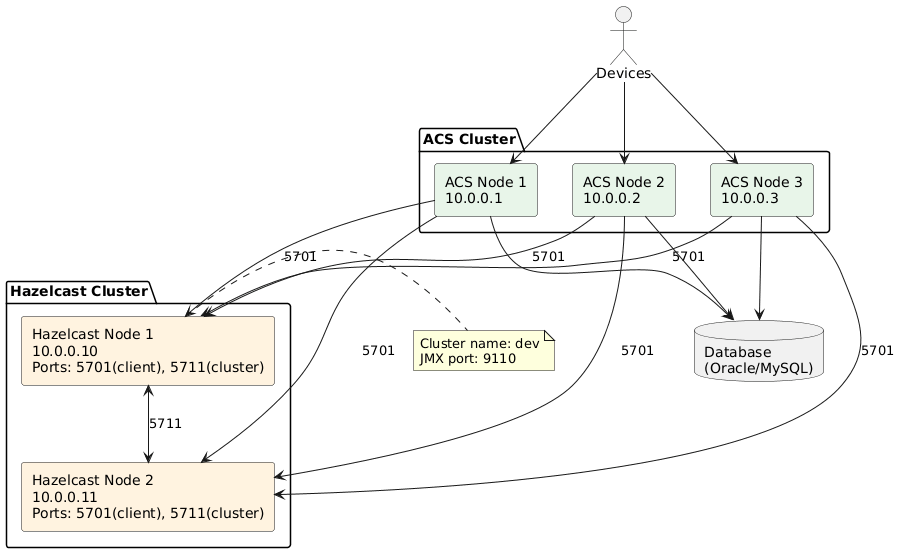
This section describes the architecture for deploying Hazelcast as a separate cluster from ACS application nodes. This separation provides better resource isolation, improved scalability, and enhanced reliability for production deployments.
16.2. Deployment Requirements
16.2.1. Mandatory Requirements
-
Hazelcast service must NOT run on ACS nodes — Hazelcast runs on dedicated separate servers with complete separation of concerns.
-
Minimum number of Hazelcast nodes: 2 — high availability requirement for cluster resilience.
-
All Hazelcast nodes must be defined in hazelcast-client.xml — ACS nodes require configuration of all Hazelcast cluster members for client connection to the entire cluster.
-
Each ACS node connects to each Hazelcast node — client port: 5701 (default), full mesh client connectivity.
16.3. Network Architecture Recommendations
16.3.1. Network Interface Separation
|
Hazelcast-ACS communication should be performed through an isolated network interface, separate from device communication. |
Hazelcast Node Network Configuration:
Single NIC for cluster communication:
-
NIC: Hazelcast cluster and ACS client connections only
-
No device traffic
-
No database connections
-
No UI connections
ACS Node Network Configuration:
Dual NIC setup (recommended):
-
NIC 1: Database, UI, CPE devices
-
NIC 2: Hazelcast cluster communication (isolated)
16.4. Architecture 1: Regular ACS Deployment
16.4.1. Infrastructure Components
Hazelcast Cluster:
-
Minimum 2 servers (e.g., 10.0.0.10, 10.0.0.11)
-
Dedicated Hazelcast application
-
Single cluster for all ACS data
ACS Cluster:
-
Minimum 2 servers (e.g., 10.0.0.1, 10.0.0.2, 10.0.0.3)
-
ACS application instances
-
Connect to Hazelcast cluster as clients
|
The number of ACS servers and Hazelcast servers do not need to be identical. Scale each tier independently based on requirements. |
|
While 1 ACS + 1 Hazelcast configuration is possible for testing, minimum 2+2 is required for production high availability. |
16.4.2. Hazelcast Configuration
hazelcast.xml (Hazelcast node):
<hazelcast>
  <cluster-name>dev</cluster-name>

  <network>
    <port auto-increment="false">5711</port>

    <join>
      <multicast enabled="false"/>
      <tcp-ip enabled="true">
        <member>10.0.0.10:5711</member>
        <member>10.0.0.11:5711</member>
      </tcp-ip>
    </join>
  </network>

  <!-- Client endpoint -->
  <network>
    <client-endpoint>
      <port>5701</port>
    </client-endpoint>
  </network>
</hazelcast>
Port Configuration:
| Purpose | Port | Description |
|---|---|---|
Server-to-server |
5711 |
Hazelcast nodes communicate with each other |
Client connections |
5701 |
ACS nodes connect to Hazelcast cluster |
jvm.options (Hazelcast node):
-Dcom.sun.management.jmxremote.port=911016.4.3. ACS Configuration
hazelcast-client.xml (ACS node):
<hazelcast-client>
  <cluster-name>dev</cluster-name>

  <network>
    <cluster-members>
      <address>10.0.0.10:5701</address>
      <address>10.0.0.11:5701</address>
    </cluster-members>
  </network>
</hazelcast-client>|
List all Hazelcast nodes in the cluster-members section for proper failover. |
16.5. Architecture 2: Provision Separation Deployment
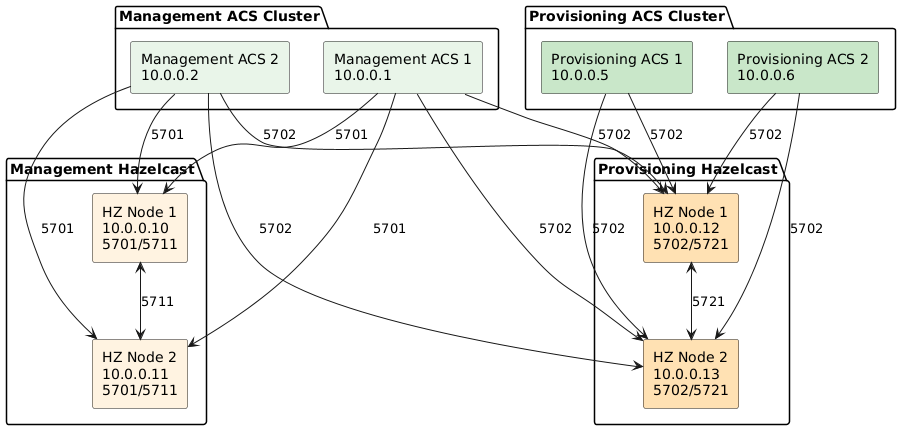
For large-scale deployments, separate Hazelcast clusters for management and provisioning traffic.
16.5.1. Infrastructure Components
Management Hazelcast Cluster:
-
Minimum 2 servers (e.g., 10.0.0.10, 10.0.0.11)
-
Cluster name:
dev -
Handles managed device data
Management ACS Cluster:
-
Minimum 2 servers (e.g., 10.0.0.1, 10.0.0.2)
-
Connects to management Hazelcast cluster
Provisioning Hazelcast Cluster:
-
Minimum 2 servers (e.g., 10.0.0.12, 10.0.0.13)
-
Cluster name:
provision -
Handles provisioning-only data
|
Provisioning Hazelcast can run on the same physical servers as management Hazelcast (as a second service with different ports), but separate servers are recommended for production. |
Provisioning ACS Cluster:
-
Minimum 2 servers (e.g., 10.0.0.5, 10.0.0.6)
-
Connects to provisioning Hazelcast cluster
16.5.2. Management Hazelcast Configuration
hazelcast.xml (Management Hazelcast nodes):
<hazelcast>
  <cluster-name>dev</cluster-name>

  <network>
    <port auto-increment="false">5711</port>

    <join>
      <multicast enabled="false"/>
      <tcp-ip enabled="true">
        <member>10.0.0.10:5711</member>
        <member>10.0.0.11:5711</member>
      </tcp-ip>
    </join>

    <client-endpoint>
      <port>5701</port>
    </client-endpoint>
  </network>
</hazelcast>
jvm.options (Management Hazelcast):
-Dcom.sun.management.jmxremote.port=911016.5.3. Provisioning Hazelcast Configuration
hazelcast.xml (Provisioning Hazelcast nodes):
<hazelcast>
  <cluster-name>provision</cluster-name>

  <network>
    <port auto-increment="false">5721</port>

    <join>
      <multicast enabled="false"/>
      <tcp-ip enabled="true">
        <member>10.0.0.12:5721</member>
        <member>10.0.0.13:5721</member>
      </tcp-ip>
    </join>

    <client-endpoint>
      <port>5702</port>
    </client-endpoint>
  </network>
</hazelcast>
jvm.options (Provisioning Hazelcast):
-Dcom.sun.management.jmxremote.port=9210Port Allocation Summary:
| Cluster | Client Port | Server Port | JMX Port |
|---|---|---|---|
Management (dev) |
5701 |
5711 |
9110 |
Provisioning |
5702 |
5721 |
9210 |
16.5.4. Management ACS Configuration
hazelcast-client.xml (Management ACS nodes):
<hazelcast-client>
  <cluster-name>dev</cluster-name>

  <network>
    <cluster-members>
      <address>10.0.0.10:5701</address>
      <address>10.0.0.11:5701</address>
    </cluster-members>
  </network>
</hazelcast-client>
hazelcast-client-prov.xml (Management ACS nodes):
<hazelcast-client>
  <cluster-name>provision</cluster-name>

  <network>
    <cluster-members>
      <address>10.0.0.12:5702</address>
      <address>10.0.0.13:5702</address>
    </cluster-members>
  </network>
</hazelcast-client>|
Management ACS nodes connect to BOTH Hazelcast clusters. |
16.5.5. Provisioning ACS Configuration
hazelcast-client.xml (Provisioning ACS nodes):
<hazelcast-client>
  <cluster-name>provision</cluster-name>

  <network>
    <cluster-members>
      <address>10.0.0.12:5702</address>
      <address>10.0.0.13:5702</address>
    </cluster-members>
  </network>
</hazelcast-client>|
Provisioning ACS nodes connect ONLY to the provisioning Hazelcast cluster. |
16.6. Configuration File Location
16.6.1. Hazelcast Node
-
hazelcast.xml— Cluster configuration -
jvm.options— JVM settings including JMX port
16.6.2. ACS Node
-
conf/hazelcast-client.xml— Primary Hazelcast client configuration -
conf/hazelcast-client-prov.xml— Provisioning Hazelcast client configuration (if using provision separation)
|
In |
16.7. Monitoring and Management
16.7.1. JMX Monitoring
Each Hazelcast cluster exposes JMX metrics on configured ports:
-
Management cluster: 9110
-
Provisioning cluster: 9210
|
In |
Available metrics:
-
Cluster member health
-
Cache statistics (hits, misses, evictions)
-
Memory usage
-
Network throughput
-
Client connections
16.8. Best Practices
16.8.1. Cluster Sizing
-
Start with 2 nodes minimum for HA
-
Scale horizontally as data volume increases
-
Monitor memory usage — add nodes before reaching 80% capacity
-
Balance load — ensure even distribution across nodes
16.8.2. Network Configuration
-
Use a dedicated network interface for Hazelcast traffic
-
Ensure low latency between Hazelcast nodes (< 1ms recommended)
-
Configure adequate bandwidth for cluster synchronization
-
Implement network redundancy where possible
16.9. Hazelcast Troubleshooting
16.9.1. Node Cannot Join Cluster
Symptoms: Node starts but remains isolated
Possible causes:
-
Network connectivity issues
-
Firewall blocking port 5711
-
Incorrect member list in configuration
-
Cluster name mismatch
Resolution:
-
Verify network connectivity:
telnet <peer-node> 5711 -
Check firewall rules allow port 5711
-
Verify cluster name matches across all nodes
-
Review Hazelcast logs for connection errors
16.9.2. High Memory Usage
Symptoms: Hazelcast node consuming excessive memory
Possible causes:
-
Cache size exceeds allocated heap
-
Memory leak
-
Large objects stored in cache
Resolution:
-
Increase JVM heap size in
jvm.options -
Review cache eviction policies
-
Analyze heap dump for memory leaks
-
Consider adding more Hazelcast nodes
16.9.3. Cannot Connect to Hazelcast
Symptoms: ACS fails to start or cache operations fail
Possible causes:
-
Hazelcast cluster unreachable
-
Incorrect member addresses in client configuration
-
Firewall blocking port 5701/5702
-
Cluster name mismatch
-
Missing
conf/hazelcast-client-prov.xmlwhen running inFTACS_MODE=MNGMNT
Resolution:
-
Verify Hazelcast cluster is running
-
Test connectivity:
telnet <hazelcast-node> 5701 -
Check cluster name in
hazelcast-client.xmlmatches server -
Review ACS logs for connection errors
16.9.4. JMX Connection Refused in PROV Mode
Symptoms: ACS logs contain java.net.ConnectException: Connection refused when collecting Hazelcast statistics
Possible causes:
-
Hazelcast JMX internal port is still
9110 -
ACS is running in
FTACS_MODE=PROVand expects provisioning JMX on9210
Resolution:
-
Set Hazelcast internal JMX port to
9210(for Docker/Compose:HZ_JMX_INTERNAL_PORT=9210) -
Optionally set published host JMX port to
9210(HZ_JMX_PORT=9210) to keep host/internal ports aligned -
Restart Hazelcast and ACS services
16.9.5. Cache Operation Timeouts
Symptoms: Slow cache operations or timeouts
Possible causes:
-
Network latency between ACS and Hazelcast
-
Hazelcast cluster overloaded
-
Large data transfer
Resolution:
-
Monitor network latency between ACS and Hazelcast
-
Check Hazelcast cluster metrics (CPU, memory, network)
-
Consider adding Hazelcast nodes
-
Optimize cached data structure sizes
16.9.6. Split-Brain Scenarios
Symptoms: Cluster partitions into multiple subclusters
Possible causes:
-
Network partition between Hazelcast nodes
-
Temporary network instability
Resolution:
-
Configure split-brain protection (quorum)
-
Implement network redundancy
-
Monitor cluster member status
-
Review network infrastructure for stability
16.10. Performance Tuning
16.10.1. JVM Settings
Recommended JVM options for Hazelcast nodes:
-Xms4g
-Xmx4g
-XX:+UseG1GC
-XX:MaxGCPauseMillis=200
-XX:+ParallelRefProcEnabled
-XX:+UseStringDeduplication
-Dcom.sun.management.jmxremote.port=9110
-Dcom.sun.management.jmxremote.authenticate=false
-Dcom.sun.management.jmxremote.ssl=false
16.10.2. Network Optimization
TCP tuning for Linux:
# Increase TCP buffer sizes
net.core.rmem_max = 134217728
net.core.wmem_max = 134217728
net.ipv4.tcp_rmem = 4096 87380 67108864
net.ipv4.tcp_wmem = 4096 65536 67108864
Additional recommendations:
-
Reduce TCP retransmission timeout
-
Enable TCP keep-alive for long-lived connections
16.11. Migration Guide
16.11.1. From Built-in to External Hazelcast
-
Deploy external Hazelcast cluster (minimum 2 nodes)
-
Configure
hazelcast.xmlon Hazelcast nodes -
Update
hazelcast-client.xmlon ACS nodes with cluster addresses -
Stop ACS instances (rolling restart recommended)
-
Restart ACS instances — they connect to external cluster
-
Verify cache connectivity through logs and JMX
-
Monitor performance to ensure proper operation
16.11.2. Adding Nodes to Existing Cluster
Hazelcast node:
-
Configure new node with same cluster name
-
Add new node IP to existing nodes' member list
-
Start new Hazelcast node
-
Verify cluster membership in logs
ACS client:
-
Update
hazelcast-client.xmlwith new Hazelcast node address -
Restart ACS instances (rolling restart to avoid downtime)
-
Verify connections to new node