Provision Separation SDD
This document describes the design of the Provision ACS component of Friendly Technologies Device Management System, enabling separation of provisioning and management workloads across dedicated ACS instances.
1. Introduction
Big service providers can have millions of devices in the network. Every device should be managed and stored leading to a huge load on the server itself. This load may influence system performance, which can result in service delivery failure. In this case, new devices will struggle to be configured for paid services; service providers may lose new clients due to not handling the first initial setup.
2. Software Architecture overview
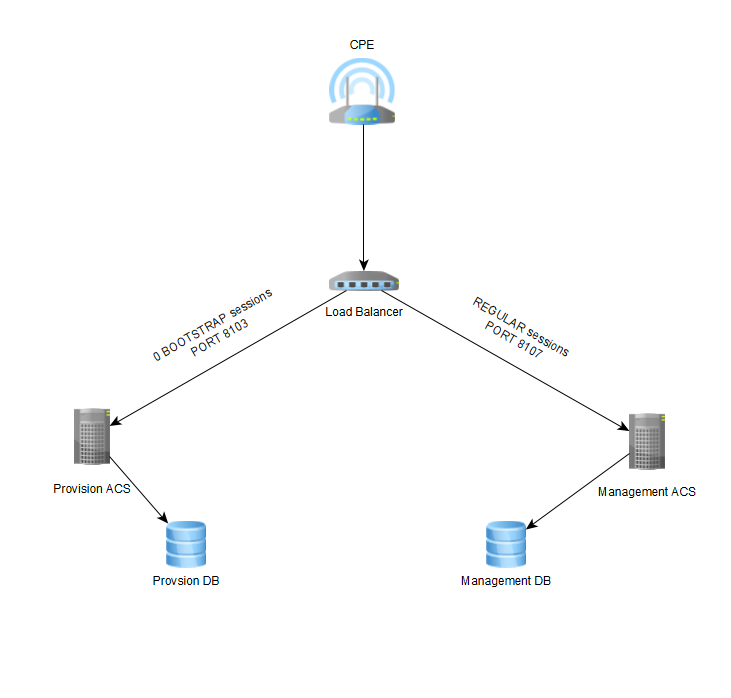
CPE has Provision ACS URL (acs.host:8103) in its base firmware and connects to it on each bootstrap session (first power on, firmware upgrade, etc.). After initial provisioning, CPE is moved to the Management ACS (acs.host:8107). Both Management and Provision ACSs have separate, independent DBs, the synchronization is the ACS part.
Here is the basic infrastructure flow:
3. Software design description
| Item | Details |
|---|---|
Use Case 1 |
Configuration of new device (initial installation) |
Description |
During the first installation the Technician installs CPE in the customer’s environment and provides automated configuration — provisioning for CPE. The technician ensures successful configuration and confirms working services. |
Basic flow |
|
Alternative |
|
Alternative flow |
| Item | Details |
|---|---|
Use Case 2 |
Change CPE Provision data - Add to provision |
Description |
Users add/delete service or change related to service settings (e.g., password for internet connection). |
Basic flow |
|
Alternative |
|
Alternative flow |
| Item | Details |
|---|---|
Use Case 3 |
Existing devices come without 0 BOOTSTRAP and NO pending tasks on ACS-Prov. |
Description |
The existing devices will come to ACS-Provision server due to hard-coded ACS URL by Periodic Inform or Reboot event, this case is only applicable on first redirect of ACS URL from existing MGMT ACS to Prov ACS, on the next device connection the ACS URL will be for MGMT ACS. |
Basic flow |
|
Alternative |
|
Alternative flow |
| Item | Details |
|---|---|
Use Case 4 |
Device after Factory Reset → Provision data exists in DB-Prov. |
Description |
User resets device to fix issue or by mistake, CPE comes to ACS-Provision by hard-coded ACS URL with "0 BOOTSTRAP" event code. No technician to confirm working services. |
Basic flow |
|
Alternative |
Provision status is Failed. |
Alternative flow |
|
| Item | Details |
|---|---|
Use Case 5 |
Device after Factory Reset → NO Provision data in DB-Prov. (old | new | deleted) |
Description |
User resets device to fix issue or by mistake, CPE comes to ACS-Provision by hard-coded ACS URL with "0 BOOTSTRAP" event code. |
Basic flow |
|
Alternative |
|
Alternative flow |
3.1. Configuration of new device (initial installation)
3.1.1. Description
During the first installation the Technician installs CPE in the customer’s environment and provides automated configuration — provisioning for CPE.
The technician ensures successful configuration and confirms working services.
3.1.2. Design description
-
Handle bootstrap session on Provision ACS
-
Send Provision and Profile to CPE
-
Send notification of the provision status to the event handling system
-
Wait ACS URL change API call from the engineer.
-
Change CPE URL to the Management ACS URL
-
Handle CPE on Management ACS
Software requirements
-
Some DB data from management need to be copied to provision DB. Tables that need to be copied:
cpe
cpe_provission
cpe_provsion_attribute
cpe_provision_object
cpe_provision_object_instance
cpe_provision_object_parameter
cpe_parameter_name (only parameters that exists in cpe_provision,
cpe_provsion_attribute, cpe_provision_object)
cpe_file
custom_rpc
file_type
cpe_serial
ftacs_parameter
product_class
product_class_group
manufacturer
cpe_login
cpe_login_license
cust_device1
event_hardcoded
event_hardcoded_url
event_receiver_url
-
A new ACS start parameter needs to be added
-Dftacs.mode=PROV/MGMNT/ALL(default ALL). Set the corresponding value on each ACS instance. In PROV mode, ACS on 0 bootstrap will send provision and profile and NOT request GetRPCMethods and cpe tree. In MGMNT mode, provision will not be sent. -
A new API method
moveCpeToManagementneeds to be added to/ACSWebServiceAdditional -
Hazelcast isolation: hazelcast cluster needs to be isolated from management ACS hazelcast and topics need to be in the same cluster as ACS management. This requires 2 new hazelcast clusters configuration (changes in hazelcast.xml)
3.2. Change CPE Provision data - Add to provision
3.2.1. Description
Users add/delete service or change related to service settings (e.g. password for internet connection).
3.2.2. Design description
-
ACS-Management server performs SPV to CPE. (Example: User changes Wi-Fi settings through API-2)
-
ACS-Management server sends new Provision settings to ACS-Provision server only after completed SPV task.
-
ACS-Provision server overwrites Provision data for CPE in its DB.
-
ACS-Management deletes Provisioning tasks.
-
New parameter in acs_configuration.xml
redirectAcsURL
3.3. Existing devices come without 0 BOOTSTRAP and NO pending tasks on ACS-Prov
3.3.1. Description
The existing devices will come to ACS-Provision server due to hard-coded ACS URL by Periodic Inform or Reboot event, this case is only applicable on first redirect of ACS URL from existing MGMT ACS to Prov ACS, on the next device connection the ACS URL will be for MGMT ACS.
3.4. Device after Factory Reset
3.4.1. Description
User resets device to fix issue or by mistake, CPE comes to ACS-Provision by hard-coded ACS URL with "0 BOOTSTRAP" event code. No technician to confirm working services.
3.4.2. Design description
-
ACS-Provision server sends all provision data + profile data to CPE.
-
If Provision status is Completed.
-
ACS-Provision server sets new ACS URL for ACS-Management connection
-
If Provision status is Failed, Device stays on ACS Provision
-
Provision ACS has method with all CPEs on it