Connected Clients Information
Overview
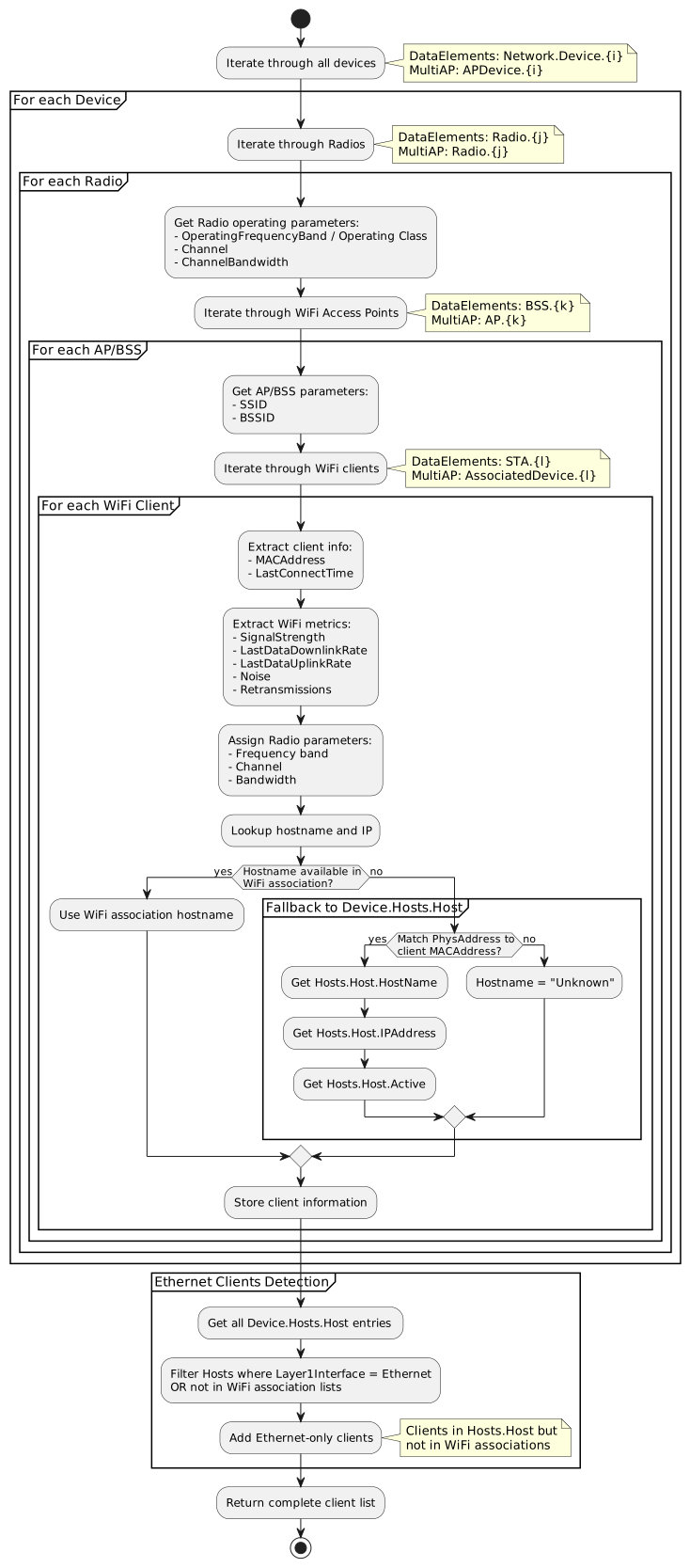
This flow collects comprehensive information about client devices connected to a mesh network using TR-181 data model paths. It gathers client details from multiple sources with intelligent fallback mechanisms to maximize data completeness across different device implementations.
This document covers both primary TR-181 paths: DataElements (modern WiFi EasyMesh) and MultiAP (legacy Multi-AP), providing a unified approach to client information collection.
Client information includes:
-
Identity: MAC address, hostname, IP address
-
Connection Details: Which AP device and radio band the client connects to
-
Connection Type: WiFi vs. Ethernet determination
-
WiFi Metrics: Signal strength (RSSI), noise, data rates, PHY capabilities
-
Network Configuration: IP assignment, DHCP status
-
Traffic Statistics: Bytes sent/received, packet counts, errors
This comprehensive client data enables:
-
Network topology visualization with device placement
-
Performance monitoring per client
-
Troubleshooting connectivity issues
-
Capacity planning and load balancing
-
Client roaming analysis across mesh APs
-
Real-time network health monitoring
TR-181 Parameter Reference
Common Parameters (Both Paths)
| Parameter Path | Description | Type | Example Value |
|---|---|---|---|
Device.Hosts.Host.{i}.PhysAddress |
Client MAC address (for matching). |
string (MAC format) |
"11:22:33:44:55:66" |
Device.Hosts.Host.{i}.HostName |
Hostname reported by client or via DHCP. |
string |
"Johns-iPhone", "Desktop-PC" |
Device.Hosts.Host.{i}.IPAddress |
Current IP address assigned to client. |
string (IP format) |
"192.168.1.100" |
Device.Hosts.Host.{i}.Active |
Whether client is currently active. |
boolean |
true, false |
Device.Hosts.Host.{i}.AddressSource |
How IP address was assigned. |
string (enum) |
"DHCP", "Static", "AutoIP" |
Device.Hosts.Host.{i}.Layer1Interface |
Physical interface the host connects through. |
string |
"Device.WiFi.SSID.1", "Device.Ethernet.Interface.1" |
DataElements Path Parameters
WiFi Association Parameters (STA):
| Parameter Path | Description | Type | Example Value |
|---|---|---|---|
Device.WiFi.DataElements.Network.Device.{i}.Radio.{j}.BSS.{k}.STA.{l}.MACAddress |
Client device MAC address (unique identifier). |
string (MAC format) |
"11:22:33:44:55:66" |
Device.WiFi.DataElements.Network.Device.{i}.Radio.{j}.BSS.{k}.STA.{l}.LastConnectTime |
Timestamp when client last connected. |
dateTime |
"2024-02-26T10:30:00Z" |
Device.WiFi.DataElements.Network.Device.{i}.Radio.{j}.BSS.{k}.STA.{l}.SignalStrength |
Received signal strength (RSSI) in dBm. |
int |
-45, -60, -75 |
Device.WiFi.DataElements.Network.Device.{i}.Radio.{j}.BSS.{k}.STA.{l}.LastDataDownlinkRate |
Most recent downlink PHY rate in Kbps. |
unsignedInt |
866000 (866 Mbps) |
Device.WiFi.DataElements.Network.Device.{i}.Radio.{j}.BSS.{k}.STA.{l}.LastDataUplinkRate |
Most recent uplink PHY rate in Kbps. |
unsignedInt |
433000 (433 Mbps) |
Device.WiFi.DataElements.Network.Device.{i}.Radio.{j}.BSS.{k}.STA.{l}.EstMACDataRateDownlink |
Estimated maximum MAC data rate downlink in Mbps. |
unsignedInt |
600 |
Device.WiFi.DataElements.Network.Device.{i}.Radio.{j}.BSS.{k}.STA.{l}.EstMACDataRateUplink |
Estimated maximum MAC data rate uplink in Mbps. |
unsignedInt |
600 |
Device.WiFi.DataElements.Network.Device.{i}.Radio.{j}.BSS.{k}.STA.{l}.BytesSent |
Total bytes sent to this client. |
unsignedLong |
12345678900 |
Device.WiFi.DataElements.Network.Device.{i}.Radio.{j}.BSS.{k}.STA.{l}.BytesReceived |
Total bytes received from this client. |
unsignedLong |
98765432100 |
Device.WiFi.DataElements.Network.Device.{i}.Radio.{j}.BSS.{k}.STA.{l}.PacketsSent |
Total packets sent to this client. |
unsignedLong |
1000000 |
Device.WiFi.DataElements.Network.Device.{i}.Radio.{j}.BSS.{k}.STA.{l}.PacketsReceived |
Total packets received from this client. |
unsignedLong |
2000000 |
Device.WiFi.DataElements.Network.Device.{i}.Radio.{j}.BSS.{k}.STA.{l}.ErrorsSent |
Errors in packets sent to client. |
unsignedInt |
10 |
Device.WiFi.DataElements.Network.Device.{i}.Radio.{j}.BSS.{k}.STA.{l}.ErrorsReceived |
Errors in packets received from client. |
unsignedInt |
5 |
Device.WiFi.DataElements.Network.Device.{i}.Radio.{j}.BSS.{k}.STA.{l}.RetransCount |
Number of packet retransmissions. |
unsignedLong |
150 |
Radio Context Parameters (DataElements):
| Parameter Path | Description | Type | Example Value |
|---|---|---|---|
Device.WiFi.DataElements.Network.Device.{i}.Radio.{j}.ID |
Radio MAC address identifier. |
string (MAC format) |
"00:11:22:33:44:55" |
Device.WiFi.DataElements.Network.Device.{i}.Radio.{j}.CurrentOperatingClassProfile.Class |
IEEE 802.11 operating class (defines frequency band). |
unsignedInt |
81 (2.4GHz), 115 (5GHz), 131 (6GHz) |
Device.WiFi.DataElements.Network.Device.{i}.Radio.{j}.CurrentOperatingClassProfile.Channel |
Current operating channel number. |
unsignedInt |
6 (2.4GHz), 36 (5GHz) |
Device.WiFi.DataElements.Network.Device.{i}.Radio.{j}.CurrentOperatingClassProfile.ChannelBandwidth |
Channel bandwidth in MHz. |
unsignedInt |
20, 40, 80, 160 |
Device.WiFi.DataElements.Network.Device.{i}.Radio.{j}.BSS.{k}.BSSID |
Basic Service Set Identifier. |
string (MAC format) |
"00:11:22:33:44:66" |
Device.WiFi.DataElements.Network.Device.{i}.Radio.{j}.BSS.{k}.SSID |
Network name (Service Set Identifier). |
string |
"MyHomeNetwork" |
MultiAP Path Parameters
WiFi Association Parameters (AssociatedDevice):
| Parameter Path | Description | Type | Example Value |
|---|---|---|---|
Device.WiFi.MultiAP.APDevice.{i}.Radio.{j}.AP.{k}.AssociatedDevice.{l}.MACAddress |
Client device MAC address (unique identifier). |
string (MAC format) |
"11:22:33:44:55:66" |
Device.WiFi.MultiAP.APDevice.{i}.Radio.{j}.AP.{k}.AssociatedDevice.{l}.LastConnectTime |
Timestamp when client last associated. |
dateTime |
"2024-02-26T10:30:00Z" |
Device.WiFi.MultiAP.APDevice.{i}.Radio.{j}.AP.{k}.AssociatedDevice.{l}.SignalStrength |
Received signal strength indicator (RSSI) in dBm. |
int |
-45, -60, -75 |
Device.WiFi.MultiAP.APDevice.{i}.Radio.{j}.AP.{k}.AssociatedDevice.{l}.LastDataDownlinkRate |
Most recent downlink PHY rate in Kbps. |
unsignedInt |
866000 (866 Mbps) |
Device.WiFi.MultiAP.APDevice.{i}.Radio.{j}.AP.{k}.AssociatedDevice.{l}.LastDataUplinkRate |
Most recent uplink PHY rate in Kbps. |
unsignedInt |
433000 (433 Mbps) |
Device.WiFi.MultiAP.APDevice.{i}.Radio.{j}.AP.{k}.AssociatedDevice.{l}.BytesSent |
Total bytes transmitted to this client. |
unsignedLong |
12345678900 |
Device.WiFi.MultiAP.APDevice.{i}.Radio.{j}.AP.{k}.AssociatedDevice.{l}.BytesReceived |
Total bytes received from this client. |
unsignedLong |
98765432100 |
Device.WiFi.MultiAP.APDevice.{i}.Radio.{j}.AP.{k}.AssociatedDevice.{l}.PacketsSent |
Total packets transmitted to client. |
unsignedLong |
1000000 |
Device.WiFi.MultiAP.APDevice.{i}.Radio.{j}.AP.{k}.AssociatedDevice.{l}.PacketsReceived |
Total packets received from client. |
unsignedLong |
2000000 |
Device.WiFi.MultiAP.APDevice.{i}.Radio.{j}.AP.{k}.AssociatedDevice.{l}.ErrorsSent |
Errors in outbound packets. |
unsignedInt |
10 |
Device.WiFi.MultiAP.APDevice.{i}.Radio.{j}.AP.{k}.AssociatedDevice.{l}.RetransCount |
Number of packet retransmissions. |
unsignedInt |
150 |
Device.WiFi.MultiAP.APDevice.{i}.Radio.{j}.AP.{k}.AssociatedDevice.{l}.Active |
Whether client is currently active. |
boolean |
true, false |
Radio and AP Context Parameters (MultiAP):
| Parameter Path | Description | Type | Example Value |
|---|---|---|---|
Device.WiFi.MultiAP.APDevice.{i}.Radio.{j}.OperatingFrequencyBand |
Radio frequency band. |
string (enum) |
"2.4GHz", "5GHz", "6GHz" |
Device.WiFi.MultiAP.APDevice.{i}.Radio.{j}.Channel |
Current operating channel number. |
unsignedInt |
6 (2.4GHz), 36 (5GHz) |
Device.WiFi.MultiAP.APDevice.{i}.Radio.{j}.CurrentOperatingChannelBandwidth |
Channel bandwidth in MHz. |
string |
"20MHz", "40MHz", "80MHz", "160MHz" |
Device.WiFi.MultiAP.APDevice.{i}.Radio.{j}.AP.{k}.SSID |
Network name (Service Set Identifier). |
string |
"MyHomeNetwork" |
Device.WiFi.MultiAP.APDevice.{i}.Radio.{j}.AP.{k}.BSSID |
Basic Service Set Identifier. |
string (MAC format) |
"00:11:22:33:44:66" |
Layer1Interface Parameter Guide
The Device.Hosts.Host.{i}.Layer1Interface parameter is essential for determining client connection types and locations (Controller vs. Satellite) in mesh networks.
Standard Layer1Interface Values
| Value Pattern | Meaning | Connection Location |
|---|---|---|
|
Client connected via Ethernet (LAN cable) |
Controller only |
|
Client connected via WiFi |
Controller only |
Empty or Non-Standard |
Connection type/location undetermined |
Requires search in WiFi association lists |
Detailed Value Examples
Ethernet Connection to Controller:
Device.Hosts.Host.10.Layer1Interface = "Device.Ethernet.Interface.1"
Device.Hosts.Host.11.Layer1Interface = "Device.Ethernet.Interface.2"
Device.Hosts.Host.12.Layer1Interface = "Device.Ethernet.Link.1"
All patterns starting with "Device.Ethernet." indicate Ethernet connection to the Controller.
WiFi Connection to Controller:
Device.Hosts.Host.5.Layer1Interface = "Device.WiFi.SSID.1"
Device.Hosts.Host.6.Layer1Interface = "Device.WiFi.SSID.2"
Device.Hosts.Host.7.Layer1Interface = "Device.WiFi.Radio.1"
All patterns starting with "Device.WiFi." indicate WiFi connection to the Controller.
Non-Standard or Empty Values:
Device.Hosts.Host.20.Layer1Interface = ""
Device.Hosts.Host.21.Layer1Interface = "Satellite.WiFi.Radio.1"
Device.Hosts.Host.22.Layer1Interface = "CustomPath.Interface.1"
These require searching in WiFi association lists to determine connection type and location.
Why Layer1Interface May Be Empty
The Layer1Interface parameter may be empty or non-standard in these cases:
-
Client Connected to Satellite: Satellites don’t populate Layer1Interface in Device.Hosts.Host
-
Device Implementation Variation: Not all manufacturers implement this parameter consistently
-
Client Not Yet Registered: Client connected but not yet in the Hosts table
-
Legacy Device Firmware: Older firmware may not support this parameter
Connection Determination Strategy
Use this three-tier strategy:
Tier 1 - Layer1Interface (Fastest):
if Layer1Interface.startsWith("Device.Ethernet."):
    return "Ethernet to Controller"
elif Layer1Interface.startsWith("Device.WiFi."):
    return "WiFi to Controller"
Tier 2 - WiFi Association Search (Most Accurate):
# DataElements path
for device in DataElements.Network.Device:
    for radio in device.Radio:
        for bss in radio.BSS:
            for sta in bss.STA:
                if sta.MACAddress == client_mac:
                    if device.is_controller:
                        return "WiFi to Controller"
                    else:
                        return "WiFi to Satellite"

# MultiAP path
for apdevice in MultiAP.APDevice:
    for radio in apdevice.Radio:
        for ap in radio.AP:
            for assoc_dev in ap.AssociatedDevice:
                if assoc_dev.MACAddress == client_mac:
                    if apdevice.is_controller:
                        return "WiFi to Controller"
                    else:
                        return "WiFi to Satellite"
Tier 3 - AccessPoint Fallback (Legacy Compatibility):
# Fallback for devices not using DataElements or MultiAP
for access_point in Device.WiFi.AccessPoint:
    for assoc_dev in access_point.AssociatedDevice:
        if assoc_dev.MACAddress == client_mac:
            return "WiFi to Controller (legacy path)"
Satellite Client Identification
Key Rule: Clients connected to Satellites typically have empty Layer1Interface and must be identified by searching WiFi association lists.
Example (DataElements):
# Client connected to Satellite
Device.Hosts.Host.15.PhysAddress = "AA:BB:CC:DD:EE:FF"
Device.Hosts.Host.15.HostName = "Smart-TV"
Device.Hosts.Host.15.IPAddress = "192.168.1.150"
Device.Hosts.Host.15.Layer1Interface = ""  # Empty!

# Search finds it in Satellite device
Device.WiFi.DataElements.Network.Device.2.Radio.1.BSS.1.STA.3.MACAddress = "AA:BB:CC:DD:EE:FF"
Device.WiFi.DataElements.Network.Device.2.Radio.1.BSS.1.STA.3.SignalStrength = -52

# Device.2 is a Satellite, so:
# Client = "Smart-TV" connected to Satellite via WiFi 5GHz
Example (MultiAP):
# Client connected to Satellite
Device.Hosts.Host.15.PhysAddress = "AA:BB:CC:DD:EE:FF"
Device.Hosts.Host.15.HostName = "Smart-TV"
Device.Hosts.Host.15.IPAddress = "192.168.1.150"
Device.Hosts.Host.15.Layer1Interface = ""  # Empty!

# Search finds it in Satellite APDevice
Device.WiFi.MultiAP.APDevice.2.Radio.1.AP.1.AssociatedDevice.3.MACAddress = "AA:BB:CC:DD:EE:FF"
Device.WiFi.MultiAP.APDevice.2.Radio.1.AP.1.AssociatedDevice.3.SignalStrength = -52

# APDevice.2 is a Satellite, so:
# Client = "Smart-TV" connected to Satellite via WiFi 5GHz
Implementation Requirements
Basic WiFi Client Configuration
DataElements Path:
# Client connected to Device 1, Radio 1, BSS 1
Device.WiFi.DataElements.Network.Device.1.Radio.1.BSS.1.BSSID = "00:11:22:33:44:66"
Device.WiFi.DataElements.Network.Device.1.Radio.1.BSS.1.SSID = "MyHomeNetwork"

Device.WiFi.DataElements.Network.Device.1.Radio.1.BSS.1.STA.1.MACAddress = "11:22:33:44:55:66"
Device.WiFi.DataElements.Network.Device.1.Radio.1.BSS.1.STA.1.LastConnectTime = "2024-02-26T10:30:15Z"
Device.WiFi.DataElements.Network.Device.1.Radio.1.BSS.1.STA.1.SignalStrength = -55
Device.WiFi.DataElements.Network.Device.1.Radio.1.BSS.1.STA.1.LastDataDownlinkRate = 866000
Device.WiFi.DataElements.Network.Device.1.Radio.1.BSS.1.STA.1.LastDataUplinkRate = 433000
Device.WiFi.DataElements.Network.Device.1.Radio.1.BSS.1.STA.1.BytesSent = 1024000000
Device.WiFi.DataElements.Network.Device.1.Radio.1.BSS.1.STA.1.BytesReceived = 512000000
Device.WiFi.DataElements.Network.Device.1.Radio.1.BSS.1.STA.1.RetransCount = 25

# Radio operating parameters
Device.WiFi.DataElements.Network.Device.1.Radio.1.CurrentOperatingClassProfile.Class = 115
Device.WiFi.DataElements.Network.Device.1.Radio.1.CurrentOperatingClassProfile.Channel = 36
Device.WiFi.DataElements.Network.Device.1.Radio.1.CurrentOperatingClassProfile.ChannelBandwidth = 80
MultiAP Path:
# AP Device, Radio, and Access Point
Device.WiFi.MultiAP.APDevice.1.Radio.1.OperatingFrequencyBand = "5GHz"
Device.WiFi.MultiAP.APDevice.1.Radio.1.Channel = 36
Device.WiFi.MultiAP.APDevice.1.Radio.1.CurrentOperatingChannelBandwidth = "80MHz"

Device.WiFi.MultiAP.APDevice.1.Radio.1.AP.1.SSID = "MyHomeNetwork"
Device.WiFi.MultiAP.APDevice.1.Radio.1.AP.1.BSSID = "00:11:22:33:44:66"

# Associated client
Device.WiFi.MultiAP.APDevice.1.Radio.1.AP.1.AssociatedDevice.1.MACAddress = "11:22:33:44:55:66"
Device.WiFi.MultiAP.APDevice.1.Radio.1.AP.1.AssociatedDevice.1.LastConnectTime = "2024-02-26T10:30:15Z"
Device.WiFi.MultiAP.APDevice.1.Radio.1.AP.1.AssociatedDevice.1.SignalStrength = -55
Device.WiFi.MultiAP.APDevice.1.Radio.1.AP.1.AssociatedDevice.1.LastDataDownlinkRate = 866000
Device.WiFi.MultiAP.APDevice.1.Radio.1.AP.1.AssociatedDevice.1.LastDataUplinkRate = 433000
Device.WiFi.MultiAP.APDevice.1.Radio.1.AP.1.AssociatedDevice.1.BytesSent = 1024000000
Device.WiFi.MultiAP.APDevice.1.Radio.1.AP.1.AssociatedDevice.1.BytesReceived = 512000000
Device.WiFi.MultiAP.APDevice.1.Radio.1.AP.1.AssociatedDevice.1.RetransCount = 25
Device.WiFi.MultiAP.APDevice.1.Radio.1.AP.1.AssociatedDevice.1.Active = true
Hostname and IP Information (Fallback)
If hostname/IP not in WiFi association parameters, use Device.Hosts.Host:
# Match by MAC address
Device.Hosts.Host.5.PhysAddress = "11:22:33:44:55:66"
Device.Hosts.Host.5.HostName = "Johns-iPhone"
Device.Hosts.Host.5.IPAddress = "192.168.1.100"
Device.Hosts.Host.5.Active = true
Device.Hosts.Host.5.AddressSource = "DHCP"
Device.Hosts.Host.5.Layer1Interface = "Device.WiFi.SSID.1"
Layer1Interface Value: "Device.WiFi.SSID.1" indicates this WiFi client is connected to the Controller (not a Satellite). To determine if connected to a Satellite, the Layer1Interface would be empty, requiring a search in WiFi association lists.
Ethernet Client Configuration
Ethernet clients appear only in Device.Hosts.Host:
Device.Hosts.Host.10.PhysAddress = "AA:BB:CC:DD:EE:FF"
Device.Hosts.Host.10.HostName = "Desktop-PC"
Device.Hosts.Host.10.IPAddress = "192.168.1.50"
Device.Hosts.Host.10.Active = true
Device.Hosts.Host.10.AddressSource = "Static"
Device.Hosts.Host.10.Layer1Interface = "Device.Ethernet.Interface.1"
Important Points:
-
Ethernet clients do NOT appear in WiFi association lists
-
The value "Device.Ethernet.Interface.1" indicates connection to the Controller via Ethernet
-
All Ethernet connections in Layer1Interface are to the Controller; Satellites do not directly support wired clients in this model
Multi-Band Client Handling
Clients may roam between bands (2.4 GHz ↔ 5 GHz):
DataElements Path:
# Client initially on 2.4 GHz (Radio 2)
Device.WiFi.DataElements.Network.Device.1.Radio.2.BSS.1.STA.3.MACAddress = "11:22:33:44:55:77"
Device.WiFi.DataElements.Network.Device.1.Radio.2.BSS.1.STA.3.SignalStrength = -72
Device.WiFi.DataElements.Network.Device.1.Radio.2.CurrentOperatingClassProfile.Class = 81

# After roaming, client on 5 GHz (Radio 1)
Device.WiFi.DataElements.Network.Device.1.Radio.1.BSS.1.STA.5.MACAddress = "11:22:33:44:55:77"
Device.WiFi.DataElements.Network.Device.1.Radio.1.BSS.1.STA.5.SignalStrength = -58
Device.WiFi.DataElements.Network.Device.1.Radio.1.CurrentOperatingClassProfile.Class = 115
MultiAP Path:
# Client on 2.4 GHz (Radio 2)
Device.WiFi.MultiAP.APDevice.1.Radio.2.OperatingFrequencyBand = "2.4GHz"
Device.WiFi.MultiAP.APDevice.1.Radio.2.AP.1.AssociatedDevice.3.MACAddress = "11:22:33:44:55:77"
Device.WiFi.MultiAP.APDevice.1.Radio.2.AP.1.AssociatedDevice.3.SignalStrength = -68

# Same client after roaming to 5 GHz (Radio 1)
Device.WiFi.MultiAP.APDevice.1.Radio.1.OperatingFrequencyBand = "5GHz"
Device.WiFi.MultiAP.APDevice.1.Radio.1.AP.1.AssociatedDevice.5.MACAddress = "11:22:33:44:55:77"
Device.WiFi.MultiAP.APDevice.1.Radio.1.AP.1.AssociatedDevice.5.SignalStrength = -52Note: MAC address stays the same; client moves between Radio instances. After roaming, client should only appear in one Radio/AP at a time.
Key Decision Points
Client Connection Type Determination
Layer1Interface Analysis
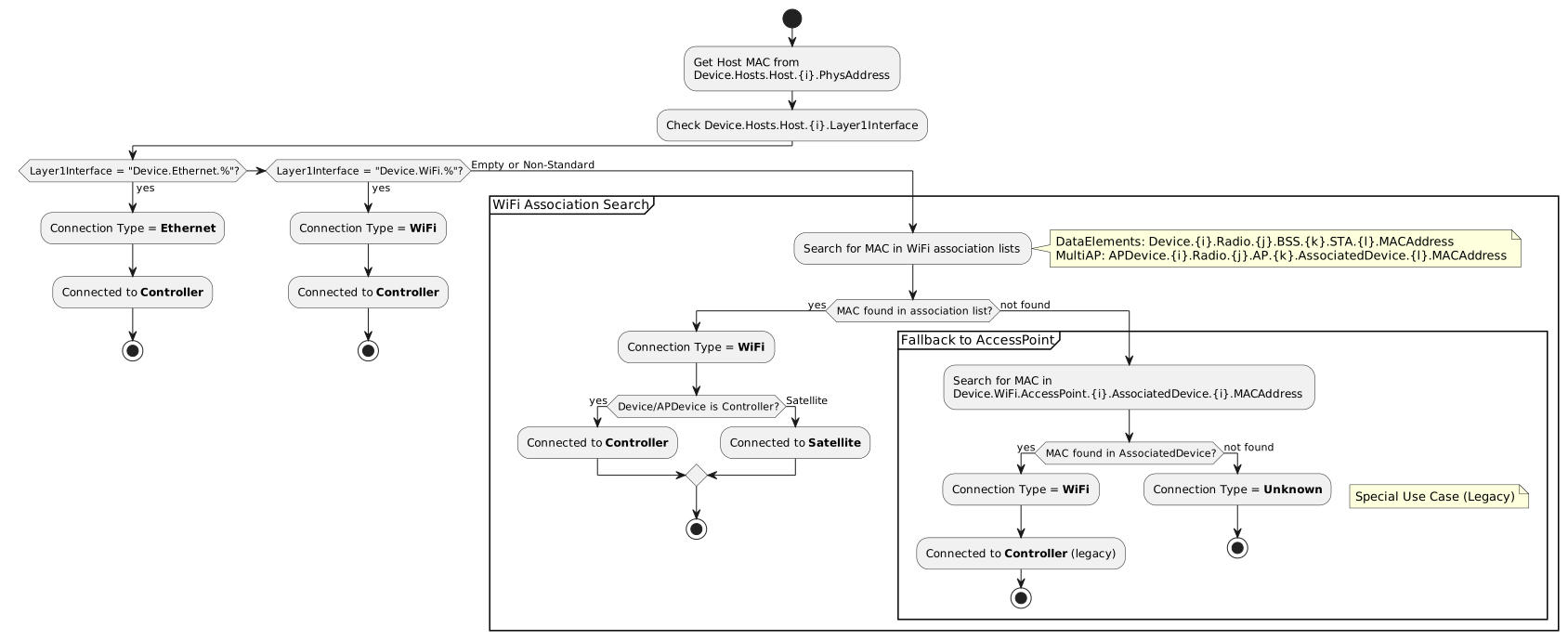
The Device.Hosts.Host.{i}.Layer1Interface parameter is crucial for determining whether a client is connected to the main gateway (Controller) or a Satellite, and whether the connection is WiFi or Ethernet.
Layer1Interface Value Meanings:
-
Device.Ethernet.%- Client connected to Controller via LAN (Ethernet) -
Device.WiFi.%- Client connected to Controller via WiFi
Important: Non-standard values for Layer1Interface (not matching "Device.Ethernet.%" or "Device.WiFi.%") should be treated as EMPTY values.
Algorithm Implementation
WiFi Client Criteria:
-
MAC address appears in WiFi association lists (DataElements STA or MultiAP AssociatedDevice)
-
OR
Hosts.Host.{i}.Layer1Interfacereferences a WiFi interface (Device.WiFi.%)
Ethernet Client Criteria:
-
MAC address in
Hosts.Host.{i}.PhysAddressbut NOT in any WiFi association list -
OR
Hosts.Host.{i}.Layer1Interfacereferences an Ethernet interface (Device.Ethernet.%)
Python Algorithm:
def determine_connection_type(client_mac, data_model_path='dataelements'):
    # Step 1: Check Hosts.Host Layer1Interface first
    host = find_host_by_mac(client_mac)

    if host and host.Layer1Interface:
        layer1 = host.Layer1Interface

        # Check for standard Ethernet interface
        if layer1.startswith("Device.Ethernet."):
            return {
                'type': 'Ethernet',
                'location': 'Controller'
            }

        # Check for standard WiFi interface
        elif layer1.startswith("Device.WiFi."):
            return {
                'type': 'WiFi',
                'location': 'Controller'
            }

        # Non-standard values treated as empty - continue to next steps

    # Step 2: Search in WiFi association lists
    if data_model_path == 'dataelements':
        for device in all_devices:
            for radio in device.radios:
                for bss in radio.bss_list:
                    for sta in bss.sta_list:
                        if normalize_mac(sta.MACAddress) == normalize_mac(client_mac):
                            device_location = 'Controller' if device.is_controller else 'Satellite'
                            return {
                                'type': 'WiFi',
                                'location': device_location,
                                'radio': radio,
                                'bss': bss
                            }

    elif data_model_path == 'multiap':
        for apdevice in all_apdevices:
            for radio in apdevice.radios:
                for ap in radio.aps:
                    for assoc_dev in ap.associated_devices:
                        if normalize_mac(assoc_dev.MACAddress) == normalize_mac(client_mac):
                            device_location = 'Controller' if apdevice.is_controller else 'Satellite'
                            return {
                                'type': f"WiFi-{radio.OperatingFrequencyBand}",
                                'location': device_location,
                                'radio': radio,
                                'ap': ap
                            }

    # Step 3: Fallback to AccessPoint.AssociatedDevice (special use case)
    for access_point in all_legacy_access_points:
        for assoc_dev in access_point.associated_devices:
            if normalize_mac(assoc_dev.MACAddress) == normalize_mac(client_mac):
                return {
                    'type': 'WiFi',
                    'location': 'Controller',
                    'note': 'Legacy path - device found in AccessPoint'
                }

    return {
        'type': 'Unknown',
        'location': 'Unknown'
    }

def normalize_mac(mac_address):
    """Normalize MAC address format for comparison"""
    return mac_address.upper().replace(':', '').replace('-', '')
Hostname Resolution Priority
Use this priority order for obtaining client hostname:
-
WiFi Association Hostname (if implemented) - Most accurate, directly from WiFi association
-
DataElements: STA.HostName
-
MultiAP: AssociatedDevice.HostName
-
-
Hosts.Host.HostName (matched by MAC) - Fallback, from DHCP or device registration
-
"Unknown" - No hostname available
IP Address Resolution
IP addresses are typically only available via Device.Hosts.Host:
def get_client_ip(client_mac):
    for host in device.hosts:
        if normalize_mac(host.PhysAddress) == normalize_mac(client_mac):
            return host.IPAddress
    return None
Signal Strength Interpretation
| RSSI Range | Quality | Client Experience |
|---|---|---|
-30 to -50 dBm |
Excellent |
Maximum throughput, no issues |
-50 to -60 dBm |
Good |
High performance, reliable |
-60 to -70 dBm |
Fair |
Moderate performance, may slow under load |
-70 to -80 dBm |
Poor |
Low performance, frequent slowdowns |
Below -80 dBm |
Very Poor |
Connection unstable, may drop |
Data Rate Interpretation
LastDataDownlinkRate and LastDataUplinkRate represent PHY rates in Kbps:
-
PHY Rate: Maximum possible transmission rate at physical layer
-
Actual Throughput: Typically 40-60% of PHY rate due to protocol overhead
Example:
-
PHY Rate: 866000 Kbps (866 Mbps)
-
Expected Throughput: ~350-520 Mbps
Factors affecting data rate:
-
Signal strength (RSSI)
-
Channel bandwidth (20, 40, 80, 160 MHz)
-
WiFi standard (802.11ac, 802.11ax)
-
Number of spatial streams (MIMO)
-
Interference and noise
Frequency Band Identification
DataElements Path (Operating Class):
| Operating Class | Frequency Band | Typical Channels |
|---|---|---|
81, 82, 83, 84 |
2.4 GHz |
1-13 |
115-130 |
5 GHz |
36, 40, 44, 48, 52, 56, 60, 64, 100-144, 149-165 |
131-136 |
6 GHz |
1-233 (6 GHz UNII-5 through UNII-8) |
MultiAP Path (Direct Band Indication):
| OperatingFrequencyBand | Typical Channels | Characteristics |
|---|---|---|
2.4GHz |
1-13 (11 in US) |
Better range, more interference, lower speeds |
5GHz |
36-165 (various ranges) |
Shorter range, less interference, higher speeds |
6GHz |
1-233 |
Shortest range, minimal interference, highest speeds |
Example Scenarios
Scenario 1: High-Performance WiFi Client
DataElements Path:
# 5 GHz WiFi client with excellent connection
Device.WiFi.DataElements.Network.Device.1.Radio.1.BSS.1.STA.1.MACAddress = "11:22:33:44:55:66"
Device.WiFi.DataElements.Network.Device.1.Radio.1.BSS.1.STA.1.SignalStrength = -42
Device.WiFi.DataElements.Network.Device.1.Radio.1.BSS.1.STA.1.LastDataDownlinkRate = 1200000
Device.WiFi.DataElements.Network.Device.1.Radio.1.BSS.1.STA.1.LastDataUplinkRate = 1200000
Device.WiFi.DataElements.Network.Device.1.Radio.1.BSS.1.STA.1.BytesSent = 50000000000
Device.WiFi.DataElements.Network.Device.1.Radio.1.BSS.1.STA.1.BytesReceived = 5000000000
Device.WiFi.DataElements.Network.Device.1.Radio.1.BSS.1.STA.1.RetransCount = 10

Device.WiFi.DataElements.Network.Device.1.Radio.1.CurrentOperatingClassProfile.Class = 115
Device.WiFi.DataElements.Network.Device.1.Radio.1.CurrentOperatingClassProfile.Channel = 36
Device.WiFi.DataElements.Network.Device.1.Radio.1.CurrentOperatingClassProfile.ChannelBandwidth = 160

Device.Hosts.Host.5.PhysAddress = "11:22:33:44:55:66"
Device.Hosts.Host.5.HostName = "MacBook-Pro"
Device.Hosts.Host.5.IPAddress = "192.168.1.100"
MultiAP Path:
# 5 GHz WiFi client with excellent connection
Device.WiFi.MultiAP.APDevice.1.Radio.1.OperatingFrequencyBand = "5GHz"
Device.WiFi.MultiAP.APDevice.1.Radio.1.Channel = 36
Device.WiFi.MultiAP.APDevice.1.Radio.1.CurrentOperatingChannelBandwidth = "160MHz"
Device.WiFi.MultiAP.APDevice.1.Radio.1.AP.1.SSID = "MyHomeNetwork"

Device.WiFi.MultiAP.APDevice.1.Radio.1.AP.1.AssociatedDevice.1.MACAddress = "11:22:33:44:55:66"
Device.WiFi.MultiAP.APDevice.1.Radio.1.AP.1.AssociatedDevice.1.SignalStrength = -42
Device.WiFi.MultiAP.APDevice.1.Radio.1.AP.1.AssociatedDevice.1.LastDataDownlinkRate = 1200000
Device.WiFi.MultiAP.APDevice.1.Radio.1.AP.1.AssociatedDevice.1.LastDataUplinkRate = 1200000
Device.WiFi.MultiAP.APDevice.1.Radio.1.AP.1.AssociatedDevice.1.BytesSent = 50000000000
Device.WiFi.MultiAP.APDevice.1.Radio.1.AP.1.AssociatedDevice.1.BytesReceived = 5000000000
Device.WiFi.MultiAP.APDevice.1.Radio.1.AP.1.AssociatedDevice.1.RetransCount = 10
Device.WiFi.MultiAP.APDevice.1.Radio.1.AP.1.AssociatedDevice.1.Active = true

Device.Hosts.Host.5.PhysAddress = "11:22:33:44:55:66"
Device.Hosts.Host.5.HostName = "MacBook-Pro"
Device.Hosts.Host.5.IPAddress = "192.168.1.100"Analysis:
-
Signal: -42 dBm (Excellent)
-
PHY Rate: 1.2 Gbps (likely WiFi 6 with 160 MHz channel)
-
Frequency: 5 GHz, Channel 36, 160 MHz bandwidth
-
Data Usage: 50 GB sent, 5 GB received (video streaming or large downloads)
-
Retransmissions: 10 (very low, excellent link quality)
-
Device: MacBook-Pro at 192.168.1.100
Conclusion: Optimal WiFi client with maximum performance.
Scenario 2: Weak WiFi Client (Edge of Coverage)
DataElements Path:
# WiFi client with poor signal
Device.WiFi.DataElements.Network.Device.2.Radio.2.BSS.1.STA.3.MACAddress = "AA:BB:CC:DD:EE:FF"
Device.WiFi.DataElements.Network.Device.2.Radio.2.BSS.1.STA.3.SignalStrength = -78
Device.WiFi.DataElements.Network.Device.2.Radio.2.BSS.1.STA.3.LastDataDownlinkRate = 65000
Device.WiFi.DataElements.Network.Device.2.Radio.2.BSS.1.STA.3.LastDataUplinkRate = 39000
Device.WiFi.DataElements.Network.Device.2.Radio.2.BSS.1.STA.3.RetransCount = 1250

Device.WiFi.DataElements.Network.Device.2.Radio.2.CurrentOperatingClassProfile.Class = 81
Device.WiFi.DataElements.Network.Device.2.Radio.2.CurrentOperatingClassProfile.Channel = 6
Device.WiFi.DataElements.Network.Device.2.Radio.2.CurrentOperatingClassProfile.ChannelBandwidth = 20

Device.Hosts.Host.15.PhysAddress = "AA:BB:CC:DD:EE:FF"
Device.Hosts.Host.15.HostName = "IoT-Camera"
Device.Hosts.Host.15.IPAddress = "192.168.1.150"
MultiAP Path:
# 2.4 GHz WiFi client with poor signal
Device.WiFi.MultiAP.APDevice.2.Radio.2.OperatingFrequencyBand = "2.4GHz"
Device.WiFi.MultiAP.APDevice.2.Radio.2.Channel = 6
Device.WiFi.MultiAP.APDevice.2.Radio.2.CurrentOperatingChannelBandwidth = "20MHz"
Device.WiFi.MultiAP.APDevice.2.Radio.2.AP.1.SSID = "MyHomeNetwork"

Device.WiFi.MultiAP.APDevice.2.Radio.2.AP.1.AssociatedDevice.3.MACAddress = "AA:BB:CC:DD:EE:FF"
Device.WiFi.MultiAP.APDevice.2.Radio.2.AP.1.AssociatedDevice.3.SignalStrength = -78
Device.WiFi.MultiAP.APDevice.2.Radio.2.AP.1.AssociatedDevice.3.LastDataDownlinkRate = 65000
Device.WiFi.MultiAP.APDevice.2.Radio.2.AP.1.AssociatedDevice.3.LastDataUplinkRate = 39000
Device.WiFi.MultiAP.APDevice.2.Radio.2.AP.1.AssociatedDevice.3.RetransCount = 1250
Device.WiFi.MultiAP.APDevice.2.Radio.2.AP.1.AssociatedDevice.3.Active = true

Device.Hosts.Host.15.PhysAddress = "AA:BB:CC:DD:EE:FF"
Device.Hosts.Host.15.HostName = "IoT-Camera"
Device.Hosts.Host.15.IPAddress = "192.168.1.150"Analysis:
-
Signal: -78 dBm (Poor)
-
PHY Rate: 65 Mbps downlink, 39 Mbps uplink (very low)
-
Frequency: 2.4 GHz, Channel 6, 20 MHz bandwidth
-
Retransmissions: 1250 (high, indicates link quality issues)
-
Device: IoT-Camera at 192.168.1.150
Issues:
-
Using 2.4 GHz instead of 5 GHz (if available)
-
Very poor signal strength
-
High retransmission count
-
Low data rates
Recommendations:
-
Relocate camera closer to AP
-
Add Satellite AP in that area
-
Check for 5 GHz support on device
-
Reduce camera video quality to match available bandwidth
Scenario 3: Ethernet Client
# No WiFi association entry (not in any association list)

# Only in Hosts.Host
Device.Hosts.Host.8.PhysAddress = "BB:CC:DD:EE:FF:00"
Device.Hosts.Host.8.HostName = "Desktop-Gaming-PC"
Device.Hosts.Host.8.IPAddress = "192.168.1.25"
Device.Hosts.Host.8.Active = true
Device.Hosts.Host.8.AddressSource = "Static"
Device.Hosts.Host.8.Layer1Interface = "Device.Ethernet.Interface.1"Analysis:
-
Connection Type: Ethernet (Layer1Interface indicates Ethernet, no WiFi association entry)
-
IP: Static IP 192.168.1.25
-
Device: Desktop-Gaming-PC
-
No WiFi Metrics: N/A for wired connection
Benefits of Ethernet:
-
Stable, high-bandwidth connection
-
No signal strength issues
-
Lower latency than WiFi
-
No interference
Scenario 4: Multi-Device Household
DataElements Path:
# Controller (Device 1) - 2.4 GHz Radio
Device.WiFi.DataElements.Network.Device.1.Radio.2.BSS.1.SSID = "MyHome"

# Client 1: Smartphone on 2.4 GHz
Device.WiFi.DataElements.Network.Device.1.Radio.2.BSS.1.STA.1.MACAddress = "11:22:33:44:55:01"
Device.WiFi.DataElements.Network.Device.1.Radio.2.BSS.1.STA.1.SignalStrength = -55
Device.Hosts.Host.10.PhysAddress = "11:22:33:44:55:01"
Device.Hosts.Host.10.HostName = "iPhone-12"
Device.Hosts.Host.10.IPAddress = "192.168.1.101"

# Client 2: Tablet on 2.4 GHz
Device.WiFi.DataElements.Network.Device.1.Radio.2.BSS.1.STA.2.MACAddress = "11:22:33:44:55:02"
Device.WiFi.DataElements.Network.Device.1.Radio.2.BSS.1.STA.2.SignalStrength = -62
Device.Hosts.Host.11.PhysAddress = "11:22:33:44:55:02"
Device.Hosts.Host.11.HostName = "iPad-Air"
Device.Hosts.Host.11.IPAddress = "192.168.1.102"

# Controller (Device 1) - 5 GHz Radio
Device.WiFi.DataElements.Network.Device.1.Radio.1.BSS.1.SSID = "MyHome"

# Client 3: Laptop on 5 GHz
Device.WiFi.DataElements.Network.Device.1.Radio.1.BSS.1.STA.1.MACAddress = "11:22:33:44:55:03"
Device.WiFi.DataElements.Network.Device.1.Radio.1.BSS.1.STA.1.SignalStrength = -48
Device.Hosts.Host.12.PhysAddress = "11:22:33:44:55:03"
Device.Hosts.Host.12.HostName = "MacBook-Pro"
Device.Hosts.Host.12.IPAddress = "192.168.1.103"

# Satellite (Device 2) - 5 GHz Radio
# Client 4: Smart TV on Satellite 5 GHz
Device.WiFi.DataElements.Network.Device.2.Radio.1.BSS.1.STA.1.MACAddress = "11:22:33:44:55:04"
Device.WiFi.DataElements.Network.Device.2.Radio.1.BSS.1.STA.1.SignalStrength = -51
Device.Hosts.Host.13.PhysAddress = "11:22:33:44:55:04"
Device.Hosts.Host.13.HostName = "Samsung-TV"
Device.Hosts.Host.13.IPAddress = "192.168.1.104"

# Client 5: Desktop PC via Ethernet
Device.Hosts.Host.14.PhysAddress = "11:22:33:44:55:05"
Device.Hosts.Host.14.HostName = "Desktop-PC"
Device.Hosts.Host.14.IPAddress = "192.168.1.105"
Device.Hosts.Host.14.Layer1Interface = "Device.Ethernet.Interface.1"
MultiAP Path:
# Controller APDevice 1 - 5 GHz Radio
Device.WiFi.MultiAP.APDevice.1.Radio.1.OperatingFrequencyBand = "5GHz"
Device.WiFi.MultiAP.APDevice.1.Radio.1.AP.1.SSID = "MyHome"

# Client 1: Laptop on Controller 5 GHz
Device.WiFi.MultiAP.APDevice.1.Radio.1.AP.1.AssociatedDevice.1.MACAddress = "11:22:33:44:55:01"
Device.WiFi.MultiAP.APDevice.1.Radio.1.AP.1.AssociatedDevice.1.SignalStrength = -48
Device.Hosts.Host.10.PhysAddress = "11:22:33:44:55:01"
Device.Hosts.Host.10.HostName = "MacBook-Pro"
Device.Hosts.Host.10.IPAddress = "192.168.1.101"

# Controller APDevice 1 - 2.4 GHz Radio
Device.WiFi.MultiAP.APDevice.1.Radio.2.OperatingFrequencyBand = "2.4GHz"
Device.WiFi.MultiAP.APDevice.1.Radio.2.AP.1.SSID = "MyHome"

# Client 2: Smartphone on Controller 2.4 GHz
Device.WiFi.MultiAP.APDevice.1.Radio.2.AP.1.AssociatedDevice.1.MACAddress = "11:22:33:44:55:02"
Device.WiFi.MultiAP.APDevice.1.Radio.2.AP.1.AssociatedDevice.1.SignalStrength = -55
Device.Hosts.Host.11.PhysAddress = "11:22:33:44:55:02"
Device.Hosts.Host.11.HostName = "iPhone-12"
Device.Hosts.Host.11.IPAddress = "192.168.1.102"

# Client 3: Tablet on Controller 2.4 GHz
Device.WiFi.MultiAP.APDevice.1.Radio.2.AP.1.AssociatedDevice.2.MACAddress = "11:22:33:44:55:03"
Device.WiFi.MultiAP.APDevice.1.Radio.2.AP.1.AssociatedDevice.2.SignalStrength = -62
Device.Hosts.Host.12.PhysAddress = "11:22:33:44:55:03"
Device.Hosts.Host.12.HostName = "iPad-Air"
Device.Hosts.Host.12.IPAddress = "192.168.1.103"

# Satellite APDevice 2 - 5 GHz Radio
Device.WiFi.MultiAP.APDevice.2.Radio.1.OperatingFrequencyBand = "5GHz"
Device.WiFi.MultiAP.APDevice.2.Radio.1.AP.1.SSID = "MyHome"

# Client 4: Smart TV on Satellite 5 GHz
Device.WiFi.MultiAP.APDevice.2.Radio.1.AP.1.AssociatedDevice.1.MACAddress = "11:22:33:44:55:04"
Device.WiFi.MultiAP.APDevice.2.Radio.1.AP.1.AssociatedDevice.1.SignalStrength = -51
Device.Hosts.Host.13.PhysAddress = "11:22:33:44:55:04"
Device.Hosts.Host.13.HostName = "Samsung-TV"
Device.Hosts.Host.13.IPAddress = "192.168.1.104"

# Client 5: Desktop PC via Ethernet
Device.Hosts.Host.14.PhysAddress = "11:22:33:44:55:05"
Device.Hosts.Host.14.HostName = "Desktop-PC"
Device.Hosts.Host.14.IPAddress = "192.168.1.105"
Device.Hosts.Host.14.Layer1Interface = "Device.Ethernet.Interface.1"
Network Summary:
-
Total Clients: 5
-
WiFi Clients: 4 (2 on 2.4 GHz, 2 on 5 GHz)
-
Ethernet Clients: 1 (Desktop-PC)
Load Distribution:
-
Controller 2.4 GHz: 2 clients (iPhone, iPad)
-
Controller 5 GHz: 1 client (MacBook-Pro)
-
Satellite 5 GHz: 1 client (Samsung-TV)
-
Ethernet: 1 client (Desktop-PC)
Analysis:
-
Good load distribution across APs
-
5 GHz band underutilized (only 2 clients vs. 2 on 2.4 GHz)
-
Could benefit from band steering to move capable 2.4 GHz clients to 5 GHz
Common Issues and Debugging
WiFi Association List Empty but Clients Connected
Symptom: No WiFi association entries but Device.Hosts.Host shows connected clients
Cause: Device not implementing WiFi association parameters (DataElements STA or MultiAP AssociatedDevice)
Solution: Fall back to checking Device.Hosts.Host.Layer1Interface to determine WiFi vs. Ethernet
Debugging:
# Check WiFi association lists
# DataElements:
echo Device.WiFi.DataElements.Network.Device.*.Radio.*.BSS.*.STA.*.MACAddress
# MultiAP:
echo Device.WiFi.MultiAP.APDevice.*.Radio.*.AP.*.AssociatedDevice.*.MACAddress

# If empty, check Hosts.Host
echo Device.Hosts.Host.*.PhysAddress
echo Device.Hosts.Host.*.Layer1Interface
Duplicate MAC Addresses Across Multiple Locations
Symptom: Same client MAC appears in multiple WiFi association entries
Cause: Client roaming between APs or bands, stale entries not cleaned up
Solution: Use LastConnectTime or Active status to identify current connection
Algorithm:
def find_current_connection(client_mac, data_model_path='dataelements'):
    matches = []

    if data_model_path == 'dataelements':
        for device in all_devices:
            for radio in device.radios:
                for bss in radio.bss_list:
                    for sta in bss.sta_list:
                        if sta.MACAddress == client_mac:
                            matches.append({
                                'device': device,
                                'radio': radio,
                                'bss': bss,
                                'last_connect': sta.LastConnectTime
                            })

    elif data_model_path == 'multiap':
        for apdevice in all_apdevices:
            for radio in apdevice.radios:
                for ap in radio.aps:
                    for assoc_dev in ap.associated_devices:
                        if assoc_dev.MACAddress == client_mac:
                            matches.append({
                                'apdevice': apdevice,
                                'radio': radio,
                                'ap': ap,
                                'timestamp': assoc_dev.LastConnectTime
                            })

    # Return most recent connection
    if matches:
        return max(matches, key=lambda x: x.get('last_connect') or x.get('timestamp'))
    return None
Hostname Shows as MAC Address
Symptom: HostName parameter contains MAC address instead of actual hostname
Cause: Client did not provide hostname via DHCP or device discovery
Solution: This is expected behavior for some clients (e.g., IoT devices, printers)
SignalStrength is 0 or Empty
Symptom: SignalStrength is 0, empty, or unrealistic value (e.g., positive number)
Cause: Device not properly measuring or reporting RSSI
Solution: Mark signal as "Unknown" or use alternative health metric like RetransCount
IP Address Not Available
Symptom: Client MAC in WiFi association but no matching Hosts.Host entry
Causes:
-
Client connected but hasn’t requested DHCP yet
-
Static IP client not registered
-
Hosts.Host not synchronized
Solution: Display client without IP; it may appear after DHCP request
Retransmission Count Very High
Symptom: RetransCount exceeds 1000 or shows continuous rapid growth
Causes:
-
Poor signal quality
-
Interference
-
Client device issues
-
AP overloaded
Debugging:
-
Check RSSI (should be > -70 dBm)
-
Check channel utilization (switch if congested)
-
Check number of clients on AP (load balance if needed)
-
Test with different client device
Performance Optimization
Efficient Client Data Collection
Collect all client data in a single pass:
def collect_all_clients(data_model_path='dataelements'):
    clients = []

    # Step 1: Build Hosts.Host lookup table (O(n))
    hosts_by_mac = {}
    for host in get_all_hosts():
        mac = normalize_mac(host.PhysAddress)
        hosts_by_mac[mac] = host

    # Step 2: Iterate through WiFi associations once (O(m))
    if data_model_path == 'dataelements':
        for device in get_all_devices():
            for radio in device.radios:
                radio_info = {
                    'band': get_band_from_operating_class(radio.CurrentOperatingClassProfile.Class),
                    'channel': radio.CurrentOperatingClassProfile.Channel,
                    'bandwidth': radio.CurrentOperatingClassProfile.ChannelBandwidth
                }

                for bss in radio.bss_list:
                    for sta in bss.sta_list:
                        client_mac = normalize_mac(sta.MACAddress)

                        # O(1) lookup for hostname/IP
                        host_info = hosts_by_mac.get(client_mac, None)

                        clients.append({
                            'mac': client_mac,
                            'hostname': host_info.HostName if host_info else 'Unknown',
                            'ip': host_info.IPAddress if host_info else None,
                            'rssi': sta.SignalStrength,
                            'downlink_rate': sta.LastDataDownlinkRate,
                            'uplink_rate': sta.LastDataUplinkRate,
                            'radio_band': radio_info['band'],
                            'channel': radio_info['channel'],
                            'ap_device': device.ID
                        })

    elif data_model_path == 'multiap':
        for apdevice in get_all_apdevices():
            for radio in apdevice.radios:
                radio_info = {
                    'band': radio.OperatingFrequencyBand,
                    'channel': radio.Channel,
                    'bandwidth': radio.CurrentOperatingChannelBandwidth
                }

                for ap in radio.aps:
                    for assoc_dev in ap.associated_devices:
                        client_mac = normalize_mac(assoc_dev.MACAddress)

                        # O(1) lookup for hostname/IP
                        host = hosts_by_mac.get(client_mac)

                        clients.append({
                            'mac': client_mac,
                            'hostname': host.HostName if host else 'Unknown',
                            'ip': host.IPAddress if host else None,
                            'rssi': assoc_dev.SignalStrength,
                            'downlink_rate': assoc_dev.LastDataDownlinkRate,
                            'uplink_rate': assoc_dev.LastDataUplinkRate,
                            'retrans': assoc_dev.RetransCount,
                            'radio_band': radio_info['band'],
                            'channel': radio_info['channel'],
                            'ap_device': apdevice.MACAddress,
                            'ssid': ap.SSID
                        })

    # Step 3: Add Ethernet clients (not in WiFi association lists)
    wifi_macs = {normalize_mac(c['mac']) for c in clients}
    for host in hosts_by_mac.values():
        host_mac = normalize_mac(host.PhysAddress)
        if host_mac not in wifi_macs and 'Ethernet' in (host.Layer1Interface or ''):
            clients.append({
                'mac': host_mac,
                'hostname': host.HostName,
                'ip': host.IPAddress,
                'connection_type': 'Ethernet',
                'ap_device': None
            })

    return clients
Caching Strategy
-
Cache Rarely-Changing Data: Radio parameters, BSS/AP SSID
-
Poll Frequently: SignalStrength, data rates (every 30-60 seconds)
-
Event-Driven: Update on client connect/disconnect events
Batch Parameter Retrieval
Use wildcard queries to minimize round trips:
DataElements:
# Efficient: Single wildcard query
GET Device.WiFi.DataElements.Network.Device.

# Returns all devices, radios, BSSs, and STAs in one responseMultiAP:
# Efficient: Wildcard query
GET Device.WiFi.MultiAP.APDevice.

# Returns all devices, radios, APs, and AssociatedDevices
Use Cases
Network Health Dashboard
Display all connected clients with status:
-
List by AP device
-
Color-code by signal strength
-
Show connection type icons (WiFi 2.4/5/6 GHz, Ethernet)
-
Display data rates and bandwidth usage
Per-Client Performance Analysis
Track individual client metrics over time:
-
Signal strength trends
-
Data rate changes (may indicate movement or interference)
-
Retransmission rate (early warning of issues)
-
AP roaming patterns
Load Balancing Optimization
Analyze client distribution:
-
Count clients per AP and radio
-
Identify overloaded APs
-
Recommend client steering to less congested bands
-
Suggest Satellite placement