Satellite Topology Detection
Overview
This document describes how to determine parent-child relationships in mesh network topologies, identifying which Satellite devices connect to which parent devices (Controller or another Satellite). Two TR-181 data model paths provide topology detection capabilities: DataElements and MultiAP.
Understanding mesh topology is essential for:
-
Visualizing network structure and device placement
-
Identifying backhaul connection paths and hop counts
-
Troubleshooting connectivity and roaming issues
-
Optimizing mesh performance through placement analysis
-
Analyzing signal strength across mesh hops
-
Calculating network latency based on hop count
This documentation presents both approaches with their respective strengths, allowing implementers to choose the most appropriate method for their device capabilities.
Detection Strategies Comparison
| Aspect | DataElements Path | MultiAP Path |
|---|---|---|
Complexity |
Complex with multiple fallback strategies |
Simple, single matching strategy |
Parameter Count |
7+ parameters with alternatives |
3 core parameters |
Matching Logic |
BSSID, Device ID, or MAC matching (3 strategies) |
Direct MAC address matching only |
Flexibility |
Multiple fallback options for compatibility |
Less flexible, requires exact MAC match |
Implementation Difficulty |
More complex logic required |
Easier to implement |
Device Support |
Broader compatibility, legacy devices |
Modern MultiAP-capable devices |
Reliability |
BSSID matching most reliable for WiFi |
MAC matching requires consistent formatting |
Recommended Use |
Mixed or legacy device environments |
Homogeneous MultiAP deployments |
DataElements Topology Detection
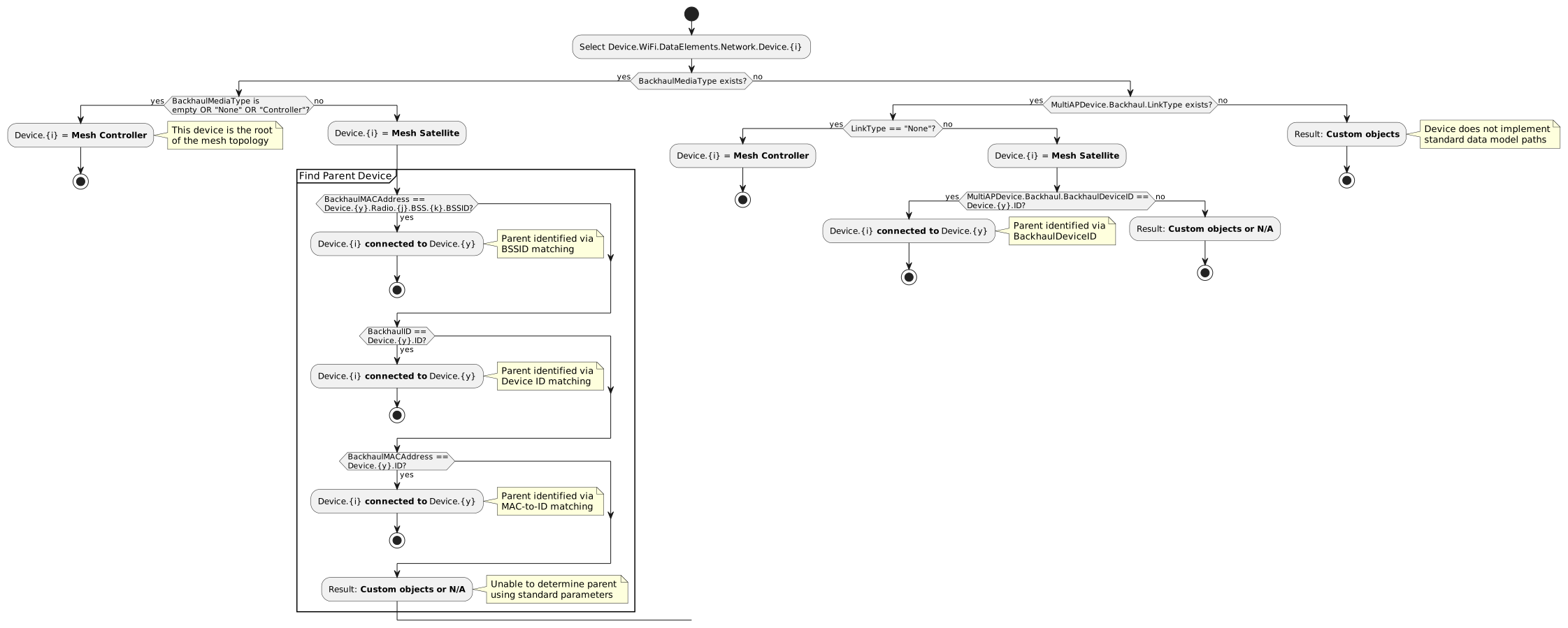
The DataElements path provides multiple fallback mechanisms to establish parent-child connections, accommodating various device implementations.
Detection Priority Order
The DataElements flow attempts multiple matching strategies in this order:
-
BSSID Matching (Most Reliable)
-
Matches BackhaulMACAddress against parent’s Radio.BSS.BSSID
-
Works for WiFi backhaul connections
-
Provides explicit BSS identification
-
Most accurate for wireless connections
-
-
Device ID Matching (Direct Reference)
-
Matches BackhaulID against parent’s Device ID
-
Works for both WiFi and Ethernet backhaul
-
Simpler but requires explicit parent tracking
-
Universal across backhaul types
-
-
MAC-to-ID Matching (Compatibility)
-
Matches BackhaulMACAddress against parent’s Device ID
-
Accommodates implementations where Device ID is the MAC address
-
Provides fallback compatibility
-
Common in some vendor implementations
-
-
BackhaulDeviceID Matching (Alternative Path)
-
Uses MultiAPDevice.Backhaul.BackhaulDeviceID
-
Fallback when BackhaulMediaType is not implemented
-
Alternative path within DataElements model
-
MultiAP Topology Detection
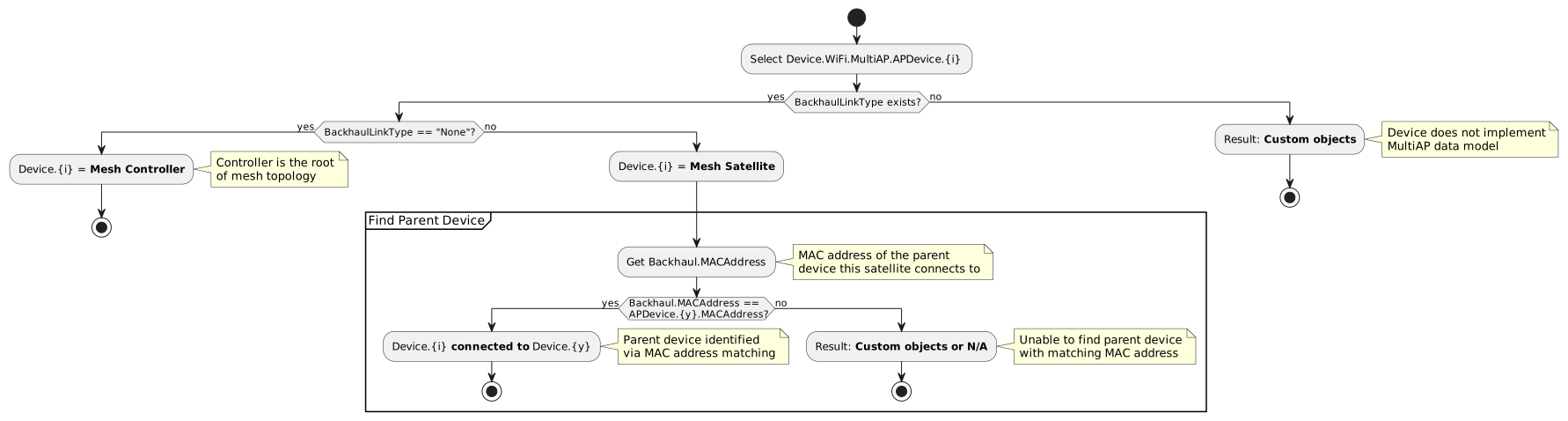
The MultiAP path provides a streamlined topology detection mechanism using fewer parameters but requiring consistent MAC address reporting.
Detection Strategy
The MultiAP approach uses a single, straightforward matching strategy:
-
Identify Controller: Find device where
BackhaulLinkType == "None" -
Identify Satellites: All devices where
BackhaulLinkType != "None" -
Match Parent: For each Satellite, find parent where
Backhaul.MACAddress == parent.MACAddress
This simpler approach requires:
- Consistent MAC address format across all devices
- Accurate MACAddress population on all devices
- Correct Backhaul.MACAddress reporting on Satellites
TR-181 Parameter Reference
DataElements Parameters
| Parameter Path | Description | Type | Example Value |
|---|---|---|---|
Device.WiFi.DataElements.Network.Device.{i}.BackhaulMediaType |
Indicates backhaul connection type. Empty, "None", or "Controller" means this is the Controller. |
string |
"WiFi", "Ethernet", "None" |
Device.WiFi.DataElements.Network.Device.{i}.BackhaulMACAddress |
MAC address of the parent device’s backhaul interface. Used to match against parent’s BSS BSSID. |
string (MAC format) |
"00:11:22:33:44:55" |
Device.WiFi.DataElements.Network.Device.{i}.BackhaulID |
Device ID of the parent device. Used for direct parent identification. |
string (MAC format) |
"AA:BB:CC:DD:EE:FF" |
Device.WiFi.DataElements.Network.Device.{i}.ID |
Unique identifier of this device, typically its MAC address. |
string (MAC format) |
"11:22:33:44:55:66" |
Device.WiFi.DataElements.Network.Device.{y}.Radio.{j}.BSS.{k}.BSSID |
BSSID of a Basic Service Set on the parent device. Used to match against Satellite’s BackhaulMACAddress. |
string (MAC format) |
"00:11:22:33:44:66" |
Device.WiFi.DataElements.Network.Device.{i}.MultiAPDevice.Backhaul.LinkType |
Alternative backhaul type indicator. "None" indicates Controller role. |
string |
"WiFi", "Ethernet", "None" |
Device.WiFi.DataElements.Network.Device.{i}.MultiAPDevice.Backhaul.BackhaulDeviceID |
Alternative parameter for parent device identification. |
string (MAC format) |
"AA:BB:CC:DD:EE:FF" |
MultiAP Parameters
| Parameter Path | Description | Type | Example Value |
|---|---|---|---|
Device.WiFi.MultiAP.APDevice.{i}.BackhaulLinkType |
Indicates device role and backhaul connection type. "None" identifies the Controller. |
string (enum) |
"WiFi", "Ethernet", "None" |
Device.WiFi.MultiAP.APDevice.{i}.Backhaul.MACAddress |
MAC address of the parent device this satellite connects to. Used to match against parent’s MACAddress. |
string (MAC format) |
"00:11:22:33:44:55" |
Device.WiFi.MultiAP.APDevice.{i}.MACAddress |
Unique MAC address identifier of this device. Used as matching target for child satellites. |
string (MAC format) |
"AA:BB:CC:DD:EE:FF" |
Implementation Requirements
Controller Configuration
DataElements Path
Device.WiFi.DataElements.Network.Device.1.ID = "00:11:22:33:44:55"
Device.WiFi.DataElements.Network.Device.1.BackhaulMediaType = "None"
# OR leave BackhaulMediaType empty
# OR set BackhaulMediaType = "Controller"
MultiAP Path
Device.WiFi.MultiAP.APDevice.1.BackhaulLinkType = "None"
Device.WiFi.MultiAP.APDevice.1.MACAddress = "00:11:22:33:44:55"
Key points for Controllers: - Must be identifiable as the mesh root - Serves as the reference point for all Satellites - Only one device should be marked as Controller
Satellite Configuration
DataElements Path (BSSID Matching - Recommended)
# Satellite configuration
Device.WiFi.DataElements.Network.Device.2.ID = "AA:BB:CC:11:22:33"
Device.WiFi.DataElements.Network.Device.2.BackhaulMediaType = "WiFi"
Device.WiFi.DataElements.Network.Device.2.BackhaulMACAddress = "00:11:22:33:44:66"

# Parent (Controller) must have matching BSSID
Device.WiFi.DataElements.Network.Device.1.Radio.1.BSS.1.BSSID = "00:11:22:33:44:66"
Why this works: The Satellite stores the BSSID of the parent’s WiFi network it connects to. Matching this against parent device BSSIDs establishes the connection with high precision.
DataElements Path (BackhaulID Fallback)
# Satellite configuration
Device.WiFi.DataElements.Network.Device.2.ID = "AA:BB:CC:11:22:33"
Device.WiFi.DataElements.Network.Device.2.BackhaulMediaType = "WiFi"
Device.WiFi.DataElements.Network.Device.2.BackhaulID = "00:11:22:33:44:55"

# Parent device ID
Device.WiFi.DataElements.Network.Device.1.ID = "00:11:22:33:44:55"
Why this works: Direct reference to parent’s Device ID, simpler but requires explicit parent identification.
DataElements Path (MAC-to-ID Compatibility)
# Satellite configuration
Device.WiFi.DataElements.Network.Device.2.BackhaulMACAddress = "00:11:22:33:44:55"

# Parent device ID (same as its MAC)
Device.WiFi.DataElements.Network.Device.1.ID = "00:11:22:33:44:55"
Use case: Accommodates implementations where Device ID is the MAC address.
MultiAP Path
# Satellite configuration
Device.WiFi.MultiAP.APDevice.2.BackhaulLinkType = "WiFi"
Device.WiFi.MultiAP.APDevice.2.MACAddress = "AA:BB:CC:11:22:33"
Device.WiFi.MultiAP.APDevice.2.Backhaul.MACAddress = "00:11:22:33:44:55"

# Parent (Controller) configuration
Device.WiFi.MultiAP.APDevice.1.MACAddress = "00:11:22:33:44:55"
Key requirements:
- Backhaul.MACAddress must match the parent device’s MACAddress
- MAC address format must be consistent across all devices
- Each Satellite only references its immediate parent
Multi-Hop Topology Support
Both approaches support multi-hop mesh topologies where Satellites connect to other Satellites. Each Satellite only needs to reference its immediate parent.
DataElements Multi-Hop Example
# Controller
Device.WiFi.DataElements.Network.Device.1.ID = "00:11:22:33:44:55"
Device.WiFi.DataElements.Network.Device.1.BackhaulMediaType = "Controller"
Device.WiFi.DataElements.Network.Device.1.Radio.1.BSS.1.BSSID = "00:11:22:33:44:66"

# First Satellite (connects to Controller)
Device.WiFi.DataElements.Network.Device.2.ID = "AA:BB:CC:11:22:33"
Device.WiFi.DataElements.Network.Device.2.BackhaulMediaType = "WiFi"
Device.WiFi.DataElements.Network.Device.2.BackhaulMACAddress = "00:11:22:33:44:66"
Device.WiFi.DataElements.Network.Device.2.Radio.1.BSS.1.BSSID = "AA:BB:CC:11:22:44"

# Second Satellite (connects to first Satellite)
Device.WiFi.DataElements.Network.Device.3.ID = "BB:CC:DD:22:33:44"
Device.WiFi.DataElements.Network.Device.3.BackhaulMediaType = "WiFi"
Device.WiFi.DataElements.Network.Device.3.BackhaulMACAddress = "AA:BB:CC:11:22:44"
MultiAP Multi-Hop Example
# Controller
Device.WiFi.MultiAP.APDevice.1.BackhaulLinkType = "None"
Device.WiFi.MultiAP.APDevice.1.MACAddress = "00:11:22:33:44:55"

# First Satellite (connects to Controller)
Device.WiFi.MultiAP.APDevice.2.BackhaulLinkType = "WiFi"
Device.WiFi.MultiAP.APDevice.2.MACAddress = "AA:BB:CC:11:22:33"
Device.WiFi.MultiAP.APDevice.2.Backhaul.MACAddress = "00:11:22:33:44:55"

# Second Satellite (connects to first Satellite)
Device.WiFi.MultiAP.APDevice.3.BackhaulLinkType = "WiFi"
Device.WiFi.MultiAP.APDevice.3.MACAddress = "BB:CC:DD:22:33:44"
Device.WiFi.MultiAP.APDevice.3.Backhaul.MACAddress = "AA:BB:CC:11:22:33"
Example Topologies
Star Topology with Mixed Backhaul
DataElements Configuration
# Controller
Device.WiFi.DataElements.Network.Device.1.ID = "00:11:22:33:44:55"
Device.WiFi.DataElements.Network.Device.1.BackhaulMediaType = "None"
Device.WiFi.DataElements.Network.Device.1.Radio.1.BSS.1.BSSID = "00:11:22:33:44:66"

# WiFi Satellite
Device.WiFi.DataElements.Network.Device.2.ID = "AA:BB:CC:11:22:33"
Device.WiFi.DataElements.Network.Device.2.BackhaulMediaType = "WiFi"
Device.WiFi.DataElements.Network.Device.2.BackhaulMACAddress = "00:11:22:33:44:66"

# Ethernet Satellite (using BackhaulID)
Device.WiFi.DataElements.Network.Device.3.ID = "BB:CC:DD:22:33:44"
Device.WiFi.DataElements.Network.Device.3.BackhaulMediaType = "Ethernet"
Device.WiFi.DataElements.Network.Device.3.BackhaulID = "00:11:22:33:44:55"
MultiAP Configuration
# Controller
Device.WiFi.MultiAP.APDevice.1.BackhaulLinkType = "None"
Device.WiFi.MultiAP.APDevice.1.MACAddress = "00:11:22:33:44:55"

# WiFi Satellite
Device.WiFi.MultiAP.APDevice.2.BackhaulLinkType = "WiFi"
Device.WiFi.MultiAP.APDevice.2.MACAddress = "AA:BB:CC:11:22:33"
Device.WiFi.MultiAP.APDevice.2.Backhaul.MACAddress = "00:11:22:33:44:55"

# Ethernet Satellite
Device.WiFi.MultiAP.APDevice.3.BackhaulLinkType = "Ethernet"
Device.WiFi.MultiAP.APDevice.3.MACAddress = "BB:CC:DD:22:33:44"
Device.WiFi.MultiAP.APDevice.3.Backhaul.MACAddress = "00:11:22:33:44:55"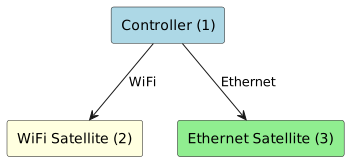
Daisy-Chain Topology (3+ Hops)
# Controller
Device.WiFi.MultiAP.APDevice.1.BackhaulLinkType = "None"
Device.WiFi.MultiAP.APDevice.1.MACAddress = "00:11:22:33:44:55"

# Satellite 1 (1 hop from Controller)
Device.WiFi.MultiAP.APDevice.2.BackhaulLinkType = "WiFi"
Device.WiFi.MultiAP.APDevice.2.MACAddress = "AA:BB:CC:11:22:33"
Device.WiFi.MultiAP.APDevice.2.Backhaul.MACAddress = "00:11:22:33:44:55"

# Satellite 2 (2 hops from Controller)
Device.WiFi.MultiAP.APDevice.3.BackhaulLinkType = "WiFi"
Device.WiFi.MultiAP.APDevice.3.MACAddress = "BB:CC:DD:22:33:44"
Device.WiFi.MultiAP.APDevice.3.Backhaul.MACAddress = "AA:BB:CC:11:22:33"

# Satellite 3 (3 hops from Controller)
Device.WiFi.MultiAP.APDevice.4.BackhaulLinkType = "WiFi"
Device.WiFi.MultiAP.APDevice.4.MACAddress = "CC:DD:EE:33:44:55"
Device.WiFi.MultiAP.APDevice.4.Backhaul.MACAddress = "BB:CC:DD:22:33:44"
Common Issues and Debugging
Topology Detection Returns "N/A"
Cause: None of the matching strategies succeeded
Debugging Steps:
For DataElements:
# Check Satellite parameters
echo Device.WiFi.DataElements.Network.Device.2.BackhaulMACAddress
echo Device.WiFi.DataElements.Network.Device.2.BackhaulID

# Check all parent BSSIDs
echo Device.WiFi.DataElements.Network.Device.1.Radio.*.BSS.*.BSSID

# Check parent Device ID
echo Device.WiFi.DataElements.Network.Device.1.ID
For MultiAP:
# Check Satellite backhaul configuration
echo Device.WiFi.MultiAP.APDevice.2.BackhaulLinkType
echo Device.WiFi.MultiAP.APDevice.2.Backhaul.MACAddress

# Check all device MAC addresses
echo Device.WiFi.MultiAP.APDevice.1.MACAddress
echo Device.WiFi.MultiAP.APDevice.2.MACAddress
echo Device.WiFi.MultiAP.APDevice.3.MACAddress
Common Problems: 1. MAC address format inconsistency (colons vs. dashes, uppercase vs. lowercase) 2. Whitespace in MAC addresses 3. Missing parameter values 4. Parent device not reporting correctly
MAC Address Format Consistency
Critical for MultiAP: MAC addresses must use consistent formatting:
Correct:   "00:11:22:33:44:55" matches "00:11:22:33:44:55"
Incorrect: "00:11:22:33:44:55" does NOT match "00-11-22-33-44-55"
Incorrect: "00:11:22:33:44:55" does NOT match "00:11:22:33:44:55 "
Best Practice: Normalize MAC addresses before comparison: - Convert to uppercase or lowercase consistently - Use consistent delimiter (prefer colons) - Trim whitespace - Validate format before use
Multiple Controllers Detected
Cause: More than one device has Controller indicators
Impact: Topology tree cannot be properly rooted
Solution:
- DataElements: Only one device should have BackhaulMediaType = "None", empty, or "Controller"
- MultiAP: Only one device should have BackhaulLinkType = "None"
- All other devices must have specific backhaul types
Orphaned Satellites
Cause: Satellite’s parent reference doesn’t match any device in the network
Possible Reasons: - Parent device is offline or not reporting - MAC address mismatch due to formatting - Incorrect parent reference value - Parent device not included in device list
Solution: 1. Verify parent device is online and reporting 2. Check MAC address consistency and formatting 3. Ensure all devices are included in discovery 4. Validate parent reference values
Circular References
Cause: Device A references Device B as parent, and Device B references Device A
Prevention: - Ensure exactly one device has Controller designation - Validate that Satellites only reference devices "above" them in hierarchy - Implement cycle detection in topology building logic - Validate topology after construction
Satellite Shows Multiple Potential Parents
Cause (DataElements): BackhaulMACAddress matches multiple parent BSSIDs
Example Scenario:
# Controller has multiple BSS with similar BSSIDs
Device.1.Radio.1.BSS.1.BSSID = "00:11:22:33:44:55"  # 2.4GHz
Device.1.Radio.2.BSS.1.BSSID = "00:11:22:33:44:56"  # 5GHz

# Satellite matches one but unclear which
Device.2.BackhaulMACAddress = "00:11:22:33:44:55"Solution: - Use additional context like frequency band - Prefer BackhaulID for direct parent identification - Use MultiAP path if available (simpler matching)
Algorithm Implementation Guidance
DataElements Topology Detection
def build_dataelements_topology():
    devices = get_all_dataelements_devices()

    # Step 1: Identify Controller
    controller = None
    satellites = []

    for device in devices:
        backhaul_type = device.BackhaulMediaType
        if not backhaul_type or backhaul_type in ["None", "Controller"]:
            controller = device
        else:
            satellites.append(device)

    if controller is None:
        raise TopologyError("No controller found")

    # Step 2: Build BSSID lookup table for parent matching
    bssid_to_device = {}
    device_id_map = {}

    for device in devices:
        device_id_map[normalize_mac(device.ID)] = device

        # Index all BSSIDs
        for radio in device.Radios:
            for bss in radio.BSSs:
                bssid_to_device[normalize_mac(bss.BSSID)] = device

    # Step 3: Match each satellite to parent
    topology = {controller.ID: []}

    for satellite in satellites:
        parent_device = None

        # Strategy 1: BSSID matching (most reliable for WiFi)
        if satellite.BackhaulMACAddress:
            backhaul_mac = normalize_mac(satellite.BackhaulMACAddress)
            parent_device = bssid_to_device.get(backhaul_mac)

        # Strategy 2: BackhaulID matching
        if not parent_device and satellite.BackhaulID:
            backhaul_id = normalize_mac(satellite.BackhaulID)
            parent_device = device_id_map.get(backhaul_id)

        # Strategy 3: MAC-to-ID matching
        if not parent_device and satellite.BackhaulMACAddress:
            backhaul_mac = normalize_mac(satellite.BackhaulMACAddress)
            parent_device = device_id_map.get(backhaul_mac)

        # Strategy 4: Alternative MultiAPDevice path
        if not parent_device and satellite.MultiAPDevice.Backhaul.BackhaulDeviceID:
            backhaul_dev_id = normalize_mac(
                satellite.MultiAPDevice.Backhaul.BackhaulDeviceID
            )
            parent_device = device_id_map.get(backhaul_dev_id)

        # Add to topology
        if parent_device:
            if parent_device.ID not in topology:
                topology[parent_device.ID] = []
            topology[parent_device.ID].append(satellite)
        else:
            # Orphaned satellite
            topology.setdefault("orphaned", []).append(satellite)

    return topology

def normalize_mac(mac_address):
    """Normalize MAC address for comparison"""
    if not mac_address:
        return None
    return mac_address.upper().replace("-", ":").strip()
MultiAP Topology Detection
def build_multiap_topology():
    devices = get_all_apdevices()

    # Step 1: Identify Controller
    controller = None
    satellites = []

    for device in devices:
        if device.BackhaulLinkType == "None":
            controller = device
        else:
            satellites.append(device)

    if controller is None:
        raise TopologyError("No controller found")

    # Step 2: Build MAC lookup table
    mac_to_device = {}
    for device in devices:
        normalized_mac = normalize_mac(device.MACAddress)
        mac_to_device[normalized_mac] = device

    # Step 3: Match each satellite to parent
    topology = {controller.MACAddress: []}

    for satellite in satellites:
        parent_mac = normalize_mac(satellite.Backhaul.MACAddress)

        # Find parent device
        parent_device = mac_to_device.get(parent_mac)

        if parent_device:
            if parent_device.MACAddress not in topology:
                topology[parent_device.MACAddress] = []
            topology[parent_device.MACAddress].append(satellite)
        else:
            # Orphaned satellite
            topology.setdefault("orphaned", []).append(satellite)

    return topology

def normalize_mac(mac_address):
    """Normalize MAC address for comparison"""
    if not mac_address:
        return None
    return mac_address.upper().replace("-", ":").strip()
Topology Validation
def validate_topology(topology, all_devices):
    """Validate topology for common issues"""
    issues = []

    # Check for orphaned devices
    orphaned = topology.get("orphaned", [])
    if orphaned:
        issues.append(f"Found {len(orphaned)} orphaned satellites")

    # Check for cycles
    visited = set()

    def check_cycles(device_id, path):
        if device_id in path:
            issues.append(f"Cycle detected: {' -> '.join(path + [device_id])}")
            return

        if device_id in visited:
            return

        visited.add(device_id)

        children = topology.get(device_id, [])
        for child in children:
            check_cycles(child.ID, path + [device_id])

    # Find root (Controller)
    root = None
    for device in all_devices:
        if is_controller(device):
            root = device.ID
            break

    if root:
        check_cycles(root, [])
    else:
        issues.append("No controller found in topology")

    # Check for unreachable devices
    all_device_ids = {d.ID for d in all_devices}
    reachable = visited.copy()
    unreachable = all_device_ids - reachable

    if unreachable:
        issues.append(f"Unreachable devices: {unreachable}")

    return issues

def is_controller(device):
    """Check if device is a controller"""
    # DataElements check
    if hasattr(device, 'BackhaulMediaType'):
        bmt = device.BackhaulMediaType
        return not bmt or bmt in ["None", "Controller"]

    # MultiAP check
    if hasattr(device, 'BackhaulLinkType'):
        return device.BackhaulLinkType == "None"

    return False
Performance Optimizations
For DataElements
-
Build Lookup Tables: Create dictionaries for O(1) lookups
-
BSSID to device mapping
-
Device ID to device mapping
-
Avoid repeated parameter queries
-
-
Process Controller First: Identify Controller before processing Satellites
-
Cache Radio/BSS Data: Store all BSSIDs in memory for quick matching
-
Batch Parameter Retrieval: Query all devices and parameters in minimal requests
-
Early Exit: Stop checking fallback strategies once match is found
For MultiAP
-
Build MAC Lookup Table: Create dictionary mapping MAC to device for O(1) lookup
-
Normalize Once: Normalize all MAC addresses during initial loading
-
Cache Topology: Recalculate only when devices join/leave network
-
Validate on Update: Check for cycles and orphans after topology changes
-
Batch Queries: Retrieve all APDevice parameters in single query
BackhaulLinkType / BackhaulMediaType Values
Common values and their meanings:
| Value | Device Type | Description |
|---|---|---|
"None" |
Controller |
Device is the mesh controller (root) |
"Controller" |
Controller |
Explicit controller designation (DataElements) |
(empty string) |
Controller |
Default for controller (DataElements) |
"WiFi" |
Satellite |
Satellite connected via WiFi backhaul |
"Ethernet" |
Satellite |
Satellite connected via Ethernet backhaul |
"MoCA" |
Satellite |
Satellite connected via MoCA backhaul |
"PLC" |
Satellite |
Satellite connected via powerline backhaul |
"Fiber" |
Satellite |
Satellite connected via fiber backhaul |
Choosing the Right Approach
Use DataElements When:
-
Supporting mixed or legacy device environments
-
Requiring maximum compatibility across vendors
-
BSSID-level matching precision is needed
-
Devices may not fully implement MultiAP
-
Multiple fallback strategies are beneficial
-
WiFi backhaul connections are primary focus