Ethernet Satellite Client Detection
Overview
This flow addresses Use Case 6: Special use case - Connected clients information for detecting Ethernet-connected clients on Satellites in mesh network topologies. This document covers both TR-181 data model paths: DataElements and MultiAP.
|
Use Case 6 - Critical Constraints:
|
The Challenge
The standard TR-181 data model does NOT provide a mechanism to definitively identify which Satellite (AP) an Ethernet-connected client is attached to in mesh topologies. Unlike WiFi clients, which have explicit association records, Ethernet clients lack such binding information.
Use Case 6 addresses this limitation using an inference-based elimination approach that works ONLY when exactly 2 APs exist (1 Controller + 1 Satellite):
Inference Logic:
-
If client is NOT connected to controller (no Layer1Interface binding)
-
AND client is NOT connected via WiFi (MAC not in any WiFi association list)
-
AND topology has exactly 2 APs
-
→ By elimination: Client must be connected to Satellite by Ethernet
Critical Limitations
|
NOT supported by standard TR-181 data model - This is an inference/assumption based on elimination logic, NOT a definitive binding. This is a custom workaround, not part of the TR-181 specification. |
Critical Limitation - Multi-Satellite Topologies:
-
With 2+ Satellites → There is NO WAY to detect which specific Satellite the Ethernet client is connected to
-
Use Case 6 ONLY works with exactly 2 APs (1 Controller + 1 Satellite)
-
With 3+ APs, alternative methods are required (switch port mapping, VLAN segmentation, per-device ARP tables)
Applies to:
-
Network topology and Mesh hosts identification
-
Determining where clients are connected by Ethernet when not connected to Controller
-
Only applicable when exactly ONE Satellite exists in the network (2 total APs)
Importance
This detection is critical for:
-
Accurate Topology Visualization: Showing which Satellite serves Ethernet clients
-
Network Troubleshooting: Identifying the correct AP for client issues
-
Traffic Attribution: Properly accounting for Ethernet client bandwidth usage
-
Load Balancing: Understanding true client distribution across mesh nodes
-
Per-AP Traffic Analysis: Properly accounting for Ethernet bandwidth usage
-
Capacity Planning: Determining if Satellites need additional Ethernet ports
Critical Requirement: This flow ONLY works in the two-AP scenario (one Controller + one Satellite). For topologies with more than two APs, Ethernet client attribution is impossible with this method - Use Case 6 does NOT apply.
Detection Flow
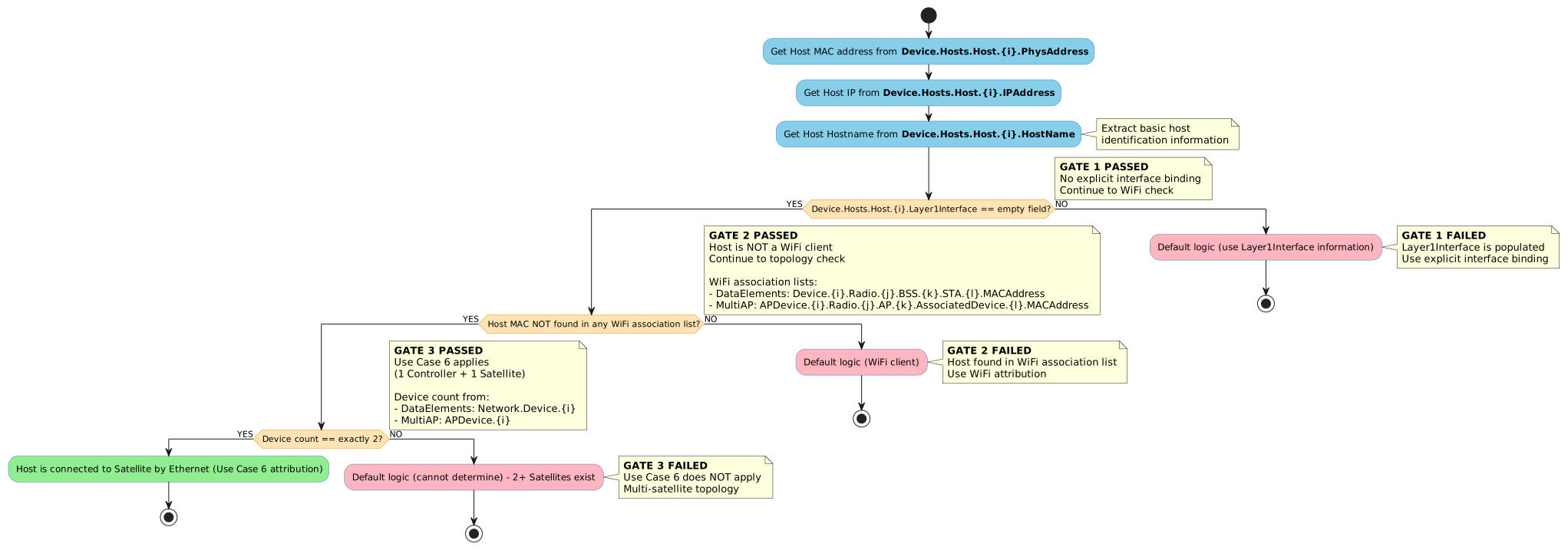
The following flowchart shows the Use Case 6 logic for detecting when an Ethernet client is connected to a Satellite device. This flow ONLY applies when the topology has exactly 2 APs (1 Controller + 1 Satellite).
Flow Logic Explanation
The detection flow follows these steps in sequence:
-
Extract Host Information
-
Get MAC address from
Device.Hosts.Host.{i}.PhysAddress -
Get IP address from
Device.Hosts.Host.{i}.IPAddress -
Get hostname from
Device.Hosts.Host.{i}.HostName
-
-
Check Layer1Interface (First Gate - GATE 1)
-
If
Device.Hosts.Host.{i}.Layer1Interfaceis empty → Continue to next check (GATE 1 PASSED) -
If
Device.Hosts.Host.{i}.Layer1Interfaceis populated → Use default logic (GATE 1 FAILED - Layer1Interface tells us the connection type)
-
-
Check WiFi Association (Second Gate - GATE 2)
-
Compare host MAC (
Device.Hosts.Host.{i}.PhysAddress) with ALL WiFi association entries:-
DataElements Path:
Device.WiFi.DataElements.Network.Device.{i}.Radio.{j}.BSS.{k}.STA.{l}.MACAddress -
MultiAP Path:
Device.WiFi.MultiAP.APDevice.{i}.Radio.{j}.AP.{k}.AssociatedDevice.{l}.MACAddress
-
-
If host MAC is NOT found in any WiFi association list → Continue to next check (GATE 2 PASSED - not a WiFi client)
-
If host MAC is found in any WiFi association list → Default logic (GATE 2 FAILED - WiFi client, use direct WiFi attribution)
-
-
Check Topology Size (Third Gate - GATE 3 - Use Case 6 Requirement)
-
Count total devices:
-
DataElements Path: Count
Device.WiFi.DataElements.Network.Device.{i}instances -
MultiAP Path: Count
Device.WiFi.MultiAP.APDevice.{i}instances
-
-
If count equals exactly 2 (1 Controller + 1 Satellite) → GATE 3 PASSED → Host is connected to Satellite by Ethernet (Use Case 6 Attribution)
-
If count does not equal 2 (1 device, or 3+ devices) → GATE 3 FAILED → Default logic (cannot determine which satellite - Use Case 6 does NOT apply)
-
Key Decision Points
| Check | Condition | Outcome |
|---|---|---|
Layer1Interface |
Empty/Missing |
Continue to WiFi check (no interface binding information) |
Layer1Interface |
Populated |
Use default logic (interface explicitly specified) |
WiFi Association Match |
MAC not in any association list |
Continue to topology check (not a WiFi client) |
WiFi Association Match |
MAC found in association list |
Default logic (WiFi client, already attributed) |
Topology Count |
Exactly 2 devices |
Attribute to Satellite by Ethernet (Use Case 6 applies) |
Topology Count |
Not 2 devices (1, 3+) |
Cannot determine (Use Case 6 does not apply) |
TR-181 Parameter Reference
Common Parameters (Both Paths)
| Parameter Path | Description | Type | Example Value |
|---|---|---|---|
Device.Hosts.Host.{i}.PhysAddress |
Client device MAC address. Used to identify the host and compare with WiFi association lists. |
string (MAC format) |
"AA:BB:CC:DD:EE:FF" |
Device.Hosts.Host.{i}.IPAddress |
Client IP address for identification. |
string (IP format) |
"192.168.1.100" |
Device.Hosts.Host.{i}.HostName |
Client hostname for identification. |
string |
"Desktop-PC", "NAS-Server" |
Device.Hosts.Host.{i}.Layer1Interface |
Physical interface the client connects through. CRITICAL: When this is empty, it triggers the Use Case 6 detection logic. |
string |
"Device.Ethernet.Interface.1", "Device.WiFi.SSID.1", or empty |
DataElements Path Parameters
| Parameter Path | Description | Type | Example Value |
|---|---|---|---|
Device.WiFi.DataElements.Network.Device.{i}.ID |
Device MAC address identifier. Used to count total AP devices for topology check. |
string (MAC format) |
"00:11:22:33:44:55" |
Device.WiFi.DataElements.Network.Device.{i}.Radio.{j}.BSS.{k}.STA.{l}.MACAddress |
MAC address of WiFi client associated to this BSS. Used to check if host is a WiFi client. |
string (MAC format) |
"AA:BB:CC:DD:EE:FF" |
Device.WiFi.DataElements.Network.Device.{i}.BackhaulMediaType |
Backhaul connection type. Used to identify Controller vs Satellite. |
string |
"None", "WiFi", "Ethernet" |
MultiAP Path Parameters
| Parameter Path | Description | Type | Example Value |
|---|---|---|---|
Device.WiFi.MultiAP.APDevice.{i}.MACAddress |
AP device MAC address. Used to count total AP devices for topology check. |
string (MAC format) |
"00:11:22:33:44:55" |
Device.WiFi.MultiAP.APDevice.{i}.Radio.{j}.AP.{k}.AssociatedDevice.{l}.MACAddress |
MAC address of WiFi client associated to this AP. Used to check if host is a WiFi client. |
string (MAC format) |
"AA:BB:CC:DD:EE:FF" |
Device.WiFi.MultiAP.APDevice.{i}.BackhaulLinkType |
Backhaul connection type. Used to identify Controller vs Satellite. |
string (enum) |
"None", "WiFi", "Ethernet" |
Parameter Usage in Use Case 6
| Parameter | Role in Detection | Check Order |
|---|---|---|
|
Primary identifier for the host |
Step 1: Extract |
|
Secondary identifier |
Step 1: Extract |
|
Human-readable identifier |
Step 1: Extract |
|
Gate 1: Empty triggers special logic |
Step 2: Check if empty |
WiFi association parameters (both paths) |
Gate 2: Check if host MAC matches any WiFi association |
Step 3: Compare with host MAC |
Device count parameters (both paths) |
Gate 3: Count devices to verify exactly 2 APs exist |
Step 4: Count instances |
Implementation Requirements
Prerequisite: Two-AP Topology Only
Use Case 6 ONLY applies when the topology has exactly 2 Access Points:
DataElements Path Example:
# Controller (Device 1)
Device.WiFi.DataElements.Network.Device.1.ID = "00:11:22:33:44:55"
Device.WiFi.DataElements.Network.Device.1.BackhaulMediaType = "None"

# Satellite (Device 2) - EXACTLY ONE
Device.WiFi.DataElements.Network.Device.2.ID = "AA:BB:CC:11:22:33"
Device.WiFi.DataElements.Network.Device.2.BackhaulMediaType = "WiFi"
Device.WiFi.DataElements.Network.Device.2.BackhaulMACAddress = "00:11:22:33:44:55"

# Total count = 2 (required for Use Case 6)
MultiAP Path Example:
# Controller (APDevice 1)
Device.WiFi.MultiAP.APDevice.1.BackhaulLinkType = "None"
Device.WiFi.MultiAP.APDevice.1.MACAddress = "00:11:22:33:44:55"

# Satellite (APDevice 2) - EXACTLY ONE
Device.WiFi.MultiAP.APDevice.2.BackhaulLinkType = "WiFi"
Device.WiFi.MultiAP.APDevice.2.MACAddress = "AA:BB:CC:11:22:33"
Device.WiFi.MultiAP.APDevice.2.Backhaul.MACAddress = "00:11:22:33:44:55"

# Total count = 2 (required for Use Case 6)| If there are 3+ devices, Use Case 6 logic does not apply and Ethernet client attribution is impossible. |
Ethernet Client Configuration Triggering Use Case 6
The client must meet ALL these conditions:
# Condition 1: Layer1Interface is EMPTY (not populated)
Device.Hosts.Host.10.PhysAddress = "BB:CC:DD:EE:FF:00"
Device.Hosts.Host.10.HostName = "Desktop-PC"
Device.Hosts.Host.10.IPAddress = "192.168.1.50"
Device.Hosts.Host.10.Layer1Interface = ""  # ← EMPTY/MISSING
Device.Hosts.Host.10.Active = true

# Condition 2: MAC does NOT appear in any WiFi association list
# DataElements: Not in Device.WiFi.DataElements.Network.Device.*.Radio.*.BSS.*.STA.*.MACAddress
# MultiAP: Not in Device.WiFi.MultiAP.APDevice.*.Radio.*.AP.*.AssociatedDevice.*.MACAddress

# Condition 3: Topology has exactly 2 devices
# DataElements: Sum of Device.WiFi.DataElements.Network.Device.{i} == 2
# MultiAP: Sum of Device.WiFi.MultiAP.APDevice.{i} == 2
Key Requirement: Layer1Interface must be empty to trigger Use Case 6 logic. If it’s populated (e.g., "Device.Ethernet.Interface.1"), the system uses that information instead.
WiFi Clients (Not Affected by Use Case 6)
WiFi clients are detected normally and do NOT use Use Case 6 logic:
DataElements Path:
# WiFi client appears in STA list
Device.WiFi.DataElements.Network.Device.1.Radio.1.BSS.1.STA.1.MACAddress = "11:22:33:44:55:66"

# Same client in Hosts table
Device.Hosts.Host.20.PhysAddress = "11:22:33:44:55:66"
Device.Hosts.Host.20.HostName = "iPhone-12"
Device.Hosts.Host.20.Layer1Interface = "Device.WiFi.SSID.1"  # or empty

# Attribution: Direct from STA list (not Use Case 6)
MultiAP Path:
# WiFi client appears in AssociatedDevice list
Device.WiFi.MultiAP.APDevice.1.Radio.1.AP.1.AssociatedDevice.1.MACAddress = "11:22:33:44:55:66"

# Same client in Hosts table
Device.Hosts.Host.20.PhysAddress = "11:22:33:44:55:66"
Device.Hosts.Host.20.HostName = "iPhone-12"
Device.Hosts.Host.20.Layer1Interface = "Device.WiFi.SSID.1"  # or empty

# Attribution: Direct from AssociatedDevice list (not Use Case 6)
Algorithm Implementation
Use Case 6 Detection Algorithm (Path-Agnostic)
Complete implementation following the flowchart logic:
def detect_ethernet_satellite_client(host, data_model_path='dataelements'):
    """
    Use Case 6: Detect if an Ethernet client is connected to Satellite.

    This is an INFERENCE-BASED detection method that uses elimination logic.
    Returns True only when ALL THREE GATES are passed:

    GATE 1: Layer1Interface is empty (no explicit binding)
    GATE 2: Host MAC is NOT in any WiFi association list (not a WiFi client)
    GATE 3: Topology has exactly 2 devices (1 Controller + 1 Satellite)

    WARNING: This is NOT a standard TR-181 feature. Results are assumptions.

    Args:
        host: Device.Hosts.Host.{i} entry
        data_model_path: 'dataelements' or 'multiap'

    Returns:
        bool: True if connected to Satellite by Ethernet (Use Case 6 applies),
              False otherwise (Use Case 6 does NOT apply)
    """

    # Step 1: Extract host information
    host_mac = host.PhysAddress
    host_ip = host.IPAddress
    host_name = host.HostName

    # Step 2: GATE 1 - Check if Layer1Interface is empty
    if host.Layer1Interface and host.Layer1Interface.strip():
        # GATE 1 FAILED: Layer1Interface is populated, use default logic
        return False

    # Step 3: GATE 2 - Check if host MAC is in any WiFi association list
    if is_wifi_client(host_mac, data_model_path):
        # GATE 2 FAILED: Host is a WiFi client, not Ethernet
        return False

    # Step 4: GATE 3 - Check topology has exactly 2 devices (critical requirement)
    device_count = count_devices(data_model_path)
    if device_count != 2:
        # GATE 3 FAILED: Use Case 6 only applies with exactly 2 APs
        # With 1 AP: No satellites
        # With 3+ APs: Cannot determine which Satellite
        return False

    # ALL THREE GATES PASSED
    # By elimination: Host is connected to Satellite by Ethernet
    return True


def is_wifi_client(client_mac, data_model_path='dataelements'):
    """
    Check if client MAC appears in any WiFi association list.

    This implements GATE 2 of Use Case 6 detection logic.

    Args:
        client_mac: Client MAC address from Device.Hosts.Host.{i}.PhysAddress
        data_model_path: 'dataelements' or 'multiap'

    Returns:
        bool: True if found in any association list (WiFi client), False otherwise (not WiFi)
    """
    normalized_mac = normalize_mac(client_mac)

    if data_model_path == 'dataelements':
        # Search DataElements STA lists
        devices = get_all_dataelements_network_devices()

        for device in devices:
            for radio in device.radios:
                for bss in radio.bss_list:
                    for sta in bss.sta_list:
                        sta_mac = normalize_mac(sta.MACAddress)
                        if sta_mac == normalized_mac:
                            return True  # Found in WiFi - GATE 2 FAILS

    elif data_model_path == 'multiap':
        # Search MultiAP AssociatedDevice lists
        apdevices = get_all_multiap_apdevices()

        for apdevice in apdevices:
            for radio in apdevice.radios:
                for ap in radio.aps:
                    for assoc_dev in ap.associated_devices:
                        assoc_mac = normalize_mac(assoc_dev.MACAddress)
                        if assoc_mac == normalized_mac:
                            return True  # Found in WiFi - GATE 2 FAILS

    return False  # Not in any WiFi association list - GATE 2 PASSES


def count_devices(data_model_path='dataelements'):
    """
    Count total device instances in topology.

    Args:
        data_model_path: 'dataelements' or 'multiap'

    Returns:
        int: Number of devices in topology
    """
    if data_model_path == 'dataelements':
        devices = get_all_dataelements_network_devices()
        return len(devices)
    elif data_model_path == 'multiap':
        apdevices = get_all_multiap_apdevices()
        return len(apdevices)
    return 0


def normalize_mac(mac_address):
    """
    Normalize MAC address to consistent format.

    Args:
        mac_address: MAC in any format

    Returns:
        str: Normalized MAC (lowercase, colon-separated)
    """
    if not mac_address:
        return ""

    # Remove all separators
    clean = mac_address.replace(":", "").replace("-", "").replace(".", "")
    clean = clean.lower()

    # Format as XX:XX:XX:XX:XX:XX
    if len(clean) == 12:
        return ":".join([clean[i:i+2] for i in range(0, 12, 2)])

    return mac_address.lower()
Complete Processing Function
def process_all_hosts_use_case_6(data_model_path='dataelements'):
    """
    Process all hosts and identify those connected to Satellite by Ethernet.

    Args:
        data_model_path: 'dataelements' or 'multiap'

    Returns:
        dict: Results with ethernet_satellite_clients list
    """

    # First, verify Use Case 6 is applicable
    device_count = count_devices(data_model_path)

    if device_count != 2:
        return {
            'use_case_6_applicable': False,
            'reason': f'Topology has {device_count} devices, requires exactly 2',
            'data_model_path': data_model_path,
            'ethernet_satellite_clients': []
        }

    # Identify Controller and Satellite
    controller, satellite = identify_controller_and_satellite(data_model_path)

    if not controller or not satellite:
        return {
            'use_case_6_applicable': False,
            'reason': 'Could not identify Controller and Satellite',
            'data_model_path': data_model_path,
            'ethernet_satellite_clients': []
        }

    # Process all hosts
    all_hosts = get_all_hosts()
    ethernet_satellite_clients = []

    for host in all_hosts:
        if detect_ethernet_satellite_client(host, data_model_path):
            ethernet_satellite_clients.append({
                'mac': host.PhysAddress,
                'ip': host.IPAddress,
                'hostname': host.HostName,
                'connected_to': satellite.ID if data_model_path == 'dataelements' else satellite.MACAddress,
                'connection_type': 'Ethernet',
                'attribution_method': 'Use Case 6 (elimination logic)'
            })

    return {
        'use_case_6_applicable': True,
        'data_model_path': data_model_path,
        'topology': {
            'controller': controller.ID if data_model_path == 'dataelements' else controller.MACAddress,
            'satellite': satellite.ID if data_model_path == 'dataelements' else satellite.MACAddress,
            'total_devices': 2
        },
        'ethernet_satellite_clients': ethernet_satellite_clients
    }


def identify_controller_and_satellite(data_model_path='dataelements'):
    """
    Identify Controller and Satellite devices.

    Args:
        data_model_path: 'dataelements' or 'multiap'

    Returns:
        tuple: (controller, satellite) or (None, None) if not found
    """
    if data_model_path == 'dataelements':
        devices = get_all_dataelements_network_devices()
    elif data_model_path == 'multiap':
        devices = get_all_multiap_apdevices()
    else:
        return None, None

    if len(devices) != 2:
        return None, None

    controller = None
    satellite = None

    for device in devices:
        if data_model_path == 'dataelements':
            backhaul = device.BackhaulMediaType
        else:  # multiap
            backhaul = device.BackhaulLinkType

        if backhaul in [None, "", "None", "Controller"]:
            controller = device
        else:
            satellite = device

    return controller, satellite
Example Scenarios
Scenario 1: Use Case 6 Applies - Ethernet Client on Satellite
This is the primary scenario where Use Case 6 logic successfully detects an Ethernet client on Satellite:
DataElements Path:
# Two-AP Topology (REQUIRED)
Device.WiFi.DataElements.Network.Device.1.ID = "00:11:22:33:44:55"
Device.WiFi.DataElements.Network.Device.1.BackhaulMediaType = "None"

Device.WiFi.DataElements.Network.Device.2.ID = "AA:BB:CC:11:22:33"
Device.WiFi.DataElements.Network.Device.2.BackhaulMediaType = "WiFi"

# Host with ALL conditions met
Device.Hosts.Host.10.PhysAddress = "BB:CC:DD:EE:FF:00"
Device.Hosts.Host.10.HostName = "Desktop-PC"
Device.Hosts.Host.10.IPAddress = "192.168.1.50"
Device.Hosts.Host.10.Layer1Interface = ""  # ← EMPTY (Condition 1 ✓)
Device.Hosts.Host.10.Active = true

# BB:CC:DD:EE:FF:00 does NOT appear in any STA list (Condition 2 ✓)
# Device count = 2 (Condition 3 ✓)
MultiAP Path:
# Two-AP MultiAP Topology (REQUIRED)
Device.WiFi.MultiAP.APDevice.1.BackhaulLinkType = "None"
Device.WiFi.MultiAP.APDevice.1.MACAddress = "00:11:22:33:44:55"

Device.WiFi.MultiAP.APDevice.2.BackhaulLinkType = "WiFi"
Device.WiFi.MultiAP.APDevice.2.MACAddress = "AA:BB:CC:11:22:33"

# Host with ALL conditions met
Device.Hosts.Host.10.PhysAddress = "BB:CC:DD:EE:FF:00"
Device.Hosts.Host.10.HostName = "Desktop-PC"
Device.Hosts.Host.10.IPAddress = "192.168.1.50"
Device.Hosts.Host.10.Layer1Interface = ""  # ← EMPTY (Condition 1 ✓)
Device.Hosts.Host.10.Active = true

# BB:CC:DD:EE:FF:00 does NOT appear in any AssociatedDevice list (Condition 2 ✓)
# APDevice count = 2 (Condition 3 ✓)
Use Case 6 Attribution Logic:
-
Layer1Interface is empty ✓
-
MAC (BB:CC:DD:EE:FF:00) not in any WiFi association list ✓
-
Device count == 2 ✓
-
Result: Host is connected to Satellite by Ethernet
Scenario 2: Use Case 6 Does NOT Apply - Layer1Interface Populated
# Two-AP Topology (either path)
# ... topology configuration with 2 devices ...

# Host with Layer1Interface populated
Device.Hosts.Host.15.PhysAddress = "CC:DD:EE:FF:00:11"
Device.Hosts.Host.15.HostName = "Smart-TV"
Device.Hosts.Host.15.IPAddress = "192.168.1.75"
Device.Hosts.Host.15.Layer1Interface = "Device.Ethernet.Interface.1"  # ← POPULATED (Condition 1 ✗)
Attribution Logic:
-
Layer1Interface is populated ✗ (Gate 1 fails)
-
Result: Use default logic (Layer1Interface tells us the connection)
Use Case 6 does NOT apply because Layer1Interface provides explicit information.
Scenario 3: Use Case 6 Does NOT Apply - WiFi Client
# Two-AP Topology (either path)
# ... topology configuration with 2 devices ...

# WiFi Client on Satellite 5 GHz
# DataElements: Device.WiFi.DataElements.Network.Device.2.Radio.1.BSS.1.STA.1.MACAddress = "11:22:33:44:55:02"
# MultiAP: Device.WiFi.MultiAP.APDevice.2.Radio.1.AP.1.AssociatedDevice.1.MACAddress = "11:22:33:44:55:02"

# Same client in Hosts
Device.Hosts.Host.20.PhysAddress = "11:22:33:44:55:02"
Device.Hosts.Host.20.HostName = "MacBook-Pro"
Device.Hosts.Host.20.Layer1Interface = ""  # ← EMPTY (Condition 1 ✓)
Attribution Logic:
-
Layer1Interface is empty ✓ (Gate 1 passes)
-
MAC (11:22:33:44:55:02) IS in WiFi association list ✗ (Gate 2 fails)
-
Result: Use default logic (client is WiFi, directly attributed)
Use Case 6 does NOT apply because the client is a WiFi client.
Scenario 4: Use Case 6 Does NOT Apply - Multi-AP Topology (CRITICAL LIMITATION)
DataElements Path:
# Three-AP Topology (3+ devices)
Device.WiFi.DataElements.Network.Device.1.BackhaulMediaType = "None"  # Controller
Device.WiFi.DataElements.Network.Device.2.BackhaulMediaType = "WiFi"  # Satellite 1
Device.WiFi.DataElements.Network.Device.3.BackhaulMediaType = "WiFi"  # Satellite 2

# Ethernet Client with empty Layer1Interface
Device.Hosts.Host.10.PhysAddress = "BB:CC:DD:EE:FF:00"
Device.Hosts.Host.10.HostName = "Desktop-PC"
Device.Hosts.Host.10.Layer1Interface = ""  # ← EMPTY (Condition 1 ✓)

# BB:CC:DD:EE:FF:00 NOT in any STA list (Condition 2 ✓)
# But device count = 3 (Condition 3 ✗)
MultiAP Path:
# Three-AP Topology (3+ devices)
Device.WiFi.MultiAP.APDevice.1.BackhaulLinkType = "None"  # Controller
Device.WiFi.MultiAP.APDevice.2.BackhaulLinkType = "WiFi"  # Satellite 1
Device.WiFi.MultiAP.APDevice.3.BackhaulLinkType = "WiFi"  # Satellite 2

# Ethernet Client with empty Layer1Interface
Device.Hosts.Host.10.PhysAddress = "BB:CC:DD:EE:FF:00"
Device.Hosts.Host.10.HostName = "Desktop-PC"
Device.Hosts.Host.10.Layer1Interface = ""  # ← EMPTY (Condition 1 ✓)

# BB:CC:DD:EE:FF:00 NOT in any AssociatedDevice list (Condition 2 ✓)
# But APDevice count = 3 (Condition 3 ✗)
Use Case 6 Attribution Logic:
-
Layer1Interface is empty ✓ (Gate 1 passes)
-
MAC not in any WiFi association list ✓ (Gate 2 passes)
-
Device count == 3 ✗ (Gate 3 FAILS)
-
Result: Use default logic - CANNOT DETERMINE which Satellite
| CRITICAL LIMITATION - With 2+ satellites, there is NO WAY to detect which satellite the Ethernet client is connected to using Use Case 6 logic. |
Analysis:
-
Device count = 3 (NOT 2)
-
Use Case 6 does NOT apply
-
Ethernet client could be connected to Satellite 1, Satellite 2, or Controller
-
Impossible to determine attribution with this method
Required Alternative Methods:
-
Switch port mapping (which port client is on)
-
ARP table analysis on each device
-
LLDP/CDP neighbor information
-
VLAN tagging or network segmentation
Conclusion: For topologies with > 2 APs, Use Case 6 elimination logic is insufficient. Requires vendor-specific extensions or network infrastructure data.
Common Issues and Debugging
Use Case 6 Not Triggering When Expected
Symptom: Ethernet client on Satellite not detected by Use Case 6
Possible Causes:
-
Layer1Interface is populated (even with wrong value)
-
Check:
Device.Hosts.Host.{i}.Layer1Interface -
Should be: Empty/null
-
Actual: Any non-empty value (breaks Gate 1)
-
-
Client MAC appears in WiFi association list
-
Check: Search all WiFi association parameters (DataElements STA or MultiAP AssociatedDevice)
-
Should be: Client MAC NOT in any association list
-
Actual: Client MAC found in association list (breaks Gate 2)
-
-
Topology has != 2 devices
-
Check: Count of device instances (DataElements Network.Device or MultiAP APDevice)
-
Should be: Exactly 2
-
Actual: 1, 3, or more (breaks Gate 3)
-
Debugging Steps:
# Step 1: Verify two-AP scenario (REQUIRED)
# DataElements:
echo Device.WiFi.DataElements.Network.Device.*.ID
# MultiAP:
echo Device.WiFi.MultiAP.APDevice.*.MACAddress
# Expected: Exactly 2 device IDs/MACs

# Step 2: Check client Layer1Interface (Gate 1)
echo Device.Hosts.Host.10.Layer1Interface
# Expected: Empty or missing

# Step 3: Search for client MAC in association lists (Gate 2)
# DataElements:
echo Device.WiFi.DataElements.Network.Device.1.Radio.*.BSS.*.STA.*.MACAddress
echo Device.WiFi.DataElements.Network.Device.2.Radio.*.BSS.*.STA.*.MACAddress
# MultiAP:
echo Device.WiFi.MultiAP.APDevice.1.Radio.*.AP.*.AssociatedDevice.*.MACAddress
echo Device.WiFi.MultiAP.APDevice.2.Radio.*.AP.*.AssociatedDevice.*.MACAddress
# Expected: Client MAC NOT in any of these lists

# Step 4: Verify client MAC
echo Device.Hosts.Host.10.PhysAddress
# Compare with WiFi association MAC addressesSolution: Verify all three gate conditions are met. If any fails, Use Case 6 will not apply.
False Positive - Use Case 6 Triggers for Controller Client
Symptom: Client connected to Controller is incorrectly attributed to Satellite
Root Cause: Use Case 6 assumes that if all three conditions are met, the client is on Satellite. This is an inference, not definitive proof.
Limitation: Use Case 6 cannot distinguish between:
-
Ethernet client on Controller (but Layer1Interface empty and not in WiFi)
-
Ethernet client on Satellite (but Layer1Interface empty and not in WiFi)
Mitigation Strategies:
-
Vendor Implementation: Ensure Layer1Interface is populated correctly by device firmware
-
Additional Heuristics: Use subnet analysis, DHCP server logs, or timing information
-
Accept Limitation: Document that Use Case 6 has false positives in certain configurations
Multi-AP Topology Using This Flow (CRITICAL ERROR)
Symptom: Inaccurate client attribution in mesh with 3+ APs
Cause: Use Case 6 was applied to topology with more than 2 devices
Impact: SEVERE - Client may be attributed to Satellite when connected to Controller, or attributed to wrong Satellite
| Do NOT use Use Case 6 logic with 3+ AP topologies. Always check device count first. |
Solution: Implement proper guard check
def apply_use_case_6(host, data_model_path='dataelements'):
    # CRITICAL: Always check device count first
    device_count = count_devices(data_model_path)

    if device_count != 2:
        # Use Case 6 NOT applicable
        return None  # Cannot determine

    # Proceed with Use Case 6 logic only if exactly 2 devices
    return detect_ethernet_satellite_client(host, data_model_path)
Correct Approach for Multi-AP:
-
Switch Port Mapping: Query switch to determine which port client is on
-
Per-Device ARP Tables: Check ARP/neighbor tables on each AP device
-
LLDP/CDP: Use link layer discovery protocols for topology mapping
-
Network Segmentation: Use VLANs or subnets to identify client location
Layer1Interface Not Populated (This is Expected for Use Case 6)
Symptom: Layer1Interface parameter is empty or missing
Status: This is EXPECTED and REQUIRED for Use Case 6 to trigger
Explanation: Use Case 6 specifically handles the case where Layer1Interface is not populated. This is not an error - it’s the condition that activates Use Case 6 logic.
If Layer1Interface is populated, the system should use that information directly rather than inferring via Use Case 6.
Limitations and Alternatives
Critical Limitations of Use Case 6
| NOT SUPPORTED BY STANDARD TR-181 DATA MODEL |
Use Case 6 is an inference-based workaround, not a standard TR-181 feature. The standard data model does not provide a mechanism to definitively attribute Ethernet clients to specific APs in mesh topologies.
Fundamental Limitations
-
NOT A STANDARD FEATURE: This is a custom inference logic, not part of TR-181 specification
-
No TR-181 parameter directly indicates which AP an Ethernet client connects to
-
Uses elimination logic to make best guess
-
Results are assumptions, not facts
-
-
Two-AP Only: ONLY works with exactly 2 APs (1 Controller + 1 Satellite)
-
With 1 AP: No satellites to detect
-
With 3+ APs: IMPOSSIBLE to determine which Satellite
-
With 2+ Satellites: NO WAY to distinguish between them
-
-
Assumption-Based Attribution: Uses elimination logic, not definitive binding
-
If Layer1Interface empty AND not WiFi client AND exactly 2 APs → ASSUME Satellite
-
Could be false positive (client actually on Controller)
-
No way to verify assumption without physical inspection
-
-
No Direct Binding: Ethernet clients don’t associate with specific APs like WiFi
-
WiFi clients have explicit association (STA/AssociatedDevice entries)
-
Ethernet clients have no such association mechanism in TR-181
-
Layer1Interface (when populated) only indicates interface type, not specific AP
-
-
No Port-Level Granularity: Cannot determine which specific Ethernet port client uses
-
Only device-level attribution (Controller vs Satellite)
-
Cannot identify specific physical port (LAN1, LAN2, etc.)
-
When Use Case 6 Fails Completely
Use Case 6 provides NO SOLUTION in these scenarios:
-
Multi-Satellite Topologies (2+ Satellites)
-
Cannot distinguish between Satellite 1, Satellite 2, Satellite 3, etc.
-
All satellites look identical from client perspective
-
Requires infrastructure-level detection (switch port mapping, VLAN segmentation, etc.)
-
-
Single AP Topology (Controller only, no Satellites)
-
Use Case 6 logic doesn’t apply
-
All Ethernet clients implicitly on Controller
-
-
Layer1Interface Always Populated
-
If device firmware always populates Layer1Interface, Use Case 6 never triggers
-
Gate 1 always fails
-
-
Mixed Ethernet Clients (some on Controller, some on Satellite)
-
Use Case 6 attributes ALL matching clients to Satellite
-
Cannot distinguish which are actually on Controller vs Satellite
-
Alternative Detection Methods
Switch Port Mapping (Preferred for Multi-AP)
Query network switch to determine port-to-device mapping:
# Vendor-specific MIB or API
Switch.Port.5.ConnectedDevice.MACAddress = "BB:CC:DD:EE:FF:00"
Switch.Port.5.ConnectedTo = "Device 00:11:22:33:44:55"
Per-Device ARP Tables
Check ARP/neighbor tables on each AP device:
# On Controller
Device.IP.Interface.1.IPv4Address.1.IPAddress = "192.168.1.50"
Device.IP.Interface.1.IPv4Address.1.LocallyServed = true

# Indicates client is locally connected to this deviceUse Cases
Small Home Mesh (Controller + 1 Satellite)
Scenario: Home network with main router (Controller) and one WiFi extender (Satellite)
Setup:
-
Controller in living room with Ethernet ports for TV, game console
-
Satellite in bedroom for WiFi coverage extension
Attribution:
-
WiFi clients: Directly attributed via association lists
-
Ethernet clients: Attributed to Controller (has Ethernet ports)
Office Mesh with Ethernet Backhaul
Scenario: Office with Controller and Satellite connected via Ethernet cable
Setup:
-
Controller in server room
-
Satellite in conference room with Ethernet backhaul + client ports
-
Desktop PCs in conference room connected via Ethernet to Satellite
Attribution:
-
Satellite BackhaulMediaType/BackhaulLinkType = "Ethernet"
-
Desktop PCs attributed to Satellite (Ethernet backhaul indicates client ports available)
Summary: Use Case 6 Quick Reference
Use Case 6 is a special-case inference logic for detecting Ethernet clients on Satellites when standard TR-181 parameters don’t provide the information.
When Use Case 6 Applies
| Condition | Requirement |
|---|---|
Topology |
Exactly 2 APs (1 Controller + 1 Satellite) - MANDATORY |
Layer1Interface |
Empty/missing (no explicit interface binding) |
WiFi Association |
Client MAC NOT in any WiFi association list (DataElements STA or MultiAP AssociatedDevice) |
Result |
By elimination: Client is on Satellite by Ethernet |
When Use Case 6 Does NOT Apply
| Scenario | Reason |
|---|---|
1 AP only |
No Satellites exist |
3+ APs |
Cannot determine which Satellite - CRITICAL LIMITATION |
Layer1Interface populated |
Use explicit interface information instead |
Client in WiFi association list |
WiFi client, not Ethernet |
Critical Warnings
| NOT a standard TR-181 feature - Custom inference logic |
| With 2+ Satellites - Attribution is IMPOSSIBLE with this method |
| Results are assumptions - Not definitive bindings |
Alternative Methods for Multi-Satellite Topologies
When Use Case 6 does NOT apply (3+ APs), use these methods:
-
Switch port mapping - Query network switch MAC address tables
-
Per-device ARP tables - Check
Device.IP.Interface..IPv4Address..LocallyServed -
LLDP/CDP discovery - Use link layer discovery protocols
-
VLAN segmentation - Assign unique subnets per AP