Environment Manager Web UI
The Environment Manager is a web-based tool for creating, managing, and monitoring FT Services deployment environments. It provides a self-service interface for developers to manage their feature branch environments without direct Kubernetes or ArgoCD access.
Overview
The Environment Manager automates the creation and management of dynamic Kubernetes environments through a Flask backend API and a responsive web frontend.
|
This tool manages dynamic environments only. Static environments (dev-mysql, dev-oracle, latest-mysql, latest-oracle) are managed directly through Git commits. |
Features
-
Environment CRUD - Create, view, and delete dynamic environments
-
Service Configuration - Select specific services and image versions
-
Harbor Integration - Browse available image tags from Harbor registry
-
GitHub Actions Integration - Trigger builds for branch-based images
-
ArgoCD Integration - Monitor sync status and health
-
ArgoCD Image Updater - Automatic image updates for static environments
-
Real-time Validation - Duplicate name protection and input validation
-
Resource Monitoring - View CPU, memory, storage usage per environment
-
Auto-refresh - Environment list auto-refreshes every 30 seconds
-
Search & Filtering - Filter environments by name, status, type, health
-
Sortable Columns - Sort by any column including resource metrics
-
Pod Logs Viewer - View and download logs from any pod/container
-
Auto-delete TTL - Set automatic expiration for temporary environments
-
Dark Mode - Toggle between light and dark themes
Architecture
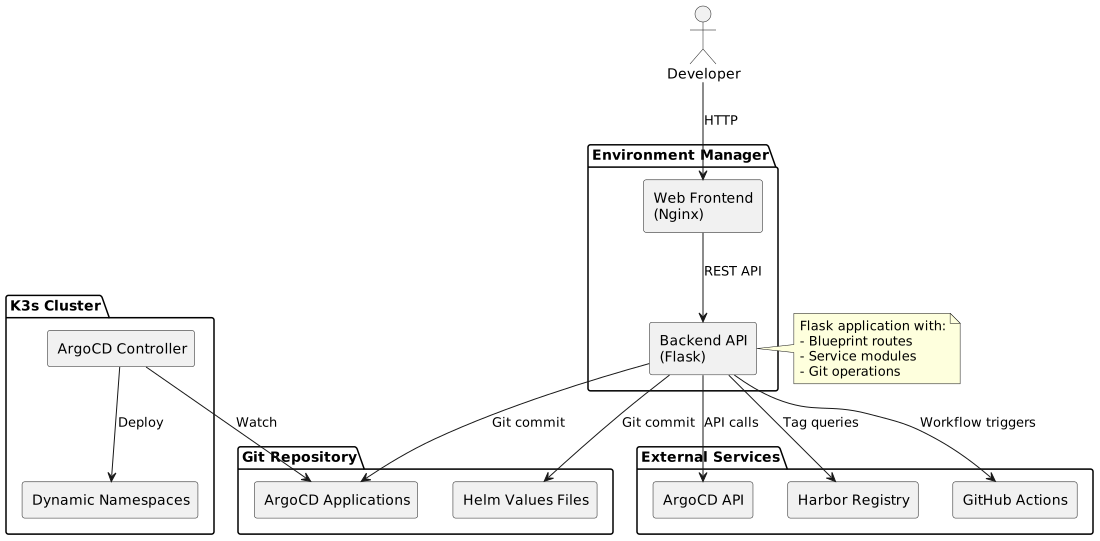
Component Details
Frontend (Nginx)
-
Technology: HTML5, CSS3, JavaScript (ES5)
-
Served by: Nginx container
-
Port: 8080
-
Features:
-
Responsive design
-
Tab-based navigation
-
Real-time form validation
-
Service card selection UI
-
Backend (Flask)
-
Technology: Python 3.x, Flask
-
Port: 5000
-
Features:
-
RESTful API endpoints
-
Git repository operations
-
External API integrations
-
Modular architecture
-
Directory Structure
web-ui/
├── backend/                    # Flask application
│   ├── app.py                  # Entry point, blueprint registration
│   ├── config.py               # SERVICE_CONFIG, constants
│   ├── utils/
│   │   └── helpers.py          # Utility functions
│   ├── services/
│   │   ├── argocd_service.py   # ArgoCD API interactions
│   │   ├── harbor_service.py   # Harbor registry API
│   │   ├── github_service.py   # GitHub Actions workflows
│   │   ├── git_service.py      # Git commit/push operations
│   │   └── values_service.py   # Helm values file management
│   └── routes/
│       ├── environments.py     # Environment CRUD routes
│       ├── services.py         # Tags/branches routes
│       ├── builds.py           # Build management routes
│       └── health.py           # Health check routes
│   └── services/
│       ├── k8s_service.py      # Kubernetes API (metrics, pods, logs)
├── frontend/                   # Web UI
│   ├── index.html              # Main HTML page
│   ├── css/
│   │   └── styles.css          # Application styles
│   └── js/
│       ├── config.js           # Configuration, global state
│       ├── api.js              # API utility functions
│       ├── services.js         # Service selection logic
│       ├── builds.js           # Build monitoring
│       ├── environments.js     # Environment CRUD functions
│       ├── modals.js           # Modal dialogs
│       ├── manager.js          # Services manager tab
│       └── main.js             # Initialization, event handlers
├── docker-compose.yml          # Docker deployment
├── Dockerfile                  # Backend container
└── nginx.conf                  # Frontend proxy config
API Reference
Environments
| Method | Endpoint | Description |
|---|---|---|
GET |
|
List all environments with sync/health status |
POST |
|
Create new dynamic environment |
DELETE |
|
Delete dynamic environment |
POST |
|
Trigger ArgoCD sync for environment |
POST |
|
Refresh ArgoCD application |
GET |
|
Get environment details (URLs, ports, debug ports) |
GET |
|
Get service configurations for environment |
PUT |
|
Update service configurations (tags, enabled state) |
POST |
|
Trigger GitHub Actions build for a service |
GET |
|
Get list of pods in environment namespace |
GET |
|
Get logs from a specific pod (query params: container, tail, previous) |
POST |
|
Check and delete expired environments based on TTL |
Create Environment Request
{
  "envName": "feature-user-123",
  "dbType": "mysql",
  "envType": "partial",
  "parentEnv": "dev-mysql",
  "services": ["portals", "uiBackend", "ftacs"],
  "serviceTags": {
    "portals": "latest",
    "uiBackend": "latest"
  },
  "serviceSources": {
    "portals": "harbor",
    "uiBackend": "harbor",
    "ftacs": "branch"
  },
  "serviceBranches": {
    "ftacs": "USER-123"
  },
  "defaultTag": "latest",
  "ttlDays": 7
}
ttlDays is optional. When set, the environment will be automatically deleted after the specified number of days. Valid values: 1, 3, 7, 14, 30 or null for no expiration.
|
Environment Response
{
  "environments": [
    {
      "name": "feature-user-123",
      "envType": "partial",
      "dbType": "mysql",
      "syncStatus": "Synced",
      "healthStatus": "Healthy",
      "defaultTag": "latest",
      "isStatic": false,
      "ttlDays": 7,
      "expiresAt": "2025-12-24T10:30:00Z",
      "createdAt": "2025-12-17T10:30:00Z",
      "metrics": {
        "cpu": "250m",
        "cpuRaw": 250,
        "memory": "1.2 Gi",
        "memoryRaw": 1228,
        "storage": "5.0 Gi",
        "storageRaw": 5120,
        "pods": "8/10"
      }
    }
  ]
}
The metrics field is only included when ?metrics=true query parameter is passed.
|
Environment Details Response
{
  "environment": "dev-mysql",
  "envIndex": 0,
  "dbType": "mysql",
  "envType": "Full (Static)",
  "isStatic": true,
  "urls": {
    "FTACS": "http://ftacs.dev-mysql.rd.friendly-tech.com/rest/swagger-ui/index.html",
    "UI Backend": "http://ui-backend.dev-mysql.rd.friendly-tech.com/iot-webservice/swagger-ui/index.html",
    "Management Portal": "http://ui.dev-mysql.rd.friendly-tech.com/management-portal/login",
    "Support Portal": "http://ui.dev-mysql.rd.friendly-tech.com/support-portal/login",
    "Northbound API": "http://nbi-api.dev-mysql.rd.friendly-tech.com/iot-webservice/swagger-ui/index.html",
    "Service API": "http://service-api.dev-mysql.rd.friendly-tech.com/iot-webservice/swagger-ui/index.html",
    "Provision API": "http://provision-api.dev-mysql.rd.friendly-tech.com",
    "AI Agent API": "http://ai-agent.dev-mysql.rd.friendly-tech.com/docs",
    "FT Device Network Service": "http://ft-device-network.dev-mysql.rd.friendly-tech.com/api/swagger-ui/index.html",
    "FT FCC Service": "http://ft-fcc-service.dev-mysql.rd.friendly-tech.com/FCC/swagger-ui.html",
    "FT System Metrics": "http://ft-system-metrics.dev-mysql.rd.friendly-tech.com/actuator/prometheus",
    "TR069 Emulator": "http://tr069-emulator.dev-mysql.rd.friendly-tech.com"
  },
  "parentUrls": {},
  "ports": {
    "MySQL": "30300 (3306)",
    "ClickHouse HTTP": "30600 (8123)",
    "ClickHouse TCP": "30500 (9000)",
    "Hazelcast": "30700 (5701)"
  },
  "debugPorts": {
    "FTACS": 30800,
    "UI Backend": 30900,
    "Northbound API": 31000,
    "Service API": 31100,
    "Provision API": 31200,
    "FT Device Network": 31300,
    "FT System Metrics": 31400
  },
  "devicePorts": {
    "MQTT": "31700 (1883)",
    "USP WebSocket": "31702 (8080)"
  },
  "debugEnabled": true
}
Services List Response
{
  "environment": "feature-user-123",
  "isFull": false,
  "defaultTag": "latest",
  "services": [
    {
      "name": "ftacs",
      "tag": "USER-123",
      "enabled": true,
      "supportsBuild": true,
      "source": "branch",
      "isFromParent": false
    },
    {
      "name": "uiBackend",
      "tag": "latest",
      "enabled": true,
      "supportsBuild": true,
      "source": "harbor",
      "isFromParent": false
    }
  ]
}
Services
| Method | Endpoint | Description |
|---|---|---|
GET |
|
Get service configuration with Harbor images |
GET |
|
Get available Harbor tags for service |
GET |
|
Get available Git branches for service |
Builds
| Method | Endpoint | Description |
|---|---|---|
POST |
|
Trigger GitHub Actions build for service |
GET |
|
Check build status |
Environment Creation Flow
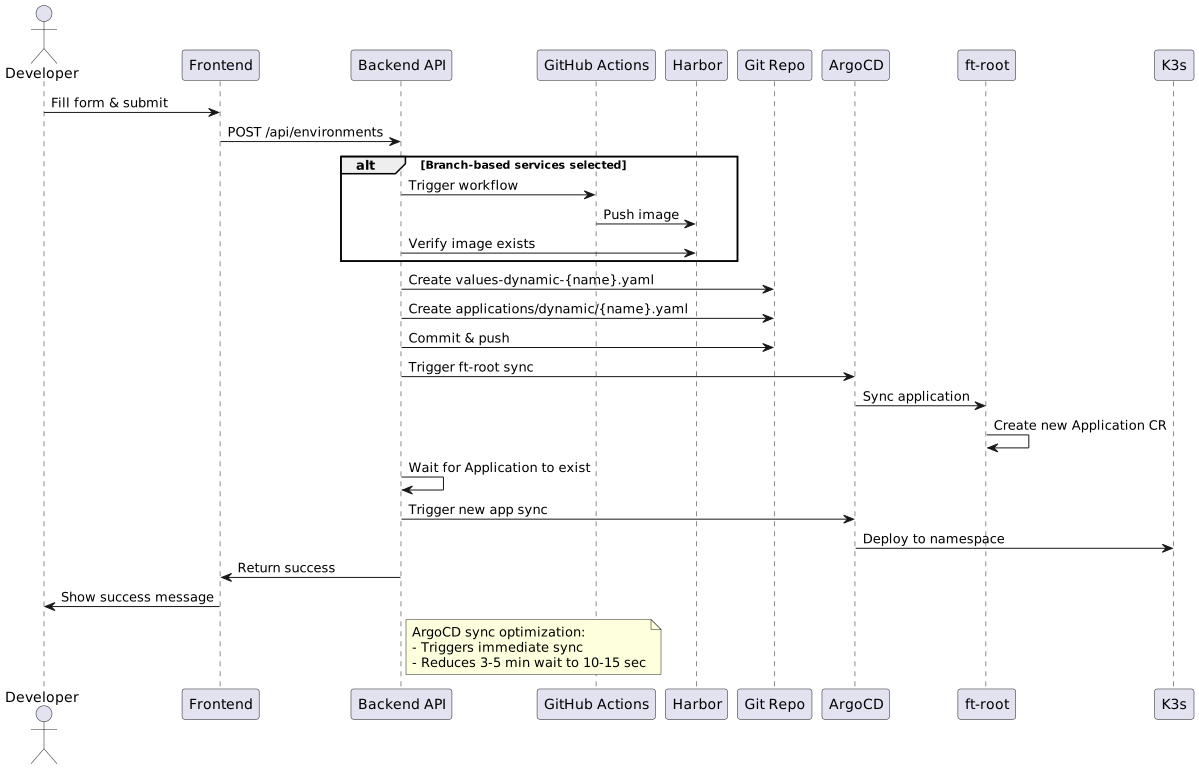
Step-by-Step Process
-
Form Validation - Frontend validates environment name, service selection
-
Duplicate Check - Backend checks for existing files and ArgoCD apps
-
Branch Builds (if needed) - Trigger GitHub Actions workflows
-
Harbor Verification - Wait for images to be available
-
Generate Files - Create Helm values and ArgoCD Application YAML
-
Git Commit - Commit and push files to repository
-
ArgoCD Sync - Trigger ft-root sync to detect new application
-
Application Sync - Trigger sync on newly created application
-
Return Success - Environment starts deploying
Environment Types
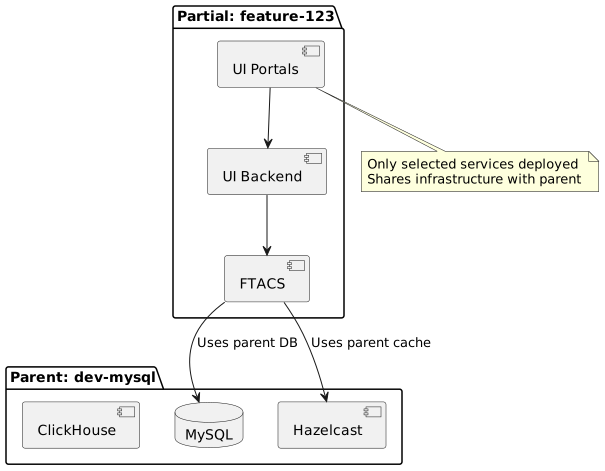
Partial Environments
Partial environments connect to an existing parent environment’s database and shared services.
| Setting | Value |
|---|---|
Database |
Inherited from parent (dev-mysql, dev-oracle, latest-mysql, latest-oracle) |
Services |
User-selected subset |
Use Case |
Testing individual services or features |
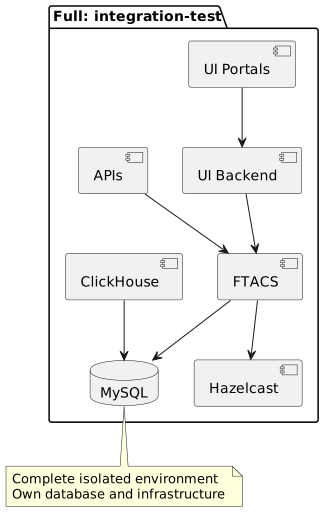
Full Environments
Full environments include all services and their own database instances.
| Setting | Value |
|---|---|
Database |
Dedicated MySQL or Oracle instance |
Services |
All services (auto-selected, cannot be unchecked) |
Use Case |
Complete isolated environment for integration testing |
User Interface
List Tab
Displays all environments (static and dynamic) with:
-
Sync status (Synced, OutOfSync, Unknown)
-
Health status (Healthy, Progressing, Degraded, Missing)
-
Resource metrics (CPU, Memory, Storage, Pods)
-
Expiration countdown (for environments with TTL)
-
Quick actions (Logs, Sync, Delete)
-
Environment type badges
Toolbar Features
-
Search - Filter environments by name (real-time)
-
Status Filter - Filter by sync status (All, Synced, OutOfSync)
-
Type Filter - Filter by type (All, Static, Dynamic, Full, Partial)
-
Health Filter - Filter by health (All, Healthy, Degraded, Progressing)
-
Auto-refresh - Toggle 30-second auto-refresh
-
Last Updated - Shows time since last refresh
Sortable Columns
Click any column header to sort:
-
Name, Type, DB, Sync, Health
-
CPU, Memory, Storage (by raw values)
-
Expires (by expiration date)
Resource Summary Banner
Displays total resource consumption across all filtered environments:
-
Total CPU (cores or millicores)
-
Total Memory (Gi or Mi)
-
Total Storage (Gi or Mi)
-
Total Pods (running/total)
Create Tab
Form for creating new environments:
-
Environment name input with real-time validation
-
Environment type selector (Partial/Full)
-
Parent environment dropdown (for partial)
-
Database type selector (for full)
-
ArgoCD Image Updater toggle (auto-update on new image pushes)
-
Auto-delete TTL selector (Never, 1, 3, 7, 14, 30 days)
-
Service card selection grid
-
Harbor tag / Git branch toggle per service
-
Tag/branch selection dropdowns
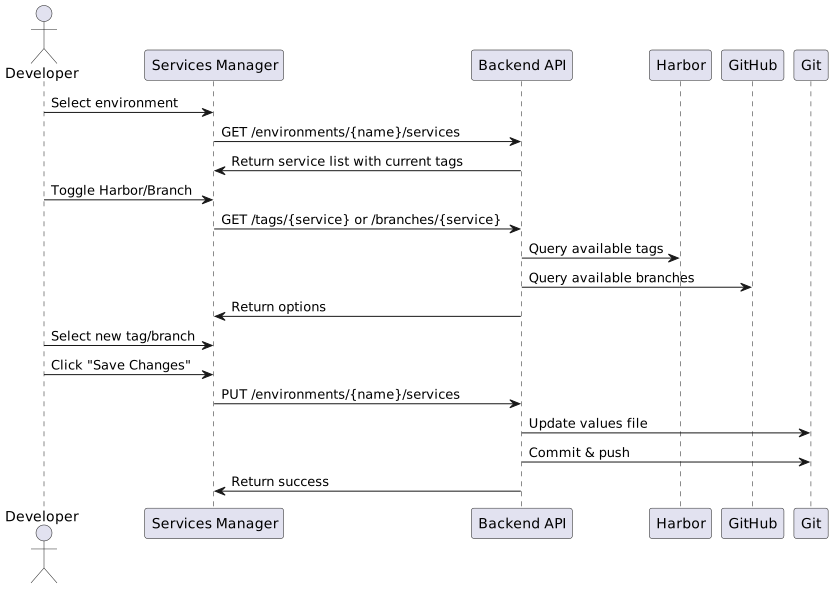
Services Manager Tab
Interface for managing service configurations in dynamic environments:
-
Service grid - View all services with current tags and enabled status
-
Harbor/Branch toggle - Switch between Harbor tags and Git branches per service
-
Tag selector dropdown - Browse and select from available Harbor tags (with tag count)
-
Branch selector - Searchable dropdown with all available Git branches (with branch count)
-
Enable/Disable toggle - Enable or disable individual services (partial environments only)
-
Build trigger - Trigger GitHub Actions builds for branch-based images
-
Pending changes summary - Review all changes before saving
-
Save/Reset - Commit changes to Git or reset to current state
Environment Info Modal
View detailed environment information including service URLs and connection ports:
-
Service URLs - Direct links to all enabled services with correct ingress hostnames
-
Management Portal, Support Portal
-
FTACS, UI Backend, Northbound API, Service API, Provision API
-
AI Agent, FT Device Network, FT Configs Service/UI
-
FT System Metrics, TR069 Emulator
-
-
Parent URLs - URLs for services inherited from parent environment (partial envs)
-
Database Ports - MySQL (30300+), Oracle (30400+), ClickHouse HTTP (30600+), ClickHouse TCP (30500+)
-
Infrastructure Ports - Hazelcast (30700+)
-
Device Connection Ports - MQTT, USP WebSocket, CoAP, STOMP ports
-
Debug Ports - Remote debugging ports for Java services (when debug enabled):
-
FTACS (30800+), UI Backend (30900+)
-
Northbound API (31000+), Service API (31100+)
-
Provision API (31200+), FT Device Network (31300+)
-
FT System Metrics (31400+), FT Configs Service (31500+), FT Configs UI (31600+)
-
Port numbers are calculated as base_port + envIndex to avoid conflicts between environments.
|
Pod Logs Viewer
View logs from any pod in any environment directly from the UI:
-
Pod Selection - Dropdown with all pods grouped by app label
-
Container Selection - Select specific container (including init containers)
-
Tail Lines - Choose how many lines to display (50, 100, 200, 500, 1000)
-
Previous Container - View logs from crashed/restarted container
-
Auto-refresh - Enable 3-second automatic refresh for tailing
-
Download - Export logs as text file
|
Accessing Pod Logs
The logs viewer requires the |
Dark Mode
Toggle between light and dark themes:
-
Click the theme toggle button in the header (🌙/☀️)
-
Preference is saved in localStorage
-
Automatically respects system preference on first visit
-
Smooth transition animations between themes
Environment TTL and Auto-Cleanup
Environments can be configured with a Time-To-Live (TTL) for automatic cleanup.
Setting TTL
When creating an environment, select an auto-delete period:
-
Never - Environment persists until manually deleted
-
1 day - For quick tests
-
3 days - For short feature testing
-
7 days - Default for feature branches (recommended)
-
14 days - For longer development cycles
-
30 days - For extended testing
How TTL Works
-
When environment is created with TTL, two annotations are added:
-
env-manager/ttl-days: The TTL value (e.g., "7") -
env-manager/expires-at: ISO timestamp of expiration
-
-
The environment list shows expiration countdown with color coding:
-
Green: More than 3 days remaining
-
Yellow: 1-3 days remaining
-
Red: Less than 1 day remaining
-
-
The cleanup endpoint (
POST /api/environments/cleanup) checks all environments and deletes expired ones
Running Cleanup
The cleanup can be triggered:
-
Manually: Call
POST /api/environments/cleanup -
Scheduled: Configure a Kubernetes CronJob to call the endpoint periodically
apiVersion: batch/v1
kind: CronJob
metadata:
name: env-cleanup
namespace: env-manager
spec:
schedule: "0 2 * * *" # Run daily at 2 AM
jobTemplate:
spec:
template:
spec:
containers:
- name: cleanup
image: curlimages/curl
command:
- curl
- -X
- POST
- http://env-manager-backend:5000/api/environments/cleanup
restartPolicy: OnFailureDuplicate Name Protection
The system implements three layers of protection against duplicate environment names:

ArgoCD Sync Optimization
The Environment Manager implements immediate sync triggering to reduce deployment time from 3-5 minutes to 10-15 seconds.
Before Optimization
Git commit 0s
Return to user 0s
------- User waits -------
ArgoCD poll interval 180s (default 3 min)
ft-root sync 5s
Application created 3s
Application sync 10s
Pods starting 30s
------- Total: ~228s (~4 min) -------After Optimization
Git commit 0s
Trigger ft-root sync 2s
Wait for ft-root sync 5s
Wait for App to exist 8s
Trigger App sync 2s
Return to user 0s
------- User waits -------
Pods starting 30s
------- Total: ~47s (under 1 min) -------Configuration
Environment Variables
| Variable | Description | Required |
|---|---|---|
ARGOCD_SERVER |
ArgoCD API server hostname |
Yes |
ARGOCD_TOKEN |
ArgoCD API authentication token |
Yes |
HARBOR_HOST |
Harbor registry hostname |
Yes |
HARBOR_PROJECT |
Harbor project name |
Yes |
HARBOR_USERNAME |
Harbor authentication username |
Yes |
HARBOR_PASSWORD |
Harbor authentication password |
Yes |
GITHUB_TOKEN |
GitHub Personal Access Token for Actions |
Yes |
GITHUB_OWNER |
GitHub repository owner/organization |
Yes |
GIT_USER_NAME |
Git commit author name |
Yes |
GIT_USER_EMAIL |
Git commit author email |
Yes |
REPO_PATH |
Local path to ft-deployments repository |
Yes |
Kubernetes RBAC Requirements
The Environment Manager requires a ServiceAccount with ClusterRole permissions to access metrics, pods, and logs across all namespaces.
apiVersion: rbac.authorization.k8s.io/v1
kind: ClusterRole
metadata:
name: env-manager-metrics-reader
rules:
# Read pods and PVCs for resource info
- apiGroups: [""]
resources: ["pods", "persistentvolumeclaims", "namespaces"]
verbs: ["get", "list"]
# Read pod logs
- apiGroups: [""]
  resources: ["pods/log"]
  verbs: ["get", "list"]
# Read pod metrics from metrics.k8s.io
- apiGroups: ["metrics.k8s.io"]
resources: ["pods", "nodes"]
verbs: ["get", "list"]
The pods/log permission is required for the logs viewer feature. Without it, attempting to view logs will result in "API Error: Forbidden".
|
Docker Compose Deployment
version: '3.8'
services:
  frontend:
    image: nginx:alpine
    ports:
      - "8080:80"
    volumes:
      - ./frontend:/usr/share/nginx/html:ro
      - ./nginx.conf:/etc/nginx/conf.d/default.conf:ro
    depends_on:
      - backend

  backend:
    build: ./backend
    environment:
      - ARGOCD_SERVER=${ARGOCD_SERVER}
      - ARGOCD_TOKEN=${ARGOCD_TOKEN}
      - HARBOR_HOST=${HARBOR_HOST}
      - HARBOR_PROJECT=${HARBOR_PROJECT}
      - HARBOR_USERNAME=${HARBOR_USERNAME}
      - HARBOR_PASSWORD=${HARBOR_PASSWORD}
      - GITHUB_TOKEN=${GITHUB_TOKEN}
      - GITHUB_OWNER=${GITHUB_OWNER}
      - GIT_USER_NAME=${GIT_USER_NAME}
      - GIT_USER_EMAIL=${GIT_USER_EMAIL}
    volumes:
      - ../:/repo:rw
Troubleshooting
Environment Creation Fails
Symptom: Error message on form submit
Check:
-
Backend logs:
docker-compose logs backend -
Git repository permissions
-
ArgoCD token validity
-
Harbor credentials
Images Not Found
Symptom: "Image not found in Harbor" error
Check:
-
GitHub Actions workflow completed successfully
-
Harbor tag exists: check Harbor UI
-
Build logs in GitHub Actions
Sync Status "Unknown"
Symptom: Environment shows "Unknown" sync status
Check:
-
ArgoCD connectivity:
curl -k https://$ARGOCD_SERVER/api/version -
ArgoCD token permissions
-
Application exists in ArgoCD
Duplicate Name Error
Symptom: "Environment already exists" error for new name
Cause: Cache out of sync or race condition
Solution:
-
Refresh the page to update cache
-
Check ArgoCD for manually created applications
-
Backend performs authoritative check
Logs Viewer "Forbidden" Error
Symptom: "API Error: Forbidden" when trying to view pod logs
Cause: Missing pods/log RBAC permission
Solution:
-
Update the ClusterRole to include
pods/log:- apiGroups: [""] resources: ["pods/log"] verbs: ["get", "list"] -
Apply the updated ClusterRole:
kubectl apply -f helm/ft-services/templates/infrastructure/env-manager.yaml
# Or trigger ArgoCD sync
argocd app sync env-manager
Resource Metrics Not Showing
Symptom: CPU, Memory, Storage columns show "-" for all environments
Cause: Metrics Server not installed or RBAC permissions missing
Solution:
-
Verify Metrics Server is installed:
kubectl get deployment metrics-server -n kube-system -
Verify ClusterRole has metrics.k8s.io permissions:
kubectl describe clusterrole env-manager-metrics-reader -
Check backend logs for errors:
kubectl logs -n env-manager -l app=env-manager-backend --tail=100
Related Documentation
Last updated: 2026-10-14 19:00:10 +0200