ArgoCD Image Updater
ArgoCD Image Updater automatically monitors container registries and updates application images when new versions are available. This page documents the configuration and management of image updates for FT Services.
Overview
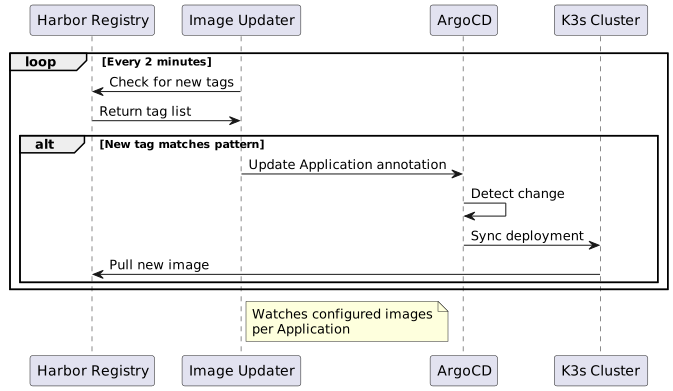
ArgoCD Image Updater watches Harbor registry for new image tags matching configured patterns and automatically updates ArgoCD Application annotations, triggering redeployment.
|
Image Updater is configured for static environments only (dev-mysql, dev-oracle, latest-mysql, latest-oracle). Dynamic feature branch environments use fixed image tags. |
Architecture
Configuration
Application Annotations
Image Updater is configured via annotations on ArgoCD Application resources:
apiVersion: argoproj.io/v1alpha1
kind: Application
metadata:
  name: dev-mysql
  annotations:
    # Enable image updater
    argocd-image-updater.argoproj.io/image-list: |
      ftacs=hub.friendly-tech.com/ftacs/ftacs,
      ui-backend=hub.friendly-tech.com/ui/backend,
      portals=hub.friendly-tech.com/ui/portals

    # Update strategy per image
    argocd-image-updater.argoproj.io/ftacs.update-strategy: semver
    argocd-image-updater.argoproj.io/ui-backend.update-strategy: latest
    argocd-image-updater.argoproj.io/portals.update-strategy: latest

    # Allow tags matching pattern
    argocd-image-updater.argoproj.io/ftacs.allow-tags: regexp:^v[0-9]+\.[0-9]+\.[0-9]+$
    argocd-image-updater.argoproj.io/ui-backend.allow-tags: regexp:^(latest|dev|v.*)$
    argocd-image-updater.argoproj.io/portals.allow-tags: regexp:^(latest|dev|v.*)$

    # Write back method
    argocd-image-updater.argoproj.io/write-back-method: argocd
Annotation Reference
| Annotation | Description | Required |
|---|---|---|
|
Comma-separated list of images to watch (alias=image) |
Yes |
|
How to select new tags: |
No (default: semver) |
|
Regex pattern for allowed tags |
No |
|
Regex pattern for ignored tags |
No |
|
Helm values path for image name |
Yes (for Helm) |
|
Helm values path for image tag |
Yes (for Helm) |
|
How to update: |
No (default: argocd) |
Update Strategies
| Strategy | Description | Example Pattern |
|---|---|---|
|
Follow semantic versioning, pick highest version |
|
|
Always use the most recently pushed tag |
Any tag |
|
Alphabetically latest tag name |
|
|
Update when image digest changes (for mutable tags) |
|
Service Configuration
FT Services Image List
| Service | Harbor Path | Helm Value Path | Default Strategy |
|---|---|---|---|
ftacs |
|
|
semver |
uiBackend |
|
|
latest |
portals |
|
|
latest |
northboundApi |
|
|
latest |
serviceApi |
|
|
latest |
provisionApi |
|
|
latest |
ftDeviceNetwork |
|
|
latest |
uiAiAgent |
|
|
latest |
ftConfigsService |
|
|
latest |
ftConfigsUi |
|
|
latest |
Environment Manager Integration
The Services Manager tab in Environment Manager provides a UI for configuring Image Updater:

Managing via UI
-
Navigate to Environment Manager
-
Click "Services Manager" tab
-
Select static environment from dropdown
-
For each service:
-
Toggle "Enable Image Updater"
-
Select update strategy
-
Configure tag pattern (optional)
-
-
Click "Save Configuration"
-
Changes are applied to ArgoCD Application annotations
Monitoring
Check Image Updater Logs
# View Image Updater logs
kubectl logs -n argocd -l app.kubernetes.io/name=argocd-image-updater -f

# Check for specific application
kubectl logs -n argocd -l app.kubernetes.io/name=argocd-image-updater | grep "dev-mysql"
Verify Current Configuration
# Get application annotations
kubectl get application dev-mysql -n argocd -o jsonpath='{.metadata.annotations}' | jq

# Check image updater status
argocd app get dev-mysql -o yaml | grep "image-updater"
Check Update History
# View recent syncs triggered by image updater
kubectl get application dev-mysql -n argocd -o jsonpath='{.status.history}' | jq

# Check ArgoCD events
kubectl get events -n argocd --field-selector involvedObject.name=dev-mysql
Troubleshooting
Images Not Updating
Checklist
-
Verify Image Updater is running
kubectl get pods -n argocd -l app.kubernetes.io/name=argocd-image-updater -
Check annotations are correct
kubectl get application dev-mysql -n argocd -o yaml | grep -A20 "annotations:" -
Verify tag pattern matches
# List available tags in Harbor curl -u "$USER:$PASS" "https://hub.friendly-tech.com/api/v2.0/projects/ftacs/repositories/ftacs/tags" -
Check Image Updater logs
kubectl logs -n argocd -l app.kubernetes.io/name=argocd-image-updater --tail=100
Wrong Image Selected
Tag pattern too broad or update strategy mismatch
# Be more specific with allow-tags
argocd-image-updater.argoproj.io/ftacs.allow-tags: regexp:^v[0-9]+\.[0-9]+\.[0-9]+$

# Or use ignore-tags
argocd-image-updater.argoproj.io/ftacs.ignore-tags: regexp:^(dev|test|snapshot)
Harbor Authentication Errors
# Verify secret exists
kubectl get secret argocd-image-updater-secret -n argocd

# Check secret contents
kubectl get secret argocd-image-updater-secret -n argocd -o yaml

# Update credentials
kubectl create secret generic argocd-image-updater-secret \
  --from-literal=harbor.credentials="$HARBOR_USER:$HARBOR_PASS" \
  -n argocd --dry-run=client -o yaml | kubectl apply -f -
Best Practices
Tag Naming Convention
| Environment | Recommended Tags | Update Strategy |
|---|---|---|
Development |
|
|
Staging |
|
|
Production |
|
|
Security Considerations
-
Use
semverstrategy for production to avoid unexpected updates -
Configure
ignore-tagsto exclude development/test tags -
Use
allow-tagsto whitelist specific patterns -
Consider using
digeststrategy for mutable tags to detect actual changes
Performance Tuning
# Adjust check interval (default 2 minutes)
apiVersion: v1
kind: ConfigMap
metadata:
  name: argocd-image-updater-config
  namespace: argocd
data:
  registries.conf: |
    registries:
    - name: Harbor
      api_url: https://hub.friendly-tech.com
      ping: yes
      credentials: secret:argocd/argocd-image-updater-secret#harbor.credentials
      defaultns: ftacs
      default: true

  # Check every 5 minutes instead of 2
  # Reduce load on Harbor registry
  interval: 5m
Related Documentation
Last updated: 2026-10-14 19:00:11 +0200