AI Agent Service Separate Host Deployment
Overview
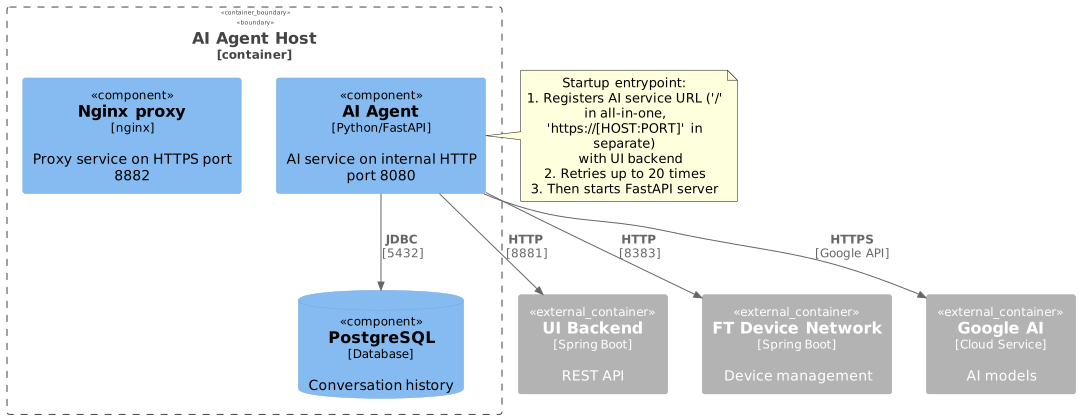
This deployment runs the AI Agent Service with its PostgreSQL database on a dedicated host. The service provides AI-powered chatbot capabilities for technical support and device troubleshooting.
The deployment includes:
-
UI AI Agent - Python FastAPI service with Google AI integration
-
PostgreSQL - Database for conversation history and AI context
Prerequisites
|
For detailed information about Docker registry and image management, see Docker Image Management Guide. |
|
For HTTPS configuration, see Ssl certificate configuration. |
Required External Components
The following components must be installed and accessible:
| Component | Purpose | Default Port |
|---|---|---|
UI Backend |
Main REST API service (for registration and API calls) |
8881 |
FT Device Network Service |
Device management API |
8383 |
Google AI API |
AI model access (requires API key) |
HTTPS/443 |
Preparation
2. Prepare Environment File
cp .env.template .envOr create .env file with the following content:
# Common vars
DATA_FOLDER=/usr/local/ft-services
FT_UI_HOST=~UI_HOST~
FT_UI_BACKEND_HTTP_PORT=8881
FT_DEVICE_NETWORK_HOST=~FT_DEVICE_NETWORK_HOST~
FT_DEVICE_NETWORK_HTTP_PORT=8383
FT_UI_BACKEND_KEYWORD=ft12Internal#$Auth%^

# --- API KEYS ---
GOOGLE_API_KEY=YOUR_GOOGLE_API_KEY
GOOGLE_APPLICATION_CREDENTIALS=/app/keys/google_service_account.json

FT_AI_AGENT_HTTP_PORT=8882
FT_AI_AGENT_HOST=~HOST~

# Request timeout for any request to FTL APIs
FTL_REQUESTS_TIMEOUT_IN_SEC=60

# Command timeout - how long to poll task results after command sent
FTL_COMMANDS_TIMEOUT_IN_SEC=180

# --- DB configs
POSTGRES_HOST=postgres
POSTGRES_PORT=5432
POSTGRES_DB=ftl_ai
POSTGRES_USER=postgres
POSTGRES_PASSWORD=postgres

# --- LLM related configs ---
TOTAL_MAX_TOKENS=5000
MAX_TOKENS_BEFORE_SUMMARY=5000
MAX_SUMMARY_TOKENS=500

# --- Audio ---
MAX_AUDIO_SIZE_IN_BYTES=5242880  # 5 MB

# --- Langchain configs [OPTIONAL] - for debug purposes
LANGCHAIN_API_KEY=
LANGCHAIN_PROJECT=
LANGCHAIN_TRACING_V2=false

DB_MIN_POOL_SIZE=10
DB_MAX_POOL_SIZE=1000
3. Configure Host Variables
Edit .env and replace placeholder values:
# Required replacements:
~HOST~                      → AI Agent hostname/IP (e.g., 192.168.1.100)
~UI_HOST~                   → UI Backend hostname/IP (e.g., 192.168.1.110)
~FT_DEVICE_NETWORK_HOST~    → FT Device Network hostname/IP (e.g., 192.168.1.120)
YOUR_GOOGLE_API_KEY         → Your actual Google API key
Example configuration:
FT_AI_AGENT_HOST=192.168.1.100
FT_UI_HOST=192.168.1.110
FT_DEVICE_NETWORK_HOST=192.168.1.120
GOOGLE_API_KEY=AIzaSyC1234567890abcdefghijklmnopContainer Startup Process
PostgreSQL Startup
-
Database Initialization
-
Creates database
ftl_aiif it doesn’t exist -
Initializes tables for conversation history
-
TCP keepalive configured for stable connections
-
-
Health Check
-
Runs
pg_isreadyevery 10 seconds -
Service marked healthy after successful connection
-
AI Agent Startup (Entrypoint)
The AI agent container runs an entrypoint script (init-interface.sh) that performs critical registration before starting the main service.
1. Environment Validation
Validates required environment variables:
FTL_WEB_UI_API_BASE_URL  # Must be set (UI backend URL)
FT_AI_AGENT_HOST         # Defaults to 'ui-ai-agent'
FT_AI_AGENT_HTTP_PORT    # Defaults to 8882
FT_UI_BACKEND_KEYWORD    # Authentication keyword
2. AI Service Registration
Registers the AI service with the UI Backend via PUT request:
PUT http://<UI_BACKEND>:8881/iot-webservice/iotw/Setting/interface
Headers:
  - Content-Type: application/json
  - X-Internal-Keyword: ${FT_UI_BACKEND_KEYWORD}
  - X-Internal-Client-Type: sc

Payload:
{
  "items": [
    {
      "id": "AIHistoryDays",
      "valueType": "INTEGER",
      "description": "",
      "required": true,
      "group": "AI Chatbot",
      "value": "0",
      "encrypted": false
    },
    {
      "id": "AIServiceConnectionURL",
      "valueType": "STRING",
      "description": "",
      "required": false,
      "group": "AI Chatbot",
      "value": "https://<FT_AI_AGENT_HOST>:8882/", // OR '/' for all-in-one
      "encrypted": false
    }
  ]
}
Purpose: This registration tells the UI Backend where to find the AI service, allowing the Support Center portal to communicate with the AI chatbot.
Retry Logic: The script retries up to 20 times (2 seconds between attempts) if the UI Backend is not yet ready.
Environment Variables
Service Configuration
| Variable | Description | Default | Required |
|---|---|---|---|
|
Public hostname for AI agent (used in registration URL) |
|
Yes |
|
AI Agent HTTPS port |
|
Yes |
|
UI Backend hostname |
|
Yes |
|
UI Backend port |
|
Yes |
|
FT Device Network service hostname |
|
Yes |
|
FT Device Network service port |
|
Yes |
|
Internal authentication keyword for cross-service communication (used during registration) |
|
Yes |
|
Minimum db pool size |
|
Yes |
|
Maximum db pool size |
|
Yes |
Google AI Configuration
| Variable | Description | Default | Required |
|---|---|---|---|
|
Google API key for AI models |
- |
Yes |
|
Path to Google service account JSON (inside container) |
|
No |
| Keep your Google API key secure. Never share publicly. |
PostgreSQL Configuration
| Variable | Description | Default | Required |
|---|---|---|---|
|
PostgreSQL hostname (internal) |
|
Yes |
|
PostgreSQL port |
|
Yes |
|
PostgreSQL database name |
|
Yes |
|
PostgreSQL username |
|
Yes |
|
PostgreSQL password |
|
Yes |
API Timeout Configuration
| Variable | Description | Default | Required |
|---|---|---|---|
|
Timeout for requests to UI backend/device network (seconds) |
|
No |
|
Timeout for device command polling (seconds) |
|
No |
LLM Configuration
| Variable | Description | Default | Required |
|---|---|---|---|
|
Maximum tokens for LLM context |
|
No |
|
Tokens threshold before summarization |
|
No |
|
Maximum tokens for summary |
|
No |
|
Maximum audio file size for transcription |
|
No |
Service Access
After successful deployment:
| Endpoint | URL | Description |
|---|---|---|
AI Agent API |
FastAPI root endpoint |
|
API Documentation |
Swagger UI (FastAPI auto-generated) |
|
Health Check |
Service health status |
Exposed Ports
| Port | Service | Protocol | Purpose | Configurable Via |
|---|---|---|---|---|
8882 |
AI Agent |
HTTPS |
FastAPI API |
|
5432 |
PostgreSQL |
TCP |
Database (internal only) |
Not exposed to host |
Verify AI Agent port is listening:
netstat -tlnp | grep 8882
# or
ss -tlnp | grep 8882
Test service health:
curl https://localhost:8882/healthData Persistence
Persistent data location (assuming DATA_FOLDER=/usr/local/ft-services):
| Path | Content | Backup Required |
|---|---|---|
|
PostgreSQL database files (conversation history) |
Yes |
Folder structure:
/usr/local/ft-services/
└── ft-data/
    └── ai-agent/
        └── postgres/
            └── data/          # PostgreSQL data directory
                ├── base/
                ├── global/
                ├── pg_wal/
                └── ...
Troubleshooting
Check Service Logs
# All services
docker compose logs -f

# AI Agent only
docker compose logs -f ui-ai-agent

# PostgreSQL only
docker compose logs -f postgres
Common Issues
AI Agent Fails to Start
Symptom: Container exits or restarts repeatedly during initialization.
Check entrypoint logs:
docker compose logs ui-ai-agent | grep "init-interface"Common causes:
-
UI Backend not accessible:
-
Entrypoint cannot reach UI Backend for registration
-
Check
FT_UI_HOSTandFT_UI_BACKEND_HTTP_PORTin.env -
Verify UI Backend is running:
curl http://<UI_HOST>:8881/iot-webservice/swagger-ui/index.html
-
-
Authentication failure:
-
FT_UI_BACKEND_KEYWORDmismatch between AI Agent and UI Backend -
Ensure both services use the same keyword value
-
-
Registration timeout:
-
Script fails after 20 retry attempts (40 seconds)
-
Increase
maxvalue in entrypoint script or fix UI Backend connectivity
-
Solution:
# Verify UI Backend reachability
curl -v http://<FT_UI_HOST>:8881/iot-webservice/iotw/Setting/interface

# Check keyword match
docker compose exec ui-ai-agent env | grep FT_UI_BACKEND_KEYWORD

# Restart after fixing configuration
docker compose restart ui-ai-agent
Cannot Connect to PostgreSQL
Symptom: AI Agent logs show database connection errors.
Check PostgreSQL status:
docker compose ps postgres
docker compose logs postgres
Verify connection:
# Test from AI Agent container
docker compose exec ui-ai-agent sh -c 'curl -v telnet://postgres:5432'

# Check PostgreSQL environment
docker compose exec ui-ai-agent env | grep POSTGRES
Solution:
- Wait for PostgreSQL to become healthy (can take 15-20 seconds on first start) - Check PostgreSQL logs for errors - Verify credentials match in .env
Google AI API Errors
Symptom: AI responses fail with API errors.
Check API key:
# Verify key is set
docker compose exec ui-ai-agent env | grep GOOGLE_API_KEY

# Test API key manually
curl "https://generativelanguage.googleapis.com/v1beta/models?key=YOUR_KEY"
Common causes:
-
Invalid or expired API key
-
API not enabled in Google Cloud Console
-
Quota exceeded
-
Network connectivity issues
Solution:
- Verify API key is correct in .env
- Enable required Google AI APIs in console - Check quota limits in Google Cloud Console - Verify internet connectivity from container
AI Service Not Registered with UI Backend
Symptom: Support Center shows no AI chatbot option.
Verify registration:
# Check if registration succeeded in logs
docker compose logs ui-ai-agent | grep "success"

# Query UI Backend for AI settings
curl -X GET "http://<FT_UI_HOST>:8881/iot-webservice/iotw/Setting/interface" \
  -H "Content-Type: application/json"
Solution:
- Check entrypoint logs for registration failures - Manually trigger registration by restarting AI Agent: docker compose restart ui-ai-agent
- Verify FT_AI_AGENT_HOST is accessible from UI Backend
Device Network Service Unreachable
Symptom: AI cannot execute device commands.
Check connectivity:
# Test from AI Agent container
docker compose exec ui-ai-agent curl -v "http://${FT_DEVICE_NETWORK_HOST}:8383/api/actuator/health"
Solution:
- Verify FT_DEVICE_NETWORK_HOST and FT_DEVICE_NETWORK_HTTP_PORT in .env
- Ensure FT Device Network service is running - Check network connectivity between hosts
Verify External Dependencies
Test connectivity to all required services:
# UI Backend
curl http://<FT_UI_HOST>:8881/iot-webservice/swagger-ui/index.html

# FT Device Network
curl http://<FT_DEVICE_NETWORK_HOST>:8383/api/actuator/health

# Google AI API (requires key)
curl "https://generativelanguage.googleapis.com/v1beta/models?key=<YOUR_KEY>"Debugging
Enable Langchain Tracing
For detailed AI operation tracing, configure Langchain:
Edit .env:
LANGCHAIN_API_KEY=your_langchain_key
LANGCHAIN_PROJECT=ft-ai-agent-debug
LANGCHAIN_TRACING_V2=true
Restart service:
docker compose restart ui-ai-agentView traces at https://smith.langchain.com/
View AI Agent Logs
# Real-time logs
docker compose logs -f ui-ai-agent

# Last 100 lines
docker compose logs --tail=100 ui-ai-agent

# Filter for errors
docker compose logs ui-ai-agent | grep -i error
Access PostgreSQL Database
# Connect to PostgreSQL
docker compose exec postgres psql -U postgres -d ftl_ai

# List tables
\dt

# Query conversation history
SELECT * FROM conversations LIMIT 10;

# Exit
\qMaintenance
Update Services
# Pull latest images
docker compose pull

# Restart with new images
docker compose up -d
Force Repull Images
docker compose down
docker compose pull --ignore-pull-failures
docker compose up -d
Backup PostgreSQL Database
# Full database backup
docker compose exec postgres pg_dump -U postgres ftl_ai > backup_$(date +%Y%m%d).sql

# Restore from backup
cat backup_20241104.sql | docker compose exec -T postgres psql -U postgres -d ftl_ai

# Backup data directory
tar -czf postgres-data-backup-$(date +%Y%m%d).tar.gz \
/usr/local/ft-services/ft-data/ai-agent/postgres/data/| Stop containers before restoring from data directory backup to avoid corruption. |