SAML SSO — Integration Guide
| Parameter | Value |
|---|---|
Application version |
Spring Boot 3.5.6 / Java 25 |
Library |
Spring Security SAML2 (Relying Party) |
Standard |
SAML 2.0, HTTP POST Binding |
1. Overview
1.1. What is SAML SSO
SAML (Security Assertion Markup Language) is an open standard for exchanging authentication data between an Identity Provider (IdP) and a Service Provider (SP). In this project, the OneIoT application acts as the SP, while an external IdP (Keycloak, Azure AD, Okta, ADFS, etc.) performs user authentication.
1.2. How SAML SSO works in this project
The application supports two separate SAML client registrations:
| Portal | Registration ID | SP Entity ID (default) |
|---|---|---|
Support Center (SC) |
|
|
Management Console (MC) |
|
|
Each portal has its own ACS URL, Entity ID, and post-authentication redirect URL.
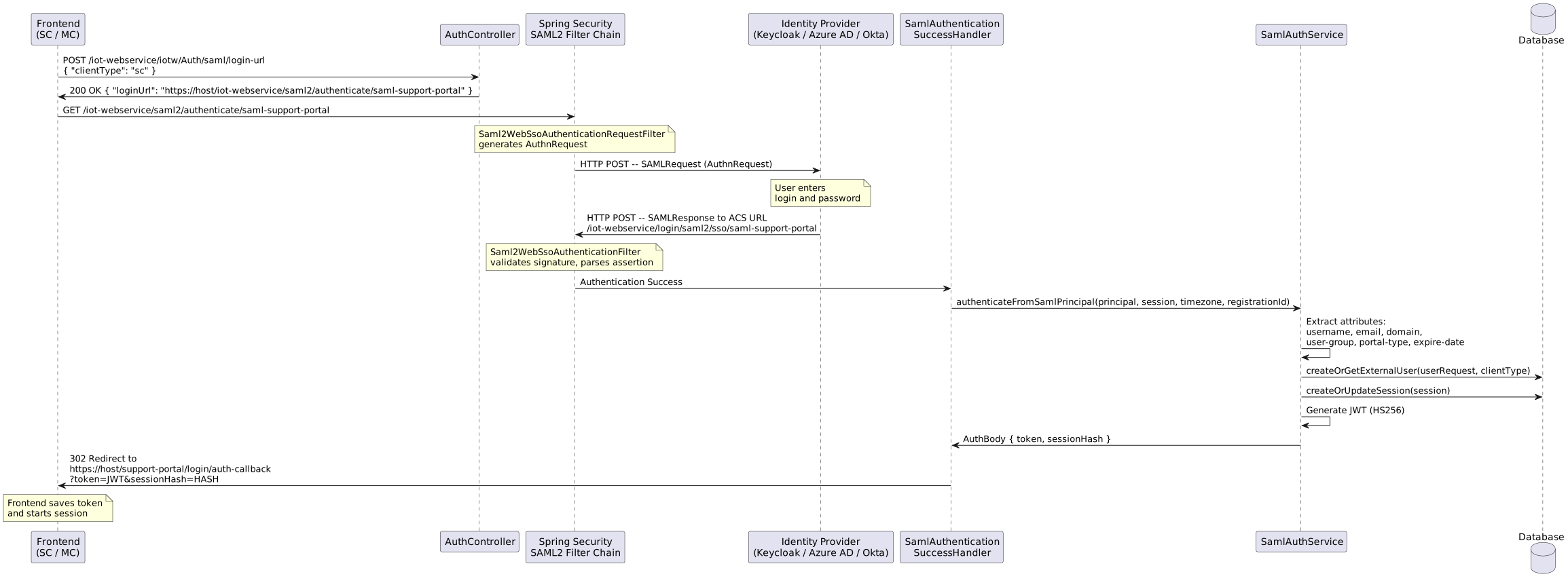
2. Application configuration
2.1. Prerequisites
To enable SAML SSO:
-
Set the
app.authentication-typevariable tosaml:app: authentication-type: samlThis value determines the authentication type returned by the
POST /iot-webservice/iotw/Auth/typeendpoint. The frontend uses it to choose between the login/password form and the SSO button. -
Set
SAML_ENABLED=true— this activates theSamlAuthenticationSuccessHandlerbean and the SAML filter chain inSecurityConfig.
2.2. Environment variables
| Environment variable | YAML path | Default value | Description |
|---|---|---|---|
|
|
|
Enables/disables SAML SSO. When |
|
|
— (required) |
Base application URL used to construct redirect links and the ACS URL. Example: |
|
|
— (required) |
Identity Provider Entity ID. Example: |
|
|
— (required) |
IdP Single Sign-On URL. Example: |
|
|
|
Path to the IdP certificate (X.509 PEM). Used to verify the SAMLResponse signature. |
|
|
|
Service Provider Entity ID for the Support Center portal. |
|
|
|
Path to the SP private key (PKCS#8 PEM). Used to sign the AuthnRequest (if enabled). |
|
|
|
Path to the SP certificate (X.509 PEM). |
|
|
|
Service Provider Entity ID for the Management Console portal. |
|
|
|
Name of the SAML attribute containing the username. |
|
|
|
Name of the SAML attribute containing the user email. |
|
|
|
Name of the SAML attribute determining the portal type ( |
|
|
|
Name of the SAML attribute containing the user domain. The value must match the domain name in the database. |
|
|
|
Name of the SAML attribute containing the user group. The value must match the group name in the database. |
|
|
|
Name of the SAML attribute with the account expiration date. Formats: ISO-8601 ( |
2.3. Spring Security SAML2 Relying Party configuration
The application.yaml file defines two relying party registrations under spring.security.saml2.relyingparty.registration:
2.3.1. saml-support-portal (SC)
spring:
  security:
    saml2:
      relyingparty:
        registration:
          saml-support-portal:
            entity-id: ${SAML_SC_SP_ENTITY_ID:oneiot-sp-sc}
            acs:
              location: "${SAML_REDIRECT_HOST}/iot-webservice/login/saml2/sso/{registrationId}"
              binding: post
            singlelogout:
              binding: post
            signing:
              credentials:
                - private-key-location: ${SAML_SP_KEY:classpath:saml/sp.key}
                  certificate-location: ${SAML_SP_CERT:classpath:saml/sp.crt}
            assertingparty:
              entity-id: ${SAML_IDP_ENTITY_ID}
              singlesignon:
                url: ${SAML_IDP_SSO_URL}
                binding: post
                sign-request: false
              verification:
                credentials:
                  - certificate-location: ${SAML_IDP_CERT:classpath:saml/idp.crt}
2.3.2. saml-management-portal (MC)
          saml-management-portal:
            entity-id: ${SAML_MC_SP_ENTITY_ID:oneiot-sp-mc}
            acs:
              location: "{baseUrl}/iot-webservice/login/saml2/sso/{registrationId}"
              binding: post
            singlelogout:
              binding: post
            signing:
              credentials:
                - private-key-location: ${SAML_SP_KEY:classpath:saml/sp.key}
                  certificate-location: ${SAML_SP_CERT:classpath:saml/sp.crt}
            assertingparty:
              entity-id: ${SAML_IDP_ENTITY_ID}
              singlesignon:
                url: ${SAML_IDP_SSO_URL}
                binding: post
              verification:
                credentials:
                  - certificate-location: ${SAML_IDP_CERT:classpath:saml/idp.crt}
Key points:
-
sign-request: false— the AuthnRequest is not signed (simplifies IdP integration since the IdP does not need to verify the request signature). -
Both registrations use the same SP key pair for signing credentials but have different
entity-idvalues. -
The SC ACS URL uses
${SAML_REDIRECT_HOST}(hardcoded host), while MC uses{baseUrl}(auto-detected from the incoming request).
2.4. ACS URL format
${SAML_REDIRECT_HOST}/iot-webservice/login/saml2/sso/{registrationId}
Specific values:
-
SC:
https://portal.example.com/iot-webservice/login/saml2/sso/saml-support-portal -
MC:
https://portal.example.com/iot-webservice/login/saml2/sso/saml-management-portal
2.5. Post-authentication redirect URLs
| Portal | URL | Configuration |
|---|---|---|
SC |
|
|
MC |
|
|
The frontend receives the JWT token and sessionHash as query parameters:
https://portal.example.com/support-portal/login/auth-callback?token=eyJhbG...&sessionHash=BASE64...
2.6. SP Metadata URL
The application automatically publishes SP metadata at:
/iot-webservice/saml2/metadata/{registrationId}
Examples:
-
https://portal.example.com/iot-webservice/saml2/metadata/saml-support-portal -
https://portal.example.com/iot-webservice/saml2/metadata/saml-management-portal
| This URL can be used in the IdP for automatic SP configuration. |
3. Certificates
All certificates are located in iot-web-app-build/src/main/resources/saml/:
| File | Purpose | Format |
|---|---|---|
|
Service Provider private key |
PKCS#8 PEM |
|
Service Provider certificate |
X.509 PEM |
|
Identity Provider certificate |
X.509 PEM |
3.1. SP certificate (sp.crt + sp.key)
Used for:
-
Signing SAML AuthnRequest (if
sign-request: truein the configuration) -
Inclusion in SP metadata in the
<KeyDescriptor use="signing">section
3.2. IdP certificate (idp.crt)
Used for:
-
Verifying the signature of the SAMLResponse received from the IdP
-
Must exactly match the signing certificate configured in the IdP
The file must be in X.509 PEM format with the following structure:
-----BEGIN CERTIFICATE-----
MIICnTCCAYUCBgGE... (base64-encoded certificate data)
...
-----END CERTIFICATE-----
The certificate MUST include the -----BEGIN CERTIFICATE----- and -----END CERTIFICATE----- header/footer lines. The content between headers must be base64-encoded. If the IdP rotates its signing keys, you MUST update the idp.crt file in the application. A certificate mismatch will cause signature verification failure and authentication denial. See Exporting IdP Signing Certificate for how to obtain the certificate from Keycloak.
|
3.3. Generating the SP key pair
To generate a new private key and self-signed SP certificate, use OpenSSL:
# Generate RSA 2048-bit private key (PKCS#8 PEM)
openssl genpkey -algorithm RSA -out sp.key -pkeyopt rsa_keygen_bits:2048

# Generate self-signed certificate valid for 10 years
openssl req -new -x509 -key sp.key -out sp.crt -days 3650 -subj "/CN=oneiot-sp"
Or in a single command (generates key and certificate simultaneously):
openssl req -new -x509 -newkey rsa:2048 -nodes \
  -keyout sp.key -out sp.crt \
  -days 3650 -subj "/CN=oneiot-sp"
The private key must be in PKCS#8 format (header -----BEGIN PRIVATE KEY-----), not in traditional RSA format (-----BEGIN RSA PRIVATE KEY-----). Convert if necessary:
|
openssl pkcs8 -topk8 -inform PEM -outform PEM -nocrypt -in sp-rsa.key -out sp.key3.4. Obtaining the IdP certificate
For Keycloak, the IdP certificate can be obtained from:
-
Realm Settings > Keys — copy the public key of the
RS256entry with usageSIG -
SAML Descriptor URL:
https://<KEYCLOAK_HOST>/realms/<REALM>/protocol/saml/descriptor— extract the certificate from<ds:X509Certificate> -
Admin Console: Realm Settings > Keys > select
RSA (sig)> View Certificate
See Exporting IdP Signing Certificate for detailed step-by-step instructions.
4. API Endpoints
4.1. POST /iot-webservice/iotw/Auth/saml/login-url
Returns the URL for redirecting the user to the IdP.
Authentication: not required (public endpoint).
4.1.1. Request
POST /iot-webservice/iotw/Auth/saml/login-url HTTP/1.1
Content-Type: application/json

{
  "clientType": "sc"
}| Field | Type | Required | Description |
|---|---|---|---|
|
|
Yes |
Portal type. Allowed values: |
4.1.2. Successful response (200 OK)
{
  "loginUrl": "https://portal.example.com/iot-webservice/saml2/authenticate/saml-support-portal"
}| Field | Type | Description |
|---|---|---|
|
|
Full URL for user redirection. Format: |
4.1.3. Error responses (400 Bad Request)
SAML disabled:
{
  "error": "SAML authentication is not enabled"
}
Invalid clientType:
{
  "error": "Invalid clientType. Must be 'sc' or 'mc'"
}
4.1.4. Registration ID resolution logic
| clientType | registrationId | Description |
|---|---|---|
|
|
Registration for the Support Center portal |
|
|
Registration for the Management Console portal |
4.1.5. curl examples
# Get login URL for SC portal
curl -X POST https://portal.example.com/iot-webservice/iotw/Auth/saml/login-url \
  -H "Content-Type: application/json" \
  -d '{"clientType": "sc"}'

# Get login URL for MC portal
curl -X POST https://portal.example.com/iot-webservice/iotw/Auth/saml/login-url \
  -H "Content-Type: application/json" \
  -d '{"clientType": "mc"}'
4.2. POST /iot-webservice/iotw/Auth/type
Auxiliary endpoint returning the current authentication type.
curl -X POST https://portal.example.com/iot-webservice/iotw/Auth/typeResponse when SAML is configured:
"saml"The frontend uses this endpoint to determine whether to show the login/password form or the SSO button.
5. Keycloak setup (test IdP)
| Keycloak is used here solely as a test Identity Provider. In production, any SAML 2.0-compliant IdP may be used: Azure AD (Entra ID), Okta, ADFS, OneLogin, Shibboleth, etc. |
5.1. Creating a Realm
-
Open the Keycloak Admin Console (
https://<KEYCLOAK_HOST>/admin). -
In the left menu, click the current realm and select Create realm.
-
Enter:
-
Realm name:
oneiot
-
-
Click Create.
5.2. Creating SAML clients
You need to create two SAML clients — one for each portal.
5.2.1. Support Center (SC) client
-
Navigate to Clients > Create client.
-
Fill in:
-
Client type:
SAML -
Client ID:
oneiot-sp-sc
-
-
Click Next, then Save.
-
On the Settings tab, configure:
-
Valid Redirect URIs:
https://<PORTAL_HOST>.rd.friendly-tech.com/* -
Master SAML Processing URL:
https://<PORTAL_HOST>.rd.friendly-tech.com/iot-webservice/login/saml2/sso/saml-support-portal -
Name ID Format:
username -
Force Name ID Format:
ON
-
5.2.2. Management Console (MC) client
-
Navigate to Clients > Create client.
-
Fill in:
-
Client type:
SAML -
Client ID:
oneiot-sp-mc
-
-
Click Next, then Save.
-
On the Settings tab, configure:
-
Valid Redirect URIs:
https://<PORTAL_HOST>.rd.friendly-tech.com/* -
Master SAML Processing URL:
https://<PORTAL_HOST>.rd.friendly-tech.com/iot-webservice/login/saml2/sso/saml-management-portal -
Name ID Format:
username -
Force Name ID Format:
ON
-
5.3. Keys settings
For each client (oneiot-sp-sc and oneiot-sp-mc):
-
Go to the Keys tab.
-
Set Client signature required = OFF.
This corresponds to the sign-request: false setting in application.yaml. The application does not sign the AuthnRequest, so the IdP must not require a client signature.
|
5.4. Exporting IdP Signing Certificate
To configure SAMLResponse signature verification, you must export the IdP’s signing certificate and place it in the application.
-
Go to Realm Settings > Keys.
-
Find the RS256 key with provider rsa-generated and usage SIG.
-
Click the Certificate button in that row to view the X.509 certificate.
-
Copy the entire certificate content displayed by Keycloak.
-
Paste it into the file
iot-web-app-build/src/main/resources/saml/idp.crt.
The file must be in X.509 PEM format with the following structure:
-----BEGIN CERTIFICATE-----
MIICnTCCAYUCBgGE... (base64-encoded certificate data)
...
-----END CERTIFICATE-----
The certificate MUST include the -----BEGIN CERTIFICATE----- and -----END CERTIFICATE----- header/footer lines. The certificate content between headers must be base64-encoded (this is what Keycloak displays). If Keycloak only shows the raw base64 without headers, you must manually add the -----BEGIN CERTIFICATE----- and -----END CERTIFICATE----- wrapper. When Keycloak rotates its signing keys, you MUST update this file with the new certificate, otherwise SAML signature validation will fail.
|
You can also obtain the certificate from the SAML Descriptor URL: https://<KEYCLOAK_HOST>/realms/<REALM>/protocol/saml/descriptor. The certificate is inside the <ds:X509Certificate> element — copy that value and wrap it with the PEM header/footer lines.
|
5.5. User Profile (attributes)
-
Navigate to Realm Settings > User Profile.
-
Create custom attributes that will be assigned to each user.
The username and email attributes already exist by default. You need to create the following additional attributes:
| Attribute Name | Display Name | Description |
|---|---|---|
|
|
User domain. The value must exactly match the domain name in the application database. |
|
|
User group. The value must exactly match the group name in the application database. |
|
|
Portal type: |
For each attribute:
-
Click Create attribute.
-
Fill in Attribute name and Display name and SAML name according to the table above.
-
Optionally set Required field = ON (recommended for
domainanduser-group). -
Click Save.
5.6. Creating users
-
Navigate to Users > Add user.
-
Fill in the required fields:
-
Username — the username
-
Email — the user email
-
First name, Last name — first and last name (optional)
-
-
Fill in the custom attributes:
-
domain — domain name (e.g.,
SuperDomain,TenantA) -
user-group — group name (e.g.,
admin,operator) -
portal-type —
scormc
-
-
Click Create.
-
Go to the Credentials tab and set a password.
The domain and user-group values must exactly match existing records in the application database. If a domain or group is not found in the database, the user will be created with domainId = null or userGroupId = null. The portal-type attribute must contain the value sc or mc.
|
5.7. Creating Mappers (Protocol Mappers)
To pass custom attributes in the SAML assertion, you need to create mappings for each client.
5.7.1. Configuration for oneiot-sp-sc client
-
Navigate to Clients > oneiot-sp-sc > Client scopes.
-
Click on oneiot-sp-sc-dedicated.
-
Click Add mapper > By configuration > User Attribute.
-
Create the following mappings:
| Mapper Name | User Attribute | SAML Attribute Name | SAML Attribute NameFormat |
|---|---|---|---|
|
|
|
Basic |
|
|
|
Basic |
|
|
|
Basic |
|
|
|
Basic |
|
|
|
Basic |
For each mapping:
-
Fill in the fields according to the table.
-
Ensure SAML Attribute NameFormat is set to
Basic. -
Click Save.
5.7.2. Configuration for oneiot-sp-mc client
Repeat the same steps for the oneiot-sp-mc client:
-
Navigate to Clients > oneiot-sp-mc > Client scopes.
-
Click on oneiot-sp-mc-dedicated.
-
Click Add mapper > By configuration > User Attribute.
-
Create the same 5 mappings from the table above.
After completing all steps, the Keycloak configuration is finished.
6. SAML attribute mapping
6.1. General principle
After successful authentication, the IdP returns a SAMLResponse containing a SAML assertion with user attributes. The SamlAuthService.authenticateFromSamlPrincipal() method extracts these attributes and maps them to internal application fields.
6.2. Attribute mapping table
| SAML attribute (default) | Environment variable | YAML path | Used for | Required |
|---|---|---|---|---|
|
|
|
Username in the system. If the attribute is missing, |
Recommended |
|
|
|
User email. If missing — empty string. |
Optional |
|
|
|
Determines the portal type (SC or MC). |
Optional |
|
|
|
Domain name for user binding. Looked up in the database by name. |
Recommended |
|
|
|
User group name. Looked up in the database by name and client type. |
Recommended |
|
|
|
Account expiration date. Formats: |
Optional |
6.3. ClientType resolution (3-level strategy)
SamlAuthService.extractClientType() determines the portal type using a three-level priority strategy:
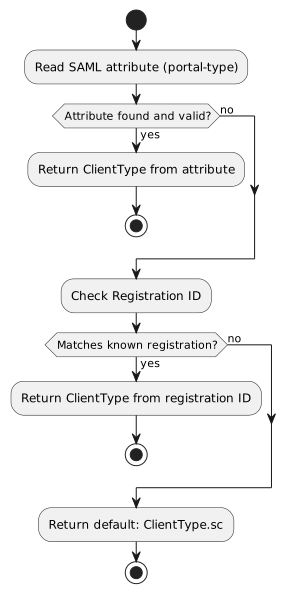
| Level | Source | Example | Result |
|---|---|---|---|
1 (highest) |
SAML attribute |
|
|
2 |
Registration ID |
|
|
2 |
Registration ID |
|
|
3 (lowest) |
Default value |
— |
|
6.4. Domain resolution
-
The SAML attribute specified in
app.saml.mapping.domain-attribute(default:domain) is read. -
If the attribute is present, the domain is looked up by name in the database via
DomainService.getDomainIdByName(). -
Special case: if the domain name matches
SuperDomain(theSUPER_DOMAIN_NAMEconstant),domainId = 0is returned. -
If the domain is not found in the database,
domainIdis set tonull.
6.5. User group resolution
-
The SAML attribute
user-groupis read. -
If the attribute is present, the group is looked up by name and client type via
UserGroupService.findGroupIdForSaml(groupName, clientType). -
If the group is not found in the database,
userGroupIdis set tonull.
| The group is not created automatically. It must exist in the database before the first SAML authentication of the user. |
6.6. User creation/update
After all attributes are extracted, UserService.createOrGetExternalUser(userRequest, clientType, zoneId) is called:
-
If a user with the given
usernamealready exists — the existing user is returned. -
If the user does not exist — a new user is created with the extracted attributes.
7. Architecture
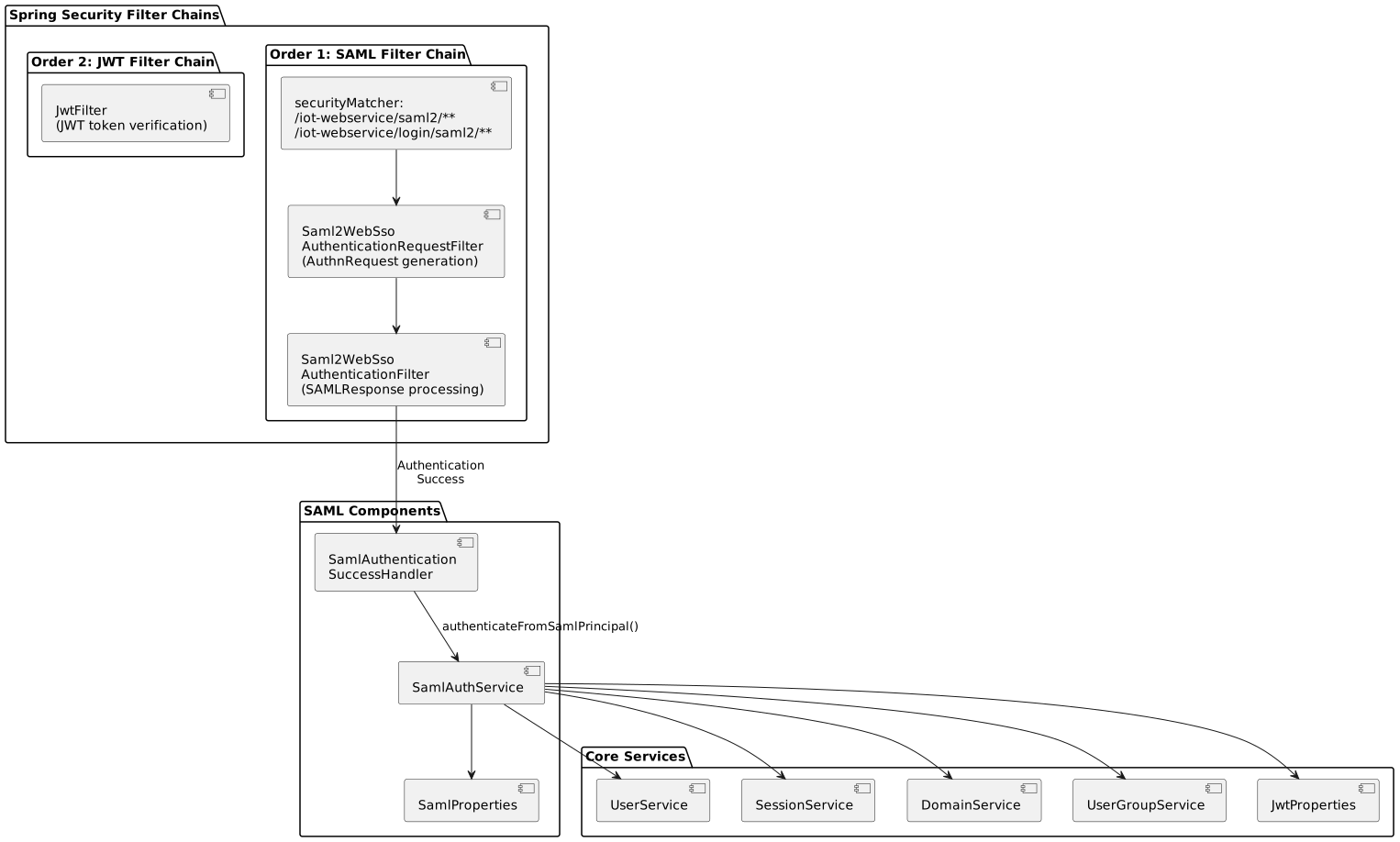
7.2. SecurityConfig — SAML Filter Chain
The SecurityConfig class defines two SecurityFilterChain beans:
| Order | Bean | Purpose | Condition |
|---|---|---|---|
|
|
SAML SSO processing |
|
|
|
JWT authentication for REST API |
Always active |
The SAML filter chain intercepts requests matching:
-
/iot-webservice/saml2/**— sending AuthnRequest to the IdP -
/iot-webservice/login/saml2/**— receiving SAMLResponse from the IdP
7.2.1. saml2Login configuration
.saml2Login(saml2 -> saml2
    .successHandler(samlSuccessHandler)
    .loginProcessingUrl("/iot-webservice/login/saml2/sso/{registrationId}")
    .authenticationRequestUri("/iot-webservice/saml2/authenticate/{registrationId}")
    .failureHandler(...)
)| Parameter | URL | Description |
|---|---|---|
|
|
ACS URL where the IdP sends the SAMLResponse (HTTP POST). |
|
|
URL that initiates the AuthnRequest to the IdP. |
|
|
URL for publishing SP metadata (XML). |
7.3. SamlAuthenticationSuccessHandler
Activated via @ConditionalOnProperty(name = "app.saml.enabled", havingValue = "true").
Sequence of actions on successful SAML authentication:
-
Extracts
registrationIdfromDefaultSaml2AuthenticatedPrincipal.getRelyingPartyRegistrationId(). -
Extracts
timezonefrom the HTTP session (saml_timezoneattribute). -
Calls
SamlAuthService.authenticateFromSamlPrincipal()to create the JWT session. -
Determines the redirect URL based on
registrationId:-
saml-management-portal— usesapp.saml.mc.success-redirect-url -
All others — uses
app.saml.success-redirect-url
-
-
Redirects the browser to a URL of the form:
{redirectBaseUrl}?token={JWT}&sessionHash={BASE64_HASH}
7.4. SamlAuthService
The main SAML authentication service. The authenticateFromSamlPrincipal() method performs:
-
Attribute extraction from the SAML assertion (username, email, groups, domain, user-group, expire-date).
-
ClientType resolution using the 3-level strategy.
-
Domain resolution via
DomainService.getDomainIdByName(). -
Group resolution via
UserGroupService.findGroupIdForSaml(). -
User creation/retrieval via
UserService.createOrGetExternalUser(). -
Session creation via
SessionService.createOrUpdateSession(). -
JWT generation using the HS256 algorithm, with token lifetime determined by
jwt.token.expired(default 36,000,000 ms = 10 hours).
8. Appendix: Full configuration example
# === SAML SSO ===
export SAML_ENABLED=true
export SAML_REDIRECT_HOST=https://portal.example.com

# IdP (Keycloak)
export SAML_IDP_ENTITY_ID=https://keycloak.example.com/realms/oneiot
export SAML_IDP_SSO_URL=https://keycloak.example.com/realms/oneiot/protocol/saml
export SAML_IDP_CERT=classpath:saml/idp.crt

# SP (Support Center)
export SAML_SC_SP_ENTITY_ID=oneiot-sp-sc
export SAML_SP_KEY=classpath:saml/sp.key
export SAML_SP_CERT=classpath:saml/sp.crt

# SP (Management Console)
export SAML_MC_SP_ENTITY_ID=oneiot-sp-mc

# Attribute Mapping (default values, shown for reference)
export SAML_ATTR_USERNAME=username
export SAML_ATTR_EMAIL=email
export SAML_ATTR_CLIENT_TYPE=portal-type
export SAML_ATTR_DOMAIN=domain
export SAML_ATTR_USER_GROUP=user-group
export SAML_ATTR_EXPIRE_DATE=expire-date

# Authentication type
# In application.yaml: app.authentication-type: saml