Azure AD + Keycloak — Authentication Architecture
1. How It Works
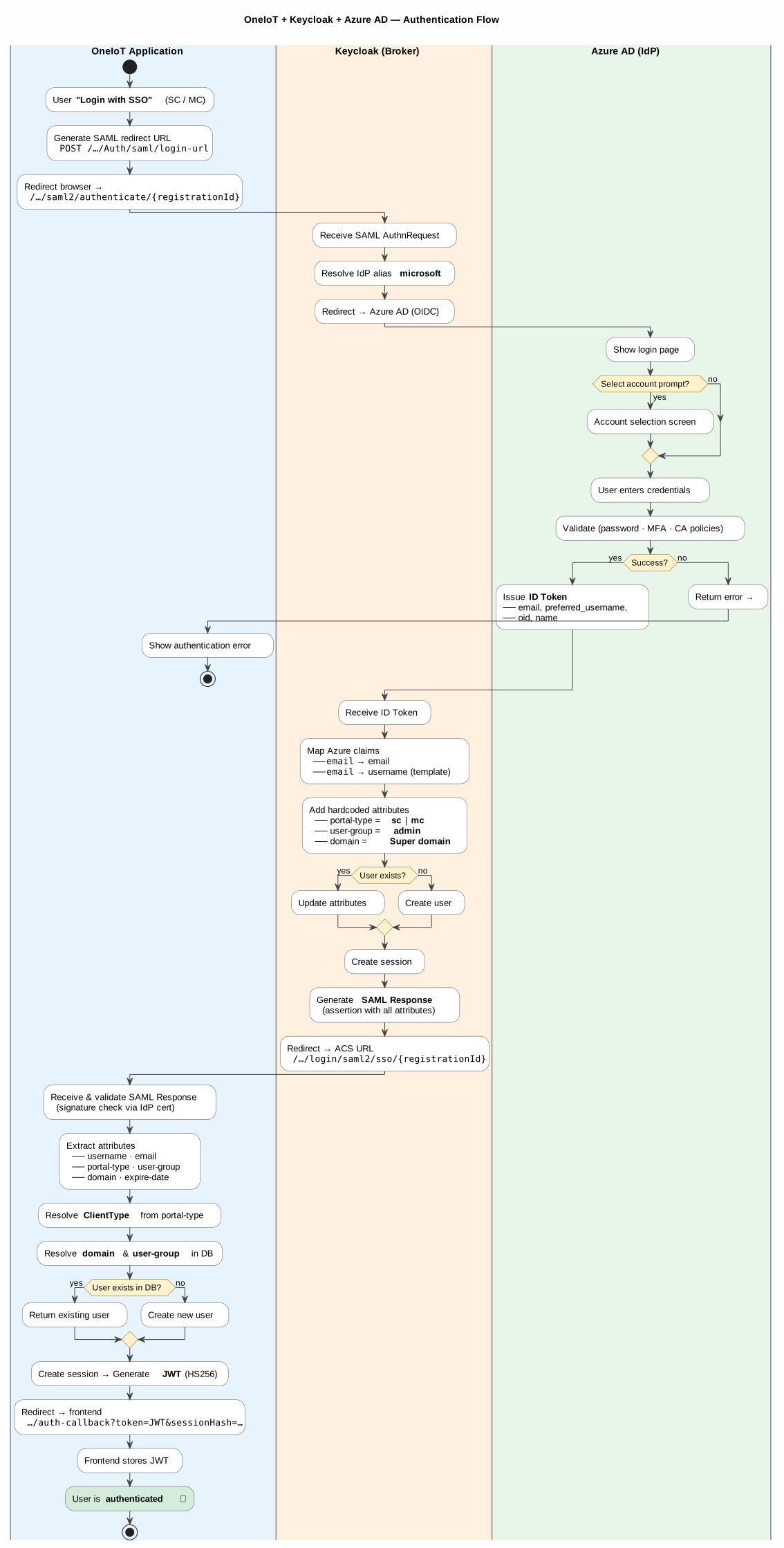
The OneIoT platform uses a three-layer authentication architecture:
| Layer | Component | Role |
|---|---|---|
Application |
OneIoT Backend (Spring Boot) |
Initiates the SAML authentication request and receives the authenticated user session. |
Broker |
Keycloak |
Acts as an intermediary between the application and the identity provider. Maps user attributes and adds custom fields required by the application. |
Identity Provider |
Microsoft Azure AD (Entra ID) |
Performs the actual user authentication and identity verification. |
3. Attribute Flow
| Attribute | Source | Keycloak Mapper Type | Description |
|---|---|---|---|
|
Azure AD token |
Attribute Importer |
Imported directly from the Azure AD |
|
Azure AD token |
Username Template Importer |
Derived from |
|
Keycloak (hardcoded) |
Hardcoded Attribute |
Set per realm: |
|
Keycloak (hardcoded) |
Hardcoded Attribute |
Default user group (e.g., |
|
Keycloak (hardcoded) |
Hardcoded Attribute |
Default domain (e.g., |
4. Key Design Decisions
Why Keycloak as a broker (not direct Azure AD integration)?
-
Keycloak allows adding custom attributes (
portal-type,user-group,domain) that Azure AD does not provide but the application requires for every user. -
Administrators can manage user attributes, sessions, and access directly in Keycloak without needing Azure AD admin permissions.
-
Each portal (SC / MC) uses a separate Keycloak realm with its own default attribute values, allowing portal-specific configuration.
-
If the identity provider changes in the future (e.g., from Azure AD to Okta or ADFS), only the Keycloak broker configuration needs to be updated — the application remains unchanged.