Windows (AD / Kerberos) SSO — Integration Guide
| Parameter | Value |
|---|---|
Application version |
Spring Boot 3.5.6 / Java 25 |
Library |
Spring Security OAuth2 Client (OIDC Relying Party) |
Standard |
OpenID Connect 1.0, OAuth 2.0 Authorization Code flow |
SSO mechanism |
Kerberos / SPNEGO brokered by Keycloak against Active Directory |
1. Overview
1.1. What is Windows (AD) SSO
"Windows authentication" lets a domain-joined user open the application and be logged in silently, using the Kerberos ticket the workstation already holds from its Active Directory (AD) logon — no login form.
The application itself does not speak Kerberos. Instead:
-
Keycloak acts as the OpenID Connect (OIDC) provider. It is federated to AD over LDAP and brokers Kerberos (SPNEGO) tickets.
-
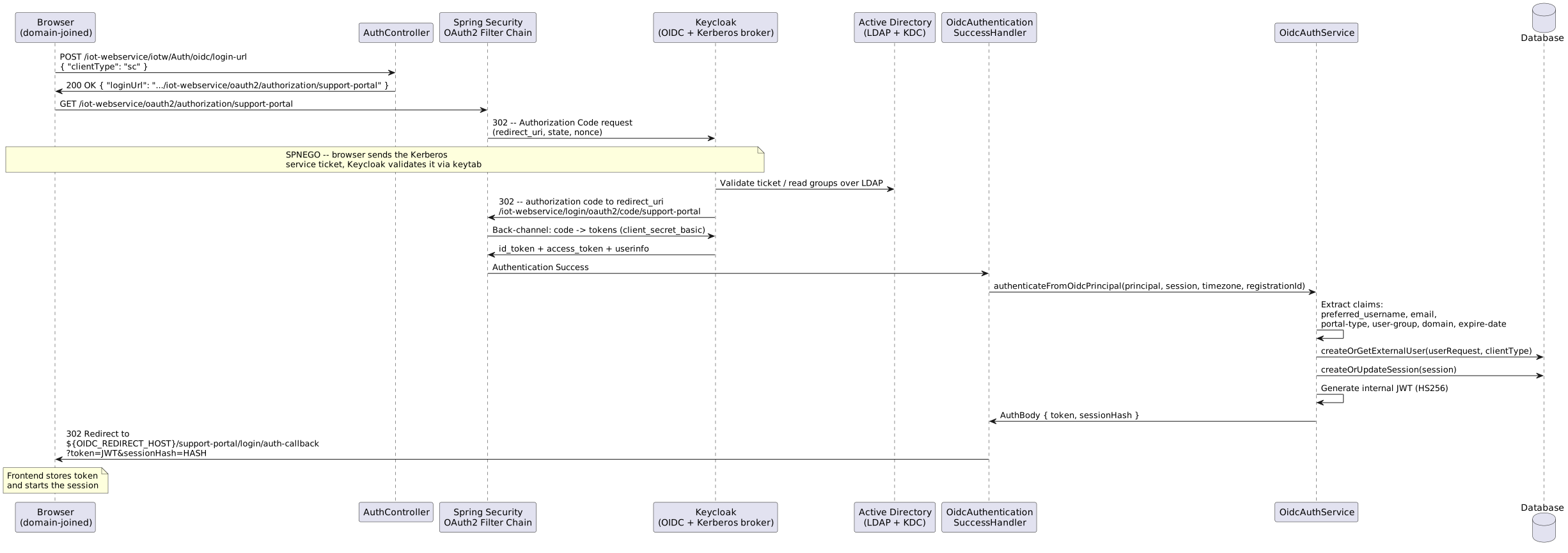
The backend acts as a confidential OIDC client (Authorization Code flow). After Keycloak authenticates the user, the backend reads the OIDC claims, provisions the user, and issues its own internal HS256 JWT — exactly the same token the DATABASE / LDAP / SAML flows issue. Downstream filters and sessions are therefore unchanged.
If Kerberos is not available (non-domain machine, no ticket), Keycloak falls back to its own login form and validates the AD credentials over LDAP. From the backend’s point of view both paths are identical.
The user-facing authentication type for this feature is Windows (AuthType.WINDOWS, value windows). The protocol underneath is OIDC; the backend properties, services and endpoints are therefore named oidc (app.oidc., /Auth/oidc/login-url). "Windows" is simply the protocol-agnostic label shown in the *AuthenticationType setting and returned by POST /Auth/type.
|
1.2. How Windows SSO works in this project
The application supports two separate OIDC client registrations, each pointing at its own Keycloak realm:
| Portal | Registration ID | Client ID (default) | Issuer (realm) |
|---|---|---|---|
Support Center (SC) |
|
|
|
Management Console (MC) |
|
|
|
Each portal has its own client ID, client secret, issuer URI (a separate realm) and post-authentication redirect URL. The two portals may live in the same Keycloak instance but use independent realms, so users, signing keys and group mappers are fully separate.
2. Application configuration
2.1. Prerequisites
To enable Windows SSO:
-
Set the AuthenticationType interface setting to
Windowsfor the relevant portal.This is stored per
ClientTypein the database (iotw_client_interface, keyAuthenticationType, JSON{"value":"Windows", …}) and is whatPOST /iot-webservice/iotw/Auth/typereturns (lower-cased towindows). The frontend uses it to choose between the login/password form and the SSO redirect. It can be changed in Settings > Interface > Authentication by a DATABASE/LDAP administrator without a redeploy.AuthType.fromValue()lower-cases its input, so the selector valueWindowsresolves toAuthType.WINDOWS. The allowed selector values (Database,LDAP,SAML,Windows) are seeded ininterfaceItems.json. -
Set
OIDC_ENABLED=true— this activates theOidcClientRegistrationConfig,OidcAuthenticationSuccessHandlerbeans and the OIDC filter chain inSecurityConfig. Whenfalse, none of these beans are created.
Keycloak does not need to be reachable at backend startup. The client registrations are built with explicit Keycloak endpoints derived from the issuer URI (no /.well-known/openid-configuration discovery fetch); the first network calls to Keycloak happen lazily at login time (authorization redirect, code → token exchange, JWK set fetch). Since those login-time back-channel calls use HTTPS, the Keycloak TLS certificate must still be trusted by the backend JVM (see Backend truststore (TLS to Keycloak)), otherwise the first login fails.
|
2.2. Environment variables
| Environment variable | YAML path | Default value | Description |
|---|---|---|---|
|
|
|
Enables/disables Windows (OIDC) SSO and the OIDC filter chain. |
|
|
— (required when enabled) |
Externally accessible base URL of the application. Used to build the |
|
|
|
Keycloak client ID for the Support Center realm. |
— (not env-configurable) |
|
|
Path to the file holding the SC Keycloak client secret (Clients > support-portal > Credentials). |
|
|
— (required when enabled) |
OIDC issuer URI of the SC realm. Must exactly match the |
|
|
|
Keycloak client ID for the Management Console realm. |
— (not env-configurable) |
|
|
Path to the file holding the MC Keycloak client secret. |
|
|
— (required when enabled) |
OIDC issuer URI of the MC realm. |
Claim names (app.oidc.mapping.*) are not environment-configurable in this project — they are fixed to the OidcProperties.Mapping defaults (preferred_username, email, portal-type, user-group, domain, expire-date) and cannot be overridden via env vars or YAML. There is no groups-array claim and no role/domain mapping tables (roles-map, domain-map) — see Claim mapping.
|
2.3. Spring Security OIDC client configuration
The two client registrations are built programmatically at startup by OidcClientRegistrationConfig, using values from the app.oidc. properties.
The standard Spring Boot spring.security.oauth2.client.registration. YAML section is not used by this project.
The registrations are driven by the following property block:
app:
  oidc:
    enabled: ${OIDC_ENABLED:false}
    sc-registration-id: support-portal
    mc-registration-id: management-portal
    redirect-url: ${OIDC_REDIRECT_HOST:}
    sc:
      client-id: ${OIDC_SC_CLIENT_ID:support-portal}
      client-secret-location: file:${app.home:./}/conf/sc-oidc-secret
      issuer-uri: ${OIDC_SC_ISSUER_URI:}
      success-redirect-url: ${OIDC_REDIRECT_HOST:}/support-portal/login/auth-callback
    mc:
      client-id: ${OIDC_MC_CLIENT_ID:management-portal}
      client-secret-location: file:${app.home:./}/conf/mc-oidc-secret
      issuer-uri: ${OIDC_MC_ISSUER_URI:}
      success-redirect-url: ${OIDC_REDIRECT_HOST:}/management-portal/login/auth-callback
    # Claim names are fixed to the OidcProperties.Mapping defaults (preferred_username,
    # user-group, portal-type, domain, ...). The user-group claim value must match a DB
    # user-group name exactly; domain is hardcoded to "Super domain" via a Keycloak mapper.
There is no app.oidc.mapping.* YAML section to configure — OidcProperties.Mapping only exposes fixed-default fields (usernameClaim, emailClaim, clientTypeClaim, userGroupClaim, domainClaim, expireDateClaim); none of them is read from an env var, and there is no groups claim, roles-map, or domain-map.
At startup, OidcClientRegistrationConfig.clientRegistrationRepository():
-
Loads the SC client secret from the file at
app.oidc.sc.client-secret-locationand builds the SC registration manually with explicit Keycloak endpoints derived from the issuer URI (<issuer>/protocol/openid-connect/auth,/token,/userinfo,/certs) — deliberately instead ofClientRegistrations.fromIssuerLocation(), which would eagerly fetch/.well-known/openid-configurationand fail startup when Keycloak is unreachable. It then sets client ID, secret, scopes (openid,profile,email),client_secret_basicauthentication, Authorization Code grant, and the redirect URI. -
Repeats for the MC realm (secret from
app.oidc.mc.client-secret-location). -
Registers both in an
InMemoryClientRegistrationRepository.
Key points:
-
The redirect URI path is fixed:
/iot-webservice/login/oauth2/code/{registrationId}When
app.oidc.redirect-url(envOIDC_REDIRECT_HOST) is set, the redirect URI is anchored to that explicit host (<redirect-url>/iot-webservice/login/oauth2/code/{registrationId}), making it deterministic and independent of reverse-proxy rewrites. Without it, Spring falls back to the request-derived{baseUrl}template, which behind Traefik can yieldhttp://host:443and be rejected by Keycloak as an invalid redirect URI — so setOIDC_REDIRECT_HOSTin proxied deployments. The resolved value must be registered verbatim in Keycloak (see Creating OIDC clients). -
The backend authenticates to Keycloak with
client_secret_basic— so the Keycloak client must be confidential (Client authentication = ON). -
userNameAttributeNameispreferred_username.
2.4. OAuth2 callback (redirect_uri) format
${OIDC_REDIRECT_HOST}/iot-webservice/login/oauth2/code/{registrationId}
(When OIDC_REDIRECT_HOST is not set, the host part falls back to the request-derived {baseUrl} — see the key points above; in proxied deployments always set OIDC_REDIRECT_HOST.)
Specific values (for OIDC_REDIRECT_HOST = https://portal.example.com):
-
SC:
https://portal.example.com/iot-webservice/login/oauth2/code/support-portal -
MC:
https://portal.example.com/iot-webservice/login/oauth2/code/management-portal
This is the URL Keycloak redirects the browser to with the authorization code. It must be listed exactly in the Keycloak client’s Valid Redirect URIs (no trailing slash, exact scheme/host/port). A mismatch produces redirect_uri did not match.
|
2.5. Post-authentication redirect URLs
| Portal | URL | Configuration |
|---|---|---|
SC |
|
|
MC |
|
|
After the backend issues the internal JWT it redirects the browser here with the token and sessionHash as query parameters:
https://portal.example.com/support-portal/login/auth-callback?token=eyJhbG...&sessionHash=BASE64...
With OIDC_REDIRECT_HOST set, both the OAuth2 redirect_uri and this final redirect are anchored to the same fixed host. The machine running the browser must therefore be able to reach OIDC_REDIRECT_HOST.
|
3. Client secrets
Each portal’s Keycloak client secret is kept in an external file under the conf/ directory of ${app.home}, not in an environment variable. On the host this is the backend ui-backend/config/ directory (e.g. /usr/local/ft-system/ui-backend/config/), mounted into the container as /opt/app/conf by the ${DATA_FOLDER:-.}/ui-backend/config:/opt/app/conf volume — so the secrets live at /usr/local/ft-system/ui-backend/config/sc-oidc-secret and …/mc-oidc-secret.
| File | Purpose | Configuration property |
|---|---|---|
|
Support Center Keycloak client secret — used for the |
|
|
Management Console Keycloak client secret — used for the |
|
Each file contains the raw secret as a single line; surrounding whitespace and newlines are trimmed when the secret is loaded at startup by OidcClientRegistrationConfig:
KuRhIQ2jabp2UJETcIyotuuXKUi3zou2
When OIDC_ENABLED=true, both files must exist and be non-empty, otherwise startup fails with Failed to read OIDC client secret … / OIDC client secret file is empty …. If a client secret is rotated in Keycloak (Clients > <client> > Credentials > Regenerate), you MUST update the corresponding sc-oidc-secret / mc-oidc-secret file, otherwise the code→token exchange fails with invalid_client.
|
| If both portals share the same Keycloak client secret, write the same value to both files — the application still loads them as two separate files, one per registration. |
4. Backend truststore (TLS to Keycloak)
OIDC requires the backend to open live TLS connections to Keycloak on every login — the back-channel authorization-code → token exchange and the JWK set fetch for token validation (there is no startup discovery call). The backend JVM must therefore trust the Keycloak TLS certificate.
-
Public CA (e.g. Let’s Encrypt) — nothing to do; the JDK trusts it already.
-
Corporate or internal CA (e.g. the company
friendly.crtchain) — import the Keycloak certificate (or its issuing CA) into a truststore the backend uses, otherwise the first OIDC login fails withPKIX path building failed: unable to find valid certification path to requested target.
4.1. Building the truststore
Base it on a copy of the JDK cacerts so the default public CAs keep working:
# 1. Obtain the Keycloak certificate (or fetch it straight from the endpoint)
keytool -printcert -rfc -sslserver keycloak.corp.local:8443 > keycloak.crt

# 2. Copy cacerts so public CAs are preserved
cp "$JAVA_HOME/lib/security/cacerts" <app.home>/conf/truststore.jks

# 3. Import the Keycloak certificate
keytool -importcert -alias keycloak -file keycloak.crt \
  -keystore <app.home>/conf/truststore.jks -storepass changeit -noprompt
Do not point the JVM at an empty/standalone truststore — that would drop trust for every other TLS endpoint (LDAPS, databases, etc.). Always start from a copy of cacerts.
|
On Windows PowerShell, do not create the .crt with > (it writes UTF-16 + BOM and keytool rejects it with Input not an X.509 certificate). Use … | Out-File -Encoding ascii keycloak.crt.
|
4.2. Wiring it into the backend
The truststore is selected via two JVM system properties. The backend launcher (bin/start.sh / bin/start.cmd) and the Docker image both forward JAVA_OPTS to the JVM:
JAVA_OPTS=-Xms512m -Xmx2g \
  -Djavax.net.ssl.trustStore=${app.home}/conf/truststore.jks \
-Djavax.net.ssl.trustStorePassword=changeit| Runtime | Where to place it + how to wire it |
|---|---|
Distribution ( |
Put |
Docker |
Place |
IDE (IntelliJ Application run config) |
A plain Application run config does not read the |
Place truststore.jks in the source iot-web-app-build/conf/ so the build assembles it into target/dist/conf/ (and the Docker image) automatically, alongside ftacs.keystore and the OIDC secret files. The truststore holds only public certificates; keep private keys (*.key) out of version control.
|
To confirm which truststore is loaded, add -Djavax.net.ssl.debug=ssl,trustmanager temporarily — the log lists the truststore path and its trusted roots (look for keycloak.corp.local). A successful start logs OIDC client registrations created: SC=… MC=….
|
5. API Endpoints
5.1. POST /iot-webservice/iotw/Auth/oidc/login-url
Returns the URL the frontend should redirect to so Spring Security starts the Authorization Code flow.
Authentication: not required (public endpoint — registered in SecurityConstants.AUTH_PUBLIC_ENDPOINTS).
5.1.1. Request
POST /iot-webservice/iotw/Auth/oidc/login-url HTTP/1.1
Content-Type: application/json

{
  "clientType": "sc",
  "timeZoneOffsetMin": 180
}| Field | Type | Required | Description |
|---|---|---|---|
|
|
Yes |
Portal type. Allowed values: |
|
|
No |
Browser timezone offset in minutes (e.g. |
5.1.2. Successful response (200 OK)
{
  "loginUrl": "https://portal.example.com/iot-webservice/oauth2/authorization/support-portal"
}
5.1.3. Error responses (400 Bad Request)
OIDC disabled:
{ "error": "OIDC authentication is not enabled" }Invalid clientType:
{ "error": "Invalid clientType. Must be 'sc' or 'mc'" }5.1.4. Registration ID resolution logic
| clientType | registrationId | Description |
|---|---|---|
|
|
Registration for the Support Center portal |
|
|
Registration for the Management Console portal |
5.1.5. curl examples
# Get login URL for SC portal
curl -X POST https://portal.example.com/iot-webservice/iotw/Auth/oidc/login-url \
  -H "Content-Type: application/json" \
  -d '{"clientType": "sc", "timeZoneOffsetMin": 180}'

# Start the flow directly (browser will be 302-redirected to Keycloak)
curl -i https://portal.example.com/iot-webservice/oauth2/authorization/support-portal
5.2. POST /iot-webservice/iotw/Auth/type
Auxiliary endpoint returning the current authentication type for the portal.
curl -X POST https://portal.example.com/iot-webservice/iotw/Auth/type \
  -H "Content-Type: application/json" \
  -d '{"clientType": "sc"}'
Response when Windows SSO is configured:
"windows"The frontend uses this endpoint to decide whether to render the login/password form or trigger the SSO redirect.
6. Active Directory preparation
All commands below run on the Domain Controller (or an RSAT machine) as a Domain Admin. Placeholders: corp.local (AD DNS domain), CORP.LOCAL (Kerberos realm), dc01.corp.local (DC FQDN), keycloak.corp.local (Keycloak FQDN).
6.1. Service account
New-ADUser -Name "svc-keycloak" `
  -SamAccountName "svc-keycloak" `
  -UserPrincipalName "svc-keycloak@corp.local" `
  -AccountPassword (Read-Host -AsSecureString "Password") `
  -Enabled $true -PasswordNeverExpires $true -CannotChangePassword $true `
  -Description "Service account for Keycloak Kerberos brokering" `
-OtherAttributes @{'msDS-SupportedEncryptionTypes'=24}|
The On an already-created account, set it after the fact with |
6.2. SPN registration
setspn -A HTTP/keycloak.corp.local svc-keycloak
setspn -L svc-keycloak
setspn -L must show HTTP/keycloak.corp.local. The SPN must be registered on exactly one account.
6.3. Keytab generation
ktpass -princ HTTP/keycloak.corp.local@CORP.LOCAL ^
       -mapuser svc-keycloak@CORP.LOCAL ^
       -pass <Password> ^
       -ptype KRB5_NT_PRINCIPAL ^
       -crypto AES256-SHA1 ^
       -out C:\keycloak.keytab
Copy keycloak.keytab to the Keycloak host next to the compose file (e.g. /usr/local/ft-system/keycloak.keytab, mode 600); the compose below mounts it into the container at /opt/keycloak/keycloak.keytab.
6.4. AD groups for application roles
There is no name translation between AD and the application: the AD group synced into the user-group claim must be named exactly like an application user-group that already exists in the database for the target portal (ClientType). Create one AD group per application user-group you want to grant via SSO, and add the test user to exactly one of them:
| Application user-group (DB, example) | AD group (must match exactly) |
|---|---|
|
|
|
|
|
|
A test user must be a member of exactly one application user-group’s AD group. If the user is in no matching AD group, or the AD group name does not match any DB user-group for that portal, OidcAuthService raises NO_MATCH_AUTH (HTTP 403) after Keycloak has authenticated the user — see User group resolution. Group names with spaces are preserved verbatim.
|
7. Network topology and DNS prerequisites
A recurring question is whether Keycloak and the backend (ui-backend) must live in the same network as the AD Domain Controller (DC). They do not. Same-network deployment is not a requirement of this feature — the real requirements are name resolution, port reachability and time sync, not network adjacency. Kerberos (SPNEGO) and OIDC both work correctly over a routed network, a site-to-site VPN, or any other path where those three requirements are met.
What matters in practice is that:
-
every hostname used in this guide (
keycloak.corp.local,dc01.corp.local,OIDC_REDIRECT_HOST) resolves to the correct IP from wherever it is looked up (domain-joined client, Keycloak host,ui-backendcontainer), and -
the ports below are reachable across whatever network path connects those hosts.
7.1. Who must resolve/reach whom
| From | To | Port(s) | Why |
|---|---|---|---|
Domain-joined client (browser) |
|
443 / 8443 |
SPNEGO + OIDC authorization redirect. The browser builds the Kerberos SPN ( |
Domain-joined client (browser) |
|
443 |
Final redirect carrying the internal JWT after Keycloak hands back the authorization code (see Post-authentication redirect URLs). |
Keycloak host/container |
|
389 / 636 (LDAP/LDAPS), 88 tcp+udp (Kerberos KDC), 464 (kpasswd, optional) |
LDAP user federation (LDAP User Federation (AD)) and Kerberos ticket validation / |
|
|
443 / 8443 |
Back-channel authorization-code → token exchange and JWK set fetch (no discovery call at startup — see Spring Security OIDC client configuration). |
All of the above |
NTP source |
123 |
Kerberos rejects tickets when clock skew exceeds 5 minutes — see the Production checklist item on NTP. |
The Keycloak hostname does not strictly have to sit inside the corp.local AD DNS zone — what matters is that it resolves consistently and matches the registered SPN. Keeping it inside the AD zone (as this guide assumes) simplifies the Local Intranet zone configuration (Group Policy / registry (Edge, Chrome)) and the domain_realm mapping in krb5.conf (krb5.conf), so it is the recommended default rather than a hard requirement.
|
7.2. DNS configuration for cross-network deployments
When Keycloak and ui-backend are deployed in a network that is separate from the AD DC (a different VPC/subnet, a different site, behind a VPN), the two DNS zones do not know about each other by default. Configure DNS delegation in both directions rather than relying on ad-hoc host entries.
7.2.1. A record in AD DNS
On the DC, create an A record so keycloak.corp.local resolves to the Keycloak host’s actual IP address in the other network. Domain-joined clients already use AD DNS for name resolution, so this single record is enough to fix client-side resolution (SPNEGO and the OIDC redirect):
Add-DnsServerResourceRecordA -ZoneName "corp.local" -Name "keycloak" -IPv4Address "<keycloak-ip>"
Use an A record, not a CNAME. With a CNAME, the browser may build the Kerberos SPN from the canonical name the CNAME points to rather than from keycloak.corp.local. No SPN is registered for that canonical name in AD (SPN registration registers HTTP/keycloak.corp.local only), so ticket acquisition fails and SSO silently falls back to the Keycloak login form — with no error visible to the user.
|
7.2.2. Conditional forwarder in the Keycloak/ui-backend network
On the local DNS server that serves the Keycloak/ui-backend network, add a conditional forwarder for the corp.local zone pointing at the AD DNS server(s). This lets the Keycloak host resolve dc01.corp.local (LDAP + KDC) without needing every AD record replicated locally.
Windows DNS Server: DNS Manager > Conditional Forwarders > New Conditional Forwarder, zone corp.local, master server <dc-ip>.
BIND:
zone "corp.local" {
    type forward;
    forward only;
    forwarders { <dc-ip>; };
};
The ui-backend Docker container does not need its own DNS configuration for this. It already declares extra_hosts: "host.docker.internal:host-gateway" (iot-web-app-build/docker/compose.yml) for a different purpose, but for keycloak.corp.local resolution what matters is that Docker’s embedded DNS forwards unresolved names to the host’s resolver — so once the host resolves keycloak.corp.local (via the conditional forwarder above, or the fallback below), the container inherits that resolution automatically. No extra extra_hosts entry is required.
|
A conditional forwarder also makes the AD SRV records (_kerberos._tcp.CORP.LOCAL, _ldap._tcp.CORP.LOCAL, etc.) resolvable from the Keycloak network, which is exactly what dns_lookup_kdc = true in the shipped krb5.conf (krb5.conf) expects. Without SRV resolution, Kerberos still works, but only because krb5.conf also pins the KDC explicitly (kdc = dc01.corp.local under [realms]) — that explicit line is what keeps kinit/ticket validation working when SRV lookups are not possible.
|
Fallback if the Keycloak network has no local DNS server to configure a forwarder on: point the Keycloak host’s resolver directly at the AD DNS server(s) — via /etc/resolv.conf on the host, or the dns: directive on the Keycloak service in the compose file. This is cruder (every DNS query from that host goes through the DC, not just corp.local ones) but works and requires no local DNS infrastructure.
7.3. hosts-file workaround (test only)
For a quick test bench, adding static entries to /etc/hosts (Linux) or C:\Windows\System32\drivers\etc\hosts (Windows) on each relevant host — and an extra_hosts entry for keycloak.corp.local on the ui-backend service in compose.yml — can substitute for the DNS delegation above.
This is not recommended for production. It requires manual, per-host maintenance — including on every domain-joined client, which does not scale beyond a handful of test machines. It breaks silently the moment an IP changes (no error, just SSO falling back to the login form), and it provides no SRV records, so it only works because krb5.conf pins the KDC explicitly (see the TIP above).
|
rdns = false in the shipped krb5.conf (krb5.conf) is what makes the hosts-file approach viable at all — Kerberos does not attempt a reverse DNS lookup on the KDC address, so a plain forward A-style hosts entry is sufficient. With rdns = true the hosts-file shortcut would not reliably work.
|
8. Deployment directory structure
Prepare the following directory structure on the deployment host:
/usr/local/ft-system/
├── compose-oidc.yml                     # Keycloak stack (see Keycloak Deployment guide)
├── kc-data/                             # Keycloak data dir, mounted at /opt/keycloak/data (from FT_DISK, next to compose-oidc.yml)
│   └── import/
│       ├── oneiot-sc-realm.json         # Pre-configured SC realm, loaded via --import-realm
│       └── oneiot-mc-realm.json         # Pre-configured MC realm, loaded via --import-realm
├── compose.yml                          # OneIoT stack
├── .env.mysql                           # or .env.oracle file for MySQL DB or Oracle DB
├── keycloak.keytab                      # Kerberos keytab, mounted into Keycloak
├── krb5.conf                            # Kerberos client config, mounted into Keycloak
├── keycloak/drivers/ojdbc11.jar         # Keycloak Oracle JDBC Driver, mounted into Keycloak (see Keycloak Deployment guide)
├── ui-backend/config/
│   ├── hazelcast-client.xml             # Main Hazelcast client configuration
│   ├── ftacs.keystore                   # Backend keystore used when HTTPS is enabled
│   ├── logback-spring.xml               # Default external logging configuration
│   ├── interfaceItems.json              # Interface seed data, loaded if present
│   ├── sc-oidc-secret                   # SC Keycloak client secret (support-portal)
│   ├── mc-oidc-secret                   # MC Keycloak client secret (management-portal)
│   ├── truststore.jks                   # Backend truststore trusting the Keycloak TLS cert
│   ├── customization/
│   │   ├── def/
│   │   ├── mc/
│   │   └── sc/
│   └── ssl/
│       ├── friendly.crt                 # TLS cert (portals Nginx + Keycloak)
│       └── friendly.key                 # TLS private key
├── ui-backend/logs/                     # Backend application logs
└── portals/nginx/logs/                  # Portals Nginx logs
Download the pre-configured backend configuration files from the FT_DISK on SharePoint (SharePoint folder ui-backend-conf) and place them into the ui-backend/config/ directory, then add the OIDC-specific files (sc-oidc-secret, mc-oidc-secret, truststore.jks) as described in this guide.
kc-data/, keycloak.keytab, krb5.conf and ui-backend/config/ssl/friendly.{crt,key} are mounted into the Keycloak container by compose-oidc.yml (see Docker Compose for the base file, and Enabling the Kerberos mounts below for the Windows/Kerberos-specific mounts). The backend files — sc-oidc-secret, mc-oidc-secret and truststore.jks — are carried into the ui-backend container at /opt/app/conf by the ${DATA_FOLDER:-.}/ui-backend/config:/opt/app/conf volume.
|
9. Keycloak deployment (test IdP)
| Keycloak is used here as a test/reference IdP. Any OIDC provider that can broker Kerberos against AD may be used. |
Deploy the Keycloak container itself — downloading compose-oidc.yml and kc-data, choosing the MySQL/Oracle block, TLS certificate, storage, shared network — by following Keycloak Deployment. The rest of this section covers only what is specific to Windows (AD/Kerberos) SSO and is not part of the generic deployment guide: the Kerberos client config (krb5.conf), enabling the Kerberos-only mounts that ship commented out in the compose file, and verifying the Kerberos ticket inside the container.
9.1. krb5.conf
Create this file on the Keycloak host next to the compose file (e.g. /usr/local/ft-system/krb5.conf); the compose file mounts it into the container at /etc/krb5.conf:
[libdefaults]
    default_realm = CORP.LOCAL
    dns_lookup_realm = false
    dns_lookup_kdc = true
    rdns = false
    forwardable = true

[realms]
    CORP.LOCAL = {
        kdc = dc01.corp.local
        admin_server = dc01.corp.local
        default_domain = corp.local
    }

[domain_realm]
    .corp.local = CORP.LOCAL
    corp.local = CORP.LOCAL
9.2. Enabling the Kerberos mounts
Keycloak Deployment's compose file ships the Windows/Kerberos-only volume mounts and environment variable commented out, since the same stack also serves the saml and ldap login types:
    volumes:
      # ...
#     Uncomment for the Windows (Kerberos) login type only:
#     - ./keycloak.keytab:/opt/keycloak/keycloak.keytab:ro
#     - ./krb5.conf:/etc/krb5.conf:ro
    environment:
      # ...
#     Uncomment for the Windows (Kerberos) login type only:
#      KRB5_CONFIG: /etc/krb5.conf
For the windows login type, uncomment these three lines before starting the stack. Place keycloak.keytab (see Keytab generation) and krb5.conf (above) next to the compose file — the mounts are relative to the directory that holds it (e.g. /usr/local/ft-system/).
Verify the keytab from the Keycloak host — run these next to the compose file, against the same files that get mounted into the container.
# Run on the Keycloak host, in the directory that holds the compose file (e.g. /usr/local/ft-system/)
klist -kte ./keycloak.keytab
KRB5_CONFIG=./krb5.conf kinit -kt ./keycloak.keytab HTTP/keycloak.corp.local@CORP.LOCAL
klist -kte inspects the keytab itself and needs no KDC — confirm the principal and kvno match what is registered in AD. kinit then proves the host can actually reach the KDC and obtain a ticket. Once both pass, Keycloak (which mounts the same keytab) will use it via its Java stack. To exercise the full path end to end, use the provider’s Test authentication button in the Admin Console (see Kerberos integration) and watch the Keycloak logs.
|
10. Keycloak configuration
The SC and MC portals use two separate realms — one per portal. Repeat every step in both realms; the only difference is the portal-type value (sc vs mc).
If Keycloak was deployed with the pre-configured realm files (oneiot-sc-realm.json / oneiot-mc-realm.json loaded via --import-realm — see Importing the pre-configured realms), the realms, clients and mappers below may already exist. In that case walk through the steps as a verification checklist against the imported configuration rather than creating everything from scratch — and pay attention to the environment-specific values the import cannot know (redirect URIs, LDAP connection/bind settings, the Kerberos keytab path, client secrets).
|
10.1. Creating realms
-
Open the Admin Console (
https://keycloak.corp.local/admin). -
Realm selector > Create realm > Name
oneiot-sc> Create. -
Repeat for
oneiot-mc.
Realm names are examples — they only need to match OIDC_SC_ISSUER_URI / OIDC_MC_ISSUER_URI.
|
10.2. LDAP User Federation (AD)
In each realm: User Federation > Add LDAP providers.
| Field | Value |
|---|---|
Vendor |
|
Connection URL |
|
Bind type |
|
Bind DN |
|
Bind credentials |
|
Edit mode |
|
Users DN |
|
Username LDAP attribute |
|
RDN LDAP attribute |
|
UUID LDAP attribute |
|
User object classes |
|
Click Test connection and Test authentication (both must succeed), Save, then Synchronize all users.
10.3. Kerberos integration
On the same LDAP provider, open the Kerberos integration section:
| Field | Value |
|---|---|
Allow Kerberos authentication |
|
Kerberos realm |
|
Server principal |
|
Key tab |
|
Use Kerberos for password authentication |
|
Debug |
|
10.4. Group mapper
LDAP provider > Mappers > Add mapper:
| Field | Value |
|---|---|
Name |
|
Mapper type |
|
LDAP Groups DN |
|
Group Name LDAP Attribute |
|
Group Object Classes |
|
Membership LDAP Attribute |
|
Membership Attribute Type |
|
Membership User LDAP Attribute |
|
User Groups Retrieve Strategy |
|
Mode |
|
Preserve Group Inheritance |
|
Preserve Group Inheritance must be OFF. With it ON, Keycloak mirrors the AD OU/group nesting as nested group paths (e.g. /OU/Groups/Admin) instead of flat group names. The user-group claim (see Claim mapping) must carry the plain group name so it can be matched exactly against the application user-group name in the database — a nested path never matches and OidcAuthService raises NO_MATCH_AUTH.
|
Save, then Action > Sync LDAP groups to Keycloak. The AD groups now appear under Groups.
10.5. portal-type attribute and mapper
-
Realm Settings > User Profile > Create attribute (required by Keycloak 24+): create attribute
portal-type(Admin can edit/view). -
LDAP provider > Mappers > Add mapper:
-
Name:
portal-type-hardcoded -
Mapper type:
hardcoded-attribute-mapper -
User Model Attribute Name:
portal-type -
Attribute Value:
scin realmoneiot-sc,mcin realmoneiot-mc
-
10.6. SPNEGO in the browser flow
Authentication > Flows > browser (optionally Duplicate it first to keep the default intact). Set the Kerberos step to Alternative (default is Disabled). If you duplicated the flow, bind it under Authentication > Bindings > Browser Flow. Repeat in both realms.
10.7. Creating OIDC clients
In each realm: Clients > Create client.
10.7.1. Support Center client (realm oneiot-sc)
-
Client type:
OpenID Connect -
Client ID:
support-portal -
Next > Client authentication:
ON(confidential) > Standard flow:ON> Next > Save. -
On Settings, set Valid redirect URIs to the exact backend callback:
https://portal.example.com/iot-webservice/login/oauth2/code/support-portal
Remove any wildcard entries.
10.7.2. Management Console client (realm oneiot-mc)
Same steps with Client ID management-portal and redirect URI:
https://portal.example.com/iot-webservice/login/oauth2/code/management-portal
Do not use wildcard redirect URIs (e.g. …/support-portal/*). A wildcard would allow an attacker to redirect the authorization code to an arbitrary URL. Always pin the exact callback path.
|
10.7.3. Client secret
For each client: Credentials tab > copy Client secret into the corresponding file in the application conf/ directory:
-
SC (
support-portal) →${app.home}/conf/sc-oidc-secret -
MC (
management-portal) →${app.home}/conf/mc-oidc-secret
The file holds the raw secret (surrounding whitespace/newlines are trimmed on load). When a secret is rotated in Keycloak, update the corresponding file. See Client secrets.
10.8. Client protocol mappers
In each client (Clients > <client> > Client scopes > <client>-dedicated > Add mapper > By configuration) add the three custom claims the backend requires — user-group, portal-type, and domain (see Claim mapping):
| Mapper | Type | Token Claim Name | Tokens |
|---|---|---|---|
|
Group Membership (Full group path = OFF) |
|
ID + access + userinfo |
|
User Attribute ( |
|
ID + access + userinfo |
|
Hardcoded claim |
|
ID + access + userinfo |
email and preferred_username come from the standard email / profile scopes.
user-group is required — unlike the old groups-array design, it is now the only mechanism OidcAuthService uses to resolve a user’s application group. Its value (the plain AD group name, since Full group path is Off) must exactly match an application user-group name that already exists in the database for that portal (see User group resolution). If the claim is missing, or a user belongs to more than one synced AD group so the mapper’s output is ambiguous, keep AD group membership limited to one relevant group per portal.
|
domain is currently hardcoded (e.g. Claim value Super domain) via a Hardcoded claim mapper — it is not derived from AD group membership (see Domain resolution).
11. Browser configuration (Kerberos clients)
Without this, the browser will not release the Kerberos ticket to Keycloak and the user sees the login form instead of silent SSO.
11.1. Group Policy / registry (Edge, Chrome)
HKLM\Software\Policies\Microsoft\Edge\AuthServerAllowlist          = "keycloak.corp.local"
HKLM\Software\Policies\Google\Chrome\AuthServerAllowlist           = "keycloak.corp.local"
HKLM\Software\Policies\Google\Chrome\AuthNegotiateDelegateAllowlist= "keycloak.corp.local"
Or, per machine, add the Keycloak host to the Local Intranet zone (Internet Options > Security > Local intranet > Sites > Advanced). For an HTTP (non-TLS) test host, uncheck "Require server verification (https:) for all sites in this zone".
11.2. Firefox
Firefox does not read the Windows registry / Local Intranet zone or the Edge/Chrome allowlists above — it keeps its own list of hosts that are allowed to receive the Kerberos ticket. Configure it separately, otherwise Firefox users always see the login form instead of silent SSO.
Per user (manual, for testing):
-
Open
about:configand accept the warning. -
Set
network.negotiate-auth.trusted-uristo the Keycloak host (comma-separated for multiple; scheme optional):network.negotiate-auth.trusted-uris = keycloak.corp.local
-
If credential delegation is required (constrained delegation scenarios), also set:
network.negotiate-auth.delegation-uris = keycloak.corp.local
-
network.auth.use-sspiistrueby default on Windows and lets Firefox obtain the ticket through the native SSPI/Kerberos stack — leave it enabled.
Per machine (enterprise rollout):
Deploy the same values through the Firefox Authentication policy, either via the ADMX Group Policy templates or a policies.json dropped next to firefox.exe (in distribution\):
{
  "policies": {
    "Authentication": {
      "SPNEGO": ["keycloak.corp.local"],
      "Delegated": ["keycloak.corp.local"]
    }
  }
}
For an HTTP (non-TLS) test host, list the bare host name (e.g. keycloak.corp.local) rather than an https:// URI so the plain-HTTP endpoint is matched.
|
12. Claim mapping
12.1. General principle
After authentication, Keycloak returns an id_token (and userinfo) with the configured claims. OidcAuthService.authenticateFromOidcPrincipal() reads these claims and maps them to internal fields.
12.2. Claim mapping table
Claim names are fixed to the OidcProperties.Mapping defaults below — there is no groups-array claim, and none of these names is environment- or YAML-configurable (see Environment variables):
| Claim (fixed name) | YAML path | Used for | Required |
|---|---|---|---|
|
|
Username. Falls back to |
Recommended |
|
|
User email (empty string if absent). |
Optional |
|
|
Portal type ( |
Optional (falls back to registration ID, then |
|
|
User group name, matched exactly against a DB user-group for the portal’s |
Required — missing claim or no DB match blocks access ( |
|
|
Domain name, looked up in the database. Currently hardcoded to |
Optional (claim absent → |
|
|
Account expiry. |
Optional |
12.3. ClientType resolution (3-level strategy)
| Level | Source | Example | Result |
|---|---|---|---|
1 (highest) |
|
|
|
2 |
Registration ID |
|
|
3 (lowest) |
Default |
— |
|
12.4. User group resolution
OidcAuthService.resolveUserGroupId() is a single-step, no-fallback lookup (OidcAuthService javadoc/logs: "No user-group claim — cannot resolve user group" / "OIDC user-group '…' not found in DB for clientType=… — blocking access"):
-
The
user-groupclaim is read. If it is missing or blank,NO_MATCH_AUTH(HTTP 403) is raised immediately — there is no fallback claim and no groups-array matching. -
Its value is looked up by name + client type (
UserGroupService.findByNameAndClientType). The match must be exact — the claim value must equal the DB user-group name (which in turn must equal the AD/LDAP group name). -
If no matching group is found, access is blocked (
NO_MATCH_AUTH, HTTP 403). The group is never created automatically and the user is never provisioned without a group.
The user group must already exist in the database; SSO never creates it. Pre-create the application user groups (Settings > User groups) before the first SSO login, otherwise every SSO login for that group is rejected with NO_MATCH_AUTH until an administrator creates a matching user-group.
|
12.5. Domain resolution
-
If the
domainclaim is present, the domain is looked up by name;Super domainreturnsdomainId = 0. Any other name not found in the database raisesNO_MATCH_AUTH. -
If the
domainclaim is absent,domainIdisnull— there is no group-based domain fallback and nodomain-mapmatching step.
domain is currently hardcoded to Super domain via a Keycloak mapper (see Claim mapping); the domain is not derived from AD group membership.
|
13. Architecture
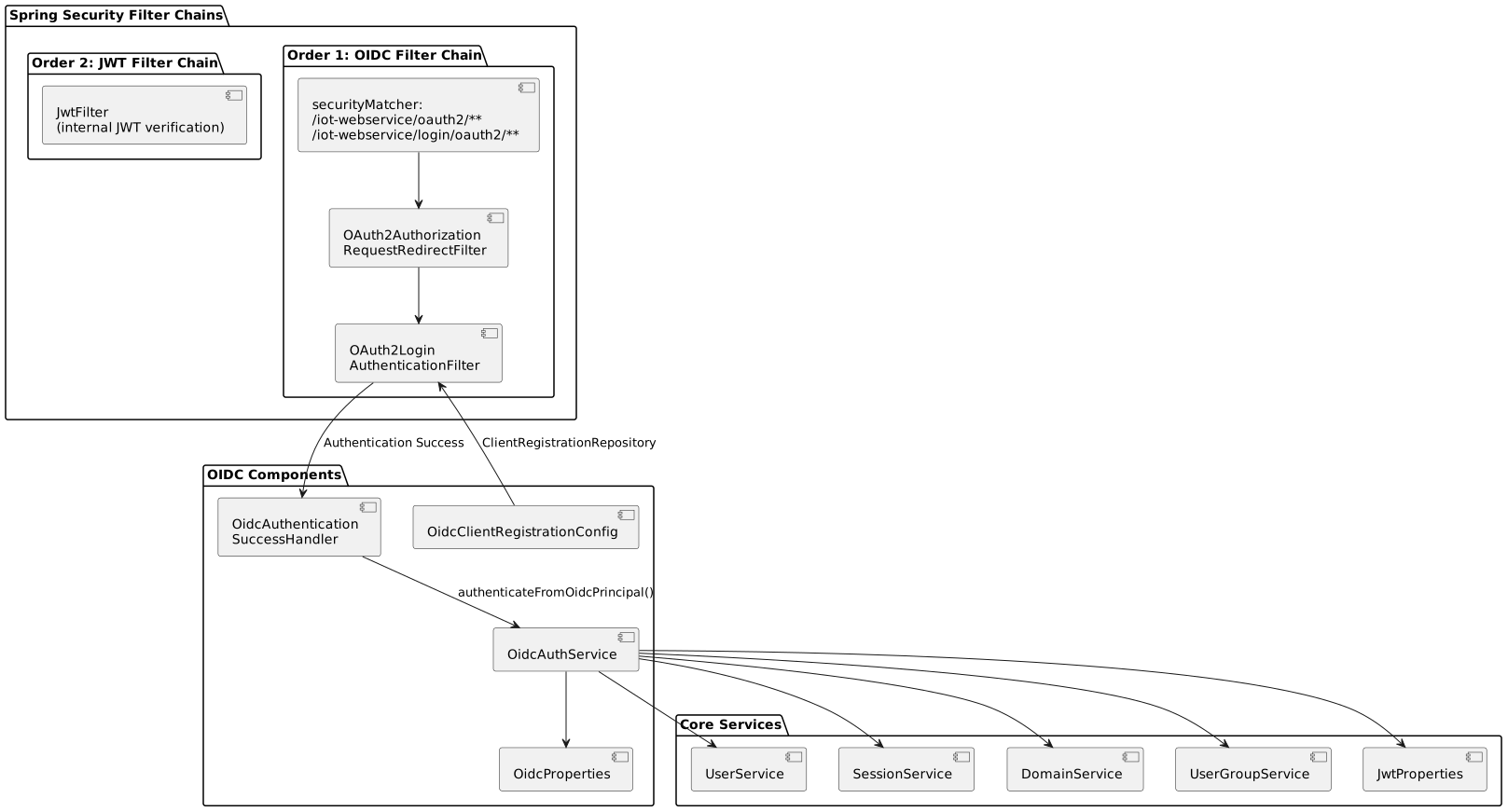
13.2. SecurityConfig — OIDC filter chain
| Order | Bean | Purpose | Condition |
|---|---|---|---|
|
|
OIDC SSO processing |
|
|
|
JWT authentication for REST API |
Always active |
The OIDC filter chain intercepts:
-
/iot-webservice/oauth2/**— starts the Authorization Code flow (redirect to Keycloak) -
/iot-webservice/login/oauth2/**— receives the authorization code (callback)
13.2.1. oauth2Login configuration
.oauth2Login(oauth2 -> oauth2
    .authorizationEndpoint(a -> a.baseUri("/iot-webservice/oauth2/authorization"))
    .redirectionEndpoint(r -> r.baseUri("/iot-webservice/login/oauth2/code/*"))
    .successHandler(oidcSuccessHandler)
    .failureHandler(...)   // logs and returns 401
)13.3. OidcClientRegistrationConfig
Builds the ClientRegistrationRepository programmatically (see Spring Security OIDC client configuration). Conditional on app.oidc.enabled=true, so disabled deployments never probe the issuer URIs.
13.4. OidcAuthenticationSuccessHandler
Activated via @ConditionalOnProperty(name = "app.oidc.enabled", havingValue = "true"). On success:
-
Reads
registrationIdfromOAuth2AuthenticationToken.getAuthorizedClientRegistrationId(). -
Reads
timezonefrom the HTTP session (oidc_timezoneattribute, set by/Auth/oidc/login-url). -
Calls
OidcAuthService.authenticateFromOidcPrincipal()to create the JWT session. -
Picks the redirect base (
management-portal→app.oidc.mc.success-redirect-url; otherwise SC). -
Redirects to
{redirectBase}?token={JWT}&sessionHash={BASE64_HASH}.
13.5. OidcAuthService
The authenticateFromOidcPrincipal() method performs:
-
Claim extraction (username, email, portal-type, user-group, domain, expire-date).
-
ClientType resolution (claim, then registration ID, then default to
sc). -
User-group resolution (exact DB match on the
user-groupclaim; blocks access withNO_MATCH_AUTHif missing or not found — never created on the fly). -
Domain resolution.
-
User creation/retrieval (
UserService.createOrGetExternalUser). -
Session creation (
SessionService.createOrUpdateSession). -
Internal JWT generation (HS256,
sub = sessionHash, lifetimejwt.token.expired, default 10 hours).
14. Security validation
The credential boundary is valid AD credentials (or a valid Kerberos ticket), not domain membership of the machine. A non-domain machine that supplies valid AD credentials in the Keycloak form is authenticated by design. Recommended checks:
| Concern | Test | Expected |
|---|---|---|
API without token |
|
|
Invalid credentials |
Submit wrong AD credentials in the Keycloak form |
Keycloak denies; no token issued |
Forged/tampered internal JWT |
Alter one character of the token, call an API |
|
Token exfiltration via redirect_uri |
Start the flow with a foreign |
Keycloak: |
Stale session |
Logout, then reuse the old token |
|
15. Production checklist
-
HTTPS on Keycloak (not
start-dev); Keycloak’s CA certificate imported into the backend JVM truststore (see Backend truststore (TLS to Keycloak)). -
LDAPS (port 636) instead of LDAP (389).
-
Confidential clients only; client secrets rotated periodically.
-
Exact (non-wildcard) Valid Redirect URIs per client.
-
LDAP user filter excluding service / built-in accounts from SSO.
-
NTP time sync between Keycloak host and the DC (Kerberos clock skew < 5 min).
-
Keycloak
realm-export.jsoncommitted (without secrets); DB in the backup set. -
Health checks: Keycloak
/health/ready; backend startup logs show both registrations. -
DR:
AuthenticationTypecan be switched back toDatabaseper portal via the config table (no redeploy).
16. Troubleshooting
| Symptom | Cause / fix |
|---|---|
Startup: |
Empty |
Startup: |
The |
Startup: |
The backend JVM does not trust the Keycloak TLS certificate. Import it into the backend truststore and wire it via |
Startup: |
Keycloak not reachable / not DNS-resolvable from the backend host. |
Startup: |
|
|
The backend was reached via a host that is not in the client’s Valid Redirect URIs. Use the exact |
After Keycloak login: 401/403, log shows |
The |
After Keycloak login: 401/403, log shows |
The |
Domain machine shows the login form (no silent SSO) |
Browser did not send SPNEGO: Keycloak host missing from Local Intranet / |
|
The |
|
Wrong client secret, or Client authentication is OFF in Keycloak. |
|
Keycloak/ |
17. Appendix: full configuration example
# === Windows (OIDC) SSO ===
export OIDC_ENABLED=true
export OIDC_REDIRECT_HOST=https://portal.example.com

# SC client -- Keycloak realm oneiot-sc
export OIDC_SC_CLIENT_ID=support-portal
export OIDC_SC_ISSUER_URI=https://keycloak.corp.local/realms/oneiot-sc
# SC client secret is read from the file ${app.home}/conf/sc-oidc-secret

# MC client -- Keycloak realm oneiot-mc
export OIDC_MC_CLIENT_ID=management-portal
export OIDC_MC_ISSUER_URI=https://keycloak.corp.local/realms/oneiot-mc
# MC client secret is read from the file ${app.home}/conf/mc-oidc-secret

# AuthenticationType = Windows is set per portal in the database
# (Settings > Interface > Authentication), not via env.
The example uses two separate Keycloak realms (oneiot-sc, oneiot-mc), each with a single OIDC client and its own LDAP federation + Kerberos integration. The user-facing authentication type is Windows; the underlying protocol is OIDC.
|