API & Integration Documentation
1. API Overview
The Northbound API exposes a RESTful API that allows clients to:
-
Authenticate and obtain JWT tokens
-
Manage device provisioning and configuration
-
Query device status and information
-
Configure network services
-
Monitor service status
2. API Design Principles
The API follows these design principles:
-
RESTful: Resources are identified by URLs and manipulated using standard HTTP methods
-
Stateless: Each request contains all necessary information
-
JSON-based: Request and response payloads use JSON format
-
Versioned: API versioning supports backward compatibility
-
Documented: OpenAPI/Swagger documentation is provided
3. Authentication
The Northbound API is secured via a custom JWT filter (FTApiJwtFilter) that intercepts incoming HTTP requests and delegates token validation to the AuthService.
3.1. Token Extraction
-
The filter reads the authentication token from the HTTP header named by
Authorization(IOT_AUTH_HEADER defined inCommonRegistry). -
Requests to
/api/System/Token, non-API endpoints, and HTTPPOSTrequests are excluded from filtering.
3.2. Token Validation
-
For protected endpoints, the filter invokes:
authService.authorizeFromHeader(token)to validate the token and populate the Spring Security context.
3.3. Unauthorized Handling
-
After the filter chain, if the response status is
401 Unauthorizedand noWWW-Authenticateheader is present, the filter adds:WWW-Authenticate: Basic realm="<soapUrl>"wheresoapUrlis injected from theapi.soap.urlproperty. -
If
AuthServicethrowsFriendlyUnauthorizedUserException, the filter:-
Clears the
SecurityContextHolder. -
Sets response status to
401. -
Sets
Content-Typetoapplication/json. -
Serializes an error response via Jackson
ObjectMapperusing:authService.buildErrorResponse(e)
-
4. API Endpoints
For detailed API documentation, please refer to the OpenAPI/Swagger documentation available at:
-
Swagger UI:
http://<server>/iot-webservice/swagger-ui/index.html-
Use the environment selector in the top‐right to switch between:
-
-
REST API (auto‐generated from code annotations)
-
SOAP API (hand-crafted OpenAPI spec for all SOAP operations)
The Swagger UI provides:
-
Interactive documentation for all API endpoints (REST and SOAP)
-
Request and response schemas for each endpoint
-
The ability to try out API calls directly from the browser
-
Authentication requirements and methods
-
Parameter specifications and constraints
|
The Swagger UI is the most up-to-date source of API documentation as it is automatically generated from the application’s code annotations and includes the full SOAP API specification. |
5. Error Response Format
All error responses follow a standardized format.
5.1. SOAP/XML Format
<soap:Envelope xmlns:xsi="http://www.w3.org/2001/XMLSchema-instance"
               xmlns:xsd="http://www.w3.org/2001/XMLSchema"
               xmlns:soap="http://schemas.xmlsoap.org/soap/envelope/">
   <soap:Body>
      <ServerWSResponse xmlns="http://www.friendly-tech.com">
         <ServerWSResult>
            <ErrorCode>100</ErrorCode> <!-- 100 = success; other codes = failure -->
            <Message/>              <!-- error message, if any -->
         </ServerWSResult>
      </ServerWSResponse>
   </soap:Body>
</soap:Envelope>
5.2. JSON Format
{
  "errorCode": 100,
  "message": ""
}
The same error codes and meanings apply in JSON responses.
Error Code |
Enum |
Description |
100 |
SUCCESS |
|
200 |
FAIL |
Operation failed |
201 |
NO_CPE |
No CPE |
201 |
USER_EXISTS |
Username already exists |
201 |
USER_NOT_EXISTS |
Username does not exist |
202 |
NO_DB |
No database available |
203 |
INCORRECT_REQUEST |
Incorrect request |
203 |
INCORRECT_REQUEST_STRUCTURE |
Incorrect request structure or non-writable parameter |
204 |
GENERAL |
General error |
205 |
NO_ACS |
No ACS available |
206 |
NO_CPE_NEW_SN |
No CPE for new serial number |
207 |
NO_CPE_CURR_SN |
No CPE for current serial number |
401 |
UNAUTHORISED |
Wrong username or password |
6. Validation
The API implements validation for request payloads:
-
Required Fields: Fields marked as required must be present
-
Field Formats: Fields must have the correct format (e.g., IP addresses, MAC addresses)
-
Enumerations: Fields with enumerated values must contain valid values
-
Range Constraints: Numeric fields must be within valid ranges
Validation errors return a 400 Bad Request status code with details about the validation failures.
7. Differences from Legacy .NET API
The Java Northbound API is a port of the legacy .NET Northbound API. Wherever practical, behavior is kept identical. In a small number of places the Java port intentionally diverges from the .NET reference to eliminate historical inconsistencies, clarify contracts, or simplify maintenance. This section documents those intentional differences so integrators relying on the legacy behavior can update their clients.
|
Governing principle. Port parity is the default, not an absolute rule:
The goal is a correct, maintainable API — not a bug-for-bug replica. Every entry below is an intentional, reviewed deviation, not an oversight. |
|
Only |
7.1. TransactionId Validation
Endpoints that accept TransactionId reject non-positive values (0 and negative numbers) with a uniform rule across both REST and SOAP transports.
Affected endpoints:
-
POST /api/Task/Pending/Transaction/ SOAPFTGetCPEPendingTasksByTransaction -
POST /api/Parameter/Transaction/ SOAPFTGetDeviceParametersByTransID -
POST /api/Transaction/ SOAPFTGetTransactionStatus
Behavior:
-
TransactionIdmust be a positive integer (> 0). -
Invalid values (
0, negative numbers, ornullwhere the field is required) are rejected before any database access. -
Response carries the typed response body with default values (empty collections or zero counts), HTTP status
200, and the error fields set as below.
| Field | Value |
|---|---|
|
|
|
|
| Endpoint | Input | .NET (REST / SOAP) | Java (REST & SOAP) |
|---|---|---|---|
|
|
REST: |
|
|
|
REST: |
|
|
|
REST: |
|
Rationale: the .NET message variation is a historical artifact of the legacy codebase, not a documented contract. The Java port standardises on a single, unambiguous message while preserving the ErrorCode=203 contract that clients rely on. Related tickets: DEV-1714, DEV-1715, DEV-1717.
8. API Documentation
The API is fully documented using OpenAPI 3.0 (Swagger):
-
Swagger UI: Available at
http://[server]/iot-webservice/swagger-ui/index.html -
OpenAPI JSON: Available at
http://[server]/iot-webservice/v3/api-docs -
OpenAPI YAML: Available at
http://[server]/iot-webservice/v3/api-docs.yaml
The OpenAPI documentation is generated automatically from annotations in the controller classes, ensuring that it’s always up-to-date with the actual implementation. The Swagger UI provides a user-friendly interface for exploring and testing the API.
9. External Integrations
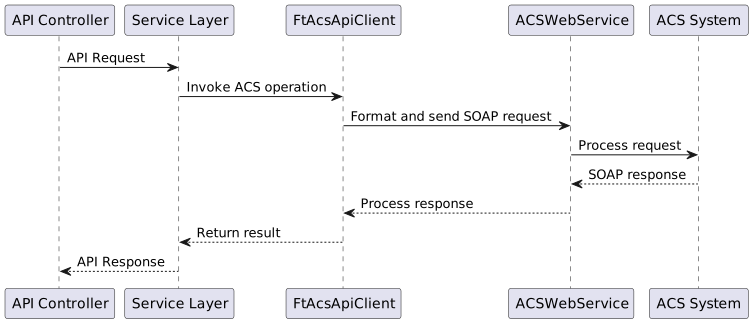
The ACS integration flow follows this general pattern:
9.1. ACS Client Configuration
The ACS client is configured in the application:
acs:
  url: ${ACS_URL}
  port: ${ACS_PORT}
  username: ${ACS_USERNAME}
  password: ${ACS_PASSWORD}
9.2. ACS Integration Endpoints
The application communicates with the Auto Configuration Server (ACS) system through SOAP API calls to manage and provision devices.
The integration is implemented via the FtAcsApiClient class which encapsulates all ACS-related operations.
9.3. Device Management Endpoints
| Operation | Method | Description |
|---|---|---|
Create Device |
|
Creates a new device in the ACS with specified manufacturer, model, OUI, protocol type, and serial number |
Create Non-TR Device |
|
Creates a non-TR-069 compliant device with custom configuration URL, login, and password |
Clear Account Info |
|
Clears the account information associated with a specified device serial number |
Update User Info |
|
Updates detailed user information including custom fields, login credentials, geographic data, and contact details |
Add Device To Blacklist |
|
Adds devices to a blacklist based on serial numbers, manufacturer, and model |
Delete Device From Blacklist |
|
Removes devices from a blacklist based on serial numbers, manufacturer, and model |
9.4. Device Configuration Endpoints
| Operation | Method | Description |
|---|---|---|
Set Device Parameters |
|
Sets or updates parameter values on devices with options for prioritization, grouping, and provisioning |
Set Parameters Without Task |
|
Sets device parameters without creating a task for immediate application |
Get Parameter Data |
|
Retrieves parameter data from devices with options to specify which aspects to fetch (names, values, attributes) |
Add CPE Object |
|
Creates a new object in the device’s data model with specified parameters |
Delete CPE Object |
|
Removes an object from the device’s data model |
9.5. Device Operations Endpoints
| Operation | Method | Description |
|---|---|---|
Reboot CPE |
|
Issues a reboot command to devices with options for prioritization and pushing |
Reset CPE |
|
Issues a factory reset command to devices |
Reprovision CPE |
|
Triggers reprovisioning of devices with options for customizing what aspects to reprovision |
Invoke RPC Method |
|
Invokes a custom RPC method on devices with specified content |
Invoke RPC Without Task |
|
Invokes a custom RPC method without creating a task for immediate execution |
Invoke Method |
|
Invokes a system-defined method on devices with parameter values |
Push Device |
|
Initiates a connection request to a device with specified timeout |
9.6. File Management Endpoints
| Operation | Method | Description |
|---|---|---|
Download Files |
|
Initiates file downloads to devices with options for authentication, delivery method, and post-download actions |
Upload Files |
|
Initiates file uploads from devices to a specified URL |
Backup |
|
Creates a device backup and uploads it to a specified location |
Restore |
|
Downloads and applies a backup to restore device configuration |
9.7. Group Update Endpoints
Group Update orchestrates the same set of tasks across many devices grouped by manufacturer/model and selected by All, an existing Condition filter view, or Individual serial numbers. The endpoints are documented in detail (request/response fields, behavior, errors and examples) on a dedicated page: Group Update API.
| Operation | Path | Description |
|---|---|---|
|
Create a new group update campaign |
|
|
Delete an existing group update campaign |
|
|
Create a device filter condition for group updates |
|
|
Delete a device filter condition |
|
|
List all group update tasks |
|
|
List predefined conditions |
|
|
Retrieve details of a specific group update |
|
|
Retrieve details of a specific condition |
|
|
Start execution of a group update |
|
|
Pause an active group update |
|
|
Stop a group update completely |
9.8. Diagnostics Endpoints
| Operation | Method | Description |
|---|---|---|
Create Diagnostic |
|
Create a diagnostic session with input parameters and output parameter names to collect |
9.9. Error Handling
ACS operations are wrapped in error handling that transforms exceptions into consistent API error responses with appropriate codes:
-
Success operations return transaction IDs where applicable
-
Errors are logged and wrapped in
FtApiExceptionwith appropriate error codes -
Connection issues to ACS result in
NO_ACSerror codes