AI Test Agent
The AI Test Agent (in the UI: FT QA agent, internally test-runner) is an autonomous QA platform that turns manual TestRail cases into executable, end-to-end regression tests for the Friendly Technologies stack — without anyone writing test code.
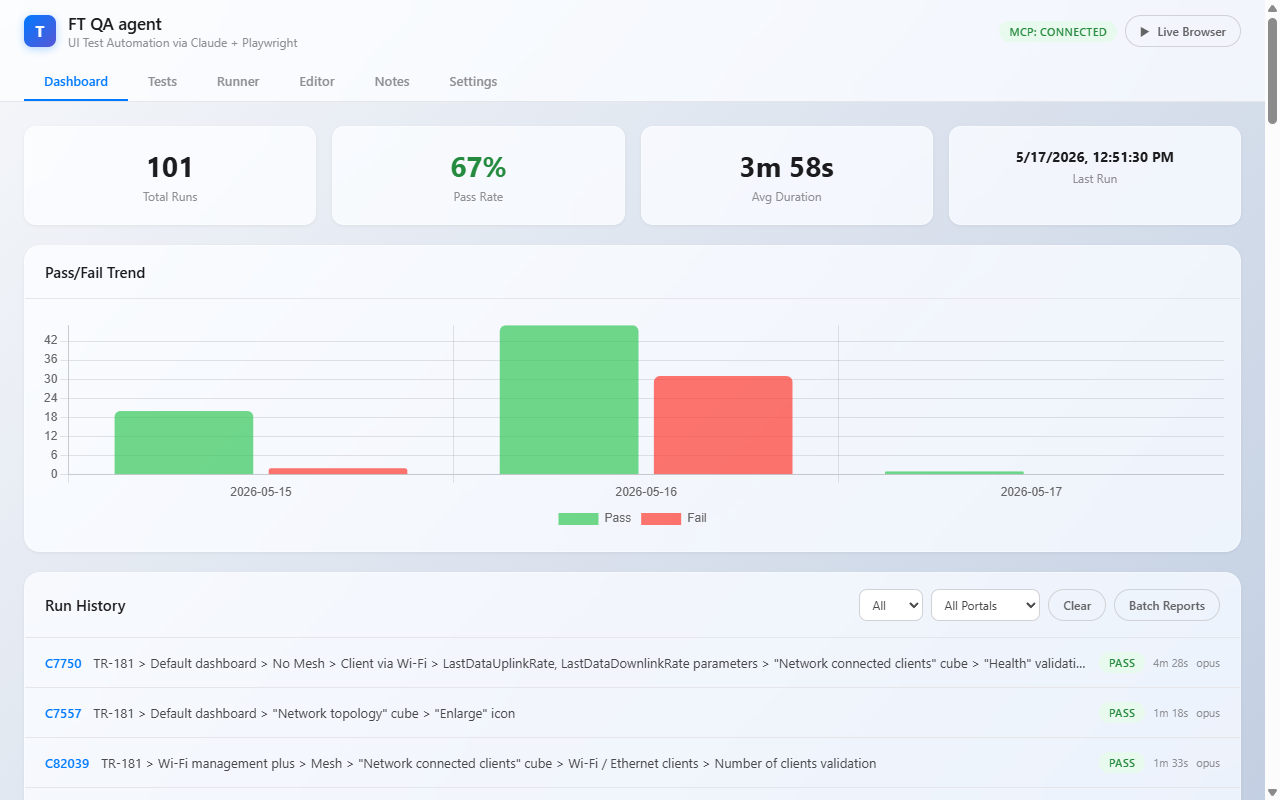
|
New here? A few clicks to your first run:
If you don’t see your TestRail case yet, hop into Editor → TestRail Import to pull it. The deep walkthrough is in User Guide; multi-environment routing is described in Multi-Stand Gateway. |
Each imported case is parsed by the Smart Converter into a deterministic YAML
spec (emulator setup + UI steps + expected widget values), then executed against
the live ACS, TR-069 emulator and portals. The agent drives a real Chromium via
Playwright MCP, applies CPE parameters through mcp-tr-emul, and verifies every
step — programmatically when the DOM is unambiguous, or with an LLM fallback
when it is not. Results are reported PASS / FAIL per step, with full traces,
screenshots and a live noVNC view of the browser session.
Powered by Claude Code CLI (Sonnet/Opus) for converter enrichment and
interact-step reasoning, and by Playwright + MCP for deterministic browser
control, the agent replaces brittle hand-written Selenium suites with
self-maintaining tests that stay in sync with TestRail.
What It Does
| Capability | Description |
|---|---|
TestRail import |
Pulls cases by project / suite / section or by case-ID, downloads attached TR-181 trees and converts the plain-text steps + preconditions into a deterministic YAML test case (see Importing Tests). |
Smart Converter |
Three-stage pipeline: regex-based step extraction → LLM enrichment (Sonnet/Opus)
→ Score Verification (Python port of backend KPI math). Generates |
Test execution |
Runs YAML cases against the live emulator + ACS + portal. Each step is either a deterministic nav action (login, sidebar click, tab switch, widget open) or an interact action handed to Claude over a snapshot-action loop. |
Pre-flight orchestration |
Sets emulator parameters via MCP, invokes ACS Inform, creates monitoring rules, runs interference / IPPing / Download diagnostics on the management backend, and seeds the ClickHouse interference dashboard before the test starts. |
Live observability |
Web UI with a Dashboard (success rate over time), live MCP call log, embedded noVNC viewer of the actual Chromium running inside the agent container. |
Team-authored quirks |
The Notes tab lets QA write down behavioural quirks once (known backend bugs, acceptable deviations, verify-time guidance). Saved notes are auto-injected into both the converter Stage 2 LLM prompt and the LLM verify prompt for tests matching their scope — see QA Validation Notes. |
Multi-environment & roles |
Pick the target stand / environment per run from the Env: dropdown — no need to rewrite the Settings URLs to retarget. Access is role-based: admin (full control), editor (author + run), viewer (read-only). See Multi-Stand Gateway and Accounts & Roles. |
Who It Is For
-
QA engineers — import tests, run regression batches, debug failures.
-
Test architects — author new YAML cases in the built-in Editor without writing code.
-
Backend developers — reproduce dashboard score regressions deterministically.
Where to Start
-
Read the User Guide for an end-to-end walkthrough — opening the UI, importing your first case, running it, and inspecting results.
-
Editor Guide explains every field of a YAML test case as exposed by the in-browser editor — including emulator setup, phases and step types.
-
Architecture is the engineer’s view: components, MCP wiring and the converter pipeline.
Production Endpoint
Web UI |
http://ai.friendly-tech.com:8083/ — the gateway; log in first
(bootstrap |
Live view |
The Live Browser button in the UI — gateway-proxied and owner-gated (you must own the active run on that stand; the old direct noVNC host port has been removed). |
REST API |
http://ai.friendly-tech.com:8083/api/…; — Bearer token from login. |
Contents
-
User Guide — workflows and walkthroughs.
-
Editor Guide — every field, every step type.
-
Running Tests — Tests / Runner / Dashboard / Batch.
-
Importing Tests — TestRail and XML flows.
-
Multi-Stand Gateway — environments, env-per-run, workers.
-
Accounts & Roles — login, admin / editor / viewer.
-
QA Validation Notes — capture and reuse team-known quirks.
-
Settings — environment defaults, MCP, TestRail, ClickHouse.
-
Architecture — technical overview.