Architecture
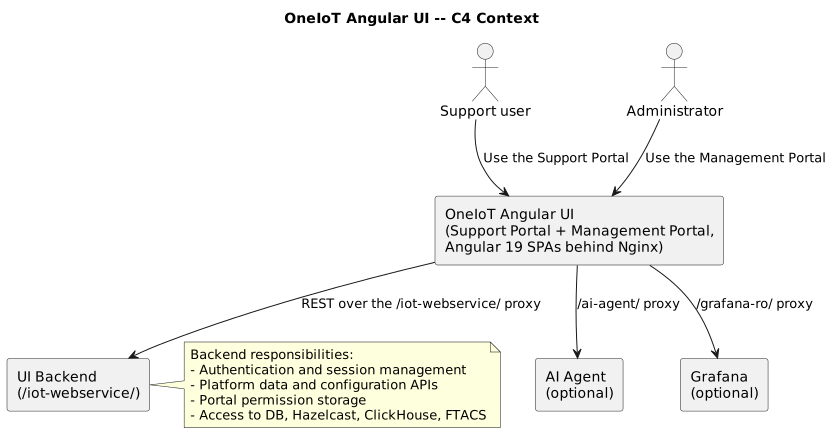
This document describes the runtime and logical architecture of the OneIoT Angular UI portals, their main building blocks, and how they interact with the UI Backend.
C4 Context
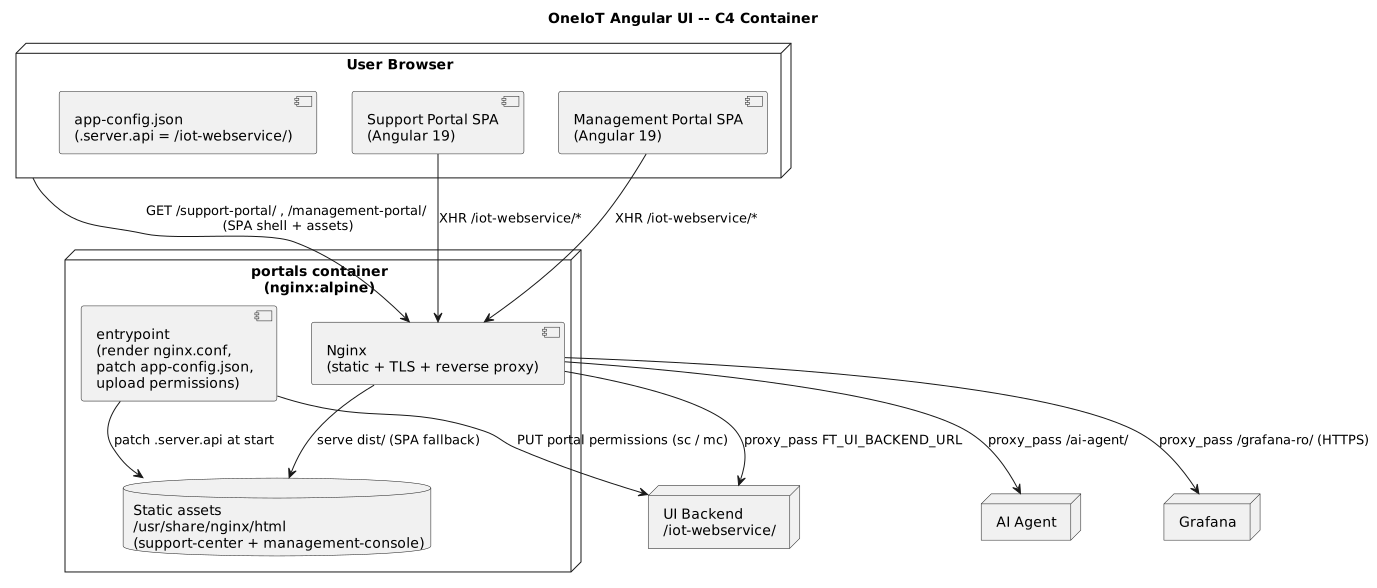
The container diagram shows how the browser, the single Nginx container, and the upstream services cooperate at runtime. Note that the browser talks only to the portals origin: Nginx proxies every API call onward.
Workspace structure
The repository is an Angular CLI 19 workspace with three build projects and per-customer overlays:
| Project | Type | Role |
|---|---|---|
|
application |
The Support Portal. Built to |
|
application |
The Management Portal. Built to |
|
library |
Shared components, services, models, store, guards, interceptors and the AI module, consumed by
both portals as |
|
overlays |
Per-customer overlays ( |
Client-side architecture
Both portals are NgModule-based Angular 19 applications. Common building blocks:
-
Shared library (
ft-common). Cross-portal components, services, state, guards and interceptors live here and are built before the applications; both portals depend on@ft/common. Secondary entry points are addressed as@ft/common/services,@ft/common/store,@ft/common/models, and so on. -
State management (NgRx). Application state uses
@ngrx/storewitheffects,entity, androuter-store. See State & Data Flow. -
Routing. Angular Router drives the view tree per portal, with a custom
AppPreloadingStrategyand route guards fromft-common. See Routing & Layouts. -
i18n.
@ngx-translate/corewith the HTTP loader provides runtime translations. -
UI toolkit. Angular Material / CDK,
ng-bootstrap+ Bootstrap 4,ngx-toastrfor notifications,chart.js/ng2-chartsfor charts,cytoscapefor network graphs, and@superset-ui/embedded-sdkplus embedded Grafana frames for analytics views.
Runtime configuration and API access
The browser calls the portals origin using the .server.api value in each app’s
assets/app-config.json. In the container that value is patched to the relative path
/iot-webservice/, and Nginx proxies it to the address configured in FT_UI_BACKEND_URL, so the
same image works across environments without a rebuild. When running from source, app-config.json
holds an absolute development URL instead. See
Configuration and
API Integration.
| Architectural changes that affect authentication, routing, or runtime configuration should be reflected both in this document and in the C4 diagrams to keep them aligned. |