Security
This document outlines security patterns, best practices, and implementation details for FT Configs UI.
Authentication
-
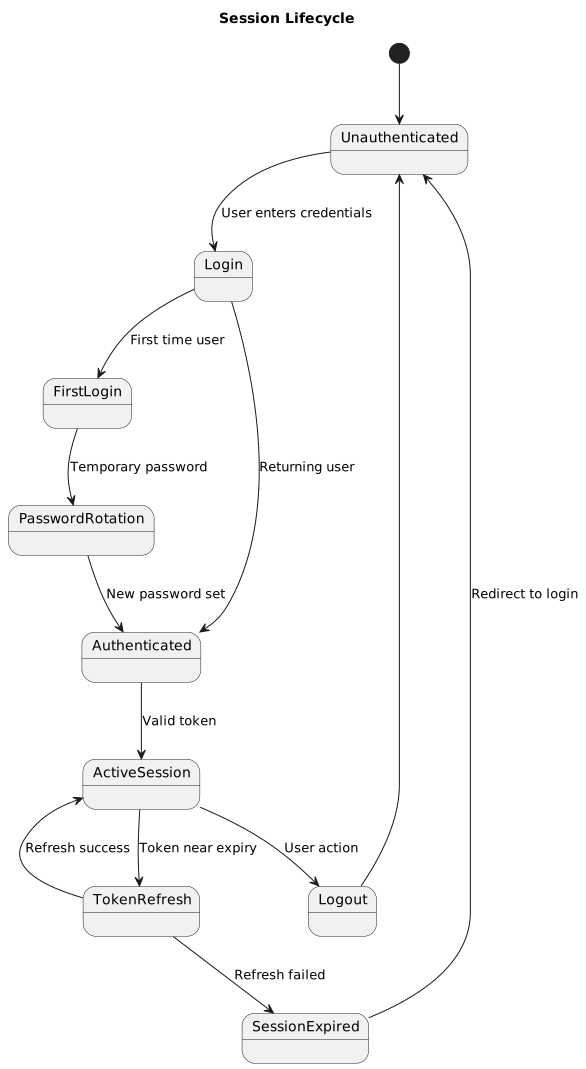
The UI relies on backend sessions and performs authenticated requests with
withCredentials: true. -
401 responses trigger a
POST /auth/refresh-tokenrequest; successful refresh replays the original request (tracked via a_retryflag to prevent infinite loops), failure redirects the browser to/login. -
Refresh is skipped for requests to
/auth/*— a 401 from the auth namespace is returned as-is. -
Authentication state lives in
AuthProvider(React Context). Route protection is enforced at the component level insrc/routes/_protected.tsx(see Routing & Layouts).
Implementation reference: src/lib/axios.ts (request/response interceptors), src/contexts/auth-provider.tsx.
Password requirements
Passwords must meet complexity requirements enforced by Zod validation:
-
Length: 6-16 characters
-
Uppercase: At least one uppercase letter (A-Z)
-
Lowercase: At least one lowercase letter (a-z)
-
Digit: At least one number (0-9)
-
Special character: At least one of
@$!%*?&
Example valid passwords: MyPass123!, Secure@2024, Admin$Pass1
Example invalid passwords:
-
short1!(too short) -
NoDigitsOrSpecial(missing digit and special char) -
no-uppercase123!(missing uppercase)
Implementation: createFirstLoginSchema() and createRegisterSchema() in src/lib/validation.ts:57-99
First-login flow
New users receive a temporary password via email (backend responsibility). On first login:
-
User enters username and temporary password
-
UI validates credentials and requests password rotation
-
User enters new password (must meet complexity requirements)
-
User confirms new password
-
Backend validates match and creates permanent session
-
User is redirected to application
Implementation: src/components/auth/first-login-page.tsx (rendered via the route file src/routes/_auth/change-password.tsx).
CSRF protection
CSRF is enforced in the Axios request interceptor (src/lib/axios.ts) — not in any server-side middleware. For every unsafe request the client performs a one-time GET /csrf exchange, then attaches the received token to the outgoing request.
Protected methods: POST, PUT, PATCH, DELETE.
Flow (per unsafe request):
-
Check in-memory
csrfTokenCache. If empty, dispatchGET /csrfwithX-Requested-With: XMLHttpRequestandwithCredentials: true. -
All concurrent unsafe requests share a single in-flight
csrfPromise— the token fetch is deduplicated; only one network call per cache miss. -
Once resolved, attach to the outgoing request:
-
X-XSRF-TOKEN: <token> -
X-Requested-With: XMLHttpRequest
-
-
The backend also reads the
XSRF-TOKENcookie set duringGET /csrf(double-submit pattern).
The token is cached for the lifetime of the page. A fresh GET /csrf only happens after a cache invalidation (e.g., on reload or after a 401 refresh path replays a request).
Implementation reference: csrfTokenCache, csrfPromise, and fetchCsrfToken() in src/lib/axios.ts.
Input validation strategy
All user inputs are validated using a layered approach:
Client-side validation (first line of defense)
Forms: React Hook Form + Zod schemas
import {useForm} from 'react-hook-form';
import {zodResolver} from '@hookform/resolvers/zod';
import {createLoginSchema} from '@/lib/validation';
import {useI18n} from '@/hooks/use-i18n';

const {t} = useI18n();
const loginSchema = createLoginSchema(t);

const form = useForm({
  resolver: zodResolver(loginSchema),
  defaultValues: {
    username: '',
    password: '',
  },
});
Direct inputs: Inline validation with Zod
import {z} from 'zod';

const portSchema = z.number().int().min(1).max(65535);

const validatePort = (value: number): boolean => {
  try {
    portSchema.parse(value);
    return true;
  } catch {
    return false;
  }
};
Benefits:
-
Immediate feedback to users
-
Reduces unnecessary backend calls
-
Localized error messages
API-level validation (server-side)
Backend validates all inputs again (never trust client):
-
Type validation (string, number, boolean, array)
-
Length/range constraints
-
Business logic validation (uniqueness, dependencies)
-
SQL injection prevention (parameterized queries)
Validation patterns
Username validation:
-
3-50 characters
-
Alphanumeric, underscore, hyphen only:
/^[a-zA-Z0-9_-]+$/
Email validation:
-
Standard email format
-
Max 100 characters
XML validation:
-
Well-formed XML check before parsing
-
No external entity expansion (XXE prevention)
Implementation: isWellFormedXml() in src/lib/xml.ts
File upload validation:
-
File type whitelist (MIME type + extension)
-
Max file size: 10 MB (configurable per endpoint)
-
Content validation (e.g., properties file structure, XML schema)
XSS prevention patterns
FT Configs UI follows React’s default XSS protection but adds extra layers:
React automatic escaping
React escapes all values rendered in JSX by default:
// Safe: React escapes userName
<div>{userName}</div>

// Safe: React escapes attributes
<input value={userInput} />
Dangerous patterns (avoid)
dangerouslySetInnerHTML: Only use for trusted content
// ⚠️ UNSAFE: Never use with user input
<div dangerouslySetInnerHTML={{__html: userInput}} />

// ✅ SAFE: Only for sanitized or trusted content
import DOMPurify from 'isomorphic-dompurify';

const sanitized = DOMPurify.sanitize(trustedHtml);
<div dangerouslySetInnerHTML={{__html: sanitized}} />
Direct DOM manipulation: Avoid when possible
// ❌ UNSAFE
element.innerHTML = userInput;

// ✅ SAFE
element.textContent = userInput;
URL handling
Always validate and sanitize URLs before rendering:
// ❌ UNSAFE: javascript: URLs can execute code
<a href={userProvidedUrl}>Link</a>

// ✅ SAFE: Validate protocol
const isSafeUrl = (url: string): boolean => {
  try {
    const parsed = new URL(url, window.location.origin);
    return ['http:', 'https:', 'mailto:'].includes(parsed.protocol);
  } catch {
    return false;
  }
};

const safeUrl = isSafeUrl(userProvidedUrl) ? userProvidedUrl : '#';
<a href={safeUrl}>Link</a>
API response sanitization
Treat all API responses as potentially malicious:
// ✅ SAFE: Validate response structure with Zod
import {z} from 'zod';

const userSchema = z.object({
  id: z.number(),
  username: z.string().max(50),
  email: z.string().email(),
});

const response = await apiService.get('/users/123');
const user = userSchema.parse(response.data); // Throws if invalid
Sensitive data handling
Passwords and credentials
Never log or expose:
-
Raw passwords
-
CSRF tokens
-
Session cookies
-
Refresh tokens
Implementation guidelines:
// ❌ UNSAFE: Logs password
console.log('User login:', {username, password});

// ✅ SAFE: Omit sensitive fields
console.log('User login:', {username});

// ❌ UNSAFE: Sends password in URL
await apiService.get(`/auth/check?password=${password}`);

// ✅ SAFE: Sends password in request body
await apiService.post('/auth/login', {username, password});
Masked input fields:
// Password fields
<Input type="password" value={password} onChange={...} />

// Secret reveal pattern
const [revealed, setRevealed] = useState(false);
<Input
  type={revealed ? 'text' : 'password'}
  value={secret}
  onChange={...}
/>
<Button onClick={() => setRevealed(!revealed)}>
  {revealed ? 'Hide' : 'Reveal'}
</Button>
Exported files with secrets
Warn users before exporting configuration containing sensitive data:
const handleExport = () => {
  showConfirmDialog({
    title: 'Export contains sensitive data',
    description: 'The exported file contains passwords and secrets in plain text. Store it securely.',
    confirmText: 'Export anyway',
    onConfirm: async () => {
      const blob = await api.export();
      downloadFile(blob, 'config.xml');
    },
  });
};
Implementation example: src/components/acs-bulk-data/*
HTTP security headers (served by nginx)
Security headers for the SPA are applied by nginx, not by the application bundle. The production image is nginx:alpine and the header directives live in the nginx config templates at docker/ops/nginx.conf.template (HTTPS+HTTP) and docker/ops/nginx-http-only.conf.template (HTTP-only). docker/ops/entrypoint.sh picks the template at startup based on the presence of /etc/nginx/ssl/tls.crt + tls.key.
The following headers are emitted at the server block level:
# docker/ops/nginx.conf.template (excerpt)
add_header X-Frame-Options          "DENY"                 always;
add_header X-Content-Type-Options   "nosniff"              always;
add_header Referrer-Policy          "no-referrer"          always;
add_header X-XSS-Protection         "1; mode=block"        always;

# HSTS — only in the SSL template
add_header Strict-Transport-Security "max-age=31536000; includeSubDomains" always;

# Content-Security-Policy
add_header Content-Security-Policy "default-src 'self'; \
  script-src 'self' 'unsafe-inline' 'unsafe-eval'; \
  style-src 'self' 'unsafe-inline'; \
  img-src 'self' data: blob:; \
  font-src 'self' data:; \
  connect-src 'self'; \
  frame-ancestors 'none'; \
  base-uri 'self'; \
  form-action 'self';" always;
connect-src 'self' is sufficient because the backend is proxied through nginx under the same origin at /configs-service/ (see Docker & Deploy). No cross-origin fetches are issued at runtime.
|
'unsafe-inline' / 'unsafe-eval' are present for compatibility with current third-party bundles; removing them is tracked as a hardening task.
Changing headers requires editing the templates in docker/ops/ and rebuilding the image — no runtime toggles exist.
Source maps are blocked
Source maps are never served in production:
-
The builder stage in
docker/Dockerfilerunsfind dist -name '*.map' -deleteafternpm run build, so.mapfiles do not exist in the image.vite.config.tsusessourcemap: 'hidden', which does not reference them from bundles. -
As a belt-and-suspenders measure, nginx returns
404for any request matching~* \.map$.
This prevents accidental disclosure of original TypeScript sources or internal paths even if a map file were ever copied in by mistake.
Dependency security
npm audit
Run security audits regularly:
# Check for vulnerabilities
npm audit

# View details
npm audit --json

# Fix automatically (minor/patch updates)
npm audit fix

# Fix with breaking changes (use with caution)
npm audit fix --force
CI/CD integration:
-
Run
npm auditin build pipeline -
Fail builds on high/critical vulnerabilities
-
Review and approve moderate vulnerabilities
Dependabot configuration
Use GitHub Dependabot for automated dependency updates:
# .github/dependabot.yml
version: 2
updates:
  - package-ecosystem: "npm"
    directory: "/"
    schedule:
      interval: "weekly"
    open-pull-requests-limit: 10
    reviewers:
      - "security-team"
    labels:
      - "dependencies"
      - "security"
Vulnerable package handling
When vulnerabilities are found:
-
Assess severity: Critical/High → immediate fix, Low/Moderate → schedule fix
-
Check for patches: Update to latest patch version
-
Review breaking changes: Read changelog before major updates
-
Test thoroughly: Run full test suite after updates
-
Document decisions: If vulnerability is accepted (false positive, no fix available), document reasoning
Roles & permissions
- VIEWER
-
Read-only access. Can browse and export configurations.
- EDITOR
-
VIEWER access + can edit configurations (create/update/delete/import).
- ADMIN
-
EDITOR access + user management (create/edit/disable/delete users).
Frontend enforcement
import {useAuth} from '@/hooks/use-auth';

const {isReadOnly, user} = useAuth();

// Disable write actions
<Button disabled={isReadOnly} onClick={handleSave}>
  Save
</Button>

// Hide admin-only features
{user?.role === 'ADMIN' && (
  <Link href="/settings/users">Manage Users</Link>
)}
Backend enforcement (primary)
Never rely solely on frontend checks:
-
Backend must validate role for every write operation
-
API returns 403 Forbidden for insufficient permissions
-
Frontend checks are UX enhancement only
Read-only enforcement (multi-layer)
Read-only (VIEWER) protection exists on three independent layers. Any one of them would be sufficient defense-in-depth; together they guarantee the user cannot even dispatch a mutating request from the browser:
-
Axios request interceptor (
src/lib/axios.ts+src/lib/permissions.ts). Before any request leaves the page,shouldBlockRequestForReadOnly(method, url)evaluates the current role (set viasetCurrentUserRole). If the role isVIEWER, the method is inUNSAFE_METHODS(post|put|patch|delete), and the URL is not in theallowedUnsafePrefixesallowlist, the promise rejects locally — the HTTP call is never made. -
AuthProvider.isReadOnlyflag. Computed asrole === 'VIEWER'and exposed viauseAuth(). Feature components receive it through props and disable mutating affordances. -
UI disabling. Buttons, import/export controls, and form submissions pass
disabled={isReadOnly}so that VIEWER users see a fully navigable, read-only experience without dead clicks.
Backend enforcement remains primary. All three client-side layers are UX and defense-in-depth. The backend still validates the caller’s role for every write operation and returns 403 Forbidden for any attempt.
Implementation reference: src/lib/permissions.ts, src/lib/axios.ts, src/contexts/auth-provider.tsx.
Allowlist exceptions:
-
/auth/login— required for login -
/auth/first-login— first-time password rotation -
/auth/register— account creation -
/auth/change-password— password updates -
/auth/logout— session termination -
/auth/refresh-token— token refresh -
/auth/me/locale— language preference -
/service-api/import/dry-run— read-only preview
Security checklist
Before committing code
-
No hardcoded credentials or API keys
-
Sensitive data not logged to console
-
User inputs validated with Zod schemas
-
No
dangerouslySetInnerHTMLwith user input -
File uploads validated (type, size, content)
-
Error messages don’t leak sensitive info
-
CSRF token attached to unsafe requests
-
Read-only users blocked from write actions
Before deploying
-
Run
npm auditand fix high/critical issues -
All environment variables configured correctly
-
Backend CSRF and CORS configured properly
-
HTTPS enforced in production
-
Session cookies marked
httpOnlyandsecure -
Content-Security-Policy header configured (recommended)
-
Rate limiting enabled on backend
-
Sensitive endpoints require authentication
Common vulnerabilities to avoid
SQL Injection
Status: Handled by backend (parameterized queries)
Frontend responsibility: Validate input types before sending to backend.
Cross-Site Scripting (XSS)
Mitigation:
-
React automatic escaping
-
Avoid
dangerouslySetInnerHTML -
Sanitize HTML with DOMPurify if needed
-
Validate URLs before rendering
Cross-Site Request Forgery (CSRF)
Mitigation:
-
CSRF token on all unsafe methods
-
SameSitecookie attribute -
Origin/Referer validation (backend)
Insecure Direct Object References (IDOR)
Mitigation:
-
Backend validates user owns requested resource
-
Frontend hides actions for inaccessible resources
-
No reliance on client-side authorization
Sensitive Data Exposure
Mitigation:
-
HTTPS in production
-
HttpOnly cookies for session tokens
-
Masked password fields
-
Warnings before exporting secrets
-
No sensitive data in localStorage
Broken Authentication
Mitigation:
-
Strong password requirements
-
Token refresh on 401
-
Automatic logout on session expiry
-
First-login password rotation
Security Misconfiguration
Mitigation:
-
Disable TypeScript build errors only in development
-
Remove debug flags in production
-
CSP and other security headers are served by nginx (
docker/ops/nginx.conf.template) -
Source maps deleted from the image and blocked by nginx (
~* \.map$ → 404) -
Regular dependency updates
Incident response
If a security vulnerability is discovered:
-
Assess impact: Determine affected systems and data
-
Contain: Deploy hotfix or disable affected feature
-
Notify: Inform stakeholders and users if data breach
-
Fix: Implement permanent fix and test thoroughly
-
Review: Conduct post-mortem to prevent recurrence
-
Document: Update security documentation and checklist