API & Integration Documentation
1. API Overview
The Northbound API exposes a RESTful API that allows clients to:
-
Authenticate and obtain JWT tokens
-
Manage device provisioning and configuration
-
Query device status and information
-
Configure network services
-
Monitor service status
2. API Design Principles
The API follows these design principles:
-
RESTful: Resources are identified by URLs and manipulated using standard HTTP methods
-
Stateless: Each request contains all necessary information
-
JSON-based: Request and response payloads use JSON format
-
Versioned: API versioning supports backward compatibility
-
Documented: OpenAPI/Swagger documentation is provided
JSON request field names are matched case-insensitively, matching the legacy .NET REST API. The canonical casing shown in the OpenAPI/Swagger schema is PascalCase (for example Parameters, Key, Value, Creator), but lowercase or mixed-case variants deserialize identically.
|
|
Breaking change in 1.0.1 — The custom key/value list on Because unknown JSON fields are ignored rather than rejected, a client that keeps sending Custom parameter keys are validated: only
The rename restores parity with the .NET contract rather than diverging from it, so it is not listed under Differences from Legacy .NET API: after the change the After column matches the .NET column on every row above. The
It completes DEV-2419, which corrected the same typo on the response side. |
3. Authentication
The Northbound API is secured via a custom JWT filter (FTApiJwtFilter) that intercepts incoming HTTP requests and delegates token validation to the AuthService.
3.1. Token Extraction
-
The filter reads the authentication token from the HTTP header named by
Authorization(IOT_AUTH_HEADER defined inCommonRegistry). -
Requests to
/api/System/Token, non-API endpoints, and HTTPPOSTrequests are excluded from filtering.
3.2. Token Validation
-
For protected endpoints, the filter invokes:
authService.authorizeFromHeader(token)to validate the token and populate the Spring Security context.
3.3. Unauthorized Handling
-
After the filter chain, if the response status is
401 Unauthorizedand noWWW-Authenticateheader is present, the filter adds:WWW-Authenticate: Basic realm="<soapUrl>"wheresoapUrlis injected from theapi.soap.urlproperty. -
If
AuthServicethrowsFriendlyUnauthorizedUserException, the filter:-
Clears the
SecurityContextHolder. -
Sets response status to
401. -
Sets
Content-Typetoapplication/json. -
Serializes an error response via Jackson
ObjectMapperusing:authService.buildErrorResponse(e)
-
4. API Endpoints
For detailed API documentation, please refer to the OpenAPI/Swagger documentation available at:
-
Swagger UI:
http://<server>/iot-webservice/swagger-ui/index.html-
Use the environment selector in the top‐right to switch between:
-
-
REST API (auto‐generated from code annotations)
-
SOAP API (hand-crafted OpenAPI spec for all SOAP operations)
The Swagger UI provides:
-
Interactive documentation for all API endpoints (REST and SOAP)
-
Request and response schemas for each endpoint
-
The ability to try out API calls directly from the browser
-
Authentication requirements and methods
-
Parameter specifications and constraints
|
The Swagger UI is the most up-to-date source of API documentation as it is automatically generated from the application’s code annotations and includes the full SOAP API specification. |
5. Error Response Format
All error responses follow a standardized format.
5.1. SOAP/XML Format
<soap:Envelope xmlns:xsi="http://www.w3.org/2001/XMLSchema-instance"
               xmlns:xsd="http://www.w3.org/2001/XMLSchema"
               xmlns:soap="http://schemas.xmlsoap.org/soap/envelope/">
   <soap:Body>
      <ServerWSResponse xmlns="http://www.friendly-tech.com">
         <ServerWSResult>
            <ErrorCode>100</ErrorCode> <!-- 100 = success; other codes = failure -->
            <Message/>              <!-- error message, if any -->
         </ServerWSResult>
      </ServerWSResponse>
   </soap:Body>
</soap:Envelope>
5.2. JSON Format
{
  "errorCode": 100,
  "message": ""
}
The same error codes and meanings apply in JSON responses.
Error Code |
Enum |
Description |
100 |
SUCCESS |
|
200 |
FAIL |
Operation failed |
201 |
NO_CPE |
No CPE |
201 |
USER_EXISTS |
Username already exists |
201 |
USER_NOT_EXISTS |
Username does not exist |
202 |
NO_DB |
No database available |
203 |
INCORRECT_REQUEST |
Incorrect request |
203 |
INCORRECT_REQUEST_STRUCTURE |
Incorrect request structure or non-writable parameter |
204 |
GENERAL |
General error |
205 |
NO_ACS |
No ACS available |
206 |
NO_CPE_NEW_SN |
No CPE for new serial number |
207 |
NO_CPE_CURR_SN |
No CPE for current serial number |
208 |
NO_TRANSACTIONS |
No transactions found (Java-only; see Unified "No transactions found" Error (ErrorCode 208)) |
401 |
UNAUTHORISED |
Wrong username or password |
ErrorCode=208 (NO_TRANSACTIONS, No transactions found) is a Java-only code introduced by DEV-2484 (with PO sign-off). It does not exist in the legacy .NET API, which used 203 for the same transaction-not-found cases. See Unified "No transactions found" Error (ErrorCode 208).
|
6. Validation
The API implements validation for request payloads:
-
Required Fields: Fields marked as required must be present
-
Field Formats: Fields must have the correct format (e.g., IP addresses, MAC addresses)
-
Enumerations: Fields with enumerated values must contain valid values
-
Range Constraints: Numeric fields must be within valid ranges
Business-rule validation failures are reported in the response body as an ErrorCode in the 20X range with an HTTP 200 status, not as a 400 Bad Request — see Error Response Format. A malformed JSON body (one that fails to parse at all) is treated the same way: it returns ErrorCode=203 (Incorrect request structure) with an HTTP 200 status — see Malformed JSON Body Rejected Uniformly (ErrorCode 203).
|
A value that cannot be read as a whole number is coerced to
On The outcome after coercion differs per field because the binding layer decides nothing: it only produces Fields outside this table are not covered by the mechanism, and their behavior has to be read per field and per endpoint rather than assumed from the table. Two worked examples, both for
Extending the coercion to the remaining numeric fields is tracked as a follow-up. |
7. Differences from Legacy .NET API
The Java Northbound API is a port of the legacy .NET Northbound API. Wherever practical, behavior is kept identical. In a small number of places the Java port intentionally diverges from the .NET reference to eliminate historical inconsistencies, clarify contracts, or simplify maintenance. This section documents those intentional differences so integrators relying on the legacy behavior can update their clients.
|
Governing principle. Port parity is the default, not an absolute rule:
The goal is a correct, maintainable API — not a bug-for-bug replica. Every entry below is an intentional, reviewed deviation, not an oversight. |
|
As a rule, only |
7.1. TransactionId Validation
Endpoints that accept TransactionId reject non-positive values (0 and negative numbers) with a uniform rule across both REST and SOAP transports.
Affected endpoints:
-
POST /api/Task/Pending/Transaction/ SOAPFTGetCPEPendingTasksByTransaction -
POST /api/Parameter/Transaction/ SOAPFTGetDeviceParametersByTransID -
POST /api/Transaction/ SOAPFTGetTransactionStatus -
POST /api/Diagnostic(get-by-transaction) / SOAPFTGetDiagnosticByTransaction
Behavior:
-
TransactionIdmust be a positive integer (> 0). -
Invalid values (
0, negative numbers, ornullwhere the field is required) are rejected before any database access. -
Response carries the typed response body with default values (empty collections or zero counts), HTTP status
200, and the error fields set as below.
| Field | Value |
|---|---|
|
|
|
|
| Endpoint | Input | .NET (REST / SOAP) | Java (REST & SOAP) |
|---|---|---|---|
|
|
REST: |
|
|
|
REST: |
|
|
|
REST: |
|
|
|
REST: |
|
Rationale: the .NET message variation is a historical artifact of the legacy codebase, not a documented contract. The Java port standardises on a single, unambiguous message while preserving the ErrorCode=203 contract that clients rely on. Related tickets: DEV-1714, DEV-1715, DEV-1717.
The Diagnostic get-by-transaction endpoint is aligned with the same rule (DEV-2491). Legacy .NET REST already guarded non-positive TransactionId with this exact message (DiagnosticController.cs); legacy .NET SOAP had no up-front guard, so transid ⇐ 0 fell through to an empty result and returned Transaction <value> not found (Diagnostic.cs). The Java port unifies both transports on TransactionId must be a positive number. In addition, an empty REST "TransactionId" previously crashed deserialization (HTTP 500, ErrorCode 204); it is now rejected as ErrorCode 203 before any database access, consistent with the sibling endpoints.
A non-numeric REST "TransactionId" (for example "AA981") is handled the same way (DEV-2501). Previously it crashed Jackson body deserialization and returned HTTP 500, ErrorCode 204; it is now leniently deserialized to null and rejected by the same guard as empty and non-positive input — HTTP 200, ErrorCode 203, TransactionId must be a positive number. This matches legacy .NET, where a value that cannot bind to the request’s long TransactionId property leaves it at its 0 default, which the TransactionId ⇐ 0 guard then rejects with the same message. The lenient deserializer is written against the Jackson 3 API (tools.jackson.*), which is what Spring Boot 4 uses for the REST message converters.
This currently applies to three of the required-TransactionId REST endpoints: POST /api/Diagnostic, POST /api/Transaction, and POST /api/Parameter/Transaction. The fourth required endpoint, POST /api/Task/Pending/Transaction, is not yet covered: its request field is inherited by the optional list endpoints (POST /api/Task/Pending, /Failed, /Rejected), whose legacy long? semantics treat a missing/non-numeric TransactionId as "operate on all". Unifying it therefore depends on an unresolved product decision and is deferred.
For a valid, positive TransactionId that does not correspond to any stored transaction, the Java port distinguishes a missing transaction from an existing transaction that simply has no tasks — on both REST and SOAP transports:
-
Transaction row absent →
ErrorCode=208,No transactions found(see Unified "No transactions found" Error (ErrorCode 208)). -
Transaction exists but has no tasks in the caller’s scope →
ErrorCode=203,There are no tasks for Transid <value>.
Legacy .NET SOAP (FTGetTransactionStatus) already drew this distinction; legacy .NET REST did not — it returned the no-tasks message for both cases. The Java port aligns both transports on the SOAP behavior. HTTP 200 is unchanged in every case. Since DEV-2484 the transaction-not-found case carries the new ErrorCode=208 (No transactions found) instead of 203; the "exists but no tasks" case keeps ErrorCode=203.
| Scenario | .NET (REST / SOAP) | Java (REST & SOAP) |
|---|---|---|
Positive |
REST: |
|
Positive |
REST: |
|
Rationale: distinguishing "the transaction does not exist" from "the transaction has no tasks" gives callers an actionable, unambiguous message and makes REST consistent with SOAP. DEV-2484 (with PO sign-off) further standardises every transaction-not-found response onto the single new ErrorCode=208 (No transactions found); see Unified "No transactions found" Error (ErrorCode 208). Related tickets: DEV-2444, DEV-2484.
7.2. Absent or Empty Parameter Name
Several parameter-bearing operations reject a parameter that carries a Value but no Name (empty or null) with ErrorCode=203 (INCORRECT_REQUEST), whereas the legacy .NET API returns ErrorCode=204 (GENERAL) for the same input. The behavior is the same on REST and SOAP.
| Operation | REST / SOAP | .NET (REST & SOAP) | Java (REST & SOAP) |
|---|---|---|---|
Add object parameter |
|
|
|
Set parameters |
|
|
|
Create diagnostic |
|
|
|
Rationale: a parameter without a Name is a malformed request structure, so 203 (INCORRECT_REQUEST) is the semantically correct code. In the .NET implementation this scenario never reaches request-structure validation — the empty name is caught earlier, during payload-to-domain conversion (the ToDeviceParam conversion in the controller layer, before the business layer), as a generic exception that falls through to the catch-all 204 (GENERAL); the explicit 203 check inside the .NET business layer is unreachable dead code. The Java port keeps the more accurate 203. The Message wording differs across the three operations on the Java side (FTAddObject matches the .NET text exactly; FTSetParameters and FTCreateDiagnostic carry an operation-specific prefix) — only the ErrorCode is contractually relevant. Related tickets: DEV-2416 (FTAddObject), DEV-2458 (FTSetParameters; FTCreateDiagnostic identified during the same registry consolidation).
7.3. FTGetCPEByIP With a Malformed Stored STUN Address
GET /api/Device/ByIp / SOAP FTGetCPEByIP may, on a second STUN resolution attempt, read a device’s stored UDPConnectionRequestAddress from the database. When that stored value is malformed and cannot be parsed as a URI, the Java port returns ErrorCode=203 (INCORRECT_REQUEST) with the parser error message, whereas the legacy .NET API lets the raw UriFormatException fall through to the catch-all ErrorCode=204 (GENERAL). The behavior is the same on REST and SOAP.
Unlike the absent-parameter-name cases, the malformed value here originates from stored device data, not from a request field, so this path is only reachable for a device whose persisted STUN address is already corrupt.
| Scenario | .NET (REST & SOAP) | Java (REST & SOAP) |
|---|---|---|
|
|
|
Rationale: an unparseable stored address is a structural data problem, so 203 (INCORRECT_REQUEST) is more precise than the generic 204 the .NET catch-all produces. Related ticket: DEV-2458 (identified during the ErrorCode-divergence registry consolidation).
7.4. Whitespace-Only Serial Number
Endpoints that require a device serial number reject a whitespace-only Sn (for example " ") as an incorrect request, whereas the legacy .NET API treats a whitespace string as a real serial and proceeds to a device lookup that then fails as "device not found".
Affected endpoints: every REST/SOAP operation that resolves a device by serial number. The serial constraint is uniform across the API (@NotBlank on the shared Device.Sn), so an absent, empty, or whitespace-only serial is always rejected before any database access. Pending-transactions retrieval (POST /api/Transaction/Task/Pending / SOAP FTGetCPEPendingTransactions) was the last endpoint brought into line with this rule.
Behavior:
-
An absent or empty
SnreturnsErrorCode 203on both transports — identical to .NET. -
A whitespace-only
Snalso returnsErrorCode 203in the Java port, whereas .NET returnsErrorCode 201(NO_CPE) becausestring.IsNullOrEmpty(" ")isfalse, so the value reaches the device lookup and misses. -
Response carries the typed response body with default values, HTTP status
200, and the fields below.
| Field | Value |
|---|---|
|
|
|
|
| Input | .NET (REST & SOAP) | Java (REST & SOAP) |
|---|---|---|
Absent or empty |
|
|
Whitespace-only |
|
|
|
For an absent or empty serial the Java port already returned the correct |
Rationale: a serial made only of whitespace is not a usable identifier, so treating it as a malformed request (203) is both more correct and keeps serial validation uniform across every serial-bearing endpoint. .NET’s acceptance of a whitespace serial is an artifact of string.IsNullOrEmpty. Related tickets: DEV-2422, DEV-2454.
7.5. FTGetUserDetailsFromDevice Device-Not-Found Message
When FTGetUserDetailsFromDevice receives a well-formed but non-existent devicesn, the device does not resolve to a CPE, so both transports return ErrorCode 201 (NO_CPE). The ErrorCode is identical to the .NET contract; only the Message text differs. In the .NET reference the message originates in the BLL device lookup (Device.FindBySerial), which throws a differently-worded FTExceptionNoCpe in each of the two separate .NET projects, so the wire text is not even consistent between .NET transports. The Java port uses a single shared service method for both transports and emits one uniform device-not-found message.
Affected endpoints:
-
SOAP
FTGetUserDetailsFromDevice -
REST
POST /api/UserInfo(get user details by device serial)
Behavior:
-
Device existence is resolved against the CPE registry (by serial number), independently of whether a customer/user-info record exists.
-
A
devicesnthat resolves to no device returnsErrorCode 201(NO_CPE), HTTP200, with the user data fields nil. -
A
devicesnthat resolves to more than one device returnsErrorCode 203(INCORRECT_REQUEST_STRUCTURE) with the uniform messageMust be only 1 CPE. -
A
devicesnthat resolves to exactly one device but has no stored user info returnsErrorCode 100(SUCCESS) with the user data fields nil (parity with the empty .NETUser). -
The
Messageis the standard Java device-not-found text used by everyNO_CPE-bearing endpoint.
| Field | Value |
|---|---|
|
|
|
|
| Input | .NET | Java (REST & SOAP) |
|---|---|---|
Non-existent |
SOAP: |
|
Rationale: the contract-critical ErrorCode is preserved identically (201 / NO_CPE). A single shared Java service method (findUserInfoByDeviceSerial) serves both transports and therefore cannot reproduce the per-transport message wording of the two distinct .NET codebases (which differ from each other in casing, quoting, and a leading space). The Java port emits the project-wide device-not-found message (buildDeviceNotFoundMessage), keeping the message consistent with every other NO_CPE endpoint in the API. Related ticket: DEV-2423.
The same single-shared-service reasoning applies to the multiple-CPE case (ErrorCode 203): the .NET codebases word it differently per transport (SOAP Must be only 1 CPE, REST Must be only 1 Device). The Java port emits one uniform message, Must be only 1 CPE, on both transports. ErrorCode 203 is identical to .NET. Related ticket: DEV-2423.
7.6. Unified "No transactions found" Error (ErrorCode 208)
DEV-2484 (with PO sign-off) introduces a new, Java-only error code — ErrorCode=208 (NO_TRANSACTIONS), Message=No transactions found — and routes every "the requested transaction was not found" case onto it. The message is a fixed constant: it does not embed the TransactionId.
|
This is an intentional divergence from .NET. The legacy .NET API has no |
Endpoints unified onto ErrorCode=208 for a positive TransactionId that does not correspond to any stored transaction (REST and SOAP alike):
| Endpoint (REST / SOAP) | Not-found trigger | Previous wording (superseded) |
|---|---|---|
|
No pending task matches and the transaction exists in none of the four task tables |
|
|
The transaction row is absent ( |
|
|
No diagnostic entries exist for the transaction |
|
The "transaction exists but simply has no tasks" case is deliberately excluded from this unification: Transaction / FTGetTransactionStatus keeps returning ErrorCode=203 / There are no tasks for Transid <value> in that case (see TransactionId Validation above). The 208 code means "no such transaction", not "no tasks".
| Field | Value |
|---|---|
|
|
|
|
HTTP status |
|
Rationale: a single, unambiguous error code and message for "the transaction does not exist" is easier for integrators to detect programmatically than the previous mix of 203 messages that overlapped with unrelated INCORRECT_REQUEST cases, and dropping the echoed TransactionId from the message avoids leaking the queried id back on the wire. Related ticket: DEV-2484 (supersedes the wording of DEV-2444, DEV-2467, DEV-2491 on these paths).
7.7. Pending Tasks: Non-Existent TransactionId
Complements TransactionId Validation. That rule covers non-positive TransactionId values (rejected before any database access). This rule covers a positive but non-existent TransactionId on the pending-tasks retrieval path.
Affected endpoints (all four share a single service method, so the behaviour is identical across them):
-
POST /api/Task/Pending/ SOAPFTGetCPEPendingTasks -
POST /api/Task/Pending/Transaction/ SOAPFTGetCPEPendingTasksByTransaction
Behavior:
-
When a positive
TransactionIdis supplied and no pending task matches, the service checks whether the transaction exists at all (any task in the pending, completed, failed, or rejected tables — mirroring the legacy .NETIsTransactionExists). -
If the transaction does not exist, the response carries
ErrorCode=208(No transactions found) andMessage=No transactions found, with the typed response body and an emptytaskslist, HTTP status200. Since DEV-2484 this uses the new unifiedErrorCode=208instead of the earlier203/Transid <value> doesn’t exist; see Unified "No transactions found" Error (ErrorCode 208). -
If the transaction exists but simply has no pending tasks, the response is an empty-
SUCCESS(ErrorCode=100) body — no error. OnTask/Pending/Transaction/FTGetCPEPendingTasksByTransactiontheMessagefield carriesNo pending task foundin this case (DEV-2618); onTask/Pending/FTGetCPEPendingTaskstheMessagestays empty. See Pending Tasks by Transaction: "No pending task found" Message.
| Field | Value (positive, non-existent TransactionId) |
|---|---|
|
|
|
|
|
empty list |
Supersedes the DEV-1931 decision for this path. DEV-1931 generalised the pending endpoints to always return an empty SUCCESS when no pending task matched (aligning them with Task/Failed and Task/Rejected); doing so suppressed the legacy error for a non-existent transaction. DEV-2467 restored an error for the positive-non-existent-transaction case only, while keeping DEV-1931’s valid part (no TransactionId, or an existing transaction with no pending tasks, still returns empty SUCCESS). DEV-2484 then replaced the 203 / Transid <value> doesn’t exist wording of that error with the unified ErrorCode=208 / No transactions found.
As a result, Task/Pending now diverges from Task/Failed and Task/Rejected: the failed/rejected path has no IsTransactionExists gate in .NET either (legacy GetTasksFromSql), so those endpoints keep returning empty SUCCESS for a non-existent transaction. This divergence is itself faithful to the legacy .NET behaviour. Related tickets: DEV-2467 (restores the error), DEV-2484 (unifies it on 208), DEV-1931 (superseded on this path).
7.8. Pending Tasks by Transaction: "No pending task found" Message
Complements Pending Tasks: Non-Existent TransactionId. That rule covers a positive but non-existent TransactionId (ErrorCode=208). This rule covers a positive TransactionId that exists but has no pending tasks, on the by-transaction retrieval path only.
Affected endpoints:
-
POST /api/Task/Pending/Transaction/ SOAPFTGetCPEPendingTasksByTransaction
Behavior: when the transaction exists (it has at least one task in the pending, completed, failed, or rejected table) but no pending task matches, the response carries ErrorCode=100 (SUCCESS) and Message=No pending task found, with the typed response body and an empty tasks list, HTTP status 200.
| Field | .NET | Java |
|---|---|---|
|
|
|
|
|
|
|
empty list |
empty list |
HTTP status |
|
|
In the legacy .NET API this endpoint resolves to the single-argument GetCPEPendingTasks(long transId) overload, whose getPendingQueueForDevice throws FTExceptionIncorrectRequestStructure("No pending task found") — ErrorCode=203 — for any empty result, conflating "transaction not found" with "transaction found, no pending tasks". The Java port shares one service method between Task/Pending and Task/Pending/Transaction, and (per DEV-2484, PO sign-off) already keeps ErrorCode=100 for the "exists but no pending tasks" case rather than reverting to the .NET 203 conflation; DEV-2618 adopts only the .NET message text (No pending task found) for that case, so the code stays 100 while the message becomes actionable.
The plain Task/Pending / FTGetCPEPendingTasks endpoint is deliberately excluded: it keeps the empty Message (the generalised empty-SUCCESS from DEV-1931), matching Task/Failed and Task/Rejected. Only the by-transaction endpoint carries the message.
Rationale: ErrorCode=100 remains correct because the transaction was found, so clients keying off ErrorCode are unaffected; the added message gives integrators the same human-readable hint the legacy API produced without reintroducing the 203 conflation the 208 contract was designed to remove. Related tickets: DEV-2618 (this message), DEV-2484 (the 208 contract this builds on), DEV-2467, DEV-1931 (superseded on this path).
7.9. Diagnostic "Time in seconds" Metric
For a completed Get Diagnostic result (POST /api/Diagnostic / SOAP FTGetDiagnostic), the Java port enriches the parameter list with three calculated objects — Time in seconds, File size in MB, and Average speed in Mbps — computed from the device’s BOMTime/EOMTime timestamps and the transferred byte count. File size in MB and Average speed in Mbps are computed with the same formulas as the .NET reference and agree with it except at exact rounding midpoints (see the rounding note below); Time in seconds differs by definition.
| Value | .NET (REST & SOAP) | Java (REST & SOAP) |
|---|---|---|
Definition |
|
Total elapsed seconds of the interval (fractional) |
Example: 10-second interval |
|
|
Example: 31-microsecond interval (fast/local transfer) |
|
|
Rationale: the .NET TimeSpan.Seconds component discards whole minutes and all sub-second precision, so a 90-second diagnostic reports 30 and a sub-second diagnostic reports 0 — neither reflects the actual duration. The Java port reports the true total elapsed time. This divergence became observable only after DEV-2476: previously a sub-millisecond BOMTime/EOMTime interval was truncated to a millisecond-precision java.util.Date, so the three calculated objects were dropped entirely (see the ticket). DEV-2476 restores nanosecond-precision duration handling, which activates this code path and surfaces the intentional Time in seconds difference documented here. Related tickets: DEV-2476 (precision fix), BUG-DG-003 (the Time in seconds divergence).
|
Rounding mode. |
7.10. FindDeviceAdvanced Empty-Value Error Message
For POST /api/Device/FindDeviceAdvanced / SOAP FTFindDeviceAdvanced, when a parameter carries a valid Name but an empty Value (for example zip with ""), the Java port returns the error Message without the single trailing space that the legacy .NET API leaves on the assembled message. ErrorCode=203 (INCORRECT_REQUEST) is identical on both sides. The behavior is the same on REST and SOAP.
| Scenario | .NET (REST & SOAP) | Java (REST & SOAP) |
|---|---|---|
|
|
|
Rationale: the .NET implementation throws its StringBuilder output verbatim, keeping the trailing space produced by its per-segment format string. The Java port strips the single outer trailing space for a cleaner client-facing message; inter-segment spacing of multi-error messages is preserved. Only cosmetic whitespace differs — the wording and ErrorCode are unchanged. Note that the verbose Valid parameter names: … hint is appended only when a parameter name is invalid (matching the .NET isAnyInvalid gate), not on the empty-value path. Related ticket: DEV-2507.
7.11. Task StartTime Parsing (Date-Only, Offset, Malformed)
For the three optional StartTime task-list endpoints — POST /api/Task/Pending, POST /api/Task/Failed, POST /api/Task/Rejected (SOAP FTGetCPEPendingTasks / FTGetCPEFailedTasks / FTGetCPERejectedTasks) — the REST StartTime is now bound as a raw string and parsed in the controller, converging on the legacy .NET REST behaviour where the field is a string parsed with Convert.ToDateTime inside a try/catch. This aligns REST with the SOAP transport, which already parsed the raw XML string.
| Input | .NET (REST) | Java (REST & SOAP) |
|---|---|---|
Date-only ( |
Accepted, start of day |
HTTP |
ISO local / offset date-time |
Accepted |
HTTP |
Blank or absent |
No date filter |
HTTP |
Malformed ( |
Empty result |
HTTP |
Previously a date-only or offset StartTime crashed the default ISO_LOCAL_DATE_TIME deserializer and returned HTTP 500 / ErrorCode 204 — the Jackson 2 @JsonDeserialize on the request field was silently ignored by the Spring Boot 4 Jackson 3 (tools.jackson) message converter. Malformed input is deliberately not coerced to null (which would silently drop the date filter and return an unfiltered list); it returns ErrorCode 204 with the parser message, fail-closed.
An StartTime carrying an explicit UTC offset is normalized to the ACS server-local wall-clock (the deploy timezone) before being stored against the naive created column, matching the legacy .NET writer’s server-local DateTime — the same storage basis as the device-activity window (DEV-2433). Related ticket: DEV-2488.
7.12. Device Not Unique — Message Form
When a device lookup that carries the Sn / Oui / ModelName discriminators matches more than one stored device, both the legacy .NET API and the Java port reject the request with ErrorCode 201 (NO_CPE). The ErrorCode is identical to .NET; only the Message text differs, and it structurally cannot be made identical.
Affected endpoints:
-
POST /api/Device/Activity(REST only — no SOAP operation exists) -
POST /api/Device/History(REST only — no SOAP operation exists) -
POST /api/Device/Info/ SOAPFTGetDeviceInfo
Behavior:
-
A duplicate match is rejected before the ISP access check, matching the legacy
load()ordering. -
Response carries the typed response body, HTTP status
200, and the error fields set as below.
| Field | Value |
|---|---|
|
|
|
|
| Input | .NET (REST) | Java (REST & SOAP) |
|---|---|---|
|
|
|
|
|
|
|
|
|
Rationale: the .NET message is rendered from an already-loaded database row, so it carries an ID=<n> prefix and spells the serial, OUI, and model as stored — including a Model name segment even when the client never sent one. The Java port composes the message from the request values it actually received, so those database-side details are unavailable to it. The Oui is uppercased in the message, matching the .NET constructor which uppercases OUI before the message is rendered. Related ticket: DEV-2619.
7.13. Oui Matched Against Manufacturer Name
Device lookups that filter on Oui match the value against both the product class OUI and the manufacturer name, unconditionally.
Affected endpoints: every endpoint resolving a device by Sn + Oui + ModelName, including POST /api/Device/Activity, POST /api/Device/History, and POST /api/Device/Info / SOAP FTGetDeviceInfo.
| .NET | Java |
|---|---|
Matches the manufacturer name only when the |
Always matches either the product class OUI or the manufacturer name; there is no equivalent setting. |
Consequence: a request whose Oui carries a manufacturer name rather than an OUI resolves a device in the Java port, whereas the .NET reference in its default configuration returns ErrorCode 201. The query lives in the shared api-orm library and is not overridable from this service, so closing the gap requires a change there. Related ticket: DEV-2619.
7.14. Absent UserInfo Block Accepted
A device-mutation request that omits the UserInfo block entirely but carries custom parameters is accepted and applied, answering ErrorCode 100 (SUCCESS). The legacy .NET REST API answers ErrorCode 204 (GENERAL) for the same input.
Affected endpoints:
-
PUT /api/UserInfo/ SOAPFTUpdateDeviceInfo -
POST /api/Device(device creation carrying only custom parameters) / SOAPFTCreateDevice
Behavior: the block is treated as present-but-empty. Every field falls back to its stored device value exactly as an explicitly empty block would, the custom parameters are written, and the response is a normal success. The all-input-null guard is unaffected: a request that omits UserInfo and carries no usable parameter is still rejected with ErrorCode 203 (INCORRECT_REQUEST, All input parameters are null), byte-identical to the .NET business layer.
| Input | .NET REST | .NET SOAP | Java (REST & SOAP) |
|---|---|---|---|
|
|
|
|
|
|
|
|
Rationale: the .NET REST 204 is not a decision but an unhandled crash. UserInfoController.cs:45-57 dereferences request.UserInfo.Cust1 while assembling the custs map, before the business layer is reached at :60; with the block absent this raises a NullReferenceException, which ConvertApi.SetErrorCode maps through its final else branch to Result.GeneralError. The .NET SOAP transport cannot exhibit the fault at all, because FTUpdateDeviceInfo takes flat string arguments (ACSWS.cs:1780-1788) rather than a nullable object, and its business-layer guard (Device.cs:2127-2133) passes whenever custs is non-empty — so .NET SOAP already succeeds on the semantically equivalent input. The Java port therefore aligns REST with SOAP on both implementations rather than reproducing a null-dereference crash. Made reachable by DEV-2620, which bound the Parameters array for these bodies; before that change such a request was rejected by the all-input-null guard and never reached the dereference. Related ticket: DEV-2620.
7.15. Comma Decimal Separator Accepted for Coordinates
The latitude and longitude custom parameters accept both the comma and the dot as decimal separator, on every endpoint that writes a coordinate and on every endpoint that filters by one. The value is normalized to the dot form before it is stored or compared, so it is always read back with a dot and a comma-form filter selects exactly the same devices as its dot form.
Affected endpoints — write path:
-
PUT /api/UserInfo/ SOAPFTUpdateDeviceInfo -
POST /api/Device/ SOAPFTCreateDevice
Affected endpoints — search path:
-
POST /api/Device/FindDeviceAdvanced/ SOAPFTFindDeviceAdvanced -
POST /api/Device/UserInfo/ SOAPFTFindDevice
Behavior: a coordinate is validated after the separator is normalized, and the normalized form is what reaches storage or the SQL predicate. Because coordinates are persisted as a numeric column, GET /api/UserInfo / SOAP FTGetUserDetailsFromDevice returns the dot form regardless of which separator was submitted.
| Aspect | .NET REST | .NET SOAP | Java (REST & SOAP) |
|---|---|---|---|
Accepted |
No — |
Yes — |
Yes — |
Stored form |
n/a |
|
|
| Endpoint | .NET REST | .NET SOAP | Java (REST & SOAP) |
|---|---|---|---|
|
No — |
No — |
Yes — |
|
No — |
Yes — |
Yes — |
The .NET search path is not uniform, which is why the two rows differ. FindDeviceAdvanced validates parameter names only and lets the value reach the business layer, where Device.FindDeviceAdvanced (FT.FTACSWS.BLL/Device.cs:466-469) calls Gui.ConvertToDouble; that helper throws a plain Exception (FT.FTACSWS.BLL/Helper/FileName.cs:16-23), which both ConvertApi.SetErrorCode (ConvertApi.cs:218-250) and ConvertWSDL.SetErrorCode (ConvertWSDL.cs:236-268) map through their final else branch to Result.GeneralError. FTFindDevice and Device/UserInfo instead validate in getCusts before the business layer, and there the two transports differ: SOAP normalizes the separator in place (ACSWS.cs:1762) and therefore accepts the comma, while the REST copy has that same line commented out (DeviceController.cs:530) and rejects it with a typed FTExceptionIncorrectRequestStructure. The Java port applies one rule everywhere instead of reproducing that three-way split.
Rationale: the .NET reference is internally inconsistent here. On the write path, .NET SOAP normalizes in place before storing (ACSWS.cs:1763, item.Value = item.Value.Replace(",", "."), stored at :1766), whereas the equivalent .NET REST line is commented out (DeviceController.cs:531), leaving the value to be validated by Gui.doubleTryParse (FT.FTACSWS.BLL/Helper/FileName.cs:10-14), which parses with InvariantCulture and AllowDecimalPoint only and therefore rejects the comma. On the search path the same split reappears one layer down: FindDeviceAdvanced and FTFindDeviceAdvanced copy the submitted value verbatim into the filter map (DeviceController.cs:120-247, ACSWS.cs:671-791) and let Device.FindDeviceAdvanced convert it with Gui.ConvertToDouble (FileName.cs:16-23), which delegates to the same comma-rejecting doubleTryParse and throws on failure, so the whole request ends as 204; FTFindDevice and Device/UserInfo reuse their transport’s own getCusts copy and therefore inherit its normalize-or-not decision, giving 100 on SOAP and 203 on REST.
The Java port takes .NET SOAP’s write-path behavior and applies it uniformly to both transports and to both the write and the search path, giving one rule — accept either separator, always store, compare and return the dot form — instead of a per-transport, per-path split. On the search path this also corrects a silently wrong result set: the Java port previously dropped a comma-form coordinate filter without an error, returning 100 together with devices that do not match the requested coordinate. Normalizing makes the filter apply instead of vanish; for the comma form the ErrorCode is unchanged by this correction (100 before and after — only the returned device list changes). A genuinely unparsable coordinate is a different input class and is now rejected rather than dropped — see Unparsable Coordinate Rejected on the Search Path. The write-path normalization additionally closes a latent defect: the Java port previously validated the comma form (by replacing before parsing) but stored the original string, which then reached the ACS client’s Double.valueOf conversion and failed with ErrorCode 204. Related ticket: DEV-2620.
7.16. Unparsable Coordinate Rejected on the Search Path
A latitude or longitude search filter whose value is not a number in either separator form — latitude=abc — is rejected with ErrorCode 203 (INCORRECT_REQUEST_STRUCTURE, message Custom parameter latitude must be correct double). It is never silently dropped.
Affected endpoints:
-
POST /api/Device/FindDeviceAdvanced/ SOAPFTFindDeviceAdvanced -
POST /api/Device/UserInfo/ SOAPFTFindDevice
An absent or empty value is not affected: it leaves the filter unapplied without an error, on both the search and the write path, and on both implementations.
| Endpoint | .NET REST | .NET SOAP | Java (REST & SOAP) |
|---|---|---|---|
|
|
|
|
|
|
|
|
Rationale: the divergence is confined to FindDeviceAdvanced, and it exists because .NET is internally inconsistent about this exact input. On its FTFindDevice route .NET already answers 203, from a typed FTExceptionIncorrectRequestStructure raised in getCusts (ACSWS.cs:1763-1765, DeviceController.cs:531-533) before the business layer is reached. On its FindDeviceAdvanced route no such check exists, so the value reaches Device.FindDeviceAdvanced (Device.cs:466-469) and Gui.ConvertToDouble throws a plain Exception (FileName.cs:16-23) that both SetErrorCode mappers fold into the catch-all Result.GeneralError. The 204 is therefore an unhandled crash, not a decision — the same pattern already recorded for FTAddObject / FTSetParameters / FTCreateDiagnostic. The .NET write path also answers 203 for this input (DeviceController.cs:531-533), as does the Java write path (DeviceInfoService.getCusts). Rather than reproduce a split in which the same malformed coordinate yields 203 on three routes and 204 on a fourth, the Java port answers 203 everywhere.
The alternative — dropping the predicate, as the Java port did before this change — was rejected outright: it returns ErrorCode 100 alongside devices that do not match the requested coordinate, so the caller receives a wrong result set with no indication that its filter was discarded. Related ticket: DEV-2620.
7.17. Malformed JSON Body Rejected Uniformly (ErrorCode 203)
A request whose body is not valid JSON — a syntax error such as a bare unquoted token ({"EventTypeValueChange": Tru}) — is rejected uniformly on every REST endpoint with HTTP 200, ErrorCode 203 (INCORRECT_REQUEST_STRUCTURE), Message Incorrect request structure, and the endpoint’s typed response body (any collection serialized as an empty array). The body is not parseable, so no field binds and the request object is absent.
This mirrors the legacy .NET behavior for the overwhelming majority of endpoints: a malformed body makes the .NET model binder yield a null request, and the first action step — Session.CreateSession(request, …) (Session.cs:233-234) — throws FTExceptionIncorrectRequestStructure("Incorrect request structure"), which ConvertApi.SetErrorCode (ConvertApi.cs:237-238) maps to Result.IncorrectRequestStructure (203) at HTTP 200. For every endpoint that calls CreateSession first, the Java 203 is therefore parity, not a divergence. Related ticket: DEV-2623.
|
Two endpoints are an intentional divergence (PO sign-off, DEV-2623): the Java port’s uniform
The divergence is deliberate: a single, structurally correct code for "the body could not be read" is more useful to integrators than reproducing .NET’s two accidental outcomes (an unhandled |
8. API Documentation
The API is fully documented using OpenAPI 3.0 (Swagger):
-
Swagger UI: Available at
http://[server]/iot-webservice/swagger-ui/index.html -
OpenAPI JSON: Available at
http://[server]/iot-webservice/v3/api-docs -
OpenAPI YAML: Available at
http://[server]/iot-webservice/v3/api-docs.yaml
The OpenAPI documentation is generated automatically from annotations in the controller classes, ensuring that it’s always up-to-date with the actual implementation. The Swagger UI provides a user-friendly interface for exploring and testing the API.
9. External Integrations
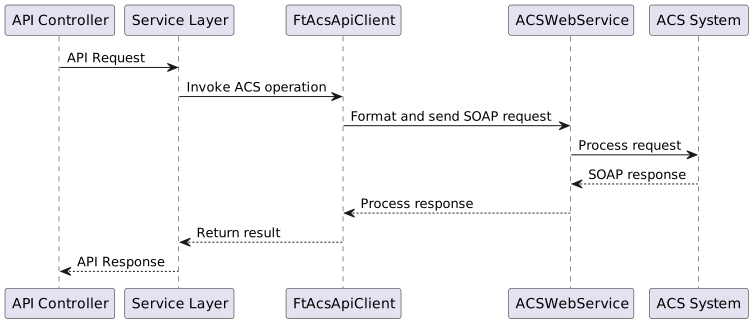
The ACS integration flow follows this general pattern:
9.1. ACS Client Configuration
The ACS client is configured in the application:
acs:
  url: ${ACS_URL}
  port: ${ACS_PORT}
  username: ${ACS_USERNAME}
  password: ${ACS_PASSWORD}
9.2. ACS Integration Endpoints
The application communicates with the Auto Configuration Server (ACS) system through SOAP API calls to manage and provision devices.
The integration is implemented via the FtAcsApiClient class which encapsulates all ACS-related operations.
9.3. Device Management Endpoints
| Operation | Method | Description |
|---|---|---|
Create Device |
|
Creates a new device in the ACS with specified manufacturer, model, OUI, protocol type, and serial number |
Create Non-TR Device |
|
Creates a non-TR-069 compliant device with custom configuration URL, login, and password |
Clear Account Info |
|
Clears the account information associated with a specified device serial number |
Update User Info |
|
Updates detailed user information including custom fields, login credentials, geographic data, and contact details |
Add Device To Blacklist |
|
Adds devices to a blacklist based on serial numbers, manufacturer, and model |
Delete Device From Blacklist |
|
Removes devices from a blacklist based on serial numbers, manufacturer, and model |
9.4. Device Configuration Endpoints
| Operation | Method | Description |
|---|---|---|
Set Device Parameters |
|
Sets or updates parameter values on devices with options for prioritization, grouping, and provisioning |
Set Parameters Without Task |
|
Sets device parameters without creating a task for immediate application |
Get Parameter Data |
|
Retrieves parameter data from devices with options to specify which aspects to fetch (names, values, attributes) |
Add CPE Object |
|
Creates a new object in the device’s data model with specified parameters |
Delete CPE Object |
|
Removes an object from the device’s data model |
9.5. Device Operations Endpoints
| Operation | Method | Description |
|---|---|---|
Reboot CPE |
|
Issues a reboot command to devices with options for prioritization and pushing |
Reset CPE |
|
Issues a factory reset command to devices |
Reprovision CPE |
|
Triggers reprovisioning of devices with options for customizing what aspects to reprovision |
Invoke RPC Method |
|
Invokes a custom RPC method on devices with specified content |
Invoke RPC Without Task |
|
Invokes a custom RPC method without creating a task for immediate execution |
Invoke Method |
|
Invokes a system-defined method on devices with parameter values |
Push Device |
|
Initiates a connection request to a device with specified timeout |
9.6. File Management Endpoints
| Operation | Method | Description |
|---|---|---|
Download Files |
|
Initiates file downloads to devices with options for authentication, delivery method, and post-download actions |
Upload Files |
|
Initiates file uploads from devices to a specified URL |
Backup |
|
Creates a device backup and uploads it to a specified location |
Restore |
|
Downloads and applies a backup to restore device configuration |
9.7. Group Update Endpoints
Group Update orchestrates the same set of tasks across many devices grouped by manufacturer/model and selected by All, an existing Condition filter view, or Individual serial numbers. The endpoints are documented in detail (request/response fields, behavior, errors and examples) on a dedicated page: Group Update API.
| Operation | Path | Description |
|---|---|---|
|
Create a new group update campaign |
|
|
Delete an existing group update campaign |
|
|
Create a device filter condition for group updates |
|
|
Delete a device filter condition |
|
|
List all group update tasks |
|
|
List predefined conditions |
|
|
Retrieve details of a specific group update |
|
|
Retrieve details of a specific condition |
|
|
Start execution of a group update |
|
|
Pause an active group update |
|
|
Stop a group update completely |
9.8. Diagnostics Endpoints
| Operation | Method | Description |
|---|---|---|
Create Diagnostic |
|
Create a diagnostic session with input parameters and output parameter names to collect |
9.9. Error Handling
ACS operations are wrapped in error handling that transforms exceptions into consistent API error responses with appropriate codes:
-
Success operations return transaction IDs where applicable
-
Errors are logged and wrapped in
FtApiExceptionwith appropriate error codes -
Connection issues to ACS result in
NO_ACSerror codes