Provision Portal Deployment (API + UI)
1. Overview
This deployment runs both Provision Portal services on a single host using Docker Compose:
-
Provision API (Spring Boot) — backend REST/SOAP API
-
Provision Portal UI (Angular on Nginx) — web interface
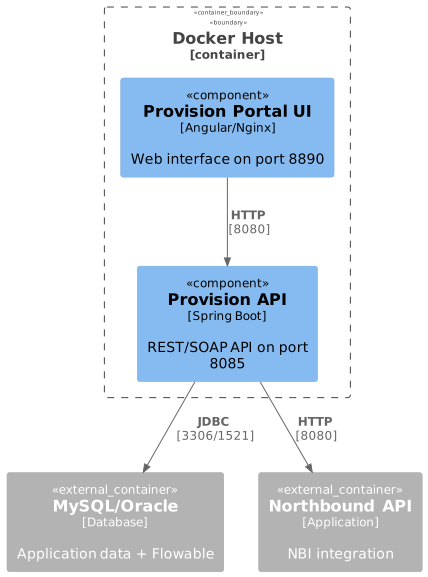
3. Prerequisites
4. Deployment Steps
4.1. 1. Prepare Environment File
The docker/ directory contains pre-configured environment templates.
Choose the appropriate file based on your database:
- MySQL
-
cd docker cp .env.mysql .env - Oracle
-
cd docker
cp .env.oracle .env
4.2. 2. Configure Host Variables
Edit .env and replace placeholder values with actual hostnames or IP addresses:
# Required replacements:
~MYSQL_HOST~       → MySQL server (e.g., 192.168.1.80)
~ORACLE_HOST~      → Oracle server (for Oracle deployment)
~NORTHBOUND_HOST~  → Northbound API server (e.g., 192.168.1.60)
Example:
DB_HOST=192.168.1.80
MYSQL_HOST=192.168.1.80
FLOWABLE_MYSQL_HOST=192.168.1.80
NORTHBOUND_API_URL=http://192.168.1.60:8080/iot-webservice5. Environment Variables
5.1. Common Variables
| Variable | Description | Default | Required |
|---|---|---|---|
|
Base directory for persistent data and configurations |
|
Yes |
|
Timezone for all services |
|
Yes |
|
Spring Boot profile: |
|
Yes |
|
Database server timezone (used in MySQL JDBC URL |
|
No |
5.2. Database Configuration
- MySQL
-
Variable Description Default MYSQL_HOSTMySQL server address
-
MYSQL_PORTMySQL port
3306MYSQL_SCHEMASchema name
ftacsMYSQL_USERMySQL username
ftacsMYSQL_PASSWORDMySQL password
ftacs - Oracle
-
Variable Description Default ORACLE_HOSTOracle server address
-
ORACLE_PORTOracle port
1521ORACLE_SERVICEOracle service name
XEPDB1ORACLE_USEROracle username
ftacsORACLE_PASSWORDOracle password
ftacs
5.3. Flowable Database Configuration
- MySQL
-
Variable Description Default FLOWABLE_MYSQL_HOSTFlowable MySQL host
Same as
MYSQL_HOSTFLOWABLE_MYSQL_PORTFlowable MySQL port
3306FLOWABLE_MYSQL_SCHEMAFlowable schema name
flowableFLOWABLE_MYSQL_USERFlowable MySQL username
flowableFLOWABLE_MYSQL_PASSWORDFlowable MySQL password
flowable - Oracle
-
Variable Description Default FLOWABLE_ORACLE_HOSTFlowable Oracle host
Same as
ORACLE_HOSTFLOWABLE_ORACLE_PORTFlowable Oracle port
1521FLOWABLE_ORACLE_SERVICEFlowable Oracle service
XEPDB1FLOWABLE_ORACLE_USERFlowable Oracle username
flowableFLOWABLE_ORACLE_PASSWORDFlowable Oracle password
flowable
5.4. External Dependencies
| Variable | Description | Default | Required |
|---|---|---|---|
|
Northbound API base URL |
|
Yes |
|
Provisioning operation timeout in seconds |
|
No |
|
Extra delay (ms) after transaction response before accepting the result. Allows ACS to finalize task statuses (e.g. late FailedCount). Default is 1000 ms; increase this value under heavy ACS load |
|
No |
5.5. Provision API Internal Configuration
| Variable | Description | Default | Required |
|---|---|---|---|
|
Path to XML configuration files inside the container |
|
Yes |
|
Path to additional configuration files inside the container |
|
Yes |
These paths must match the directory structure inside the mounted volume (provision-api-conf). See Data Persistence for volume layout.
|
5.6. Logging
| Variable | Description | Default | Required |
|---|---|---|---|
|
Log level for the application package ( |
|
No |
5.7. Service Port Configuration
| Variable | Description | Default | Required |
|---|---|---|---|
|
Provision API HTTP port on host |
|
Yes |
|
JVM memory settings for Provision API |
|
No |
|
Provision Portal UI HTTP port on host |
|
Yes |
|
Provision Portal UI HTTPS port on host |
|
No |
6. Service Access
After successful deployment, access services at:
| Service | URL | Description |
|---|---|---|
Provision Portal UI |
Web interface |
|
Provision API (SOAP) |
SOAP API WSDL |
|
Provision API (Health) |
Health check endpoint |
7. Exposed Ports
| Port | Service | Protocol | Configurable Via |
|---|---|---|---|
8890 |
Provision Portal UI (Nginx) |
HTTP |
|
8893 |
Provision Portal UI (Nginx) |
HTTPS |
|
8085 |
Provision API (Spring Boot) |
HTTP |
|
| Debug port 5005 is not exposed by default. See Remote Debugging for details. |
To verify ports are listening:
netstat -tlnp | grep -E '8890|8893|8085'
# or
ss -tlnp | grep -E '8890|8893|8085'
8. Service Startup Order
Services start in the following order with health checks:
-
Provision API — REST/SOAP backend (waits for database availability)
-
Provision Portal UI — Web interface (waits for Provision API to become healthy)
9. Data Persistence
Persistent data is stored in the following locations (assuming DATA_FOLDER=/usr/local):
| Service | Path | Content |
|---|---|---|
Provision API Config |
|
Spring Boot configs, XML configs (must be pre-configured) |
Provision API Logs |
|
Application logs |
SSL Certificates |
|
SSL certificates for Nginx |
Portal Nginx Logs |
|
Nginx access and error logs |
10. Remote Debugging
By default, JDWP remote debugging is disabled to prevent unnecessary CPU usage and security risks from external port scanning.
To enable debugging, use compose.debug.yml as an override:
cd docker
docker compose -f compose.yml -f compose.debug.yml up -d
This exposes JDWP on 127.0.0.1:5005 (localhost only) and adds the debug agent to JVM options.
| Variable | Description | Default |
|---|---|---|
|
Debug port on host (localhost only) |
|
| Never expose port 5005 to the public network. External scanners will continuously hit the JDWP port, causing high CPU usage and potential security vulnerabilities. |
11. Troubleshooting
11.1. Check Service Logs
# All services
docker compose logs -f

# Specific service
docker compose logs -f provision-api
docker compose logs -f provision-portal
11.2. Common Issues
11.2.1. Services Not Starting
Check if all external dependencies are accessible:
# Test database connection
telnet <DB_HOST> 3306    # MySQL
telnet <DB_HOST> 1521    # Oracle

# Test Northbound API
curl http://<NORTHBOUND_HOST>:8080/iot-webservice12. Maintenance
12.1. Update Services
Pull latest images and restart:
# Pull latest images
docker compose pull

# Restart with new images
docker compose up -d