AI Test Agent
The AI Test Agent (in the UI: FT AI Test Agent, internally test-runner) is an autonomous QA platform that turns manual TestRail cases into executable, end-to-end regression tests for the Friendly Technologies stack — without anyone writing test code.
|
New here? A few clicks to your first run:
If you don’t see your TestRail case yet, hop into Editor → the ⋯ menu at the top of the case list → TestRail… to pull it. The deep walkthrough is in User Guide; multi-environment routing is described in Multi-Stand Gateway. |
Each imported case is parsed by the Smart Converter into a deterministic YAML
spec (emulator setup + UI steps + expected widget values), then executed against
the live ACS, TR-069 emulator and portals. The agent drives a real Chromium via
Playwright MCP, applies CPE parameters through mcp-tr-emul, and verifies every
step — programmatically when the claim can be measured, and with an LLM
fallback when it cannot. Every verdict records who reached it, and an LLM
verdict that quotes nothing from the captured page is reported as
inconclusive rather than as a pass — see
Reading a Verdict. Results come with full
traces, a screenshot of the first failing step and a live noVNC view of the
browser session.
Powered by Claude Code CLI (Opus by default) for converter enrichment and
interact-step reasoning, and by Playwright + MCP for deterministic browser
control, the agent replaces brittle hand-written Selenium suites with
self-maintaining tests that stay in sync with TestRail.
What It Does
| Capability | Description |
|---|---|
TestRail import |
Pulls cases by project / suite / section or by case-ID, downloads attached TR-181 trees and converts the plain-text steps + preconditions into a deterministic YAML test case (see Importing Tests). |
Smart Converter |
Three-stage pipeline: regex-based step extraction → LLM enrichment → Score
Verification (Python port of backend KPI math). Generates |
Test execution |
Runs YAML cases against the live emulator + ACS + portal. A step is one of
23 types: the deterministic nav action (login, sidebar click, tab switch,
widget open — around a hundred distinct actions), the interact action handed
to Claude over a snapshot-action loop, and twenty-one typed executors —
emulator, ACS task, DB query, log check and the growing |
Protocols |
TR-181 / TR-098 devices run on the TR-069 emulator through |
Pre-flight orchestration |
Sets emulator parameters via MCP, invokes ACS Inform, creates monitoring rules, runs interference / IPPing / Download diagnostics on the management backend, and seeds the ClickHouse interference dashboard before the test starts. |
Live observability |
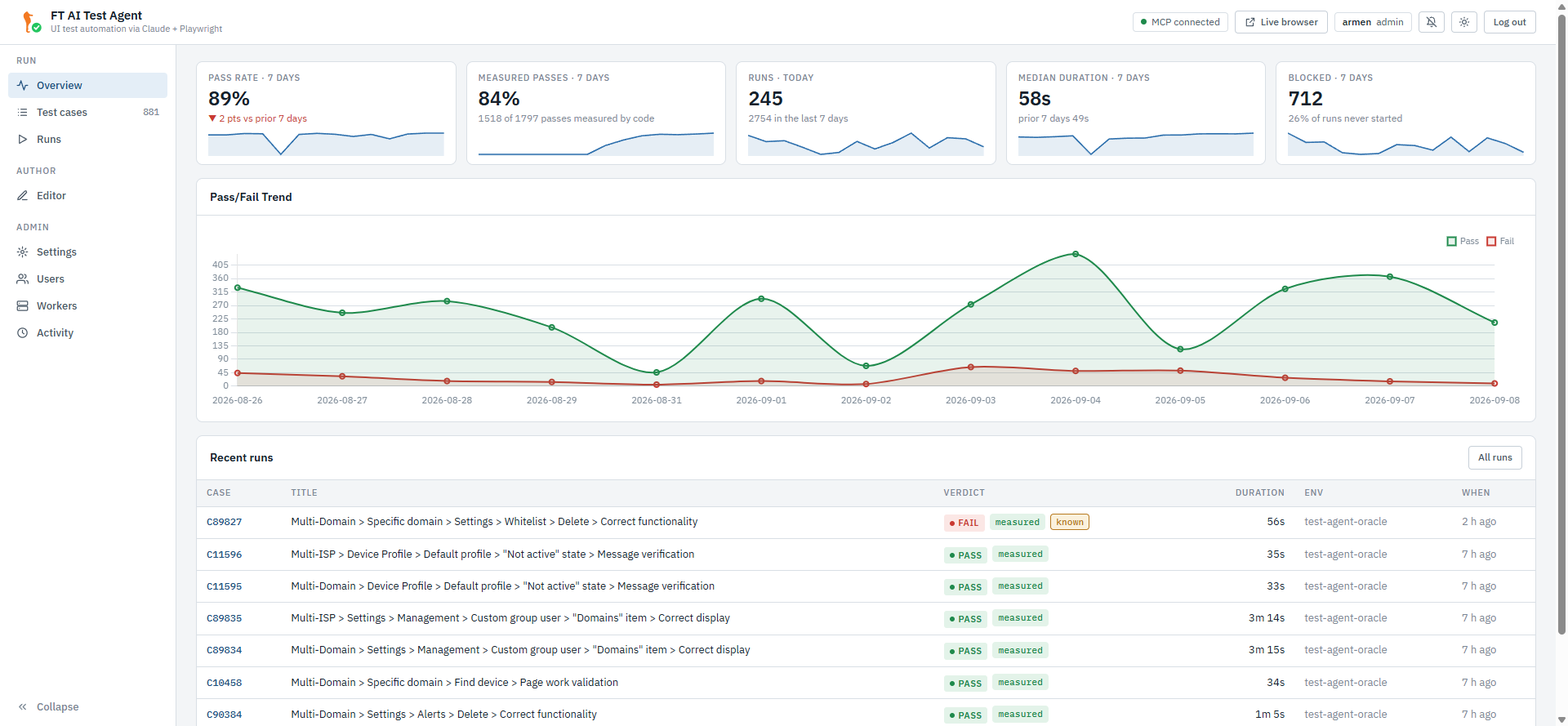
Web UI with an Overview (pass rate, measured pass rate, median duration, blocked share), a live step list and MCP call log, failure screenshots, and an embedded noVNC viewer of the actual Chromium running inside the agent container. A wave in flight is visible to every account, so nobody redeploys a stand out from under a colleague’s batch. |
Multi-environment & roles |
Pick the target stand / environment per run from the environment dropdown that opens the run bar on Test cases — no need to rewrite the Settings URLs to retarget. Access is role-based: admin (full control), editor (author + run), viewer (read-only). See Multi-Stand Gateway and Accounts & Roles. |
Who It Is For
-
QA engineers — import tests, run regression batches, debug failures.
-
Test architects — author new YAML cases in the built-in Editor without writing code.
-
Backend developers — reproduce dashboard score regressions deterministically.
Where to Start
-
Read the User Guide for an end-to-end walkthrough — opening the UI, importing your first case, running it, and inspecting results.
-
Editor Guide explains every field of a YAML test case as exposed by the in-browser editor — including emulator setup, phases and step types.
-
Architecture is the engineer’s view: components, MCP wiring and the converter pipeline.
Production Endpoint
Web UI |
http://ai.friendly-tech.com:8083/ — the gateway; log in first
(bootstrap |
Live view |
The Live browser button in the UI — gateway-proxied and owner-gated (you must own the active run on that stand; the old direct noVNC host port has been removed). |
REST API |
http://ai.friendly-tech.com:8083/api/…; — Bearer token from login. |
Contents
-
Installation & Deployment — deploying the runner, the gateway and their MCP sidecars.
-
User Guide — workflows and walkthroughs.
-
Editor Guide — every field, every step type.
-
Running Tests — Overview / Test cases / Runs, verdicts and batches.
-
Importing Tests — TestRail and XML flows.
-
Multi-Stand Gateway — environments, env-per-run, workers.
-
Accounts & Roles — login, admin / editor / viewer.
-
Settings — environment defaults, MCP, TestRail, ClickHouse.
-
Architecture — technical overview.
-
Changelog — release history and the external component versions.