Test Management: Trash, History, Attachments & Run Reports
Projects and sections say where a case belongs. This page covers what happens to a case and to a run over their lifetime: how a delete becomes recoverable, who changed what and when, how a case is copied, renamed in bulk, carried out as XML and back, and how a finished wave gains a name, comments, defect links and a spreadsheet a QA lead can read.
|
At a glance
|
Trash and Restore
Deleting a case — Delete in the bulk bar of Test cases,
Delete in the Editor’s More menu, or DELETE /api/tests/{filename} —
moves the YAML into tests/cases/.trash/ instead of unlinking it. A sidecar
<filename>.meta.json records test_id, title, deleted_by, deleted_at
and an optional reason, and the event is written to the case’s history as
deleted with the account that did it.
The case list only globs *.yaml at the top level, so a trashed case leaves the
UI immediately while staying whole on disk.
Trash (N) in the Library menu of the Test cases header switches the list to the trashed rows — Case | Title | Deleted by | When | Reason — each offering Restore and Purge; the view’s own header has Refresh and, for admins, Empty trash. The menu item is offered to every account: the restore and purge buttons inside the view carry their own gate, and hiding the way in would hide that a delete is undoable.
| Method | Path | Purpose |
|---|---|---|
DELETE |
|
Move one case to the trash. Answers |
DELETE |
|
Move a whole section to the trash, each case attributed individually. Answers |
GET |
|
Trashed cases, newest delete first: |
POST |
|
Move the case back. 409 when a live case of that name already exists. |
DELETE |
|
Purge one trashed case for good, with its attachments and its whole version history. |
DELETE |
|
Empty the trash (admin only) — same removal, for every case in it. |
A purge is the only step that removes anything permanently, and it removes
everything the case had: the YAML, its sidecar, .attachments/<stem>/,
.history/<filename>/, the case_history rows and the case_meta row that
recorded who created and last edited it. That completeness is the point — a case
later created under the same filename starts its history at version 1 rather
than inheriting the numbering of the case that is gone.
Each removal is defended separately and none of them is fatal: a directory the name validator will not vouch for is left alone and logged, and a file the OS refuses to delete is logged rather than raised — a purge that half-succeeded is reported, never a 500 over a case that is already gone.
|
What a restore does and does not do
A restore puts the file back under its original name and logs Re-import ( |
Duplicating a Case
Copy on a case row of Test cases (it appears on hover, beside the pencil)
and Duplicate in the Editor’s More menu both post
POST /api/tests/{filename}/duplicate. The body takes an optional
{id?, title?}; neither button sends one, so from the UI you always get the
generated pair below. A copy is the original verbatim except for three things:
-
the id —
<id>-copy, then-copy2,-copy3… until no case in the corpus carries it (ids are checked across all cases, not just filenames); -
the title —
<title> (copy); -
testrail_runs, which is dropped. Run membership belongs to TestRail: the copy is a new case, not a second answer for the same run.
Attachments are copied with it, into the new case’s own directory. The new file
opens its history with a created entry whose change line reads
duplicated from <file>. An id or a filename that already exists answers
409, and the filename the new id would produce is validated before it is
ever joined to the corpus directory.
Bulk Update (Find / Replace)
Tick rows on Test cases and choose Find / replace… from the bulk bar.
The modal previews every before/after in a table before anything is written:
Preview runs the call with dry_run (its default) and only then does
Apply light up, which repeats the call with dry_run: false behind a
confirmation naming the field and the number of cases. dry_run defaults to
true on the endpoint too, so the preview is the default and the write is the
deliberate second step.
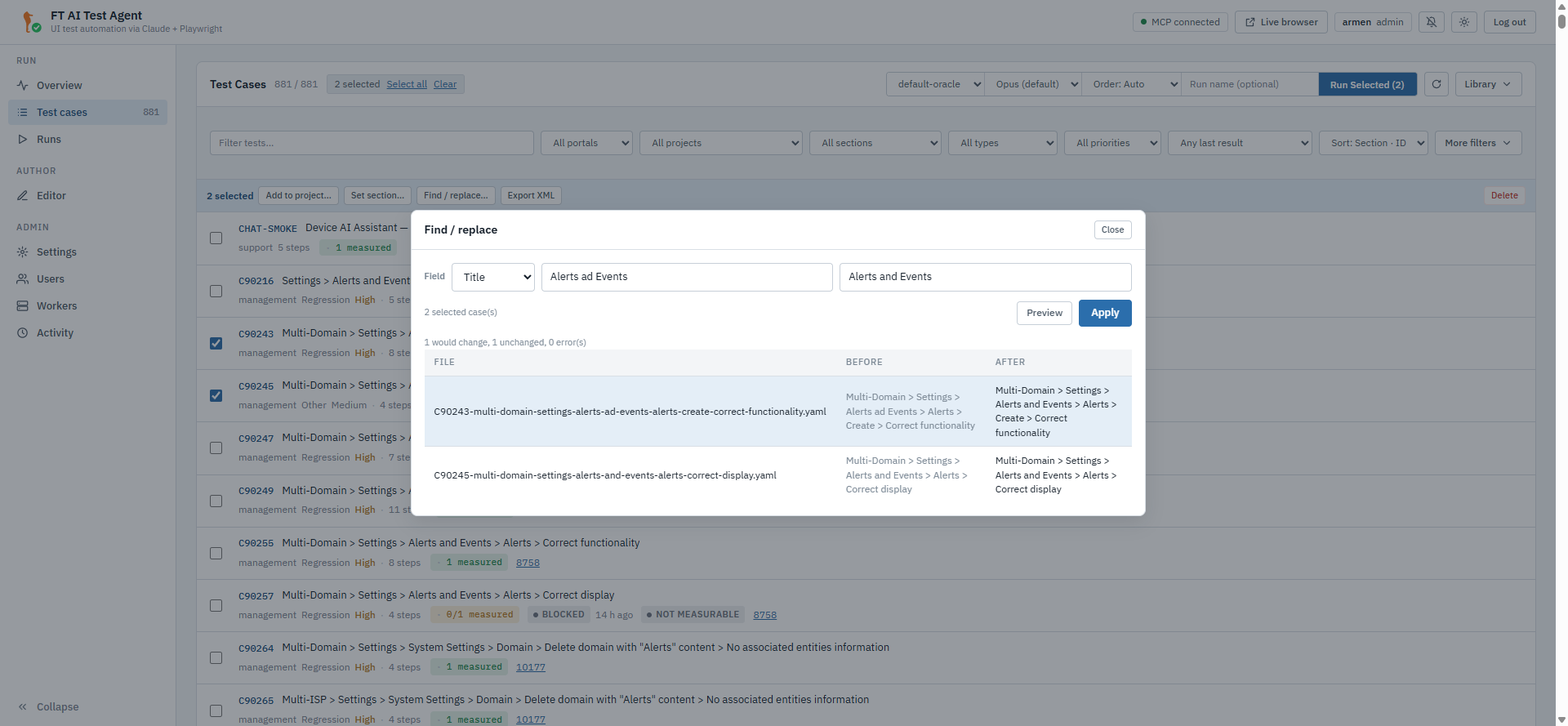
The modal only ever sends mode: replace. The other mode has its own button:
Set section… in the same bar asks for one value and writes it onto every
ticked case (mode: set, dry_run: false) — there is nothing to preview when
the "after" is the value you just typed.
POST /api/tests/bulk-update:
{ "files": ["C1-a.yaml", "C2-b.yaml"],
  "field": "title",
  "mode": "replace",
  "find": "OIT ACS", "replace": "CPE Admin",
"dry_run": true }| Key | Meaning |
|---|---|
|
One of |
|
|
|
For |
|
|
The answer is {changed, unchanged, errors, dry_run, items:[{file, before,
after, changed, error?}]}; unchanged counts the files that were read and left
alone, while a file that could not be read at all is an error, not a decision
to skip it. Each written file records an edited history entry whose change
line names the field, e.g. title: OIT ACS login → CPE Admin login, and an
empty value renders as (none). Setting project registers the project first
(the same ensure_project an import uses). The filename never changes — a
bulk rename edits titles, not files.
| The writer reloads and re-dumps the YAML with the serializer’s own dumper and no line wrapping, so untouched keys stay byte-identical. A one-field edit across hundreds of cases is a one-line diff in each of them. |
Change History and Versions
Editor Save and New, Upload, bulk update, duplicate, restore-from-trash, restore-from-version, XML import, TestRail import and re-import all go through one recorder, so the history is complete whichever of those buttons produced the change.
|
Four writes deliberately do not go through it, because they patch one
organisational field rather than edit a case: |
A version is a number plus a full snapshot of the file as it was written.
Snapshots live in tests/cases/.history/<filename>/v<N>.yaml.
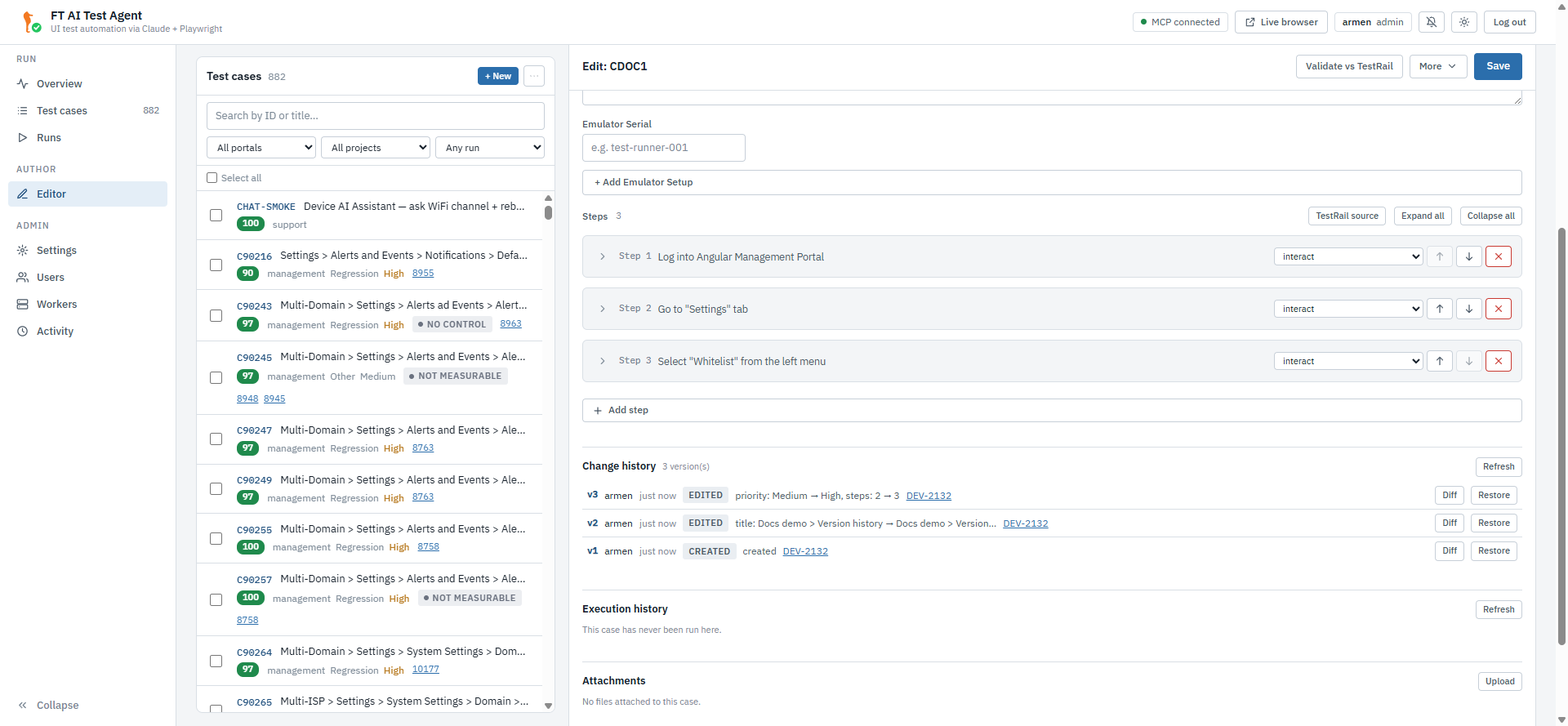
The Editor’s Change history panel lists, newest first: version, action, who, when, the changed fields, the case’s Jira reference (rendered as a link) and the portal build the change was made against. Two actions per row, both offered only while the row still has its snapshot:
-
Diff — a modal holding the unified diff of that snapshot against the file as it is now, and nothing else; when the two are identical it says so. The modal offers Restore this version too, so you can read before deciding. The snapshot’s own YAML is fetched with the diff but is not displayed.
-
Restore — writes the snapshot back as the current file, with a confirmation. The restore is itself a new version (
restored v3), so nothing is lost by walking back.
| Method | Path | Purpose |
|---|---|---|
GET |
|
|
GET |
|
|
POST |
|
Write that snapshot back as the current case and log |
The change lines are computed by comparing the two parsed cases, not the two
texts: title, section, project, portal, preconditions,
metadata.references / priority / type, emulator_setup, and the steps
(steps: 12 → 13, step 4 changed, at most ten step numbers listed). A file
that cannot be parsed on either side records content changed; two files that
differ in nothing the recorder tracks record no visible change.
Numbering is taken under a process-wide lock: two saves of one case arriving together cannot both claim the same version and overwrite each other’s snapshot. A snapshot that cannot be written is logged and the version row is still recorded — the row then carries no snapshot, and its Diff and Restore buttons are not offered.
Execution history per case
The Editor’s Execution history panel shows the case’s last 20 runs —
Verdict | When | Took | Env | Owner — from GET /api/runs?test_id=<id>,
which matches the case id exactly, so asking for C1 never answers with C10.
Clicking a row opens that run’s report. GET /api/tests/{filename} carries a
last_run summary ({id, status, date, elapsed_ms} or null) drawn from the
runs you can see; through the gateway it is the newest across every worker,
not just the one that served the case list.
Per-Case Attachments
A case can carry files: the device tree it was written against, a screenshot of
the expectation, an extract from a spec. They live in
tests/cases/.attachments/<filename stem>/, outside the glob the case list
walks — attaching a file never adds a field or a step to the YAML.
The Editor’s Attachments panel lists, uploads, downloads and deletes them,
showing each file’s size and uploader, and offers .xml files a one-click
Use as tree button that uploads the file through POST /api/trees/upload
and writes its name into the form’s tree_file. It needs an Emulator Setup
block to write into, and it only fills the form — Save the case to keep it.
| Method | Path | Purpose |
|---|---|---|
GET |
|
|
POST |
|
Upload (multipart |
GET |
|
Download one file. |
DELETE |
|
Remove one file. |
Limits: 20 MB per file; the stored name is the basename with anything outside
A-Za-z0-9.- folded to , so a browser sending a full Windows path and a
caller trying to climb out of the directory both end up with a plain name.
Uploading the same name again replaces the file and says so (replaced: true).
Viewers may read attachments; only admins and editors may upload or delete.
Trashing a case and restoring it leave the attachment directory exactly where it is — while the case sits in the trash the attachment routes answer 404 (there is no such case), and a restore makes them readable again. Purging the case is what removes the files.
Exporting and Importing Cases as XML
TestRail’s own XML cannot carry an executable step, so the agent exports its own
lossless format: one <test_case> element per case, with the whole YAML as the
text of its <yaml> element. The text is XML-escaped on the way out (&, <
and > become entities) and unescaped on the way back in, so the round trip is
byte-exact and no CDATA section is involved.
<ft-test-cases version="1" exported_at="2026-09-08T10:00:00Z" exported_by="armen">
<test_case file="C123-x.yaml" id="C123" title="…" portal="management"
section="TR" project="P">
<yaml>test_case:
id: C123
title: Devices > Correct display
steps: []
</yaml>
</test_case>
</ft-test-cases>-
Export XML in the bulk bar →
POST /api/tests/export-xml, body{files:[…]}; an empty list exports the whole corpus, and the button sends the ticked cases (falling back to everything the filters currently show). The answer is anapplication/xmlattachment namedtest-cases-<date>.xml. -
Import XML… in the Library menu of the Test cases header →
POST /api/tests/import-xml(multipartfile, formon_conflict=skip|overwriteandllm_mode). The on-conflict choice is asked in a dialog once the file has been picked, so it is answered about a known file rather than left standing in the toolbar: the dialog names the file and offers Skip existing cases (the default) or Overwrite existing cases, then Import or Cancel. Cancel has the focus when the dialog opens — it appears by itself after the file picker closes, and a stray Enter must not start an import.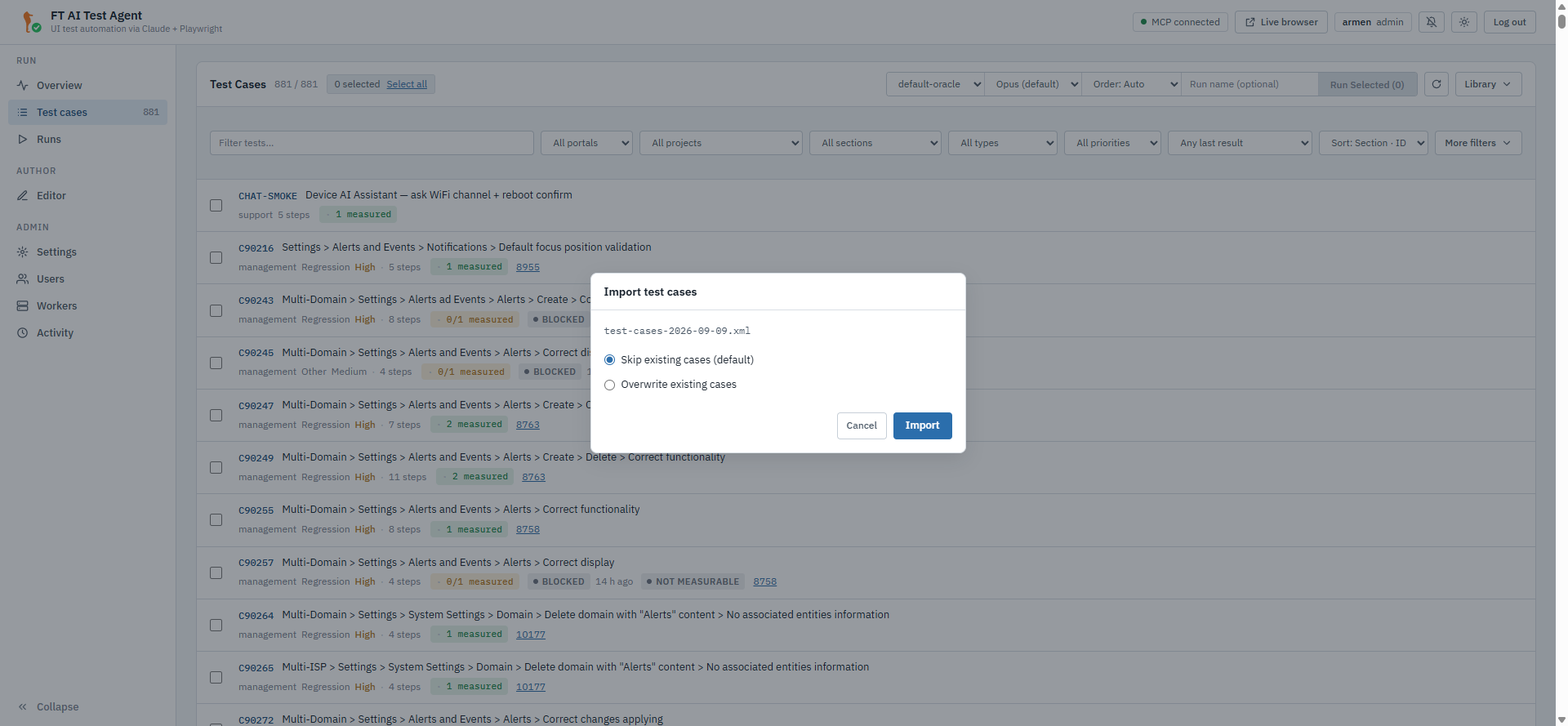
A document rooted at
ft-test-casesis written case by case, each recording animportedhistory entry. The answer is{imported, skipped, overwritten, errors, with_attachments}.Any other root is treated as a TestRail export, so the same item takes one. A TestRail export only names its cases. The worker reads each case from TestRail and converts it in the background import job. This path needs a working TestRail connection. The answer is the job,
{job_id, status, total}. The job converts the cases in the LLM mode of the dialog. The default is No LLM, cached only: the job skips a case without a cached conversion. A native document ignores the mode. The page shows the result when the job ends. A case missing from its TestRail suite is listed as an error. An export of a suite with another name than TestRail’s suite of the same id is refused.
Attachments are binary and stay out of the XML; the answer names the cases that had some so you know what did not travel. An import writes live files only — it never empties the trash, so an export/delete/import cycle leaves the trashed copies in place.
|
What an import refuses before it parses
A document larger than 64 MB answers 413 (the reader stops one byte past
the cap, so an oversized file never becomes an oversized object in memory), one
that is not UTF-8 answers 400, and any document type declaration answers
400 — anywhere in the text, not just in the prolog. Per case, a |
Search, Sort and Filters
The API
GET /api/tests takes, alongside the existing isp and run filters:
| Parameter | Meaning |
|---|---|
|
Case-insensitive substring over id, title, reference and section, all four joined into one haystack. |
|
Whole-field, case-insensitive matches. |
|
Substring over the case’s Jira reference — deliberately not a whole-field match, because one case can carry several references in one string. |
|
|
|
|
All of them combine, and with isp and run. id and section sort the case
id numerically, so C9 precedes C10; edited reads the DB-side stamp, which
is 0 for a case nobody has touched.
The UI
The SPA does not use those parameters. It fetches the corpus once
(GET /api/tests, no query string) and narrows and orders it in the browser, so
the header’s controls and the API’s parameters overlap without being the same
set — the API can sort by id and by edited, the header offers Last run
instead.
The filter row under the Test cases header carries the search box (which
matches on reference and section as well as on id and title), the All portals
/ All projects / All sections / All types / All priorities /
Any last result filters, the Sort select (Section · ID, Title, Type,
Priority, Reference, Last run), Reset filters — shown only while
something is set, and clearing all ten at once — and the More filters
toggle. Any ISP mode, Any run and Any claims sit behind that toggle, whose
label carries how many of the three are active, so a filter set there cannot
narrow the list unseen; the row opens by itself when one of them becomes active
and remembers its state between visits. None of the ten filters touches the selection: a
ticked case stays ticked when the next keystroke hides it, which is how a batch
of two is assembled by id (tick C11653, search for C91355, tick that one
too). What the filters hide is named instead of dropped — the pill carries an
M hidden chip next to N selected, and Run Selected (N) counts the whole
selection. Up to the 2026-09-08 build every filter pruned the selection, and the
second search emptied what the first had picked.
The header’s remaining controls are the run bar, an icon-only Refresh, and the Library menu — New test case (the Editor’s new-case form), New project (a project before any case lands in it), Import XML…, Sync runs… and Trash (N). See Running Tests → Test Cases for the header read row by row.
Naming, Commenting and Exporting a Run
Giving a batch an identity
The run bar of Test cases accepts an optional Run name.
POST /api/run/batch stores name (≤ 120 characters), project, section
and source_batch on the batch;
they are saved into batch-<id>.json and returned by
GET /api/run/batch/summary, /report and /reports, and forwarded by the
gateway. The default name is empty, and the UI then shows the batch id as it
always did.
source_batch is set by Duplicate run, which re-posts a finished report’s
own test_files as a new batch named Copy of <name or id>, carrying the same
project and section and pointing back at the report it came from. A duplicate
starts empty — it copies the case list, never the results.
Statistics
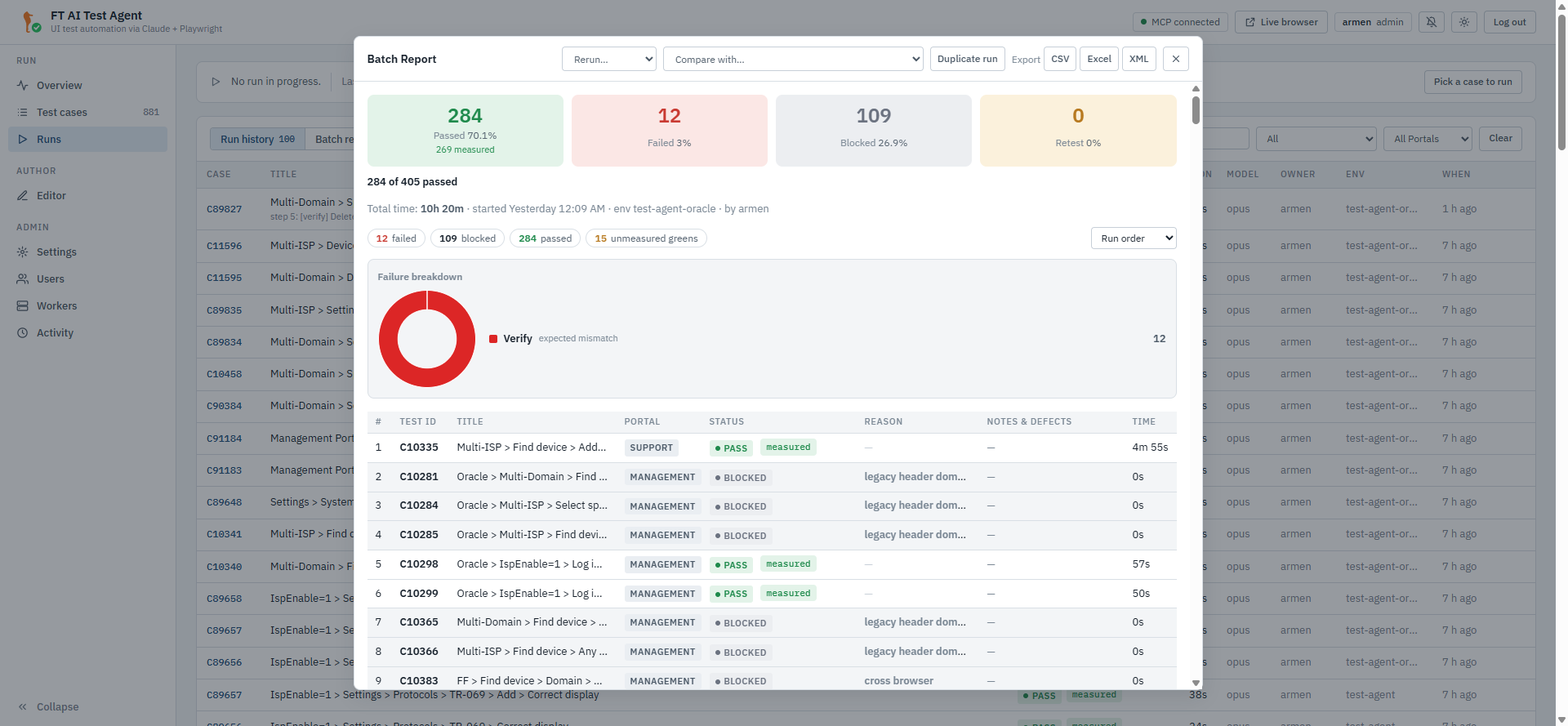
The batch report opens with the four TestRail-style tiles — Passed,
Failed, Blocked, Retest — each with its count and its share of the
whole wave, the Passed tile also carrying n measured underneath. Below them
the headline "284 of 405 passed", the n blocked and m skipped split when the
wave has any, and the verdict chips the table is cut by.
The buckets are computed on the server (_summarize_batch_results) so the
modal, the exports and a printed report cannot each round differently:
-
retest=inconclusive+error— the runs that say nothing yet and have to be repeated; -
the blocked share also counts
skippedrows (a precondition the stand could not meet), while the blocked count stays verdict-only; -
passed_of_totalis the pre-composed"<passed> of <total>"line.
A report saved before the server computed these is counted in the browser from
its own rows, reading skipped as blocked and error as retest exactly as the
server does — so an old report and a new one are read the same way.
| Each percentage is rounded to one decimal independently, so the four shares can add up to 99.9 or 100.1. The counts are the arithmetic of record; the percentages are a reading aid. |
Comments and defects
A wave is discussed, and the discussion belongs with the report rather than in chat. The report modal has a Comments panel at its foot for the batch, and every result row carries a Notes & defects cell edited in place — a pencil opens a Comment and a Defects field, each capped at 2000 characters. Defects are free text of Jira keys, rendered as links by the same helper the case reference uses.
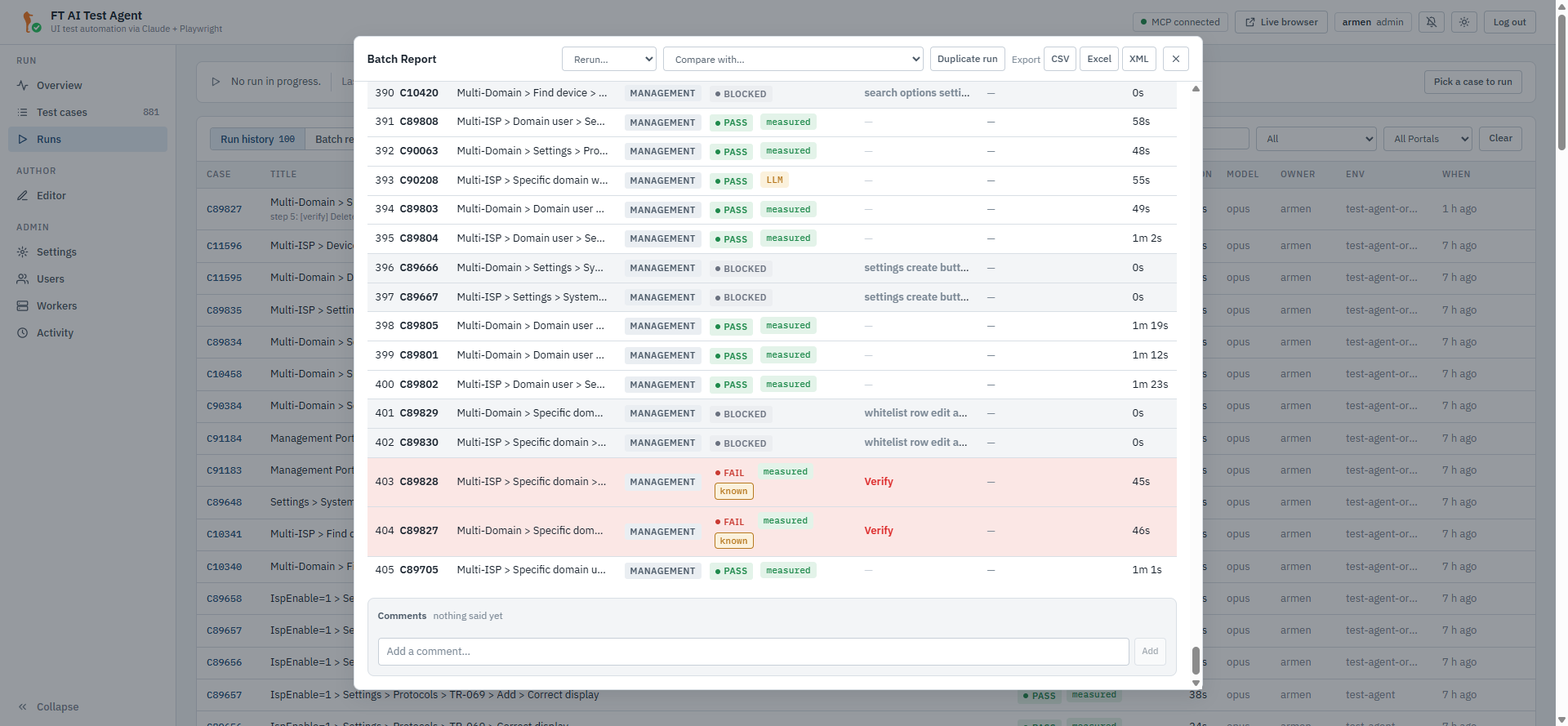
| Method | Path | Purpose |
|---|---|---|
GET |
|
The batch’s comments. |
POST |
|
Add one. Body |
DELETE |
|
Remove one — author or admin. |
PATCH |
|
Set |
Every one of these is owner-scoped: a batch you do not own answers 404, not 403 — you are not told it exists. The row mirror is checked separately, so a row naming somebody else’s run updates the report and leaves that run alone.
Reading and exporting a report you own needs no more than a viewer account; writing on one — a comment, a defect key, an imported run — needs the write role, because a report is the artefact the morning review is held over. A saved report that cannot be read at all is treated as a missing one.
Export: CSV, Excel and XML
GET /api/run/batch/reports/{batch_id}/export?format=csv|xlsx|xml, reached from
the report modal’s Export menu — CSV, Excel, XML. All three are built
by the server, so they carry the columns of the printed report rather than the
rows the modal happens to be showing, and each downloads as
run-<batch_id>.<ext>.
The CSV and the workbook carry the same columns, in this order:
Title | Build | Case ID | Defects | Section | Status | Version | Expended time
then Verdict, Reason, Run ID and Retry of, and finally a summary block
with the counts, the percentages and the total time.
| Column | Where it comes from |
|---|---|
|
The row, stamped from the case when the run was created. |
|
The batch’s environment stamp — see Portal Build and Version. |
|
The row’s |
|
The QA-facing label (see the mapping below). |
|
The raw runner value, unmapped. |
|
|
| Verdict | Status |
|---|---|
|
Passed |
|
Failed |
|
Blocked |
|
Retest |
The XML export is the round-trip format: <ft-test-run> with the batch
attributes, a <summary/>, a <results> list of <result> elements (each
optionally carrying a <comment>) and a <comments> block.
POST /api/run/batch/reports/import-xml — Import XML in the header of the
Batch reports view — takes it back in as a new report owned by the
importer, status completed, with imported_from naming the original batch,
a fresh eight-hex id and the summary recomputed from the rows. Imported comments
keep their original author and go through the same validator a typed one does;
an empty one is dropped. Through the gateway the import lands on the primary
worker, since a report that has not run anywhere has no worker of its own yet.
The importer refuses a document over 20 MB, one whose root is not
<ft-test-run>, and any that declares a document type or an entity — the same
"billion laughs" guard the case import uses.
|
Excel and spreadsheet safety
A CSV cell starting with |
Editing a run in flight
PATCH /api/run/batch/{batch_id} body {add:[files], remove:[files]},
owner-scoped, accepted while the batch is running or paused — any other
status answers 409. Edit run exposes it with an add/remove case picker,
both on the batch report and on the Wave in progress card.
The loop consumes a live queue, so an added case is appended to what is still to
come and a removed one is dropped if it has not started. Removals are processed
before additions, so one call can swap a case out for another without the new
one being refused on a name that is about to leave. Nothing is all-or-nothing:
every file the batch cannot take comes back in rejected with its reason —
already started, not queued, not found, not a case name,
not batchable (a draft or an explore file) or already in batch — and the
rest is applied, so one stale name in a list of forty does not cost the other
thirty-nine. The answer is {added, removed, rejected, total}.
GET /api/run/batch is what the picker reads: it splits the wave into
started_files and queued_files, because only a queued case can still be
withdrawn. Through the gateway the PATCH fans out to every worker; the one
holding your batch answers, the rest 404 by ownership.
Portal Build and Version
Every batch stamps the portal it ran against, and the two values fill the
Build and Version columns of the export and the header of the report.
They come from POST {base_url}/iot-webservice/iotw/System/information with an
empty body — the call needs no token and answers e.g.
{"appVersion": "7.1.1 Build master_7.1.2.RC"}, which is split on " Build "
into portal_version (7.1.1) and portal_build (master_7.1.2.RC). A shape
that does not split reports the whole string as the version rather than dropping
what was known. The answer is cached for 10 minutes per base URL with a 3-second
timeout, and any failure caches an empty answer just as a success is cached, so
a stand that is down costs one connect attempt per TTL rather than one per run:
the stamp never delays or blocks a run.
The probe is skipped entirely when FT_PORTAL_VERSION_PROBE=0 — no unit test
may dial a stand. A case edit reads the cache and never dials, because three
of the four case-write endpoints are async, and a synchronous probe on the
event loop would stall every other request for as long as the portal took to
answer; an edit made on a server that has never run against the stand therefore
records no build rather than delaying the save to learn one.
|
A batch that ran before the stamp existed carries neither value, so the Build column of the batch report list is empty for it. It fills in from the first wave started after the stamp shipped.
|
Where the Data Lives
Nothing on this page adds a field to a case YAML or a step to a test. The side
data sits next to the corpus, in directories the *.yaml glob never sees:
| Location | Holds |
|---|---|
|
Deleted cases plus a |
|
One snapshot per version. The
version rows themselves (who, when, action, changes, reference, build) are in
the SQLite |
|
A case’s files, with a |
|
The batch report, including its name, project, section, comments and per-row comments/defects. |
The trash and the history snapshots are never purged
automatically — there is no retention job, and no route or button removes a
snapshot on its own. A case’s snapshots, its version rows and its case_meta
row go exactly once: when the case is purged from the trash, which takes its
attachments with them. Short of that, the only way to remove one is by hand on
the volume — so nothing disappears while you are not looking.
|
|
Which worker holds it
Everything on this page except the batch routes is proxied to the worker the
gateway resolves for you, and each worker keeps its own A batch report is different — it lives on the one worker that ran it, so the
gateway resolves the batch id to that worker and sends the comments, the row
annotations and the export there. The exception is |
See Also
-
Organizing Cases — projects, sections and the org fields a bulk update edits.
-
Editor Guide — the form the Change history, Execution history and Attachments panels sit beside.
-
Running Tests → Batch Runs — starting the wave these reports come from.
-
REST API — the one-line reference for every route named here.