Environments & the Gateway
The AI Test Agent is no longer a single container on :8083. That port is now a
gateway that authenticates every caller and routes each run onto a pool of
per-environment worker containers. This page explains the topology, what an
"environment" is, how you pick one per run, and the scheduling rules that keep
two runs from colliding on the same emulator.
|
At a glance
|
Why a Gateway
The old model was one test-runner container that you retargeted by editing all four base URLs in Settings before a run. That serialised everyone onto one emulator and one Chromium, and gave no way to run two environments at once.
The gateway (test-runner-gateway image) replaces that. It is the only
process users talk to. Behind it sit one or more workers — each an ordinary
test-runner container (plus its mcp-tr-emul and bbf-tree-mcp sidecars) that
is env-agnostic: it holds no fixed environment of its own. The gateway pushes
the chosen env’s settings onto a worker just before it starts the run.
Authentication lives entirely in the gateway. gateway_service/app.py runs an
auth middleware that rejects any request without a valid Bearer session token,
except the allowlist above and the /novnc/* asset prefix. The gateway then
forwards the caller’s identity to the worker as X-Forwarded-User /
X-Forwarded-Role headers, signed with the shared X-Gateway-Secret.
Topology
| Component | Role |
|---|---|
Gateway ( |
The only public port. Hosts the SPA, terminates auth, owns the central user /
stand / profile database ( |
Worker (test-runner container) |
Executes runs. Env-agnostic — the gateway materializes a profile’s settings
onto it per dispatch via |
Bundled emulator MCP sidecars ( |
Part of every worker stack. Env-agnostic: the runner passes the profile’s
|
Workers reach the gateway-forwarded headers as the source of truth for
who is running. A worker never sees a user password — only the signed identity
headers. The X-Gateway-Secret must match on both sides or the worker rejects
the forwarded identity.
|
Environment Profiles
An environment is a named JSON settings blob stored in the gateway’s
profiles table (name, settings_json, created_by, updated_at). The
settings shape is identical to the per-worker Settings form
(support / management / backend / emulator / ACS URLs, credentials, MCP URLs,
…) — but it lives centrally instead of on one container.
Manage profiles from the Settings tab, which is now an env-profile editor:
| Action | Effect |
|---|---|
Create / Save-as |
|
Export / Import |
Round-trips a profile’s JSON so envs can be copied between deployments. |
Delete |
|
Listing profiles (GET /api/gateway/profiles) is allowed for any
logged-in user so the environment dropdown can populate; create / read-full /
delete are admin-only.
|
Selecting an Env per Run
On the Test cases tab the environment dropdown is the first control of the
run bar; it reads — select env — until a profile is chosen and carries no
visible caption (screen readers announce it as "Environment"). Your choice is
remembered in localStorage, so it persists across reloads — see
running-tests.adoc#env-select.
When you start a run, the SPA calls POST /api/gateway/run (or
/api/gateway/run/batch) with {env, test_file|test_files, model?}. The
gateway then:
-
Picks a free worker from the enabled pool.
-
Materializes the env —
PUT /api/settingsonto that worker (as the gateway admin) with the profile’s settings. -
Starts the run on that worker as you (your forwarded identity), and records
run_id → workerso later reads / WebSocket progress route back to the same worker.
This replaces the old "edit all four Settings URLs to retarget" workflow — you no longer mutate a shared container to switch environments; you just choose a different env in the dropdown.
Scheduling Model
The scheduler (gateway_service/scheduler.py) enforces two independent
constraints.
Env-exclusive + emulator-mutex
A worker is "free" only when it is enabled, not already busy, and reports zero
active runs upstream. On top of that, exclusivity is keyed on the env’s
physical emulator (emulator_url), not its name:
-
Two different envs that point at the same emulator (e.g.
Default,qa65,kira2all ontr069-emulator.test-agent) share one device serial per case, so they are mutually exclusive — the second submit gets409"the emulator for env '…' is busy". -
Envs on distinct emulators (e.g.
kira3→qa11m) carry different mutex keys and run in parallel.
| Condition | Response |
|---|---|
Requested env’s emulator already has a run |
|
No enabled worker is free |
|
Keying the mutex on the emulator (not the env name) turns a silent
device-serial collision into a clean 409. If a profile’s emulator_url
lookup ever fails, the scheduler degrades to a per-env-name mutex rather than
breaking dispatch.
|
Per-account isolation
Runs, history, force-stop, and the live browser are scoped to the calling user.
The gateway fans these reads out to every enabled worker as the caller; the
worker endpoints are owner-scoped, so you only ever see your own runs. Admins
see all. The reads affected: GET /api/runs, GET /api/runs/active, the
GET /api/run/batch* family, POST /api/run/stop, and the noVNC live view
(POST /api/live/ticket + /novnc/{stand}/websockify?ticket=…, gated so you
may watch a worker’s browser only while you own the active run, or a running
batch, on it — checked when the ticket is issued, at connect and re-checked
while the view is open). The stream is opened with a one-time ticket, never the
session token: the ticket is bound to the account, role and worker, lives
60 s (GATEWAY_LIVE_TICKET_TTL, bounded to (0, 300]) and is spent by its first
use. Tickets are held
in the gateway’s memory (it runs a single process), so a gateway restart only
means clicking Live browser again. The noVNC asset passthrough forwards
neither the query string nor the Referer to the worker and serves every asset
with Referrer-Policy: no-referrer.
A run’s progress stream (WS /ws/run/{run_id}) opens the same way: before
every (re)connect the SPA asks POST /api/runs/{run_id}/ws-ticket for a
one-time ticket bound to the account, role and that run (same 60 s TTL, same
single use) and connects with ?ticket=…; the session token is no longer
accepted in that URL, since the server logs every WebSocket URL with its query
string. Tickets are scoped, so a live-view ticket never opens a run stream and
the reverse. Ownership is still enforced by the worker at connect, under the
ticket holder’s forwarded identity. A tab loaded before this change keeps
following its run by polling until it is reloaded.
Workers
Workers (stands) are managed from the Workers section of the sidebar (admin-only). The table is Name | Env (pinned) | Display | Base URL | noVNC URL | Status | Busy | Actions, and it refreshes itself every 10 seconds while open.
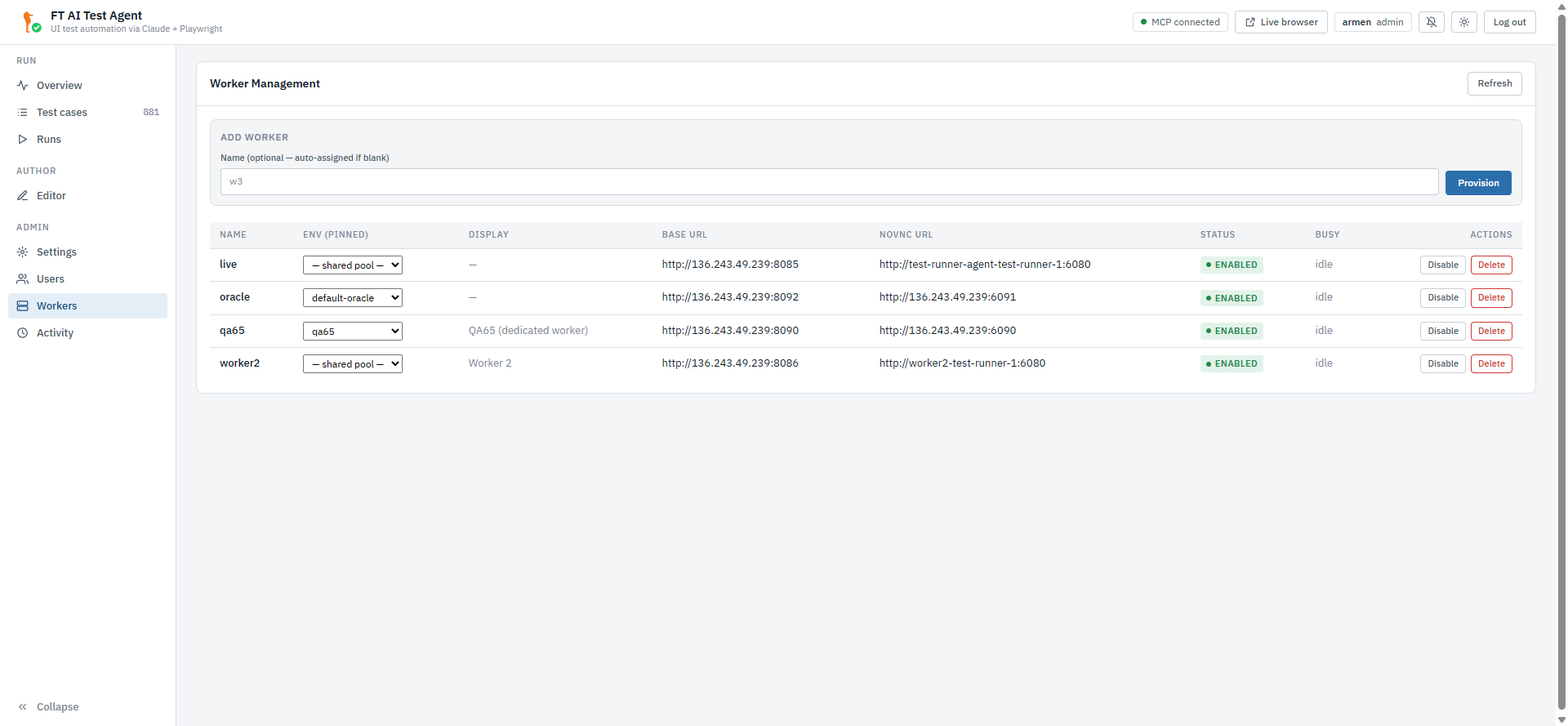
The noVNC URL column hides the address. Click Show address to see it. The direct address skips the gateway ticket check. To watch a run, use Live browser. Disable, Delete and a change of Env (pinned) ask for confirmation and name the worker.
Two columns are worth calling out:
-
Env (pinned) — pin a worker to one env and that env runs only there, while that worker serves only it. Unpinned workers form the shared pool. Set from the same dropdown, or over
PATCH /api/gateway/stands/{name}{profile}. -
Busy — what the worker is running right now, whoever owns it: the scheduler’s view, not the per-account one. It reads
batch|run <key> · <user>, and it is the answer to "is this stand free?".This is the one deliberate break in per-account isolation, and it exists for a reason: GET /api/runs/activeis owner-scoped, so it will report "nothing running" while a colleague’s wave holds the stand. Redeploying then cuts their run in half — its pre-flight has already made domains, users and device moves, and the post-flight that would clean them up never runs.
Actions available:
| Action | Endpoint |
|---|---|
Register a worker |
|
Enable / disable |
|
Add Worker (provision) |
|
Deregister / teardown |
|
Portainer Auto-Provisioning
gateway_service/provision.py can deploy stacks straight into Portainer. It is
best-effort and inert when Portainer credentials are unset — provisioning
simply does nothing and the add still succeeds. Saving an env profile never
provisions anything: the emulator MCP sidecars are bundled in every worker.
| Trigger | Provisions |
|---|---|
Add Worker |
A |
Provisioned stacks publish host ports the gateway then addresses by
base_url. Teardown (?teardown=true on stand delete) removes the matching
tr-worker-<name> Portainer stack; profile delete removes only the profile.
|
Invariants
Read these before changing the gateway or adding a worker:
-
GATEWAY_SECRETmust match across the gateway and every worker. It signs the forwarded-identity headers; a mismatch makes workers reject all proxied requests. -
Workers run
TRUST_GATEWAY=1. This disables their local login and makes them trustX-Forwarded-User/X-Forwarded-Rolefrom the gateway. A worker in this mode must never be exposed to users directly — it has no auth of its own. -
Per-stand persistent volumes keep each worker’s state isolated:
test-cases-<STAND>,run-reports-<STAND>,qa-notes-<STAND>, and/opt/mcp-shared-<STAND>(serial isolation). They survive redeploys. -
Shared Claude OAuth — the
${CLAUDE_CONFIG_DIR:-/root/.claude}volume is mounted read-write on each worker so a token refresh on one propagates to all.
Gateway Endpoints
The gateway-specific surface (everything else falls through to the catch-all proxy → primary worker). Full request/response detail in REST API.
| Endpoint | Purpose |
|---|---|
|
Session auth. Login returns a |
|
Env profile CRUD (a blank |
|
Worker (stand) registration, enable / disable, deregister. |
|
Auto-provision a new worker container. |
|
Schedule a single / batch run onto a free worker for the chosen |
|
Per-account fan-out reads across enabled workers. |
|
Live-view ticket and target resolution, owner-scoped stop, run-stream ticket and run progress stream, noVNC. |
See also: Settings (the env-profile editor and field reference), Running Tests (picking an env per run), and API Reference (gateway endpoint details).