QA Validation Notes
|
At a glance
|
The Notes tab is the team’s shared write-up of behavioural quirks, known backend bugs, and verify-time guidance for tests. A note written here is auto-injected at three points so the agent learns from the team without anyone editing prompts by hand:
-
The LLM verify prompt during a run, for every step whose
expectedtext is judged by Claude (not the deterministic verifier). -
The converter Stage 2 LLM prompt when a TestRail case is (re-)imported.
-
The test-runner Claude proactively, when the interact loop is stuck or sees a suspicious widget value, via the
search_qa_notesMCP tool.
If knowledge-mcp is unreachable, every injection point silently falls back
to its pre-notes behaviour — a missing note never breaks a run.
What Belongs in a Note
A note describes real-world behaviour the LLM would otherwise judge wrong:
-
known_bug — backend computes a value that differs from spec, and that difference is accepted on this environment (e.g. DSC AVERAGE(12) unreachable due to integer division).
-
warning — the value is correct but flaky / off-by-±10 across runs (e.g. Monitoring widget Health flap because of CWMP cache merge).
-
info — non-obvious convention the LLM should know about (e.g. the Network topology widget renders satellite-Wi-Fi clients via the legacy AccessPoint fallback path).
A note does not replace spec docs. Spec lives in ft_docs_v2 and is
already fetched by search_docs — notes layer team-authored deltas on top.
Scope — How a Note Reaches the Right Test
Each note carries a scope with up to four fields. The agent injects a note
into a test only if any scope field matches OR global=true:
| Field | Matches when… |
|---|---|
|
the running test’s |
|
a |
|
the test’s |
|
|
|
when |
Be narrow. A global=true note shows up on every verify and competes
with the real signal — prefer the most specific scope you can describe.
|
UI — Notes Tab
Open http://ai.friendly-tech.com:8083/#notes (or click Notes in the header).
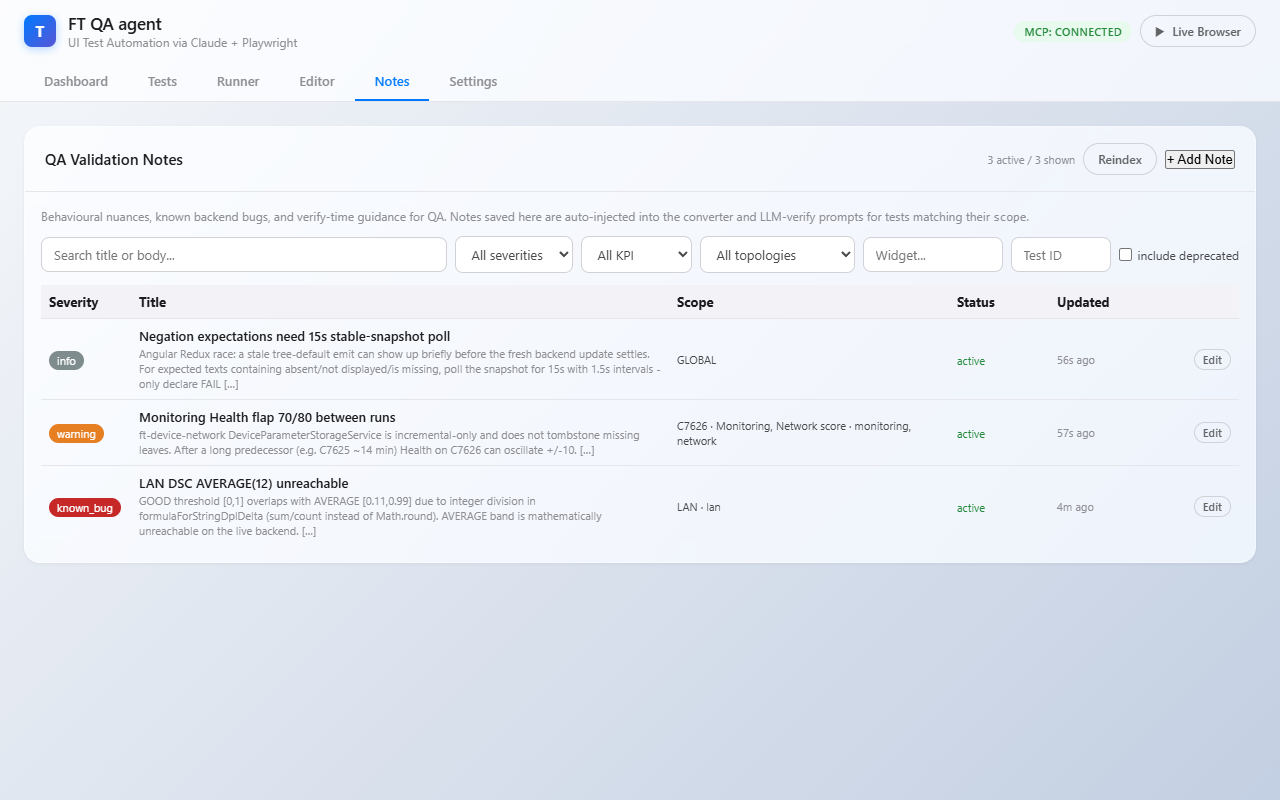
Toolbar
-
Search title or body… — substring filter over the in-memory list.
-
All severities / KPI / topologies — server-side
scope_*filter. -
Widget, Test ID — text filters that compare against the note’s scope fields (substring match).
-
include deprecated — by default a deprecated note is hidden; tick to show all.
-
Reindex — explicit "pull-and-reindex" trigger. See The Reindex Button.
-
+ Add Note — opens the editor modal.
List view
| Column | Meaning |
|---|---|
Severity |
Colour pill — |
Title |
Bold title + 240-char snippet of the body. |
Scope |
Compact label — |
Status |
|
Updated |
Relative time ( |
Edit |
Opens the editor modal in edit mode. |
Click a row anywhere to edit.
Editor modal
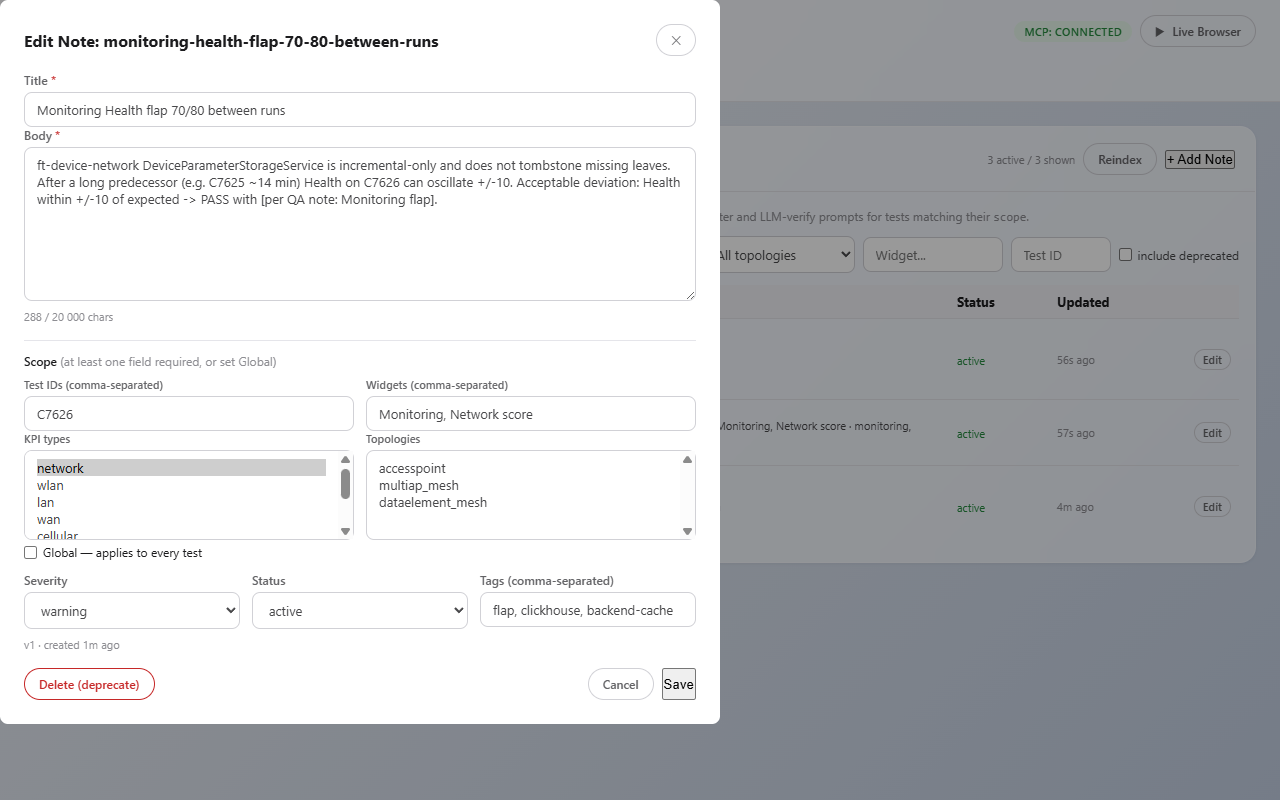
| Field | Notes |
|---|---|
Title* |
One-line summary. Shows up in the prompt header (e.g. "Health flap 70/80"). |
Body* |
Full description. Up to 20 000 chars. Markdown not rendered — kept plain so the LLM does not chase emphasis markers. |
Test IDs |
Comma-separated case IDs ( |
Widgets |
Comma-separated widget names ( |
KPI types |
Multi-select (Ctrl/Cmd-click for multiple). |
Topologies |
Multi-select. |
Global |
When ticked, scope fields above are ignored — the note applies to every test. |
Severity |
|
Status |
|
Tags |
Free-text comma-separated keywords for filtering ( |
Save → atomic file write to /data/qa-notes/<id>.yaml → webhook fires →
knowledge-mcp re-pulls, embeds and upserts into Qdrant. Visible in
search_qa_notes within ~3 seconds.
Delete (deprecate) is soft by default — the YAML stays on disk with
status=deprecated. Hard delete is available via the REST API only
(DELETE /api/notes/{id}?hard=true).
The Reindex Button
Every save fires a webhook that tells knowledge-mcp to re-pull. Reindex
is the safety net for when the webhook didn’t take effect:
-
knowledge-mcpwas down during a save — the YAML lives on the volume but is missing from the Qdrant index. -
You imported a batch of notes via
curl/ a migration script and want to push them all in one call instead of N webhooks. -
You changed
KNOWLEDGE_MCP_REST_URL/KNOWLEDGE_ADMIN_TOKENand want to validate the new wiring. -
You just want the summary — the response shows
added=X updated=Y unchanged=Z deleted=W errors=Eso you can see what the index thought of your YAMLs.
Day-to-day there is no need to press it — the webhook keeps everything in sync.
Pipeline
UI Save  ──► POST /api/notes
              │
              ├── atomic write /data/qa-notes/<id>.yaml
              │
              └── background webhook
                    │
                    └── POST knowledge-mcp:7030/admin/refresh-notes
                          │
                          └── QaNotesIndex.refresh()
                                ├── GET test-runner:8083/api/notes/raw
                                ├── (id, version, payload-hash) diff
                                ├── embed changed via embedding-service-v2
                                └── upsert / drop into Qdrant ft_qa_notes

Run / Reimport
   │
   ├── converter Stage 2          (when scope matches test_id / kpi / topo)
   │       └── _build_qa_notes_section()  ─► search_qa_notes ─► backend_ctx
   │
   ├── LLM verify (per nav segment)
   │       └── _fetch_qa_notes_block()    ─► search_qa_notes ─► prompt block
   │
   └── test-runner Claude (interact loop)
           └── mcp__knowledge__search_qa_notes   (proactive, when stuck)
Source of Truth
/data/qa-notes/<id>.yaml on the qa-notes named volume mounted into
test-runner-agent. The Qdrant collection ft_qa_notes is a derived
index — wipe it and Reindex rebuilds it from the YAML files.
The YAML layout matches what POST /api/notes accepts plus a few
auto-managed fields:
id: c7626-monitoring-flap
title: "Monitoring widget Health flap 70/80"
body: |
  ft-device-network DeviceParameterStorageService is incremental-only,
  so the Health value can flap by ±10 between runs when ClickHouse is
  not purged before BootStrap.
  Acceptable deviation when verifying C7626 Health: ±10 → PASS.
scope:
  test_ids: [C7626]
  widgets: [Monitoring, Network score]
  kpi_types: [monitoring, network]
  topologies: []
  global: false
severity: warning
status: active
tags: [flap, clickhouse, backend-cache]
version: 3
created_by: armen.malkhasian
created_at: 2026-05-17T10:00:00Z
updated_at: 2026-05-17T10:14:32Z
version is bumped on every PUT. PUT /api/notes/{id} accepts an
expected_version field for optimistic locking — pass the version you
read; the server returns 409 Conflict if it changed under you.
|
How a Note Appears in Prompts
Verify prompt (Phase 4)
The agent prepends a section to the LLM verify prompt before the "VERIFY each step" instruction block:
PRIOR QA NOTES (consider before declaring FAIL):
- [WARNING] Monitoring widget Health flap 70/80: ft-device-network...
These describe what REALLY happens on the live backend, written by QA.
If a note lists an acceptable deviation that matches the observed value,
mark the step PASS with a brief `[per QA note: <title>]` annotation...
The LLM is told to cite the note by title when it relaxes a verdict, so the report stays auditable.
Converter prompt (Phase 5)
Stage 2 LLM enrichment receives a section after the existing Spec / TR-181 context:
## QA Validation Notes (team-authored, prefer over priors)
[WARNING] Monitoring widget Health flap 70/80
ft-device-network DeviceParameterStorageService...
Bumping the converter cache version (_CONVERSION_CACHE_VERSION in
scripts/test_server.py) is what forces every cached YAML to be
re-converted with the latest notes context on the next reimport. The
operator does this when a note is significant enough that older YAMLs
should reflect it; day-to-day notes don’t require a bump.
Proactive interact loop (Phase 6)
mcpknowledgesearch_qa_notes is in the runner Claude’s allowed-tools
glob. The system prompt tells it to call the tool when:
-
the interact loop is stuck on the same step for >2 iterations;
-
a widget shows an unexpected value (Health=0, score=N/A, ±10 flap);
-
a negation expectation didn’t pass the first snapshot;
-
a dialog / dropdown behaves differently from the snapshot;
-
verify just failed and the observed value is "close" to the expected one.
REST API
See REST API → QA Validation Notes for the full endpoint reference. The summary:
| Method | Path | Purpose |
|---|---|---|
GET |
|
List with |
GET |
|
One full note. |
GET |
|
All notes incl. deprecated — internal pull path used by |
GET |
|
Severity / status / KPI / topology allowlists (drives UI dropdowns). |
POST |
|
Create. Auto-derives |
PUT |
|
Full replace; bump |
DELETE |
|
Soft-deprecate by default. |
POST |
|
Manual webhook trigger to |
Environment Variables
| Variable | Used by |
|---|---|
|
test-runner. Defaults to |
|
test-runner. Defaults to |
|
test-runner and knowledge-mcp. Must match on both — auths |
|
knowledge-mcp. Defaults to |
|
knowledge-mcp. Qdrant collection name. Defaults to |
Bootstrap on a Fresh Environment
If you stand up a new Qdrant cluster:
# Idempotent — creates the collection + 9 payload indexes
QDRANT_URL=http://your-qdrant:6333 python tmp/create_qa_notes_collection.py
The QaNotesIndex will also auto-create the collection on first refresh
(without payload indexes), so the script is optional but recommended for
production deployments — payload indexes are what make scope_* filters
fast.
Troubleshooting
| Symptom | Diagnosis |
|---|---|
Note saved but |
Press Reindex and read the summary — |
|
|
|
Tokens differ between test-runner and knowledge-mcp. Sync them. |
Reindex summary shows |
|
Note shows up in |
Scope mismatch. Either widen the scope (broader |
Old YAMLs were converted before a |
Reimport the affected cases. The converter only re-runs when the
idempotency cache says inputs changed. Toggle Force refresh in the
TestRail modal, or set |