Settings
The Settings tab is the admin-only, central environment-profile editor. An
environment (env) is a named settings blob — base URLs, credentials,
emulator/ACS targets, MCP services, ClickHouse, Platform DB, Log Server,
TestRail — stored centrally in the gateway profiles table (not in any
single container’s run-reports/settings.json). A run picks an env via the
Env: dropdown on the Tests tab; the gateway then materializes that env’s
settings onto a worker (PUT /api/settings as admin) immediately before
starting the run.
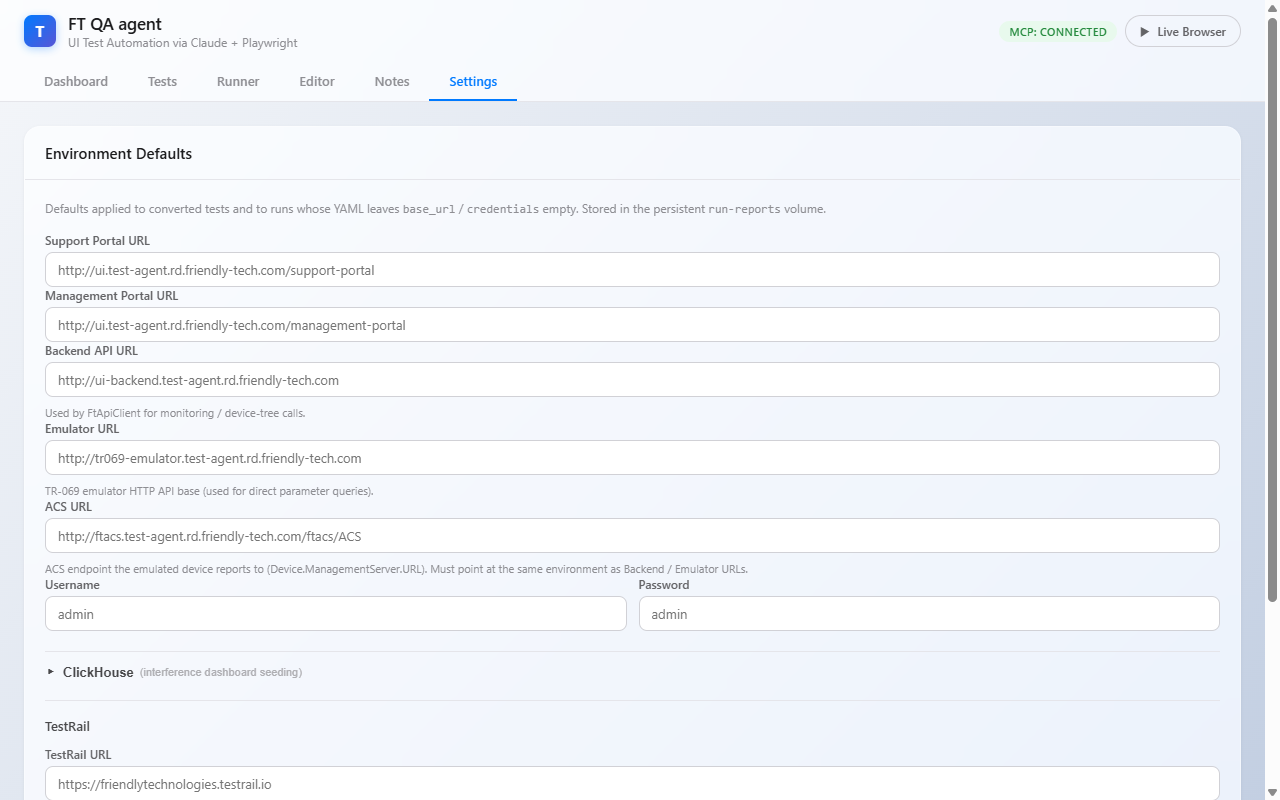
|
Non-admins cannot see this tab at all ( |
|
At a glance
|
A profile populates defaults — individual YAML cases still override
per-test via their own base_url / credentials / emulator_serial fields.
For the full env model, gateway routing, and stand binding see
Environments & the Gateway.
|
Environment Profiles
The profile bar at the top of the tab manages the central profile set. All
profile mutations are admin-only and persist in the gateway profiles table
(scripts/auth_db.py — name, settings_json, created_by, updated_at).
| Control | Behaviour |
|---|---|
Environment profile (dropdown) |
Lists every central profile ( |
Save |
Upserts the current form as the selected (or newly named) profile
( |
Delete |
Removes the selected profile ( |
Export all / Export selected |
Downloads a JSON backup — all profiles, or just the selected one — for versioning or transfer to another gateway. |
Import |
Uploads a previously exported JSON file and upserts the profiles it contains. |
A profile can be bound to a stand so that stand defaults to that env. Stand binding and worker provisioning are covered in Environments & the Gateway.
What Lives in an Env Profile
These are the core fields stored in each profile. Switching environments is a matter of selecting (or authoring) a profile with the right set — you no longer hand-edit four URLs on a shared container.
| Field | Notes |
|---|---|
Support Portal URL |
Where the agent navigates for tests with |
Management Portal URL |
Same for |
Backend UI URL |
|
Emulator URL |
TR-069 emulator HTTP API base for direct parameter queries
( |
Emulator MCP URL |
|
ACS URL |
The ACS endpoint the emulated device reports to (written to
|
ACS Username / Password |
Basic/Digest credentials for authenticated CWMP registration. Empty = no auth
(use the plain |
Username / Password |
Default portal credentials when a YAML leaves them blank. Default:
|
| Keep the portal, backend, emulator, and ACS hosts inside one environment within a single profile. A mixed profile sets parameters on one emulator and reads state from another. |
Platform DB
Drives the db_query step type (scripts/platform_db.py) — a state-read
against the platform’s primary relational DB (one of MySQL / Oracle).
| Field | Notes |
|---|---|
Platform DB Type |
|
Platform DB Host |
DB host. Default |
Platform DB Port |
Blank/invalid falls back to the engine default (MySQL 3306, Oracle 1521). Default |
Platform DB Name |
Schema name for MySQL; the service_name for Oracle thin-mode DSN ( |
Platform DB User / Password |
Connection credentials. |
Log Server
Drives the log_check step type (scripts/log_server.py) — an SSH login that
greps device/server logs for error patterns after a test runs. Stand-specific:
an empty host disables the feature.
| Field | Notes |
|---|---|
Log SSH Host |
SSH host. Empty = log checks disabled. |
Log SSH Port |
Default |
Log SSH User / Password |
SSH credentials. |
Log Dir |
Directory the log files live in. |
Log Error Pattern |
Regex / substring the check scans for. |
MCP Services
| Field | Used by |
|---|---|
BBF Tree MCP URL |
The Generate Tree button in the Editor (NL → XML tree) and the converter’s
Stage 2 LLM enrichment ( |
Qdrant MCP URL |
Direct Qdrant access for the converter’s |
Knowledge MCP URL |
Stateless retrieval over |
The TR-069 emulator MCP and the Playwright MCP are launched inside the worker container — no URL configuration needed.
ClickHouse
Optional block (collapsed by default — click the ▸ arrow to expand).
Used only when INTERFERENCE_DASHBOARD_SEED=true and a test has the
RUN_INTERFERENCE_DIAGNOSTICS UI precondition. The agent writes synthetic
points into ftacs_qoe_ui_data so the interference history widget renders
deterministic colours / counts.
| Field | Default |
|---|---|
ClickHouse URL |
|
Database |
|
User |
|
Password |
(redacted in GET responses) |
TestRail Credentials & Links
Mandatory before any TestRail-import / reimport flow works.
| Field | Notes |
|---|---|
TestRail URL |
|
TestRail Email |
Personal SSO email or team account. |
TestRail API Key |
Generated from TestRail user profile → API Keys. Redacted in GET responses. |
Auto-sync Interval (min) |
|
Jira Base URL ( |
Browse-URL prefix used to render a case’s Reference field as a clickable
link. Default |
The connection pill on the Tests tab and inside the TestRail modal reflects the current credential validity.
Secret Redaction
Secret fields are never returned verbatim over the Settings HTTP API — a GET
masks each non-empty secret as **. The redacted keys are password,
acs_password, clickhouse_password, platform_db_password,
log_ssh_password, nbi_password, and testrail_api_key.
When the UI re-submits a profile it round-trips the mask for any secret the user
did not change; the server swaps the mask back for the stored value on save, so
a save never overwrites a real secret with the mask. An empty secret stays
empty (so the UI can tell "unset" from "set"). Internal callers read the real
values directly via load_settings().
Saving
-
Save — upserts the form as the selected/named central profile (
POST /api/gateway/profiles). URLs are validated (must parse ashttp(s)://…). -
Reload / profile re-select — re-reads the profile from the gateway.
-
The status text next to the buttons shows the result (green = saved, red = validation error).
Settings take effect for new runs (the env is materialized onto the worker at run start) and new conversions. Already-running tests are not interrupted.
Environment Variable Overrides
For Docker Compose / Portainer deployments where a worker’s local
settings.json is the source of truth (e.g. the gateway is not materializing an
env), every field can be set via environment variables. Env vars take
precedence over settings.json at server startup; the UI shows the effective
value but persisting overwrites it on next save.
| Field | Env variable |
|---|---|
Support Portal URL |
|
Management Portal URL |
|
Backend UI URL |
|
Emulator URL |
|
Emulator MCP URL |
|
ACS URL |
|
ACS Username |
|
ACS Password |
|
Username |
|
Password |
|
BBF Tree MCP URL |
|
Qdrant MCP URL |
|
Knowledge MCP URL |
|
ClickHouse URL |
|
ClickHouse Database |
|
ClickHouse User |
|
ClickHouse Password |
|
Platform DB Type |
|
Platform DB Host |
|
Platform DB Port |
|
Platform DB Name |
|
Platform DB User |
|
Platform DB Password |
|
Log SSH Host |
|
Log SSH Port |
|
Log SSH User |
|
Log SSH Password |
|
Log Dir |
|
Log Error Pattern |
|
Jira Base URL |
|
TestRail URL |
|
TestRail Email |
|
TestRail API Key |
|
TestRail Auto-sync minutes |
|
QA Notes Pipeline (not exposed in the UI)
These are not editable from Settings — they configure the wiring between
test-runner-agent and knowledge-mcp (stack 12) and are set in the Portainer
stack env. See qa-notes.adoc#env.
| Variable | Stack | Purpose |
|---|---|---|
|
test-runner |
On-disk root for the QA Notes YAMLs. Defaults to |
|
test-runner |
Webhook target. Defaults to |
|
both |
Shared secret authenticating |
|
knowledge-mcp |
Pull endpoint on the test-runner — defaults to |
|
knowledge-mcp |
Qdrant collection name. Defaults to |
| For one-off retargeting prefer authoring or editing a profile in the UI; the env-var path is for deploy-time configuration that should track with the container image. |