Backhaul Information Detection
Overview
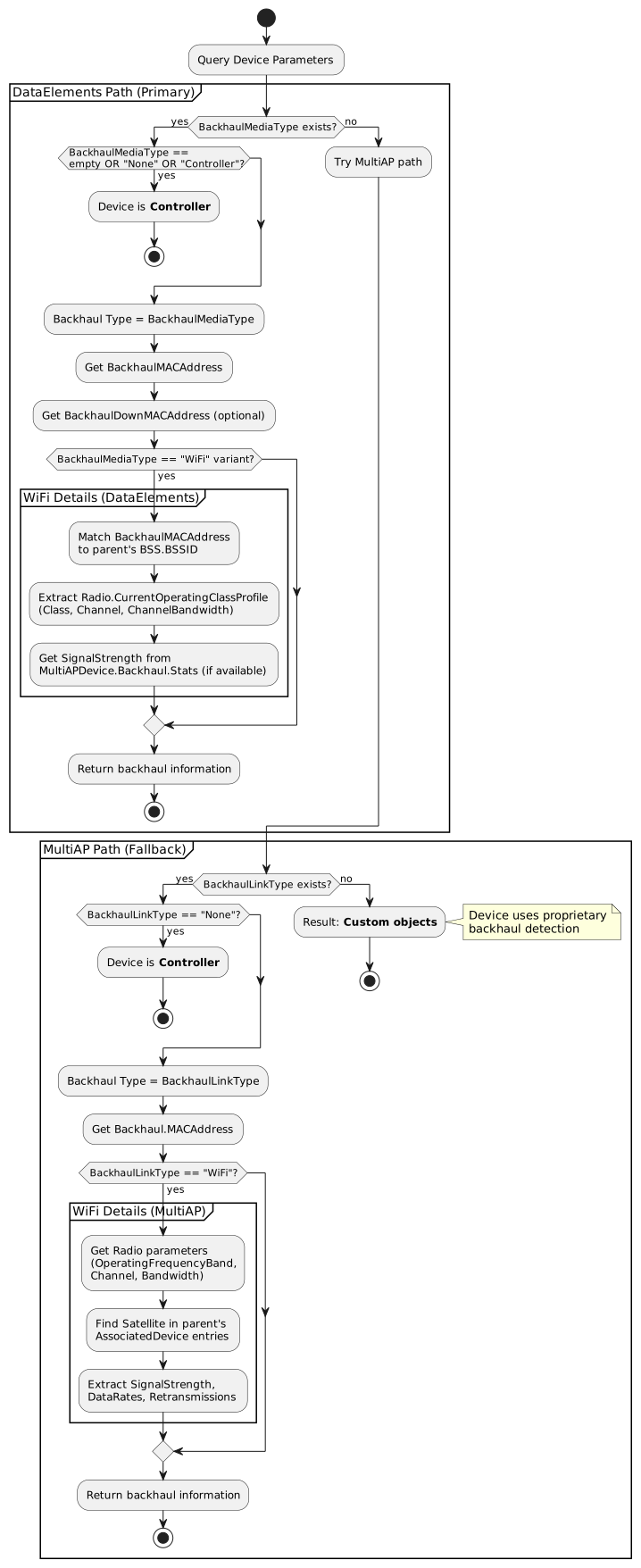
This flow extracts detailed backhaul connection information for mesh Satellite devices using TR-181 data models. Backhaul information includes the connection type (WiFi, Ethernet, MoCA, PLC, etc.), MAC addresses of upstream and downstream interfaces, and for WiFi backhaul, comprehensive radio characteristics including frequency, channel, bandwidth, and signal quality metrics.
Understanding backhaul characteristics is critical for:
-
Performance Analysis: WiFi vs. Ethernet backhaul performance comparison
-
Signal Quality Monitoring: RSSI, noise, and data rate tracking for WiFi backhaul
-
Capacity Planning: Identifying backhaul bottlenecks in multi-hop scenarios
-
Troubleshooting: Diagnosing connectivity issues and suboptimal routing
-
Network Optimization: Making decisions about Satellite placement and backhaul selection
-
Topology Visualization: Display backhaul connection details in management interfaces
Data Model Approaches
TR-181 provides two main paths for backhaul information extraction:
| Aspect | DataElements Path | MultiAP Path |
|---|---|---|
Base Path |
|
|
Primary Type Parameter |
|
|
Supported Types |
WiFi (with IEEE standards), Ethernet (with IEEE standards), MoCA, PLC, Generic PHY, None, Controller |
WiFi, Ethernet, MoCA, PLC, None |
Type Format |
IEEE standard identifiers (e.g., "IEEE 802.11ax", "IEEE 802.3ab") |
Simple type names (e.g., "WiFi", "Ethernet") |
Radio Parameters |
Via |
Via |
Signal Metrics Source |
Via matching parent’s BSS parameters or |
Via parent’s |
Complexity |
More comprehensive, requires cross-referencing multiple objects |
Streamlined, well-defined structure |
Use Case |
Detailed protocol-level information, comprehensive backhaul type coverage |
Simplified Multi-AP specific deployments |
TR-181 Parameter Reference
Parameter Path Comparison
| DataElements Path | MultiAP Path |
|---|---|
Backhaul Type Indicator |
|
|
|
Type: string |
Type: string (enum) |
Parent Device MAC Address |
|
|
|
MAC address of parent device’s backhaul interface (upstream) |
MAC address of parent device this satellite connects to |
Local Interface MAC Address |
|
|
Not available in MultiAP |
MAC address of this device’s backhaul interface (optional) |
|
Frequency Band |
|
Via |
|
Channel Number |
|
|
|
Type: unsignedInt |
Type: unsignedInt |
Channel Bandwidth |
|
|
|
Type: unsignedInt |
Type: string |
Signal Strength (WiFi Backhaul) |
|
|
|
Type: int (dBm or RCPI) |
Type: int (dBm or RCPI) |
Data Rates (WiFi Backhaul) |
|
Via parent’s |
|
Type: varies by implementation |
Type: unsignedInt (Kbps) |
Link Quality Indicators |
|
Implementation-specific via MultiAPDevice.Backhaul.Stats |
|
Type: unsignedInt (packet count) |
|
DataElements-Specific Parameters
| Parameter Path | Description | Type | Example Value |
|---|---|---|---|
Device.WiFi.DataElements.Network.Device.{i}.Radio.{j}.ID |
Radio MAC address identifier |
string (MAC) |
"AA:BB:CC:11:22:44" |
Device.WiFi.DataElements.Network.Device.{y}.Radio.{j}.BSS.{k}.BSSID |
Parent device’s BSS identifier for WiFi backhaul matching |
string (MAC) |
"00:11:22:33:44:66" |
Device.WiFi.DataElements.Network.Device.{i}.Radio.{j}.BSS.{k}.SSID |
WiFi network name for the backhaul connection |
string |
"MyMesh_Backhaul_5G" |
Device.WiFi.DataElements.Network.Device.{i}.MultiAPDevice.Backhaul.LinkType |
Fallback parameter when BackhaulMediaType not available |
string |
"WiFi", "Ethernet", "None" |
BackhaulMediaType Values (DataElements)
The BackhaulMediaType parameter provides detailed IEEE standard identifiers:
| Category | BackhaulMediaType Value | Description |
|---|---|---|
Ethernet |
IEEE 802.3u |
Fast Ethernet (100 Mbps) |
IEEE 802.3ab |
Gigabit Ethernet (1000 Mbps) |
|
WiFi |
IEEE 802.11b |
WiFi 1 - 2.4 GHz, up to 11 Mbps |
IEEE 802.11g |
WiFi 3 - 2.4 GHz, up to 54 Mbps |
|
IEEE 802.11a |
WiFi 2 - 5 GHz, up to 54 Mbps |
|
IEEE 802.11n 2.4 |
WiFi 4 - 2.4 GHz, up to 600 Mbps |
|
IEEE 802.11n 5.0 |
WiFi 4 - 5 GHz, up to 600 Mbps |
|
IEEE 802.11ac |
WiFi 5 - 5 GHz, up to 6.9 Gbps |
|
IEEE 802.11ad |
WiGig - 60 GHz, up to 6.75 Gbps |
|
IEEE 802.11af |
White-Fi - TV white spaces |
|
IEEE 802.11ax |
WiFi 6/6E - 2.4/5/6 GHz, up to 9.6 Gbps |
|
IEEE 802.11be |
WiFi 7 - 2.4/5/6 GHz, up to 46 Gbps |
|
Powerline |
IEEE 1901 Wavelet |
Powerline Communication - Wavelet OFDM PHY |
IEEE 1901 FFT |
Powerline Communication - FFT OFDM PHY |
|
MoCA |
MoCAv1.1 |
Multimedia over Coax Alliance v1.1 |
Other |
Generic PHY |
Generic physical layer (unspecified) |
None |
No backhaul (Controller device) |
Controller |
Usage Notes: - WiFi values include band-specific identifiers - IEEE standard format provides protocol-level detail - Empty string, "None", or "Controller" indicates mesh Controller role - Specific standard depends on device negotiation
Operating Class to Frequency Band Mapping
Per IEEE 802.11 specification, Operating Class (used in DataElements path) maps to frequency bands:
| Operating Class | Frequency Band | Typical Channels |
|---|---|---|
81, 82, 83, 84 |
2.4 GHz |
1-13 |
115-130 |
5 GHz |
36, 40, 44, 48, 52, 56, 60, 64, 100, 104, 108, 112, 116, 120, 124, 128, 132, 136, 140, 144, 149, 153, 157, 161, 165 |
131-136 |
6 GHz |
1-233 (6 GHz UNII-5 through UNII-8) |
Channel Characteristics by Band:
| Frequency Band | Typical Channels | Characteristics |
|---|---|---|
2.4 GHz |
1-13 (11 in US) |
Better range, more interference, lower capacity |
5 GHz |
36, 40, 44, 48 (UNII-1) |
Shorter range, less interference, higher capacity |
6 GHz |
1-233 |
Newest band, very high capacity, shortest range |
Signal Strength: RSSI vs RCPI Conversion
The SignalStrength parameter may report values in either RSSI (dBm) or RCPI format depending on device implementation. This applies to both DataElements and MultiAP paths.
Identifying the Format
-
RSSI (Received Signal Strength Indicator): Negative values in dBm (e.g., -55, -70)
-
RCPI (Received Channel Power Indicator): Positive values per IEEE 802.11k (e.g., 110, 150)
Conversion Formula
When SignalStrength is a positive value (RCPI), convert to RSSI using:
RSSI [dBm] = RCPI / 2 - 110RCPI Values Reference (IEEE 802.11k)
| RCPI Value | RSSI Equivalent | Meaning |
|---|---|---|
0 |
-110 dBm |
Minimum measurable power |
1-220 |
-109.5 to 0 dBm |
Normal measurement range (0.5 dB steps) |
220 |
0 dBm |
Maximum measurable power |
221-254 |
N/A |
Reserved values |
255 |
N/A |
Measurement not available |
Implementation Example
def get_rssi(signal_strength):
    """Convert SignalStrength to RSSI in dBm

    Works for both DataElements and MultiAP paths.
    """
    if signal_strength < 0:
        # Already in RSSI format
        return signal_strength
    elif signal_strength <= 220:
        # RCPI format - convert to RSSI
        return signal_strength / 2 - 110
    else:
        # Reserved or unavailable
        return None
SignalStrength Parameter Paths
DataElements:
- Device.WiFi.DataElements.Network.Device.{i}.Radio.{j}.BSS.{k}.STA.{l}.SignalStrength
- Device.WiFi.DataElements.Network.Device.{i}.MultiAPDevice.Backhaul.Stats.SignalStrength
MultiAP:
- Device.WiFi.MultiAP.APDevice.{i}.Radio.{j}.AP.{k}.AssociatedDevice.{l}.SignalStrength
- Device.WiFi.MultiAP.APDevice.{i}.BackhaulSignalStrength
RSSI Quality Interpretation
| RSSI Range | Quality | Implications |
|---|---|---|
-30 to -50 dBm |
Excellent |
Maximum throughput, stable connection |
-50 to -60 dBm |
Good |
High throughput, reliable connection |
-60 to -70 dBm |
Fair |
Moderate throughput, may experience occasional issues |
-70 to -80 dBm |
Poor |
Low throughput, frequent retransmissions |
Below -80 dBm |
Very Poor |
Connection unstable, may drop frequently |
Implementation Requirements
For Controller Devices
DataElements:
Device.WiFi.DataElements.Network.Device.1.BackhaulMediaType = "None"
# or empty string, or "Controller"
Device.WiFi.DataElements.Network.Device.1.ID = "00:11:22:33:44:55"
MultiAP:
Device.WiFi.MultiAP.APDevice.1.BackhaulLinkType = "None"
Device.WiFi.MultiAP.APDevice.1.MACAddress = "00:11:22:33:44:55"Note: Controllers are the root of the mesh and have no upstream backhaul connections.
For WiFi Backhaul
DataElements:
# Satellite device backhaul configuration
Device.WiFi.DataElements.Network.Device.2.BackhaulMediaType = "IEEE 802.11ax"
Device.WiFi.DataElements.Network.Device.2.BackhaulMACAddress = "00:11:22:33:44:66"
Device.WiFi.DataElements.Network.Device.2.BackhaulDownMACAddress = "AA:BB:CC:11:22:33"

# Parent device must have matching BSS
Device.WiFi.DataElements.Network.Device.1.Radio.1.BSS.1.BSSID = "00:11:22:33:44:66"
Device.WiFi.DataElements.Network.Device.1.Radio.1.BSS.1.SSID = "MyMesh_Backhaul_5G"

# Radio operating parameters (parent device)
Device.WiFi.DataElements.Network.Device.1.Radio.1.CurrentOperatingClassProfile.Class = 115
Device.WiFi.DataElements.Network.Device.1.Radio.1.CurrentOperatingClassProfile.Channel = 36
Device.WiFi.DataElements.Network.Device.1.Radio.1.CurrentOperatingClassProfile.ChannelBandwidth = 80
Key Requirements (DataElements):
- BackhaulMACAddress must match parent’s BSS BSSID
- Operating Class maps to frequency band
- SSID identifies backhaul network name
- Signal metrics available via MultiAPDevice.Backhaul.Stats or parent’s STA entry
MultiAP:
# Satellite backhaul configuration
Device.WiFi.MultiAP.APDevice.2.BackhaulLinkType = "WiFi"
Device.WiFi.MultiAP.APDevice.2.MACAddress = "AA:BB:CC:11:22:33"
Device.WiFi.MultiAP.APDevice.2.Backhaul.MACAddress = "00:11:22:33:44:55"

# Radio operating parameters (on the Satellite)
Device.WiFi.MultiAP.APDevice.2.Radio.1.OperatingFrequencyBand = "5GHz"
Device.WiFi.MultiAP.APDevice.2.Radio.1.CurrentOperatingChannelBandwidth = "80MHz"
Device.WiFi.MultiAP.APDevice.2.Radio.1.Channel = 36

# AssociatedDevice entry on parent showing the Satellite connection
Device.WiFi.MultiAP.APDevice.1.Radio.1.AP.1.AssociatedDevice.5.MACAddress = "AA:BB:CC:11:22:33"
Device.WiFi.MultiAP.APDevice.1.Radio.1.AP.1.AssociatedDevice.5.SignalStrength = -55
Device.WiFi.MultiAP.APDevice.1.Radio.1.AP.1.AssociatedDevice.5.LastDataDownlinkRate = 866000
Device.WiFi.MultiAP.APDevice.1.Radio.1.AP.1.AssociatedDevice.5.LastDataUplinkRate = 433000
Device.WiFi.MultiAP.APDevice.1.Radio.1.AP.1.AssociatedDevice.5.Retransmissions = 2
Key Requirements (MultiAP): - Radio parameters describe Satellite’s configuration - AssociatedDevice entry appears on parent device - Signal metrics measured from parent’s perspective - Direct frequency band string (no Operating Class conversion needed)
For Ethernet Backhaul
DataElements:
Device.WiFi.DataElements.Network.Device.2.BackhaulMediaType = "IEEE 802.3ab"
Device.WiFi.DataElements.Network.Device.2.BackhaulMACAddress = "00:11:22:33:44:55"
Device.WiFi.DataElements.Network.Device.2.BackhaulDownMACAddress = "AA:BB:CC:11:22:33"
MultiAP:
Device.WiFi.MultiAP.APDevice.3.BackhaulLinkType = "Ethernet"
Device.WiFi.MultiAP.APDevice.3.MACAddress = "BB:CC:DD:22:33:44"
Device.WiFi.MultiAP.APDevice.3.Backhaul.MACAddress = "00:11:22:33:44:55"
Key Points:
- No radio or WiFi-specific parameters needed
- BackhaulMACAddress/Backhaul.MACAddress references parent device
- No AssociatedDevice entry (Ethernet is layer 2)
- DataElements can specify Ethernet standard (e.g., "IEEE 802.3ab" for Gigabit)
For Other Backhaul Types (MoCA, PLC)
DataElements:
# MoCA backhaul
Device.WiFi.DataElements.Network.Device.2.BackhaulMediaType = "MoCA"
Device.WiFi.DataElements.Network.Device.2.BackhaulMACAddress = "00:11:22:33:44:55"

# Powerline (PLC) backhaul
Device.WiFi.DataElements.Network.Device.3.BackhaulMediaType = "IEEE 1901 FFT"
Device.WiFi.DataElements.Network.Device.3.BackhaulMACAddress = "00:11:22:33:44:55"
MultiAP:
# MoCA backhaul
Device.WiFi.MultiAP.APDevice.4.BackhaulLinkType = "MoCA"
Device.WiFi.MultiAP.APDevice.4.Backhaul.MACAddress = "00:11:22:33:44:55"

# Powerline (PLC) backhaul
Device.WiFi.MultiAP.APDevice.5.BackhaulLinkType = "PLC"
Device.WiFi.MultiAP.APDevice.5.Backhaul.MACAddress = "00:11:22:33:44:55"
Key Decision Points
Path Selection Strategy
-
Check DataElements Path First (Primary)
-
More comprehensive backhaul type information
-
IEEE standard identifiers provide protocol-level detail
-
Extended type support (specific WiFi/Ethernet standards, PLC variants)
-
-
Fallback to MultiAP Path (Secondary)
-
Used when DataElements not implemented
-
Streamlined parameter structure
-
Simplified backhaul type names
-
-
Check MultiAPDevice.Backhaul.LinkType (Tertiary)
-
Fallback within DataElements hierarchy
-
Limited to basic types (WiFi, Ethernet, None)
-
-
Result: Custom Objects (No standard parameters)
-
Device uses proprietary backhaul detection
-
WiFi Backhaul Details Extraction
DataElements Approach:
Step 1: Identify Backhaul Radio
- Match BackhaulMACAddress to parent device’s Radio.BSS.BSSID
- Identifies which radio and BSS the Satellite connects to
Step 2: Extract Operating Parameters
- CurrentOperatingClassProfile.Class → Map to frequency band
- CurrentOperatingClassProfile.Channel → Channel number
- CurrentOperatingClassProfile.ChannelBandwidth → Channel width
Step 3: Collect Signal Metrics
- Check MultiAPDevice.Backhaul.Stats.SignalStrength
- Or find STA entry in parent’s BSS
- Extract data rates and quality metrics
MultiAP Approach:
Step 1: Identify Backhaul Connection
- Get Backhaul.MACAddress from Satellite
- Identifies the parent device MAC
Step 2: Find AssociatedDevice Entry
- Search parent device’s Radio.{j}.AP.{k}.AssociatedDevice entries
- Match where AssociatedDevice.MACAddress == Satellite.MACAddress
- Extract SignalStrength, data rates, retransmissions
Step 3: Extract Radio Parameters
- From Satellite’s own Radio.{j} parameters
- OperatingFrequencyBand → Direct band string
- Channel → Channel number
- CurrentOperatingChannelBandwidth → Bandwidth string
Step 4: Combine Information - Radio parameters from Satellite - Signal metrics from parent’s AssociatedDevice entry - Result: Complete backhaul characterization
Example Scenarios
Scenario 1: WiFi Backhaul with Full Details
DataElements:
# Satellite (Device 2)
Device.WiFi.DataElements.Network.Device.2.ID = "AA:BB:CC:11:22:33"
Device.WiFi.DataElements.Network.Device.2.BackhaulMediaType = "IEEE 802.11ax"
Device.WiFi.DataElements.Network.Device.2.BackhaulMACAddress = "00:11:22:33:44:66"
Device.WiFi.DataElements.Network.Device.2.BackhaulDownMACAddress = "AA:BB:CC:11:22:44"

# Parent (Device 1) - Controller
Device.WiFi.DataElements.Network.Device.1.ID = "00:11:22:33:44:55"
Device.WiFi.DataElements.Network.Device.1.Radio.1.ID = "00:11:22:33:44:66"
Device.WiFi.DataElements.Network.Device.1.Radio.1.BSS.1.BSSID = "00:11:22:33:44:66"
Device.WiFi.DataElements.Network.Device.1.Radio.1.BSS.1.SSID = "MyMesh_5G_Backhaul"
Device.WiFi.DataElements.Network.Device.1.Radio.1.CurrentOperatingClassProfile.Class = 115
Device.WiFi.DataElements.Network.Device.1.Radio.1.CurrentOperatingClassProfile.Channel = 36
Device.WiFi.DataElements.Network.Device.1.Radio.1.CurrentOperatingClassProfile.ChannelBandwidth = 80
MultiAP:
# Parent Device (Controller - APDevice.1)
Device.WiFi.MultiAP.APDevice.1.BackhaulLinkType = "None"
Device.WiFi.MultiAP.APDevice.1.MACAddress = "00:11:22:33:44:55"
Device.WiFi.MultiAP.APDevice.1.Radio.1.OperatingFrequencyBand = "5GHz"
Device.WiFi.MultiAP.APDevice.1.Radio.1.Channel = 36
Device.WiFi.MultiAP.APDevice.1.Radio.1.CurrentOperatingChannelBandwidth = "80MHz"

# AssociatedDevice entry on parent showing the Satellite
Device.WiFi.MultiAP.APDevice.1.Radio.1.AP.1.AssociatedDevice.3.MACAddress = "AA:BB:CC:11:22:33"
Device.WiFi.MultiAP.APDevice.1.Radio.1.AP.1.AssociatedDevice.3.SignalStrength = -58
Device.WiFi.MultiAP.APDevice.1.Radio.1.AP.1.AssociatedDevice.3.LastDataDownlinkRate = 866000
Device.WiFi.MultiAP.APDevice.1.Radio.1.AP.1.AssociatedDevice.3.LastDataUplinkRate = 866000
Device.WiFi.MultiAP.APDevice.1.Radio.1.AP.1.AssociatedDevice.3.Retransmissions = 5

# Satellite Device (APDevice.2)
Device.WiFi.MultiAP.APDevice.2.BackhaulLinkType = "WiFi"
Device.WiFi.MultiAP.APDevice.2.MACAddress = "AA:BB:CC:11:22:33"
Device.WiFi.MultiAP.APDevice.2.Backhaul.MACAddress = "00:11:22:33:44:55"
Device.WiFi.MultiAP.APDevice.2.Radio.1.OperatingFrequencyBand = "5GHz"
Device.WiFi.MultiAP.APDevice.2.Radio.1.Channel = 36
Device.WiFi.MultiAP.APDevice.2.Radio.1.CurrentOperatingChannelBandwidth = "80MHz"
Extracted Backhaul Information: - Type: WiFi (802.11ax / WiFi 6) - Upstream MAC: 00:11:22:33:44:66 - Downstream MAC: AA:BB:CC:11:22:44 - Frequency: 5 GHz (Operating Class 115) - Channel: 36 - Bandwidth: 80 MHz - SSID: MyMesh_5G_Backhaul - RSSI: -58 dBm (Good) - Downlink/Uplink Rate: 866 Mbps - Retransmissions: 5 (Low, good quality)
Scenario 2: Ethernet Backhaul
DataElements:
# Satellite (Device 2)
Device.WiFi.DataElements.Network.Device.2.ID = "AA:BB:CC:11:22:33"
Device.WiFi.DataElements.Network.Device.2.BackhaulMediaType = "IEEE 802.3ab"
Device.WiFi.DataElements.Network.Device.2.BackhaulMACAddress = "00:11:22:33:44:55"
Device.WiFi.DataElements.Network.Device.2.BackhaulDownMACAddress = "AA:BB:CC:11:22:99"

# Parent (Device 1)
Device.WiFi.DataElements.Network.Device.1.ID = "00:11:22:33:44:55"
MultiAP:
# Parent Device (Controller)
Device.WiFi.MultiAP.APDevice.1.BackhaulLinkType = "None"
Device.WiFi.MultiAP.APDevice.1.MACAddress = "00:11:22:33:44:55"

# Satellite Device with Ethernet backhaul
Device.WiFi.MultiAP.APDevice.2.BackhaulLinkType = "Ethernet"
Device.WiFi.MultiAP.APDevice.2.MACAddress = "AA:BB:CC:11:22:33"
Device.WiFi.MultiAP.APDevice.2.Backhaul.MACAddress = "00:11:22:33:44:55"
Extracted Backhaul Information: - Type: Ethernet (Gigabit - 802.3ab) - Upstream MAC: 00:11:22:33:44:55 (parent device) - Downstream MAC: AA:BB:CC:11:22:99 (local Ethernet interface) - No radio parameters (Ethernet is layer 2)
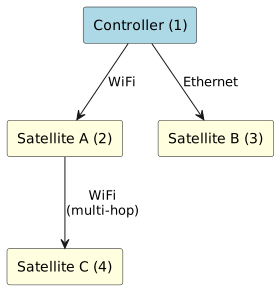
Scenario 3: Mixed Backhaul Topology
# Controller (Device 1)
BackhaulMediaType/BackhaulLinkType = "None"

# Satellite A (Device 2) - WiFi backhaul to Controller
BackhaulMediaType/BackhaulLinkType = "WiFi"
BackhaulMACAddress = "00:11:22:33:44:66"

# Satellite B (Device 3) - Ethernet backhaul to Controller
BackhaulMediaType/BackhaulLinkType = "Ethernet"
BackhaulMACAddress = "00:11:22:33:44:55"

# Satellite C (Device 4) - WiFi backhaul to Satellite A (multi-hop)
BackhaulMediaType/BackhaulLinkType = "WiFi"
BackhaulMACAddress = "AA:BB:CC:11:22:77"
Resulting Topology:
Scenario 4: Degraded WiFi Backhaul
MultiAP Example:
# Satellite with poor backhaul signal
Device.WiFi.MultiAP.APDevice.2.BackhaulLinkType = "WiFi"
Device.WiFi.MultiAP.APDevice.2.MACAddress = "AA:BB:CC:11:22:33"
Device.WiFi.MultiAP.APDevice.2.Backhaul.MACAddress = "00:11:22:33:44:55"
Device.WiFi.MultiAP.APDevice.2.Radio.1.OperatingFrequencyBand = "2.4GHz"
Device.WiFi.MultiAP.APDevice.2.Radio.1.Channel = 6
Device.WiFi.MultiAP.APDevice.2.Radio.1.CurrentOperatingChannelBandwidth = "20MHz"

# Parent's view of the Satellite connection
Device.WiFi.MultiAP.APDevice.1.Radio.2.AP.1.AssociatedDevice.2.MACAddress = "AA:BB:CC:11:22:33"
Device.WiFi.MultiAP.APDevice.1.Radio.2.AP.1.AssociatedDevice.2.SignalStrength = -78
Device.WiFi.MultiAP.APDevice.1.Radio.2.AP.1.AssociatedDevice.2.LastDataDownlinkRate = 72000
Device.WiFi.MultiAP.APDevice.1.Radio.2.AP.1.AssociatedDevice.2.LastDataUplinkRate = 54000
Device.WiFi.MultiAP.APDevice.1.Radio.2.AP.1.AssociatedDevice.2.Retransmissions = 145
Extracted Backhaul Information: - Type: WiFi - Frequency: 2.4 GHz (suboptimal) - Channel: 6 - Bandwidth: 20 MHz (narrow) - RSSI: -78 dBm (Poor signal) - Downlink Rate: 72 Mbps (low) - Uplink Rate: 54 Mbps (low) - Retransmissions: 145 (very high)
Issues Identified: 1. Using 2.4 GHz instead of 5 GHz (lower capacity, more interference) 2. Poor signal strength (-78 dBm) 3. Narrow 20 MHz bandwidth 4. Low PHY rates 5. High retransmission count (link quality problem)
Recommendations: - Relocate Satellite closer to parent - Switch to 5 GHz backhaul if available - Check for interference sources - Consider Ethernet backhaul if WiFi cannot be improved
Common Issues and Debugging
Backhaul Type Parameter Not Populated
Symptom: BackhaulMediaType or BackhaulLinkType parameter is empty or missing
Solution: Try all fallback paths in order:
# 1. Check DataElements BackhaulMediaType (primary)
echo Device.WiFi.DataElements.Network.Device.2.BackhaulMediaType

# 2. Check MultiAP BackhaulLinkType (fallback 1)
echo Device.WiFi.MultiAP.APDevice.2.BackhaulLinkType

# 3. Check DataElements MultiAPDevice.Backhaul.LinkType (fallback 2)
echo Device.WiFi.DataElements.Network.Device.2.MultiAPDevice.Backhaul.LinkType
Cannot Match BackhaulMACAddress to Parent
Symptom: WiFi backhaul type detected, but cannot find matching parent BSS (DataElements) or AssociatedDevice entry (MultiAP)
Causes: - Parent device not reporting BSS/AssociatedDevice parameters - MAC address format mismatch (colons vs. dashes, uppercase vs. lowercase) - Wrong radio band being checked
Debugging:
DataElements:
# Check Satellite backhaul MAC
echo Device.WiFi.DataElements.Network.Device.2.BackhaulMACAddress

# Check all parent BSSIDs across all radios
echo Device.WiFi.DataElements.Network.Device.1.Radio.1.BSS.*.BSSID
echo Device.WiFi.DataElements.Network.Device.1.Radio.2.BSS.*.BSSID

# Verify MAC format consistency
MultiAP:
# Check Satellite MAC and backhaul parent
echo Device.WiFi.MultiAP.APDevice.2.MACAddress
echo Device.WiFi.MultiAP.APDevice.2.Backhaul.MACAddress

# Check all AssociatedDevice entries on parent across all radios
echo Device.WiFi.MultiAP.APDevice.1.Radio.1.AP.1.AssociatedDevice.*.MACAddress
echo Device.WiFi.MultiAP.APDevice.1.Radio.2.AP.1.AssociatedDevice.*.MACAddress

# Normalize MAC addresses (handle format differences)
WiFi Backhaul but No Radio Details
Symptom: Backhaul type shows "WiFi" but radio parameters are empty
Cause: Parent device or Satellite not reporting Radio parameters
Solution: Ensure device firmware populates:
DataElements:
- Radio.{i}.ID
- Radio.{i}.BSS.{j}.BSSID
- Radio.{i}.CurrentOperatingClassProfile.* parameters
MultiAP:
- Radio.{i}.OperatingFrequencyBand
- Radio.{i}.Channel
- Radio.{i}.CurrentOperatingChannelBandwidth
High Retransmission Count (MultiAP)
Symptom: AssociatedDevice.Retransmissions is very high (>50)
Causes: - Poor signal strength - Interference on channel - Distance too far - Obstacles blocking signal
Troubleshooting Steps: 1. Check RSSI (should be > -70 dBm) 2. Analyze channel utilization (switch to less congested channel) 3. Verify line-of-sight or reduce obstacles 4. Consider relocating Satellite or using Ethernet backhaul
Performance and Optimization
Caching Strategy
For frequently queried backhaul information:
-
Cache Static Information: Parent MAC addresses, backhaul types change infrequently
-
Cache Radio Parameters: Frequency, channel, bandwidth change only during reconfiguration
-
Update on Topology Change: Recalculate when devices join/leave or backhaul switches
-
Poll Signal Metrics: RSSI, data rates should be monitored periodically (e.g., every 30-60 seconds)
-
Lazy Load WiFi Details: Only fetch detailed radio/signal parameters when specifically needed
-
Event-Driven Updates: Refresh backhaul info on topology change events
Query Optimization
Efficient Approach - Batch queries:
# DataElements: Single query for all backhaul info
GET Device.WiFi.DataElements.Network.Device.2.

# MultiAP: Single query for device
GET Device.WiFi.MultiAP.APDevice.2.
Inefficient Approach - Sequential queries:
GET Device.WiFi.DataElements.Network.Device.2.BackhaulMediaType
<wait for response>
GET Device.WiFi.DataElements.Network.Device.2.BackhaulMACAddress
<wait for response>
GET Device.WiFi.DataElements.Network.Device.2.BackhaulDownMACAddress
...
Two-Stage Retrieval for WiFi Backhaul
Stage 1: Get basic backhaul info (always)
GET BackhaulMediaType or BackhaulLinkType
GET BackhaulMACAddress or Backhaul.MACAddress
GET Radio operating parameters
Stage 2: Only if WiFi backhaul, get signal metrics
# DataElements
GET MultiAPDevice.Backhaul.Stats.SignalStrength (if available)

# MultiAP
GET parent's Radio.*.AP.*.AssociatedDevice entries
Filter for matching Satellite MAC
Extract SignalStrength, data rates, retransmissions
Use Cases
Network Health Monitoring
Track WiFi backhaul signal quality over time: - Monitor RSSI trends for degradation - Identify high-noise environments - Detect channel interference - Alert on poor signal conditions (< -70 dBm) - Color-code by signal strength in dashboards
Capacity Planning
Analyze backhaul bottlenecks: - Compare WiFi vs. Ethernet backhaul throughput - Identify multi-hop WiFi chains with capacity issues - Recommend Ethernet backhaul for high-traffic Satellites - Calculate aggregate backhaul bandwidth - Plan Satellite placement based on backhaul availability
Automated Troubleshooting
Detect suboptimal backhaul conditions: - Satellites using 2.4 GHz backhaul when 5 GHz available - Narrow channel bandwidth (20 MHz) when wider possible - Poor RSSI indicating Satellite placement issues - High retransmission rates (link quality problems) - Multi-hop configurations with degraded performance
Topology Visualization
Display backhaul details in network diagrams: - Show backhaul type (WiFi/Ethernet) on connection lines - Display channel and frequency for WiFi backhaul - Indicate signal strength with color coding (green/yellow/red) - Show data rates and link quality - Highlight multi-hop paths