Mesh Network Detection
Overview
Mesh network detection is the foundational step in identifying whether a TR-181 compliant device participates in a mesh network topology. A mesh network consists of multiple interconnected wireless access points (APs) that work together to provide extended WiFi coverage through a unified network infrastructure.
What is Mesh Detection?
Mesh detection determines:
-
Mesh Capability: Whether the device supports mesh networking
-
Mesh Activation: Whether mesh is currently active (2+ devices present)
-
Mesh Standard: Which TR-181 data model path is in use (DataElements or MultiAP)
-
Device Count: Number of mesh nodes in the topology
This information is critical for:
-
Topology Visualization: Displaying network hierarchy and device relationships
-
Performance Monitoring: Tracking inter-device backhaul quality
-
Client Management: Understanding which AP each client connects through
-
Network Optimization: Identifying coverage gaps and signal strength issues
-
Troubleshooting: Diagnosing connectivity and performance problems
Why Mesh Detection Matters
Modern WiFi environments increasingly rely on mesh networks to overcome traditional limitations:
| Challenge | Traditional Solution | Mesh Solution |
|---|---|---|
Limited Coverage |
Multiple standalone APs with different SSIDs |
Unified SSID across all mesh nodes with seamless roaming |
Dead Zones |
Additional wired APs or range extenders |
Wireless backhaul between mesh nodes fills coverage gaps |
Complex Management |
Configure each AP independently |
Centralized management through controller device |
Client Roaming |
Manual reconnection when moving between APs |
Automatic handoff with WiFi EasyMesh standards |
Performance |
Clients stuck on distant AP |
Intelligent client steering to optimal node |
Without proper mesh detection, management systems cannot leverage these capabilities or provide meaningful network insights to users.
Mesh vs Non-Mesh Detection Criteria
Mesh Network Definition
A mesh network is confirmed when all of the following conditions are met:
-
Device Count >= 2: At least two distinct mesh nodes are detected
-
Standard Data Model: Device implements either DataElements or MultiAP TR-181 objects
-
Active Configuration: Devices report backhaul connections indicating active mesh topology
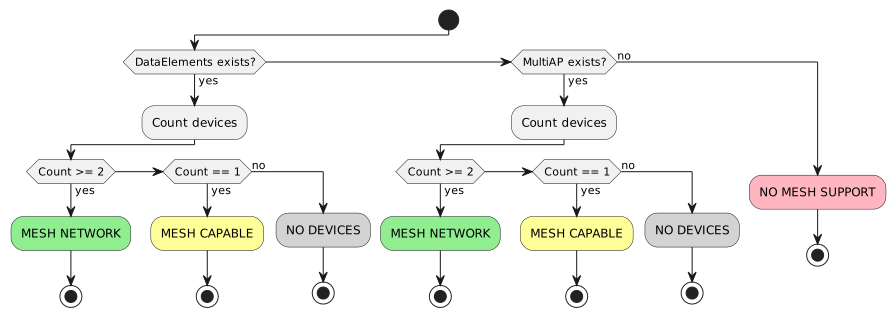
Detection Outcomes
| Outcome | Condition | Next Steps |
|---|---|---|
Mesh Network |
2+ devices in DataElements or MultiAP |
Proceed with Controller/Satellite Detection and Topology Detection |
Mesh Capable (Not Active) |
1 device in DataElements or MultiAP |
Device supports mesh but no satellites are connected. Monitor for future satellite additions. |
No Mesh Devices |
0 devices despite object existence |
DataElements or MultiAP object exists but contains no instances. Device may be initializing or misconfigured. |
No Mesh Support |
Neither DataElements nor MultiAP exists |
Device does not implement standard TR-181 mesh objects. Check for vendor-specific custom objects. |
TR-181 Parameters Used
DataElements Path Parameters
| Parameter Path | Purpose | Type | Example Value |
|---|---|---|---|
Device.WiFi.DataElements.Network.Device.{i}. |
Mesh device entry (EasyMesh) |
object |
N/A |
Device.WiFi.DataElements.Network.Device.{i}.ID |
Unique device identifier (typically MAC) |
string |
AA:BB:CC:DD:EE:FF |
Device.WiFi.DataElements.Network.Device.{i}.BackhaulMediaType |
Connection type to parent device |
string |
Wi-Fi, Ethernet, None |
Device.WiFi.DataElements.Network.Device.{i}.BackhaulMACAddress |
Parent device BSSID or MAC address |
string (MAC) |
00:11:22:33:44:55 |
Device.WiFi.DataElements.Network.Device.{i}.MultiAPDevice.HostName |
Device hostname |
string |
MyRouter-Satellite-1 |
Device.WiFi.DataElements.Network.Device.{i}.MultiAPDevice.IPv4 |
Device IP address |
string (IPv4) |
192.168.1.10 |
Device.WiFi.DataElements.Network.Device.{i}.ManufacturerModel |
Device model name |
string |
RT-AX88U |
Device.WiFi.DataElements.Network.Device.{i}.MultiAPDevice.Backhaul.LinkType |
Alternative backhaul type parameter |
string |
Wi-Fi, Ethernet, None, Controller |
MultiAP Path Parameters
| Parameter Path | Purpose | Type | Example Value |
|---|---|---|---|
Device.WiFi.MultiAP.APDevice.{i}. |
Multi-AP device entry (legacy standard) |
object |
N/A |
Device.WiFi.MultiAP.APDevice.{i}.MACAddress |
Device MAC address |
string (MAC) |
AA:BB:CC:DD:EE:FF |
Device.WiFi.MultiAP.APDevice.{i}.BackhaulMACAddress |
Parent device MAC address |
string (MAC) |
00:11:22:33:44:55 |
Device.WiFi.MultiAP.APDevice.{i}.BackhaulLinkType |
Connection type to parent (None = Controller) |
string |
Wi-Fi, Ethernet, None |
Device.WiFi.MultiAP.APDevice.{i}.BackhaulSignalStrength |
RSSI for WiFi backhaul (dBm) |
int |
-65 |
Common Properties
Both DataElements and MultiAP paths share these characteristics:
-
Instance-Based: Each mesh node gets a unique instance number {i}
-
Controller Indicator: BackhaulMediaType/BackhaulLinkType = "None" or empty indicates controller role
-
MAC-Based Identification: Device identification primarily uses MAC addresses
-
Hierarchical Structure: Parameters support parent-child relationship discovery
Detection Algorithm
Step-by-Step Algorithm
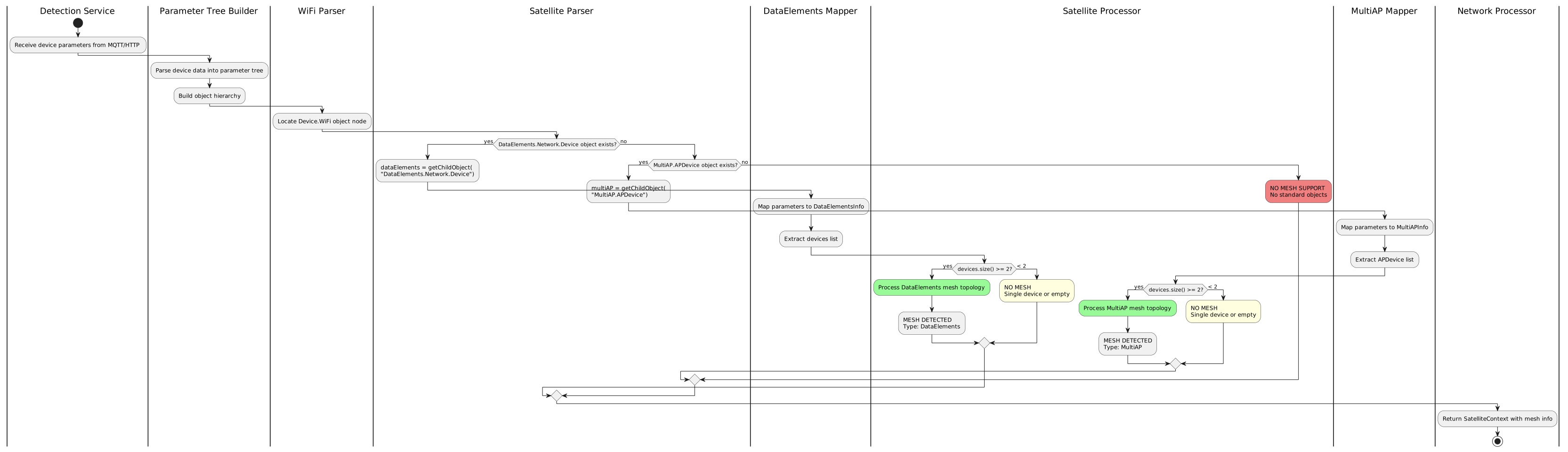
The mesh detection algorithm follows this priority order:
public SatelliteContext detectMesh(ParameterTree tree,
                                   WifiContext wifiContext,
                                   List<HostInfo> hosts,
                                   DeviceInfo deviceInfo) {
    // Step 1: Locate WiFi object root
    ObjectNode wifiNode = tree.getObject("Device.WiFi");

    // Step 2: Try DataElements path (preferred for modern devices)
    ObjectNode dataElements = wifiNode
        .getChildObject("DataElements")
        .getChildObject("Network")
        .getChildObject("Device");

    if (!dataElements.isEmpty()) {
        // Step 3: Process DataElements mesh
        DataElementsInfo info = DataElementsMapper.toDataElementsInfo(dataElements);

        if (info.getDevices().size() >= 2) {
            // MESH DETECTED via DataElements
            SatelliteContext context = SatelliteProcessor.processDataElements(info);
            context.setSatelliteType(SatelliteType.DATA_ELEMENTS);
            return context;
        } else {
            // Mesh capable but not active (< 2 devices)
            return createNoMeshContext("DataElements capable, but < 2 devices");
        }
    }

    // Step 4: Fallback to MultiAP path (legacy devices)
    ObjectNode multiAP = wifiNode
        .getChildObject("MultiAP")
        .getChildObject("APDevice");

    if (!multiAP.isEmpty()) {
        // Step 5: Process MultiAP mesh
        MultiAPInfo info = APMapper.toMultiAPInfo(multiAP, deviceInfo);

        if (info.getDevices().size() >= 2) {
            // MESH DETECTED via MultiAP
            SatelliteContext context = SatelliteProcessor.processMultiAP(info, wifiContext);
            context.setSatelliteType(SatelliteType.MULTI_AP);
            return context;
        } else {
            // Mesh capable but not active (< 2 devices)
            return createNoMeshContext("MultiAP capable, but < 2 devices");
        }
    }

    // Step 6: No mesh support detected
    return createNoMeshContext("No DataElements or MultiAP objects");
}
Priority Order Rationale
-
DataElements First: WiFi EasyMesh is the modern standard with richer parameter sets
-
MultiAP Fallback: Provides compatibility with older certified devices
-
Count Validation: Ensures 2+ devices to confirm active mesh (not just capability)
-
No Empty Objects: Both paths must contain device instances to proceed
Troubleshooting
Why Isn’t Mesh Detected?
| Issue | Symptoms | Solution |
|---|---|---|
TR-181 Path Not Implemented |
Neither DataElements nor MultiAP objects exist |
• Verify device firmware version supports TR-181 mesh objects |
Only One Device Present |
Object exists but contains single instance |
• Satellite devices not connected or powered on |
Empty Object Tree |
Object exists but getChildrenObjectList() returns empty |
• Device initializing (wait 30-60 seconds after boot) |
Parameters Not Synced |
Sporadic detection results |
• Increase MQTT QoS level to ensure message delivery |
Wrong Data Model Path |
Expecting DataElements but device uses MultiAP |
• Detection algorithm should try both paths automatically |
MAC Address Format Mismatch |
Devices counted incorrectly due to MAC comparison failures |
• Normalize MAC addresses (uppercase, colon-separated) |
Partial TR-181 Implementation |
Device implements object but not all required parameters |
• Check which specific parameters are null or empty |
Common Detection Failures
Symptom: "No Mesh Support" Despite Known Mesh Device
Diagnosis:
# Query device directly via CWMP
GetParameterNames Device.WiFi. 1

# Expected result should include:
Device.WiFi.DataElements.Network.Device.
# OR
Device.WiFi.MultiAP.APDevice.
Possible Causes:
-
Device uses legacy TR-098 data model instead of TR-181
-
Custom vendor objects not mapped in
networkDeviceParameterMapping.xml -
CWMP agent on device has incomplete object implementation
Resolution:
-
Check TR-098 fallback:
InternetGatewayDevice.LANDevice.{i}.WLANConfiguration.{j}. -
Request vendor-specific mapping documentation
-
Use TR-098 detection flows as alternative
Symptom: Mesh Detected Intermittently
Diagnosis: Monitor parameter availability over time:
// Log detection results with timestamp
log.info("Mesh detection: dataElements={}, multiAP={}, count={}",
    dataElementsExists, multiAPExists, deviceCount);
Possible Causes:
-
Satellite devices rebooting or losing connectivity
-
MQTT message loss due to QoS 0 delivery
-
Parameter cache timeout causing inconsistent reads
Resolution:
-
Implement result caching with appropriate TTL (5-10 minutes)
-
Use MQTT QoS 1 or 2 for critical device data topics
-
Add retry logic for parameter queries
-
Monitor satellite device uptime and stability
Vendor-Specific Considerations
Implementation Variations
Different vendors may implement TR-181 mesh parameters with subtle variations:
| Vendor | DataElements Support | MultiAP Support |
|---|---|---|
ASUS |
Full implementation on AiMesh-capable routers (RT-AX series) |
Available on older models (RT-AC series) |
TP-Link |
Partial implementation; may require firmware updates |
Standard implementation on OneMesh devices |
Netgear |
Full EasyMesh support on newer Orbi systems |
Legacy implementation on older models |
Ubiquiti |
Custom object paths; not standard TR-181 |
Not implemented (uses proprietary UNMS protocol) |
AVM FRITZ!Box |
Limited implementation depending on market region |
Available on FRITZ!Repeater devices |
Generic ODM/OEM |
Varies widely; check specific firmware version |
More commonly implemented due to certification requirements |
Vendor-Specific Workarounds
ASUS AiMesh
// ASUS may use both DataElements.Network.Device.{i}.ID
// and custom AiMesh_NodeList parameter
String aiMeshNodes = getParameterValue("Device.X_ASUS_AiMesh.NodeList");
if (aiMeshNodes != null && !aiMeshNodes.isEmpty()) {
    // Parse comma-separated MAC list
    String[] nodes = aiMeshNodes.split(",");
    // Validate against DataElements count
}
TP-Link OneMesh
// TP-Link may report satellites in MultiAP but with empty BackhaulLinkType
// Fallback to checking BackhaulMACAddress presence
APDeviceInfo device = ...;
if (device.getBackhaulLinkType() == null || device.getBackhaulLinkType().isEmpty()) {
    if (device.getBackhaulMACAddress() != null && !device.getBackhaulMACAddress().isEmpty()) {
        // Infer Satellite role from non-empty BackhaulMACAddress
        return ConnectedDeviceMeshType.SATELLITE;
    }
}
Netgear Orbi
// Netgear Orbi may use DataElements.Network.Device.{i}.BackhaulALID
// instead of BackhaulMACAddress for parent reference
String parentId = device.getBackhaulMACAddress();
if (parentId == null || parentId.isEmpty()) {
    parentId = device.getBackhaulALID(); // Alternative parent reference
}
Custom Object Detection
When standard detection fails, attempt vendor-specific custom object detection:
def detect_vendor_custom_mesh(device):
    """Attempt detection using vendor-specific custom objects"""

    # Check for vendor-specific mesh indicators
    vendor_paths = {
        'ASUS': 'Device.X_ASUS_AiMesh.NodeList',
        'TP-Link': 'Device.X_TP_OneMesh.DeviceList',
        'Netgear': 'Device.X_NETGEAR_Orbi.SatelliteTable',
        'Ubiquiti': 'Device.X_UBNT_Mesh.Nodes'
    }

    for vendor, path in vendor_paths.items():
        value = query_parameter(device, path)
        if value is not None:
            return {
                'detected': True,
                'vendor': vendor,
                'custom_path': path,
                'requires_mapping': True
            }

    return {'detected': False, 'reason': 'No standard or custom objects found'}
Implementation Example
Python Pseudocode for Complete Detection
class MeshDetector:
    """Complete mesh network detection implementation"""

    def __init__(self, device_parameters):
        self.params = device_parameters
        self.device_tree = self.build_parameter_tree()

    def detect_mesh(self):
        """Main detection entry point"""
        # Try DataElements path first (modern standard)
        data_elements_result = self.try_data_elements()
        if data_elements_result['detected']:
            return data_elements_result

        # Fallback to MultiAP path (legacy standard)
        multi_ap_result = self.try_multi_ap()
        if multi_ap_result['detected']:
            return multi_ap_result

        # No standard mesh detected
        return {
            'detected': False,
            'mesh_type': None,
            'device_count': 0,
            'reason': 'No DataElements or MultiAP objects found'
        }

    def try_data_elements(self):
        """Attempt detection via DataElements path"""
        base_path = "Device.WiFi.DataElements.Network.Device"
        devices = self.get_object_instances(base_path)

        if len(devices) == 0:
            return {'detected': False, 'reason': 'DataElements object empty'}

        if len(devices) == 1:
            return {
                'detected': False,
                'mesh_capable': True,
                'reason': 'Single device - mesh capable but not active',
                'device_count': 1
            }

        # Parse device information
        mesh_devices = []
        for idx, device in enumerate(devices):
            device_path = f"{base_path}.{idx}"
            device_info = {
                'id': self.get_param(f"{device_path}.ID"),
                'backhaul_type': self.get_param(f"{device_path}.BackhaulMediaType"),
                'backhaul_mac': self.get_param(f"{device_path}.BackhaulMACAddress"),
                'hostname': self.get_param(f"{device_path}.MultiAPDevice.HostName"),
                'model': self.get_param(f"{device_path}.ManufacturerModel")
            }

            # Determine role
            if not device_info['backhaul_type'] or \
               device_info['backhaul_type'] in ['None', 'Controller', '']:
                device_info['role'] = 'CONTROLLER'
            else:
                device_info['role'] = 'SATELLITE'

            mesh_devices.append(device_info)

        return {
            'detected': True,
            'mesh_type': 'DataElements',
            'standard': 'WiFi EasyMesh',
            'device_count': len(mesh_devices),
            'devices': mesh_devices,
            'controller_count': sum(1 for d in mesh_devices if d['role'] == 'CONTROLLER'),
            'satellite_count': sum(1 for d in mesh_devices if d['role'] == 'SATELLITE')
        }

    def try_multi_ap(self):
        """Attempt detection via MultiAP path"""
        base_path = "Device.WiFi.MultiAP.APDevice"
        devices = self.get_object_instances(base_path)

        if len(devices) == 0:
            return {'detected': False, 'reason': 'MultiAP object empty'}

        if len(devices) == 1:
            return {
                'detected': False,
                'mesh_capable': True,
                'reason': 'Single device - mesh capable but not active',
                'device_count': 1
            }

        # Parse device information
        mesh_devices = []
        for idx, device in enumerate(devices):
            device_path = f"{base_path}.{idx}"
            device_info = {
                'mac': self.get_param(f"{device_path}.MACAddress"),
                'backhaul_type': self.get_param(f"{device_path}.BackhaulLinkType"),
                'backhaul_mac': self.get_param(f"{device_path}.BackhaulMACAddress"),
                'backhaul_rssi': self.get_param(f"{device_path}.BackhaulSignalStrength")
            }

            # Determine role
            if device_info['backhaul_type'] == 'None' or not device_info['backhaul_type']:
                device_info['role'] = 'CONTROLLER'
            else:
                device_info['role'] = 'SATELLITE'

            mesh_devices.append(device_info)

        return {
            'detected': True,
            'mesh_type': 'MultiAP',
            'standard': 'WiFi MultiAP',
            'device_count': len(mesh_devices),
            'devices': mesh_devices,
            'controller_count': sum(1 for d in mesh_devices if d['role'] == 'CONTROLLER'),
            'satellite_count': sum(1 for d in mesh_devices if d['role'] == 'SATELLITE')
        }

    def get_object_instances(self, base_path):
        """Get all instances of an object"""
        instances = []
        idx = 0
        while True:
            test_path = f"{base_path}.{idx}"
            if test_path in self.device_tree:
                instances.append(test_path)
                idx += 1
            else:
                break
        return instances

    def get_param(self, path):
        """Get parameter value from device tree"""
        return self.device_tree.get(path)

    def build_parameter_tree(self):
        """Build hierarchical parameter tree from flat parameters"""
        # Implementation depends on parameter format (CSV, JSON, etc.)
        # See ParameterTreeBuilder.java for reference
        pass


# Usage example
if __name__ == "__main__":
    # Device parameters from MQTT or HTTP
    device_params = {
        "Device.WiFi.DataElements.Network.Device.0.ID": "AA:BB:CC:DD:EE:01",
        "Device.WiFi.DataElements.Network.Device.0.BackhaulMediaType": "None",
        "Device.WiFi.DataElements.Network.Device.1.ID": "AA:BB:CC:DD:EE:02",
        "Device.WiFi.DataElements.Network.Device.1.BackhaulMediaType": "Wi-Fi",
        "Device.WiFi.DataElements.Network.Device.1.BackhaulMACAddress": "AA:BB:CC:DD:EE:01"
    }

    detector = MeshDetector(device_params)
    result = detector.detect_mesh()

    if result['detected']:
        print(f"✓ Mesh Network Detected!")
        print(f"  Type: {result['mesh_type']} ({result['standard']})")
        print(f"  Devices: {result['device_count']} total")
        print(f"    - Controllers: {result['controller_count']}")
        print(f"    - Satellites: {result['satellite_count']}")
    else:
        print(f"✗ No Mesh Detected")
        print(f"  Reason: {result['reason']}")
        if result.get('mesh_capable'):
            print(f"  Note: Device is mesh-capable but not configured")
Related Documentation
-
Controller and Satellite Detection - Determine device roles after mesh is detected
-
Satellite Topology Detection - Build parent-child relationships
-
DataElements Overview - Comprehensive guide to DataElements path
-
MultiAP Overview - Comprehensive guide to MultiAP path
-
Network Topology Visualization - Display mesh network structure
Next Steps
Once mesh is successfully detected:
-
Role Detection: Proceed to Controller/Satellite Detection
-
Topology Mapping: Build device hierarchy with Topology Detection
-
Backhaul Analysis: Extract connection details via Backhaul Information
-
Client Tracking: Identify connected devices through Connected Clients Detection
Each flow builds upon mesh detection to provide complete network visibility and management capabilities.