Client Parameters Reference
Overview
This document provides a comprehensive reference for all connected client parameters available in the TR-181 data model. It covers parameter paths, value formats, fallback strategies, and calculation methods for client information display.
Active Clients Filter
|
Only active clients should be retrieved and displayed. Primary Source: Fallback Source (if Hosts.Host not available or empty): |
Satellite Exclusion
|
MESH Satellites MUST be excluded from the client list. Before adding a host to the client list, verify it is not a mesh satellite device by checking:
Only regular client devices should appear in the connected clients list. |
Empty Value Handling
|
If a parameter is not available or its value is empty, that information row should NOT be presented in the UI. Do not display "N/A" or empty fields - simply omit the entire row from the display. |
"Undefined" Connection Status
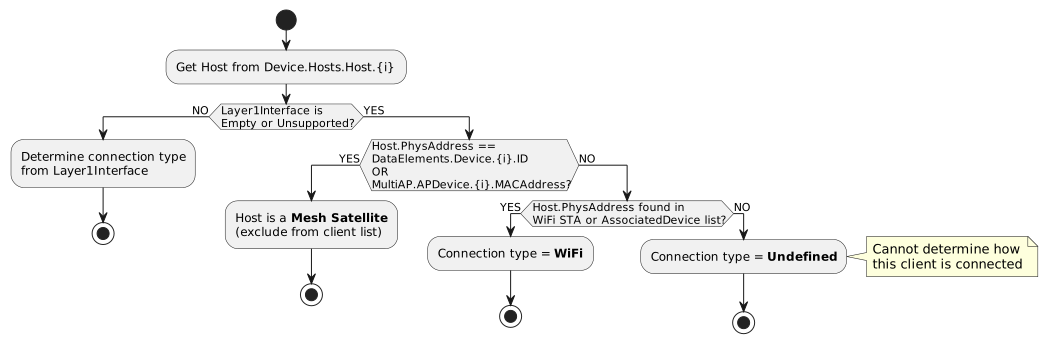
The "Undefined" status appears when the connection type cannot be determined. This occurs when ALL of the following conditions are true:
Detailed Conditions
"Undefined" status appears when:
Condition 1: Layer1Interface unavailable
Device.Hosts.Host.{i}.Layer1Interface == Empty
OR
Device.Hosts.Host.{i}.Layer1Interface contains unsupported/unreadable value
AND
Condition 2: Host is NOT a mesh device
Device.Hosts.Host.{i}.PhysAddress != Device.WiFi.DataElements.Network.Device.{y}.ID
AND
Device.Hosts.Host.{i}.PhysAddress != Device.WiFi.MultiAP.APDevice.{y}.MACAddress
AND
Condition 3: Host is NOT found in any WiFi client list
# DataElements path check
Device.Hosts.Host.{i}.PhysAddress != Device.WiFi.DataElements.Network.Device.{y}.Radio.{j}.BSS.{k}.STA.{l}.MACAddress
AND
Device.Hosts.Host.{i}.PhysAddress != Device.WiFi.AccessPoint.{y}.AssociatedDevice.{z}.MACAddress

# OR MultiAP path check
Device.Hosts.Host.{i}.PhysAddress != Device.WiFi.MultiAP.APDevice.{y}.Radio.{j}.AP.{k}.AssociatedDevice.{l}.MACAddress
AND
Device.Hosts.Host.{i}.PhysAddress != Device.WiFi.AccessPoint.{y}.AssociatedDevice.{z}.MACAddress
Implementation Example
def determine_connection_status(host):
    mac = host.phys_address

    # Check Layer1Interface first
    if host.layer1_interface and is_supported_interface(host.layer1_interface):
        return get_connection_from_layer1(host.layer1_interface)

    # Layer1Interface unavailable - check if it's a mesh device
    if is_mesh_device(mac):
        return "EXCLUDE"  # This is a Satellite, not a client

    # Check WiFi STA/AssociatedDevice lists
    if is_in_wifi_client_list(mac):
        return "WiFi"

    # Cannot determine connection type
    return "Undefined"

def is_mesh_device(mac):
    # Check DataElements devices
    for device in dataelements_devices:
        if mac == device.id:
            return True

    # Check MultiAP devices
    for apdevice in multiap_devices:
        if mac == apdevice.mac_address:
            return True

    return False

def is_in_wifi_client_list(mac):
    # Check AccessPoint AssociatedDevice
    for ap in access_points:
        for assoc in ap.associated_devices:
            if mac == assoc.mac_address:
                return True

    # Check DataElements STA
    for device in dataelements_devices:
        for radio in device.radios:
            for bss in radio.bss_list:
                for sta in bss.sta_list:
                    if mac == sta.mac_address:
                        return True

    # Check MultiAP AssociatedDevice
    for apdevice in multiap_devices:
        for radio in apdevice.radios:
            for ap in radio.aps:
                for assoc in ap.associated_devices:
                    if mac == assoc.mac_address:
                        return True

    return False
Possible Causes of "Undefined" Status
| Cause | Description |
|---|---|
Ethernet client without Layer1Interface |
Client connected via Ethernet but device doesn’t populate Layer1Interface parameter |
Stale host entry |
Host entry remains in Device.Hosts.Host but client is no longer connected |
Unsupported connection method |
Client connected via method not recognized by standard TR-181 parameters |
Device implementation gap |
Device firmware doesn’t properly report connection information |
Client Parameters Table
Basic Information (All Connection Types)
| Parameter | Value Format | Object/Parameter Path | Notes |
|---|---|---|---|
Hostname |
String |
|
Client device name |
IP Address |
IPv4: X.X.X.X IPv6: X:X:X:X:X:X:X:X |
|
May contain IPv4, IPv6, or both |
MAC Address |
X:X:X:X:X:X |
|
Hardware address |
Connected to |
String "XX GHz / Eth" |
Based on Mesh topology logic document |
Shows: Model name of Controller or Satellite + IP of controller/satellite + Connection type (2.4/5/6 GHz or Ethernet) |
Health |
Graph |
Calculated metric |
Visual health indicator |
WiFi-Specific Parameters
| Parameter | Value Format | Object/Parameter Path | Notes |
|---|---|---|---|
Type |
String |
|
Only for WiFi clients connected to main router (Controller). Use current logic for other cases. |
RSSI |
XXX dBm |
OR
|
See RSSI/RCPI conversion section below |
SNR |
XXX dB |
|
If SNR parameter not available, calculate from SignalStrength - Noise (see SNR calculation section) |
Operating Standard |
String |
|
Research alternatives: |
Last Data DL Rate |
XXX Mbps |
OR
|
Convert from Kbps to Mbps for display |
Last Data UL Rate |
XXX Mbps |
OR
|
Convert from Kbps to Mbps for display |
Retransmissions |
XXX (XXXX) |
OR
|
Delta between last and previous values (Total retransmissions) |
Ethernet-Specific Parameters
| Parameter | Value Format | Object/Parameter Path | Notes |
|---|---|---|---|
Collisions |
XXX (XXXX) |
|
Delta between last and previous values (Total collisions) |
Traffic Statistics (All Connection Types)
| Parameter | Value Format | Object/Parameter Path | Notes |
|---|---|---|---|
Bytes Received |
XXX (XXXX) MBytes |
OR
OR
|
Delta between last and previous values (Total bytes) |
Bytes Sent |
XXX (XXXX) MBytes |
OR
OR
|
Delta between last and previous values (Total bytes) |
Errors Rate DL |
XX (XX) % |
Ethernet: WiFi: DataElements: |
Percent of Error packets out of Total packets. Average % between Last and First values. |
Errors Rate UL |
XX (XX) % |
Ethernet: WiFi: DataElements: |
Percent of Error packets out of Total packets. Average % between Last and First values. |
Connection Time Calculation
Connection time is calculated differently based on available parameters and connection type:
Priority 1: Host.Active with ActiveLastChange
IF Device.Hosts.Host.{i}.Active == True THEN
    Connection Time = Current Time - Device.Hosts.Host.{i}.ActiveLastChange
Priority 2: WiFi AssociatedDevice (Fallback)
If Host.Active or ActiveLastChange is not available and device is connected by WiFi:
IF Device.WiFi.AccessPoint.{i}.AssociatedDevice.{i}.Active == True THEN
    Connection Time = Current Time - Device.WiFi.AccessPoint.{i}.AssociatedDevice.{i}.AssociationTime
Priority 3: WiFi to Mesh Satellite
If device is connected by WiFi to a Mesh Satellite:
Connection Time = Current Time - Device.WiFi.DataElements.Network.Device.{i}.Radio.{i}.BSS.{i}.STA.{i}.LastConnectTimeImplementation Example
def get_connection_time(host, current_time):
    # Priority 1: Host ActiveLastChange
    if host.active and host.active_last_change:
        return current_time - host.active_last_change

    # Priority 2: WiFi AssociatedDevice AssociationTime
    if host.is_wifi:
        assoc_device = find_associated_device(host.mac_address)
        if assoc_device and assoc_device.active and assoc_device.association_time:
            return current_time - assoc_device.association_time

    # Priority 3: DataElements STA LastConnectTime (for Satellite connections)
    if host.connected_to_satellite:
        sta = find_sta_entry(host.mac_address)
        if sta and sta.last_connect_time:
            return current_time - sta.last_connect_time

    return None  # Unable to determine
RSSI / RCPI Conversion
The SignalStrength parameter may contain either RSSI (negative dBm values) or RCPI (positive values per IEEE 802.11k).
Detection and Conversion
def get_rssi(signal_strength):
    """Convert SignalStrength to RSSI in dBm"""
    if signal_strength is None:
        return None

    if signal_strength < 0:
        # Already RSSI format
        return signal_strength
    elif signal_strength == 0:
        # RCPI minimum
        return -110  # dBm
    elif 1 <= signal_strength <= 220:
        # RCPI format - convert to RSSI
        # RSSI [dBm] = RCPI / 2 - 110
        rssi = signal_strength / 2 - 110
        # Round based on mathematical rules
        return round(rssi)
    else:
        # 221-255: Reserved or unavailable
return NoneSNR Calculation
If the direct SNR parameter is not available, calculate Signal-to-Noise Ratio:
Method 1: AccessPoint Path
SNR = Device.WiFi.AccessPoint.{i}.AssociatedDevice.{i}.SignalStrength
      - Device.WiFi.Radio.{i}.Stats.Noise
Method 2: DataElements Path
SNR = Device.WiFi.DataElements.Network.Device.{i}.Radio.{i}.BSS.{i}.STA.{i}.SignalStrength
      - Device.WiFi.DataElements.Network.Device.{i}.Radio.{i}.Noise
Implementation Example
def get_snr(client_mac, ap_index, radio_index):
    # Try direct SNR parameter first
    snr = get_param(f"Device.WiFi.AccessPoint.{ap_index}.AssociatedDevice.*.SNR",
                    mac=client_mac)
    if snr is not None:
        return snr

    # Calculate from SignalStrength - Noise
    signal = get_param(f"Device.WiFi.AccessPoint.{ap_index}.AssociatedDevice.*.SignalStrength",
                       mac=client_mac)
    noise = get_param(f"Device.WiFi.Radio.{radio_index}.Stats.Noise")

    if signal is not None and noise is not None:
        # Handle RCPI conversion if needed
        rssi = get_rssi(signal)
        if rssi is not None:
            return rssi - noise

    return None
Error Rate Calculation
Error rates are calculated as a percentage of error packets out of total packets:
Formula
Error Rate DL (%) = (ErrorsReceived / PacketsReceived) * 100
Error Rate UL (%) = (ErrorsSent / PacketsSent) * 100
Delta Calculation
Display shows both current delta and total:
Current Delta = (Current Errors - Previous Errors) / (Current Packets - Previous Packets) * 100
Average = (Total Errors / Total Packets) * 100

Display Format: "XX (XX) %" where first is delta, second is average
Implementation Example
def calculate_error_rate(current_errors, previous_errors,
                         current_packets, previous_packets,
                         total_errors, total_packets):
    # Delta calculation
    delta_errors = current_errors - previous_errors
    delta_packets = current_packets - previous_packets

    if delta_packets > 0:
        delta_rate = (delta_errors / delta_packets) * 100
    else:
        delta_rate = 0

    # Average calculation
    if total_packets > 0:
        avg_rate = (total_errors / total_packets) * 100
    else:
        avg_rate = 0

    return f"{delta_rate:.0f} ({avg_rate:.0f}) %"
"Connected to" Field Logic
The "Connected to" field displays which mesh device the client is connected to:
Display Format
{Model Name} ({IP Address}) via {Connection Type}

Examples:
- "Archer AX6000 (192.168.1.1) via 5 GHz"
- "RE605X (192.168.1.2) via 2.4 GHz"
- "Controller (192.168.1.1) via Ethernet"
Detection Logic
-
Determine which AP device the client is connected to using mesh flow logic:
-
Check
Layer1Interfacefor direct indication -
Search DataElements
STAor MultiAPAssociatedDevicelists -
Apply Ethernet Satellite detection for wired clients
-
-
Get AP device information:
-
Model name from
Device.DeviceInfo.ModelNameor mesh detection -
IP address from device configuration
-
Connection type from Layer1Interface or radio band
-
-
Connection type values:
-
"2.4 GHz" - WiFi 2.4 GHz band
-
"5 GHz" - WiFi 5 GHz band
-
"6 GHz" - WiFi 6 GHz band
-
"Ethernet" - Wired connection
-
See Connected Clients Detection for detailed detection flows.
Parameter Path Summary
AccessPoint Path (Primary for Controller-connected WiFi clients)
Device.WiFi.AccessPoint.{i}.AssociatedDevice.{j}.
    ├── Active
    ├── MACAddress
    ├── SignalStrength
    ├── SNR
    ├── Type
    ├── OperatingStandard
    ├── LastDataDownlinkRate
    ├── LastDataUplinkRate
    ├── AssociationTime
    ├── BytesReceived
    ├── BytesSent
    ├── PacketsReceived
    ├── PacketsSent
    ├── ErrorsReceived
    ├── ErrorsSent
    └── RetransCount
DataElements Path (Alternative/Satellite connections)
Device.WiFi.DataElements.Network.Device.{i}.Radio.{j}.BSS.{k}.STA.{l}.
    ├── MACAddress
    ├── SignalStrength
    ├── LastDataDownlinkRate
    ├── LastDataUplinkRate
    ├── LastConnectTime
    ├── BytesReceived
    ├── BytesSent
    ├── PacketsReceived
    ├── PacketsSent
    ├── ErrorsReceived
    ├── ErrorsSent
└── RetransCountImplementation Checklist
When implementing client information display:
-
[ ] Filter only
Active == Trueclients -
[ ] Exclude mesh Satellite devices from client list
-
[ ] Omit rows where parameter value is empty/unavailable
-
[ ] Use mesh topology logic for "Connected to" and connection type
-
[ ] Apply RCPI to RSSI conversion when needed
-
[ ] Calculate SNR from SignalStrength - Noise if direct SNR unavailable
-
[ ] Calculate connection time based on priority order
-
[ ] Calculate error rates as percentage with delta and average
-
[ ] Convert data rates from Kbps to Mbps for display
-
[ ] Format bytes as MBytes with delta values
Related Documentation
-
Backhaul Information - RSSI/RCPI conversion details