Mesh Network Flows - MultiAP Path
Overview
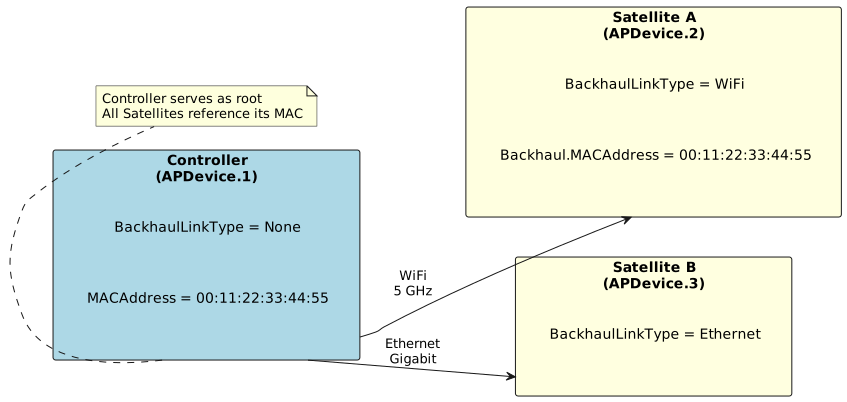
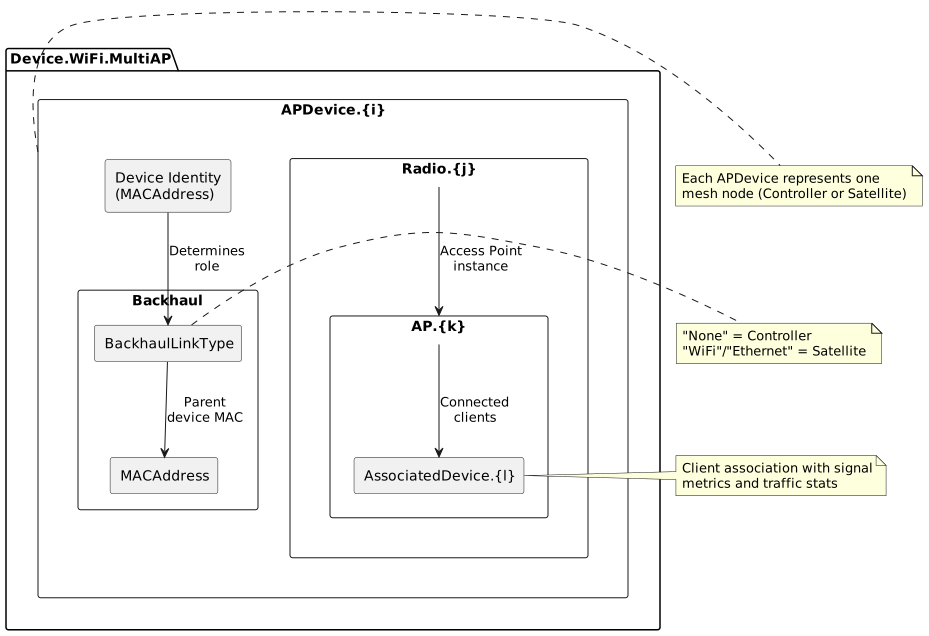
The MultiAP data model path (Device.WiFi.MultiAP.APDevice) provides a streamlined, standardized approach to mesh network management based on the WiFi Alliance Multi-AP specification. This path offers well-defined parameter structures specifically designed for Multi-AP mesh architectures with direct, straightforward detection mechanisms.
MultiAP is ideal for certified Multi-AP devices and provides:
-
Simple, direct parameter mappings for quick implementation
-
Standardized approach across Multi-AP certified devices
-
Clear controller/satellite role identification
-
Direct MAC-based topology detection
-
Well-structured client association data
Available Flows
This data model path supports the following mesh network detection and management flows:
| Flow | Document | Description |
|---|---|---|
Controller/Satellite Detection |
Identifies device role using BackhaulLinkType parameter. "None" indicates Controller; other values ("WiFi", "Ethernet", etc.) indicate Satellite. Model name resolved from Device.DeviceInfo.ModelName or Hosts.Host.HostName. |
|
Satellite Topology Detection |
Determines parent-child relationships by matching Satellite’s Backhaul.MACAddress to parent APDevice.MACAddress. Simple, direct matching strategy for topology building. |
|
Backhaul Information |
Extracts backhaul connection details including type, parent MAC address, and for WiFi backhaul: frequency band, channel, bandwidth, RSSI, and PHY rates from parent’s AssociatedDevice entry. |
|
Connected Clients Information |
Collects client data from Radio.AP.AssociatedDevice entries including MAC address, hostname, IP, signal strength, data rates, byte/packet statistics, and retransmission counts. |
|
Ethernet Satellite Client Detection |
Attributes Ethernet-connected clients to correct AP device in two-AP topologies using BackhaulLinkType analysis, Ethernet interface availability, and elimination logic. |
Key Parameters
Device Identification
| Parameter Path | Purpose | Type |
|---|---|---|
Device.WiFi.MultiAP.APDevice.{i}.MACAddress |
Unique AP device MAC address identifier |
string (MAC) |
Device.WiFi.MultiAP.APDevice.{i}.BackhaulLinkType |
Backhaul connection type and role indicator |
string (enum) |
Device.DeviceInfo.ModelName |
Controller device model name |
string |
Backhaul Configuration
| Parameter Path | Purpose | Type |
|---|---|---|
Device.WiFi.MultiAP.APDevice.{i}.Backhaul.MACAddress |
MAC address of parent device |
string (MAC) |
Device.WiFi.MultiAP.APDevice.{i}.Backhaul.BackhaulAP |
Reference to parent’s AP instance |
string |
Radio and AP Parameters
| Parameter Path | Purpose | Type |
|---|---|---|
Device.WiFi.MultiAP.APDevice.{i}.Radio.{j}.OperatingFrequencyBand |
Radio frequency band (2.4GHz, 5GHz, 6GHz) |
string (enum) |
Device.WiFi.MultiAP.APDevice.{i}.Radio.{j}.Channel |
Operating channel number |
unsignedInt |
Device.WiFi.MultiAP.APDevice.{i}.Radio.{j}.CurrentOperatingChannelBandwidth |
Channel bandwidth (20MHz, 40MHz, 80MHz, 160MHz) |
string |
Device.WiFi.MultiAP.APDevice.{i}.Radio.{j}.AP.{k}.SSID |
Network name |
string |
Device.WiFi.MultiAP.APDevice.{i}.Radio.{j}.AP.{k}.BSSID |
Basic Service Set Identifier |
string (MAC) |
Client (AssociatedDevice) Parameters
| Parameter Path | Purpose | Type |
|---|---|---|
Device.WiFi.MultiAP.APDevice.{i}.Radio.{j}.AP.{k}.AssociatedDevice.{l}.MACAddress |
Client device MAC address |
string (MAC) |
Device.WiFi.MultiAP.APDevice.{i}.Radio.{j}.AP.{k}.AssociatedDevice.{l}.SignalStrength |
RSSI in dBm |
int |
Device.WiFi.MultiAP.APDevice.{i}.Radio.{j}.AP.{k}.AssociatedDevice.{l}.LastDataDownlinkRate |
Downlink PHY rate in Kbps |
unsignedInt |
Device.WiFi.MultiAP.APDevice.{i}.Radio.{j}.AP.{k}.AssociatedDevice.{l}.BytesSent |
Total bytes transmitted to client |
unsignedLong |
Device.WiFi.MultiAP.APDevice.{i}.Radio.{j}.AP.{k}.AssociatedDevice.{l}.RetransCount |
Packet retransmission count |
unsignedInt |
Detection Strategy
The MultiAP path uses a straightforward, single-strategy approach:
-
Role Detection: Check BackhaulLinkType - "None" = Controller, other values = Satellite
-
Topology Building: Match Backhaul.MACAddress to parent’s APDevice.MACAddress
-
Client Association: Read AssociatedDevice entries directly from Radio.AP structure
-
Fallback: If MultiAP parameters unavailable, device doesn’t support Multi-AP specification
This direct approach ensures simple implementation and predictable behavior on Multi-AP certified devices.
BackhaulLinkType Values
| Value | Device Role | Description |
|---|---|---|
"None" |
Controller |
Device is the mesh controller (root node) with no upstream backhaul |
"WiFi" |
Satellite |
Satellite connected to parent via WiFi backhaul |
"Ethernet" |
Satellite |
Satellite connected to parent via Ethernet backhaul |
"MoCA" |
Satellite |
Satellite connected to parent via MoCA (Multimedia over Coax) backhaul |
"PLC" |
Satellite |
Satellite connected to parent via Powerline Communication backhaul |
Advantages of MultiAP Path
| Advantage | Description |
|---|---|
Simplicity |
Straightforward parameter structure with direct mappings, easier to implement and maintain. |
Multi-AP Certification |
Standardized across WiFi Alliance certified Multi-AP devices, ensuring interoperability. |
Clear Role Identification |
Single BackhaulLinkType parameter definitively identifies Controller vs. Satellite role. |
Direct Topology Matching |
Simple MAC-to-MAC matching for parent-child relationships, no complex fallback logic needed. |
Predictable Structure |
Well-defined Radio → AP → AssociatedDevice hierarchy follows Multi-AP specification exactly. |
Efficient Queries |
Fewer parameters to query, reducing network overhead and processing time. |
Comparison with DataElements Path
| Aspect | MultiAP Path | DataElements Path |
|---|---|---|
Complexity |
Simple with direct mappings |
More complex with multiple fallback strategies |
Parameter Count |
Focused parameter set (3-5 key parameters) |
Extensive parameter set (10+ key parameters) |
Detection Strategies |
Single: Direct MAC matching |
Multiple: BSSID, Device ID, MAC, BackhaulDeviceID |
Backhaul Types |
WiFi, Ethernet, MoCA, PLC |
WiFi, Ethernet, MoCA, PLC, custom types |
Client Information |
AssociatedDevice entries with core metrics |
STA entries with extensive metrics and fallbacks |
Device Support |
Multi-AP certified devices |
Broader compatibility through fallbacks |
Recommended For |
Simple topologies, certified devices |
Complex topologies, mixed environments |
Implementation Difficulty |
Easier to implement |
More complex logic required |
Implementation Considerations
When implementing detection flows using the MultiAP path:
-
Device Certification: Verify devices are Multi-AP certified before relying on this path
-
MAC Normalization: Ensure consistent MAC address formatting (case, separators) for matching
-
Topology Validation: Check for single Controller, no cycles, no orphaned Satellites
-
Signal Metrics Location: WiFi backhaul signal metrics come from parent’s AssociatedDevice entry, not Satellite itself
-
Ethernet Clients: Ethernet clients do NOT appear in AssociatedDevice lists (WiFi-specific)
Common Use Cases
Simple Mesh Deployments
The MultiAP path is ideal for: - Home mesh networks with 2-5 access points - Multi-AP certified device ecosystems - Star or simple daisy-chain topologies - Environments where all devices use same firmware/vendor - Quick deployment with minimal configuration
Limitations
The MultiAP path has some constraints compared to DataElements:
-
No Fallback Options: If MultiAP parameters unavailable, no alternative detection methods
-
WiFi Backhaul Signal Location: Metrics require querying parent device’s AssociatedDevice entry
-
Limited to Multi-AP Spec: Devices must implement Multi-AP data model
-
Simpler Parameter Set: Less detailed information than DataElements for advanced use cases
-
Two-Device Limitation for Ethernet Clients: Ethernet client attribution only reliable in 2-AP topologies
-
No Ethernet Satellite Client Detection: There is no standard TR-181 way to determine if a Host is connected to a Satellite device by Ethernet (see Ethernet Satellite Client Detection for inference-based workaround)
Custom Objects and Vendor-Specific Flows
When detection flows return "Custom objects" or "N/A", this indicates the device does not implement the standard TR-181 MultiAP data model. In such cases:
When to Expect Custom Objects
-
Non-Certified Devices: Devices without WiFi Alliance Multi-AP certification
-
Legacy Firmware: Older firmware versions predating Multi-AP specification
-
Proprietary Mesh: Vendor-specific mesh implementations (e.g., Mesh Pods, Proprietary backhaul)
-
DataElements-Only Devices: Devices implementing DataElements but not MultiAP
Handling Custom Objects
-
Try DataElements Path: The DataElements path may be available with multiple fallback strategies
-
Document Vendor Mappings: Create vendor-specific parameter mapping for proprietary implementations
-
Contact Vendor: Request Multi-AP certification status or parameter mapping documentation
-
Use Device.Hosts: For client information, Device.Hosts.Host is often available as a universal fallback
-
Manual Configuration: Provide options for manual role assignment if automatic detection fails
Custom Objects Detection Example
def detect_mesh_role(device):
    # Try MultiAP path
    link_type = get_param(device, "BackhaulLinkType")
    if link_type:
        return "Controller" if link_type == "None" else "Satellite"

    # Try DataElements fallback
    backhaul_type = get_param(device, "WiFi.DataElements.Network.Device.BackhaulMediaType")
    if backhaul_type:
        return "Controller" if backhaul_type in ["", "None", "Controller"] else "Satellite"

    # Custom objects - device doesn't implement standard parameters
return "Custom" # Requires vendor-specific handlingNote: The "Custom objects" result is not an error but an indication that this device requires vendor-specific implementation or may not support mesh functionality at all.
Related Documentation
-
Detecting Mesh Topology - Initial mesh network detection
-
DataElements Overview - Alternative DataElements data model path
-
WiFi Alliance Multi-AP Specification: https://www.wi-fi.org/discover-wi-fi/multi-ap
Getting Started
To begin working with MultiAP flows:
-
Verify Support: Check if your devices implement Device.WiFi.MultiAP.APDevice
-
Count Devices: Query Device.WiFi.MultiAP.APDevice.{i}.MACAddress to count mesh nodes
-
Identify Roles: Check Controller/Satellite Detection
-
Build Topology: Proceed to Topology Detection
Each flow document provides detailed implementation requirements, complete examples, and troubleshooting guidance.