Controller and Satellite Detection
Overview
This document describes how to determine whether a mesh device functions as a Controller (primary/root device) or Satellite (secondary access point) using TR-181 data model parameters. Two standardized approaches are available, each using different parameter paths in the TR-181 specification:
-
DataElements Path - Uses Device.WiFi.DataElements.Network.Device objects with BackhaulMediaType parameter
-
MultiAP Path - Uses Device.WiFi.MultiAP.APDevice objects with BackhaulLinkType parameter
Both methods provide equivalent functionality and follow the same detection logic: Controllers are identified by specific parameter values indicating no upstream backhaul connection, while Satellites have values indicating their connection type to the Controller.
Parameter Path Comparison
| Aspect | DataElements Path | MultiAP Path |
|---|---|---|
Primary Object Path |
Device.WiFi.DataElements.Network.Device.{i} |
Device.WiFi.MultiAP.APDevice.{i} |
Role Detection Parameter |
BackhaulMediaType |
BackhaulLinkType |
Controller Indicator |
Empty, "None", or "Controller" |
"None" |
Satellite Indicators |
Any non-empty value except "None"/"Controller" |
"WiFi", "Ethernet", "MoCA", "Other" |
MAC Address Parameter |
ID or BackhaulMACAddress |
MACAddress |
Alternative Controller Detection |
BackhaulMACAddress == BackhaulALID == ID |
N/A (not applicable) |
TR-181 Specification |
Issue 2 Amendment 15+ (DataElements) |
Issue 2 Amendment 15+ (MultiAP) |
Common Use Case |
EasyMesh, Wi-Fi Alliance Data Elements |
Multi-AP Alliance specification |
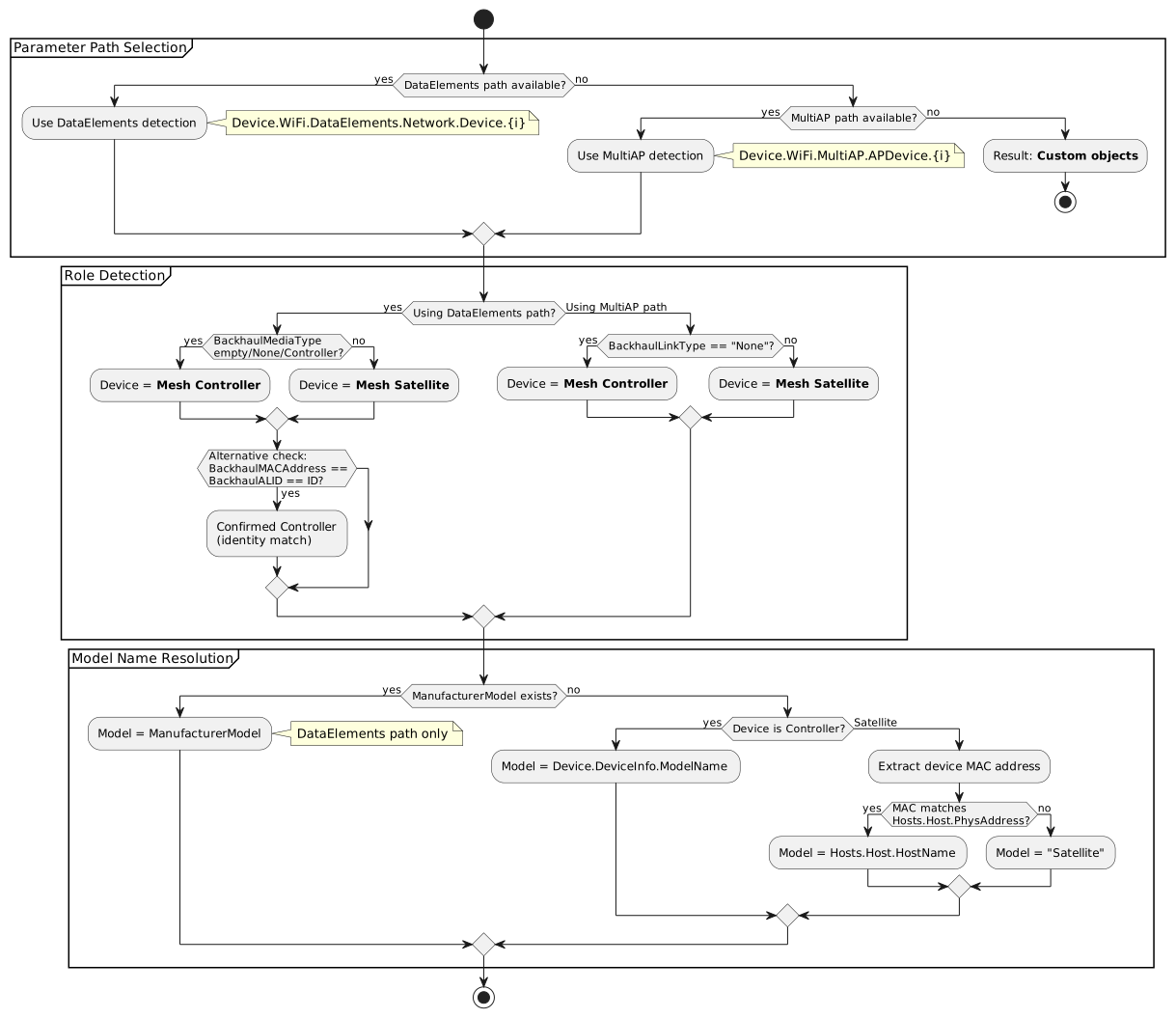
Unified Detection Flow
The following flowchart shows the complete detection logic for both parameter paths:
TR-181 Parameter Reference
DataElements Path Parameters
| Parameter Path | Description | Type | Example Value |
|---|---|---|---|
Device.WiFi.DataElements.Network.Device.{i}.BackhaulMediaType |
Primary role indicator. Empty, "None", or "Controller" indicates a Controller device. |
string |
"None", "WiFi", "Ethernet" |
Device.WiFi.DataElements.Network.Device.{i}.MultiAPDevice.Backhaul.LinkType |
Alternative role indicator within DataElements structure. "None" means Controller. |
string |
"None", "WiFi" |
Device.WiFi.DataElements.Network.Device.{i}.ManufacturerModel |
Device model identifier (preferred source) |
string |
"MeshRouter-X200" |
Device.WiFi.DataElements.Network.Device.{i}.ID |
Device MAC address (primary identifier) |
string (MAC) |
"00:11:22:33:44:55" |
Device.WiFi.DataElements.Network.Device.{i}.BackhaulMACAddress |
MAC address of upstream backhaul connection |
string (MAC) |
"00:11:22:33:44:55" |
Device.WiFi.DataElements.Network.Device.{i}.BackhaulALID |
Backhaul Agent Link Identifier (alternative parent reference) |
string (MAC) |
"00:11:22:33:44:55" |
MultiAP Path Parameters
| Parameter Path | Description | Type | Example Value |
|---|---|---|---|
Device.WiFi.MultiAP.APDevice.{i}.BackhaulLinkType |
Backhaul connection type. "None" indicates Controller. Other values indicate Satellite. |
string (enumeration) |
"None", "WiFi", "Ethernet", "MoCA", "Other" |
Device.WiFi.MultiAP.APDevice.{i}.MACAddress |
MAC address of the AP device |
string (MAC) |
"AA:BB:CC:DD:EE:FF" |
Common Parameters (Both Paths)
| Parameter Path | Description | Type | Example Value |
|---|---|---|---|
Device.DeviceInfo.ModelName |
Device model name (Controller fallback) |
string |
"Router-AC2600" |
Device.Hosts.Host.{i}.PhysAddress |
Physical (MAC) address of connected device |
string (MAC) |
"AA:BB:CC:DD:EE:FF" |
Device.Hosts.Host.{i}.HostName |
Hostname of connected device (Satellite name resolution) |
string |
"Kitchen-Satellite" |
Detection Criteria
Controller Detection
A device is identified as a Mesh Controller when any of the following conditions are met:
DataElements Path:
-
BackhaulMediaType is empty, "None", or "Controller"
-
OR MultiAPDevice.Backhaul.LinkType equals "None"
-
OR Identity match: BackhaulMACAddress == BackhaulALID == ID
MultiAP Path:
-
BackhaulLinkType equals "None"
Satellite Detection
A device is identified as a Mesh Satellite when:
DataElements Path:
-
BackhaulMediaType has a value other than empty/"None"/"Controller" (e.g., "WiFi", "Ethernet")
-
OR MultiAPDevice.Backhaul.LinkType has a value other than "None"
MultiAP Path:
-
BackhaulLinkType has a value other than "None" (e.g., "WiFi", "Ethernet", "MoCA", "Other")
Identity Match Controller Detection (DataElements Only)
The DataElements path provides an additional verification method using identity matching:
Device.WiFi.DataElements.Network.Device.{i}.BackhaulMACAddress ==
Device.WiFi.DataElements.Network.Device.{i}.BackhaulALID ==
Device.WiFi.DataElements.Network.Device.{i}.ID
When all three parameters share the same value, it confirms the device is the Controller. This pattern indicates the device has no upstream parent, so backhaul reference parameters point back to itself.
Model Name Resolution
Implementation Examples
DataElements Path Implementation
Controller Configuration
# Controller Device Parameters
Device.WiFi.DataElements.Network.Device.1.ID = "00:11:22:33:44:55"
Device.WiFi.DataElements.Network.Device.1.BackhaulMediaType = "None"
Device.WiFi.DataElements.Network.Device.1.BackhaulMACAddress = "00:11:22:33:44:55"
Device.WiFi.DataElements.Network.Device.1.BackhaulALID = "00:11:22:33:44:55"
Device.WiFi.DataElements.Network.Device.1.ManufacturerModel = "MeshGateway-Pro"
Device.DeviceInfo.ModelName = "MeshGateway-Pro"
Satellite Configuration
# Satellite Device Parameters (WiFi Backhaul)
Device.WiFi.DataElements.Network.Device.2.ID = "AA:BB:CC:11:22:33"
Device.WiFi.DataElements.Network.Device.2.BackhaulMediaType = "WiFi"
Device.WiFi.DataElements.Network.Device.2.BackhaulMACAddress = "00:11:22:33:44:55"
Device.WiFi.DataElements.Network.Device.2.ManufacturerModel = "MeshNode-X100"

# Corresponding Hosts Entry
Device.Hosts.Host.10.PhysAddress = "AA:BB:CC:11:22:33"
Device.Hosts.Host.10.HostName = "LivingRoom-Mesh"
MultiAP Path Implementation
Controller Configuration
# Controller Device Parameters
Device.WiFi.MultiAP.APDevice.1.BackhaulLinkType = "None"
Device.WiFi.MultiAP.APDevice.1.MACAddress = "00:11:22:33:44:55"
Device.DeviceInfo.ModelName = "MeshRouter-X200"
Satellite Configuration
# Satellite Device Parameters (Ethernet Backhaul)
Device.WiFi.MultiAP.APDevice.2.BackhaulLinkType = "Ethernet"
Device.WiFi.MultiAP.APDevice.2.MACAddress = "BB:CC:DD:44:55:66"

# Corresponding Hosts Entry
Device.Hosts.Host.11.PhysAddress = "BB:CC:DD:44:55:66"
Device.Hosts.Host.11.HostName = "Bedroom-Mesh"
Complete Mesh Network Example
# Using MultiAP Path for Controller + 2 Satellites

# Controller
Device.DeviceInfo.ModelName = "MeshGateway-Pro"
Device.WiFi.MultiAP.APDevice.1.BackhaulLinkType = "None"
Device.WiFi.MultiAP.APDevice.1.MACAddress = "00:11:22:33:44:55"

# Satellite 1 (WiFi Backhaul)
Device.WiFi.MultiAP.APDevice.2.BackhaulLinkType = "WiFi"
Device.WiFi.MultiAP.APDevice.2.MACAddress = "AA:BB:CC:11:22:33"
Device.Hosts.Host.10.PhysAddress = "AA:BB:CC:11:22:33"
Device.Hosts.Host.10.HostName = "LivingRoom-Mesh"

# Satellite 2 (Ethernet Backhaul)
Device.WiFi.MultiAP.APDevice.3.BackhaulLinkType = "Ethernet"
Device.WiFi.MultiAP.APDevice.3.MACAddress = "BB:CC:DD:44:55:66"
Device.Hosts.Host.11.PhysAddress = "BB:CC:DD:44:55:66"
Device.Hosts.Host.11.HostName = "Bedroom-Mesh"
Path Selection Guidelines
When to Use DataElements Path
-
Device implements EasyMesh or Wi-Fi Alliance Data Elements specification
-
ManufacturerModel parameter is available and provides accurate model information
-
Alternative controller detection via identity matching is desired
-
Device supports MultiAPDevice.Backhaul.LinkType as fallback
When to Use MultiAP Path
-
Device implements Multi-AP Alliance specification
-
Simpler parameter structure is preferred
-
BackhaulLinkType enumeration covers all required backhaul types
-
Device firmware includes TR-181 Issue 2 Amendment 15+ with MultiAP support
Migration Strategy
If transitioning between paths:
-
DataElements to MultiAP: Map BackhaulMediaType values directly to BackhaulLinkType
-
MultiAP to DataElements: Set both BackhaulMediaType and MultiAPDevice.Backhaul.LinkType to same value
-
Dual Support: Implement both paths and prefer DataElements if ManufacturerModel is populated
Common Issues and Debugging
Detection Returns "Custom objects"
Cause: Neither DataElements nor MultiAP parameter paths exist on the device
Solutions:
-
Verify device firmware includes TR-181 Issue 2 Amendment 15 or later
-
Check if mesh functionality is enabled in device configuration
-
Confirm device supports EasyMesh, Multi-AP, or equivalent mesh protocol
-
Review device manufacturer documentation for supported TR-181 objects
Satellite Model Name Shows as "Satellite"
Cause: MAC address matching failed between device MAC and Hosts table
Solutions:
-
Verify Satellite’s MAC address parameter is correctly populated (ID for DataElements, MACAddress for MultiAP)
-
Ensure Satellite is registered in Device.Hosts.Host table with correct PhysAddress
-
Check MAC address format consistency (uppercase/lowercase, separator style)
-
Confirm the management interface MAC is the one tracked in Hosts table
-
Verify DHCP or network discovery has populated the Hosts table
Controller Not Detected Correctly
Cause: BackhaulMediaType or BackhaulLinkType has incorrect value
Solutions:
-
For DataElements: Verify BackhaulMediaType is empty, "None", or "Controller"
-
For MultiAP: Verify BackhaulLinkType is exactly "None" (case-sensitive)
-
Check identity match: BackhaulMACAddress == BackhaulALID == ID (DataElements only)
-
Ensure only one device in the mesh has Controller indicator values
Multiple Controllers Detected
Cause: Multiple device instances have Controller indicator values
Solutions:
-
In proper mesh topology, only one device should be Controller
-
Verify mesh configuration and role assignments
-
Check if devices are in standalone mode vs. mesh mode
-
Review BackhaulMediaType/BackhaulLinkType values across all device instances
BackhaulMediaType Empty but Not Recognized as Controller
Cause: Implementation requires explicit value check for empty string
Solutions:
-
Ensure detection logic treats empty string as Controller indicator
-
Verify parameter exists in data model (absence vs. empty are different)
-
Check for whitespace-only values that appear empty
-
Consider using identity match as alternative verification
Validation Checklist
Use this checklist to verify correct implementation:
DataElements Path
-
Device.WiFi.DataElements.Network.Device.{i} object exists
-
BackhaulMediaType parameter is populated with valid value
-
Controller has BackhaulMediaType = empty/"None"/"Controller"
-
Satellites have BackhaulMediaType with actual media type
-
ManufacturerModel is populated (recommended)
-
Identity match works: BackhaulMACAddress == BackhaulALID == ID for Controller
-
Satellite MAC addresses exist in Device.Hosts.Host table
MultiAP Path
-
Device.WiFi.MultiAP.APDevice.{i} object exists
-
BackhaulLinkType parameter is populated with valid value
-
Controller has BackhaulLinkType = "None"
-
Satellites have BackhaulLinkType with actual link type ("WiFi", "Ethernet", etc.)
-
MACAddress parameter is populated for all APDevice instances
-
Satellite MAC addresses exist in Device.Hosts.Host table
-
Device.DeviceInfo.ModelName is set for Controller
Common Requirements
-
Only one device has Controller indicators in the mesh
-
All Satellites reference the Controller via backhaul parameters
-
Device.Hosts.Host table is populated with Satellite entries
-
MAC address formats are consistent (case, separators)
-
Model name resolution succeeds for both Controller and Satellites