Mesh Network Flows - DataElements Path
Overview
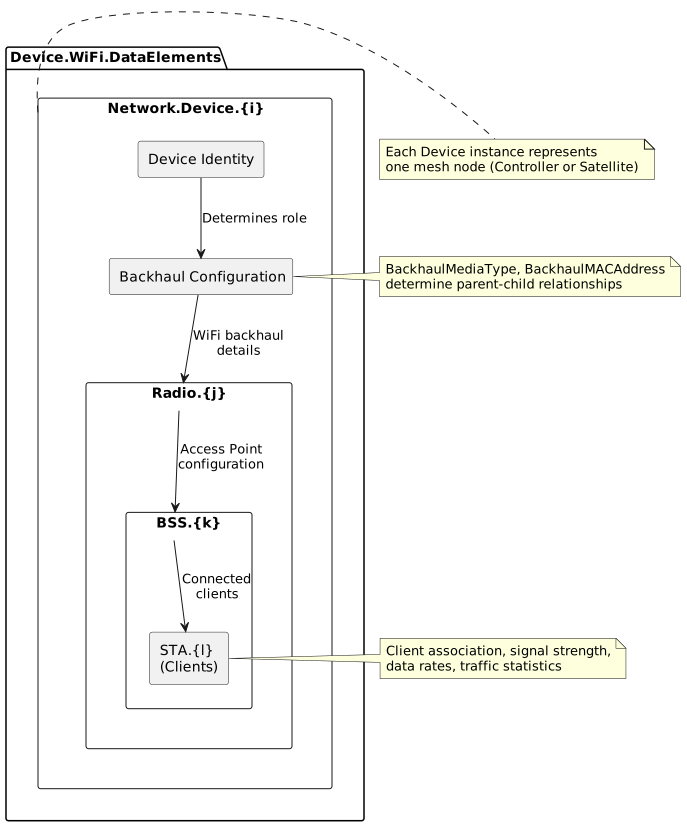
The DataElements data model path (Device.WiFi.DataElements.Network.Device) provides a comprehensive, modern approach to mesh network management aligned with the WiFi EasyMesh specification. This path offers extensive parameters for mesh topology detection, backhaul configuration, and client management with multiple fallback mechanisms for maximum device compatibility.
DataElements is the preferred path for newer TR-181 implementations and provides:
-
Rich parameter sets with multiple detection strategies
-
Comprehensive WiFi metrics and signal quality data
-
Flexible fallback mechanisms for different device implementations
-
Support for multi-hop mesh topologies
-
Detailed radio and BSS (Basic Service Set) information
Available Flows
This data model path supports the following mesh network detection and management flows:
| Flow | Document | Description |
|---|---|---|
Controller/Satellite Detection |
Determines whether a mesh device is a Controller or Satellite using BackhaulMediaType or MultiAPDevice.Backhaul.LinkType parameters. Includes model name resolution with multiple fallback strategies. |
|
Satellite Topology Detection |
Identifies parent-child relationships in mesh topology by matching BackhaulMACAddress to parent BSSIDs, BackhaulID to Device IDs, or using MultiAPDevice BackhaulDeviceID. Supports multi-hop topologies. |
|
Backhaul Information |
Extracts detailed backhaul connection information including type (WiFi, Ethernet, MoCA, PLC), MAC addresses, and for WiFi backhaul: frequency band, channel, bandwidth, signal strength, and data rates. |
|
Connected Clients Information |
Collects comprehensive client device data from Radio.BSS.STA entries including MAC address, hostname, IP, signal strength, PHY rates, traffic statistics, and connection quality metrics. |
|
Ethernet Satellite Client Detection |
Determines which Satellite device an Ethernet-connected client belongs to in two-AP topologies using elimination logic, subnet analysis, and Ethernet interface availability checks. |
Key Parameters
Device Identification
| Parameter Path | Purpose | Type |
|---|---|---|
Device.WiFi.DataElements.Network.Device.{i}.ID |
Unique device identifier (typically MAC address) |
string (MAC) |
Device.WiFi.DataElements.Network.Device.{i}.ManufacturerModel |
Device model name |
string |
Device.WiFi.DataElements.Network.Device.{i}.BackhaulMediaType |
Backhaul connection type (empty/None/Controller = Controller role) |
string |
Backhaul Configuration
| Parameter Path | Purpose | Type |
|---|---|---|
Device.WiFi.DataElements.Network.Device.{i}.BackhaulMACAddress |
MAC address of parent device’s backhaul interface |
string (MAC) |
Device.WiFi.DataElements.Network.Device.{i}.BackhaulID |
Device ID of parent device |
string (MAC) |
Device.WiFi.DataElements.Network.Device.{i}.BackhaulDownMACAddress |
This device’s backhaul interface MAC |
string (MAC) |
Radio and BSS Parameters
| Parameter Path | Purpose | Type |
|---|---|---|
Device.WiFi.DataElements.Network.Device.{i}.Radio.{j}.ID |
Radio MAC address identifier |
string (MAC) |
Device.WiFi.DataElements.Network.Device.{i}.Radio.{j}.CurrentOperatingClassProfile.Class |
IEEE 802.11 operating class (frequency band) |
unsignedInt |
Device.WiFi.DataElements.Network.Device.{i}.Radio.{j}.BSS.{k}.BSSID |
Basic Service Set Identifier |
string (MAC) |
Device.WiFi.DataElements.Network.Device.{i}.Radio.{j}.BSS.{k}.SSID |
Network name |
string |
Client (STA) Parameters
| Parameter Path | Purpose | Type |
|---|---|---|
Device.WiFi.DataElements.Network.Device.{i}.Radio.{j}.BSS.{k}.STA.{l}.MACAddress |
Client device MAC address |
string (MAC) |
Device.WiFi.DataElements.Network.Device.{i}.Radio.{j}.BSS.{k}.STA.{l}.SignalStrength |
RSSI in dBm |
int |
Device.WiFi.DataElements.Network.Device.{i}.Radio.{j}.BSS.{k}.STA.{l}.LastDataDownlinkRate |
Downlink PHY rate in Kbps |
unsignedInt |
Device.WiFi.DataElements.Network.Device.{i}.Radio.{j}.BSS.{k}.STA.{l}.BytesSent |
Total bytes transmitted to client |
unsignedLong |
Detection Strategy
The DataElements path employs a hierarchical fallback approach:
-
Primary Detection: Use BackhaulMediaType and BackhaulMACAddress for most operations
-
Fallback Path 1: If BackhaulMediaType unavailable, use MultiAPDevice.Backhaul.LinkType
-
Fallback Path 2: For topology, try BSSID matching, then Device ID matching, then MAC-to-ID matching
-
Fallback Path 3: For client info, if STA parameters missing, use Device.Hosts.Host table
This multi-tier approach ensures maximum compatibility across different device implementations and firmware versions.
Advantages of DataElements Path
| Advantage | Description |
|---|---|
Comprehensive Parameters |
More detailed information available compared to MultiAP path, including extended backhaul types, multiple identification methods, and richer client metrics. |
Multiple Fallback Options |
Hierarchical detection strategies ensure operation even when some parameters are not implemented by device firmware. |
WiFi EasyMesh Alignment |
Modern specification aligned with WiFi Alliance EasyMesh standards for interoperability. |
Topology Flexibility |
Supports complex multi-hop topologies with multiple matching strategies for parent-child relationships. |
Extended Backhaul Types |
Supports WiFi, Ethernet, MoCA, PLC (Powerline), and other backhaul technologies beyond basic WiFi/Ethernet. |
Detailed Radio Info |
Operating class, channel, bandwidth, and BSS-level parameters provide comprehensive WiFi environment understanding. |
Comparison with MultiAP Path
| Aspect | DataElements Path | MultiAP Path |
|---|---|---|
Complexity |
More complex with multiple fallback strategies |
Simpler with direct parameter mappings |
Parameter Count |
Extensive parameter set (10+ key parameters) |
Focused parameter set (3-5 key parameters) |
Detection Strategies |
Multiple: BSSID, Device ID, MAC, BackhaulDeviceID |
Single: Direct MAC address matching |
Backhaul Types |
WiFi, Ethernet, MoCA, PLC, custom |
WiFi, Ethernet, MoCA |
Client Information |
STA entries with extensive metrics |
AssociatedDevice entries with core metrics |
Device Support |
Broader compatibility through fallbacks |
Devices with MultiAP certification |
Recommended For |
Complex topologies, mixed device environments |
Simple topologies, MultiAP-certified devices |
Implementation Considerations
When implementing detection flows using the DataElements path:
-
Query Optimization: Use wildcard queries to retrieve all Network.Device instances in a single operation
-
Caching Strategy: Cache device IDs and BSSIDs for topology matching; poll signal metrics periodically
-
Fallback Handling: Always implement fallback detection paths for missing parameters
-
MAC Normalization: Ensure consistent MAC address formatting (colons, case) across comparisons
-
Validation: Verify topology for cycles, orphaned devices, and multiple controllers after building hierarchy
Custom Objects and Vendor-Specific Flows
When detection flows return "Custom objects" or "N/A", this indicates the device does not implement standard TR-181 DataElements parameters. In such cases:
When to Expect Custom Objects
-
Legacy Devices: Older firmware may predate DataElements specification
-
Proprietary Implementations: Some vendors use custom parameter paths
-
Partial Implementation: Device may implement some but not all required parameters
-
Non-Mesh Devices: Standalone APs without mesh capability
Handling Custom Objects
-
Document Vendor Mappings: Create vendor-specific parameter mapping files that translate proprietary paths to standard DataElements parameters
-
Contact Vendor: Request TR-181 compliance information or mapping documentation
-
Fallback to MultiAP: Try the MultiAP path as an alternative data model
-
Use Device.Hosts: For client information, Device.Hosts.Host may be available as a universal fallback
-
Manual Configuration: In worst case, provide manual device role configuration options
Custom Objects Detection Example
def detect_mesh_role(device):
    # Try DataElements path first
    backhaul_type = get_param(device, "BackhaulMediaType")
    if backhaul_type:
        return "Controller" if backhaul_type in ["", "None", "Controller"] else "Satellite"

    # Try MultiAPDevice fallback
    link_type = get_param(device, "MultiAPDevice.Backhaul.LinkType")
    if link_type:
        return "Controller" if link_type == "None" else "Satellite"

    # Custom objects - device doesn't implement standard parameters
return "Custom" # Requires vendor-specific handlingNote: The "Custom objects" result is not an error but an indication that vendor-specific implementation details are required for full mesh detection on this device.
Common Use Cases
Large-Scale Mesh Deployments
The DataElements path excels in environments with: - Multiple Satellites in multi-hop configurations - Mixed backhaul types (WiFi + Ethernet + MoCA) - Various device manufacturers and firmware versions - Need for detailed signal quality monitoring - Complex topology visualization requirements
Related Documentation
-
Detecting Mesh Topology - Initial mesh network detection
-
MultiAP Overview - Alternative MultiAP data model path
-
TR-181 Data Model Specification: https://cwmp-data-models.broadband-forum.org/tr-181-2-20-1-cwmp-full.xml
Getting Started
To begin working with DataElements flows:
-
Verify Support: Check if your devices implement Device.WiFi.DataElements.Network.Device
-
Count Devices: Query Device.WiFi.DataElements.Network.Device.{i}.ID to count mesh nodes
-
Start with Detection: Begin with Controller/Satellite Detection
-
Build Topology: Proceed to Topology Detection
Each flow document provides detailed implementation requirements, examples, and troubleshooting guidance.