API Integration
HTTP client (Axios)
FT Configs UI uses a single Axios instance with:
-
base URL resolution at runtime,
-
withCredentials: truefor cookie-based auth, -
locale propagation via
Accept-Languageheader, -
read-only enforcement for
VIEWERrole, -
CSRF token fetching from
/csrffor unsafe methods, -
refresh-token retry on 401 via
/auth/refresh-token.
Implementation entry points:
-
Axios instance + interceptors:
src/lib/axios.ts -
Base URL resolution:
src/lib/api-url.ts -
Runtime config loader (Zod-validated):
src/lib/runtime-config.ts -
Permission / read-only helpers:
src/lib/permissions.ts -
Common auth APIs:
src/lib/api.ts
Server-side state (caching, dedup, refetch) is handled by TanStack Query on top of apiService. Axios owns the HTTP transport layer only. See State & Data Flow.
|
Axios instance configuration
// src/lib/axios.ts
const axiosInstance = axios.create({
  baseURL: resolveApiUrl(),
  headers: { 'Content-Type': 'application/json' },
  withCredentials: true,
});

export const apiService = {
  get:    <T>(url: string, params?: unknown, config?: AxiosRequestConfig) => ...,
  post:   <T>(url: string, data?: unknown, config?: AxiosRequestConfig) => ...,
  put:    <T>(url: string, data?: unknown, config?: AxiosRequestConfig) => ...,
  patch:  <T>(url: string, data?: unknown, config?: AxiosRequestConfig) => ...,
  delete: <T>(url: string, config?: AxiosRequestConfig) => ...,
};
Every helper merges withCredentials: true so cookie-based session and CSRF cookies are always sent.
Base URL resolution
The base URL is resolved at runtime — the same build artifact targets any backend environment without recompilation.
Resolution chain (src/lib/api-url.ts → resolveApiUrl()):
-
getRuntimeConfig().API_URL— read fromwindow.RUNTIME_CONFIG, validated against a Zod schema insrc/lib/runtime-config.ts. Populated by/runtime-config.js, which is loaded synchronously byindex.htmlbefore the app bundle. In production it is generated at container startup bydocker/ops/entrypoint.shwith a fixedAPI_URLof/configs-service. -
Fallback
/configs-service— used only if runtime config is missing or fails Zod validation (e.g. in tests). A relative path works because in development the Vite dev server proxies/configs-servicetohttp://localhost:8082(seevite.config.ts), and in production nginx proxies the same prefix toBACKEND_URL.
Build-time constants (import.meta.env.VITE_APP_VERSION, import.meta.env.VITE_APP_BUILD) are injected by Vite’s define from version.json and are used for version display, not for API URL resolution.
There are no NEXT_PUBLIC_* environment variables in this project. Build-time configuration uses import.meta.env.VITE_*; runtime configuration uses window.RUNTIME_CONFIG.
|
Helper: buildActuatorHealthUrl(apiBase) normalizes <base>/actuator/health for readiness probes.
Request interceptor
The request interceptor runs in this order:
-
Re-sync
config.baseURLviasyncApiUrl()— picks up any runtime config changes. -
Ensure
withCredentials: true. -
Read
localefromdocument.cookieand setAccept-Language. -
Read-only check:
shouldBlockRequestForReadOnly(method, url)rejects the request immediately if the current user isVIEWER, the method is unsafe, and the URL is not in the allowlist (see Read-only request blocking). -
CSRF fetch for unsafe methods: on first unsafe call,
GET /csrfwithX-Requested-With: XMLHttpRequest; parallel calls sharecsrfPromise(dedup); the token is cached incsrfTokenCacheand attached asX-XSRF-TOKEN+X-Requested-Withheaders on the outgoing request.
CSRF protection flow
All unsafe HTTP methods (POST, PUT, PATCH, DELETE) require a CSRF token.
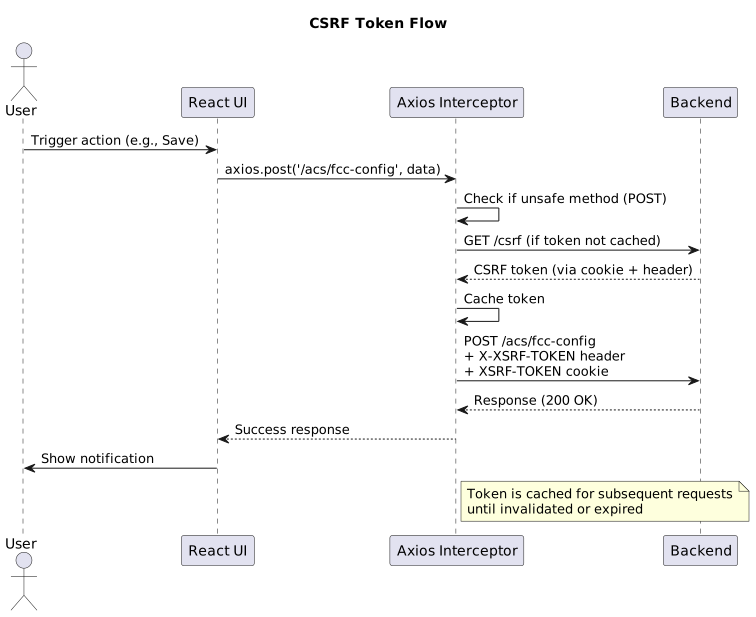
Key implementation details:
-
Token is fetched lazily before the first unsafe request
-
Token is extracted from response headers (
X-XSRF-TOKEN), response body, or cookie (XSRF-TOKEN) -
Token is cached in memory and reused until invalidated
-
Concurrent requests share the same token fetch promise to avoid race conditions
Implementation: fetchCsrfToken() in src/lib/axios.ts.
Token refresh on 401
When the backend returns 401 Unauthorized, the client attempts to refresh the session.
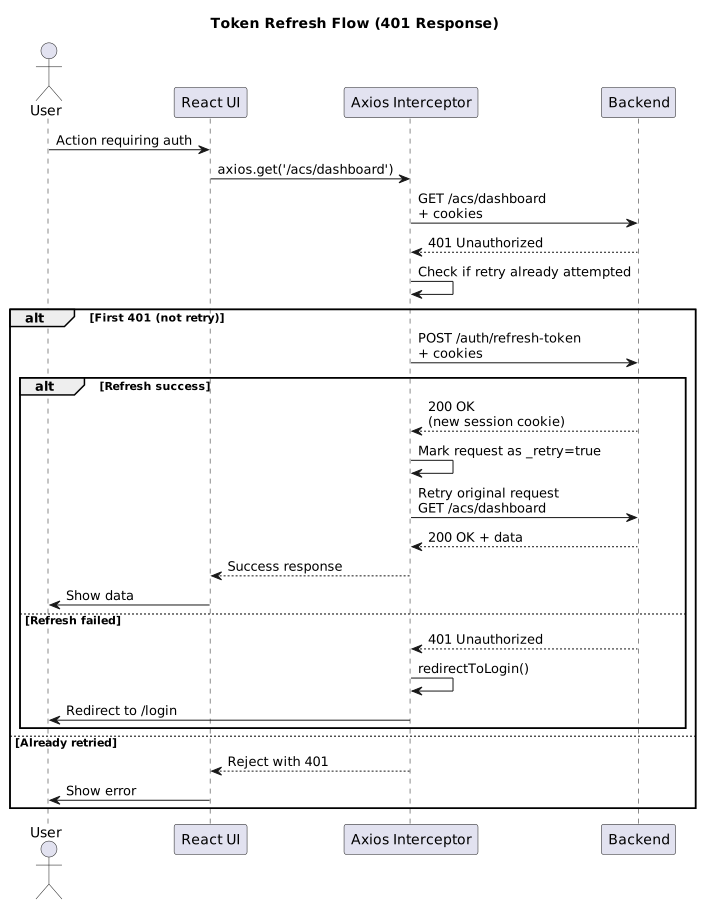
Key implementation details:
-
Only the first 401 triggers refresh; subsequent 401s redirect to login
-
Refresh is skipped for auth endpoints (e.g.,
/auth/login) to avoid loops -
Original request is automatically retried after successful refresh
-
Failed refresh redirects to
/loginimmediately
Implementation: response interceptor in src/lib/axios.ts.
Domain clients
Feature modules define typed API wrappers under src/api/<module>/ (for example src/api/acs/fcc-config.ts, src/api/angular/tab-view.ts, src/api/settings/users.ts). They consume DTOs from src/lib/definitions.ts.
Patterns to follow:
-
Prefer
apiService.get/post/put/deleteover creating new Axios instances. -
For imports:
-
validate and normalize payloads in the UI layer (often via Zod),
-
call
/import/dry-runfirst, then/importon confirmation.
-
-
For exports:
-
request blobs when the backend returns files (
responseType: "blob"), -
download via
downloadFile(src/lib/api.ts).
-
Example: Basic CRUD operations
// src/api/acs/fcc-config.ts
import {apiService} from '@/lib/axios';
import type {FccConfigEntryDto, FccConfigSnapshotDto} from '@/lib/definitions';

export const acsFccConfigApi = {
  // GET snapshot
  getSnapshot: async (): Promise<FccConfigSnapshotDto> => {
    const response = await apiService.get<FccConfigSnapshotDto>('/acs/fcc-config');
    return response.data;
  },

  // PUT bulk update
  updateEntries: async (entries: FccConfigEntryDto[]): Promise<FccConfigSnapshotDto> => {
    const response = await apiService.put<FccConfigSnapshotDto>('/acs/fcc-config', entries);
    return response.data;
  },

  // DELETE single entry
  deleteEntry: async (key: string): Promise<void> => {
    await apiService.delete(`/acs/fcc-config/${encodeURIComponent(key)}`);
  },
};
Example: Export with blob response
// Export configuration as file
export const exportConfiguration = async (): Promise<{blob: Blob; filename: string}> => {
  const response = await apiService.get<Blob>('/acs/fcc-config/export', undefined, {
    responseType: 'blob',
  });

  const contentDisposition = response.headers['content-disposition'];
  const filenameMatch = contentDisposition?.match(/filename[^;=\n]*=((['"]).*?\2|[^;\n]*)/);
  const filename = filenameMatch?.[1]?.replace(/['"]/g, '') || 'fcc.properties';

  return {
    blob: response.data,
    filename,
  };
};
Example: Import with dry-run
// Import workflow: dry-run → confirm → apply
export const importWithDryRun = async (
  file: File,
  allowWarnings: boolean = false
): Promise<ImportResultDto> => {
  const formData = new FormData();
  formData.append('file', file);

  // Step 1: Dry-run (validation only)
  const dryRunResponse = await apiService.post<ImportResultDto>(
    '/acs/fcc-config/import/dry-run',
    formData,
    {
      headers: {'Content-Type': 'multipart/form-data'},
    }
  );

  if (dryRunResponse.data.ok && dryRunResponse.data.errors.length === 0) {
    // Step 2: Apply import
    const importResponse = await apiService.post<ImportResultDto>(
      `/acs/fcc-config/import?allowWarnings=${allowWarnings}`,
      formData,
      {
        headers: {'Content-Type': 'multipart/form-data'},
      }
    );
    return importResponse.data;
  }

  return dryRunResponse.data;
};
Error handling strategies
The UI uses a unified error handling approach via useErrorHandler() hook.
Error classification
Errors are classified into types for appropriate handling:
-
server — HTTP errors from backend (400, 401, 404, 500, etc.)
-
network — Network failures, timeouts, CORS issues
-
validation — Client-side validation errors (Zod, form validation)
-
frontend — Application logic errors
-
unknown — Unclassified errors
Implementation: classifyError() in src/lib/error-utils.ts.
Error extraction and normalization
// Unified error extraction
import {extractUnifiedError} from '@/lib/error-utils';
import {useI18n} from '@/hooks/use-i18n';

const {t} = useI18n();

try {
  await apiService.post('/acs/fcc-config', data);
} catch (error) {
  const unified = extractUnifiedError(error, t);

  console.error('Error details:', {
    type: unified.type,        // 'server' | 'network' | 'validation' | ...
    message: unified.message,   // Localized message
    description: unified.description, // Additional context
    code: unified.code,        // HTTP status or error code
  });
}
Standard error handling pattern
import {useErrorHandler} from '@/hooks/use-error-handler';
import {useToast} from '@/hooks/use-toast';

const {handleError} = useErrorHandler();
const {toast} = useToast();

try {
  const result = await apiService.post('/acs/fcc-config', data);

  toast({
    title: t('success'),
    description: t('acsFccConfig.notifications.saveSuccess'),
    variant: 'success',
  });

  return result.data;
} catch (error) {
  handleError(error, {
    title: t('acsFccConfig.notifications.saveError'),
  });
  throw error; // Re-throw if caller needs to handle
}
Frontend error creation
For application logic errors, use predefined error factories:
import {FrontendErrors} from '@/lib/error-utils';

// Validation error
if (!isValid(value)) {
  throw FrontendErrors.validation(
    'Value must be a positive integer',
    'threshold',
    value
  );
}

// Permission error
if (isReadOnly) {
  throw FrontendErrors.permission(
    'Read-only access: editing is disabled',
    'write',
    'configuration'
  );
}

// Missing data error
if (!requiredField) {
  throw FrontendErrors.missingData(
    'Client type must be selected',
    'clientType'
  );
}
Implementation: FrontendErrors factories in src/lib/error-utils.ts.
Retry policies
Automatic retry (401 only)
The client automatically retries failed requests only for 401 Unauthorized responses:
-
First 401 → attempt token refresh → retry original request
-
Second 401 (after refresh failed) → redirect to login
-
Other status codes (400, 403, 404, 500) → no retry, fail immediately
Implementation: axiosInstance.interceptors.response in src/lib/axios.ts.
Manual retry (user-initiated)
For network errors or temporary failures, users must manually retry:
-
UI shows error notification with "Retry" button
-
Retry button re-executes the failed operation
-
No automatic exponential backoff (simplicity over complexity)
Example:
const [error, setError] = useState<string | null>(null);

const loadData = async () => {
  setError(null);
  setLoading(true);
  try {
    const data = await apiService.get('/acs/dashboard');
    setSnapshot(data.data);
  } catch (err) {
    handleError(err, {title: t('dashboard.fetchError')});
    setError(t('dashboard.fetchError'));
  } finally {
    setLoading(false);
  }
};

// Retry on user action
const handleRetry = () => {
  void loadData();
};
No retry scenarios
The following errors never trigger automatic retry:
-
Client errors (400, 422) — indicates invalid request data
-
Forbidden (403) — insufficient permissions
-
Not found (404) — resource doesn’t exist
-
Conflict (409) — data conflict (e.g., duplicate key)
-
Server errors (500, 502, 503) — backend failures (user must manually retry)
Rationale: Retrying these errors wastes resources and provides poor UX. Users should fix the issue or be notified of permanent failures.
Read-only request blocking
For VIEWER role users, the Axios request interceptor blocks unsafe methods before they leave the browser. This is one of several layers enforcing read-only mode (the others are AuthProvider.isReadOnly consumed by UI components, and the backend itself).
// Request interceptor (src/lib/axios.ts)
axiosInstance.interceptors.request.use(async (config) => {
  const method = config.method;

  if (shouldBlockRequestForReadOnly(method, config.url ?? null)) {
    return Promise.reject(createReadOnlyError());
  }

  // ... continue with locale header, CSRF fetch, etc.
});UNSAFE_METHODS: POST, PUT, PATCH, DELETE (from src/lib/permissions.ts).
Allowed unsafe prefixes:
-
/auth/login -
/auth/first-login -
/auth/register -
/auth/change-password -
/auth/logout -
/auth/refresh-token -
/auth/me/locale -
/service-api/import/dry-run(read-only preview)
The role is tracked in module-level state in src/lib/permissions.ts:
-
setCurrentUserRole(role)— called byAuthProvideron session load / login / logout. -
isReadOnlyRole(role)— returnsrole === 'VIEWER'. -
shouldBlockRequestForReadOnly(method, url)— combined check used by the interceptor.
Implementation: shouldBlockRequestForReadOnly() in src/lib/permissions.ts.
Best practices
Do’s
-
✅ Use
apiService.get/post/put/deletefor all API calls -
✅ Handle errors with
useErrorHandler()hook -
✅ Show user-friendly notifications via
useToast() -
✅ Validate request payloads with Zod before sending
-
✅ Use dry-run endpoints for imports before applying changes
-
✅ Check
isReadOnlyflag before showing write actions in UI -
✅ Cancel in-flight requests on component unmount (AbortController)
Don’ts
-
❌ Don’t create new Axios instances (bypasses interceptors)
-
❌ Don’t retry non-401 errors automatically
-
❌ Don’t send sensitive data in URL query params (use request body)
-
❌ Don’t ignore CSRF errors (indicates misconfiguration)
-
❌ Don’t bypass read-only checks in UI (backend still enforces)
-
❌ Don’t assume baseURL is static (resolved at runtime)
Troubleshooting
CSRF token errors (403 Forbidden)
Symptoms: All write requests fail with 403
Diagnosis:
-
Check browser devtools → Network tab → look for
/csrfcall -
Verify
X-XSRF-TOKENheader is present on POST/PUT/DELETE requests -
Check if
XSRF-TOKENcookie is set
Solutions:
-
Ensure
withCredentials: trueis set on all requests -
Verify backend CSRF configuration allows UI origin
-
Clear browser cookies and retry
Token refresh loop (infinite 401s)
Symptoms: Browser rapidly calls /auth/refresh-token repeatedly
Diagnosis:
-
Check if
/auth/refresh-tokenitself returns 401 -
Look for
_retry: trueflag in request logs
Solutions:
-
Verify backend session/token configuration
-
Check if refresh token has expired
-
Clear browser storage and re-login
Base URL resolution fails (404 or CORS)
Symptoms: All API calls fail with 404 or CORS errors
Diagnosis:
-
Open browser devtools console and evaluate
window.RUNTIME_CONFIG— it must contain a non-emptyAPI_URLstring. -
Verify
/runtime-config.jsis served (Network tab) and loaded before the app bundle (it is a blocking<script>inindex.html). -
Confirm Docker entrypoint generated the file:
docker exec <container> cat /usr/share/nginx/html/runtime-config.js. -
Check the nginx
/configs-service/location proxies to the expectedBACKEND_URL.
Solutions:
-
Ensure the runtime config script is loaded:
view-source:on the page and search forRUNTIME_CONFIG. -
Inspect entrypoint logs:
docker logs <container>— look for the generatedruntime-config.jsline. -
If
getRuntimeConfig()throws"Invalid runtime configuration: …", the injected object failed Zod validation — fix the generatedruntime-config.js(itsAPI_URL). -
In dev mode, verify
vite.config.tsproxy targets a reachable backend (defaulthttp://localhost:8082). -
Check backend CORS configuration allows the UI origin (dev uses
http://localhost:9002).
Read-only blocking not working
Symptoms: VIEWER users can trigger write actions
Diagnosis:
-
Check
currentUserRoleinsrc/lib/permissions.ts -
Verify
setCurrentUserRole()is called on login/session load -
Check if endpoint is in
allowedUnsafePrefixesallowlist
Solutions:
-
Ensure
AuthProvidercallssetCurrentUserRole()after session check -
Remove endpoint from allowlist if blocking is required
-
Verify UI disables write buttons for read-only users